
Plans And Pricing
Starter, Growth, Professional and Enterprise: what each plan includes, monthly versus annual, upgrades, downgrades and trials.
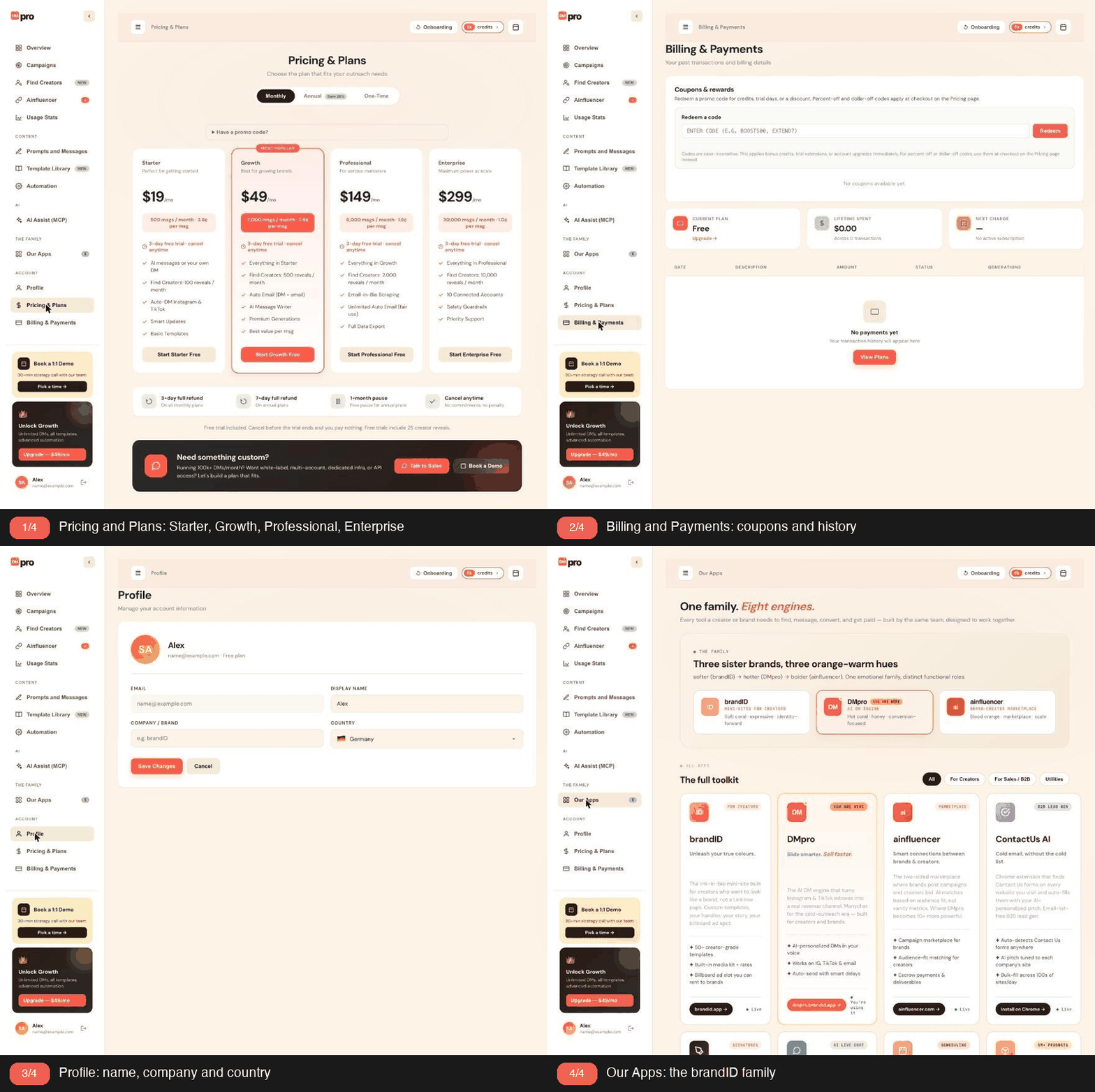
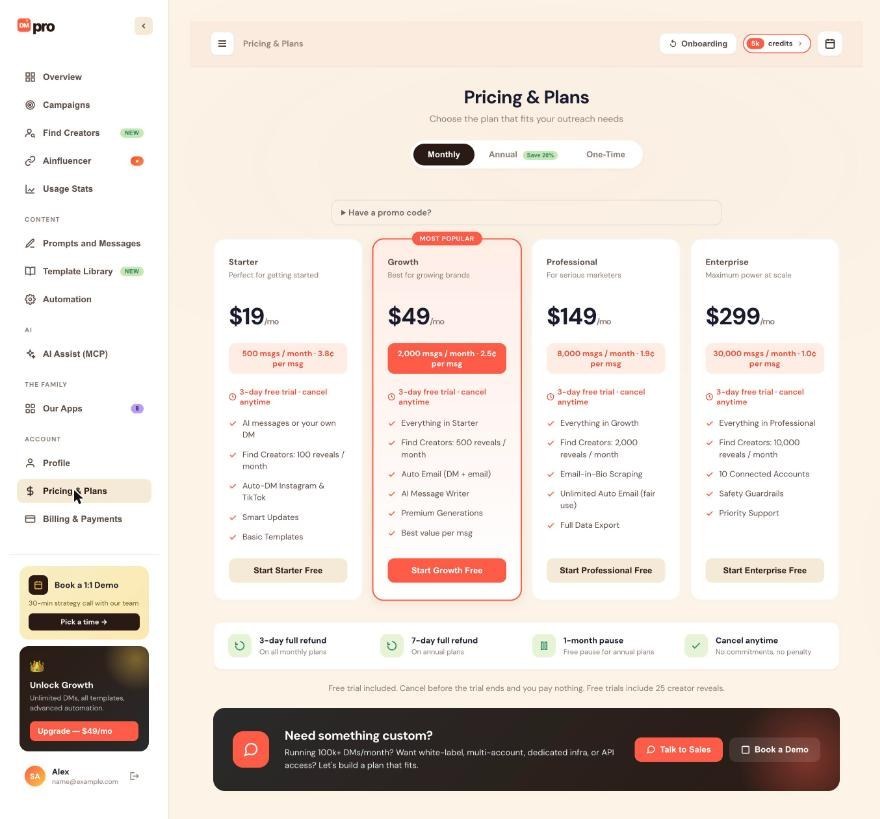
DMpro has four paid tiers. Here is each one in detail, side by side.
1. Starter Plan
- Monthly: $19/month.
- Annual: $182/year ($15.17/month effective).
- Credits: 500 generations/month.
- One-time package: $19 for 200 credits.
- Trial: 3 days (monthly), 5 days (annual), with a 25-message cap monthly, 50 message cap annual.
- Features: AI-written messages or your own DM, Auto-DM on Instagram + TikTok, Smart Message Updates, Basic Templates Library, 100 Find Creators reveals a month.
Best for: individuals or side hustlers sending 20-30 DMs per week.
2. Growth Plan (POPULAR)
- Monthly: $49/month.
- Annual: $470/year ($39.17/month effective).
- Credits: 2,000 generations/month.
- One-time package: $49 for 1,500 credits.
- Trial: 3 days (monthly), 5 days (annual), with a 75-message cap monthly, 150 message cap annual.
- Features: Everything in Starter, plus Auto Email (DM + email), AI-Powered Message Writer (higher-quality AI), Premium Generations, 500 Find Creators reveals a month.
Best for: regular outreach doers who send 100-500 DMs per month.
3. Professional Plan
- Monthly: $149/month.
- Annual: $950/year ($79.17/month effective).
- Credits: 8,000 generations/month.
- One-time package: $149 for 6,000 credits.
- Trial: 3 days (monthly), 5 days (annual), with a 150-message cap monthly, 300 message cap annual.
- Features: Everything in Growth, plus Email-in-Bio Scraping, Unlimited Auto Email (fair use: higher email limits than Growth), Full Data Export, 2,000 Find Creators reveals a month, 3 Connected Social Accounts.
Best for: serious marketers or small agencies running consistent high-volume outreach.
4. Enterprise Plan
- Monthly: $299/month.
- Annual: $2,390/year ($199.17/month effective, marked BEST VALUE).
- Credits: 30,000 generations/month.
- Annual credits: 50,000 generations/month.
- One-time package: $299 for 15,000 credits.
- Trial: 3 days (monthly), 5 days (annual), with a 200-message cap monthly, 400 message cap annual.
- Features: Everything in Professional, plus 10,000 Find Creators reveals a month, 10 Connected Social Accounts, Account Safety Guardrails, Priority Support.
Best for: teams, agencies, or brands running outreach at scale.
5. Free Tier
- Cost: $0.
- Credits: 10 free credits to start (no monthly reset).
- Features: Full access to core features. Limited by credit count.
Best for: trying DMpro before subscribing.
6. Feature Comparison Quick Reference
| Feature | Starter | Growth | Professional | Enterprise |
|---|---|---|---|---|
| Monthly credits | 500 | 2,000 | 8,000 | 30,000 |
| Annual credits | 500/mo | 2,000/mo | 8,000/mo | 50,000/mo |
| Auto-DM on IG + TT | ✓ | ✓ | ✓ | ✓ |
| Smart Update | ✓ | ✓ | ✓ | ✓ |
| Templates Library | ✓ | ✓ | ✓ | ✓ |
| Find Creators reveals per month | 100 | 500 | 2,000 | 10,000 |
| AI-Powered Writer | ✓ | ✓ | ✓ | |
| Premium Generations | ✓ | ✓ | ✓ | |
| Auto Email (DM + email) | ✓ | ✓ | ✓ | |
| Unlimited Auto Email (fair use) | ✓ | ✓ | ||
| Email-in-Bio Scraping | ✓ | ✓ | ||
| Full Data Export | ✓ | ✓ | ||
| Connected Accounts | 2 | 2 | 3 | 10 |
| Account Safety Guardrails | ✓ | |||
| Priority Support | ✓ |
7. How To Pick
Match your volume:
- Trying DMpro → Free (10 credits to start); under 20 DMs a week → Starter.
- 20-100 DMs/week → Growth.
- 100-400 DMs/week → Professional.
- 400+ DMs/week or team → Enterprise.
Related questions:
Every DMpro paid plan comes in monthly or annual billing. Annual is ~20% cheaper per month. Here is the tradeoff.
1. Monthly Vs Annual Pricing
| Plan | Monthly Price | Annual Price | Annual Per Month | Savings |
|---|---|---|---|---|
| Starter | $19 | $182 | $15.17 | 20% |
| Growth | $49 | $470 | $39.17 | 20% |
| Professional | $149 | $950 | $79.17 | 47% |
| Enterprise | $299 | $2,390 | $199.17 | 33% |
Note: Professional and Enterprise annual plans have larger discounts than the standard 20%.
2. Enterprise Annual: Best Value
Enterprise annual gets a BEST VALUE badge because:
- 50,000 credits/month (vs 30,000 for monthly Enterprise).
- $199/mo effective vs $299 for monthly Enterprise.
- 33% cheaper AND more credits.
If you’re already on Enterprise monthly, the annual switch is a no-brainer if you plan to stay 12 months.
3. When To Pick Monthly
- You’re new to DMpro and unsure how much you’ll use.
- You want flexibility to change plans or cancel.
- You’re on Starter or Growth and the annual discount isn’t huge.
4. When To Pick Annual
- You’ve been using DMpro for at least a few months and know your pattern.
- You want to lock in the lower rate for a year.
- You’re on Professional or Enterprise where the discount is very significant.
- You have budget certainty for the year.
5. Trial Differences
- Monthly plan trial: 3 days.
- Annual plan trial: 5 days, with double the trial message cap.
If you want the longest possible trial, pick annual to get the 5-day period.
6. Cancellation Behavior
- Monthly plan cancellation: Access continues to the end of the current month. Monthly plans have a 3-day full refund; after that window there is no refund for the remaining month.
- Annual plan cancellation: 7-day money-back guarantee within the first week. After that, no refund; you keep access until the end of your annual period.
See “Refund Policy” for full details.
7. Switching Between Monthly And Annual
- Monthly to Annual: Downgrade to annual at any time. Any unused portion of your current monthly is credited to your annual.
- Annual to Monthly: Not typical. Contact support if you need to switch.
8. Volume Considerations
Annual credits refresh monthly (so 12x the annual monthly credits total). Yearly credit purchases don’t stack; each month refreshes to the tier’s monthly amount.
For example:
- Growth annual = 2,000 credits every month (12 * 2,000 = 24,000 total for the year).
- Same as monthly Growth but you pay 20% less.
Related questions:
Upgrading takes effect immediately. Here is exactly how to upgrade and what happens.
1. Go To Pricing
Go to Dashboard → Pricing & Plans. You see all plans with your current plan highlighted.
2. Pick The Target Plan
Click Upgrade to [Plan Name] on the plan you want.
3. Stripe Checkout
You’re redirected to Stripe Checkout to enter payment details (if you don’t have a saved card) or confirm your existing card.
Enter/confirm and click Pay.
4. Immediate Access
Within seconds of payment:
- Your plan status updates in DMpro.
- Your credit balance updates to the new tier’s monthly allocation (prorated based on how far into the current billing cycle you were).
- You have immediate access to the new tier’s features (for example Auto Email from Growth, and the higher email limits on Professional and Enterprise).
5. Proration
DMpro credits you for the unused portion of your previous plan. So if you upgrade from Starter to Growth 15 days into your monthly cycle, you pay:
- New plan price ($49).
- Minus prorated credit for unused Starter time.
- Net charge: less than $49.
Stripe handles the math automatically.
6. Billing Date
Your billing date usually stays the same. If you upgrade on the 15th, your next full charge is the 15th of the next month (at the new tier’s price).
7. Downgrading Instead
Downgrading is different: see “How To Downgrade Your Plan?”. Downgrades take effect at end of period, not immediately.
8. Common Upgrade Path
- Free → Starter: Users who need more than the 10 free credits.
- Starter → Growth: Users needing 2,000+ credits/month.
- Growth → Professional: Users needing email extraction, data export, or 8,000+ credits.
- Professional → Enterprise: Users needing team accounts, higher safety guardrails, or 30,000+ credits.
9. Reverting An Upgrade
If you regret upgrading:
- Within the refund window (3 days on monthly plans, 7 days on annual plans): Contact support at [email protected] for a full refund.
- After that: Standard refund policy applies (see “Refund Policy”).
Related questions:
Downgrading takes effect at the end of your current billing period. Here is how to downgrade and what happens.
1. Go To Payments
Go to Dashboard → Billing & Payments or Dashboard → Pricing & Plans. Find the Downgrade section.
2. Pick The Target Plan
Click Downgrade to [Plan Name].
3. Confirmation
DMpro shows a confirmation:
Click Confirm.
4. Timing
- Immediate: No change; you still have full current tier access.
- At end of period: Downgrade takes effect. Your credit balance and features drop to the new tier.
For example, if you downgrade from Growth to Starter on the 15th of March, you keep Growth features and credits until the last day of your current billing period, then switch to Starter on that day.
5. Credit Balance At Downgrade
On the downgrade date:
- Subscription credits reset to the new tier’s monthly amount (not your old tier’s).
- One-time credits are preserved.
- Any features lost (like Email-in-Bio Scraping) are disabled.
6. Canceling Vs Downgrading
- Downgrading = moving to a lower paid tier. You still have a subscription.
- Canceling = going to free tier. No subscription.
Both take effect at end of period.
7. Downgrading To Free
Go to Dashboard → Billing & Payments → Cancel. Cancel takes you to free tier at end of period. See “How To Cancel Your Subscription?” for full details.
8. Undoing A Downgrade
Before the downgrade takes effect:
- Go to Dashboard → Billing & Payments.
- Click Undo Downgrade on the pending downgrade banner.
- Your subscription continues at the current tier.
After the downgrade has taken effect, you can re-upgrade at any time.
9. Feature Loss On Downgrade
When downgrading, features lost are:
- From Enterprise to Professional: Lose 10-account limit (drops to 3), lose Account Safety Guardrails, lose priority support, and monthly Find Creators reveals drop from 10,000 to 2,000.
- From Professional to Growth: Lose Email-in-Bio, Full Data Export and the higher email limits of Unlimited Auto Email (Growth keeps Auto Email with the standard limits), drop from 3 to 2 connected accounts, and monthly Find Creators reveals drop from 2,000 to 500.
- From Growth to Starter: Lose AI-Powered Writer, Premium Generations and Auto Email, and monthly Find Creators reveals drop from 500 to 100.
You keep everything the lower tier includes.
Related questions:
Prefer not to subscribe? Buy credits as a one-time package. They never expire. Here is what’s available and when to use them.
1. One-Time Package Options
- Starter package: $19 = 200 credits.
- Growth package: $49 = 1,500 credits.
- Professional package: $149 = 6,000 credits.
- Enterprise package: $299 = 15,000 credits.
2. Credit Per Dollar
- Starter: 10.5 credits/$.
- Growth: 30.6 credits/$.
- Professional: 40.3 credits/$.
- Enterprise: 50.2 credits/$.
Higher tier packages give more credits per dollar.
3. Never Expire
One-time credits stay in your account until you use them. Even if you:
- Cancel your subscription.
- Delete your account (no, they’d be lost with the account).
- Go on vacation for 3 months.
4. When To Buy One-Time Vs Subscribe
- Buy one-time if: Occasional user, budget-conscious, unsure of monthly volume, want zero recurring charges.
- Subscribe if: Regular monthly outreach, want reliable monthly refresh, higher volume needs.
5. Combining One-Time And Subscription
Yes. You can have an active subscription AND buy one-time packages on top. Both credit pools coexist and you draw from subscription first, one-time second.
6. Purchase Flow
- Go to Dashboard → Pricing & Plans → toggle to One-Time.
- Pick a package.
- Stripe Checkout.
- Credits added instantly.
7. Refund Policy
One-time credits are refundable within 30 days if not used. After 30 days or if you’ve used any credits, no refund.
If you want to refund a package where you’ve used some credits, contact support at [email protected]; case-by-case.
8. Best Practice
Use one-time packages as an emergency buffer. Subscribe for baseline monthly needs. Buy a one-time Enterprise package once a year to have 15,000 credits sitting in your account for peak season.
Related questions:
Every paid DMpro plan starts with a free trial. Here is exactly how the trial works, and what happens after.
1. Trial Duration By Plan Interval
- Monthly plans: 3-day trial.
- Annual plans: 5-day trial.
Trial length is set at signup. You cannot extend it.
2. Trial Message Caps By Tier
During your trial, DMs are capped:
| Plan | Monthly Trial Cap | Annual Trial Cap |
|---|---|---|
| Starter | 25 messages | 50 messages |
| Growth | 75 messages | 150 messages |
| Professional | 150 messages | 300 messages |
| Enterprise | 200 messages | 400 messages |
Cap is total messages sent during the trial, not per day.
3. What You Get During Trial
- Full access to the tier’s features.
- 25 creator reveals in Find Creators.
- The trial message cap (which is often less than the full monthly quota).
- The ability to cancel any time.
4. Charging After The Trial
If you don’t cancel:
- On day 4 (monthly) or day 6 (annual), Stripe charges your card.
- Your subscription starts at the paid tier.
- Full monthly credit allocation kicks in (2,000 for Growth, etc.).
5. Canceling During The Trial
- Anytime during the trial: Cancel with no charge.
- Ability to keep using free tier: Yes. You can cancel and continue on Free (no monthly credits; one-time credits stay).
Cancel from Dashboard → Billing & Payments → Cancel Trial.
6. What Happens When Trial Ends
- Card charged: You become a paid subscriber.
- Credits reset: New tier’s monthly amount replaces the trial cap.
- Features enabled: All the tier’s premium features unlocked.
7. Cannot Extend Trial
Trials are fixed length. No extensions.
8. Trial Eligibility
Free tier users can start a trial. If you’ve done a trial before and canceled, you may not be eligible for another trial on the same email. Contact support if you have a good reason (business trial, etc.).
9. Trial Message Cap Vs Total Volume
The trial cap prevents you from burning through your first month’s credit allocation in a single day. It’s designed to give you a taste. If you want unlimited volume immediately, subscribe without the trial (contact support for that).
Related questions:
If you don’t cancel during the trial, DMpro auto-converts to your chosen paid plan. Here is exactly what happens.
1. Charge Timing
- Monthly plan: Charged on day 4 (start of day, in your local timezone).
- Annual plan: Charged on day 6.
The charge attempts your saved card. If it fails, see “Failed Payment: Grace Period Explained”.
2. Credit Balance Change
On the charge day:
- Trial message cap replaced with full monthly credits (e.g., 2,000 for Growth).
- New credit balance visible immediately.
3. Feature Access
- All tier features remain enabled.
- No change in what you can do.
4. Notification
You receive an email:
5. Canceling Post-Trial
If you change your mind after the trial converts:
- Go to Dashboard → Billing & Payments → Cancel.
- Refunds:
– Monthly: 3-day full refund; after that, not refunded for the current month. – Annual: 7-day money-back guarantee. Contact support within 7 days.
6. Downgrading Post-Trial
Immediately after the trial converts, you can downgrade to a cheaper plan:
- Go to Dashboard → Pricing & Plans → Downgrade.
- Downgrade takes effect at end of current period.
7. Interaction With Fingerprint Block
If you signed up but got fingerprint-blocked (multi-account abuse), your trial converts but you have no free tier fallback if you cancel. The trial still charges normally.
8. Failed Payment On Conversion
If your card is declined on the trial conversion:
- Your subscription enters a past_due status.
- DMpro tries the card 3 more times over 3 days.
- If still failing, subscription is canceled.
- You are on Free (no monthly credits; one-time credits stay).
See “Failed Payment: Grace Period Explained”.
9. Restarting Trial
Once your trial has ended (successfully converted or explicitly canceled), you cannot restart the same trial. If you cancel and later want to try again, contact support to see if a special trial can be enabled.
Related questions:
Full feature matrix comparing every plan. Print this out or bookmark it.
1. Full Comparison Table
| Feature | Free | Starter | Growth | Professional | Enterprise |
|---|---|---|---|---|---|
| Monthly credits | 10 to start (no monthly reset) | 500 | 2,000 | 8,000 | 30,000 |
| Annual credits (per month) | n/a | 500 | 2,000 | 8,000 | 50,000 |
| One-time package credits | n/a | 200 | 1,500 | 6,000 | 15,000 |
| Trial period (monthly) | n/a | 3 days | 3 days | 3 days | 3 days |
| Trial period (annual) | n/a | 5 days | 5 days | 5 days | 5 days |
| Trial cap (monthly) | n/a | 25 msg | 75 msg | 150 msg | 200 msg |
| Trial cap (annual) | n/a | 50 msg | 150 msg | 300 msg | 400 msg |
| Auto-DM on IG | ✓ | ✓ | ✓ | ✓ | ✓ |
| Auto-DM on TikTok | ✓ | ✓ | ✓ | ✓ | ✓ |
| Smart Message Updates | ✓ | ✓ | ✓ | ✓ | ✓ |
| Your Own DM | ✓ | ✓ | ✓ | ✓ | ✓ |
| Auto Email (DM + email) | ✓ | ✓ | ✓ | ||
| Basic Templates Library | ✓ | ✓ | ✓ | ✓ | ✓ |
| Find Creators reveals per month | 0 | 100 | 500 | 2,000 | 10,000 |
| AI-Powered Message Writer | ✓ | ✓ | ✓ | ||
| Premium Generations | ✓ | ✓ | ✓ | ||
| Email-in-Bio Scraping | ✓ | ✓ | |||
| Outreach emails per hour / day | 60 / 300 | 60 / 300 | 60 / 300 | 200 / 2,000 (fair use) | 200 / 2,000 (fair use) |
| Full Data Export | ✓ | ✓ | |||
| Connected Social Accounts | 2 | 2 | 2 | 3 | 10 |
| Account Safety Guardrails | ✓ | ||||
| Priority Support | ✓ | ||||
| ROI Command Center | ✓ | ✓ | ✓ | ✓ | ✓ |
| Credit Runway Predictor | ✓ | ✓ | ✓ | ✓ | ✓ |
| Coupon Wallet | ✓ | ✓ | ✓ | ✓ | ✓ |
| Gift Links Redeem | ✓ | ✓ | ✓ | ✓ | ✓ |
| Ainfluencer Integration | ✓ | ✓ | ✓ | ✓ | ✓ |
| brandID Integration | ✓ | ✓ | ✓ | ✓ | ✓ |
2. Monthly Prices
- Free: $0
- Starter: $19
- Growth: $49 (POPULAR)
- Professional: $149
- Enterprise: $299
3. Annual Prices (~20% Off Standard, More For Higher Tiers)
- Starter: $182 = $15.17/mo effective
- Growth: $470 = $39.17/mo effective
- Professional: $950 = $79.17/mo effective
- Enterprise: $2,390 = $199.17/mo effective (BEST VALUE)
4. Best Fit By Persona
- Solo creator sending to potential brand partners: Growth. Sweet spot for creators.
- Brand doing bulk influencer outreach: Professional or Enterprise.
- Recruiter DMing candidates weekly: Growth or Professional.
- Agency handling multiple clients: Enterprise (multi-account support).
- Trying DMpro out: Free tier.
Related questions:
Free accounts have a few rules to keep the free credits available for legitimate new users, and this article lists what is included, what is not, and how the anti-abuse works.
1. What’s Included On Free
- 10 free credits to start (for AI-written messages or own DMs sent).
- Full access to the DMpro extension.
- Prompts and own DMs: up to 500 prompts and 100 own DMs, the same as every plan.
- Campaigns: create them like any plan; they use your credits (1 per AI-written message or own DM sent) and pause as Out of Credits when credits run out.
- The Template Library.
- Usage Stats and the Overview page in the dashboard.
2. What’s Not Included On Free
- Auto Email (Growth, Professional and Enterprise, also while you have credits from a matching one-time package).
- The higher outreach email limits of Professional and Enterprise (Free has 60 emails an hour and 300 a day).
- Multiple connected accounts (Professional 3, Enterprise 10).
- Monthly creator reveals in Find Creators (Free has none; each reveal costs 3 credits).
- Priority support.
3. No Monthly Reset
The 10 free credits are a one-time start. They do not refill each month. (The one exception: when a gift plan ends, your account goes back to Free with 10 credits.)
4. Fingerprint Anti-Abuse
DMpro’s fingerprint system prevents users from signing up multiple times to get more free credits. If you sign up email A with Instagram handle X, then sign up email B with the same handle X, the second account is blocked from free credits.
The first account keeps its free 10 credits. The second account has to subscribe or use one-time credits.
5. What The Block Feels Like
On the blocked account, you see:
- 0 credits in your balance.
- A banner: “Multi-account block: this handle is already registered on another DMpro account. Free credits and trial not available. Subscribe to use DMpro.”
- Ability to buy a subscription or one-time package to continue.
6. Legitimate Reasons For Multiple Accounts
Some users legitimately have multiple emails and want DMpro for each:
- Personal email for personal use.
- Work email for work use.
In these cases, use different Instagram/TikTok accounts on each DMpro account. That way both remain valid without triggering the block.
7. Getting A Block Cleared
If you were incorrectly blocked (e.g., you legitimately share a browser with your partner):
- Contact support at [email protected].
- Explain the situation.
- Provide details about both accounts.
Support reviews case-by-case. Blocks are cleared for legitimate cases.
8. Free Tier Duration
There’s no time limit on how long you can stay on free. Stay forever if you want.
Related questions:
Enterprise is DMpro’s top standard tier at $299/mo monthly or $2,390/yr annual (BEST VALUE). Beyond that, custom Enterprise+ deals are available for large teams. Here is what’s possible.
1. Standard Enterprise Includes
- 30,000 generations/month (monthly) or 50,000/month (annual).
- 10 connected social accounts.
- Account Safety Guardrails (advanced rate limit management).
- Priority support (24-hour response SLA).
- All Professional features.
2. When To Consider Custom Enterprise+
Contact [email protected] if you need:
- More than 10 connected social accounts.
- More than 50,000 generations/month.
- Dedicated support (Slack channel, weekly check-ins).
- Custom SLA (99.9% uptime commitment).
- Custom contract terms (annual with monthly payment, procurement forms, etc.).
- Team account structure with roles and permissions.
- API access for automated campaign creation.
3. Custom Pricing Factors
Custom Enterprise pricing is based on:
- Monthly generation volume.
- Number of connected accounts.
- Team size and structure.
- Support level required.
- Contract length.
Typical custom Enterprise starts around $999/month for teams doing 100k+ generations.
4. How To Contact Sales
Email [email protected] with:
- Company name.
- Estimated monthly volume.
- Team size.
- Use case description.
- Any specific requirements.
We respond within 1-2 business days with a proposal.
5. Enterprise Onboarding
Custom Enterprise deals include:
- Dedicated onboarding call.
- Custom prompt library setup.
- Integration setup (Ainfluencer, other tools).
- Team training session.
6. Enterprise Trial
Standard Enterprise gets the standard 3-5 day trial. Custom Enterprise may include an extended trial (typically 14 days) as part of the sales process.
7. Enterprise Cancellation
Same terms as annual plans generally:
- 7-day money-back guarantee.
- After that, keep access until end of contract period.
- Custom contracts may have different terms specified in the agreement.
8. Common Enterprise Use Cases
- Media agencies managing 50+ brand campaigns simultaneously.
- Talent agencies representing large creator rosters.
- E-commerce brands doing weekly influencer campaigns.
- Sales teams DMing 500+ prospects per week across multiple products.
Related questions:
Still stuck? We’re happy to help.
Create your account, or reach out to support.




