
Coupons
Redeem coupon codes, use the coupon wallet and share your referral code.
Coupons are promotional codes that give you a discount, bonus credits, extended trial, or other rewards. Here is how they work in DMpro.
1. Where Coupons Come From
- Marketing campaigns. DMpro runs periodic promotions (holiday sales, launch discounts).
- Referral codes. Your personal referral code that friends can use.
- Partner promotions. Codes distributed by our partners.
- Support gestures. Occasionally issued by support for goodwill.
2. Six Coupon Types
DMpro coupons come in six types:
- Percent off. Discount as a percentage of the subscription price (e.g., 20% off Growth).
- Amount off. Fixed dollar amount off (e.g., $10 off any plan).
- Bonus credits. Adds credits to your balance immediately (e.g., +100 credits).
- Trial extension. Extends your trial period (e.g., 7 extra days).
- Free months. Free months of subscription (e.g., 1 month free).
- Tier upgrade. Free upgrade to a higher tier for a period (e.g., Starter → Growth for 1 month).
3. How To Redeem A Coupon
Two paths:
- At checkout. When buying a plan, enter the coupon code in the “Have a coupon?” field.
- In your wallet. Go to Dashboard → Payments → Coupon Wallet. Enter the code. It applies to your account.
See “How To Redeem A Coupon Code?” for the step-by-step.
4. When Coupons Apply
- Percent and amount off: Applied at your next subscription charge.
- Bonus credits: Applied immediately.
- Trial extension: Applied to your active trial.
- Free months: Applied to your next subscription month(s).
- Tier upgrade: Applied immediately, reverts after the duration.
5. Stacking Multiple Coupons
By default:
- Monetary coupons (percent off, amount off) do NOT stack.
- Non-monetary coupons (credits, extension, free months) can stack with each other.
- Some coupons explicitly disallow stacking.
Rules per coupon are shown at redemption.
6. Coupon Expiry
Every coupon has an expiry:
- Not-yet-redeemed: Expires on the coupon’s set expiry date.
- Redeemed: Effect applies according to coupon type; the effect itself may have its own duration.
Expired coupons cannot be redeemed.
7. Your Coupon Wallet
The wallet at Dashboard → Payments → Coupon Wallet shows:
- Available coupons: Coupons you’ve applied but haven’t fully consumed.
- Redeemed coupons: Historical log.
- Referral code: Your personal code to share.
8. Coupons And Refunds
If you redeem a coupon and then refund the underlying purchase:
- Bonus credits: May be revoked if not yet spent.
- Trial extensions: Removed.
- Tier upgrades: Reverted.
Refund cases handled case-by-case.
Related questions:
Redeeming a coupon takes about 30 seconds. Here is exactly how, from both checkout and your account.
1. Redeeming At Checkout
When purchasing a plan:
- Go to Dashboard → Pricing.
- Pick a plan and click Subscribe or Upgrade.
- On the Stripe Checkout page, look for Add promotion code.
- Click it. A field appears.
- Enter your coupon code (case-insensitive).
- Click Apply.
If valid, the discount shows on the checkout page immediately. Complete the purchase to lock in the coupon.
2. Redeeming In Your DMpro Account (For Non-Monetary Coupons)
For bonus credits, trial extensions, or free months (non-monetary), you can redeem outside checkout:
- Go to Dashboard → Payments → Coupon Wallet.
- Click Redeem A Coupon.
- Enter the coupon code.
- Click Apply.
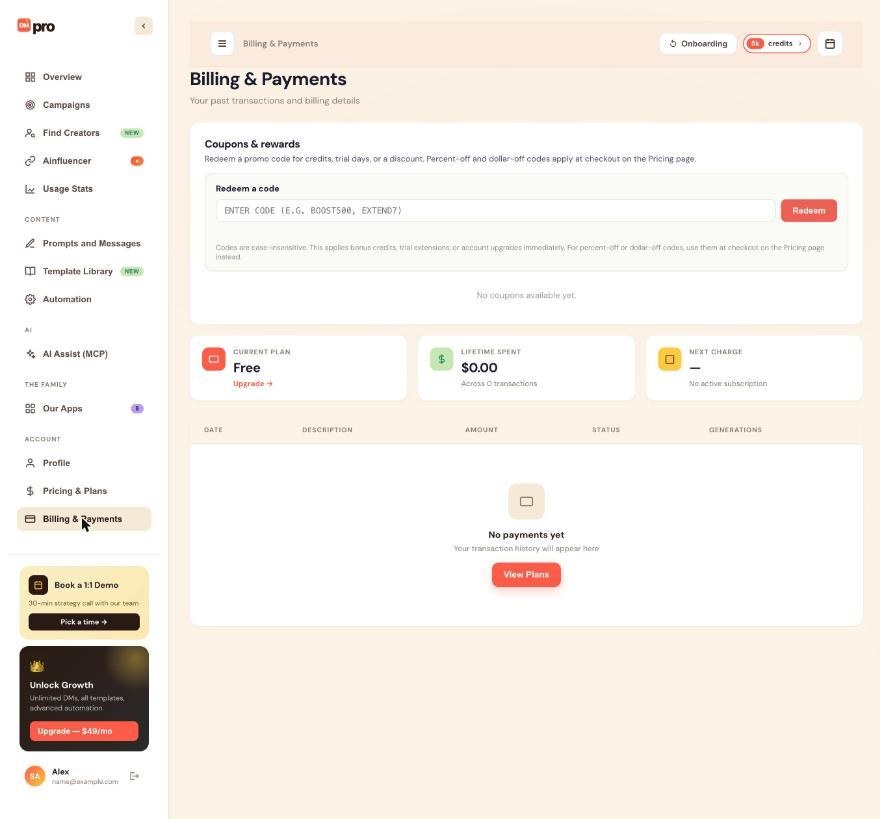
3. Redeeming In The Extension
The extension has a “Have a promo code?” input at the auth screen. Enter the code during sign-up and it applies to your new account.
4. What Happens After Redemption
Depending on the coupon type:
- Percent/amount off: Applies to your next charge (or immediately if you’re in the middle of a charge).
- Bonus credits: Added to your balance immediately.
- Trial extension: Your trial deadline shifts.
- Free months: Your next billing date shifts.
- Tier upgrade: Your tier is upgraded immediately for the duration.
5. Confirmation
On successful redemption, DMpro shows:
- A green success banner: “Coupon applied. [effect description]”.
- The coupon appears in your wallet under Redeemed.
6. Redemption Failures
Common reasons a coupon doesn’t apply:
- Invalid code: Typo or misheard.
- Expired: Past the coupon’s expiry date.
- Already used: Some coupons are single-use per account.
- Restrictions: Some coupons require a minimum plan or specific interval (e.g., annual only).
- Not eligible: Some coupons are for new users only, or specific persona types.
See “Why Isn’t My Coupon Working?” for troubleshooting.
7. Redeeming Multiple Coupons
- Monetary coupons don’t stack; the last one you enter replaces the previous.
- Non-monetary coupons can stack.
- The system shows a warning if you try to stack coupons that don’t stack.
8. Coupon Codes Are Case-Insensitive
DMpro normalizes coupon codes: “WELCOME20” and “welcome20” are the same. Whitespace is stripped. Trailing periods or spaces are removed.
9. Where To Find Your Coupon Codes
Codes come from:
- Marketing emails. Look in your inbox from DMpro or brandID.
- Partner websites. Some partners list coupon codes on landing pages.
- Referral shares. If someone shared their code with you.
- Support. Occasionally issued directly.
DMpro doesn’t have a public “coupon catalog” of active codes.
Related questions:
DMpro has six coupon types. Each has different rules and effects. Here is each in detail.
1. Percent Off
- Effect. Reduces your subscription price by a percentage.
- Example. “20% off Growth annual” → $470 becomes $376 for the year.
- Applies to. The plan you subscribe to (or renew).
- Duration. Usually first month, first year, or ongoing (varies by coupon).
- Stackable. No, only one monetary coupon at a time.
2. Amount Off
- Effect. Reduces your price by a fixed dollar amount.
- Example. “$10 off any plan” → Growth monthly becomes $39 instead of $49.
- Applies to. Any qualifying plan.
- Duration. Usually one-time. Some are recurring.
- Stackable. No, only one monetary coupon at a time.
3. Bonus Credits
- Effect. Adds credits to your account immediately.
- Example. “+500 bonus credits” → your balance increases by 500.
- Applies to. Your credit balance (added as one-time credits, so they never expire).
- Duration. Permanent (credits don’t expire).
- Stackable. Yes.
4. Trial Extension
- Effect. Extends your active trial period.
- Example. “+7 days trial” → your trial deadline shifts by 7 days.
- Applies to. Your active trial only. Not applicable if you’re already past trial.
- Duration. Extends the trial by the amount specified.
- Stackable. Yes, with other trial extensions.
5. Free Months
- Effect. Free months of subscription added to your account.
- Example. “1 month free of Growth” → your next billing date shifts by 1 month.
- Applies to. Your active subscription.
- Duration. The number of free months specified.
- Stackable. Yes, adds to existing free-month balance.
6. Tier Upgrade
- Effect. Free upgrade to a higher tier for a period.
- Example. “1 month of free Growth” (upgraded from Starter) → your Starter plan gets Growth features and credits for 1 month.
- Applies to. Your active subscription (or free tier).
- Duration. The period specified. Reverts after.
- Stackable. No (only one tier upgrade active at a time).
7. Coupon-Specific Rules
Every coupon has rules that appear at redemption:
- Minimum plan. Some coupons require Growth or higher.
- Interval restriction. Some are annual-only or monthly-only.
- New users only. Some are new-signup only, not existing users.
- Persona restriction. Some are creator-only, brand-only, etc.
8. Which Type Is Best For Me?
- Best value for new subscribers: Percent off annual (biggest discount).
- Best for casual users: Bonus credits (no commitment).
- Best for trial users: Trial extension (more time to evaluate).
- Best for existing subscribers: Free months or tier upgrade.
9. Combining Coupon Effects
Non-monetary coupons stack. So you can:
- Redeem 500 bonus credits.
- Redeem 100 more bonus credits.
- Redeem a 7-day trial extension.
All apply. Your account has 600 bonus credits and 7 more trial days.
10. Expired Coupons
Every coupon has an expiry. Redeem before it expires. If you have an unredeemed coupon in your wallet approaching expiry, DMpro sends a reminder email 3 days before.
Related questions:
The Coupon Wallet is where all your coupons live: available to redeem, redeemed, and expired. Here is everything about it.
1. Where To Find Your Wallet
Go to Dashboard → Payments → Coupon Wallet. You see three sections:
- Available. Coupons you can still redeem or have partially consumed.
- Redeemed. Coupons you’ve already applied.
- Expired. Coupons past their expiry.
2. What “Available” Means
An available coupon is one that:
- Has not been fully consumed (for multi-use coupons).
- Has not expired yet.
- Is applicable to your account.
You can redeem an available coupon at any time.
3. What “Redeemed” Means
A redeemed coupon is one you’ve applied. Each entry shows:
- Coupon name.
- Type (percent, credits, etc.).
- Redeemed date.
- Effect summary.
4. What “Expired” Means
Expired coupons cannot be redeemed anymore. They stay in the wallet for reference so you know what promotions passed you by.
5. Redeeming From The Wallet
Click Redeem on an available coupon. The effect applies immediately (for non-monetary coupons) or on your next charge (for monetary coupons).
6. Referral Code In The Wallet
Your personal referral code is displayed in the wallet header. Share it with friends. Every friend who redeems gets bonus credits, and so do you.
7. Coupon Codes Vs Wallet Entries
- Coupon code. The string you type to redeem (e.g., “WELCOME20”).
- Wallet entry. The record of the coupon on your account after typing the code.
Applying a code creates a wallet entry.
8. Deleting Wallet Entries
You can’t delete wallet entries. They’re a historical record. Expired coupons hang around forever.
9. Wallet Notifications
DMpro sends emails when:
- A new coupon is auto-added to your wallet.
- An unredeemed coupon is about to expire (3 days out).
- A redeemed coupon has an effect that’s ending (e.g., tier upgrade reverting).
Toggle notifications in Dashboard → Profile → Notification Preferences.
10. Team/Enterprise Wallet
On Enterprise team accounts, admins can distribute coupons to team members from a shared wallet. Standard tiers don’t have team wallet features.
Related questions:
Every DMpro user gets a personal referral code. Share it with friends to get bonus credits when they subscribe. Here is how it works.
1. Finding Your Referral Code
Go to Dashboard → Payments → Coupon Wallet → Your Referral Code. Your code is displayed prominently.
Example format: YOURNAME20 or similar. Each code is unique to you.
2. Sharing Your Code
Copy the code and share it via:
- Direct message on Instagram/TikTok.
- Email.
- Social media post.
- Slack/Discord.
- Word of mouth.
The code is safe to share publicly. Only one redemption per email address is allowed.
3. What Your Friends Get
When your friend redeems your code:
- They get $10 off their first month (or 20% off on their first year, depending on current promotion).
- Their coupon shows up in their wallet as “Applied via referral: [your name]”.
4. What You Get
When a friend’s redemption is confirmed (they’ve subscribed and passed the trial):
- You get 50 bonus credits added to your one-time credit balance (permanent).
- You get a notification.
Higher tier friends give higher rewards:
- Friend subscribes to Growth: 50 credits.
- Friend subscribes to Professional: 200 credits.
- Friend subscribes to Enterprise: 500 credits.
5. Tracking Referrals
Go to Dashboard → Payments → Referrals to see:
- Who has redeemed your code.
- How many total credits you’ve earned.
- Which referrals are pending trial completion.
6. Referral Rules
- One redemption per email. Your friend cannot redeem twice.
- Cannot self-refer. You can’t create a second account and redeem your own code.
- Fingerprint protection. DMpro’s abuse system prevents users from creating fake accounts to farm referral credits.
7. Bulk Referral Programs
If you have a following or a team and want to distribute referral codes systematically:
- Custom codes: Available for Professional+ subscribers. Contact support to set up.
- Affiliate program: Available for creators with 10k+ followers. Different rewards structure. Contact [email protected].
8. Referral Fraud Detection
DMpro monitors for suspicious referral patterns:
- Too many redemptions from similar IP addresses.
- Redemptions from disposable email addresses.
- Rapid signups followed by cancellations.
Flagged referrals may not credit the referrer, and repeat abuse can suspend accounts.
9. Referral Credits Vs Regular Credits
Referral credits are treated as one-time credits: they never expire, they add to your balance, and they’re used after subscription credits.
Related questions:
If a coupon code isn’t applying, run through these common causes and fixes.
1. Typo In The Code
Double-check the code:
- Case-insensitive but check for typos (“WELCOM20” vs “WELCOME20”).
- No trailing spaces or invisible characters.
- The letters O and 0 (zero) are commonly confused.
- The letters I and 1 (one) are commonly confused.
Copy-paste when possible.
2. Coupon Expired
Every coupon has an expiry. If you got the code weeks or months ago, it may have expired. Check the wallet for the specific expiry date if the code is in your account.
For codes you got via email or social media, look for the expiry mentioned in the original promotion.
3. Coupon Already Redeemed
Single-use coupons can only be applied once per account. If you already redeemed it, it won’t apply again.
Check your Coupon Wallet → Redeemed section.
4. Coupon Restrictions Not Met
Common restrictions:
- Plan requirement. Some coupons require Growth or higher.
- Interval requirement. Some are annual-only.
- New users only. If you’re already a paid user, some coupons don’t apply.
- Persona restriction. Some are for specific personas.
- Region restriction. Some are geo-locked.
The error message at redemption tells you which restriction wasn’t met.
5. Cannot Stack With Existing Coupon
If you already have a monetary coupon applied to your next charge, adding another monetary coupon isn’t allowed. Only non-monetary coupons stack.
6. Fingerprint Block Interference
If your account is flagged for multi-account abuse (fingerprint block), most referral coupons will not apply. Contact support if this affects you.
7. Free Tier Restrictions
Some coupons only apply to paid tiers. If you’re on free, redeeming may not have an obvious effect.
Solution: subscribe first, then coupon applies to your subscription.
8. Stripe Vs DMpro Coupons
- Stripe promo codes work at checkout (the “Add promotion code” field on Stripe’s page).
- DMpro internal coupons work in the DMpro dashboard’s Coupon Wallet.
Some coupons work in both, some in only one. If a code doesn’t work at checkout, try in the wallet, or vice versa.
9. Contact Support
If none of the above solves it, contact [email protected] with:
- The coupon code.
- Where you got it from.
- What error you saw (screenshot if possible).
- Your DMpro account email.
We can often manually apply or troubleshoot.
Related questions:
Every DMpro coupon has terms that govern how it applies. Here are the standard restrictions and where to find specific terms.
1. Where To See Coupon Terms
When you attempt to redeem a coupon, DMpro shows:
- The effect. What the coupon does.
- Duration. How long the effect lasts.
- Restrictions. Any limits on who can use it or how.
- Expiry. When the code stops working.
2. Standard Restrictions
Most coupons have some combination of:
- One per account. Cannot redeem the same coupon twice.
- New users only. Only accounts created after a certain date.
- Existing users only. Only accounts older than a certain date.
- Minimum plan. Requires Growth or higher.
- Specific interval. Monthly or annual only.
- Cannot stack. Cannot combine with other monetary coupons.
3. Persona Does Not Matter
Coupons do not depend on your persona (Brand, Creator or Business). A coupon that does not apply to you is limited by its other rules, such as the plan, the billing period or who it was issued to.
4. Geographic Restrictions
Some coupons are region-specific:
- US only.
- EU only.
- Certain countries excluded (tax or compliance reasons).
Based on your billing address in Stripe.
5. Time-Limited Coupons
Every coupon has an expiry. Common patterns:
- Launch coupons: Expire 30 days after launch.
- Holiday coupons: Expire at end of season.
- Personal referral codes: Expire 30 days after code creation (but you can generate a new one).
6. Refund Impact
If you redeem a coupon and later refund the associated purchase:
- Percent/amount off: Refunded amount adjusted for the coupon discount.
- Bonus credits: May be revoked if not consumed.
- Trial extension: Removed.
- Free months: Removed if not consumed.
- Tier upgrade: Reverted.
7. Chargeback And Coupons
If you initiate a chargeback on a purchase, associated coupons may be revoked and your account may be suspended pending resolution.
8. Custom Terms
Enterprise customers may negotiate custom coupon terms in their contract. Standard terms above apply to standard tiers.
9. Illegal Or Abusive Use
Terms specifically prohibit:
- Selling coupon codes to others.
- Using multiple accounts to redeem the same code.
- Automating redemptions.
- Sharing single-use codes broadly.
Violation may result in coupon reversal and account suspension.
10. Full Legal Terms
The full legal Terms of Service governing coupons are at dmpro.brandid.app/terms. This article is a plain-language summary.
Related questions:
Still stuck? We’re happy to help.
Create your account, or reach out to support.




