
How to update your profile
Change your display name, company or brand and country, and find where everything else about your account lives. About one minute.
Before you start
- You are signed in to the DMpro dashboard
Open the Profile page
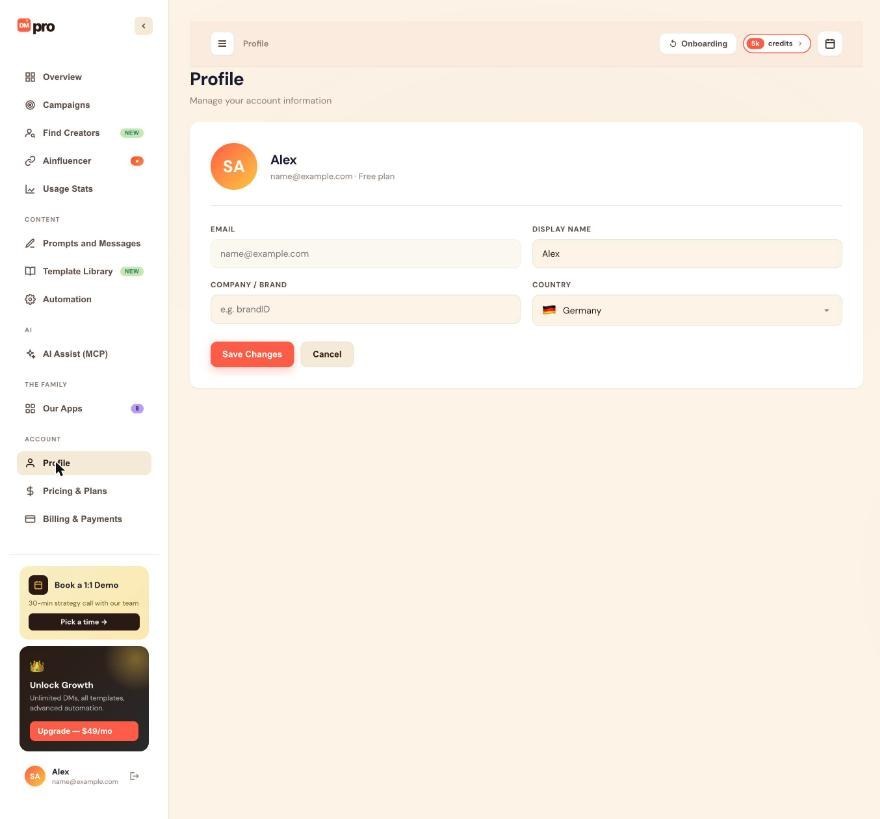
Click Profile in the left menu under ACCOUNT. At the top you see your avatar, your name and a line with your email and plan. Below that are four fields: EMAIL, DISPLAY NAME, COMPANY / BRAND and COUNTRY.
Edit your display name
Click the DISPLAY NAME field, select the old name and type the new one. This is the name DMpro shows for you inside the dashboard.
Edit your company or brand and your country
Type your business or brand name in COMPANY / BRAND. The empty box shows a sample such as “e.g. brandID”.
Open the COUNTRY list, search for your country and pick it. It starts as the country you chose in onboarding.
The EMAIL field is greyed out. It is your sign-in and cannot be edited here. See “How to change your email address”.
You will not see a photo upload: the avatar is made from your initials, so there is nothing else to fill in on this page.
Save your changes
Click Save Changes. The new values take effect straight away. Click Cancel instead to go back to the values that were saved before. Reload the page if you want to confirm: the name at the top should show the new one.
Know where the other settings are
- Persona, offer and ideal customer: click Onboarding at the top of the dashboard to go through the five steps again.
- Business address in your emails: set on the Auto Email card, on the Prompts and Messages or Automation page, not on Profile.
- Plan and payments: Pricing & Plans and Billing & Payments.
Tips
- There is no prompt variable for your own name. If you want the AI to introduce you, write your name into the prompt.
- An AI app connected through AI Assist (MCP) with access to Account can also change your name, company, time zone and business details for you. The email, sign-in and plan are off limits to it.
If something goes wrong
I cannot edit my email
The email field is read-only on the Profile page because it is your account’s sign-in. See “How to change your email address” for what to do.
My name does not show up in my DMs
Your display name is for the dashboard only. DMpro has no variable for your own name, so write your name into the prompt or your own DM text.
I changed something but it did not save
Click Save Changes: typing alone does not save. If the page does not update, reload and check that you are signed in to the right account.
Related how-to guides
Still stuck? We’re happy to help.
Create your account, or reach out to support.




