
How to change your email address
Move your DMpro account to a new email, or find out what to do when the Profile page does not offer a change. About five minutes.
Before you start
- Access to the new email inbox
- Access to the old email if you can, so you can see the security notice
Know what the email does
Your email is your sign-in: DMpro emails a 6-digit code to it every time you sign in. It is also where receipts and notices go, and it is the billing email in Stripe. Changing it affects all of these, so DMpro treats the change as a security action.
Look at the Email field on Profile
Click Profile in the left menu and look at the EMAIL field. It is greyed out and cannot be typed into.
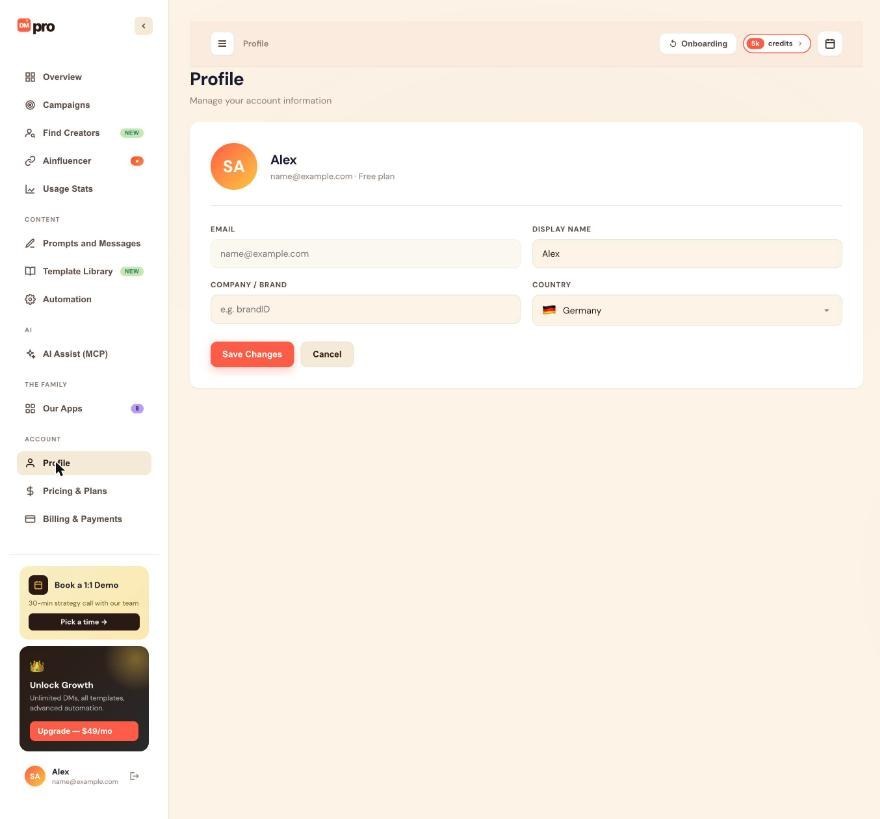
If you see Change Email, use the code flow
- Click Change Email and type your new address.
- DMpro sends a 6-digit code to the new address. Type it in within 10 minutes. If time runs out, request a new code.
- DMpro then sends a security notice to your old address saying the email was changed.
Only someone with access to the new inbox can finish the change, which is why it uses a code.
If you do not see it, ask support
Open the support chat bubble in the bottom right corner of the dashboard, or use the support contact on the Help Center, and write from any email you control. Include your current account email, the new email you want and why. Support asks for proof you own the account, such as a past invoice or the email on your Stripe receipt. Expect 24 to 48 hours.
Sign in with the new email
After the change, sign in with the new email: DMpro emails the code there. Old sessions on other devices are signed out. Your trial or subscription continues without change, and DMpro updates the billing email in Stripe. You can set a different billing email in Stripe’s billing portal if you want receipts to go elsewhere.
Tips
- Notification preferences stay with your account, so you do not need to set them up again.
- If you change email because your old inbox is compromised, tell support in the same message so they can check your sessions.
If something goes wrong
“This email is already in use”
DMpro allows one account per email. Use a different address, or contact support if the other account is also yours and you want help with it.
The 6-digit code did not arrive
Wait a minute, check spam and promotions, and confirm the address is spelled correctly. If you asked for more than one code, only the latest works. You can request a new one from the same screen.
I lost access to my old email
Contact support from any email you control. They ask for proof of ownership before changing the account email, and the check usually takes 24 to 48 hours.
Related how-to guides
Still stuck? We’re happy to help.
Create your account, or reach out to support.




