
How to delete your DMpro account
Permanently delete your DMpro account and its data by asking support, after saving what you need. Allow about 10 minutes to prepare, then up to 7 business days.
Before you start
- Access to the email address on the account
- Any results you want to keep, saved first
Decide whether you really want deletion
Deleting is permanent. Your prompts, campaigns, history and remaining credits go, and credits cannot be transferred or refunded. If you only want a break, see “How to pause your subscription”. If you want to stop paying, cancelling keeps your account and your one-time credits.
Save what you want to keep
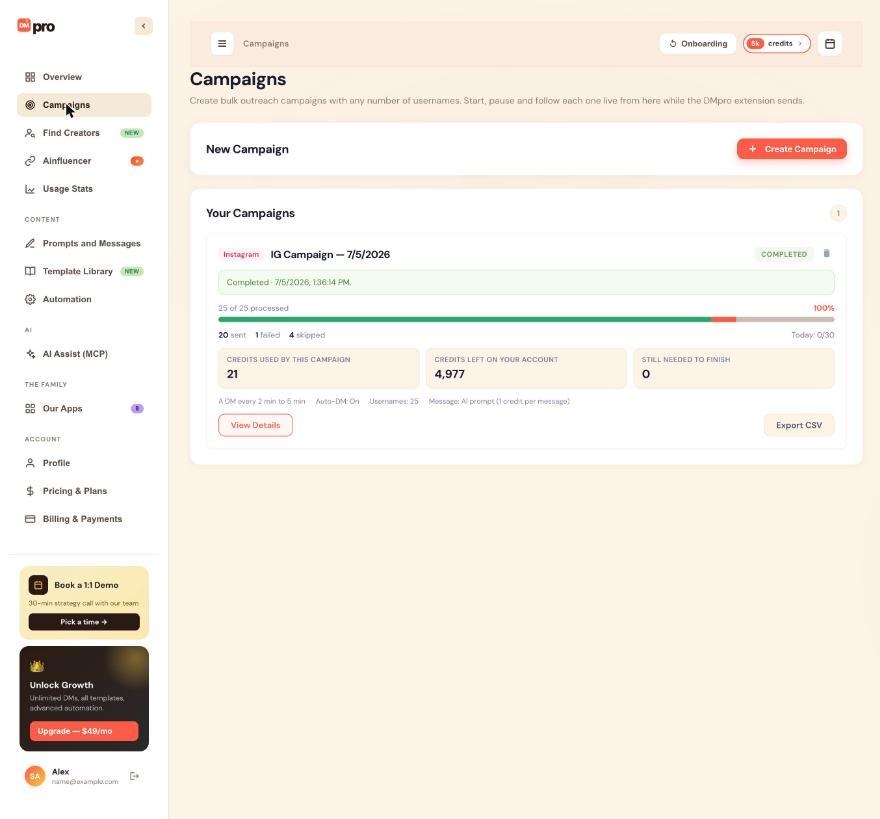
Open Campaigns and click Export CSV on each campaign whose results you need. Copy any prompt or own DM text you want to reuse, since those are deleted too. Download the invoices you need from Billing & Payments.
Cancel any paid subscription first
If you have a paid plan, cancel it on Billing & Payments before you ask for deletion, so no further charge is made. See “How to downgrade or cancel your plan”. Deleting the account also cancels subscriptions, but cancel first to be safe.
Ask support to delete the account
There is no delete button in the dashboard, and an AI app connected through AI Assist (MCP) cannot delete the account either. Contact support from the email address on your account (the support chat bubble at the bottom right of the dashboard, or the support email listed in the Help Center). Use the subject “Delete My Account”, give the account email and say that you understand it cannot be undone.
Wait for the confirmation
Requests are processed within 7 business days and you get an email when it is done. Your user record, prompts and campaigns are removed, and any subscription is cancelled. Anonymized payment records are kept for tax and legal reasons, and links between your Instagram or TikTok handle and the account are removed after a retention period.
Know what comes after
You can create a new account with the same email later, but nothing from the old one comes back. If you change your mind within about 30 days, ask support whether restoring is possible. It is not guaranteed.
Tips
- Signing out is not deleting. If you just want to leave a shared computer, use the sign-out icon next to your name at the bottom of the left menu.
- Your Instagram and TikTok accounts are not touched. DMpro never has their passwords.
If something goes wrong
I deleted my account but I was still charged
Contact support right away with your account email, the amount and the date. Cancelling the subscription before you request deletion avoids this.
I want my data instead of deleting it
Ask support for an export of your prompts, campaigns and usage data (JSON or CSV). Requests under data protection laws are answered within 30 days.
I did not get a confirmation email
Check spam, and make sure you wrote from the email address on the account. If 7 business days pass with no reply, write to support again with the original message.
Related how-to guides
Still stuck? We’re happy to help.
Create your account, or reach out to support.




