
How to set notification preferences
Choose which DMpro emails you get: product updates, AI app approvals and Find Creators alerts. About five minutes.
Before you start
- You are signed in to the DMpro dashboard
- Access to the inbox of your account email
Know which emails exist
- Account emails: the 6-digit sign-in code and a welcome email. These cannot be turned off.
- Payment emails from Stripe, such as receipts and failed payment notices. Required for your account.
- Product updates and tips: new features, templates and outreach tips.
- AI Assist emails: a notice when an app connects, a code to confirm a sensitive change, and an “approval needed” email.
- Find Creators alerts: a weekly email for each saved search that has alerts on.
DMpro does not send weekly or monthly usage reports. Your numbers are on Overview and Usage Stats.
Change product updates and tips
You pick this during onboarding with the checkbox Send me product updates and outreach tips. To change it later, click Onboarding at the top of the dashboard, go through the five steps and change the checkbox on the last one before you click Finish. Or click the unsubscribe link at the bottom of any product email.
Control the approval emails from AI apps
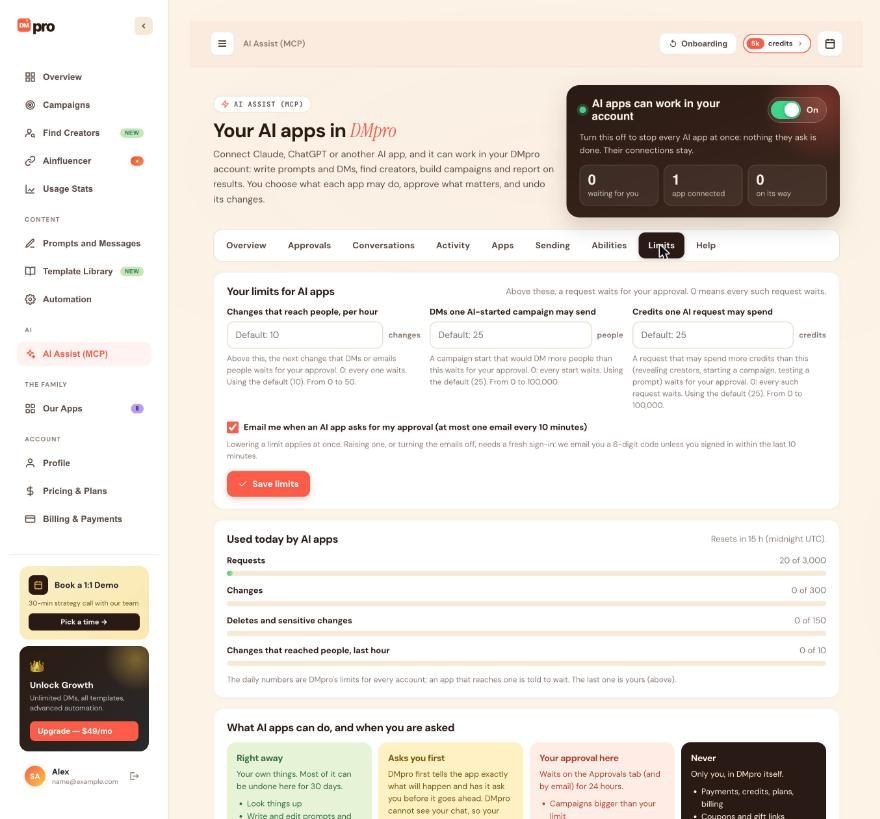
Click AI Assist (MCP), then the Limits tab. Tick or untick Email me when an AI app asks for my approval (at most one email every 10 minutes) and click Save limits. Turning the emails off needs a fresh sign-in: DMpro emails you a 6-digit code unless you signed in within the last 10 minutes.
Stop a Find Creators alert
Find Creators sends one email a week, on Mondays, for each saved search that has alerts on. Each email has links to stop the alert for that search or for all of them. An AI app that has access to Find Creators can also turn the weekly email of a saved search on or off.
Fix emails that land in spam
The first email from a new sender often goes to Promotions or Spam. Move one DMpro email to your inbox and mark it “Not spam”, and add DMpro’s sender address to your contacts. On a work email, ask your IT team to allow it, or use a personal address for your account.
Tips
- If a 6-digit code is stuck in spam, move that email first, then use the code; only the newest code works.
- You cannot pause all emails at once. Turn off product updates and approval emails; sign-in and payment emails always come through.
If something goes wrong
I cannot find a Notification Preferences page
The DMpro Help Center mentions one, but the Profile page on the dashboard has only your email, display name, company and country. Use the options in this guide instead: onboarding for product updates, the Limits tab for AI app emails, and the links in each email.
I turned approval emails off but still get them
Turning them off needs a fresh sign-in code. If you were asked for one and have not entered it, the change has not been saved. Redo it and enter the 6-digit code.
I still get emails after unsubscribing
Sign-in codes, welcome and payment emails are required and cannot be switched off. For anything else, check that the email you unsubscribed from is the same category as the one still arriving.
Related how-to guides
Still stuck? We’re happy to help.
Create your account, or reach out to support.




