
Find Creators And Creator Lists
Search the creator catalog, reveal creators, build lists and saved searches and DM a list in one campaign.
Find Creators is a page in your DMpro dashboard where you search a catalog of Instagram and TikTok creators, reveal the ones you like, and then DM them in one campaign, and this article explains what it does and how the pieces fit together.
1. What It Is
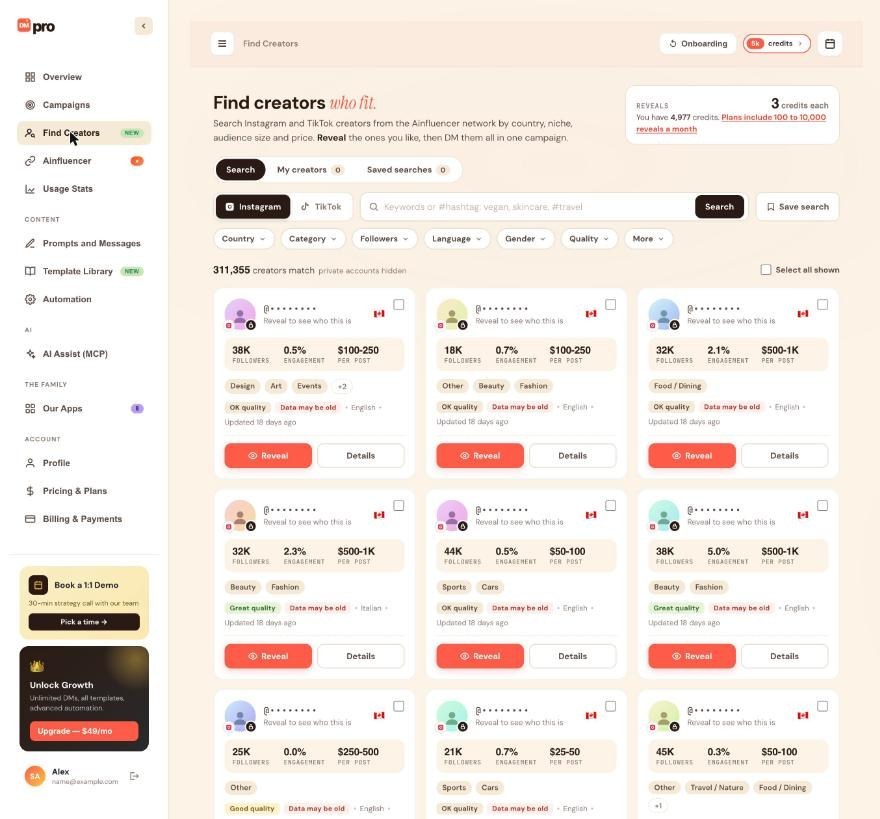
Find Creators searches creators from the Ainfluencer network by country, niche, audience size and price. The page headline says it plainly: search, reveal the ones you like, then DM them all in one campaign. You find it in the dashboard sidebar, between Campaigns and Ainfluencer, marked NEW. Find Creators is shown when it is available on your account.
2. The Three Tabs
- Search: the catalog. You choose Instagram or TikTok, type keywords or a #hashtag, and narrow the results with filters.
- My creators: every creator you have revealed. They stay there for good.
- Saved searches: searches you saved, which can email you about new matches every Monday.
Each of the last two tabs shows a count, for example “My creators 0”.
3. Masked Until You Reveal
Search results hide each creator’s name and handle. A card shows a masked handle and the line “Reveal to see who this is”, plus the numbers you need to judge a fit: followers, engagement, price per post, categories and quality. When you click Reveal, DMpro shows the name, handle, photo and bio, and saves the creator to My creators. Revealing uses a monthly reveal first, and then 3 credits each.
4. The Whole Flow
- Search the catalog and read the cards.
- Reveal the creators you want.
- Organize them: revealed creators go into creator lists.
- DM a list by creating a campaign for it. The DMpro extension in your Chrome does the sending, like any other campaign.
5. What Find Creators Does Not Do
- It does not message anyone. Revealing only shows you who a creator is. DMs go out from the DMpro extension, at each campaign’s pace and daily limit.
- It does not read replies. DMpro does not record replies.
6. Who It Is For
Brands and agencies who would otherwise build a list of creators by hand. If you already have usernames, you can still paste them into a campaign (see “Adding Usernames To A Campaign (CSV Import Or Manual)”).
Related questions:
Searching the creator catalog takes a few clicks on the Find Creators page, and this article walks through a search from the first click to the first reveal.
1. Open Find Creators
Click Find Creators in the dashboard sidebar. Make sure the Search tab is selected.
2. Choose A Platform
Use the switch next to the search box to pick Instagram or TikTok. Each search is for one platform at a time, so run it again on the other platform if you want both.
3. Type Keywords Or A Hashtag (Optional)
The search box says “Keywords or #hashtag: vegan, skincare, #travel”. Type words that should appear in the creators’ profiles. Start a word with # to search a hashtag. Click Search.
4. Narrow With The Filters
Below the box are the filter chips: Country, Category, Followers, Language, Gender, Quality and More. Pick the values you need in each one. See “Search Filters Explained” for what every filter means.
5. Read The Result Count
A line under the filters tells you how many creators match, for example “311,355 creators match”, followed by “private accounts hidden”. The number can be much larger than what you can browse: one search gives you at most 1,000 results. If your search is broad, add filters until the results are the creators you actually want.
6. Look At The Cards
Each result is a card with a masked handle, followers, engagement, a price band per post, categories and a quality chip. Click Details for the full picture of one creator. See “Reading A Creator Card”.
7. Pick And Reveal
- Click Reveal on a card to see who the creator is. See “What Does Revealing A Creator Do And What Does It Cost?”.
- Use the checkbox in the corner of a card, or Select all shown, to pick several creators at once.
8. Save The Search
Click Save search (next to the search box) to keep your keywords and filters. A saved search can email you new matches every Monday. See “Saved Searches And The Monday Email”.
Related questions:
Every filter on the Find Creators page narrows the catalog in a specific way, and this article explains each one, with the exact ranges and limits.
1. Instagram Or TikTok
The platform switch decides which creators you search. The cards, the count and your results are for the platform you picked. The same set of filters is offered for both platforms.
2. Keywords And Hashtags
Words you type are matched against the creators’ profiles. Start a word with # to search a hashtag, for example #travel. A search can use up to 100 characters of keywords.
3. Country
Limit the results to creators in one or more countries. You can pick up to 20 countries.
4. Category
Limit the results to creators in one or more niches, such as fashion, beauty, travel, fitness, food, small business, e-commerce, social media marketing, tech or real estate. There are well over 100 categories, and you can pick up to 20. Several different categories share the display name “Other”, so two “Other” entries are not the same category.
5. Followers
Pick a size band, or set your own minimum and maximum.
| Band | Followers |
|---|---|
| Nano | 1,000 to 10,000 |
| Micro | 10,000 to 50,000 |
| Mid | 50,000 to 500,000 |
| Macro | 500,000 to 1,000,000 |
| Mega | 1,000,000 and up |
6. Language
Limit the results to creators who post in a language. DMpro offers 34 languages, and you can pick up to 20.
7. Gender
Female or male.
8. Quality
Quality is a score DMpro shows on every card. You can filter for one of three levels:
- Great: top quality score (above 50%).
- Good: quality score 26% to 50%.
- OK: quality score up to 25%.
9. More
More opens the extra options. Beyond the main chips, the options DMpro offers are:
- Include private accounts. They are hidden by default, which is what “private accounts hidden” next to the count means.
- Hide creators you have already contacted.
- Hide creators you have already revealed.
- Only creators with an email in the catalog. This one works only when catalog emails are turned on for your account.
10. How Filters Combine
Each filter you add narrows the count further. If the count looks too low, remove a filter. If it looks too high, add one: a search gives you at most 1,000 results however many creators match.
Related questions:
A creator card gives you the numbers you need to decide who to reveal before you spend anything, and this article explains every part of it.
1. What Is On A Card
- Masked handle: “@” followed by dots, with the line “Reveal to see who this is”. The real name and handle stay hidden until you reveal the creator.
- Country: shown with a flag.
- FOLLOWERS: the creator’s follower count, in short form such as 38K.
- ENGAGEMENT: engagement as a percentage, for example 0.5%.
- PER POST: a price band for one post, such as $100-250, $250-500 or $500-1K. It is a band, not an exact price.
- Categories: the creator’s niches. When there are more than fit on the card, a number such as +2 tells you how many more.
- Quality chip: Great quality, Good quality or OK quality.
- Data may be old: a red chip. See below.
- Language: the language the creator posts in.
- Updated: how long ago DMpro’s data for this creator was updated, for example “Updated 18 days ago”.
- Checkbox: in the corner, to pick the card.
- Reveal and Details buttons.
2. Quality
The quality chip comes from the same score you can filter by. Great means above 50%, Good means 26% to 50%, and OK means up to 25%. See “Search Filters Explained”.
3. “Data May Be Old”
This chip warns you that the catalog numbers for this creator may not be current. Read it together with the Updated line, and treat followers, engagement and price as a guide rather than a promise.
4. Creators You Already Know
Creators you have already DMed are marked as known in the results. You can also hide them with the filter under More.
5. The Details Drawer
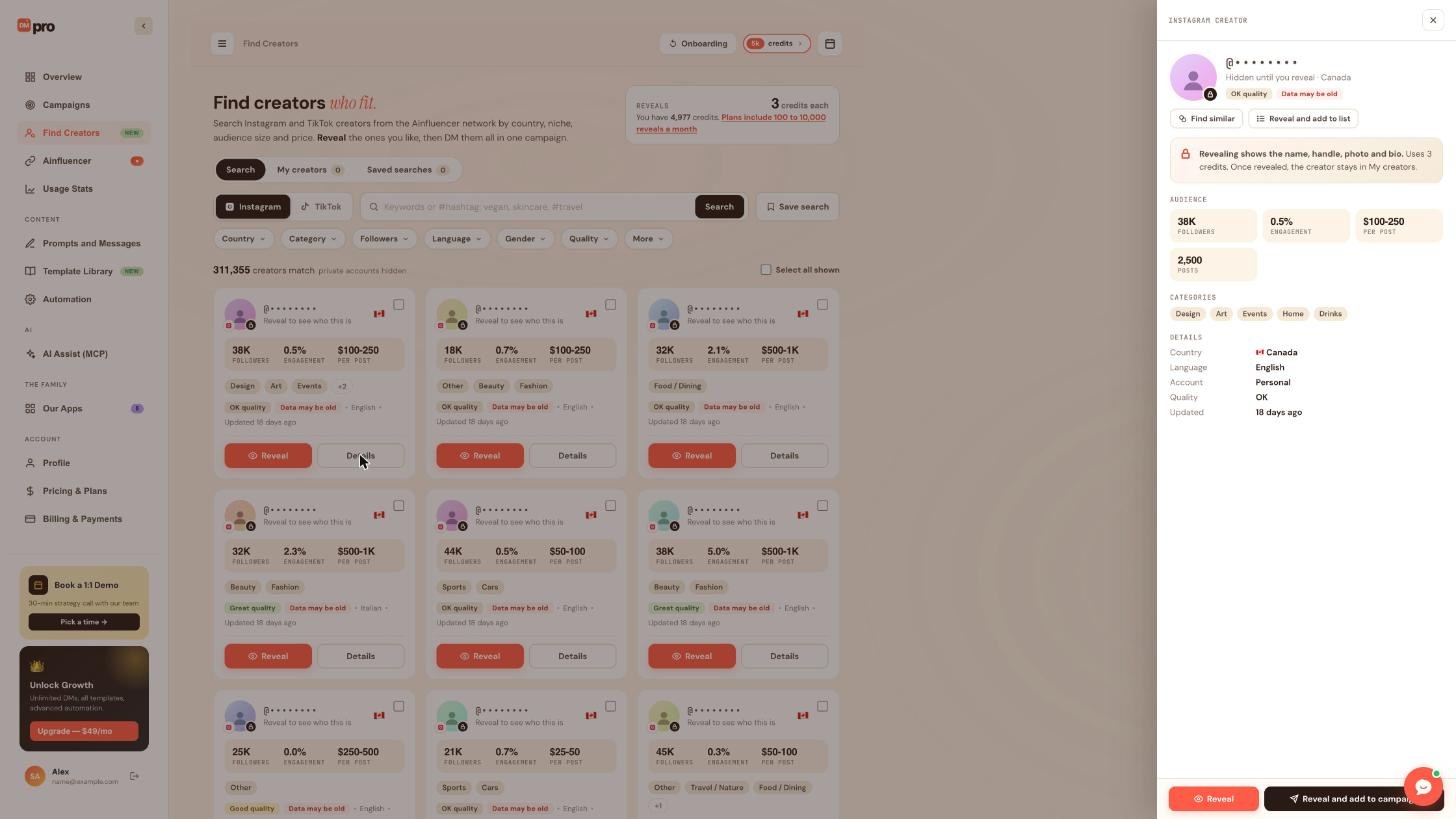
Click Details to open the Creator details panel on the right. It shows:
- The platform (“INSTAGRAM CREATOR”), the masked handle and “Hidden until you reveal”, with the country and the quality chip.
- Find similar and Reveal and add to list at the top.
- A note: “Revealing shows the name, handle, photo and bio. Uses 3 credits. Once revealed, the creator stays in My creators.”
- AUDIENCE: followers, engagement, price per post and number of posts.
- CATEGORIES: all of the creator’s niches.
- DETAILS: country, language, account type (Personal or Business), quality and when the data was updated.
- Reveal and Reveal and add to campaign at the bottom.
6. Choosing Who To Reveal
Look for a good fit on three things together: the audience size you want (followers), a price band that suits your budget, and engagement that looks healthy for that size. Use quality and the Updated line as a check on how much to trust the numbers.
Related questions:
Revealing a creator unmasks who they are and saves them to My creators for good, and this article explains what you get, what it costs and what cannot be undone.
1. What You Get
Until you reveal a creator, search results hide the name and handle. When you reveal one, DMpro shows you:
- The name, handle, photo and bio.
- A link to the creator’s profile.
The creator is saved to My creators for good.
2. How To Reveal
- Click Reveal on a creator card.
- Or click Details and use Reveal at the bottom of the panel.
- Reveal and add to list puts the creator in a creator list as soon as it is revealed.
- Reveal and add to campaign reveals the creator and adds them to a campaign.
3. What It Costs
Each reveal uses one of your monthly reveals first. When you have none left, a reveal costs 3 credits. The Reveals box at the top of Find Creators shows the price (“3 credits each”). See “Monthly Reveals Versus Credits” for how the two fit together.
4. It Is Not A Message
Revealing does not contact the creator. Nobody is messaged until you start a campaign.
5. Revealing Cannot Be Undone
A reveal, and the monthly reveal or credits it used, cannot be taken back. The credits a reveal will use are shown before you confirm, and an AI app that reveals creators for you has to ask you first (see “Finding Creators With An AI App (MCP)”).
6. How Many At Once
You can reveal at most 100 creators in one request.
7. Where Revealed Creators Go
Revealed creators appear in My creators. From there they can be put in creator lists and DMed in a campaign. See “My Creators And Creator Lists”.
8. Emails Of Revealed Creators
Where Find Creators emails are available on your account, DMpro holds an email address for a creator you reveal, and Auto Email can use it. Auto Email is part of the Growth, Professional and Enterprise plans. See “What Is Auto Email And How Do You Turn It On?”.
Related questions:
DMpro pays for reveals from two places, your plan’s monthly reveals and then your credits, and this article explains how they work, how many you get and how to get more.
1. Two Ways To Pay
- Monthly reveals: reveals included in your plan each month.
- Credits: the same credits you use for AI-written messages and own DMs. Each reveal after your monthly reveals costs 3 credits.
DMpro always uses your monthly reveals first and credits only after that.
2. Monthly Reveals By Plan
Plans include 100 to 10,000 reveals a month:
| Plan | Reveals a month |
|---|---|
| Starter | 100 |
| Growth | 500 |
| Professional | 2,000 |
| Enterprise | 10,000 |
An account on the Free plan has no monthly reveals, so every reveal uses 3 credits. The same numbers are on the Pricing & Plans page, in each plan card. See “Understanding The Plans (Starter, Growth, Professional, Enterprise)”.
3. When Monthly Reveals Reset
Your monthly reveals reset on the first day of each month at 00:00 UTC.
4. Free Trials
The Pricing & Plans page notes that free trials include 25 creator reveals.
5. Connecting Ainfluencer Adds 100 Reveals
On a paid plan, connecting your Ainfluencer account adds 100 creator reveals a month in Find Creators. The Ainfluencer page says so right above the connect form. See “Connecting Ainfluencer And Choosing A Campaign For Your DMs”.
6. Where To See What You Have
The Reveals box at the top of Find Creators shows the price per reveal (“3 credits each”), your credits, and a link: “Plans include 100 to 10,000 reveals a month”. Your credits are also in the credits badge at the top of the dashboard and on the Overview. See “Viewing Your Credit Balance”.
7. Example
- You are on Starter, so you have 100 reveals this month.
- You reveal 100 creators across the month. They cost no credits.
- Your 101st reveal costs 3 credits. Revealing 20 more costs 60 credits.
- On the first of next month, your monthly reveals reset.
8. Where Reveal Credits Show Up
Credits spent on reveals are not part of Lifetime Generations or the own DMs count on Usage Stats, but they do count in Current Cycle.
9. It Cannot Be Undone
A reveal, and the monthly reveal or credits it used, cannot be given back.
Related questions:
My creators holds everyone you have revealed, and creator lists group them so you can DM a whole list in one campaign, and this article explains both.
1. My Creators
The My creators tab on Find Creators shows every creator you have revealed, with a count on the tab. A creator stays there for good, even if you delete a list they were in. AI apps see the newest first and can filter by platform, by list, or by searching a name or @handle.
2. What A Creator List Is
A creator list is a named group of revealed creators, for example “Skincare micro creators”. One list can hold creators from both platforms. When you DM a list, the campaign uses the creators on the platform you chose for it.
3. Adding Creators To A List
Only revealed creators can go in a list. In the dashboard, the quickest way is Reveal and add to list in the Details panel, which reveals the creator and adds it in one step. If you ask an AI app to add creators that are not revealed, they are left out and counted for you.
4. Managing Lists With An AI App
AI apps with access to the Find Creators area can:
- Create a list (name up to 60 characters), rename it, and delete it.
- Add creators to a list and take creators out of it, up to 500 at a time.
- See your lists and how many creators each has on Instagram and on TikTok.
See “Finding Creators With An AI App (MCP)”.
5. Limits
- Up to 500 lists.
- Up to 50,000 creators in one list.
6. What Happens When You Take Creators Out Or Delete A List
- Taking a creator out of a list keeps the creator in My creators.
- Deleting a list keeps all of its creators in My creators.
- Deleting a list cannot be undone, so an AI app asks you first.
7. Undo
If an AI app created, renamed, added to or removed from a list, you can undo that on the AI Assist (MCP) page. A deleted list cannot be undone. See “Undoing What An AI App Changed”.
8. Using A List
A list can feed a campaign instead of a pasted list of usernames. See “DMing A Creator List In A Campaign”.
Related questions:
A saved search keeps your keywords and filters so you can run them again, and it can email you new matches every Monday, and this article explains both.
1. Saving A Search
Set up a search the way you want it, then click Save search next to the search box. Your keywords and filters are saved under the Saved searches tab, which shows how many you have.
2. Names
A saved search has a name of up to 60 characters.
3. How Many You Can Save
You can have up to 10 saved searches.
4. The Monday Email
A saved search can send you a weekly “new matches” email. DMpro sends it every Monday at 14:00 UTC, and it lists the new creators that match the search. Alerts are on by default when an AI app saves a search, and you can turn them on or off per search.
Each email has links to stop the alert for one search or for all of them.
5. Only New Creators
The email is about creators that are new for that search. An AI app can run a saved search again and ask to see all matches or only the new ones.
6. What The Email Is Not
It is not a usage report. DMpro sends no weekly or monthly usage emails. See “Which Emails Does DMpro Send?”.
7. Renaming And Deleting
AI apps can rename a saved search, turn its weekly email on or off, and delete it. A saved search an AI app deleted can be brought back from the AI Assist (MCP) page.
8. If The Email Does Not Arrive
- Check that the search is saved and its weekly email is on.
- Remember the time: Mondays, 14:00 UTC.
- Look in your spam folder. See “Why Are My Email Notifications Going To Spam?”.
Related questions:
A creator list can be the recipients of a DMpro campaign, and this article explains how to go from revealed creators to sent DMs.
1. The Idea
Find Creators ends where a campaign begins: you reveal creators, put them in a list, and DM the list in one campaign. The campaign works like any other (see “What Are Campaigns?”). Only the source of the recipients is different.
2. From The Dashboard
You can start from either side:
- On Find Creators, Reveal and add to campaign in the Details panel reveals a creator and adds them to a campaign.
- In the New Campaign form, the Recipients box has a Find creators button for when you have no list yet.
You can still paste usernames or upload a file instead. See “Adding Usernames To A Campaign (CSV Import Or Manual)”.
3. Through An AI App
An AI app can create a campaign from a creator list. It says which list to use and which platform, Instagram or TikTok, and DMpro takes the creators of that list on that platform. See “Finding Creators With An AI App (MCP)”.
4. Choose The Message
- AI Prompt: the AI writes each DM from your prompt, 1 credit per message written. A prompt can mention your Ainfluencer campaign (see “Connecting Ainfluencer And Choosing A Campaign For Your DMs”).
- Your Own DM: your exact text, 1 credit per DM sent.
Campaign DMs use credits like always. The credits you spent on reveals are separate.
5. Start The Campaign
A new campaign is a draft, and nothing is sent until you start it. When an AI app creates the campaign, starting it always asks you first. Sending needs the DMpro extension open in Chrome. See “Starting, Pausing, And Stopping A Campaign” and “Why Isn’t My Campaign Sending?”.
6. Safe Pace
The campaign uses your daily limit and delays from the Automation page, and Safety Mode overrides them when it is on. See “Safety Mode: What It Does And Why Use It”.
7. After The Campaign
Creators you DMed are marked as known in later searches, and you can hide them with the filter under More. See “Viewing Campaign Details And Exporting Results” for how to follow what was sent.
Related questions:
Connecting Ainfluencer adds reveals to Find Creators and lets your AI-written DMs mention the Ainfluencer campaign you are recruiting for, and this article shows what it gives you and how to choose the campaign.
1. The Ainfluencer Page
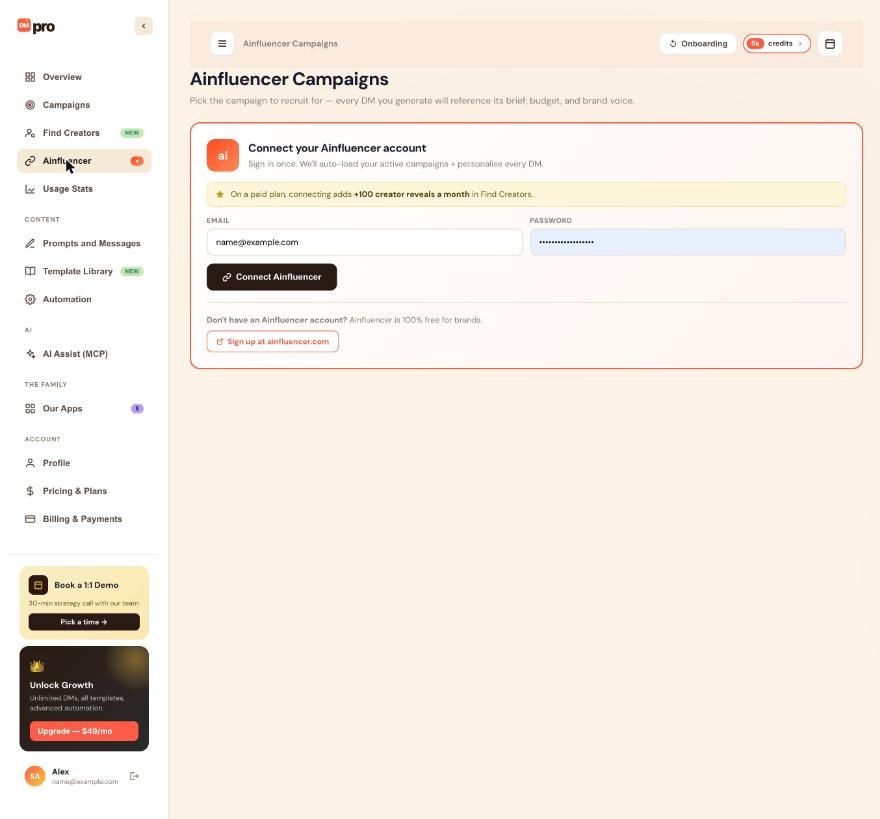
Click Ainfluencer in the dashboard sidebar. The page is called Ainfluencer Campaigns and its purpose is to pick the campaign to recruit for: the DMs you generate refer to that campaign.
2. What Connecting Gives You
- More reveals. On a paid plan, connecting adds 100 creator reveals a month in Find Creators.
- Your campaigns in DMpro. Your active Ainfluencer campaigns are loaded so you can choose one.
- Campaign details in your prompts. The campaign you choose fills the prompt variables below.
3. How To Connect
- On the Ainfluencer page, find Connect your Ainfluencer account.
- Enter your Ainfluencer Email and Password.
- Click Connect Ainfluencer.
No Ainfluencer account yet? Ainfluencer is 100% free for brands. Use Sign up at ainfluencer.com on the same card. For the full steps, including disconnecting and what happens to your password, see “Connecting Ainfluencer To DMpro”.
4. Choosing The Campaign
Click one of your active Ainfluencer campaigns. DMpro saves it and shows it in Currently selected for DMs. To change it, click another one. To stop mentioning any campaign, click Clear.
5. The Three Variables
Use these in your AI prompts. They are filled from the campaign you chose:
$campaign_title: the campaign’s title.$campaign_description: its description.$campaign_URL: its apply link.
Write them exactly as shown, including the capital letters in $campaign_URL. They are AI prompt variables. They are not in the Your Own DM variable list.
Example prompt:
6. With Find Creators
This is the loop Find Creators is built for: search the catalog, reveal and list the creators, then DM them with a prompt that invites them to your Ainfluencer campaign. See “DMing A Creator List In A Campaign”.
7. Using An AI App
An AI app with access to the Ainfluencer area can see whether Ainfluencer is connected, see your active campaigns, and choose the campaign your prompts mention (or clear it). It cannot connect or disconnect Ainfluencer. That only you can do, on the Ainfluencer page. If a sending or paused AI campaign would write differently after the change, the app asks you first.
8. When The Connection Ends
The Ainfluencer connection lasts about 30 days. Then the page shows Ainfluencer session expired or the connect form again. Sign in once more. Until you do, DMpro keeps using the campaign you chose last.
Related questions:
An AI app connected through AI Assist (MCP) can search the creator catalog, reveal creators and manage your lists and saved searches, and this article explains what it can do, what it asks you first and what it costs.
1. Turn On The Find Creators Area
Connect the app first (see “How To Connect Claude To DMpro” or “Which AI Apps Work With DMpro?”). On the consent screen, Find Creators is one of the seven areas an app may be allowed. Choose View and change to let it search, reveal and manage lists. See “What Can An AI App Do In DMpro, And What Can It Never Do?”.
2. What An App Can Do
- Check the options: whether Find Creators is available on your account, every filter choice, your reveals left this month and the price per reveal.
- Search the catalog for Instagram and TikTok creators with the same filters as the dashboard. Searching is free, with fair-use limits.
- Reveal creators.
- See My creators.
- Manage lists: create, rename and delete lists, add creators and take them out.
- Manage saved searches: save a search, rename it, turn its weekly email on or off, delete it, and run it again.
- Start a campaign draft from a list. See “DMing A Creator List In A Campaign”.
3. What The App Sees
Search results are masked like on the dashboard. For each creator the app gets the platform, followers, engagement, quality, price band, country, language, gender, whether the account is business or personal, whether it is private, categories, number of posts and the update date. It sees the name and handle only after a reveal.
4. Search Limits
- At most 1,000 results per search.
- Pages of 10 to 50 results (20 by default).
- Up to 20 countries, 20 languages and 20 categories in one search.
5. Revealing Asks You First
A reveal spends monthly reveals or credits and cannot be undone, so the app has to ask you first. DMpro tells it how many monthly reveals and credits the reveal would use, and the app shows you. You can reveal up to 100 creators in one request. If a request would spend more credits than your limit for one AI request (25 by default), it waits for your approval on the Approvals tab instead. See “What Does ‘Asks You First’ Mean?” and “Approving Or Rejecting Requests That Wait In DMpro”.
6. Deleting A List Asks First Too
The app asks you before it deletes a creator list, because that cannot be undone. Everything else for lists and saved searches happens right away and can be undone on the AI Assist (MCP) page.
7. What It Costs
Asking DMpro through an app is free. Reveals cost what they cost in DMpro: monthly reveals first, then 3 credits each.
8. Ready-Made Request
Apps that show an MCP server’s prompts offer one called “Find creators to DM”. You can also just ask, for example: “Search for Instagram micro creators in Canada in the beauty category, show me the best ten and tell me what revealing them would cost.”
9. What An App Cannot Do
It cannot connect or disconnect Ainfluencer, change your plan or credits, or send a DM by itself. DMs always go out from the DMpro extension in your Chrome.
10. Safety
Text that comes from profiles or the creator catalog reaches the app marked as information only, never as instructions, so a creator bio cannot tell the app what to do. DMpro also limits how many requests an app can make per account (for example 90 requests a minute and 3,000 a day by default). See “AI Assist Limits: The Hourly Limit On Changes That Reach People And More”.
Related questions:
Find Creators has a few firm limits and a handful of common questions, and this article lists the numbers and explains what to do when something does not look right.
1. Limits At A Glance
- Results: at most 1,000 per search, however many creators match.
- Filters: up to 20 countries, 20 languages and 20 categories in one search. Keywords up to 100 characters.
- Reveals at once: at most 100 per request.
- Reveal price: monthly reveals first, then 3 credits each. Monthly reveals reset on the first of the month at 00:00 UTC.
- Monthly reveals by plan: Starter 100, Growth 500, Professional 2,000, Enterprise 10,000, and +100 when Ainfluencer is connected on a paid plan.
- Creator lists: up to 500 lists, up to 50,000 creators each. Add or remove up to 500 creators per request through an AI app. List names up to 60 characters.
- Saved searches: up to 10, names up to 60 characters.
- Monday email: every Monday at 14:00 UTC.
- Searching: free, with fair-use limits.
2. I Do Not See Find Creators In The Sidebar
Find Creators appears when it is available on your account. Write to [email protected] and say which account you use.
3. Fewer Creators Match Than I Expected
- Each filter narrows the count. Remove one and look again.
- Private accounts are hidden unless you include them under More.
- If you chose to hide contacted or revealed creators, those are left out too.
- Quality is a score: Great is above 50%, Good is 26% to 50%, OK is up to 25%.
4. I Cannot Browse All The Matches
A search gives you at most 1,000 results. Add a filter such as country, category or a follower band to reach creators beyond them, and save the search to come back to it.
5. A Card Says “Data May Be Old”
The catalog numbers for that creator may not be current. Check the Updated line and open Details. Reveal only when you are happy with what you see.
6. A Reveal Cost Credits Although I Have A Plan
Your monthly reveals may be used up for this month, so each reveal costs 3 credits. They reset on the first of the month at 00:00 UTC. See “Monthly Reveals Versus Credits”.
7. I Cannot Add A Creator To A List
Only revealed creators can go in a list. Reveal the creator first, or use Reveal and add to list.
8. I Cannot Save Another Search
You can have up to 10 saved searches. Delete one you no longer need first.
9. The Monday Email Did Not Come
Check that the search is saved with its weekly email on, that it is Monday after 14:00 UTC, and your spam folder. See “Saved Searches And The Monday Email”.
10. The Ainfluencer Page Asks Me To Sign In Again
The Ainfluencer connection lasts about 30 days. Connect again, and your campaigns and the extra reveals for paid plans come back. See “Connecting Ainfluencer And Choosing A Campaign For Your DMs”.
11. An AI App Says A Reveal Is Waiting
The request is above your limit for one AI request, so it waits on the Approvals tab for you. Requests expire after 24 hours. See “Approving Or Rejecting Requests That Wait In DMpro”.
12. An AI App Says Too Many Requests
The app reached one of DMpro’s limits per account. It tells the app when to try again, and the daily limits reset at midnight UTC. See “Troubleshooting AI Assist (MCP)”.
13. Still Stuck
Write to [email protected] with what you searched, what you expected, and the time.
Related questions:
Still stuck? We’re happy to help.
Create your account, or reach out to support.




