
How to compare plans and upgrade
The Upgrade plan page shows Starter, Pro and Elite side by side. This guide explains how to read it, and what happens when you start a paid plan.
Before you start
- A bookme account.
- Your own list of what you need: bookings per month, webinars, team events and whether you take payments.
Open Upgrade plan
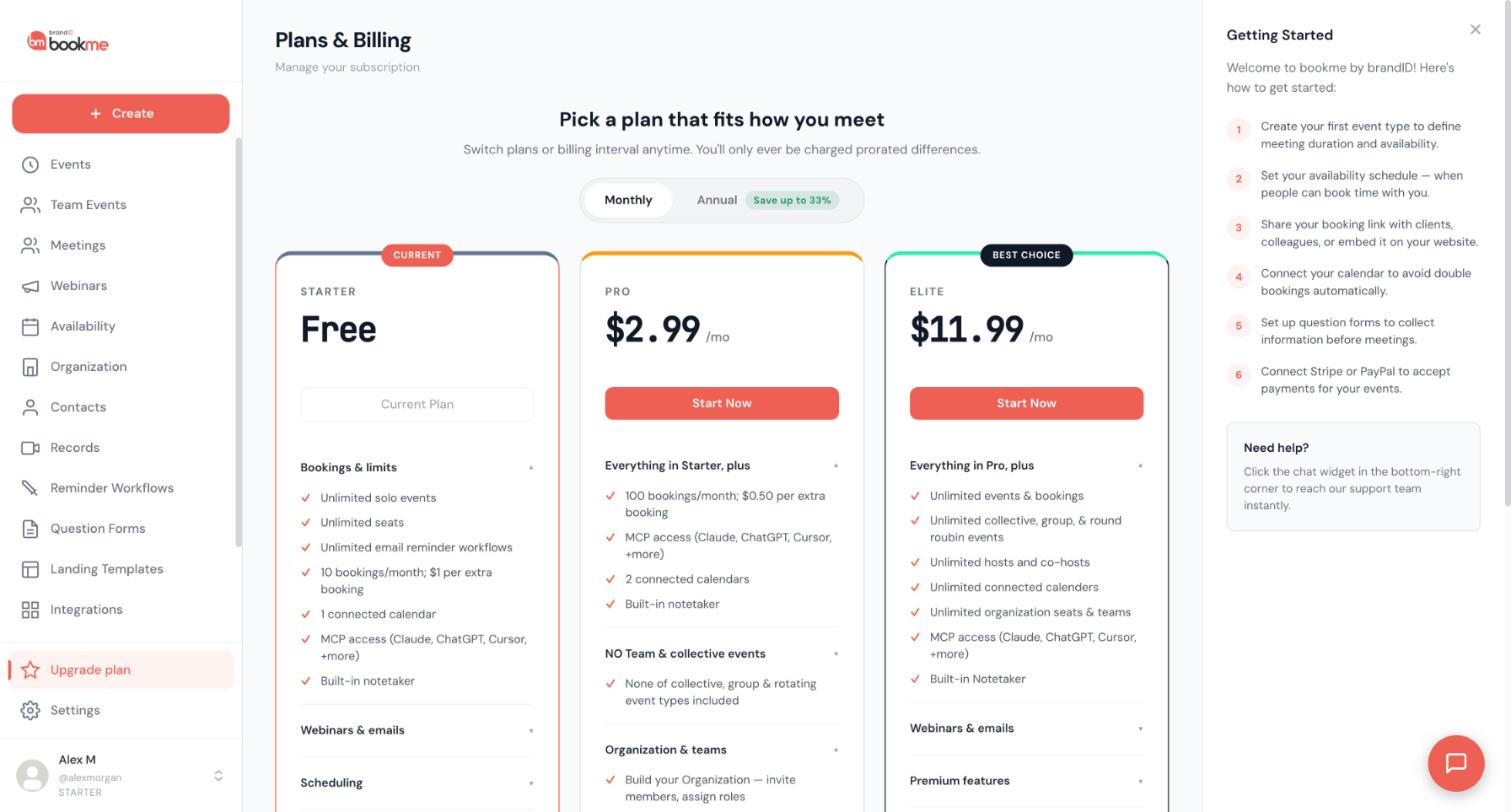
Click Upgrade plan in the sidebar. The page is called Plans & Billing. Your current plan is marked CURRENT and its button reads Current Plan. The page says you can switch plans or billing interval anytime and are only charged prorated differences.
Choose Monthly or Annual
Use the switch under the heading. Annual shows a Save up to 33% label. The cards show the monthly prices: Starter is free, Pro is $2.99 per month and Elite is $11.99 per month.
Read the Starter card
Starter is free. It includes unlimited solo events, unlimited seats, unlimited email reminder workflows, 10 bookings per month with $1 per extra booking, 1 connected calendar, MCP access and the built-in notetaker. For webinars it lists 1 webinar, 10 attendees per webinar and 100 invite emails per month.
Read the Pro card
Pro adds 100 bookings per month with $0.50 per extra booking, 2 connected calendars, 2 webinars with 20 attendees each, and 1,000 invite emails per month. It lists the Organization and Managed Events features, custom email reminder workflows, custom cancellation policy messages, custom branding with 100 landing page designs and priority support.
The Pro card also says that none of the collective, group and rotating event types are included. The Create event dialog says My team is available on Pro and Elite. The two differ, so check the cards when team events matter to you.
Read the Elite card
Elite adds unlimited events and bookings, unlimited collective, group and round robin events, unlimited hosts and co-hosts, unlimited connected calendars, unlimited organization seats and teams, unlimited webinars and attendees, and 5,000 invite emails per month. It lists API access, the AI builder for email workflows, removing the bookme branding, advanced admin controls and phone support.
Compare the fees on paid bookings
If you charge for bookings, compare the platform fee. With your own gateway it is 15% on Starter, 5% on Pro and 3% on Elite. With the bookme gateway it is 20% on all three plans.
Start a plan, or leave things as they are
To change plan, click the button on the card, such as Start Now.
Once you pay for a plan, the buttons read things like Upgrade to Elite or Switch to Annual and change your subscription in place. To go back to Starter, use Cancel subscription; you keep the plan until the end of the period you paid for.
Tips
- Use the Usage This Month box on the same page to see whether your own bookings justify a plan.
- Use Manage billing, once you are on a paid plan, to change your card or find invoices.
- Reading and comparing plans costs nothing; only the plan buttons change your subscription.
If something goes wrong
My card was declined when I changed plan.
A renewal failed.
Will I lose my events if I go back to Starter?
Can I get a refund for a subscription charge?
Related how-to guides
Still stuck? We’re happy to help.
Create your bookme account, see pricing, or reach out to support directly.




