
The brandID Ecosystem
How DMpro works with Ainfluencer, brandID and Chatgram, and what data is shared across the family.
DMpro is part of the brandID family, a suite of tools for creators and brands. Here is an overview of every tool and how they work together.
1. brandID: The Parent Brand
brandID is the umbrella brand for a family of interconnected products focused on helping creators and small businesses reach, message, convert, and get paid. Every tool in the family is built by the same team.
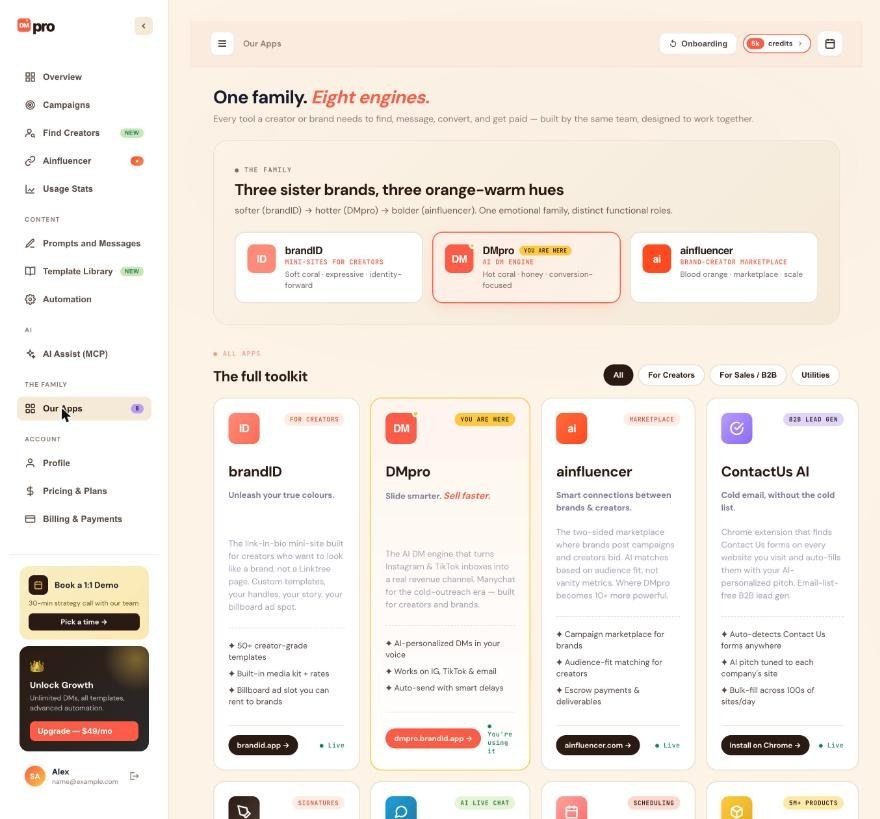
2. The Full Family
- brandID. Link-in-bio platform. Your one link on Instagram or TikTok that hosts all your other links.
- Ainfluencer. Influencer marketing marketplace connecting brands with 5M+ influencers.
- DMpro (this product). Instagram and TikTok DM automation.
- ContactID. B2B contact form outreach at scale (Chrome extension).
- signID. E-signature platform, DocuSign alternative.
- bookme. Scheduling platform, Calendly-style.
- Chatgram. Telegram-based live chat widget.
- leadID. B2B contact data provider.
3. What “The brandID Family” Means
Products in the family:
- Share a single account. Sign up once, use any product.
- Share billing. One card, all products.
- Integrate with each other. DMpro pulls Ainfluencer campaigns; brandID hosts your DMpro creator info; etc.
- Consistent design. Same look, feel, and shortcuts across products.
4. Which Products Integrate With DMpro
DMpro integrates directly with:
- Ainfluencer. Pull active campaigns for use in prompts (Brand persona).
- brandID. Pull creator handle, niche, and page URL (Creator persona).
- Chatgram. In-app support chat widget.
Indirect integrations (available):
- bookme. Schedule meetings booked via DM replies (link out).
- signID. Send contracts after a DM conversation converts.
5. Why Bundle Multiple Tools?
The brandID family is built around the customer journey: find, message, convert, get paid.
- Ainfluencer / leadID = find.
- DMpro / ContactID = message.
- brandID / bookme = convert (they book, sign up, engage).
- signID = close (they sign).
Using multiple tools compounds efficiency because they hand off cleanly.
6. Pricing Across The Family
Each tool has its own pricing, but if you use multiple tools, ask about family bundle pricing at [email protected]. Multi-tool discounts are available for Enterprise customers.
7. Signing Up For Other Tools
- Ainfluencer: ainfluencer.com. Sign up separately (may soon be unified).
- brandID: brandid.app. Same.
- bookme: bookme.brandid.app.
- signID: signid.brandid.app.
- ContactID: contactid.app.
Each has its own dashboard and its own free tier to try.
8. The Shared Vision
All brandID tools help creators and small businesses do professional-grade outreach, marketing, and business operations at DIY prices. No massive sales teams. No expensive enterprise contracts. Just tools that work.
Related questions:
Ainfluencer and DMpro are the brand-outreach power combo. Ainfluencer helps you find creators; DMpro helps you personalize DMs to them. Here is how they connect.
1. What Ainfluencer Does
Ainfluencer is an influencer marketing marketplace:
- Brands create campaigns describing what they need.
- Creators (5M+ registered, 900K+ active verified) browse and apply.
- Brands review applications, pick creators, and pay them.
If you’re a brand, Ainfluencer helps you find creators who match your niche and budget.
2. Where DMpro Fits In
Once you have a list of creators from Ainfluencer, DMpro helps you:
- Reach out to more of them. Not just the ones who applied, but any relevant creator you find on Instagram/TikTok.
- Personalize each DM. With AI-written messages that reference their profile.
- Track what you sent. Campaign details show who was messaged, with what and when (DMpro does not read replies).
The two tools together: Ainfluencer finds the pool; DMpro executes outreach to them.
3. Connecting Ainfluencer To DMpro
See “Connecting Ainfluencer To DMpro” (article 3.3) for the step-by-step. Summary:
- Go to DMpro Dashboard → Ainfluencer.
- Sign in with your Ainfluencer credentials.
- Access token is stored securely on DMpro’s server.
- Your active Ainfluencer campaigns are pulled in.
4. Using Ainfluencer Data In Prompts
Once connected, use variables in your DMpro prompts:
$campaign_title: active campaign’s name.$campaign_description: full campaign description.$campaign_URL: short link for creators to apply.
Example prompt:
5. Selecting Which Campaign To Reference
- Go to DMpro Dashboard → Ainfluencer.
- Pick which active Ainfluencer campaign to use.
- The variables above reference that campaign until you switch.
Change campaigns whenever you shift focus.
6. Messaging A List Of Creators
DMpro does not import creators from Ainfluencer automatically. To DM a list of creators, paste their usernames or upload a CSV file when you create a DMpro campaign, or, when Find Creators is available on your account, search the creator catalog and add creators to a campaign from there. See “Adding Usernames To A Campaign (CSV Import Or Manual)”.
7. Managing Both
Each tool has its own dashboard:
- Ainfluencer: ainfluencer.com/dashboard.
- DMpro: dmpro.brandid.app.
They don’t share a single unified dashboard yet (roadmap item). Sign in to each separately as needed.
8. Best Practice For The Combo
- Use Ainfluencer as your discovery layer. Find creators, campaigns, and matches.
- Use DMpro as your execution layer. Send outreach that’s personalized and consistent.
- Compare prompts. Rotate two prompts in one campaign and compare the replies you get in your inbox.
Related questions:
brandID is the link-in-bio platform. When you connect brandID to DMpro, your creator identity flows into every DM. Here is how it works.
1. What brandID Is
brandID is a link-in-bio landing page you host on brandid.app. Creators use it as the “one link” they put on their Instagram bio.
Your brandID has:
- Your handle (@username).
- Your display name.
- A niche description.
- All your links (YouTube, TikTok, shop, etc.).
- Optional booking, sign-up, or content sections.
2. Why Connect To DMpro
When connected, DMpro can pull your brandID data into prompts. So instead of you writing “I’m a fashion creator” in every prompt, you can use $niche and DMpro fills it in from your brandID profile.
3. Connecting brandID To DMpro
See “Connecting Your brandID Profile” (article 3.5) for the step-by-step. Summary:
- In the onboarding (Creator persona), reach the brandID step (or click Onboarding at the top of the dashboard).
- Enter your brandID handle.
- DMpro fetches your public brandID data.
4. Data Pulled In
- Display name.
- brandID URL.
- Niche: up to three of your brandID categories.
What you pitch (Collab, Billboard or both) is chosen in DMpro’s onboarding, not pulled from brandID.
5. brandID Variables In Prompts
Use these in DMpro prompts:
$brandidUrl: your brandID page address.$brandidName: your display name.$niche: your niche.
6. Sample Prompt
7. Refreshing Data
If you update your brandID profile, connect brandID again from Onboarding to pull in the latest data. DMpro does not refresh it by itself.
8. Why brandID + DMpro Is Useful
Two big wins:
- Consistent identity. Your DMs, your brandID page, and your other content all match. Same handle, same niche wording.
- Zero copy-paste. Update your brandID once; every DMpro DM reflects the change.
9. Disconnecting brandID
There is no Disconnect button for brandID; ask DMpro support to remove it. Prompts that use $brandidUrl, $brandidName or $niche then leave them out.
Related questions:
Chatgram is a Telegram-based live chat widget embedded in DMpro’s dashboard for support conversations. Here is what it does.
1. What Chatgram Is
Chatgram is a support chat platform where your messages to the DMpro team route through Telegram on the backend. From your side, it looks like a normal chat widget in the corner of your dashboard.
2. Where Chatgram Appears
- DMpro Dashboard: Bottom-right corner chat bubble.
- DMpro Extension: Optional, when you tap Support inside the extension.
Click the bubble to open the chat.
3. Using Chatgram
- Click the chat bubble.
- Type your question or issue.
- Send.
The DMpro support team receives your message on their end (via Telegram) and responds. Responses appear in the Chatgram widget.
4. Response Times
- During business hours (Toronto time, Mon-Fri 9am-6pm): Usually 15 minutes to 2 hours.
- After hours / weekends: Next business day.
- Enterprise priority support: Faster; usually within 4 hours 24/7.
5. What To Ask Chatgram
- Bugs or unexpected behavior.
- Account questions.
- Refund or billing issues.
- Feature requests.
- Anything else.
Chatgram is your live channel. For questions that need investigation (payment discrepancy, etc.), Chatgram is fine but may take longer than a self-service action from your dashboard.
6. Chatgram Vs Email
Both work. Chatgram is faster for quick questions. Email ([email protected]) is better for detailed inquiries with attachments (screenshots, invoice PDFs).
7. Anonymity
Chatgram messages are tied to your DMpro account email, so we know who you are. Support conversations are logged for quality and are not shared publicly.
8. Data Privacy In Chatgram
- Chatgram messages are relayed via Telegram Bot API.
- Message content is stored on our support system for the conversation duration + 12 months for reference.
- After 12 months, chat logs are anonymized or deleted.
9. Chatgram Is Also Part Of brandID Family
Chatgram is a full brandID product for anyone to use on their own site. See chatgram.brandid.app if you want to embed Chatgram on your own product.
Related questions:
Products in the brandID family share some data to make integrations seamless. Here is what’s shared and what isn’t.
1. Shared Data Between Products
When you use multiple brandID products, some data flows across:
- Your name. From your primary brandID account, echoed across.
- Your email. Same email works across products (with unified login roadmap).
- Your creator handle. brandID’s handle is available to DMpro (with connection).
- Your Ainfluencer campaigns. Available to DMpro (with connection).
- Your subscription tier. Some tools have family bundle pricing.
2. Data NOT Shared By Default
- Your DMpro prompts. DMpro-only.
- Your DMpro sent messages. DMpro-only.
- Your bookme meetings. bookme-only.
- Your signID contracts. signID-only.
- Your ContactID activity. ContactID-only.
Each product’s private data stays private.
3. Explicit Opt-In For Sharing
Cross-product data sharing (like DMpro pulling Ainfluencer campaigns) requires you to explicitly connect the two:
- Sign in to product A.
- Go to product B’s dashboard.
- Click Connect [Product A].
- Authenticate.
Nothing happens automatically without your action.
4. Unified Login (Roadmap)
Currently each product has its own login. Roadmap includes a single sign-on so signing in to brandID signs you in to everything.
5. Family Bundle Discounts
For accounts using 3+ brandID products, Enterprise family bundle pricing is available. Contact [email protected] to negotiate.
6. Data Storage And Security
Each product stores its data in its own database:
- Separate databases mean a breach on one product doesn’t affect others.
- Data is encrypted at rest per product.
- Access controls are per product.
7. Deleting Data In One Product Vs Family
- Delete DMpro account: Only DMpro data deleted. Other products unaffected.
- Delete brandID account: Only brandID data. DMpro still works.
Each is an independent decision.
8. Team And Enterprise
Enterprise team plans that include multiple brandID products may have shared team management across products. This is negotiated per-contract.
Related questions:
Still stuck? We’re happy to help.
Create your account, or reach out to support.




