
How to recover after an Instagram block
Stop sending, let the restriction pass and restart carefully if Instagram blocks your account while you use DMpro. Plan for a few days.
Before you start
- Access to your DMpro dashboard
- Your Instagram account (the same advice applies to TikTok restrictions)
Recognise the signs
A temporary block usually shows as:
- every DM send failing with an error,
- a CAPTCHA when you browse Instagram,
- “Please wait a few minutes” messages on Instagram itself,
- being unable to like posts or comment.
DMpro does not watch for Instagram or TikTok restrictions, so it will not pause your campaigns for you. You have to do it.
Pause everything that sends
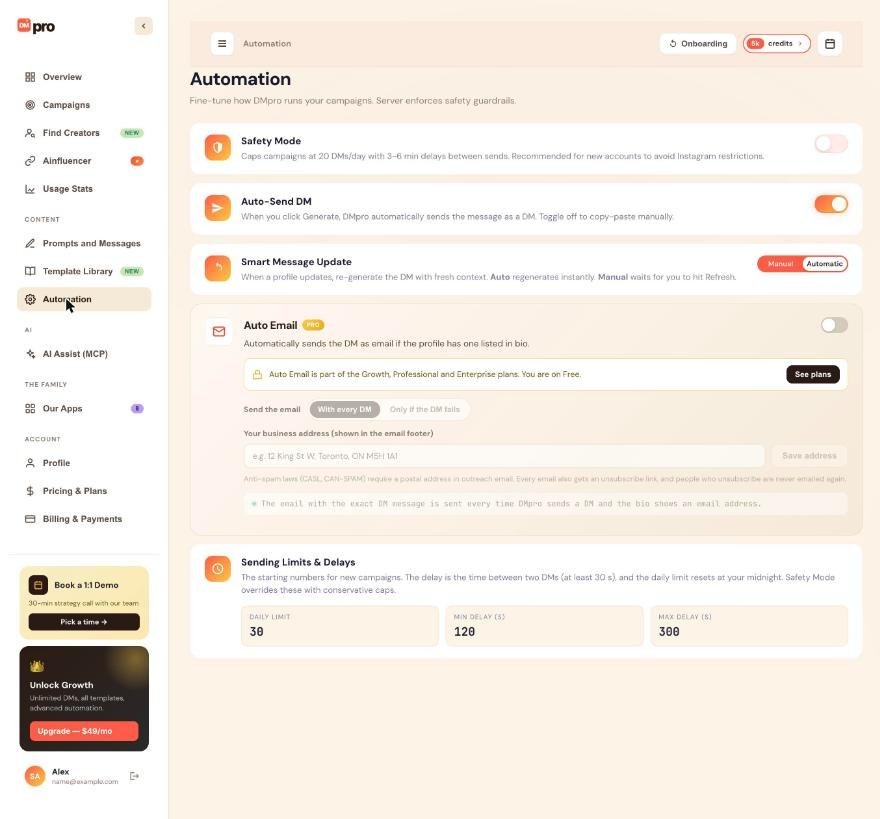
Open Campaigns and click Pause on every running campaign (or use the extension’s campaign screen). Then open Automation and turn Auto-Send DM off so single-profile DMs are not sent automatically.
Pausing keeps everyone who has not been messaged in the queue, so you can resume later.
Wait
Stop all automation and wait until the platform lifts the restriction. The Help Center says this is usually a day or two. During the wait:
- Do not send DMpro DMs or run bulk actions by hand.
- Do not sign back in repeatedly to test. That can extend the block.
- Remember that even manual actions from the same account may extend it.
Check that you can use Instagram normally
After the wait, sign in to Instagram in the usual way and confirm you can browse and open profiles without warnings. Do not send DMs yet.
Turn on Safety Mode and lower your numbers
On the Automation page, switch Safety Mode on. New campaigns then send at most 20 DMs a day with 3 to 6 minutes between them. Create a fresh campaign rather than resuming an old one, because a campaign keeps the pace it was created with.
Ramp back up slowly
The Help Center suggests a cautious restart: about 5 manual DMs on day 1, about 10 on day 2, then a gradual rise toward 20 a day with Safety Mode on. Raise your limits only while your DMs go through without warnings.
Reduce the chance of a repeat
- Keep Safety Mode on.
- Vary your wording: spintax in your own DM, or Rotate prompts in AI campaigns.
- Message people who are a good fit, so fewer people report you.
- Send during business hours in your audience’s time zone.
- Warm up new accounts before you automate them.
Tips
- If you are blocked repeatedly, scale your volume back a lot, or consider an older, established account.
- Single-profile DMs are not limited by Safety Mode. Keep your own manual pace modest too.
- Keep your campaign exports. They show exactly who was messaged and when.
If something goes wrong
My campaign kept running after Instagram blocked me.
DMpro does not detect blocks. Pause the campaign yourself on the dashboard. People who failed stay marked Failed and are not retried by DMpro.
Sends fail again right after I resume.
Pause again and wait longer. Restart with Safety Mode on and a lower daily limit than before.
Is it a block or a DMpro problem?
Open a conversation on Instagram by hand. If Instagram itself shows warnings or refuses actions, it is a restriction. If Instagram works but DMpro fails, read the Reason in View Details and see How to fix a campaign that is not sending.
Related how-to guides
Still stuck? We’re happy to help.
Create your account, or reach out to support.




