
How to start, pause and stop a campaign
Control a campaign with Start, Pause, Resume and Stop, and learn what each one does to the people still waiting. It takes about 2 minutes.
Before you start
- A saved campaign (a Draft) on the Campaigns page
- Chrome open with the DMpro extension signed in to the same account
Find your campaign card
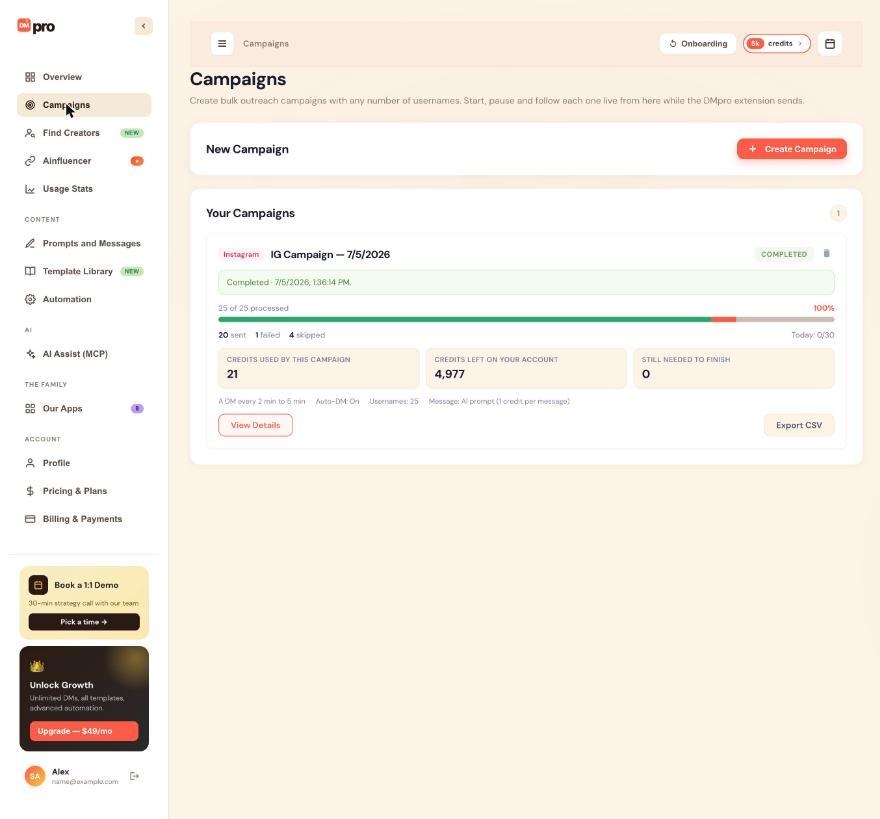
Open Campaigns in the left menu. Every campaign has a card under Your Campaigns with its platform, name, status, progress and “Today: x/y”. The buttons on the card depend on the status.
In the extension, the Bulk Campaign screen shows the active campaign in an Active Campaign card and older ones under Recent Campaigns.
Start a draft
A campaign made with Create & Save is a Draft. Click Start on its card. DMpro says “Started. It begins as soon as Chrome with the DMpro extension is open (within a minute).” If the extension runs in the same browser, it picks the campaign up at once.
In the extension, Start Campaign creates and starts the campaign in one step.
Watch it run
A running card shows what the extension is doing, for example “Running in the DMpro extension · Waiting before the next DM · next DM in 1:42”, plus the progress bar and “Today: x/y”. Running does not always mean a DM goes out this minute: the card may say it is waiting for the extension, queued behind another campaign, or at the daily limit. The guide How to read campaign and username statuses lists these lines.
Pause when you need a break
Click Pause on the card (or on the extension’s Active Campaign card). DMpro says “Paused. The extension stops within about 30 seconds; a DM already being sent finishes first.” People who were not messaged stay in the queue.
Pausing is the safe choice when you want to edit a prompt, check a warning from Instagram or TikTok, or add credits.
Resume where it stopped
Click Resume on a Paused or Out of Credits campaign. Sending continues with the next person, within today’s limit. In the extension, the Active Campaign card’s Pause button turns into Resume.
A campaign that ran out of credits does not restart by itself when credits arrive. Add credits first (the card has a Get credits button), then click Resume. Nobody is skipped.
Stop a campaign for good
Click Stop and confirm “Stop this campaign permanently? You will not be able to resume it.” Nobody left in the campaign is messaged, and the campaign cannot be started again. Its results stay available.
Let it finish, or delete it
When everyone has been handled, the campaign becomes Completed on its own. You can still open View Details and Export CSV.
The trash icon deletes a campaign. DMpro asks “Delete this campaign and all its results? This cannot be undone.” Deleting a running campaign also stops it. DMs already sent stay sent.
Tips
- Start, Pause, Resume and Stop on the dashboard reach the extension wherever it runs, even on another computer. A pause takes effect within about 30 seconds and a start within about a minute, as long as Chrome with the extension is open.
- To change what an AI campaign writes, pause it, change the prompt, test it on a profile or two, then resume.
- Export the results before you delete a campaign. Deleting removes them for good.
If something goes wrong
I clicked Resume but the campaign is not sending.
Read the line on the card. It may be at the daily limit, queued behind another campaign, or waiting for the extension. See How to fix a campaign that is not sending.
Can I start a stopped campaign again?
No. A Stopped or Completed campaign cannot be started again. Create a new campaign with the usernames you still want to reach.
Two campaigns are running but only one is sending.
The extension runs one campaign at a time. The other one shows “Queued” and starts when the first one finishes. Pause one of them if you want the other to go first.
Related how-to guides
Still stuck? We’re happy to help.
Create your account, or reach out to support.




