
Shopify’s Basic plan is $39 a month. Almost nobody pays $39 a month.
By the time a working store has a review app, an email tool, a page builder, a subscription app, and a theme that does not look like every other Shopify store, the real monthly figure is commonly $150 to $400. Add the 2% penalty for using any payment processor other than Shopify Payments and the gap widens further.
That gap between advertised price and operating cost is why most people go looking for Shopify alternatives, and it is the thing almost no comparison article calculates properly.
This guide covers what Shopify is and how it works, what a store actually costs to run once it is doing real volume, and 14 alternatives grouped by the trade each one makes. It also covers the migration risk specific to Shopify, which is not your products but your URLs.
Sellers weighing a marketplace instead of a store of their own should read the Etsy alternatives comparison first, because marketplaces and store builders solve genuinely opposite problems.
Key Takeaways
- The advertised price is a fraction of the real cost. Apps, themes, and transaction fees routinely triple a $39 plan
- Shopify charges 2% extra on every order if you use a payment processor other than Shopify Payments
- The right alternative depends on one trade: how much control you want against how much you are willing to maintain
- Open-source platforms remove the monthly fee and hand you hosting, security, and updates in exchange
- Digital-only sellers are overpaying most, because Shopify’s entire architecture is built for shipping parcels
- Migration risk is your URLs, not your products. Product data exports cleanly; search rankings do not
- Below roughly 50 orders a month, almost every alternative here is cheaper and none of them is meaningfully worse
What Is Shopify and How Does It Work?
Shopify is a hosted ecommerce platform. You pay a monthly subscription and Shopify provides the storefront, the checkout, the hosting, the security certificates, and the admin panel where you manage products, orders, and customers.
The setup process is genuinely simple. You pick a theme, add products with images and prices, connect a payment method, set shipping rates, and point a domain at it. Shopify handles everything that would otherwise require a developer, and the checkout is among the highest-converting on the internet because millions of shoppers have used it before.
What Shopify does not do out of the box is most of the specific things a growing store needs. Those arrive through the App Store, and each one has its own monthly fee.
| What is included | What needs an app |
|---|---|
| Storefront, hosting, and SSL | Product reviews and user-generated content |
| Checkout and payment processing | Email marketing and automation |
| Product, order, and customer management | Advanced page building beyond the theme editor |
| Basic discount codes | Subscriptions and recurring orders |
| Shipping rate calculation | Upsells, bundles, and cross-sells |
| Basic sales reporting | Loyalty programmes and referrals |
What a Shopify Store Actually Costs
This is the number to compare against, and it is not the one on the pricing page. A realistic small store adds four or five apps almost immediately, because the gaps they fill are not optional for a store trying to sell things.
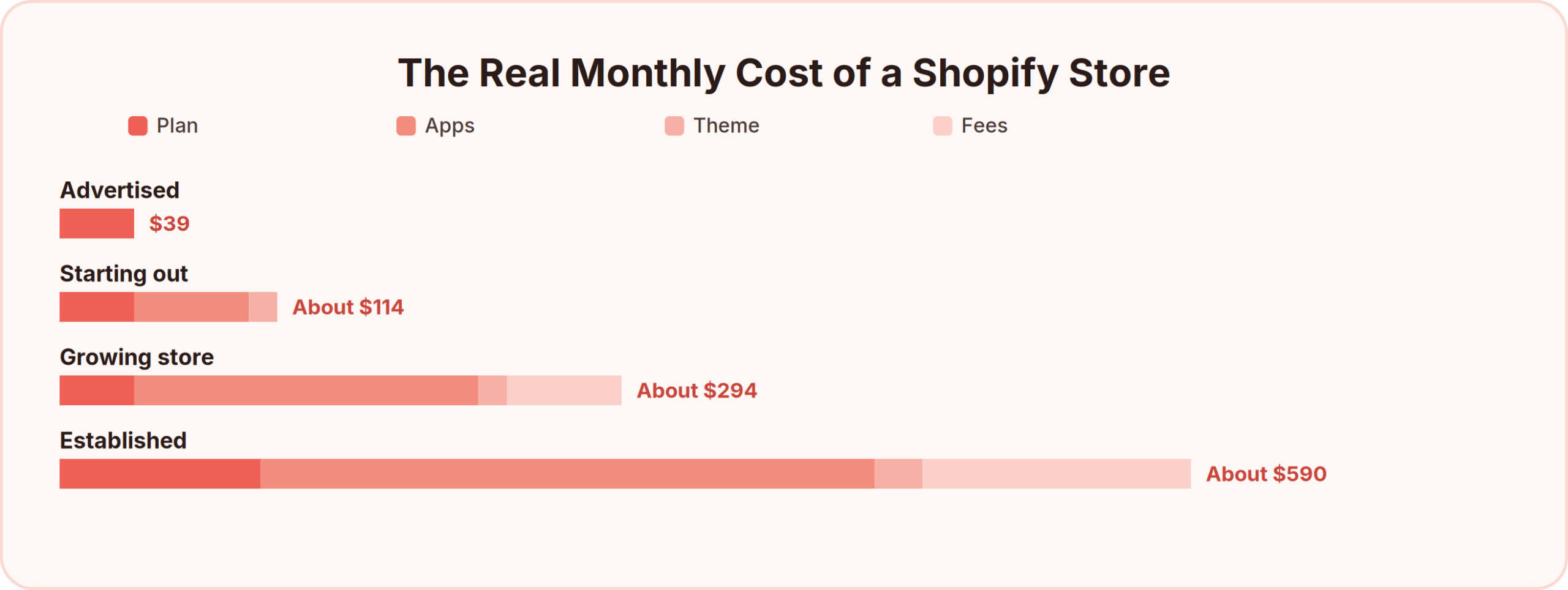
Three costs do the damage, and none of them appear on the pricing page.
- The app stack. Reviews, email, page building, subscriptions, and upsells are five separate apps at $10 to $60 each. Most stores run eight to fifteen.
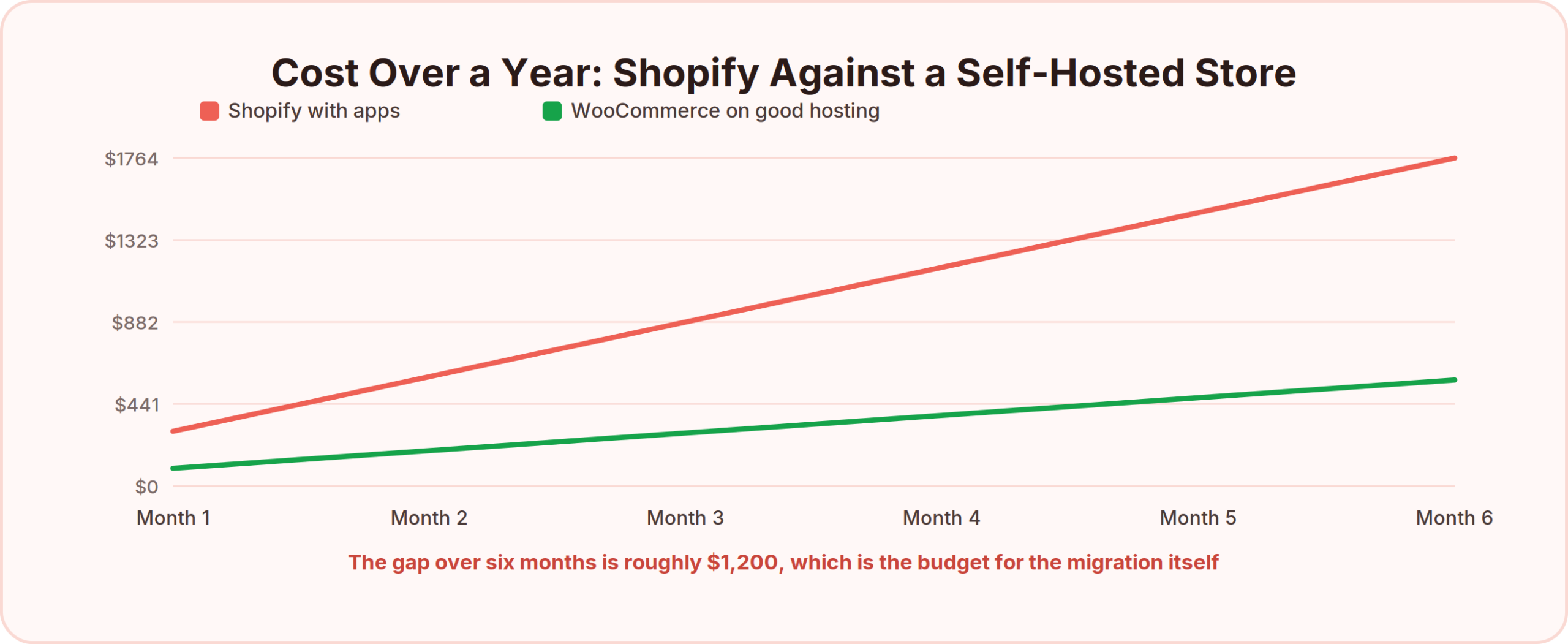
- The payment penalty. Shopify charges an additional 2% on Basic if you process payments anywhere other than Shopify Payments. On $20,000 of monthly sales that is $400 a month for using your own processor.
- Theme and development. Premium themes run $200 to $400 one-off, and any customization beyond the editor means hiring someone.
Open your Shopify billing page and total the last three months, including every app charge and every transaction fee. That figure, not $39, is what an alternative has to beat.
Why Store Owners Look for Shopify Alternatives
Cost is the trigger. These are the reasons people actually complete the move.
- Costs that grow faster than revenue. Every new capability is a new subscription, and app pricing frequently scales with order volume too.
- The 2% payment penalty. Being charged extra for choosing your own processor is the single most resented Shopify policy among established merchants.
- Checkout is closed on lower plans. Deep checkout customization requires Shopify Plus, which starts in the thousands per month.
- You are renting the platform. Themes use Shopify’s own templating language, so a store built over three years does not port anywhere easily.
- It is architected for physical goods. Digital sellers pay for inventory, shipping, and fulfillment systems they will never touch.
- Overkill for small catalogs. A store selling six products carries the same platform weight as one selling six thousand.
None of this makes Shopify a bad platform. It is the best hosted ecommerce product available and the checkout genuinely converts. The question is whether your store needs an engine built for scale you do not have yet.
The Trade Every Alternative Makes
Every platform below sits somewhere on one line: how much control you get against how much maintenance you take on. Nothing gives you both, and choosing the wrong end of it is the expensive mistake here.
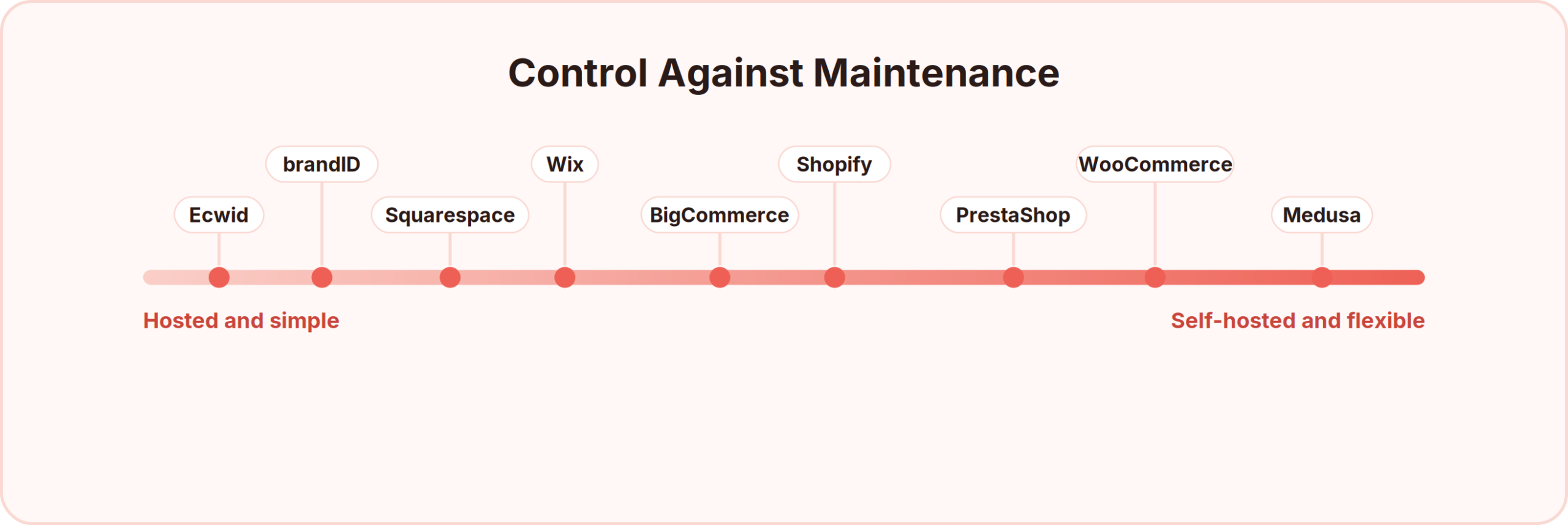
Move left and you pay a subscription while someone else handles hosting, security patches, uptime, and PCI compliance. Move right and those become your responsibility, in exchange for owning the code and paying no platform fee at all.
The honest question is not which is better. It is whether anyone on your team wants to be responsible for a store being down at 2am during a sale.
14 Shopify Alternatives Compared
| Platform | Type | Best for | Monthly cost | Transaction fee |
|---|---|---|---|---|
| WooCommerce | Self-hosted | WordPress sites wanting full control | Hosting only | 0% platform |
| BigCommerce | Hosted | Growing stores wanting features included | From $39 | 0% platform |
| Squarespace | Hosted | Design-led brands and small catalogs | From around $28 | 0% on higher tiers |
| Wix | Hosted | Beginners wanting drag-and-drop | From around $29 | 0% platform |
| Ecwid | Add-on store | Adding a shop to an existing site | Free tier available | 0% platform |
| Squarespace + Acuity | Hosted | Service businesses selling online | From around $28 | 0% on higher tiers |
| PrestaShop | Self-hosted | European stores wanting open source | Hosting only | 0% platform |
| OpenCart | Self-hosted | Simple open-source catalogs | Hosting only | 0% platform |
| Medusa | Headless | Developer teams building custom | Hosting only | 0% platform |
| Adobe Commerce | Enterprise | Large multi-store operations | Quote-based | 0% platform |
| Shift4Shop | Hosted | US merchants using its own processor | Free with its processor | 0% platform |
| brandID | Creator storefront | Digital products and creator brands | Free, or $9 | 0% on your gateway from $9 |
| Payhip | Digital storefront | Digital sellers on a budget | Free, or from $29 | 5% on free plan |
| Sellfy | Creator storefront | Digital plus print-on-demand | From $22 | 0% platform |
Hosted Shopify Alternatives
These work the way Shopify works: a monthly fee, someone else handling the servers, and a storefront live the same afternoon. The differences are in what comes included before you start adding apps.
1- BigCommerceMost features included as standard
BigCommerce is a hosted ecommerce platform that works almost identically to Shopify from the merchant’s side: you subscribe, build a storefront from a theme, add products, and it handles hosting and checkout.
The difference is philosophical. BigCommerce builds features into the platform that Shopify leaves to its App Store, so a store that would need six paid apps on Shopify frequently needs zero here. Product reviews, faceted search, and multi-currency all ship as standard.
It also charges no transaction fee regardless of which payment gateway you use, which removes Shopify’s 2% penalty entirely.
- Built-in reviews, faceted search, and multi-currency
- No platform transaction fee on any gateway
- Multi-channel selling to Amazon, eBay, and social
- Unlimited staff accounts on every plan
- Strong native SEO controls including URL structure
| ✓ BigCommerce Pros | ✗ BigCommerce Cons |
|---|---|
|
|
BigCommerce Pricing
- Standard: from $39/month
- Plus: around $105/month
- Pro: around $399/month, with sales thresholds on each tier
Best For: Growing stores paying more in Shopify apps than in Shopify itself, particularly those with large catalogs.
2- SquarespaceBest design without a designer
Squarespace is a website builder with commerce built in. You choose a template, edit pages visually, and add a shop section with products, inventory, and checkout attached to the same site.
Commerce is a feature here rather than the foundation, so inventory and fulfillment tooling is thinner than Shopify’s. What you get instead is the best-looking store on this list with no design work, which matters more than merchants admit for higher-priced goods.
For a brand selling forty considered products rather than four thousand SKUs, that trade usually favours Squarespace.
- Award-winning templates that need no customization
- Blogging, email campaigns, and scheduling included
- Digital products and member areas supported
- Custom domain included on annual plans
- Strong mobile rendering by default
| ✓ Squarespace Pros | ✗ Squarespace Cons |
|---|---|
|
|
Squarespace Pricing
- Business: from around $28/month with a transaction fee
- Commerce plans: from around $32/month with 0% transaction fee
Best For: Brands where presentation carries part of the price, selling small, considered catalogs.
3- WixEasiest builder for beginners
Wix is a drag-and-drop website builder with an ecommerce module. You place elements anywhere on the page by dragging them, which makes it the most forgiving option here for anyone who has never built a site.
The commerce side covers products, inventory, discounts, shipping, and a reasonable checkout, plus an app market for the rest.
The historic criticism was performance and SEO, both of which have improved considerably, though the free-placement editor still produces heavier pages than template-based builders.
- True drag-and-drop editing with no layout constraints
- Hundreds of templates across industries
- Built-in bookings, blogging, and email marketing
- App market for additional functionality
- AI site generation from a description
| ✓ Wix Pros | ✗ Wix Cons |
|---|---|
|
|
Wix Pricing
- Ecommerce plans: from around $29/month
Best For: First-time store owners who value getting live over getting optimal.
4- EcwidAdds a store to a site you already have
Ecwid is a store you embed rather than a site you build. You create the catalog in Ecwid’s dashboard, then paste a snippet into an existing WordPress, Wix, Squarespace, or plain HTML site, and the shop appears inside it.
The same catalog can be embedded in several places at once, and syncs across all of them, so one product update reaches every site and social channel.
There is a genuinely free tier for small catalogs, which makes it the cheapest way to start selling on a site that already gets traffic.
- Embeds into any existing website with a snippet
- One catalog synced across multiple sites and channels
- Sells through Instagram, Facebook, and marketplaces
- Free plan for small catalogs
- Point-of-sale for in-person selling
| ✓ Ecwid Pros | ✗ Ecwid Cons |
|---|---|
|
|
Ecwid Pricing
- Free: limited product count
- Paid: from around $19/month, scaling with catalog size
Best For: Anyone with a working website who wants to add selling without rebuilding anything.
5- Shift4ShopFree if you use its payment processor
Shift4Shop is a hosted ecommerce platform offered free to US merchants who process payments through Shift4’s own gateway. The platform cost is effectively subsidised by the processing margin.
Feature depth is closer to BigCommerce than to a lightweight builder, covering large catalogs, B2B pricing, and multi-currency.
The catch is obvious and worth stating plainly: you are locked to one payment processor, and if its rates are worse than your current ones, the free plan is not free.
- Full ecommerce platform at no subscription cost
- Large catalog and B2B pricing support
- Built-in SEO and marketing tools
- Unlimited products and staff accounts
- US-focused compliance and tax handling
| ✓ Shift4Shop Pros | ✗ Shift4Shop Cons |
|---|---|
|
|
Shift4Shop Pricing
- Free: for US merchants using Shift4 Payments
- Paid: available for merchants using other processors
Best For: US merchants comfortable committing to one processor in exchange for removing the platform fee.
Open-Source and Self-Hosted Shopify Alternatives
These remove the monthly platform fee entirely and hand you the responsibilities that fee was paying for. The savings are real and so is the work.
6- WooCommerceMost widely used, on WordPress
WooCommerce is a free plugin that turns a WordPress site into a store. You install it on hosting you control, and it adds products, cart, checkout, and order management to the site you already have.
Because WordPress powers a large share of the web, WooCommerce has the deepest extension ecosystem of anything here, and finding a developer who knows it is trivial.
The plugin is free. The store is not: hosting, a theme, and the extensions for payments, shipping, and subscriptions all cost money, and you own the maintenance.
- Free core plugin with thousands of extensions
- Complete control over code, data, and hosting
- Any payment gateway with no platform penalty
- Content and commerce on one WordPress install
- Enormous developer community
| ✓ WooCommerce Pros | ✗ WooCommerce Cons |
|---|---|
|
|
WooCommerce Pricing
- Plugin: free
- Real cost: hosting from around $15/month, plus theme and extensions
Best For: Stores already on WordPress, and merchants at revenue where percentage-free operation is worth the maintenance.
7- PrestaShopOpen source with strong European support
PrestaShop is a self-hosted open-source ecommerce platform, closer to a full store system than a plugin. You install it on your own hosting and get a complete merchant back office out of the box.
It has particularly strong adoption across Europe, which shows in its multi-language, multi-currency, and EU tax and invoicing handling.
Like WooCommerce, the software is free and the operation is not, though more functionality is included before you start buying modules.
- Complete store system rather than a plugin
- Strong multi-language and multi-currency support
- EU tax, invoicing, and compliance handling
- Large module marketplace
- Full control over hosting and data
| ✓ PrestaShop Pros | ✗ PrestaShop Cons |
|---|---|
|
|
PrestaShop Pricing
- Software: free
- Real cost: hosting, plus modules and any development
Best For: European merchants and multi-market stores wanting open source without assembling it from plugins.
8- MedusaHeadless commerce for developer teams
Medusa is an open-source headless commerce engine. It provides the backend, the API, the cart, and the order logic, and you build whatever storefront you want on top of it.
Headless means the shop front end and the commerce engine are separate, so the storefront can be a Next.js site, a mobile app, or an in-store kiosk, all talking to the same backend.
This is a developer product. There is no drag-and-drop anything, and without engineering capacity it is not a Shopify alternative in any practical sense.
- Fully open-source commerce backend
- API-first, so any front end can be built on it
- Modular architecture you extend in code
- No licence or platform fees
- Modern JavaScript and TypeScript stack
| ✓ Medusa Pros | ✗ Medusa Cons |
|---|---|
|
|
Medusa Pricing
- Software: free and open source
- Real cost: engineering time plus hosting
Best For: Companies with in-house developers whose commerce requirements do not fit a template.
Shopify Alternatives for Digital Products and Creators
Shopify is built to move parcels. If you sell files, the inventory system, shipping calculator, and fulfillment workflow are machinery you pay for and never touch.
9- brandIDBest for digital products and creator brands
brandID is a creator storefront rather than an ecommerce platform. One page holds your products, links, subscriptions, and audience, and you connect your own Stripe or PayPal so payments land in your account directly.
For a digital seller the contrast with Shopify is structural rather than incremental. There is no inventory to track, no shipping to configure, no fulfillment status, and no app stack, because selling digital products needs none of it. Files deliver instantly on payment.
It also runs the income streams Shopify would need several apps for: subscriptions, tipping, affiliate collections, and rentable ad slots, all from the same page at 0% platform fee on your own gateway from $9 a month.
- Digital storefront: downloads, video, audio, and documents delivered instantly with no fulfillment step
- Subscriptions and memberships: recurring revenue without a subscriptions app
- Affiliate marketplace: over 5 million products from more than 2,000 brands, commission averaging up to 65%, with no approval process
- Tipping and digital billboards: supporter income and rentable ad slots on your own page
- Email capture and CRM: customer list ownership without an email app subscription, and you can build an email list without a website from the same page
- Custom domain and branding on paid plans
| ✓ brandID Pros | ✗ brandID Cons |
|---|---|
|
|
brandID Pricing
- Free: one digital product, one subscription, one tipping jar, unlimited affiliate products
- Creator, $9/month: unlimited products, custom branding, 0% fee on your own gateway
- Turbo Creator, $15/month: unlimited subscribers, email and SMS marketing
Best For: Creators and digital sellers paying for Shopify’s physical-goods architecture while selling files, and anyone whose buyers arrive from social rather than search.
10- SellfyDigital and print-on-demand together
Sellfy is a hosted storefront covering digital downloads, physical goods, subscriptions, and print-on-demand from one dashboard. You add products, it generates the store, and buyers check out without leaving.
The print-on-demand is built in rather than integrated, so merch is manufactured and shipped when ordered with no stock and no separate Printful account.
For a creator selling both files and merch, that combination replaces two subscriptions.
- Digital, physical, subscription, and POD in one store
- Email campaigns, discounts, and cart recovery included
- PDF stamping and download limits for file protection
- Embeddable store and buy-now buttons
- Affiliate system with custom commission rates
| ✓ Sellfy Pros | ✗ Sellfy Cons |
|---|---|
|
|
Sellfy Pricing
- Starter: $22/month billed annually
- Higher tiers: from $59/month for growing stores
Best For: Creators selling downloads and merchandise who want one dashboard instead of Shopify plus a POD app.
The Sellfy review covers how its print quality and shipping times compare with running Printful through Shopify.
11- PayhipDigital storefront with no monthly cost
Payhip is a hosted storefront for digital products, courses, memberships, and coaching. You upload a product, set a price, and Payhip generates a store page and handles checkout and delivery.
The free plan charges no monthly fee and takes 5% per sale, so nothing is owed until something sells.
EU VAT is calculated and handled automatically, which removes real administrative work for anyone selling into Europe.
- Free plan with no monthly fee
- Digital downloads, courses, memberships, and coaching
- Automatic EU VAT handling
- Built-in affiliate programme
- Coupons, upsells, and email marketing
| ✓ Payhip Pros | ✗ Payhip Cons |
|---|---|
|
|
Payhip Pricing
- Free: unlimited products, 5% per sale
- Plus: around $29/month with a reduced fee
- Pro: around $99/month with 0% transaction fee
Best For: Digital sellers testing whether they can leave Shopify without committing to another subscription.
The Payhip review breaks down its VAT handling, which is the feature most Shopify sellers migrate for.
Enterprise Shopify Alternatives
Above a certain size the question changes from cost to capability, and Shopify Plus starts in the thousands per month. These compete at that level.
12- Adobe CommerceEnterprise depth and complexity
Adobe Commerce, formerly Magento, is an enterprise ecommerce platform for large or complex operations. It handles multiple storefronts, brands, currencies, and warehouses from a single installation.
It is available self-hosted through the open-source Magento edition or as a paid Adobe cloud product, and both assume a development team.
The capability is genuinely at another level from Shopify. So is the implementation cost, which is measured in months and six figures rather than weeks.
- Multi-store, multi-brand, multi-currency from one install
- Advanced B2B pricing and quoting
- Deep customization with no platform limits
- Sophisticated merchandising rules
- Open-source edition available
| ✓ Adobe Commerce Pros | ✗ Adobe Commerce Cons |
|---|---|
|
|
Adobe Commerce Pricing
- Open source: free software, substantial implementation cost
- Adobe Commerce: quote-based, typically enterprise-level
Best For: Large retailers with genuine multi-store or B2B complexity and an engineering budget to match.
13- Salesforce Commerce CloudFor businesses already on Salesforce
Salesforce Commerce Cloud is an enterprise commerce platform tightly integrated with the wider Salesforce ecosystem, so commerce data sits alongside CRM, service, and marketing records natively.
It is sold on a revenue-share model rather than a flat fee, which aligns the vendor’s incentives with growth and makes it expensive at scale.
The case for it is almost never commerce features alone. It is that the rest of the business already runs on Salesforce.
- Native integration with Salesforce CRM and Marketing Cloud
- AI-driven merchandising and personalization
- Global multi-site and multi-currency
- Enterprise support and service levels
- Unified customer data across channels
| ✓ Salesforce Commerce Cloud Pros | ✗ Salesforce Commerce Cloud Cons |
|---|---|
|
|
Salesforce Commerce Cloud Pricing
- Pricing: revenue share, quote-based
Best For: Enterprises already committed to Salesforce wanting commerce inside the same data model.
14- ShopwareEuropean enterprise open source
Shopware is a German ecommerce platform available in open-source and commercial editions, positioned between mid-market and enterprise. It has a modern API-first architecture and a visual page builder that most enterprise systems lack.
Adoption is concentrated in Europe, and its handling of EU tax, invoicing, and B2B requirements reflects that.
It sits in a useful gap: more capable than a hosted platform, considerably less punishing to implement than Adobe Commerce.
- Open-source and commercial editions
- API-first with headless capability
- Visual page builder included
- Strong B2B and EU compliance features
- Multi-channel and multi-store
| ✓ Shopware Pros | ✗ Shopware Cons |
|---|---|
|
|
Shopware Pricing
- Community: free open-source edition
- Commercial: tiered subscriptions with support
Best For: European mid-market merchants who have outgrown hosted platforms but not the budget for Adobe Commerce.
The Migration Risk Nobody Warns You About
Moving products off Shopify is straightforward. Shopify exports products, customers, and orders as CSV, and every platform here imports them.
The thing that actually breaks is your URLs.
Shopify enforces a rigid URL structure. Every product sits under /products/, every category under /collections/, every article under /blogs/. Almost no other platform uses that structure, so a store with three years of accumulated search rankings will change the address of every single page on the day it migrates.
Without a redirect for each one, every ranking, backlink, and bookmarked page points at a 404. Stores have lost the majority of their organic traffic this way, and it takes months to recover.
| What moves cleanly | What breaks | What to do about it |
|---|---|---|
| Product data and images | Product URLs | Build a one-to-one 301 redirect map before launch |
| Customer records | Saved payment methods | Customers re-enter card details on first purchase |
| Order history | Subscription billing | Existing subscribers must re-subscribe |
| Blog content | Blog URL structure | Redirect /blogs/news/post to the new path |
| Reviews, with an app export | Review app data left in place | Export before cancelling the app subscription |
| Discount codes | App-generated discounts and bundles | Rebuild these natively on the new platform |
Export a list of every live URL on your Shopify store before you cancel anything, then map each one to its new address. That spreadsheet is the difference between a migration and a traffic collapse.
Choosing the Right Shopify Alternative
| If you… | Choose | Because |
|---|---|---|
| Sell digital products only | brandID or Payhip | You stop paying for inventory and shipping systems |
| Are paying more in apps than in Shopify | BigCommerce | The same features are included rather than rented |
| Care most about how the store looks | Squarespace | Best design with no designer involved |
| Already run a WordPress site | WooCommerce | Content and commerce on one install, no platform fee |
| Have a site and just need a cart | Ecwid | Embeds into what you already have |
| Are building your first store | Wix or Squarespace | Lowest learning curve, live the same day |
| Have developers and unusual requirements | Medusa | Complete control, no fees, any front end |
| Run multi-brand or B2B at scale | Adobe Commerce or Shopware | Complexity nothing hosted can handle |
| Sell files and merch together | Sellfy | Digital and print-on-demand in one dashboard |
Whatever you choose, the traffic problem does not move with you. A store builder brings no buyers, so SEO and social both have to carry more weight than they did, and link in bio tools are what turn social attention into a shop visit.
One rule cuts through most of it. If your monthly Shopify bill including apps is under $100 and you are selling physical goods successfully, the migration effort probably outweighs the saving. Above $300 a month, or if you are selling files through a platform built for parcels, the case makes itself.
Conclusion
Shopify is the best hosted ecommerce platform available, and that is not really in dispute. What is in dispute is whether every store needs it, and whether the price a store actually pays resembles the price it was quoted.
Pull your last three months of Shopify billing including every app. If the total is modest and the store works, stay. If it has quietly become $400 a month for a shop selling twelve products, the alternatives above will each remove a different part of that bill.
And if the products are files rather than parcels, you are paying for an inventory system, a shipping calculator, and a fulfillment workflow you have never once used. Working out which digital products sell best changes the shortlist more than any feature comparison on this page.
What Is the Best Alternative to Shopify?
It depends on what you sell and how much maintenance you want. BigCommerce is the closest like-for-like replacement with more included as standard, WooCommerce removes platform fees if you already run WordPress, Squarespace wins on design for small catalogs, and brandID suits digital sellers who never needed Shopify’s shipping and inventory architecture.
What Are the Cheapest Shopify Alternatives?
Ecwid and brandID both have permanent free tiers, Payhip charges nothing monthly and takes 5% per sale, and WooCommerce, PrestaShop, and Medusa are free software where you pay only for hosting. Shift4Shop is free for US merchants using its own payment processor.
How Much Does Shopify Really Cost Per Month?
The Basic plan is $39, but a working store typically runs $150 to $400 once apps, a premium theme, and transaction fees are counted. Shopify also adds 2% on Basic if you use a payment processor other than Shopify Payments, which on $20,000 of monthly sales is $400 by itself.
Is WooCommerce Cheaper Than Shopify?
Usually yes at volume, but not free. The plugin costs nothing and there is no platform fee, so you pay only hosting, a theme, and extensions. The trade is that you handle hosting, security, updates, and any breakage, which is a real cost in time even when it is not a cost in money.
Can I Migrate From Shopify Without Losing SEO?
Only if you plan for it. Product and customer data export cleanly as CSV, but Shopify’s URL structure using /products/ and /collections/ does not match other platforms, so every page address changes. Export a full URL list before cancelling anything and build a one-to-one 301 redirect map, or you will lose the rankings attached to those pages.
What Is the Best Shopify Alternative for Digital Products?
brandID, Payhip, or Sellfy, because none of them charge you for inventory management, shipping calculation, or fulfillment workflows that digital products never use. brandID reduces the platform fee to 0% on your own payment gateway from $9 a month and adds subscriptions and tipping natively.
Does Shopify Charge Extra for Using PayPal or Stripe?
Yes. Shopify applies an additional transaction fee, 2% on the Basic plan and lower on higher tiers, to every order processed through a gateway other than Shopify Payments. Almost every alternative here charges nothing for using the processor of your choice.
Which Shopify Alternative Is Best for Beginners?
Wix has the gentlest learning curve because of its drag-and-drop editor, and Squarespace produces a better-looking result with slightly more structure. Both go live the same day. Ecwid is the easiest option if you already have a website and only need to add a cart.
Are There Free Alternatives to Shopify?
Yes, in two forms. Hosted free tiers from Ecwid and brandID cost nothing monthly but limit product counts or take a small percentage. Open-source platforms including WooCommerce, PrestaShop, OpenCart, and Medusa are free software where the real cost is hosting plus your own time maintaining them.
When Should I Leave Shopify?
When your app bill exceeds your plan cost, when the 2% payment penalty becomes material, when you are paying for physical-goods infrastructure to sell digital files, or when you need checkout control that only Shopify Plus provides. Below roughly $100 a month in total cost on a working store, migration effort usually outweighs the saving.
 Summarize this article with:









