
Ainfluencer is a marketplace where brands and sellers pay creators to post about their products. It also runs an affiliate platform for Shopify and Amazon stores, a product gifting program, escrow payments and a fully managed service. This review covers all of it: the brand app screen by screen, the money (checkout, escrow, wallet, fees, plans), the affiliate and gifting side, and the creator side in the mobile app.
This is a long guide, built to be read in parts. It has 40 numbered feature sections, 36 figures and a short list of places where the app and the documentation contradict each other. If you are a brand, start with sections 1 to 12, then the payment sections 27 to 30. If you sell on Shopify or Amazon, read sections 15 to 22 and the gifting sections 24 and 25. An agency should add section 34. A creator can jump to sections 35 to 40. Everyone should read the pricing section and the list of disagreements before paying.
Key Takeaways
- What it is: a two-sided marketplace for paid creator collaborations, plus an affiliate platform for Shopify and Amazon sellers, product gifting and a managed service.
- Real escrow: a brand pays at checkout, the money is locked, and it moves to the creator only when the brand approves the post. If nobody approves, it returns to the brand’s wallet.
- Free plan: $0 with 1 active campaign, 5 invites and 5 username reveals a month, and a 25% fee on top of every creator price. There is no free trial.
- Plan fees: the fee on creator payments is 25%, 20%, 15% or 3% by plan. Creators also pay a 20% fee when they withdraw. Paid plans list at $49, $149 and $699 a month.
- Money limits: the brand wallet has no withdraw button, creators are paid by PayPal or crypto only, and affiliate commission is billed 35 days after a sale.
- Open questions: several numbers differ between the app and the Help Center, and hybrid campaigns are still marked Coming Soon. We list every case we found.
Ainfluencer at a Glance
| Details | |
|---|---|
| Type | Influencer marketing marketplace with an affiliate platform, product gifting, escrow payments and a managed service |
| Made by | Ainfluencer, a sister product of brandID, the publisher of this blog |
| Who it is for | Brands, Shopify and Amazon sellers, agencies and creators |
| Sides | Brands use the web app at app.ainfluencer.com. Sellers also use seller.ainfluencer.com. Creators use the iOS and Android apps |
| Campaign types | Paid Collaboration, Affiliate Campaign and Product Gifting & Seeding. Paid collab + Affiliate is marked Coming Soon |
| Platforms | Creators on Instagram, TikTok and YouTube. Store connections for Shopify and Amazon |
| Payments model | The brand pays the creator’s price plus a plan fee into escrow. Release happens on approval. The creator withdraws less a 20% fee. Affiliate commission is charged to the seller’s card after 35 days |
| Plans and prices | Free $0, Starter $49, Professional $149 and Ultimate $699 a month (Help Center list). The app annual view shows $33, $104 and $500 |
| Free tier | Yes. 1 active campaign, 5 invites, 5 reveals and a 25% fee. No trial |
| Apps | Creator apps for iOS and Android. Brands use the browser |
| Extensions | Two Chrome extensions: AI DM Inviter and Contact Form Filler |
| Managed service | Fully managed packages from $7,999 to $29,999. A custom Enterprise tier and a success manager on higher plans |
What Is Ainfluencer?
Ainfluencer connects two groups. Brands and sellers post a campaign, find creators and pay for results. Creators browse campaigns in the mobile app and send offers with their own price. The platform sits between them: it holds the money, checks campaigns before creators see them, and releases payment when the brand approves the post. A separate affiliate platform handles commission on sales for connected Shopify and Amazon stores.
A paid campaign runs in six steps. First, the brand signs up on the web and answers two onboarding questions. Second, the brand builds a Paid Collaboration campaign, which a person reviews before creators see it, and invites creators or waits for offers. Third, a creator sends an offer from the app and the brand negotiates in the chat. Fourth, the brand pays, which counts as accepting, and the money goes into escrow. Fifth, the creator posts on their own account and submits the link. Sixth, the brand approves, the creator’s wallet is credited within about a minute, and the creator withdraws. If the brand never approves, the deal fails and the price returns to the brand’s wallet.
Affiliate campaigns and gifting follow different rules. Affiliate pays a percentage per tracked sale with no fee and no escrow. Gifting trades a free product for a post, also with no escrow. Both are covered in their own sections, along with every limit we could find.
The sections follow the order in which you meet the product. If you are still comparing options, our guide to micro influencer brand deals shows how smaller creators approach brands, which helps you judge the offers you will receive. Creators who want to compare other places to find paid work can read our UGC platforms for creators list.
The creator half of the platform is covered in sections 35 to 40. If that is your side, our becoming an influencer guide gives the wider picture before you sign up for any platform.
Brand and Marketplace Features
1. Signing up as a brand, and not as a creator
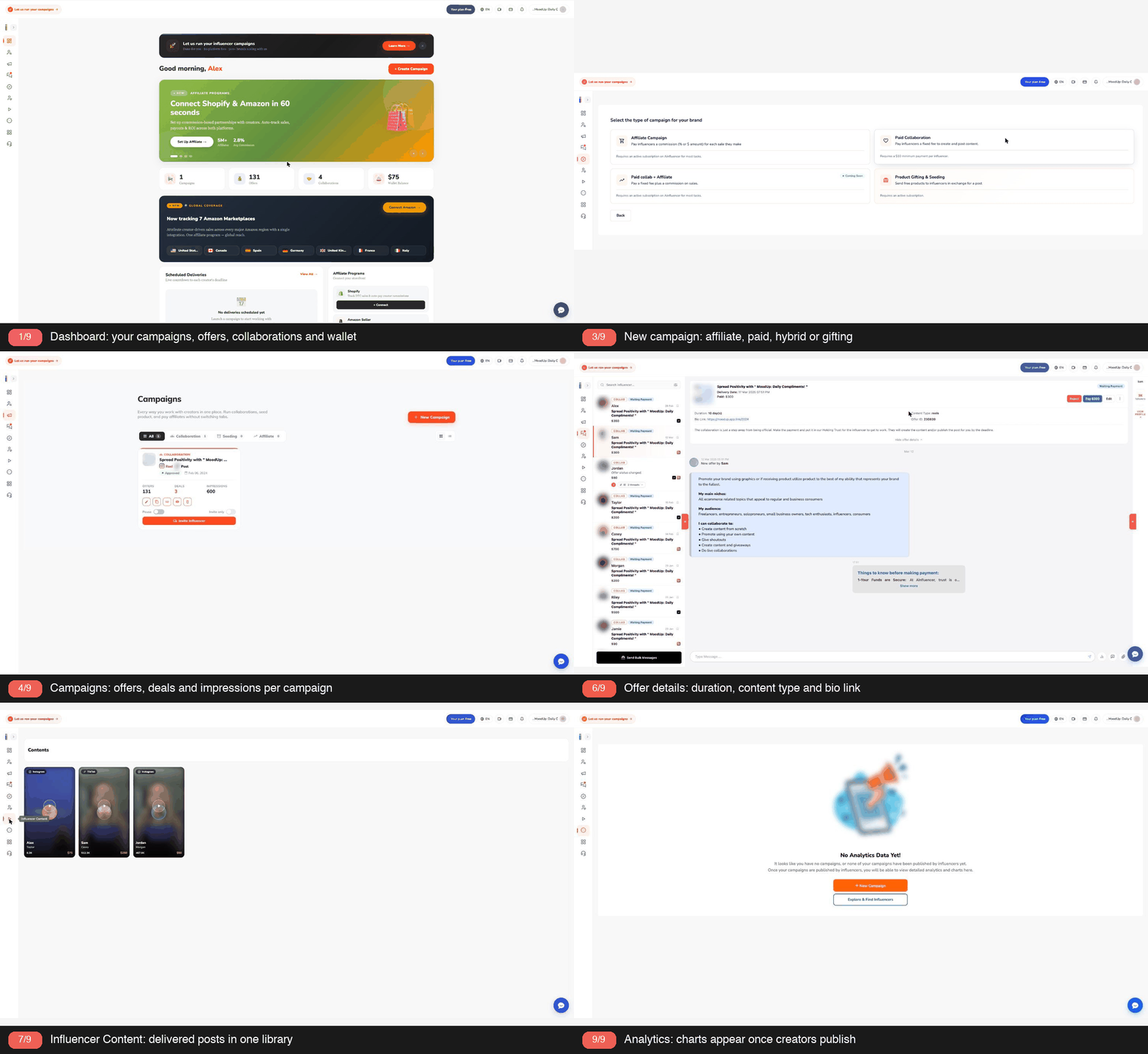
Brands use Ainfluencer in a web browser at app.ainfluencer.com. Creators use the iOS and Android apps. The split is strict. A creator who logs in on the website is told the platform is for brands, and a brand who logs in on the phone app is told it is only for influencers. Ainfluencer also publishes a brand side platform tour of every screen, which this review follows and checks against the live app.
The sign-up form asks for first name, last name, work email, a password of at least 8 characters, a phone number, a tick for the terms and a reCAPTCHA. The phone number must have a plus sign and country code, but the support documentation says it is never verified. There is no SMS step. “Sign up with Google” skips the password, phone and CAPTCHA and creates an already verified account. The brand account setup guide covers the same ground in Ainfluencer’s words.
Email confirmation is where the sources differ. The support documentation describes a 5 digit code (with a one click Verify button) typed on a “Verify your email” screen. The public Help Center page describes a verification link, and says landing page sign-ups get a link. Expect either, and check Spam. Codes can be resent after 60 seconds.
Onboarding follows. Only two answers are required: business name and country. Company size, category, preferred platform, the influencer size you want, a logo and up to two objectives are optional and editable later on Profile. The business name is what creators see, so keep links and contact details out of it. On the logo, onboarding says up to 8 MB and Profile says up to 5 MB, so stay under 5 MB. No card is needed to sign up, and a wallet is created automatically.
- One email, one account. You cannot change the email yourself, even before verifying it. Support must do it.
- No conversion. A brand account cannot become a creator account, and deleting one does not free the email. The Help Center suggests a second address for the other side. One person can hold both logins.
- Deleting is final. Profile has a Delete Account button. It cancels all subscriptions at once, takes campaigns off the marketplace and logs out your team. Wallet money stays in the deleted account and is not refunded automatically, so sort it out first. The email can never sign up again.
A creator who lands on the brand side by mistake has broken nothing. They should download the app and sign up there with another email. Ainfluencer’s brand versus creator help page says the stray web account is harmless. A creator who builds a brand campaign gets it rejected under code E9, covered below.
2. The dashboard, block by block
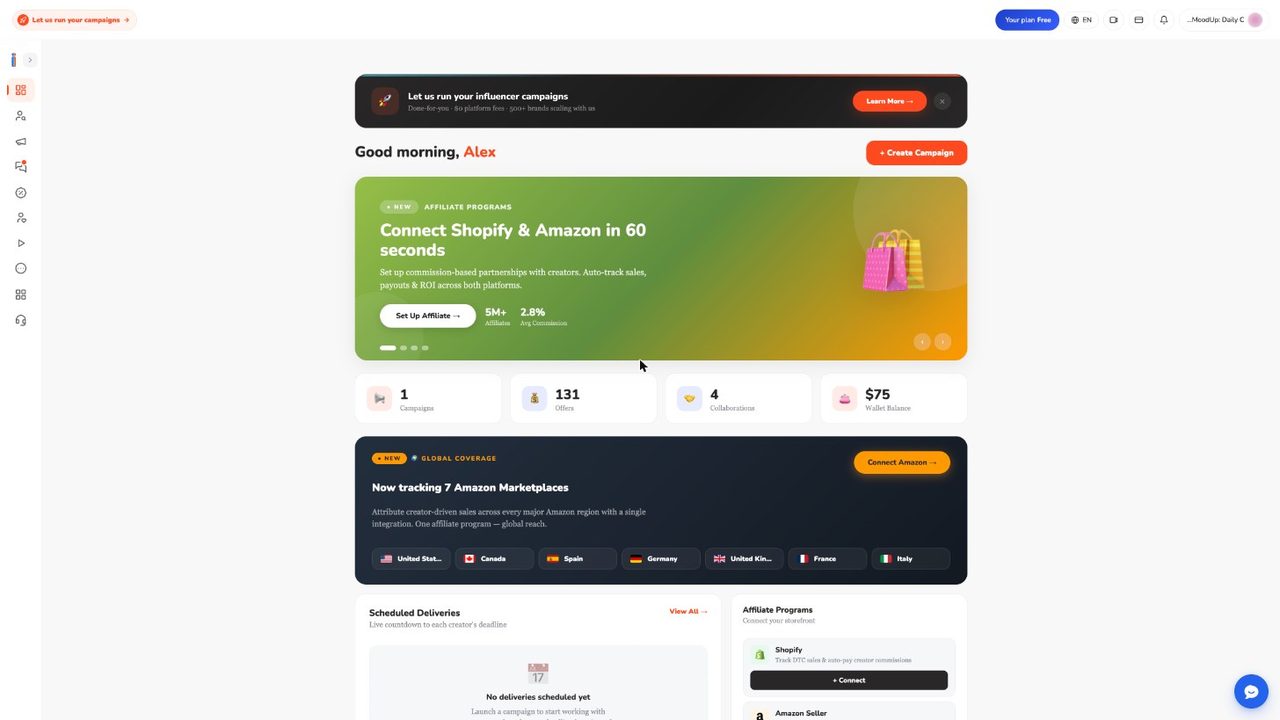
You land here after every login. The header shows your plan (“Your plan Free” in our account), a language switch and your account menu. A pill at top left and a black banner advertise the fully managed service. The banner can be closed.
- Create Campaign. Opens the type picker. Quick buttons also open Find Influencers and Rent a Billboard, which is tagged Coming Soon.
- Banner carousel. Promos for hybrid campaigns, “Connect Shopify and Amazon in 60 seconds” and billboards (BETA). The hybrid promo sits beside a picker where the hybrid card is still marked Coming Soon.
- Four counters. Campaigns, Offers, Collaborations and Wallet Balance.
- Amazon banner. “Now tracking 7 Amazon Marketplaces” (US, CA, ES, DE, UK, FR, IT) with a Connect Amazon button. Some Help Center pages say 19 marketplaces. We saw only these seven.
- Scheduled Deliveries is a live countdown to each creator’s deadline, empty until a deal is paid. Affiliate Programs has Connect buttons for Shopify and Amazon Seller.
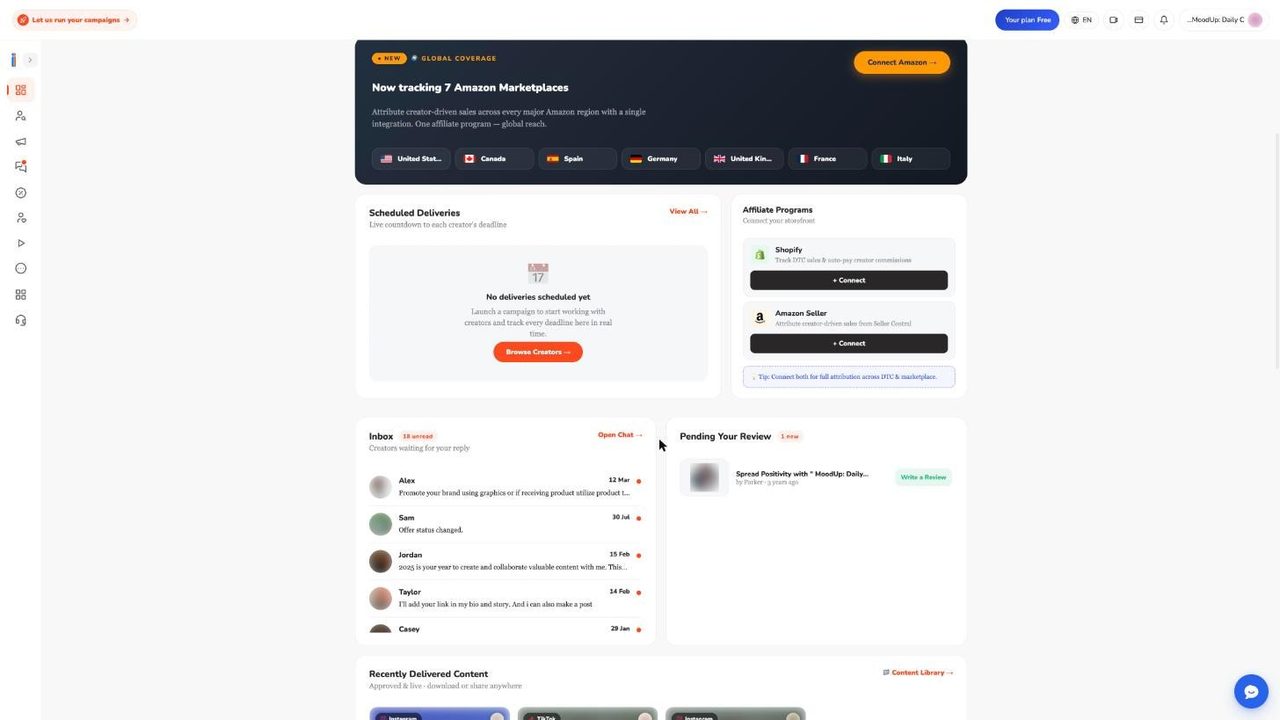
- Inbox. Latest creator messages, an unread count (18 in our sample) and an Open Chat link.
- Pending Your Review. Finished deals where you have not yet reviewed the creator.
- Recently Delivered Content. Approved, live posts with a link to the content library.
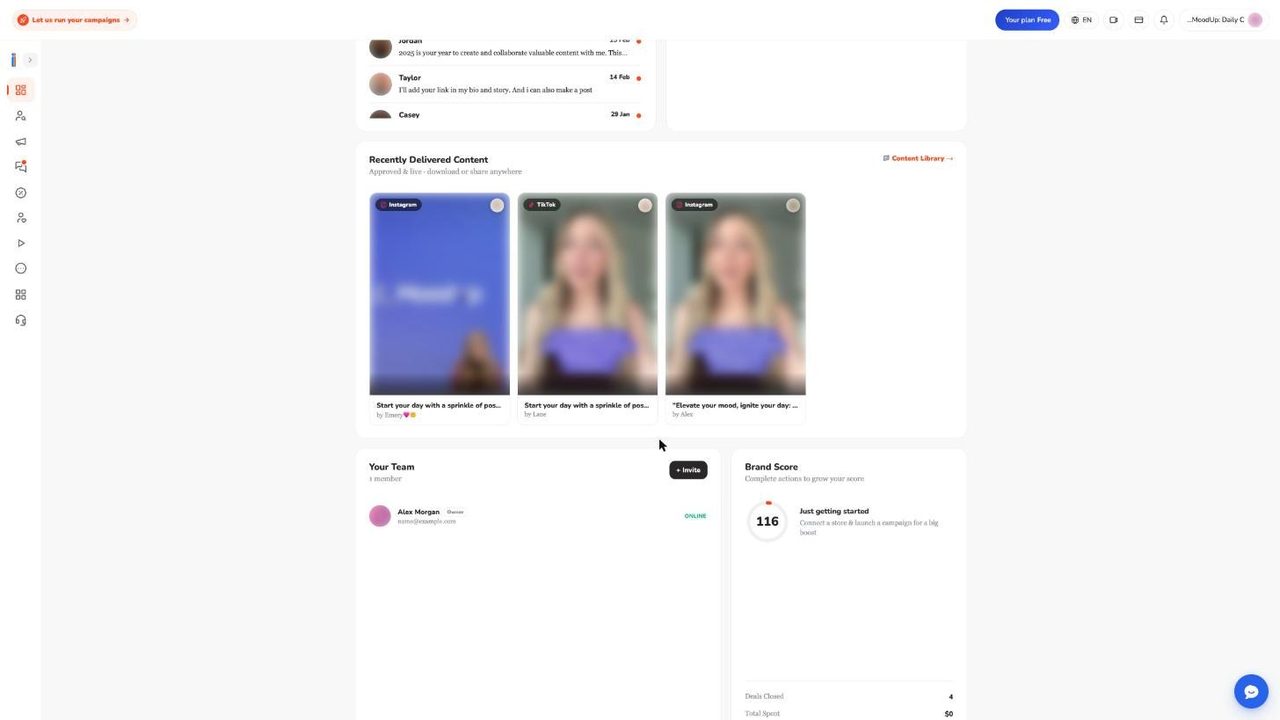
- Your Team. Members plus an Invite button. Free and Starter have one seat, so Invite leads to an upgrade prompt.
- Brand Score. Per the support documentation you earn points for live campaigns (5 each), deals closed (10 each), 1 point per $20 paid, replies within a day (2 each) and written reviews (10 each). Tiers: Bronze to 499, Silver 500 to 1,499, Gold 1,500 to 2,499, Platinum 2,500 and up. It is recalculated from current state, so it can drop. The public tour says a higher score brings more inbound offers, but the support notes could not confirm any effect on ranking or badges. Treat it as a progress meter.
- Ainfluencer Academy and Growth Toolkit. Four tutorial videos and cards for sister apps. Not part of the core workflow.
The sidebar holds Dashboard, Find Influencers, Campaigns, Inbox (a red dot means unread), Affiliate, Favorite Influencers, Influencer Content, a More group with Scheduler and Analytics, Our Apps and Fully Managed IM.
3. Find Influencers: filters, cards and reveals
Search asks first which campaign you are recruiting for, because that sets the button on every card: Invite to campaign for paid collaboration and hybrid, Invite to program for affiliate, Request to send product for gifting. Tabs switch between Instagram, TikTok and YouTube, and a “Your usage this month” panel shows allowances. Ainfluencer’s influencer discovery guide explains the same flow.
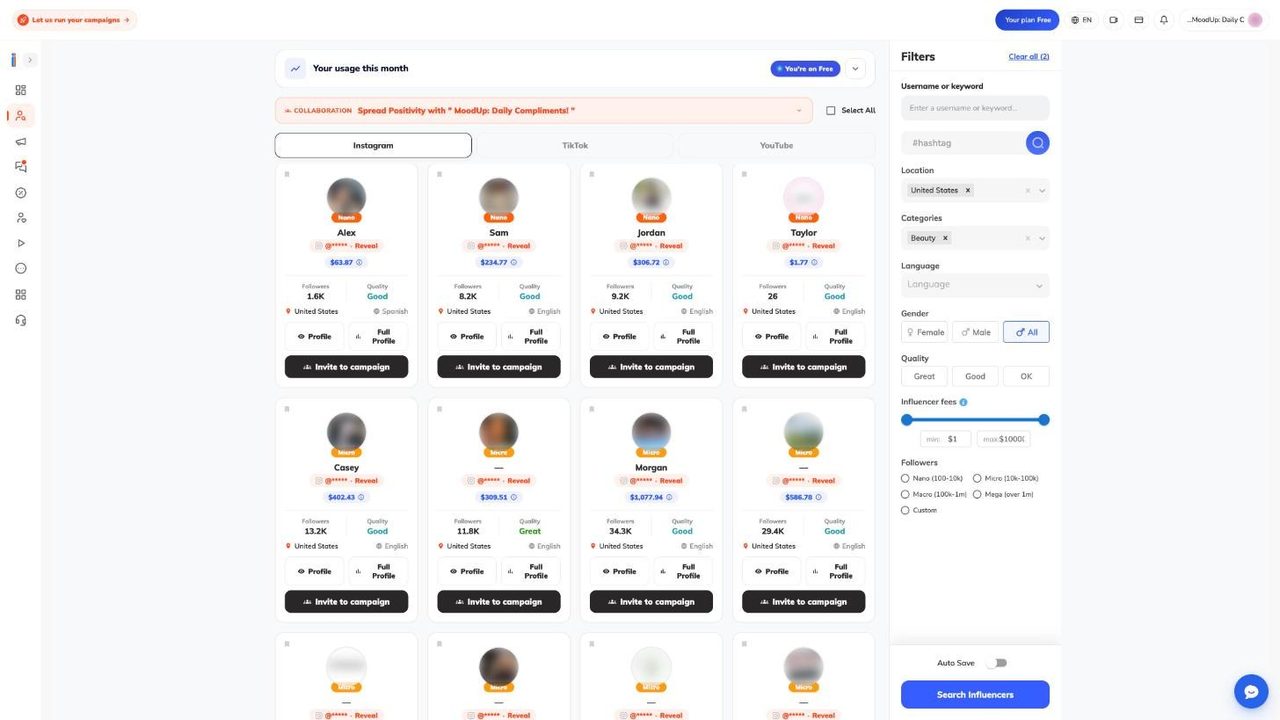
A card shows a size badge (Nano, Micro or Macro), name, a masked handle (@***** with Reveal), a blue fee estimate, followers, a quality label of Great, Good or OK, country and language. Buttons are Profile (a quick drawer), Full Profile and Invite to campaign. Select All ticks a page.
- Filters. Username or keyword, hashtag, Location, Categories, Language, Gender (Female, Male, All), Quality, an Influencer fees slider from $1 to $10,000, and Followers: Nano 100 to 10k, Micro 10k to 100k, Macro 100k to 1m, Mega over 1m, or Custom. Gifting adds “Address ready to ship”, affiliate adds “Open to commission”. There is no city filter. Auto Save remembers filters and Clear all resets them.
- The fee estimate. Ainfluencer calls it a rough estimate. In our test search the first eight cards ran from $1.77 to $1,077.94. Negotiate from the creator’s real offer.
- Freshness. Results come from Ainfluencer’s own index, and Instagram data refreshes monthly, so follower counts can be weeks old.
Handles are locked on purpose. Ainfluencer says this stops brands harvesting the marketplace and moving talks off platform. A reveal costs one monthly credit, or a small wallet payment once credits run out. The app’s usage panel shows 5 reveals a month on Free. Help Center pages list 50 on Starter, 100 on Pro and 6,000 on Ultimate. A reveal is permanent for that creator, covers all their accounts and is never charged twice. Paying an offer reveals the creator free.
Limits worth knowing. Our first row of Beauty results included a Nano card with 26 followers, although Nano is defined as starting at 100, so check follower counts yourself. Free plan reveals tend to run out before anything else. And the app’s Nano starts at 100 followers while the campaign wizard says 5k.
4. Profiles, vetting, Favorites and invitations
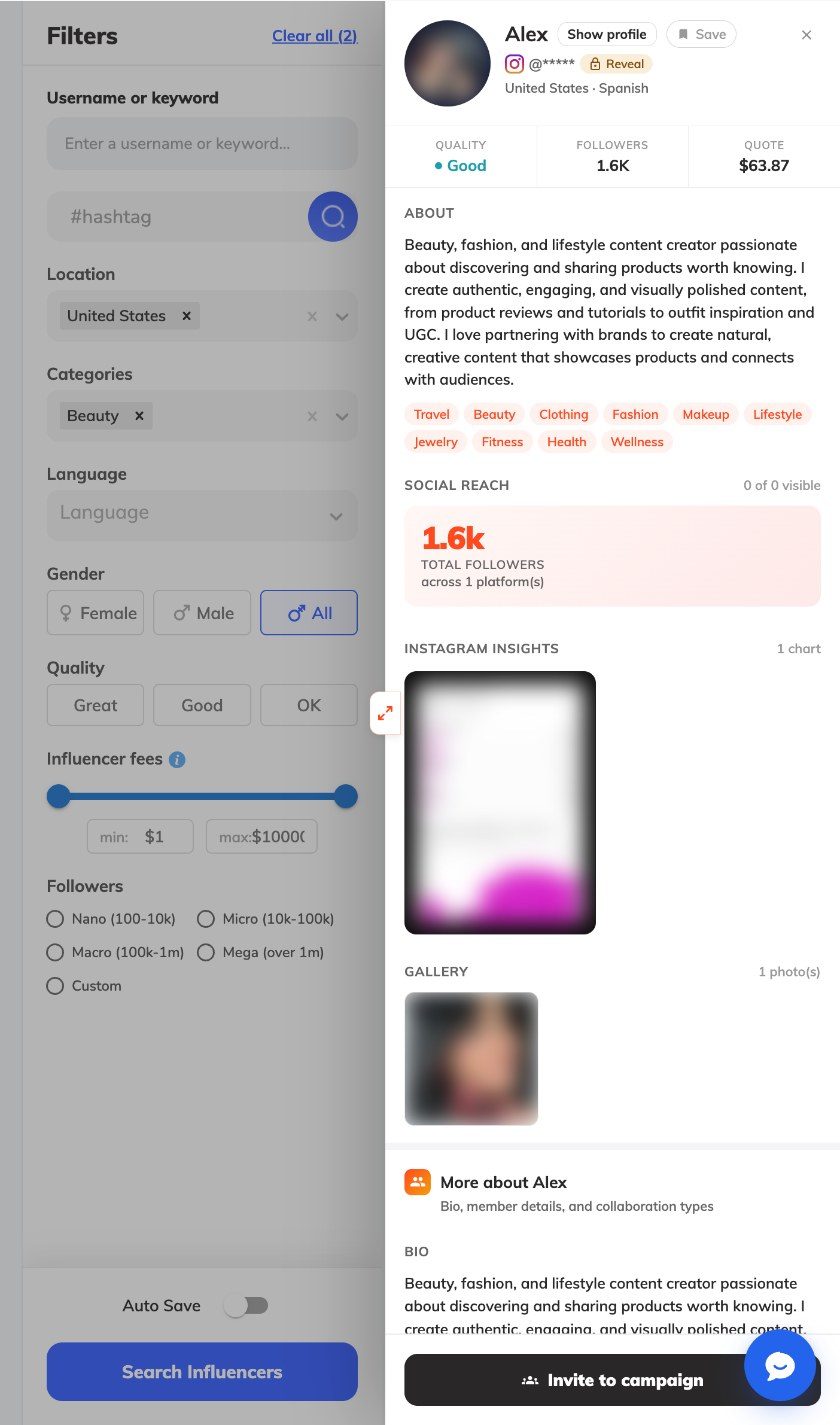
The Profile drawer is the quick check: quality, followers, a quote, About text, category tags, social reach, an Instagram insights chart and a gallery. Full Profile goes deeper. The documentation lists audience data, published content, ratings from other brands and past collaborations. Some sample profiles are thin. Ours read “0 of 0 visible” under Social reach despite 1.6K followers.
Vetting is worth a few minutes. Ainfluencer’s creator vetting and scores page says the one signal you can filter on is the Great, Good or OK quality label, a rating and not a score out of 100. It also mentions an “Ainfluencer Score”, but we saw no numeric creator score in the app, so treat that as NOT VERIFIED. The checklist it gives is sensible:
- Engagement against the same niche, not against the internet.
- Audience country and age match your buyers.
- Reviews and past collaborations. Staff check reviews before they appear.
- Request live insights in chat before paying.
- Reply speed while you negotiate. Ainfluencer says the most common refund is a creator who accepted and then went quiet.
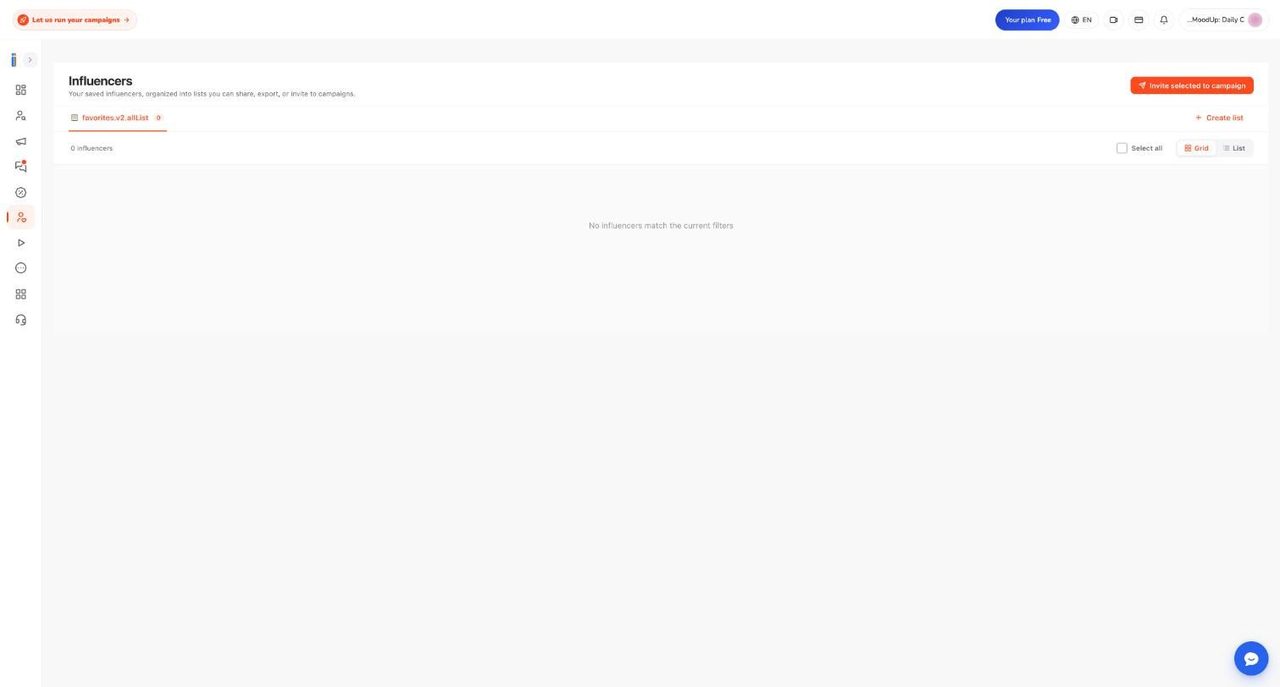
Favorite Influencers holds named lists. Create a list, then add creators with the bookmark on a card or Save in the drawer. Names are required, up to 50 characters and unique. Creators are not told when you save them. Our account had none saved, so this follows the documentation.
Inviting is slower than it looks. Per the finding and inviting creators guide, invitations go out as one grouped email per creator, twice a day, at 06:00 and 18:00 UTC. The campaign must be approved. Invitations queued during review are held, and deleted if the campaign is rejected. Only creators with an email on file are invited, and a creator can be re-invited to the same campaign only after 14 days. The in-app panel shows 0 of 5 invites used on Free. If an invite from the search page never seems to go out, invite from the profile drawer or a list instead.
If you cannot find a creator you know, the documentation gives the reasons: media kit unfinished (Draft, hidden from brands), waiting on review, rejected at verification, suspended (hidden from search) or renamed handle (archived until staff restore it). You cannot search by handle, because handles are masked.
5. Working with YouTube creators
YouTube is the third tab on Find Influencers. Ainfluencer’s Help Center says it is the largest index, with 483,754 accounts, and also the quietest: a small fraction of the offers Instagram and TikTok get, and about 43 percent of accounts not refreshed in over six months. We could not check these figures.
So you invite, you do not wait. The working with YouTube creators guide suggests saving twenty to thirty channels and sending personal invitations. Open the live channel to check subscribers and upload rhythm before you negotiate.
- No separate campaign. YouTube is a post type (“YouTube Video”) inside the Paid Collaboration wizard, and can be combined with Instagram or TikTok.
- Suggested settings. Creators create and publish, duration Permanent, and your product URL as the bio link, which becomes the description link. Say where in the video you want the mention.
- Fee plus commission. The Help Center suggests a flat fee for production and an affiliate commission for the long tail. Today that is two setups, since the combined picker card is Coming Soon.
- Each channel is its own account. Invite the channel you want. Channels under a Google Brand Account can fail to connect.
- Delivery. The creator submits the video URL. A public YouTube link is readable, so you get the longer approval window (about 9 days). Allow longer lead time than for a feed post.
More answers are in YouTube creator questions answered. It admits there is no standard YouTube rate and too little deal history to quote an average. Price the production, not the placement.
6. Creating a campaign: the four types and the wizard
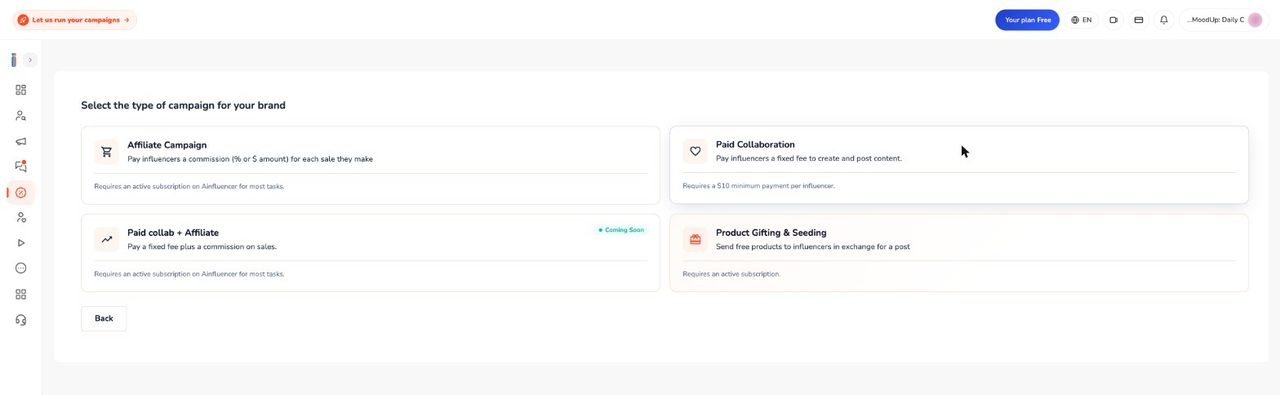
Create Campaign opens four cards. Ainfluencer’s campaign launch walkthrough is the matching step by step page.
| Card | What it is | What the picker says |
|---|---|---|
| Paid Collaboration | A fixed fee per creator. Creators answer your brief with a priced offer. | “Requires a $10 minimum payment per influencer” |
| Affiliate Campaign | A commission per sale. Needs a connected Shopify or Amazon store and a card, otherwise you are sent to the affiliate dashboard. | “Requires an active subscription on Ainfluencer for most tasks” |
| Product Gifting & Seeding | Free product for a post, with its own wizard and review. | “Requires an active subscription” |
| Paid collab + Affiliate | A fixed fee plus a sales commission. | Green Coming Soon tag, not clickable |
If you already run an affiliate program elsewhere, choose Paid Collaboration and share your own tracking link. On the Free plan an outside program is a documented rejection reason (below).
The Paid Collaboration wizard starts with Let’s Go, which creates a draft and runs a plan check. At your campaign limit nothing is created and an upgrade pop-up appears. The wizard then asks one question per screen and saves each answer:
- What creators do (post existing content, create and publish, or only create), influencer size, gender, shipping a physical product (then countries), language, post duration, bio link, categories and hashtags.
- “Who can send offers to you?” Invited creators only, or anyone. Invite only is quieter and much slower to fill.
- Title and description from templates or an AI writer, limited to 2 uses per campaign and to the account owner.
- Platforms and post types (Instagram Feed, Story or Reel, TikTok Video, YouTube Video), a caption of up to 2,200 characters and 30 hashtags, and “About your brand” up to 1,024 characters.
The last screen surprises people. The campaign is submitted only when you save the upload step with at least one file. Allowed: 1 to 10 files, images JPG, JPEG or PNG up to 8 MB, videos up to 100 MB. A campaign still marked Draft almost always skipped this step. Drafts are invisible to creators, hold no slot and trigger reminder emails at 24 and 72 hours. A paid collaboration has no end date and stays up until you pause or delete it. A pop-up then offers wallet funding, which is optional. We did not run a full wizard on our test account, so this follows the documentation and the picker we captured.
7. Targeting, content types and changing terms
Targeting sits inside the wizard. Ainfluencer’s targeting and audience guide page says you can choose several countries and languages, and a creator sees your campaign if they match at least one. There is no city filter, only country. The workaround is hashtags and city keywords.
- Gender. The app’s search shows Female, Male and All. The Help Center page also lists non-binary and no preference, which we could not confirm in the wizard. Leaving gender open widens the pool, which Ainfluencer puts at 2 to 3 times.
- Follower size. The wizard offers Nano 5k to 10k, Micro 10k to 100k, Macro 100k to 1m, Mega over 1m and All.
- Physical products. Say yes and you must pick the countries creators live in.
- Narrow filters shrink the pool. Fix a thin brief before you widen targeting.
Content types are Instagram Feed, Story and Reel, TikTok Video and YouTube Video. Per changing content type terms, you can change them on a live campaign, but only future offers are affected. Accepted deals keep the original terms unless both sides agree in chat. Saving such an edit in the wizard also sends the campaign back to review. Creators with open offers are notified, and a big scope change can invalidate pending offers.
Price is set per offer, not per campaign. One campaign can pay $300 for a Reel and $700 for a Reel plus Stories. The offer form records only four things: price, delivery date, duration and bio URL. Number of posts, required tags, disclosure and usage rights live only in chat, so agree them before paying. Content must follow platform guidelines and ad disclosure law, and asking for off platform contact or escrow bypass triggers rejection.
8. Campaign review and the rejection reasons
A person reads every paid collaboration before creators see it. Affiliate campaigns skip review and go live when products are assigned. The card reads Pending Approval meanwhile. The Help Center says approval is typically the same day or next morning, with Free plan campaigns possibly taking a few days. The support documentation states no guaranteed time and no automatic approval, so do not plan to the hour.
Statuses are Pending Approval, Approved, Paused and Disapproved by Admin (the info icon shows the reason). A rejection email cites a code from E1 to E20. To fix one, click Edit, change what was cited and save the upload step. It returns to the queue by itself, and you need a free slot. Rejection deletes the campaign’s pending invitations. Ainfluencer’s self serve rejection reasons page covers E1 to E14:
| Code | Reason | Fix |
|---|---|---|
| E1 | Barter only, no payment | Add a flat fee, or upgrade |
| E2 | Looks like a test | Write a real brief |
| E3 | Too few visuals | Upload 2 to 3 product images |
| E4 | Pornography, guns, hate, illegal | No fix, hard rejection |
| E5 | Contact details shared | Keep chat on platform |
| E6 | Piggybacks another brand | Focus on your own product |
| E7 | Community guidelines | Read the email, adjust |
| E8 | Description too thin | Product, audience, format, deliverables, deadline |
| E9 | Created by a creator | Use the creator app |
| E10 | Reads like a sales pitch | Reframe as a paid collaboration |
| E11 | History of violations | Book a call with the team |
| E12 | No About Us on profile | Fill in About Your Brand |
| E13 | Unedited template | Edit every templated section |
| E14 | Contact info in images | Remove phones, emails, URLs, QR codes |
E15 to E20 are gated by plan or wallet. The plan and wallet rejections page says large barter, gifting or multi creator affiliate campaigns can need a wallet deposit first, some need a 15 minute strategy call, and a third party affiliate platform means Pro or Ultimate or running the program natively through Shopify or Amazon. The deposit figures are inconsistent: $1,000, $2,500 and $2,000 appear, and the page says the in-app pop-up sometimes disagrees with the email. Another Help Center page says an ordinary top-up has a $1 minimum and unlocks nothing. We could not trigger any of these, so confirm the figure in your own email before depositing.
Two traps. Saving the upload step of an approved campaign sends it back to Pending Approval and hides it from creators until re-approved, though existing deals continue. And if your plan limit is exceeded at approval, for example after a downgrade, the approved campaign is paused at once and you only receive the approval message.
9. The Campaigns page: managing, duplicating, pausing
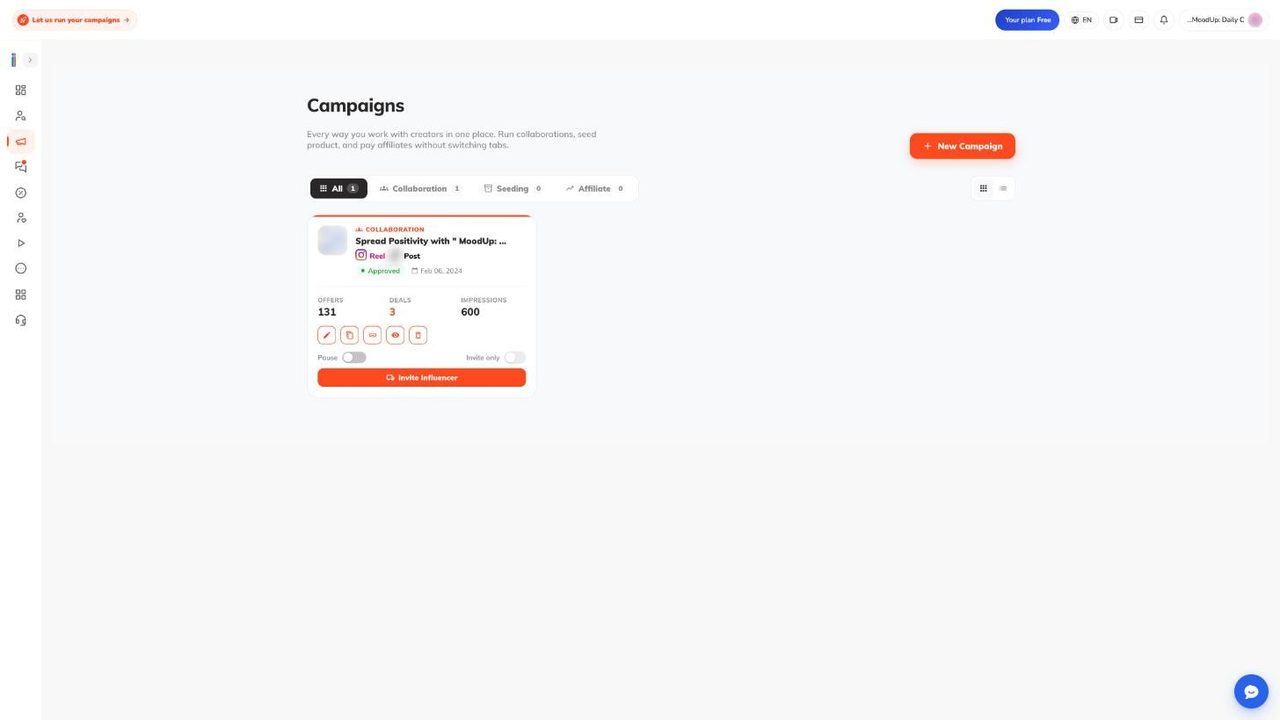
Every campaign is listed here, with tabs by type and a grid or list switch. Cards show Offers, Deals and Impressions. Many offers and few deals usually means the filters or brief need work.
The icons are Edit, Duplicate, Copy link, Preview and Delete. Per creating and editing campaigns and the support notes:
- Duplicate works for collaborations only. It makes a Draft without images, videos or bio link, and needs a free slot.
- Copy link gives a public preview link. Affiliate campaigns open a Share and Embed panel instead.
- Delete archives the campaign. Offers and deals are not cancelled, and there is no undo.
- Pause hides the campaign at once. Running deals continue. Resuming needs an active subscription and a free slot. The Help Center and support notes disagree on whether a paused campaign frees a slot, so check your counter.
- Invite only limits the campaign to invited creators and does not trigger review.
Plan changes act here silently. When a paid plan ends, the oldest running campaigns over the new limit are paused with no notice. For affiliate campaigns, pausing or deleting here changes only the Ainfluencer copy. Campaign limits in the app’s plan table are 1 on Free, 2 on Starter, 3 on Professional and unlimited on Ultimate.
10. Receiving and negotiating offers
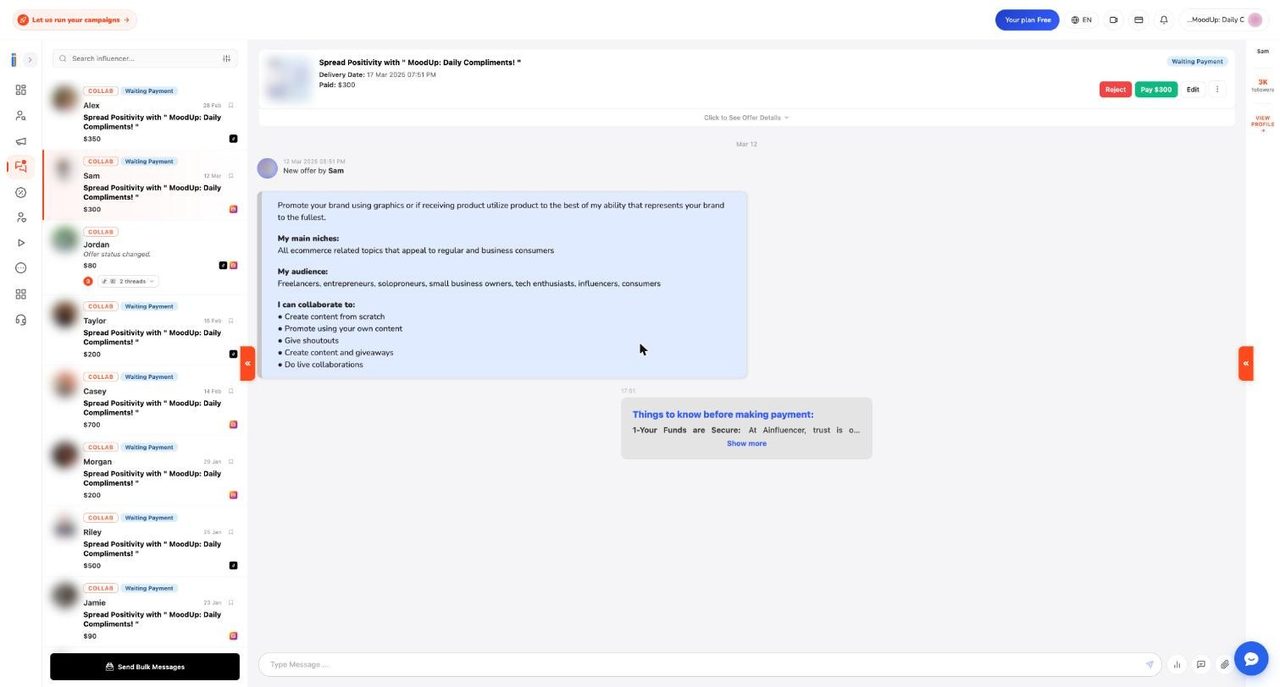
Offers arrive in the Inbox. The creator proposes price, delivery date, how long the post stays up and a pitch from the phone app. Sending counts as their acceptance and opens a chat. Threads carry tags such as COLLAB and Waiting Payment, plus the price.
There is no Accept button. Per Ainfluencer’s how deals get closed guide, paying is accepting. The chat header offers Reject, Pay (with the amount) and Edit.
- Price guidance. The receiving and managing offers page says offers show a suggested range, to weigh against budget, audience, quality label and similar deals. We saw only the search fee estimate in our sample, so the suggested range is NOT VERIFIED. The default minimum offer is $10.
- Counter with Edit. Four fields: price, delivery date (in the future), duration (Permanent, or Temporary for over four hours) and bio URL. The creator accepts, edits or rejects. If they reject, your original terms still stand.
- Reject. Use the header button and confirm “Yes, Reject it”. A short wizard asks why and lets you adjust targeting, and those answers update the campaign. The “Reject Offer” item in the three dot menu only files the offer as rejected.
- Block, spam, report. The three dot menu also has Archive, Delete, Spam User, Block User and Report Influencer. Block User stops that creator offering on any of your campaigns.
- Send Bulk Messages. One message to a filtered group of offers. Documented defaults: 5 sends a day, 5 minute cooldown, 200 characters.
Before paying, check the delivery date (the system asks for a new one if it is under 24 hours away), usage rights, which the offer form cannot record, and the creator’s reply speed. Escrow and fees are covered in the payments part of this review. After payment, Edit becomes a revision request: you change price, date, duration or bio link, pay any difference, and the creator must accept. Default limit is 2 revisions and one open request at a time. A paid deal cannot be cancelled by either side. Unpaid offers trigger reminder emails to you after 1 and 3 days, and staff can edit an unpaid offer, shown as an Admin card in chat.
11. The Inbox and chat
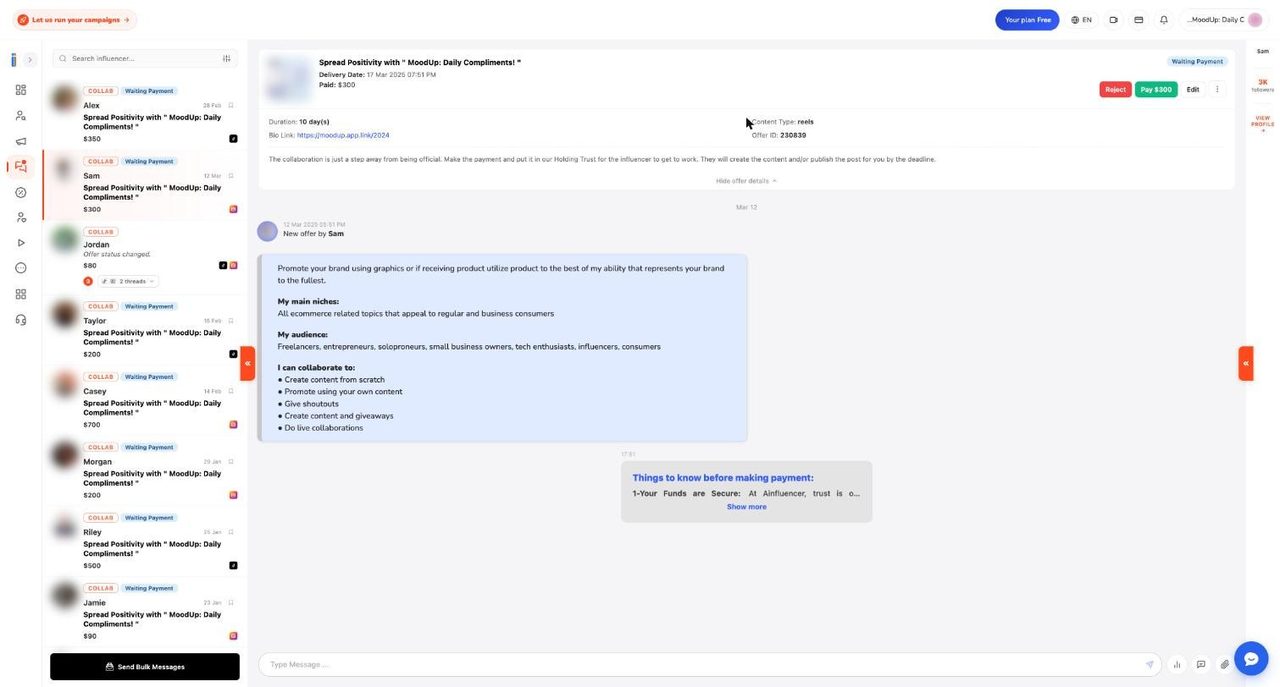
There is one chat room per brand and creator pair, with one thread per collaboration. The header shows campaign, status, delivery date and amount. “Click to See Offer Details” expands duration, content type, bio link and offer ID. A right rail shows follower count and a View profile link. All brand to creator messaging happens here, and Ainfluencer does not support the affiliate platform’s own chat.
- Insights. The chart icon in the composer requests Influencer insights, screenshots of the creator’s own audience data for the last 90 days. Per chat insights and templates, you get one request per offer, and every brand sees the same latest set.
- Templates. Save messages you repeat. A strong brief includes a product link, 3 to 5 references, voice notes, required tags and disclosure, and the deadline.
- Attachments. Up to 10 files at a time, videos to 200 MB, images to 20 MB, PDFs to 50 MB. Messages cannot be edited or deleted, and there are no read receipts or search.
- System cards. Offer created, terms changed, paid, date changed, revision requested and publishing updates are posted automatically as the deal timeline.
Contact sharing is the rule that most often surprises brands. Before an offer is paid, emails, phone numbers, links, handles and apps such as WhatsApp, Telegram or PayPal are blocked. You see an “Unlock full sharing” pop-up with Get Ultimate or Keep chatting, the message is not sent, and repeated attempts can pause the account. The block lifts when the offer is paid, or on Ultimate, which Ainfluencer calls open messaging. Gifting chats are not masked. Links to ainfluencer.com, brandid.app and YouTube are allowed.
The filter uses simple text patterns, so a harmless number or the word “email” can be caught. Rephrase and resend. A nightly check flags unpaid offer chats for staff, but never suspends anyone automatically. Ainfluencer’s reasoning is that escrow only protects deals that stay on platform. It is still a real limit if you like to move to email early.
A chat turns read only if the offer was archived, deleted, spammed or blocked, or if the creator’s social account is no longer active. Archive on the web closes the chat for both sides. Alerts are an unread badge, an hourly unread messages email and, for creators only, phone push.
12. Reviewing, approving and chasing delivery
Approval pays the creator, so read this twice. After payment the creator posts on their own account and submits a link or uploads files, and Ainfluencer tries to fetch the post. You review it in the Inbox chat, not the content library. The “Final Delivered Result” panel gives View Post, Download, Preview, Copy (a public share link) and two buttons, Approve it and Disapprove it. See Ainfluencer’s review and approval guide.
- Approve it. Optional note (it goes to admins only, never to the creator), then Submit. Money reaches the creator within about a minute. You cannot undo it.
- Disapprove it. Money stays held and returns to your wallet 14 days after the deal’s start date, while the creator can fix and resubmit. An admin disapproval refunds at once. Afterwards the buttons disappear, so changing your mind needs support.
- Request changes. There is no such button. Ask in chat and keep the deal unapproved while the creator edits, often just a caption.
- Status trap. Your side reads “Published” both while a delivery waits and after approval. The reliable check is whether the Approve it box is still showing.
There is no automatic approval, and a clock runs. For a readable link or uploaded files, the deal fails about 9 days after submission and refunds about a day later. For a story or private post, which cannot be read, the deal fails 2 days after the agreed publish date and refunds at 3 days. Neither side gets a warning. The platform fee is not returned, and money goes to your wallet, not your card. Asking for a screen recording of a story helps.
Before approving, open the live post. Check caption against brief, required tags, disclosure such as #ad, that it is public and that duration matches. Nothing checks captions automatically. content review and delivery adds that downloads come at original quality. Afterwards, “Write a review” rates Performance, Communication and Observance of terms out of 5, asks whether you would work with them again, and takes a public review. It cannot be edited, is checked before publishing and earns 10 brand score points.
Delivery dates and ghosting are covered in deadlines and unresponsive creators. If the date is under 24 hours away when you click Pay, “Update Date and Make Payment” lets you set a later date without asking the creator. After payment, the creator extends once from the app. The Help Center describes a brand side Extend Deadline button, while the support notes describe it as a creator action, which we could not verify in our account.
If a creator goes quiet, message them in chat once for a record. With nothing submitted, the deal fails 2 days after the publish date and your money returns 3 days after it, with no dispute needed. To skip the wait, ask support to disapprove the collaboration, which refunds at once. Approving after a refund charges your wallet again for the price.
13. Influencer Content, Scheduler and Analytics
These three pages show what happens after a deal, and they stay thin until creators deliver. Our test account has sample data, so we describe the empty states as they are.
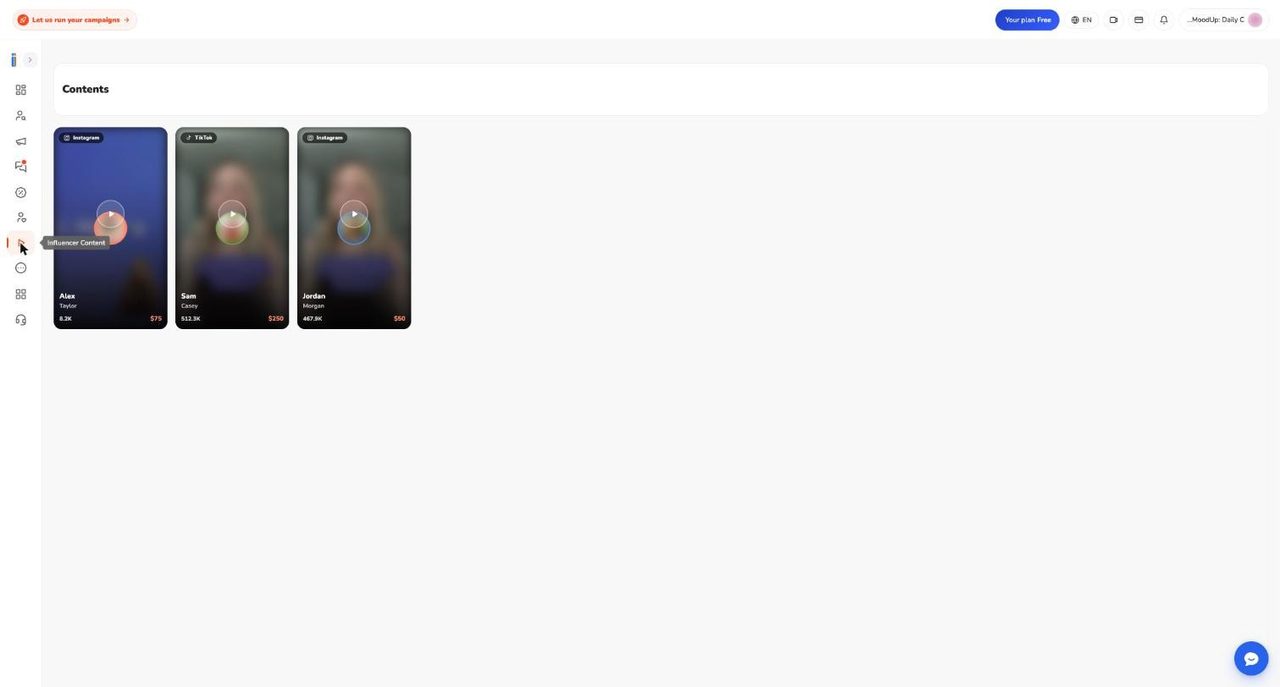
Influencer Content is the library of delivered posts. Each item can be viewed, downloaded, opened as a live post, translated (a paid service) or shared by link. There is no approve button here. The library is owner only: team members are sent back to the dashboard though the sidebar link shows. Anyone with a share link can view an item without logging in.
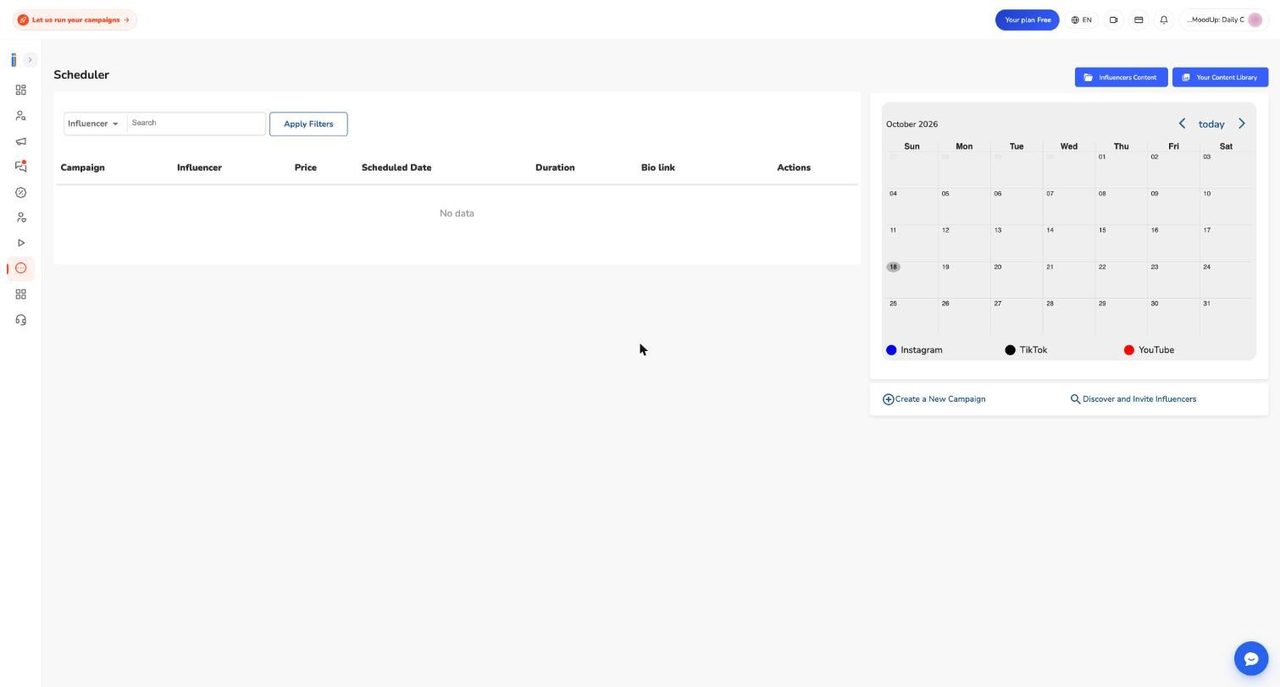
Scheduler lists paid deals with their publish dates and a monthly calendar. Check the bio link column: per Ainfluencer’s tour, a mismatch with what you agreed can fail verification. Our table said “No data”.
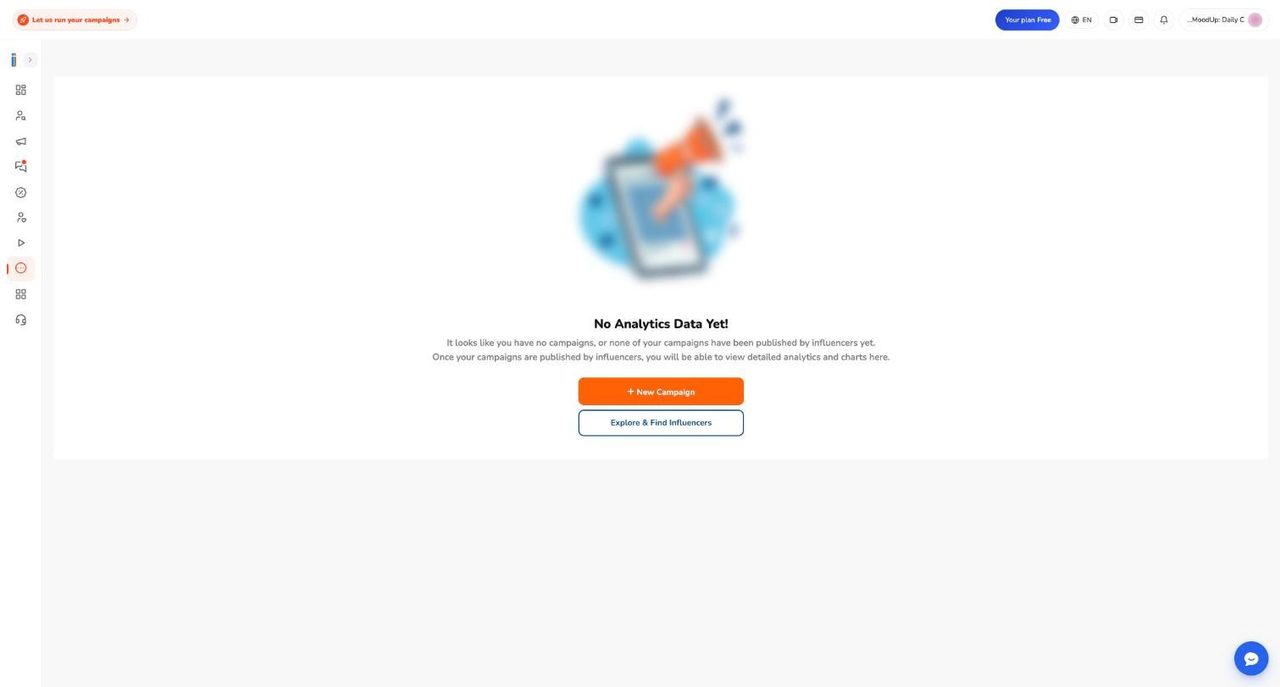
Analytics shows the honest empty state above. Per the documentation, a campaign appears only with a paid deal whose delivery was approved, a submitted link and at least one snapshot. Snapshots come about 1 hour, 1 day, 3 days and 1 week after submission, so there is no live refresh, and only Instagram, TikTok and YouTube links qualify, not uploaded files, stories or private posts. You then see likes, comments, views and saves with per creator timelines. Advanced reports are capped by plan, with 3 a month on Free in the app’s table.
14. Team seats, notifications, connections and fixing login
Team. Invite from the profile menu under Team Members. Ainfluencer’s team seats and permissions page explains the owner does not use a seat, so “3 seats” means you plus two colleagues. The app’s table lists 1 seat on Free and Starter, 3 on Professional and unlimited on Ultimate. Extra seats show as $19 on Pro and $29 on Ultimate in the upgrade pop-up. Pending invitations use a seat, expire after 7 days for new users and must go to the exact email invited. Creator emails cannot join a team.
Roles do not exist yet. The page says “Roles coming soon”, and every member is Admin. A member can create campaigns, message creators, pay from your wallet and approve deliveries. A member cannot open Profile, change the logo, password or notification settings, or open the content library. There is no limited access option, so invite only people you would trust with the wallet. Removed members are signed out, with no email, and removing one may not free the seat.
Notifications. Profile menu, Notifications and Emails. Per email and notification settings, seven categories each have Email, Push and SMS switches: Account Notifications (always on), Campaign Updates, Offer Notifications, Deal Completion, Payment Notifications, Admin Actions or Alerts and Marketing Updates. Press Save Preferences or nothing is stored. On the web, Push means the in-app bell. Unsubscribe in an email stops most mail until staff reverse it, though verification, password and security emails still arrive. Brands cannot reach the daily digest, gifting or chat switches on the web page and must ask support.
Connections. A brand connects stores, not social accounts: Shopify and Amazon Seller from the dashboard or Affiliate area. Social connections belong to creators. Per social account connection guide, creators prove Instagram ownership by sending a code by direct message and connect TikTok and YouTube by signing in. New accounts sit in Draft until the media kit is finished, then wait in Pending Admin Approval, and only Active accounts appear in your search. The Help Center says reviewers expect around 5,000 followers, yet as noted above smaller accounts appear in search.
Login problems. The login problems and fixes page and support notes cover the common snags:
- Forgot password. Login page, “Forgot your password?”, “Send me reset link”, new password twice, Update password. Check Spam. Google accounts have no password, so use Forgot password. Brands created through the Shopify app must create one once.
- Wrong password twice. Within 6 hours this triggers a Security Alert email with a one click “Go to My Panel” button, valid 60 minutes. There is no lockout.
- CAPTCHA loops. Usually a shared IP, a VPN or strict privacy settings. Try another browser. Support can issue a one time login link.
- Blank pages. Hard refresh, another browser, cleared cookies, no ad blocker or incognito mode. If a payment method is added but you cannot create a campaign, the page calls it an intermittent backend issue.
- Sessions. “Your session has expired” means log in again. Changing your password does not log out other devices.
- Suspended. Login shows an “Account Suspended” pop-up. You get one appeal: give a reason, acknowledge the rules, watch a short video and click Confirm Watched, which is what sends it. A temporary suspension does not end by itself.
Affiliate Platform, Gifting and Integrations
15. Two dashboards, one login: how the affiliate side is organised
Ainfluencer runs two products under one login. The brand app at app.ainfluencer.com handles influencer campaigns: invites, offers, escrow, content review and gifting. The affiliate platform handles everything that depends on a store: Shopify or Amazon connections, product catalogs, commission rates, tracked links, sales reports and commission billing. Sellers use it at seller.ainfluencer.com and creators at affiliate.ainfluencer.com. Ainfluencer’s own rule of thumb is simple. Use the app when your goal is content and reach. Use the seller dashboard when your goal is sales attribution at scale. Use both if you sell products and also run creator campaigns. The Help Center affiliate side platform tour walks through ten screens of the seller app.
You do not register twice. Accounts are matched by email. A brand’s seller account is created the first time you use an affiliate feature that needs it: connecting a store, adding a card, opening the affiliate dashboard or creating an affiliate campaign. A different email on the seller side creates a separate account, and the two are never merged. Inside the app, the Affiliate item in the sidebar opens a dashboard with five tabs: Programs, Campaigns, Affiliates, Performance and Payouts. A banner on it, Advanced Affiliate Dashboard, opens the seller app in a new tab, already signed in. That sign-in link expires after about an hour, so reload the page if it fails.
The two dashboards overlap, but not completely. This is how the documentation divides the work.
| Task | In the app (Affiliate tabs) | In the seller app |
|---|---|---|
| Connect a store, refresh products | Programs tab | Manage accounts, with Re-Sync |
| Add the commission card | Payouts tab | Account settings, Billing |
| Set commission per product | Edit Products on a program | My Products, with bulk edit |
| Invite affiliates, lists, brand landing page, partnerships, promotions, email campaigns | Not in the tabs | Yes |
| Reports | Performance tab summary | Reports tabs with CSV export |
| Team roles, support tickets | Not in the tabs | Yes |
Creators need their own affiliate profile, ideally on the same email as their Ainfluencer account. Onboarding asks for a verified phone number and at least one promotion platform. Since early October 2026 a creator needs one approved platform before applying, accepting an invitation or creating a link. Creators who join an affiliate campaign from the mobile app are approved automatically and get tracked links. To be paid they connect Stripe. Keep brand and creator conversation in the Ainfluencer chat, because the messaging buttons on the affiliate platform are not a supported channel.
A note on evidence. The screenshots here come from a Free-plan brand account with sample data and no store connected, so most affiliate tabs are empty. We have no screenshots of the seller app or of Shopify and Amazon views with live data. Those parts are described from the documentation.
16. The five tabs of the affiliate dashboard in the app
This is what each tab shows today. The Help Center page on affiliate basics and setup covers the same ground from the seller side, including the app versus seller dashboard question.
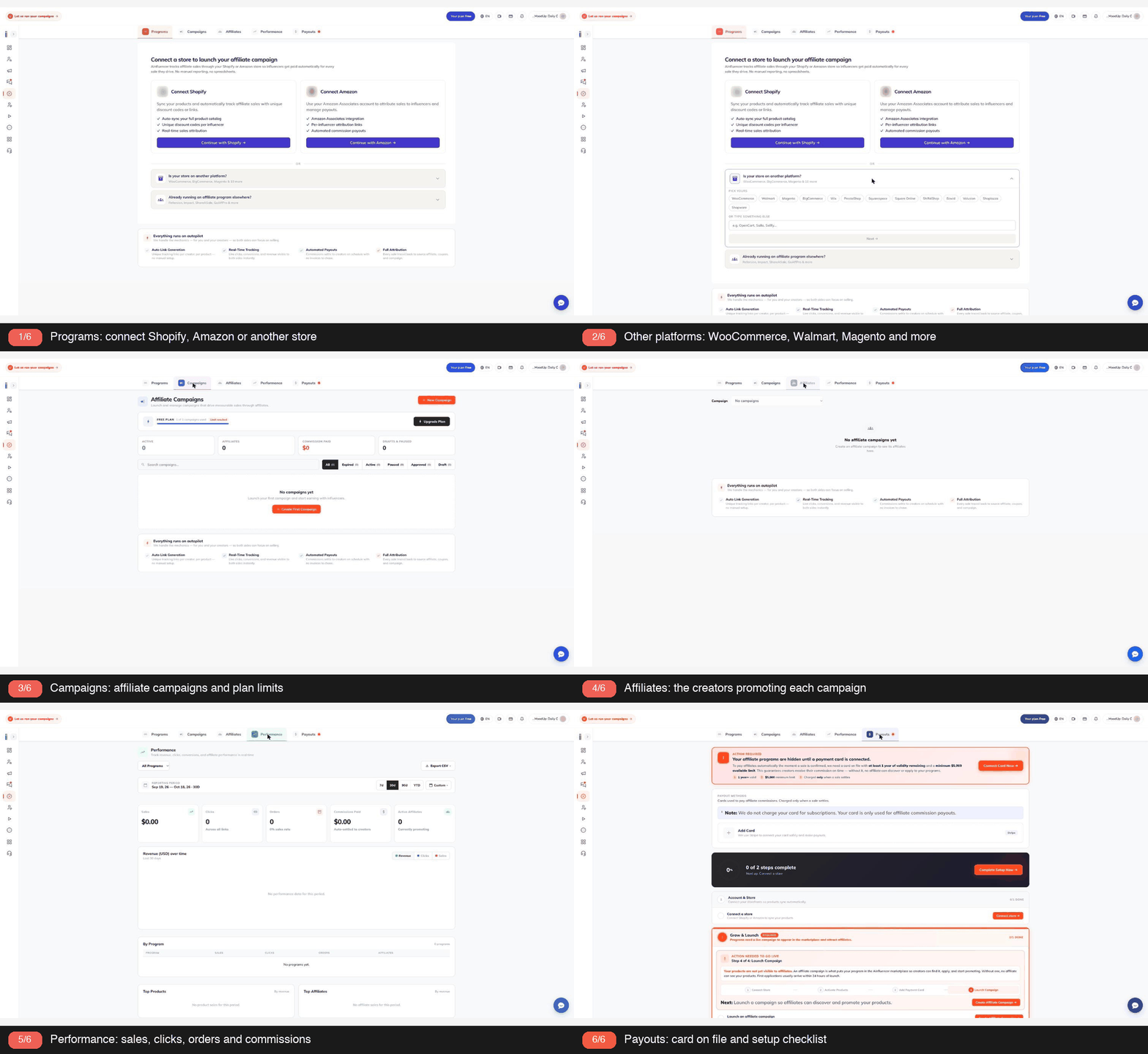
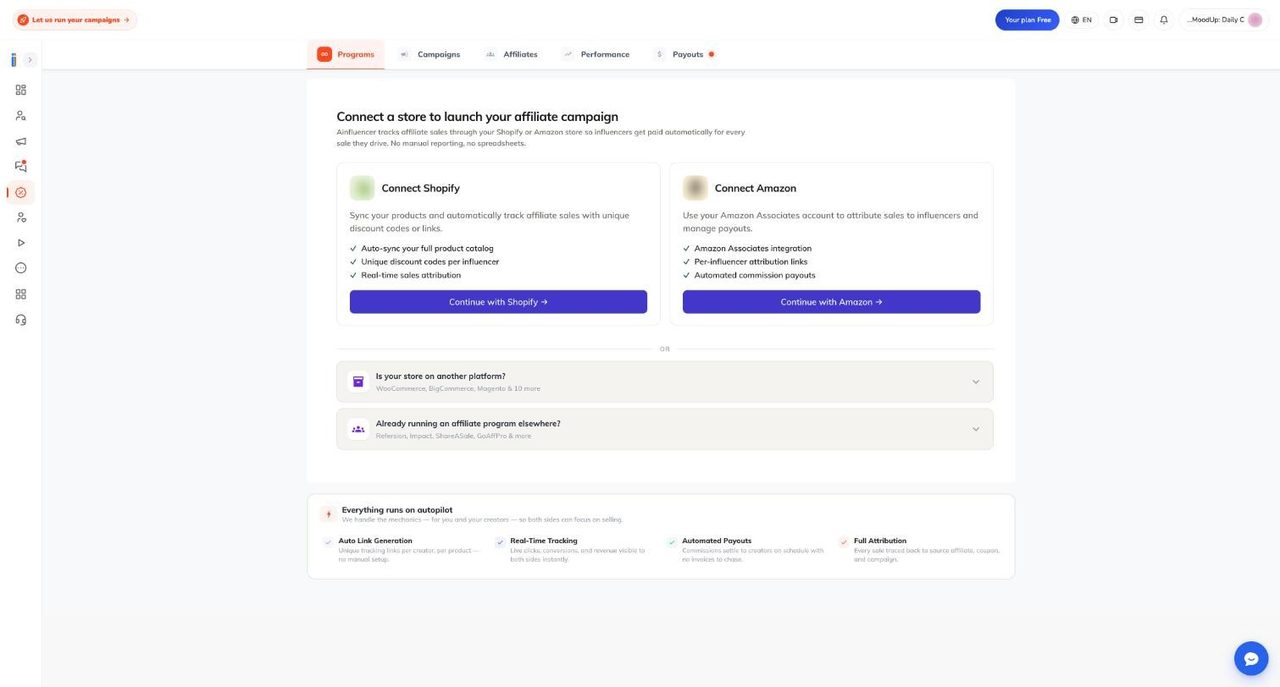
Programs. With no store connected the page reads Connect a store to launch your affiliate campaign. It offers two cards, Connect Shopify and Connect Amazon, then two collapsed rows: Is your store on another platform, and Already running an affiliate program elsewhere. Once a store is connected, each Amazon brand or Shopify store becomes one program, with buttons such as Create Shopify Affiliate Program and Re-sync Products.
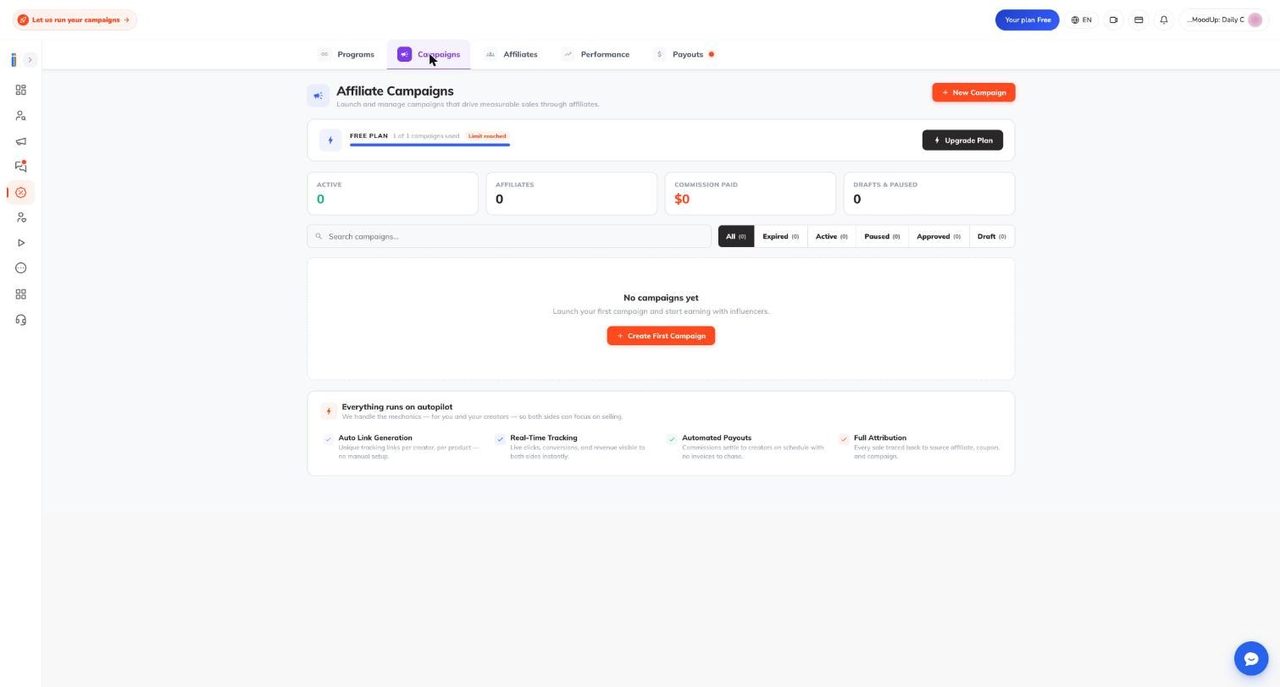
Campaigns. The page is titled Affiliate Campaigns and has a New Campaign button. On the Free plan a plan bar reads 1 of 1 campaigns used with a Limit reached tag, above four counters (Active, Affiliates, Commission Paid, Drafts and Paused) and filters for All, Expired, Active, Paused, Approved and Draft. The bar can confuse because the allowance is shared with other campaign types: our sample account shows zero affiliate campaigns and a reached limit. Affiliate campaigns are not reviewed by an admin. They go live once you assign products, and until one is live creators cannot find your products. One known label quirk: Commission paid on a campaign card has been reported to show total sales, not commission.
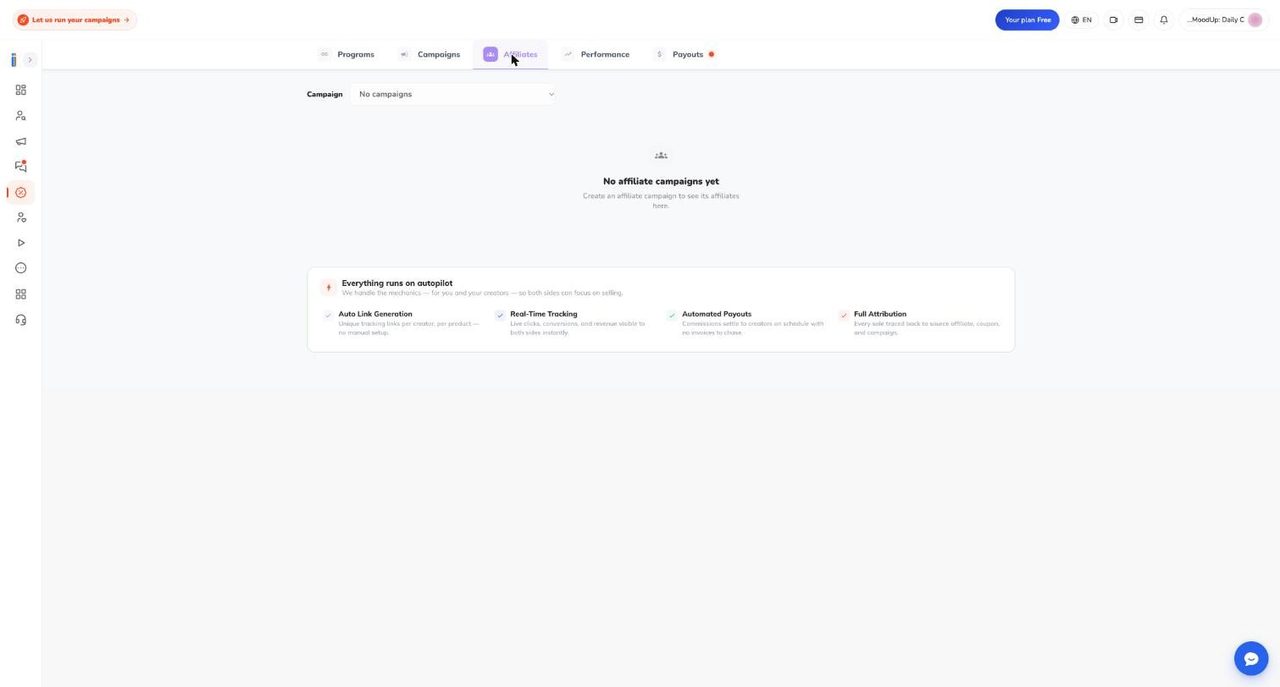
Affiliates has a campaign selector and lists the creators who joined, shown in the recruiting section. Performance holds the sales counters and charts, shown in the same section. Payouts carries a red dot when something is missing and holds the card and setup checklist, shown in the payouts section.
To launch a campaign, choose Affiliate Campaign in the type picker, then Track sales through Ainfluencer. Fill in a name, start date, optional end date, description, categories, countries and image, then pick products and confirm commissions. A connected store and a card on file are required first. Without them the picker sends you back to the dashboard with no explanation, which Ainfluencer calls a known rough edge. After a campaign’s end date, its partnership contracts are revoked the next night and links stop earning.
17. Connecting Shopify
Shopify is the smoother native integration. The dashboard banner promises affiliate setup for Shopify and Amazon in about 60 seconds. The page Shopify connection walkthrough says about 90 seconds if you already know your store address.
Before you start. You need an active Shopify store on any plan, trials included, and admin access (the Owner, or Staff with the Apps permission). You need the address ending in .myshopify.com, not your custom domain, with no https, no www, no path and no capital letters. Find it in Shopify admin under Settings, then Domains.
Steps. On the Programs tab choose Continue with Shopify, enter the address, approve the permission screen in Shopify, and the catalog syncs by itself. Ainfluencer’s estimates are about 30 seconds under 100 products, one to three minutes for 100 to 1,000, and up to 15 minutes for very large catalogs. Later changes arrive by webhook, usually within seconds.
What Ainfluencer can and cannot access. The Help Center lists reading your catalog (names, images, prices, variants, stock), reading orders and sales data for attribution, and managing tracking links and discount codes. It says Ainfluencer has no access to billing or payment details and asks for no write access to your catalog or customer data. A support document adds that sales tracking runs through a web pixel the app installs, and that Ainfluencer does not otherwise read your orders beyond the free shipping orders it creates for creators. The two descriptions are worded differently, so read the permission screen before you approve.
What gets imported. Inactive and out of stock products are skipped, and products need the Ainfluencer sales channel enabled. The default commission applied at sync is 25 percent on Free, which is also the Free minimum. Shopify users can put several products in one parent campaign. If prices show in the wrong currency, the documented fix is to confirm the primary currency in Shopify under Settings, then Markets. The Shopify connection FAQ has the full missing products checklist.
Discount codes and links. Ainfluencer says it generates a unique discount code and tracking link per affiliate. On importing codes you already have, the sources disagree: the Help Center says importing existing discounts is on the roadmap, while a support document says codes created in Shopify admin appear as public promotions waiting for approval. Test one code before building a campaign on it.
Commission tracking began in early October 2026. Per the documentation, each Shopify purchase now carries a commission worked out once at purchase: price times quantity of the linked product lines times the rate, or units times a fixed amount. Shopify sales before that release earned nothing and are not recalculated. Some older help text still says Shopify commission is not calculated. The seller dashboard shows Shopify numbers live, while the detailed report tabs are described as reading Amazon data only.
Limits. One Shopify store can belong to only one seller account. Plans cap active programs, with Amazon brands and Shopify stores counted together. The Help Center and the app’s plan table list 1, 2, 5 and unlimited for Free, Starter, Pro and Ultimate. A support document says that since 11 October 2026 the enforced limits are 1, 1, 2 and unlimited. Check the live number before choosing a plan for several stores. If you uninstall the app in Shopify, the store goes inactive within about an hour. A store cannot be deleted once any partnership contract has existed on it.
18. Connecting Amazon, Amazon Attribution and the Brand Referral Bonus
Amazon has no storefront script. Ainfluencer measures sales through Amazon’s own attribution reports. The page connecting an Amazon store says you authorise through Amazon and your catalog syncs in one click.
Steps. On the Programs tab choose Continue with Amazon, then sign in with Amazon in the popup. Ainfluencer keeps your seller or vendor profiles in the supported marketplaces, syncs each and imports products and brands. Each imported brand is one affiliate program. Amazon KDP book titles sync too. Ainfluencer creates ad groups named ainfluencer_ followed by a suffix in your Amazon Ads account for tracking. Do not delete or rename them.
Which Amazon account? The in-app card says Use your Amazon Associates account. The support documentation describes the Amazon account with Amazon Ads access, through Amazon Attribution. We could not check which one a given seller needs (NOT VERIFIED), so read the Amazon login screen carefully.
Marketplaces. The sources disagree. The brand dashboard lists seven: US, CA, ES, DE, UK, FR and IT. The Connecting Amazon page opens with seven but then tables nineteen. A support document lists eight, the seven plus Mexico. Ainfluencer says almost every seller on the platform is on Amazon US. If you sell elsewhere, confirm your marketplace with support first.
How fresh the data is. Products refresh about every 48 hours. Sales come from Attribution reports pulled about every 72 hours for the last 60 days, so a sale can take up to about four days to appear and recent days can change. Amazon uses a 14 day last touch window.
Standalone Attribution. The page Amazon Attribution seller guide describes a manual workflow for paid and seeding campaigns. Enable Attribution in Seller Central (Brand Registry or Vendor Central is required), create one tag per creator, paste the tagged URL into the offer brief, make sure the creator uses it unchanged, and check Amazon’s dashboard 24 to 72 hours after posting. Tags report clicks, detail page views, add to carts, purchases, sales and new to brand sales. The page warns that Attribution typically captures 30 to 70 percent of true impact. That is Ainfluencer’s own estimate.
Brand Referral Bonus. Ainfluencer says Amazon’s bonus returns roughly 10 percent of the sale price to sellers who send external traffic through Attribution tags. It needs Brand Registry, an active tag and enrolment in Seller Central. The seller app has a BRB report tab for Amazon stores. It is an Amazon program, so Amazon confirms the rate and eligibility.
19. Other platforms and running an external affiliate program
If you are not on Shopify or Amazon, the Programs tab lists chips for WooCommerce, Walmart, Magento, BigCommerce, Wix, PrestaShop, Squarespace, Square Online, Shift4Shop, Ecwid, Volusion, Shoplazza and Shopware, a box for any other platform, and a Next button. A second row, Already running an affiliate program elsewhere, names Refersion, Impact, ShareASale and GoAffPro.
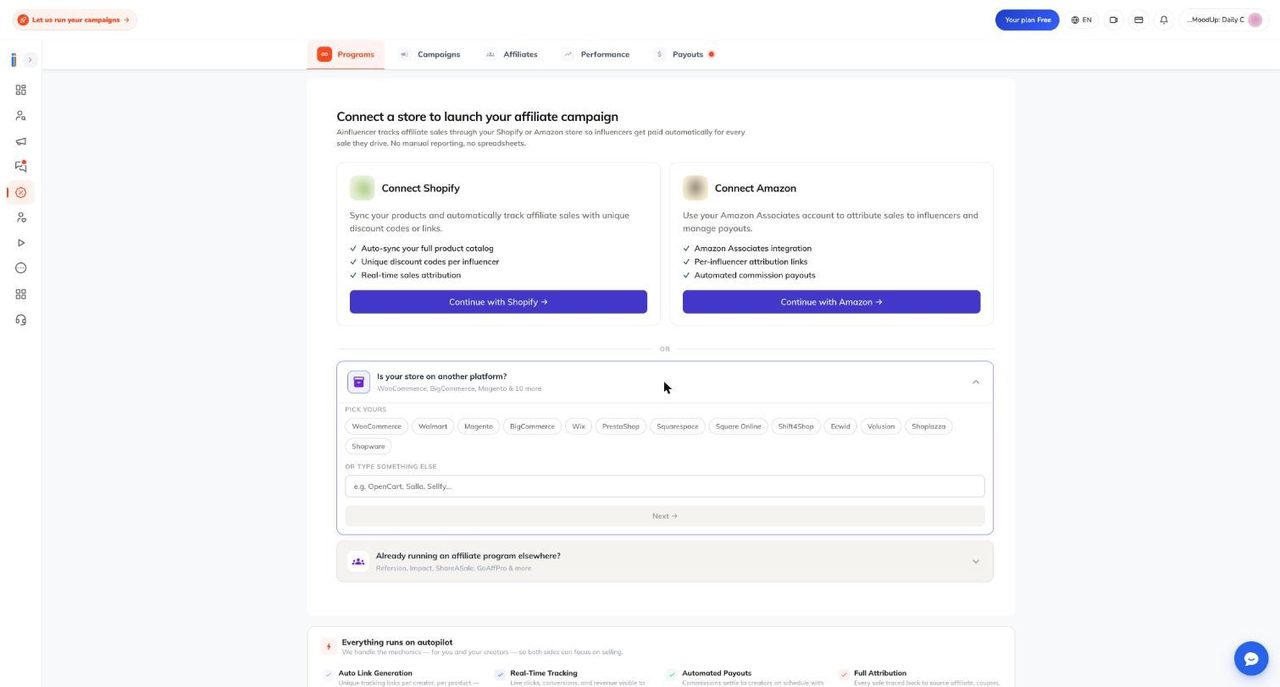
The sources do not say what Next does and we did not submit it, so read the chips as an interest form until you see a follow up. The page other platforms guide is plain about the substance: WooCommerce, Magento and Walmart are not connected natively, there are no firm dates, and you should plan around the alternative route.
The alternative route. Run a Paid Collaboration and give creators your own affiliate link. In the picker this is the I already have an affiliate platform option, which opens the paid collaboration wizard with a fixed fee plus your own links. Ainfluencer holds the fee in escrow and handles the creator relationship, and you keep the link infrastructure. The trade off is no real time tracking inside Ainfluencer. The same route is recommended for software, apps and digital products.
The plan catch. A paid collaboration that is really an external affiliate deal can be rejected, because Ainfluencer cannot see clicks, conversions or commissions on an outside platform and so cannot verify creators were paid. The valid paths are a paid plan, or rebuilding natively on Shopify or Amazon. One page names Pro or Ultimate and another says only a paid plan. A 2,000 dollar wallet deposit is described as an alternative for barter and third party affiliate campaigns. Check the live rejection message and plan page.
20. Commissions: rates, basis, reversals
The page commissions and payouts guide is the main reference.
Setting rates. You set a rate per product from My Products in the seller app, one by one or in bulk, as a percentage or a fixed amount per sale. Free plan sellers cannot go below 25 percent. Paid plans allow any rate. Ainfluencer’s reason for the floor is that a 5 percent commission rarely attracts quality affiliates. Whether that holds depends on your category, and a 25 percent floor is above many margins, which is the main reason an affiliate first brand upgrades. When a plan ends or drops to Free, rates below the new minimum are raised, for example from 15 to 25 percent.
Check the default on day one. The Help Center says it is 25 percent on Free, while a support document says imported products start at 15 percent. Open the product list after your first sync and verify every rate.
Per product or per affiliate. The product rate is the default for everyone. A custom rate agreed in a partnership overrides it for one affiliate and needs a plan with private commission. Ainfluencer says rates in use today run from 5 to 50 percent per product and 10 to 60 percent for custom rates. Changing a product rate changes existing partnerships, except custom ones, and re-prices unbilled sales from the last 60 days. The sources disagree on bonuses: a tour page lists a tiered bonus option, while the commissions page says no automatic sales threshold bonus exists. Plan to raise a top performer’s rate by hand.
Basis. Commission is calculated on the product base price after discount codes, excluding shipping, tax and platform fees. Ainfluencer’s example: a 100 dollar product with a 10 percent discount at 20 percent commission earns 18 dollars, not 20.
Cancelled and returned orders. They reverse the commission. The affiliate’s pending balance drops, and anything already paid is recovered from their next payout. This syncs from Shopify and Amazon automatically. One page says commissions are confirmed after 30 days, but the billing rule everywhere else is 35. Sales made after you deactivate a product earn nothing, and deactivating a brand or store deactivates all its products without reactivating them later.
21. Getting paid: the 35 day hold, the card and the Payouts tab
The timeline is longer than most people expect, and the page run an affiliate program says so up front: roughly five to seven weeks from sale to bank.
- Day 0: a shopper buys through an affiliate link or code.
- Day 35: the sale becomes billable. This covers the returns window.
- Nightly billing run: your saved card is charged the full commission, and the commission minus the Ainfluencer platform fee goes to the affiliate’s Stripe Connect account in the same payment. Ainfluencer holds nothing in between and there is no affiliate wallet.
- Stripe payout: Stripe pays the affiliate’s bank on its own schedule.
The platform fee. Support documentation says the default is 5 percent of the commission, fixed on the day the sale is recorded, and not changed by the affiliate’s own plan. Other places attach different percentages to the seller’s plan, so check your Payments statement instead of trusting one page.
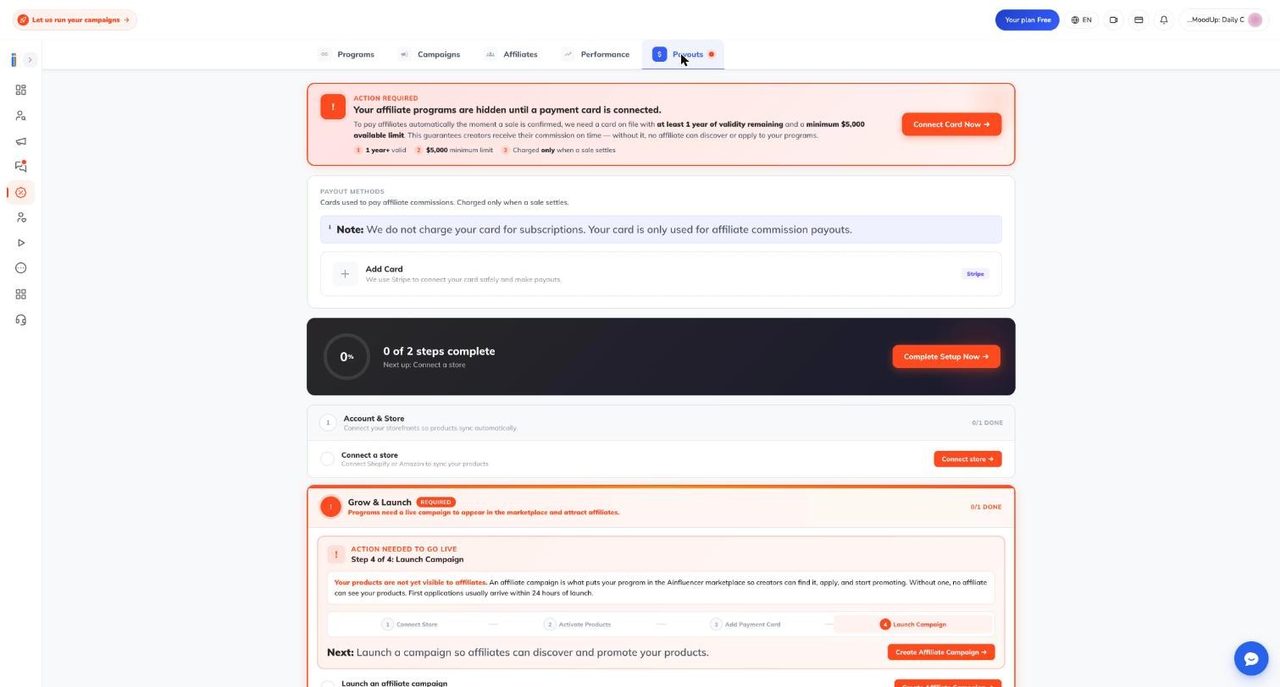
The card. Commission is charged to a card on file, never from the Ainfluencer wallet. The Payouts tab says the card is not charged for subscriptions and only when a sale settles. Until a card is connected, a banner says your affiliate programs are hidden. It asks for a card with at least one year of validity remaining and a minimum 5,000 dollar available limit. That is a high bar for a small seller. A support document says the app does not actually check either number, so confirm with support before relying on either reading. You add the card through Stripe. Below the banner is a four step checklist: Connect Store, Activate Products, Add Payment Card and Launch Campaign. Ainfluencer says first applications usually arrive within 24 hours of launch.
If the charge fails. Ainfluencer tries your other saved methods, then up to three attempts a minute apart. After that the row stays Failed until you update the card and retry, and until then the affiliate gets nothing. A failed card stalls every affiliate on your program. With no card, Ainfluencer affiliate campaigns cannot be created and are paused nightly.
What affiliates need. A Stripe Connect account, set up once in the affiliate app under Account Settings, Billing. Its country follows the verified phone number and cannot be changed later. There is no minimum payout above 0 dollars. Without Stripe connected, sales are skipped and paid on a later run, not lost. Payment notices appear in the bell and under Payments only, with no email. Some older in-app help text describes a monthly payday around the 15th. The documented rule is the rolling 35 day one, but we could not watch a live payment run.
22. Recruiting affiliates and running the program week to week
Affiliates rarely find a new program on their own. The page finding and recruiting affiliates says to build a saved list of 20 to 30 prospects, send invitations in batches and personalise each message. Ainfluencer claims personalised invites convert three to five times better. That is its own number.
Where you search. In the seller app, Affiliate Discovery shows registered affiliates in three rows (Featured, Recommended, Deal Coupon), with filters for platform, category, location, gender, partnership status and follower range. Cards offer Invite affiliate, Add to list and Send message. An Expanded Network adds creators who have not registered, with an Invite via Email Campaigns button. Lists can be manual or smart. Revealing an email uses your allowance, then costs 0.10 dollars each from the seller wallet. Contact details are shared free once a partnership is approved.
Limits. The Help Center and the app’s plan table agree: affiliate invites 5, 50, 500 and 50,000, and email reveals none, 50, 100 and 6,000, for Free, Starter, Pro and Ultimate. The pages say monthly. Support documentation counts invitations per UTC day and reveals over a rolling 24 hours. The user menu shows Daily Invites and Daily Email Revealed counters, so watch those. Five invites is a small batch, so real recruiting needs Starter at least.
Landing page and partnerships. Every brand or store gets a public recruitment page with product count, average commission, optional stats and an Apply for Partnership button. You can customise it, edit the address (Amazon brands only) and share it by link, QR code or embed. Applications cover all your products at the default commission. Automatic Partnership Approval, per brand, approves applicants instantly. It switches on for all brands when a paid plan starts. Otherwise review requests under Partnership (Applications, Partnered, Invitations, Revoked, Rejected). Rejection cannot be undone. Approval creates a contract that snapshots each product’s commission.
Promotions and email. My Promotions in the seller app creates public or private discount codes. For Amazon you must create the same code in Seller Central yourself, and promotions need a plan that includes them, with the upgrade pop up pointing to Ultimate. The Help Center tour still labels Coupons Coming Soon. Email Campaigns lets you write to selected affiliates through your own SMTP server, each campaign approved by the Ainfluencer team first. A support document says the automatic sending step is currently not running, so do not plan outreach around it.
Contracts. The tour describes templates (standard affiliate, ambassador retainer, exclusive category, seasonal) signed through signID. Use them for your top few creators.
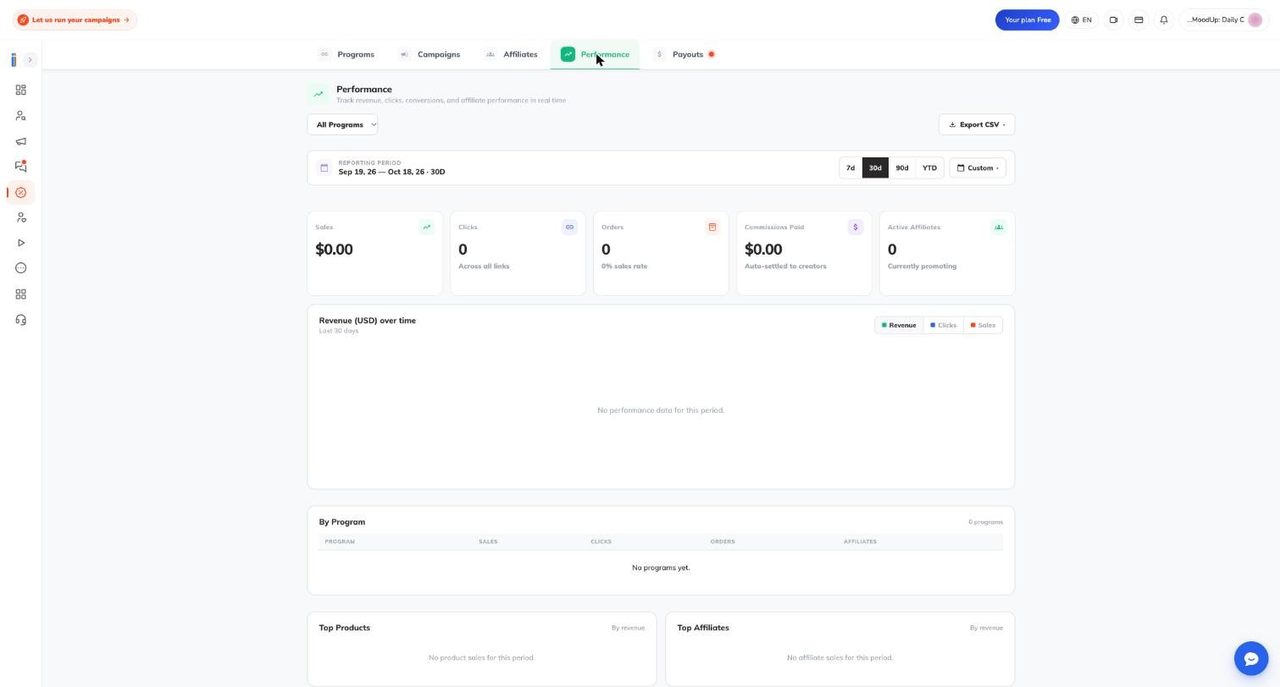
Reports. The Performance tab shows sales, clicks, orders, commissions paid and active affiliates, a revenue chart you can switch between revenue, clicks and sales, By Program, Top Products and Top Affiliates, Export CSV, and periods of 7 days, 30 days, 90 days, year to date or custom. The seller app adds deeper tabs. Only sales attributed to affiliate links are counted. Ainfluencer suggests watching four numbers: reversal rate (above about 15 percent usually points to shipping, image or sizing problems), top affiliates, conversion by product and the health of your card.
23. Hybrid deals and paid collaborations: pre-funding, payment models, agreements
Pure commission is a risk for creators. The page hybrid deal guide describes the answer: a flat fee held in escrow until the content goes live, plus commission on tracked sales. Its test is useful. A 50 dollar fee plus 5 percent on a 20 dollar product does not move the needle. 300 dollars plus 15 percent on a 50 dollar product might.
Where hybrid stands in the app. Dashboard banners promote Hybrid campaigns, but in the campaign type picker the Paid collab plus Affiliate card carries a green Coming Soon tag and cannot be clicked. The documented workaround is a paid collaboration with your flat fee and the commission terms written into the brief. We have not seen that commission tracked automatically end to end, so test with one creator first (NOT VERIFIED).
Pre-funding. A paid collaboration is a flat fee through escrow. The picker shows a 10 dollar minimum per influencer, though your plan sets the real minimum. The page paid collaboration pre funding recommends funding escrow before creators start, and says funded campaigns earn a Guaranteed Funding badge. It is candid that funding does not rank you higher. It removes delay: if you accept an offer and have funds, you pay at once and the creator starts the same day. Otherwise the offer sits at Waiting Payment and the creator may not start. Wallet deposits cannot be withdrawn to your card, so fund for the campaign in front of you. If a creator does not deliver, the money returns to your wallet.
Payment models. The page payment models and agreements lists the structures. Ainfluencer says its marketplace data ranks them by creator acceptance:
- Fixed fee per post: highest acceptance, especially for micro and mid tier creators.
- Hybrid, product plus commission: high when the product is seen as valuable.
- Ambassador retainer: a monthly fee for a set number of posts, typically three to twelve months.
- Upfront plus performance bonus: solid if the base fee is respectable.
- Gifting only: moderate.
- Commission only: lowest, and often rejected on Free.
It also gives rough 2026 US benchmarks per Reel or feed post, from 30 to 100 dollars for nano creators and 100 to 500 for micro, to 10,000 dollars and up for mega. Its size bands differ from those in Find Influencers. The app takes one price per offer, so bonuses and retainers are agreed in chat. The page mentions monthly wallet auto debit for retainers, which we could not confirm in the app (NOT VERIFIED).
What an agreement records. Less than most brands assume. Only four structured terms are tracked on an offer:
| Captured on the offer | Not captured in any structured field |
|---|---|
| Price | Number of posts |
| Expected delivery date | Platform and format, for example Reel against Story |
| Duration, permanent or temporary | Usage rights, including paid ad use |
| Bio URL | Required tags, hashtags and disclosure |
| Exclusivity and competitor posting |
The right column lives in your brief and the chat. It counts as agreed and Ainfluencer staff read the chat as the record, but no field holds it and no timer checks it. State usage rights in chat before you pay: how long, on which channels, and whether paid promotion is included. After money is released, changing terms is a negotiation, not a right.
24. Product gifting and seeding: how a program works
Gifting is cheapest on paper. You send a free product, pay no fee, and there is no escrow because there is no money to hold. The page run a gifting campaign is honest about the cost: if a creator never posts, you have lost the product, and the automatic refund that protects a paid deal does not exist.
Gifting versus seeding. The page gifting versus seeding explained defines gifting as a free product for a required post with agreed tags, disclosure and deadline, and seeding as a product sent to advocates with no content obligation. In the app both share one campaign type, Product Gifting and Seeding, under a Campaigns tab labelled Seeding. You set the obligation through your requirements and what you tell creators in chat.
Plan. The picker says it needs an active subscription. The plan table shows seeding as none on Free, 25 a month on Starter, 100 on Professional and unlimited on Ultimate. The Help Center says Starter or above, while the wizard text in a support document says Pro and Ultimate. Check at launch. You also need a free campaign slot.
The wizard. Six steps, saved as you go. Service: a title, then Self-serve or Managed, where Managed means the team runs it for you after a brief call (the Help Center says nothing behaves differently in the system). Products: at least one, from Shopify, Amazon or typed in. Cadence: one time with a unit count, or monthly, with a start date and optional end date. Recipients: niches, audience size, platforms (Instagram, TikTok, YouTube), languages and optional requirements such as minimum engagement, 18 plus, disclosure and competitor exclusivity. Shipping: your ship from country and the countries you ship to, and only creators there are matched. Review: Launch program sends it to the team for approval.
Settings that look like controls but are not. This is the most useful passage in the guide.
| Wizard setting | What it does today |
|---|---|
| Total units, units per month | Display and ordering only. Requests are not blocked at the limit |
| Pause when stock runs low | Stored, nothing acts on it |
| Roll over unused units | Stored, nothing acts on it |
| Email me a monthly summary | Stored, nothing sends it |
| Send tracking notifications | Stored, but gifting has no tracking integration |
So count your own units. If you set 50 and 80 creators request, all 80 arrive and you reject 30, which costs goodwill. Set an end date when you are full.
The board. Each creator is a card in a pipeline: Pending Influencer Acceptance, Requested by Influencer, Accepted and awaiting ship, Shipped, Received, Completed, Rejected, Archived. A pending request can only be accepted or rejected, and rejected is final. You see the address only after you accept, and it locks once you move the card to Shipped. Outreach templates go through the Ainfluencer chat, and you can export a CSV.
What you cannot do. There is no pause button, although the review screen says you can pause. Set an end date or ask support. Changing products on a live program, or extending an expired one, sends it back to review. Deleting is allowed even with gifts in transit. The join button on the public gifting preview is broken, so creators should use the Gifting tab in the mobile app. When searching, filter on Address ready to ship.
25. Shipping, fulfilment, insurance and Shopify account differences
Here the public pages and the support documentation disagree most. The page fulfillment shipping and insurance describes automatic fulfilment: you approve a creator, Ainfluencer pulls the address and creates a free order in your Shopify store, your normal shipping flow takes over, and tracking flows back into the chat. The gifting guide and a support document say the opposite for gifting campaigns: there is no tracking integration, you ship the parcel, share the tracking number in chat and move the card to Shipped the same day. Plan on the manual version.
What does exist. For a paid collaboration linked to a Shopify product, the Inbox shows a Product Tracking box after the offer is paid. Choose Send via Shopify, pick products (one unit of each), confirm the address, and Ainfluencer creates a free order in your store with nothing charged. You then enter the carrier and tracking number, status updates appear, and both sides are notified on delivery. The option to ask the creator for their address leads nowhere today, so get it in chat and enter it yourself.
Shipping and customs. Shipping is the merchant’s cost, since the free order discount covers product cost only. For international parcels you can pay as sender or, if agreed in chat first, ask the recipient to pay. Duties usually fall on the recipient, so Ainfluencer suggests small declared values and a promotional sample label.
Insurance. It is bought per offer at checkout, never on the campaign, so a gifting campaign has no insurance switch. On a paid offer you turn on the Insurance toggle and enter the product value. The Help Center page says the fee is 10 percent of that value and covers a product not returned and no show creators. Read the rate on your own checkout, because we found two figures in the documentation. Neither the platform fee nor the insurance fee is refunded. If a creator keeps the product and never posts, their fee returns to your wallet automatically, but the product is recoverable only if you insured that offer. Do not approve delivery, message the creator for a dated record, then contact support with the offer link, tracking and date, and say you are making a claim. Finance reviews claims. On a 20 dollar sample insurance buys little. On a 400 dollar product going to a new creator it is the only protection for the item.
What a Shopify connection adds. The page Shopify account differences says connecting Shopify is additive: same login and brand dashboard, plus live catalog sync, multi product campaigns, a direct to consumer dashboard with click to checkout attribution, auto fulfilled gifting (see the caveat above) and automated payouts from Shopify orders. Non-Shopify accounts can run affiliate, paid and gifting campaigns, but manually. A Shopify campaign cannot change its product later.
26. The brandID family, growth toolkit and Chrome extensions
Ainfluencer sits inside a group of apps that share design and account systems. The brand dashboard has a Your Growth Toolkit section, and the sidebar has an Our Apps page.
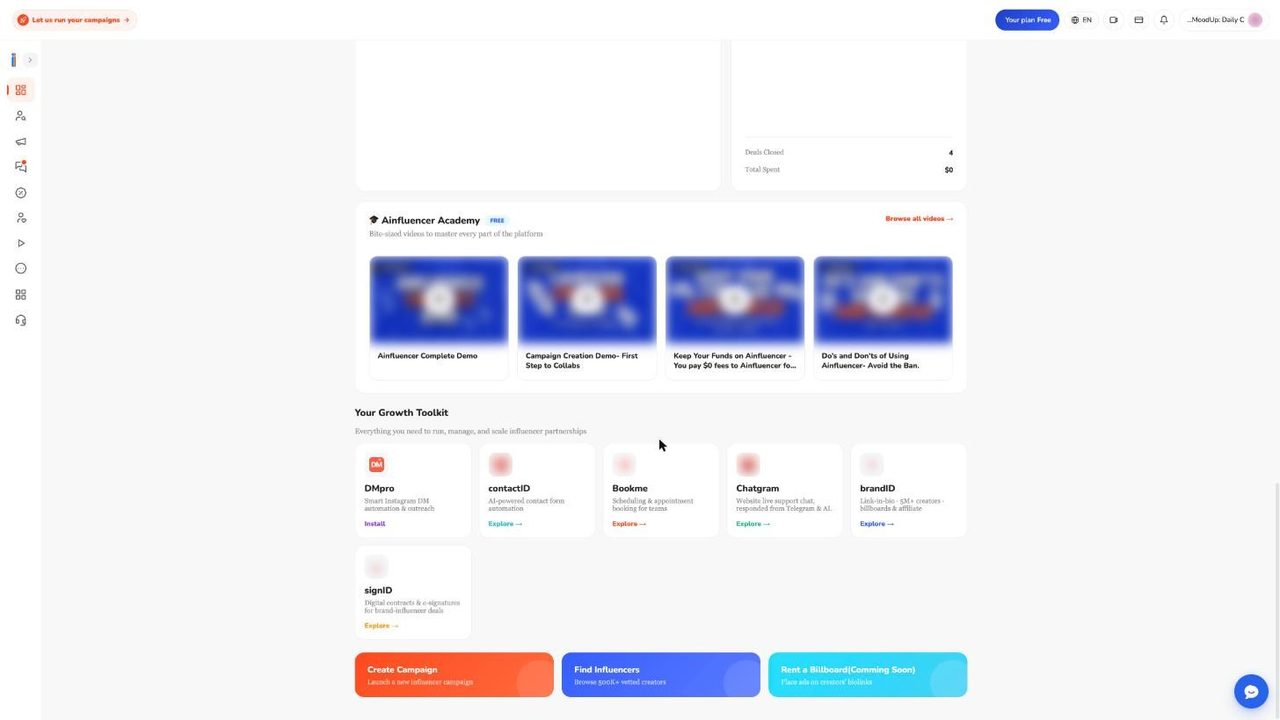
The tiles read: DMpro, smart Instagram DM automation and outreach; contactID, AI powered contact form automation; Bookme, scheduling and appointment booking for teams; Chatgram, website live support chat answered from Telegram and AI; brandID, link in bio with 5M plus creators, billboards and affiliate; signID, digital contracts and e signatures for brand and influencer deals. A Rent a Billboard button on the same page is marked Coming Soon.
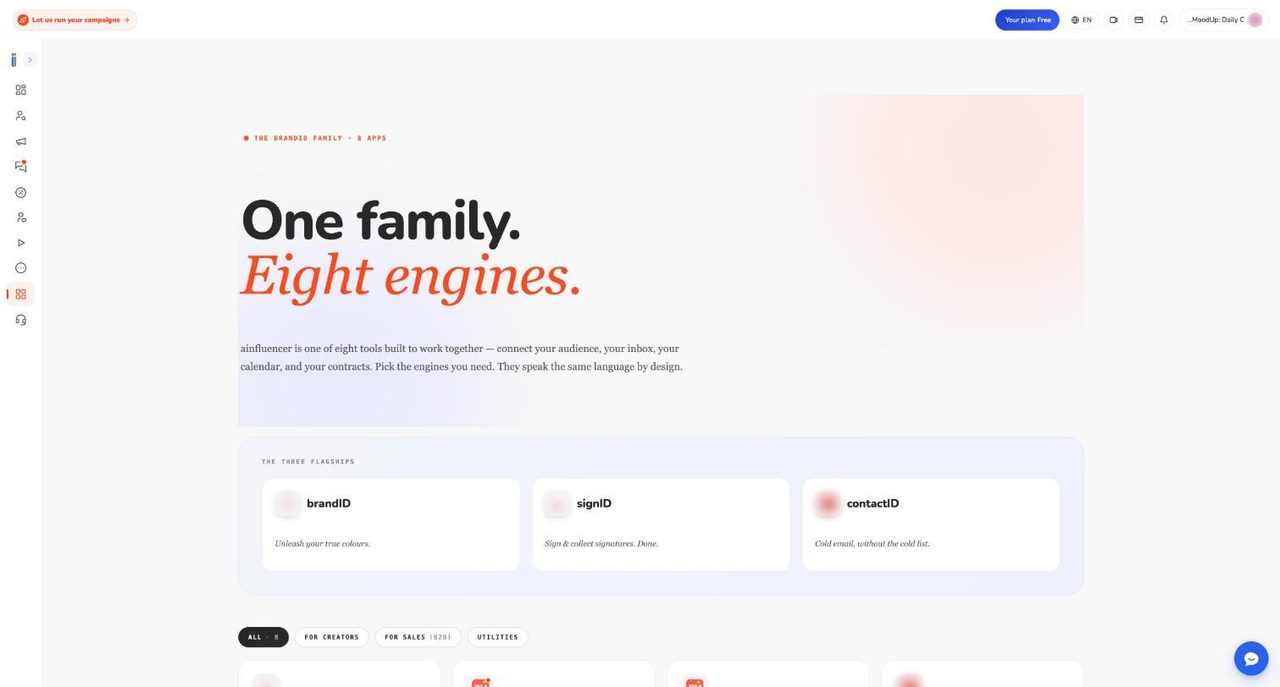
The page says eight apps but the dashboard shows six tiles. The Help Center explains the gap: the full grid also includes the Affiliate Marketplace and Ainfluencer itself, and it names the contact tool ContactUs AI. Ainfluencer groups them into a loop of build, find, engage and close, and says Ultimate subscribers get extra perks across the family. They are separate products with separate accounts, and we have no screenshots inside them.
brandID for creators. The page brandID link in bio describes brandid.app as a link in bio builder, store and affiliate marketplace that Ainfluencer says is free forever. It lists affiliate products (commissions up to 75 percent), digital products, memberships, bookings, tips and billboards, and claims over 2,000 brands, 5 million products and weekly payouts with no minimum. These are vendor claims we have not tested. For sellers there are three real touchpoints. A pop up after creators generate affiliate links invites them to build a storefront, but it only opens a web page. The List in the brandID storefront button currently opens an information page rather than sending a request. And brandID earnings are not part of the Ainfluencer wallet or affiliate payouts.
Chrome extensions. The public site lists two for growth. The AI DM Inviter drafts personalised direct messages to creators on Instagram and TikTok from your brand prompt and campaign link, and you copy and send them yourself. Ainfluencer says it is free for brands. One Help Center page describes a button that sends the invite itself, so treat it as a drafting tool. The Contact Form Filler fills website contact forms in bulk for B2B outreach, billed through contactID, and Ainfluencer says you pay only for successful submissions. Its page lists pay as you go at 0.15 dollars per website, or monthly tiers at 6.99, 34.99, 69.99 and 139.99 dollars for 100, 833, 3,333 and 19,999 websites. The same page says Free to Use in its badges while listing paid plans, so read the billing terms before a large batch.
Payments, Plans, Services and the Creator Side
27. Paying for an offer: checkout, fees and what happens next
A paid collaboration starts when a creator sends an offer from the mobile app. It lands in your Inbox as a chat with the status Waiting Payment. The creator’s proposal counts as their acceptance, so paying is how you accept. Nothing is charged until you click Pay in the chat header. Our screenshots do not include the checkout itself, so this section follows the support documentation. For the line by line version, see Ainfluencer’s checkout guide for offers.
First the app checks the delivery date. If it is less than 24 hours away or already past, a pop-up called Update Date & Make Payment asks for a later date, at least about a day ahead. Clicking Update & Pay saves it without asking the creator, so agree the date in the chat first.
The checkout is headed Pay safely with Escrow. It shows up to six lines: offer price, platform fee, optional insurance, coupon discount, wallet credit used and total due. The offer minimum is $10, and a checkout stays valid for 30 minutes.
| Your plan | Platform fee | A $200 deal costs you |
|---|---|---|
| Free | 25% | $250 |
| Starter | 20% | $240 |
| Professional | 15% | $230 |
| Ultimate | 3% | $206 |
The fee sits on top of the agreed price, is calculated after any coupon, and never comes out of what the creator receives. Ainfluencer’s pages say it has only been charged since May 2026, so older invoices will not show it. Your negotiated price did not change. The line is new.
Insurance is optional and bought per offer. It is meant for physical products you ship, and covers a product that is not returned and no-show creators. It is not refunded with the deal, and claims go to a finance review rather than paying automatically. The pages we read say 10 percent of the product value you enter, though one says 10 percent of the deal, so read the percentage on the checkout line. Ainfluencer’s own fee page says almost nobody buys it.
You can add one coupon per order. Ainfluencer pays the coupon’s share, so the creator still gets the full price. Pay from wallet uses your balance first, with promotional credit before cash. Methods are Credit Card, PayPal, Stripe and Crypto, depending on which are switched on. A saved card or Stripe credits at once. PayPal and crypto only complete when you return to the result page, so do not close the tab early.
When payment clears, five things happen. The money moves into the creator’s locked escrow wallet. The deal becomes Paid & Scheduled and the creator can start. A delivery record is created for the agreed date. The creator’s handle is revealed to you without using a reveal credit. And contact sharing unlocks in the chat.
| What you see | What it means | What to do |
|---|---|---|
| Additional verification required | Your bank wants 3-D Secure, which the built in card form cannot complete | Use the Stripe option |
| Payment could not be processed | Your bank declined it, often an international platform charge | Try another card or PayPal |
| Payment gateway unavailable | That method is switched off at Ainfluencer’s end | Pick another method |
| Not enough funds in your wallet | You are approving a deal that was already refunded | Add funds, then approve |
If your statement shows a charge but the deal still says Waiting Payment, do not pay twice. Send support the amount, the date and the last four card digits.
28. Escrow and refunds, end to end
Escrow means your money leaves your visible balance when you pay, but the creator cannot touch it. It goes forward to the creator when you approve the delivery, or back to your wallet if nobody approves in time. The wallet and escrow basics page answers the common questions. The two sides see the same money under different labels.
| Stage | What the brand sees | What the creator sees |
|---|---|---|
| You paid, nobody approved | On Hold in Escrow | Payment Escrowed |
| Approved, or the timer released it | Transferred To Influencer Wallet | Payment Released |
| Ainfluencer sent the payout | Paid Out to Influencer | Payout Made |
| Returned to you | Refunded To Brand Wallet | Refunded Payment |
Release happens only when you or an Ainfluencer admin approve, and then takes about a minute. There is no automatic approval. Older pages and an in-app payout pop-up mention holds of up to 7 days after delivery. The current Help Center refund pages describe the timers below, so plan around those.
Almost every refund is automatic, and the label on your side keeps reading Published the whole time. Nobody is warned before it fires. The clock depends on what the creator submitted.
| What the creator submitted | Deal fails | You are refunded |
|---|---|---|
| A public Instagram, TikTok or YouTube post the system can read | About 9 days after submission | About 10 days after submission |
| Content files uploaded in the chat | 9 days after upload | 10 days after upload |
| A story, a private post or an unsupported link | 2 days after the agreed publish date | 3 days after it |
| Nothing at all | 2 days after the agreed publish date | 3 days after it |
The third row catches brands out. A creator can post a story in good faith and still leave you under 48 hours, because the system cannot read stories. If a story is planned, agree that the creator also uploads a screen recording. If you disapprove a delivery, the money stays held and returns 14 days after the deal’s start date, which lets the creator fix it. An admin disapproval refunds immediately.
A refund returns the creator’s price, not your whole checkout. On a $200 deal on the Professional plan you pay $230 and get $200 back. The platform fee, any insurance, and any coupon or credit share do not return, because coupon and credit were never your cash. The refund goes to your wallet, never to the card automatically. Card refunds are case by case through finance. Check Refunded to you in Payments & Billing, or filter Transactions by Refunded To Brand Wallet. The how refunds work page has the full walkthrough.
If you change your mind, approving a refunded deal takes the creator’s price from your wallet again, with no second fee. Tell the creator first, since from their side the deal already failed. You cannot disapprove once money is released, and you cannot undo an approval.
On disputes, the documentation disagrees with itself. The brand side page mentions cancelling a deal and an arbitration team taking 3 to 7 business days. The creator side pages say there is no arbitration panel and no cancel button, only support and an admin who can approve or disapprove a delivery while money is still held. Plan on the second version, raise problems while the money is in escrow, and do not approve while you wait. The refunds and disputes guide lists five things to send in one message: the offer link, the publish date, what was submitted and when, what you want, and a screenshot of the live post or its absence.
Ainfluencer’s page lists refunded deals falling from 242 in October 2025 to 14 in September 2026, nearly all non deliveries. That is a vendor statement we could not check. Subscription refunds are a separate process, covered below.
29. The wallet: balance, top-ups, credit and currency
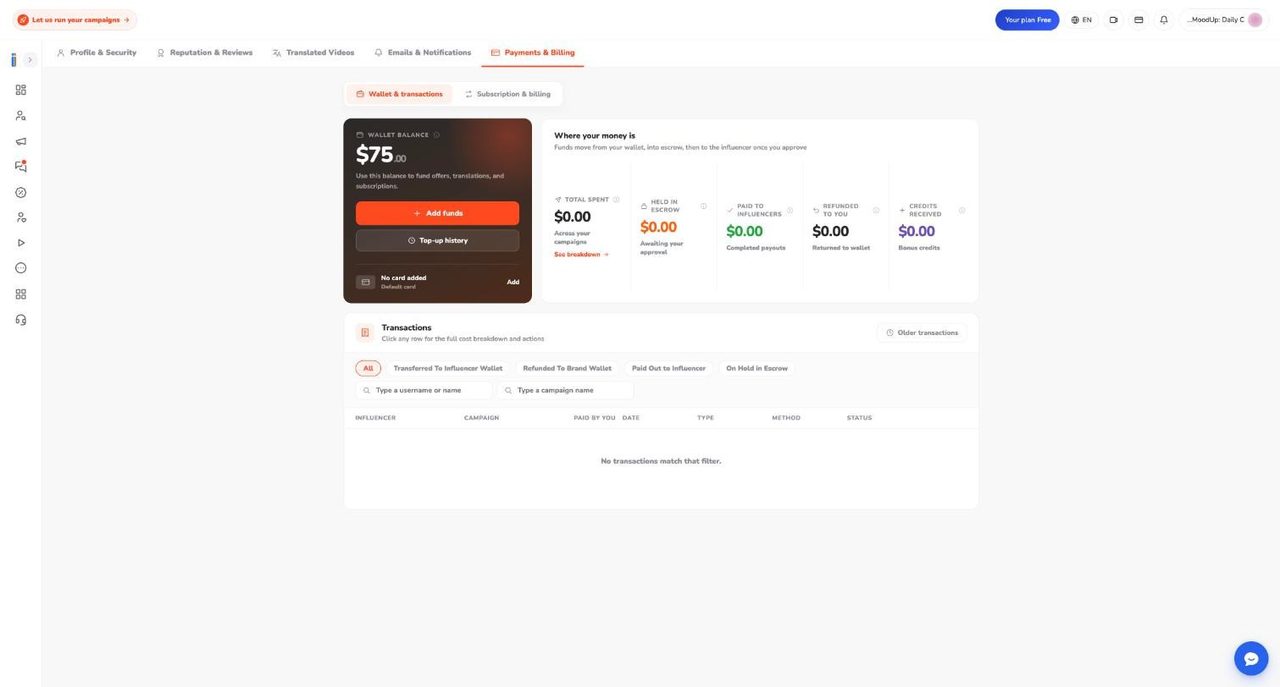
Every brand has a wallet in US dollars. The number on screen is two pots added together: your own funds (top-ups and refunds) and promotional credit added by Ainfluencer staff. Credit is spent first and can never be returned or withdrawn. Escrow is a third pot, not included in the balance, which is why the figure drops when you pay a creator. The tiles under Where your money is show Total spent, Held in escrow, Paid to influencers, Refunded to you and Credits Received. For more, see the wallet funding guide.
To top up, click Add funds. Presets are $500, $1,000 (Recommended), $2,000 (Best Value) and $5,000, or type a whole dollar amount. The minimum is $1, with no maximum and no top-up fee, in US dollars only. Your bank converts if you pay from another currency. You must tick “I agree that wallet deposits are non-refundable if not used on campaigns” before the button activates.
| Method | Covers | When the balance moves |
|---|---|---|
| Stripe | Apple Pay, Google Pay and cards, with bank verification | Immediately |
| Credit Card | Visa, Mastercard, American Express; saved or new card | Immediately |
| PayPal | PayPal balance or linked funding | Only when you land back on the result page |
| Crypto | Bitcoin, Ethereum, Solana, USDT, USDC | Same, and slower if still confirming |
A few other Help Center pages mention bank transfer or wire for larger top-ups. The Add funds page we documented lists the four methods above, so check the screen before relying on a bank route. If a PayPal or crypto top-up never arrives, do not pay again. Send support the tracking code, amount and time, and the team credits it by hand.
The part to understand before depositing is that a brand wallet has no withdraw button anywhere. It is a prepaid balance, and returning an unused balance is a manual finance decision, not a promise. Deposit what you plan to spend on the next campaign or two. The wallet pays for collaborations, insurance and translations. Plan charges go to your card at Stripe. The wallet withdrawal limits guide covers the limits.
If the balance drops and you did not pay anyone, the usual causes are money moved into escrow, an insurance line, a translation purchase, or credit spent first. In Transactions, filter by On Hold in Escrow, Transferred To Influencer Wallet, Paid Out to Influencer or Refunded To Brand Wallet. Click a row for Amount, Platform fee, Content insurance, Coupon discount and Total paid by you. Read Total paid by you, because the fee sits on top. Top-up history lists every deposit, and Older transactions holds anything before the new payment system began on 9 August 2025.
30. Fees, receipts and invoices
Ainfluencer says a collaboration carries exactly two fees. The brand pays a collaboration fee at checkout on top of the price: 25, 20, 15 or 3 percent by plan. The creator pays a 20 percent payout fee at withdrawal, the same on PayPal and every crypto option. On a $100 deal on Professional you pay $115 and the creator withdraws $80. Topping up, posting a campaign, messaging, negotiating and receiving a refund are free. See the commission and platform fees page for the detail.
Prices with creators are fully negotiable. The fees are not, and no account gets a different rate. No payment processing fee is added, but three outside charges can appear: your bank’s currency conversion, PayPal’s own fees on a payout, and blockchain network fees on a crypto payout. Affiliate commissions run on a separate system and are not part of these fees.
Whether the fee justifies an upgrade is arithmetic. At monthly list prices, a subscription beats Free at about $980 of monthly creator spend on Starter, $1,490 on Professional and $3,180 on Ultimate. That is our calculation from the fee gaps, and annual billing lowers each figure. Ainfluencer’s own advice matches: below about $1,500 a month, Free is cheaper.
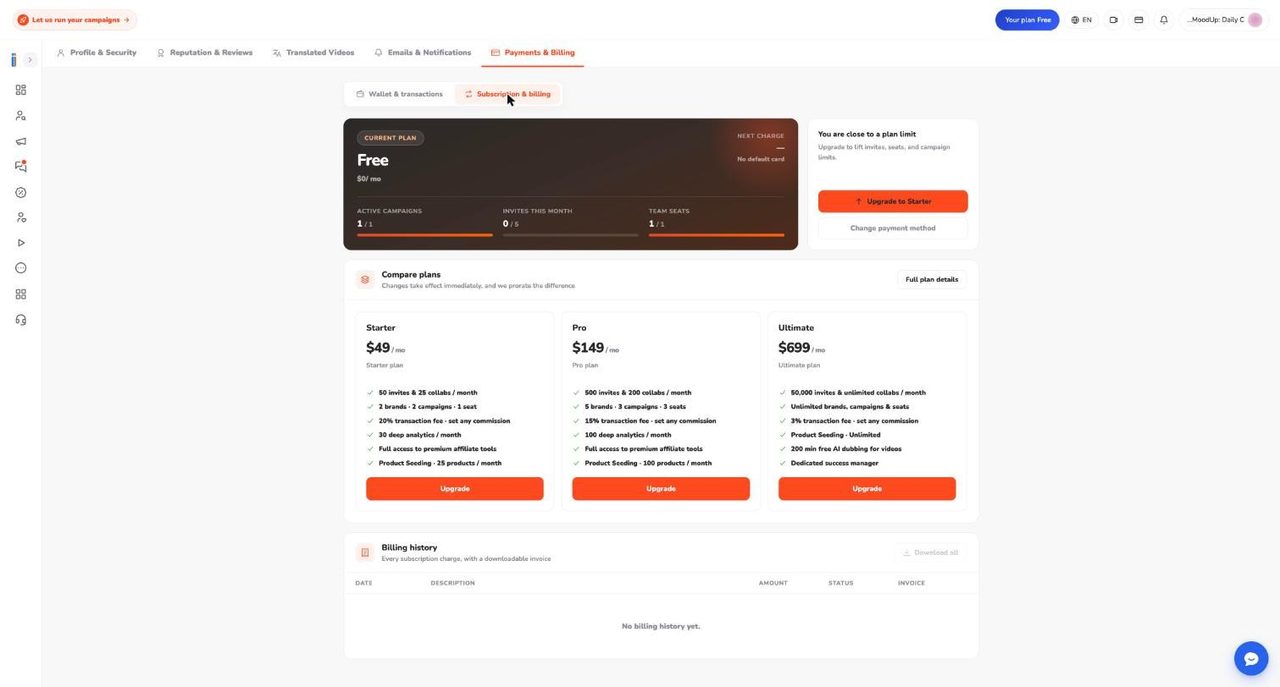
For wallet payments, open Profile, then Transactions, click the transaction and use Download Receipt for a PDF. For a formal invoice with your company name, tax ID and billing address, email support from your account address with the transaction ID. Ainfluencer says it issues the invoice through Stripe in 1 to 2 business days, and an annual payment summary in 3 to 5. Subscription invoices sit in Billing history with a PDF or View link and Download all, and the Amount column shows the original amount even if refunded. The payments invoices and receipts page covers the request flow.
Good to know: Ainfluencer sends no emails for subscription purchases, renewals or failed payments, only Stripe receipts where enabled. Subscriptions are charged to a card through Stripe in dollars, and Stripe may offer a euro option at checkout.
31. The four plans and what they cost
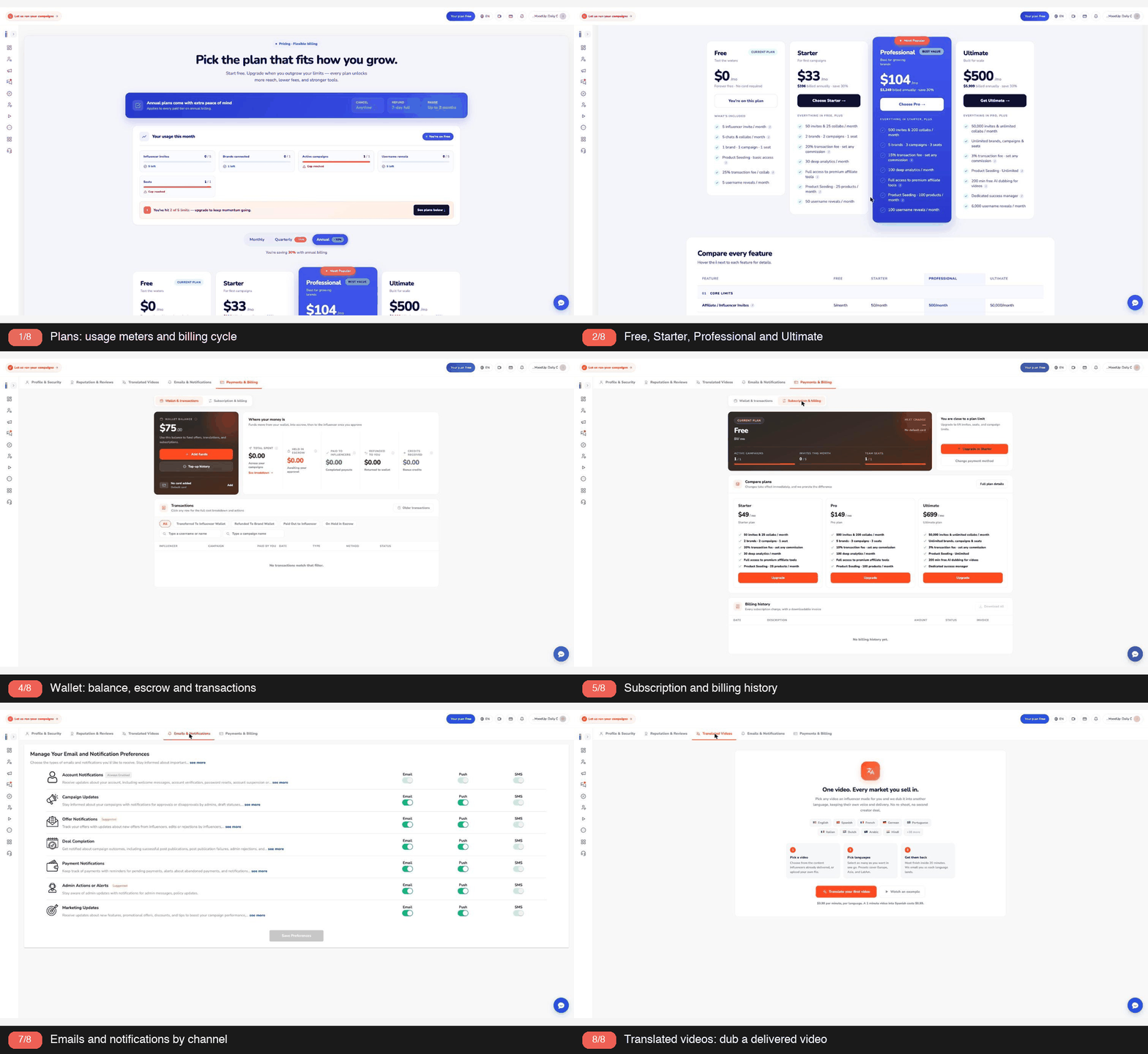
Ainfluencer has four brand plans: Free, Starter, Professional (Pro in some places) and Ultimate. The plan sets your platform fee, your campaign and invite limits, and who else can use the account. There is no free trial, so Free is the way to try it. A custom Enterprise tier sits behind a Meet our sales team button. For the full matrix, see plans and limits explained.
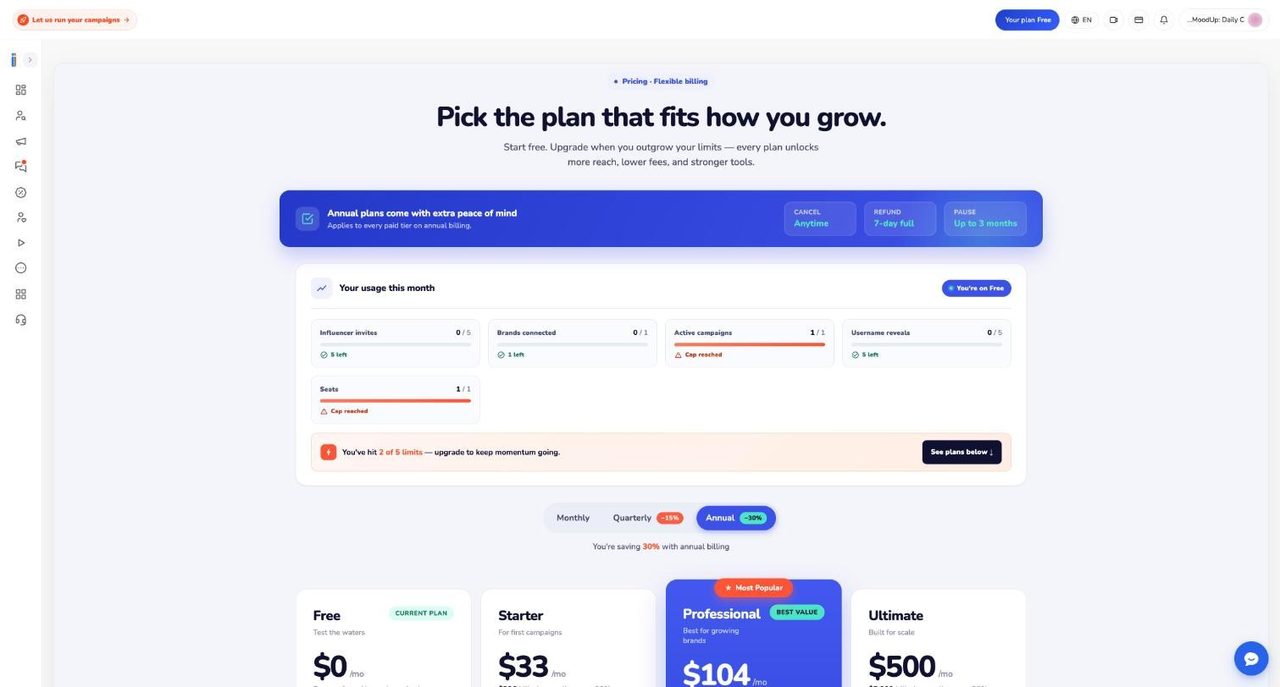
Prices depend on where you look, so here is every number we found.
| Plan | App, annual view, per month | App, billed annually | Help Center monthly | Help Center quarterly | Help Center annual |
|---|---|---|---|---|---|
| Free | $0 | $0 | $0 | None | None |
| Starter | $33 | $396 | $49 | $129 | $399 |
| Professional | $104 | $1,249 | $149 | $399 | $1,249 |
| Ultimate | $500 | $5,999 | $699 | $1,799 | $5,999 |
The in-app toggle labels quarterly as 15 percent off and annual as 30 percent off. Help Center pages say quarterly saves about 30 percent and annual about 50, which the listed prices do not support. From those prices, annual saves about 32 percent on Starter, 30 on Professional and 28.5 on Ultimate. Treat the checkout price as the truth.
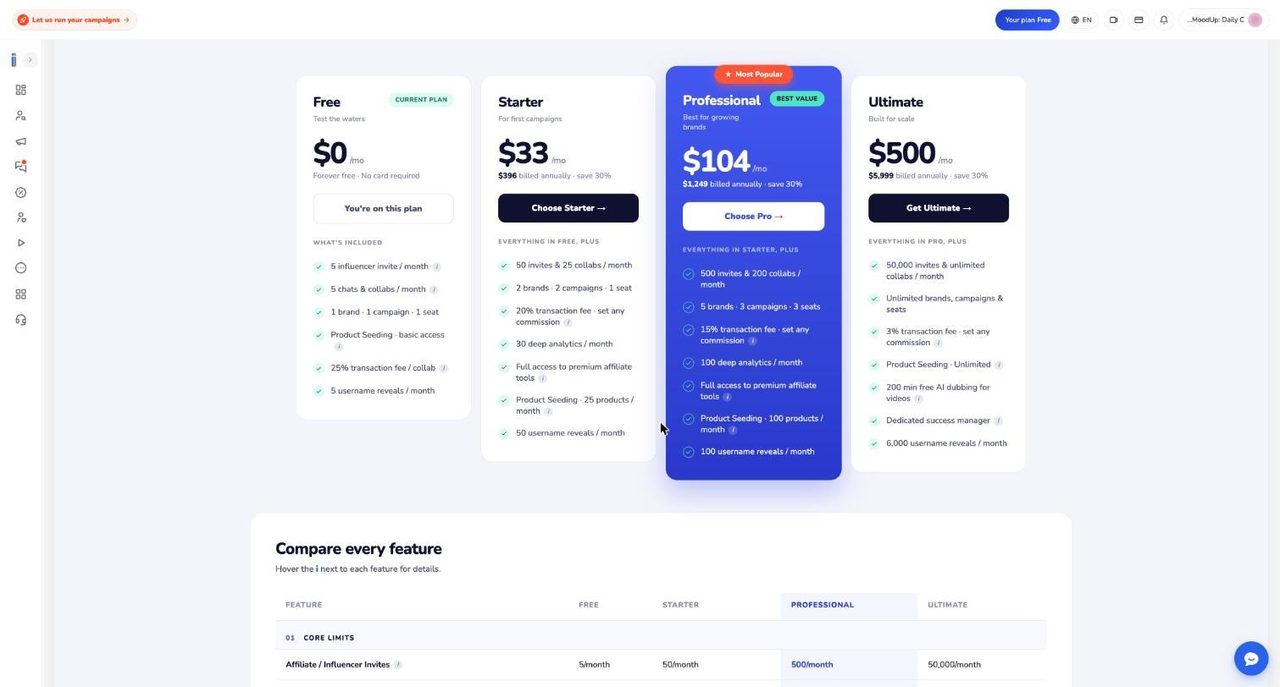
This is the in-app comparison table, captured on 18 October 2026.
| Feature | Free | Starter | Professional | Ultimate |
|---|---|---|---|---|
| Influencer invites per month | 5 | 50 | 500 | 50,000 |
| Username reveals per month | 5 | 50 | 100 | 6,000 |
| Chats and collabs per month | 5 | 25 | 100 | Unlimited |
| Paid collaborations | $10 minimum | 25 a month, no minimum | 200 a month, no minimum | Unlimited, no minimum |
| Brands connected | 1 | 2 | 5 | Unlimited |
| Active campaigns | 1 | 2 | 3 | Unlimited |
| Product seeding | None | 25 products a month | 100 products a month | Unlimited |
| Creator selection and outreach | None | Self-serve | Self-serve | Done for you |
| Shipment and content tracking | None | Self-tracked | Self-tracked | Fully managed |
| Transaction fee on collabs | 25% | 20% | 15% | 3% |
| Affiliate commission | 25% minimum | Any rate | Any rate | Any rate |
| Deep analytics reports per month | 3 | 30 | 100 | 1,000 |
| Team seats | 1 | 1 | 3 | Unlimited |
| Affiliate email reveals | None | 50 | 100 | 6,000 |
| AI dubbing | None | None | None | 200 minutes |
| Extra reveal price | $1.00 | $1.00 | $0.75 | $0.50 |
| Extra report price | $1.00 | $0.75 | $0.75 | $0.25 |
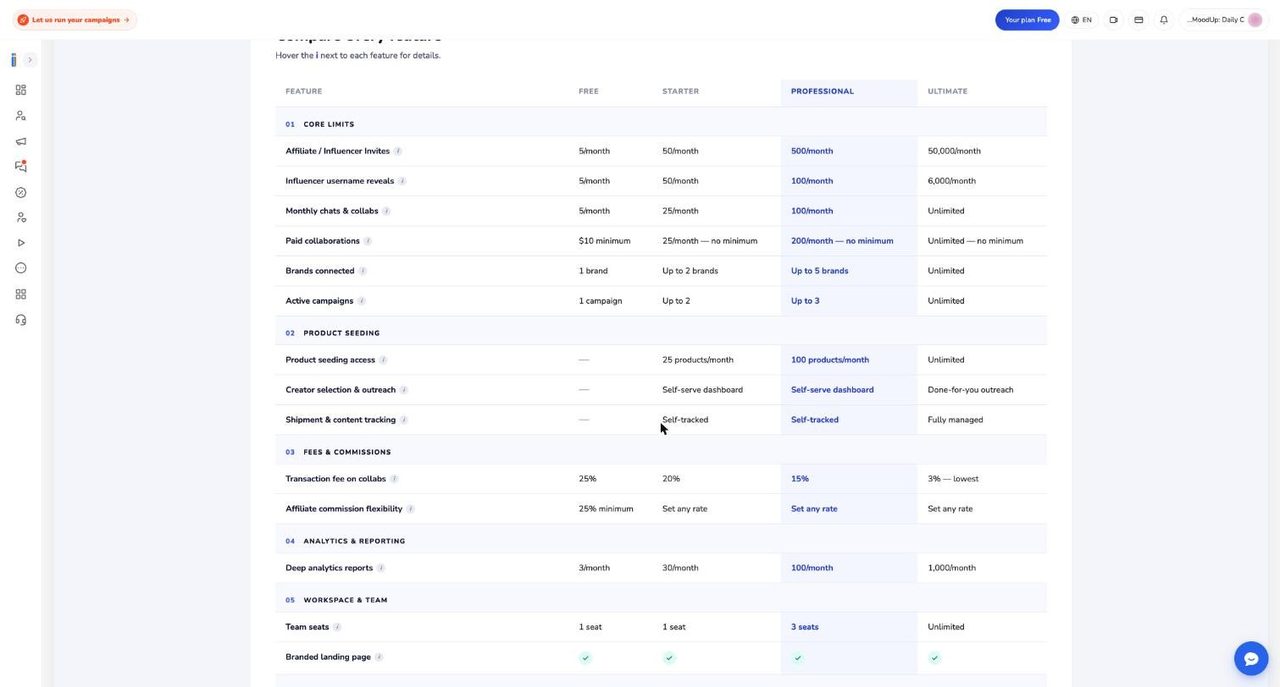
Several things do not line up, and a buyer should know them.
- Free card versus table: the Free card lists Product Seeding basic access and 5 chats and collabs a month, while the table shows no seeding on Free. Help Center pages say seeding starts at Starter, and support notes say the chats and collabs cap is not enforced.
- Professional collaborations: the card says 200 collabs a month, while the table shows 100 chats and collabs and 200 paid collaborations.
- Seats: one Help Center page says Starter has 2 seats, another says 1 person, and the app shows 1. Professional is 3 people in total, meaning you plus two colleagues.
- Success manager: the app card puts it on Ultimate only, while the Help Center says Professional and Ultimate.
- Minimum price: the app shows a $10 minimum only on Free, while the documentation says $10 is the default minimum per offer. Plan on $10.
The limit most brands hit first is username reveals, five a month on Free. The Help Center’s rule of thumb: Free for testing, Starter if you work alone and pay creators under about $1,000 a month, Professional for a team or more than about $1,500 a month, and Ultimate for high volume, several brands or the 3 percent fee.
32. Limits, top-ups, upgrading, cancelling and pausing
Going over a limit refuses the action and opens an upgrade pop-up, with a title such as Campaign Limit Reached, Influencer Invite Limit Reached, Seats Limit Reached, Username Reveal Limit Reached or Analytics Limit Reached. Usage meters show on the plans page and under Subscription & billing. Our Free account showed 2 of 5 limits reached, with active campaigns at 1 of 1 and seats at 1 of 1. The plans limits and upgrading page has the full explanation.
What counts matters. Campaigns count when live or waiting for review, in every type. Drafts, paused and rejected ones do not. Every influencer you invite counts, even from a favourites list. Reveals count once per creator. Past the reveal allowance you can pay per reveal from the wallet, and analytics over the allowance is charged from the wallet instead of refused. Paid plans reset on the monthly anniversary and Free on the first of each month.
Ainfluencer’s help pages also describe one time top-up packs: invites in packs of 100, 250, 500 and 1,000 (the 1,000 pack at $169), and seeding packs of 25, 50, 100 and 250 products (the 250 pack at $249). Extra seats are listed at $19 on Professional and $29 on Ultimate. Support notes say these add-ons are not available in the app, and we did not see them on our Free account, so treat them as NOT VERIFIED. The invite pop-up we know instead offers to invite only as many creators as your plan still allows.
To upgrade, pick a higher plan and confirm. The change is immediate, Stripe charges the prorated difference to your card, and any queued downgrade is cancelled. Going from annual back to monthly is not a refund. The unused part stays as Stripe credit against future billing.
A downgrade takes effect at the end of the period you paid for, and you cannot pick Free, you cancel instead. To cancel, open Payments & Billing, then Subscription & billing, then Cancel your subscription. It is a three step flow with a short survey, ending in Active until a date. Resume undoes it before then. Cancelling is blocked while money is held in escrow.
When a paid plan ends, campaigns above the new limit are paused, oldest first, and team members above the seat limit are removed, pending invitations first, then the oldest members. Nothing is deleted, and the documentation says no email warns you. A failed renewal is faster: the account drops to Free at once and extra campaigns pause within about an hour. Paying restores the plan, but you switch paused campaigns back on by hand.
The annual banner promises Cancel anytime, Refund 7-day full and Pause up to 3 months. Treat the last two with care. The documentation says there is no refund or pause button, and the team does both on request. The Help Center describes refund windows of 3, 5 and 7 days by billing cycle for brands that have not materially used the value, while the Terms of Service dated 1 June 2026 describe fees as final with discretionary exceptions. Refunds go to the card, and banks take 5 to 10 business days. A pause lasts 1 to 3 months and takes all live campaigns off the marketplace. Ask support before buying annual if either promise decides your purchase.
33. Brand score, reviews, translated videos, notifications and profile
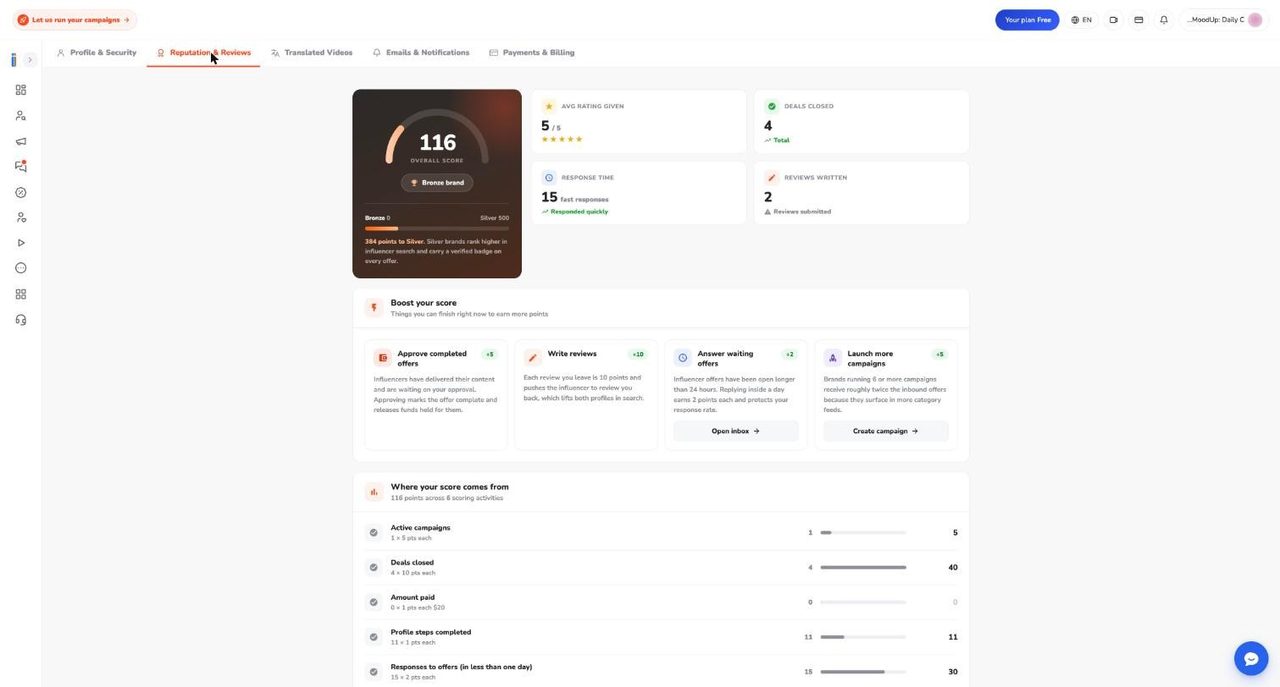
The Reputation & Reviews page turns your behaviour into a score. Our sample account had 116 points, the Bronze brand tier and 384 points to go to Silver. Points come from six activities: 5 for each live campaign, 10 for each deal closed, 1 for every $20 paid, 1 for each completed profile step, 2 for each response to an offer within a day, and 10 for each written review. The documentation lists Bronze 0 to 499, Silver 500 to 1,499, Gold 1,500 to 2,499 and Platinum 2,500 and up. The score is recalculated from your current state, so it can go down.
The page says Silver brands rank higher in search and carry a verified badge on every offer. The support documentation did not find that effect in the live app, only a use in ordering campaigns in a weekly email to creators. Treat the score as a record of activity, not a ranking lever, until you see otherwise.
After a deal is Published, Failed or Disapproved by Admin, a Write a review button appears. You rate Performance, Communication and Observance of agreed terms out of 5, answer whether you would work with them again (never shown to the creator), and write a public review of up to 5,000 characters. All fields are required, there is one review per deal, and you cannot edit it. An admin approves reviews before they reach the creator’s profile.
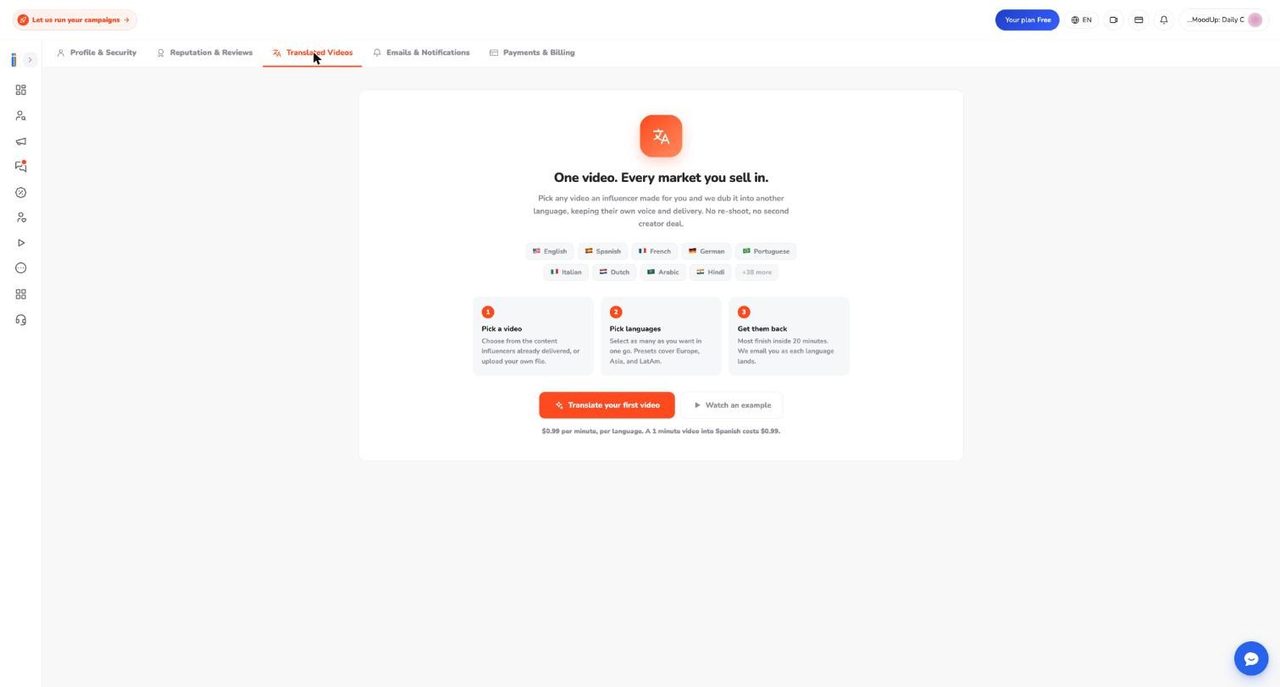
Translated Videos dubs a video into other languages in the creator’s own voice. You pick a delivered video or upload your own (MP4, MOV or WebM up to 500 MB), choose languages, and pay by card, wallet or PayPal. The page names nine languages plus 38 more, while marketing pages claim 180 or 200, so trust the app list. The price is $0.99 per minute per language, in US dollars like everything else, as the currency and regional pricing page explains. Up to 59 seconds counts as one minute, and the documentation’s example, a 1:20 video into three languages, comes to about $4.46. The page says most finish inside 20 minutes. Failed translations are not retried or refunded automatically. The Ultimate card advertises 200 free dubbing minutes, but support notes could not confirm how they apply, so ask first.
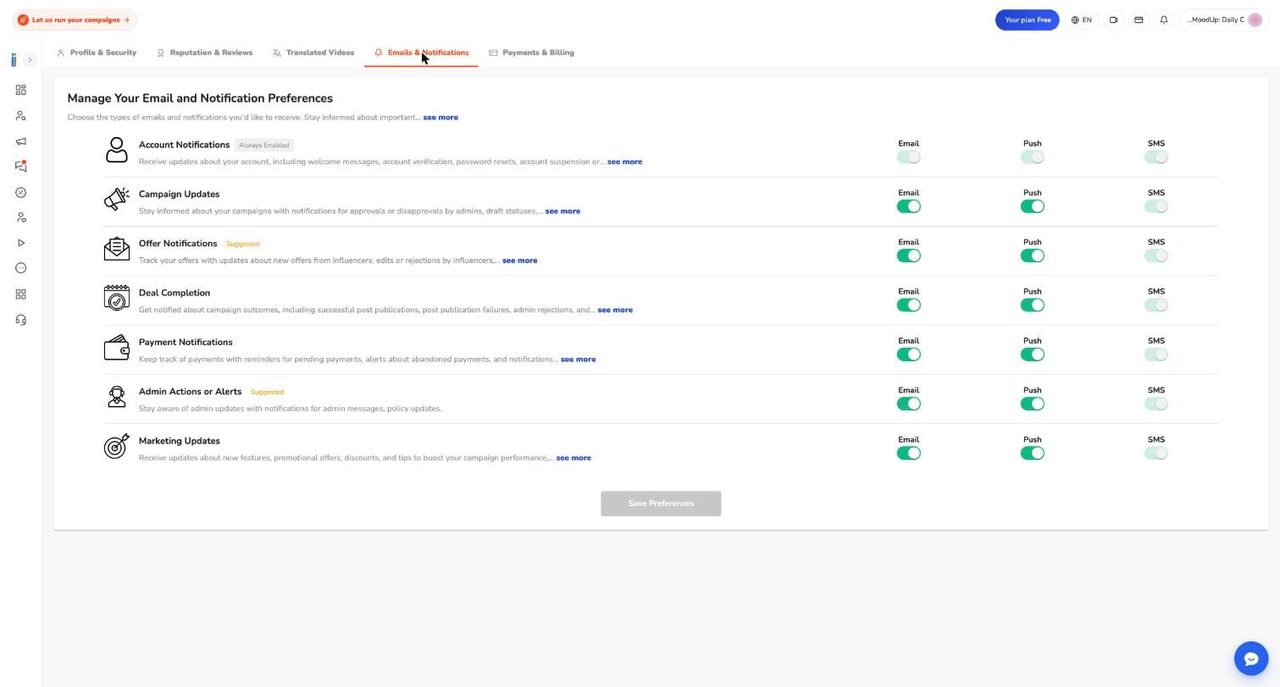
There are seven categories: Account Notifications (always on), Campaign Updates, Offer Notifications, Deal Completion, Payment Notifications, Admin Actions or Alerts and Marketing Updates. Everything starts on, and you must click Save Preferences. On the web, Push controls the in-app bell, not a phone alert. Payment related emails include reminders for unpaid offers after 1 and 3 days, and abandoned checkout emails after 3 and 24 hours. A daily digest goes out at 08:00 UTC on days with creator activity, and this page cannot switch it off. Unsubscribe stops most emails, but security and suspension notices continue, and only staff can re-subscribe you.
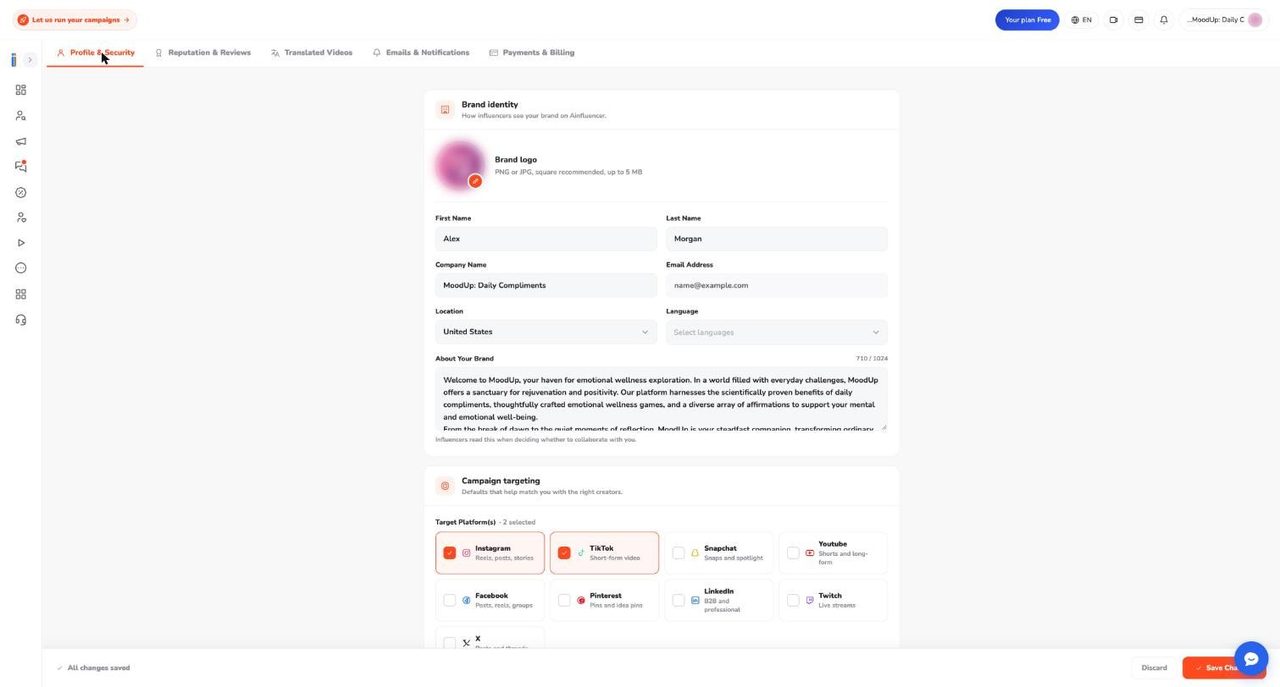
Profile & Security is what creators read when deciding whether to work with you. It holds your logo (PNG or JPG, up to 5 MB), company name, location, language, an About Your Brand text of up to 1,024 characters, target platforms and influencer sizes, company size, budget, categories and hashtags. Password and Delete Account sit below. Only the owner edits it. Onboarding allows an 8 MB logo, so the two screens disagree.
34. Fully managed service and agencies
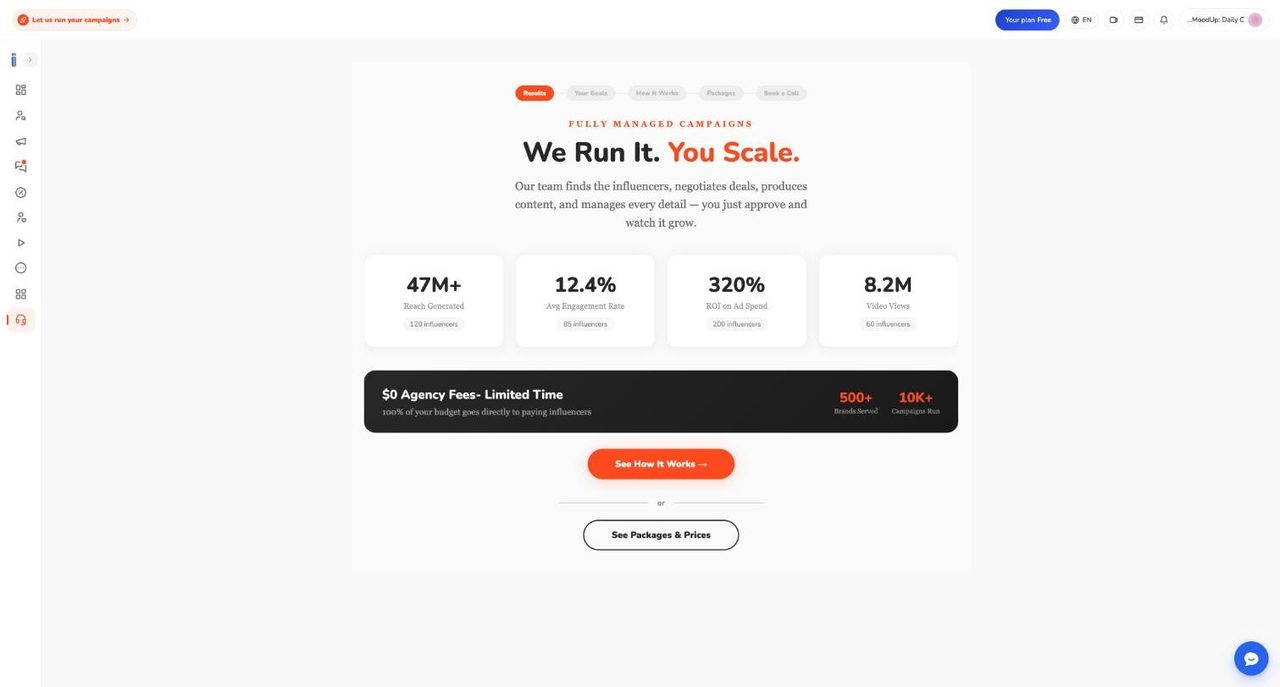
Fully managed means Ainfluencer’s team runs the campaign. Per the done for you service page, you handle the destination: goals, audience, KPIs, brand voice and approvals. The team handles discovery, vetting, outreach, negotiation, briefing, product shipping, escrow payments, tracking, brand rules and translation. It says the team can reach niche audiences, such as dentists or regional B2B specialists, through backend tools, extensions and direct outreach, and that a typical campaign runs about 21 days. Most brands start self-managed and move to managed for a launch.
The public packages are below. Each says it includes $0 agency fees, meaning 100 percent of the package budget goes to creators and the price is a flat fee paid once at the start. Traditional agencies add 15 to 25 percent, which is the pitch. The app banner adds Limited Time, so ask whether the terms will hold.
| Package | Length | Price | Reach | Creators | Video | Translation |
|---|---|---|---|---|---|---|
| Viral | 1 month | $7,999 | 2.5M+ people | 25 | 1 minute trailer | Not included |
| Scale | 2 months | $9,999 | 7.5M+ people | 50 | 1 minute trailer | 1 language |
| Super Scale | 3 months | $15,000 | 25M+ people | 75 | 1 minute commercial | 2 languages |
| Super Viral | 4 months | $29,999 | 100M+ people | 200 | 2 minute commercial | 10 languages |
The reach figures are goals Ainfluencer states, not results we verified. Custom budgets and a free 30 minute strategy call are offered. A separate managed affiliate offer is listed as a $2,900 one month pilot, then $1,500, $2,500 or $3,000 a month for 25, 75 or 150 affiliates a month, with a three month minimum after the pilot. Affiliate commissions are passed through on top. We only captured the first step of the in-app flow, Results, which is followed by Your Goals, How It Works, Packages and Book a Call.
Agencies have another route. The agency multi client guide says the best fit is Ultimate plus a multi-client command center. You switch between client brands from one login, and each client keeps separate analytics, chats, wallet, payment methods and approvals. The alternative is for each client to own the account and invite the agency as seats, which keeps data ownership clean if the engagement ends, and Ainfluencer says this is becoming the default. We did not test multi-client switching. The app’s brands connected limit is 1, 2, 5 and unlimited by plan. Seats have no roles yet, so every seat can spend the wallet and approve deliveries. No agency pricing is published.
35. The creator side: account setup and approval
One plain note on sources. The creator side of Ainfluencer lives in the mobile app, and we did not screenshot it. Everything from here to the end of this part comes from Ainfluencer’s documentation, not from our own testing.
Creators use the iOS or Android app. Signing in on the website sends a creator to a download page, and a brand account cannot be converted, so you need a second email. Sign up with name, email and password, enter the 5 digit email code, pick Instagram, TikTok, YouTube or a mix, and enter your public handle without the at sign. The creator account setup guide covers this.
Getting live takes four gates: verify your email, connect an account, finish your media kit and pass quality review. The status on the account card shows where you are.
| Status | What it means | Who moves it |
|---|---|---|
| Pending Verification | A reviewer is confirming you own the account | A person |
| Verification Rejected | Turned down; tap the card for reasons | You, by fixing and resubmitting |
| Draft | Connected, media kit unfinished | You |
| Pending Admin Approval | Media kit done, waiting for quality review | A person |
| Active | Approved; you can make offers and brands can see you | Done |
Instagram uses a code. You enter your username, get something like ain-123456, follow @ainfluencer.official and send the code as its own message from the same account. Nothing goes in your bio. TikTok and YouTube use a sign-in, and each YouTube channel becomes its own account. If the app cannot confirm you, the request goes to manual review, and after five rejected requests in seven days you are locked out for seven days.
How many followers you need depends on the page. The creator guides say the figure that decides at review is about 5,000 on every platform, and the most common rejection. Support notes give a default minimum of 100 for TikTok and YouTube, and the suspension guide mentions a hard floor of 100. Plan for 5,000, though a reviewer can accept a strong smaller account. Keep the account public. The app says review takes up to 24 hours, a target rather than a timer, so contact support after 48 hours. See joining and getting approved for the connection errors.
The media kit has six steps: a bio of 20 to 700 characters with no contact details, niche, audience with an insights screenshot, a photo gallery, a shipping address and goals. Finishing it creates a shareable media kit page for each social account. One login can hold several accounts, all paid into one wallet. Renaming a handle can archive the account, so tell support first.
36. Finding campaigns, sending offers and pricing
Explore is the creator’s marketplace, with tabs for All, Affiliate, Gifting, Most paid, For You, Invited to, My country and My category. Campaigns match the account selected at the top, so switching accounts changes what you see. The advice is to check Invited to first, because the brand already picked you, then work through For You. The campaign and offer guide has the walkthrough.
To pitch, open a campaign, tap Make an Offer and fill in the form: delivery date (default two weeks out), how long the post stays up, your price with a suggestion, and pitch, audience and portfolio text of 50 to 250 characters each. You get one offer per account per campaign, and contact details are blocked. The minimum price is $10 by default, which leaves $8 after the 20 percent payout fee. Ainfluencer advises pricing the deliverable, not the post, since a Reel plus Stories plus usage rights is not one post, and being wary of commission only offers handled off the platform. The form cannot record usage rights, so put them in the chat.
Volume and personalisation decide response rates, and a pitch that names the product beats generic ones. The finding and applying guide lists what to check when no one answers: Active status, a finished media kit, enough offers, personal pitches and a realistic price.
| Status the creator sees | What it means | Start work? |
|---|---|---|
| Waiting Brand Approval | The brand has not responded | No |
| Waiting Your Approval | The brand countered your terms | No |
| Waiting Payment | Terms agreed, nothing in escrow | No |
| Paid & Scheduled | Ainfluencer holds the money | Yes |
The rule that matters most is to not create or post anything until the deal reads Paid & Scheduled. An accepted offer is not a funded one, and delivering early is against the terms. Creators have received formal warnings for it. Before payment either side can edit the offer. After payment, changes are revision requests that the creator accepts or rejects, two per offer by default. Brand invitations arrive twice a day, at 06:00 and 18:00 UTC, and expire after a week if unsent. Hiding one is permanent. The invitations and negotiation guide covers counter offers and sending insights.
37. From deal to delivery to approval
Where the money sits matters more than the price. The how deals become money page walks a $100 deal through four stages: the brand pays $100 into escrow, you deliver while it stays locked, the brand approves and $100 shows in your wallet, and you withdraw $80 after the 20 percent fee. The brand’s platform fee is paid on top and never touches your money, and Ainfluencer covers any coupon. Contact details stay hidden until the offer is paid, so shipping addresses come after payment.
Ainfluencer does not post for you. The Scheduler is a reminder tool, with pushes at 72, 24, 12, 6 and 3 hours before the date. You post on your own account, then open the deal chat and tap Submit Post URL on the offer card. Pasting a link as a chat message does not count. You can submit up to five links, never a profile link, and content only deals use Upload Content. Edit URL works until approval. The post submission guide has the steps.
What you submit sets the review clock, and getting it wrong is the costliest mistake on the platform. A public post link or uploaded files give the brand about nine days. A story, a private post or an unsupported link gives only two to three days from the agreed date, so also upload a screen recording. After you submit, the deal vanishes from all three Scheduler tabs, which is normal. Find it in the chat, where the card reads Published & Waiting Approval.
If you are late, the deal fails 2 days after the date and the brand is refunded 3 days after it. Submitting before the refund revives it. To move the date, tap Extend Deadline before it passes. It works once per scheduled period, takes effect at once and does not ask the brand. A promise in the chat moves nothing. The scheduling and posting guide covers misses and the Scheduler tabs.
Approval is the only thing that releases money, and nothing approves automatically. The brand sees Final Delivered Result with Approve it and Disapprove it buttons. If the brand does nothing, the deal fails and the brand is refunded, so chase after two or three days and say that approving is what pays you. If the brand disapproves, the money stays held until 14 days after the deal’s start date and you can resubmit, but the brand’s note goes to Ainfluencer, not to you. Nothing checks your caption for tags or disclosures. There is no arbitration, though an admin can approve a delivery while money is held. The review and approval guide shows what brands see.
38. YouTube, affiliate and gifting for creators
YouTube is two connections, not one. In the mobile app you sign in with Google for paid collaborations, paid by PayPal or crypto. In the affiliate app you connect again under Manage Platforms for commission, paid through Stripe. Connecting one does not connect the other. Each channel becomes its own account, and a Brand Account channel you only manage can fail to connect. The earning with your channel page argues a video earns for years, so ask for a fee plus a commission and price production, not the post. The $10 minimum means little for a video. Put your tracking link in the description before publishing. A public YouTube link also gets the nine day approval clock.
Affiliate campaigns pay on results, with no fee, no escrow and no deadline. Per the affiliate campaigns for creators page, connect Stripe first, because your Stripe country is fixed by your verified phone number. Tap Generate Link, share it unchanged, and earn a percentage of the product price after any buyer discount, not shipping or tax. A $100 product with a 10 percent discount at 20 percent commission earns $18. Rates run from 5 to 50 percent per product, and custom rates from 10 to 60.
The timeline is long. A sale must be 35 days old before the seller’s card is billed, then Stripe pays you, roughly five to seven weeks after the sale. Returns reverse the commission, even after payout. Help Center pages say Ainfluencer takes no fee on affiliate payouts, while the support documentation describes a 5 percent platform fee by default, so check the net figures in Link analytics. Shopify sales earn commission only when tracked through the product link, since early October 2026.
Gifting trades a free product for a post. The gifting for creators guide is blunt that no fee means no escrow, so judge it like a purchase. Save a shipping address, check the ship-to countries, request the gift, and the brand sees your address once it accepts. The address freezes when it ships. Tap Confirm Received, then Tell the brand I posted with your link. Taking a product and not posting can get you suspended. The public join link on gifting pages is reported as broken, so use the Gifting tab.
39. Getting paid: payout methods, fees and real timings
There are three waits between posting and money. First, the brand approving, up to about nine days, with nothing automatic. Second, approval to your wallet, about a minute. Third, withdrawal to your account, which is done by hand. The how you get paid page is the one to read first. A week after posting with no money almost always means the first wait.
For deal money you can use PayPal or crypto, and only those. Crypto means USDT or USDC on BNB Smart Chain (BEP20), Ethereum (ERC20), Solana or Tron (TRC20), and you can save one of each method. Bank transfer is not available. An older answer on the payout page mentions Stripe bank deposits and tax forms, but the newer answers and support notes say Stripe payouts are switched off for deals. Follow the PayPal and crypto answer. The payout methods guide has the setup steps.
To withdraw, open the Wallet tab, pick a method, tap Submit Withdrawal Request and select completed deals. The sheet shows Offer Amount, Ainfluencer Fee (20%) and You Will Receive before you confirm. Only deals showing Payment Released can be withdrawn. There is no minimum, and Ainfluencer says its smallest payout was $4, though an older public payment page mentions a $20 minimum. There is no cancel button, so ask support.
| Time from request to money sent | Share of 554 payouts |
|---|---|
| Within 5 days | 47% |
| Within 15 days | 91% |
| Longer than 30 days | Under 3% |
The app says funds go out on the 1st and 15th, then take up to five business days. Ainfluencer’s figures put the average near nine days, and a request sent just before the 1st or 15th is the only real speed up. Requests from before August 2025 can sit in Processing indefinitely and need a message to support. A rejection is not a penalty, nine of 643 so far, and the money returns to your wallet. A request keeps the address it was sent with, so fix a wrong address the same day.
The fee is a flat 20 percent on every method. Your wallet shows the full price and the fee comes off at withdrawal. Earnings from before August 2025 show as Legacy balance, with no fee. PayPal’s own charges and blockchain network fees apply afterwards. The creator commissions and fees page lists them. Payout completion appears in the app only, with no email or push.
40. When something goes wrong: suspensions, appeals and non delivery
Start by working out which problem you have. The when something goes wrong guide sorts them. A card reading Disapproved is a suspension. A card in the Archived tab means your username could not be found, usually after a rename. An email headed Violation Notice is a warning, not a suspension. A failed deal is a timer that ran out. A payout stuck in Processing is usually from before August 2025.
Every suspension is applied by an Ainfluencer admin, since the automatic rules are not running. The app shows plain text reasons: Low-Quality Score or Engagement Rate, Low Followers, Low Publishing Activities, High Spamming Rate or Violation of Terms. The suspension reasons explained page adds Low Ratings or Bad Reviews, Failed to Publish Closed Deals, misrepresented location, category or gender, Insights Incomplete, Account Doesn’t Exist and Other, each with a fix. A temporary suspension has no end date and lasts until an admin reactivates the account.
While suspended you cannot make offers, the chat box is hidden and profile edits are blocked. Offers you already sent stay visible for 48 hours, then disappear. A deal that was already paid can still be delivered, so do not let it fail. The suspensions and violations guide covers the rest.
You get one appeal per suspension, so fix the problem first, then appeal with specifics. It is a four step pop-up with a required reason, then a video and Confirm Watched. An approval is emailed and pushed. A denial sends nothing, so open the app and read the card. After about three business days, contacting support is reasonable. For Violation of Terms, reactivation usually needs a six point written commitment, and a repeat means permanent suspension. Asking a brand for contact details or payment off the platform is the commonest cause, and a nightly review flags it.
Not delivering has no automatic fine. The deal fails after 2 days, the brand is refunded after 3, and you earn nothing. Repeated misses can lead an admin to suspend you. There is no cancel button for creators. Your options are Extend Deadline, letting the deal lapse after saying so in the chat, or asking support. The non delivery and disputes page adds that there is no dispute panel. To contact support, use Settings then Get Help, since the Contact Support button on the suspension alert is a known fault. Include the offer link, dates, what you want and proof.
Ainfluencer Pricing
| Plan | Price | What is included |
|---|---|---|
| Free | $0 | 1 active campaign, 5 invites and 5 username reveals a month, 1 seat, 3 deep analytics reports, 25% fee on creator payments, affiliate commission at 25% or more. The comparison table lists no product seeding on Free |
| Starter | $49 a month list ($33 a month in the app annual view) | 2 active campaigns, 50 invites, 50 reveals, 25 paid collaborations a month, 20% fee, 25 seeding products a month, any affiliate commission rate, 30 reports, 1 seat, 2 brands |
| Professional | $149 a month list ($104 in the app annual view) | 3 active campaigns, 500 invites, 100 reveals, 200 paid collaborations a month, 15% fee, 100 seeding products a month, 100 reports, 3 seats, 5 brands |
| Ultimate | $699 a month list ($500 in the app annual view) | Unlimited campaigns, seeding, brands and seats, 50,000 invites, 6,000 reveals, 3% fee, done-for-you creator selection, 1,000 reports, 200 AI dubbing minutes (ask how they apply) |
These are the in-app comparison figures from 18 October 2026. The in-app annual view shows lower per-month prices than the Help Center monthly list: $33, $104 and $500 a month, billed as $396, $1,249 and $5,999 a year. There is no free trial. The checkout page is the authority for what you pay, and we saw no checkout because we stayed on Free.
Plan limits, going over them, upgrading, cancelling and the rules about pausing are in section 32. The full plan comparison and its inconsistencies are in section 31, and the fee arithmetic is in section 30. Affiliate programs have their own limits, covered in section 17.
Where the App and the Help Center Disagree
Ainfluencer’s app, its support documentation and its public Help Center were written at different times, and they do not always agree. This table lists the cases a reader is most likely to trip over, with what each source says and what to do. None of this means anything is hidden. It means the product is moving fast, so check the live screen before you rely on a figure.
| Topic | What the app shows | What the documentation says | What to do |
|---|---|---|---|
| Plan prices and savings | In-app annual view: $33, $104 and $500 a month. Toggle says quarterly saves 15% and annual 30% | Help Center monthly list $49, $149 and $699. Pages say quarterly saves about 30% and annual about 50%. The listed prices give about 32%, 30% and 28.5% for annual | Trust the checkout price. See section 31 |
| Professional collaborations | The plan card says 200 collabs a month. The table says 100 chats and collabs and 200 paid collaborations | Support notes say the chats and collabs cap is not enforced | Ask support before buying for volume. See section 31 |
| Plan gating of gifting and large campaigns | The Free card says basic seeding access, the table says none, and the picker says an active subscription is needed | The Help Center says gifting starts at Starter. A support document says Pro and Ultimate. Large barter, gifting or multi creator affiliate campaigns can need a wallet deposit or a call, with deposit figures that differ | Check at launch and confirm any deposit in your rejection email. See sections 8 and 24 |
| Platform fee on affiliate payouts | Not shown in the tabs we could open | Support documentation says a default 5% of the commission. Other pages tie the fee to the seller plan. Creator pages say no fee | Read your Payments statement and the creator’s Link analytics. See section 21 |
| Hybrid campaigns | Dashboard banners promote hybrid. In the type picker the card says Coming Soon and cannot be clicked | The hybrid guide describes the model as available | Run a paid collaboration with the commission terms in the brief and test with one creator. See section 23 |
| Shopify commission start | Seller dashboard shows Shopify numbers | Commission is calculated for purchases since early October 2026. Older help text says it is not calculated. One passage gives a different date | Treat earlier Shopify sales as unpaid. See section 17 |
| Amazon marketplaces | Seven: US, CA, ES, DE, UK, FR and IT | One page tables nineteen. A support document lists eight, adding Mexico | Confirm your marketplace with support first. See section 18 |
| Insurance rate | Shown on the checkout line | The Help Center says 10 percent of the product value. One page says 10 percent of the deal. Other documentation gives a different default | Read the percentage at checkout. See sections 27 and 25 |
| Affiliate payout timing | Payouts tab describes charging the card when a sale settles | Rolling rule: a sale is billable after 35 days. One page says 30. Older in-app help describes a monthly payday around the 15th | Plan on five to seven weeks. See section 21 |
| Seller card requirement | Payouts tab asks for a card with a year of validity and a $5,000 available limit | A support document says the app checks neither | Ask support before relying on either reading. See section 21 |
| Creator follower bar | Smaller accounts appear in search | Creator guides say about 5,000 at review. Support notes give 100 for TikTok and YouTube | Plan for 5,000, though a strong small account can pass. See section 35 |
| Add-on packs | Not visible on a Free account. The invite pop-up offers to invite up to your plan allowance | Help pages list invite packs, seeding packs and extra seats at $19 and $29. Support notes say they are not available in the app | Do not budget for packs. See section 32 |
| Brand score effects | A score and a tier on the dashboard and the Reputation page | The page says Silver ranks higher with a badge. Support could not find that effect in the live app | Treat the score as a progress meter. See section 33 |
| Affiliate program limits per plan | Plan table: 1, 2, 5 and unlimited for Free to Ultimate | A support document says the enforced limits since 11 October 2026 are 1, 1, 2 and unlimited | Check the live number before planning several stores. See section 17 |
| Refund and pause promises | Annual banner: Cancel anytime, Refund 7-day full, Pause up to 3 months | No self-serve refund or pause. The team does both on request. The Terms of Service describe fees as final with discretionary exceptions | Ask support before buying annual. See section 32 |
What we could not verify
These items are marked NOT VERIFIED in the feature sections. We carry them here so you can treat them with care:
- The numeric Ainfluencer Score for creators, which we did not see in the app.
- The suggested price range shown on offers.
- Whether a commission added to a paid collaboration brief is tracked end to end.
- Wallet auto debit for monthly retainers.
- Which Amazon account a seller needs: Associates or Amazon Ads with Attribution.
- Whether a brand can extend a creator’s deadline from its own screen.
- The add-on packs and extra seat prices.
Ainfluencer Pros and Cons
Ainfluencer Pros
- Real escrow: the creator cannot touch the money until the brand approves, and unapproved deals refund to the brand
- A free tier that lets you test search, campaigns and chat, though only 1 active campaign
- Ainfluencer says it has a very large creator pool across Instagram, TikTok and YouTube, with filters and quality labels
- Affiliate setup for Shopify and Amazon that Ainfluencer says takes about a minute or two
- Clear refund timers: most failed deals refund on their own without a dispute
- Creators can be paid by PayPal or crypto, with no minimum withdrawal in the app
- Gifting has no platform fee and no escrow, which keeps it cheap for low value products
- A fully managed option, and agency features on Ultimate
- Detailed Help Center with a guide for nearly every screen
- Fee rules are published and apply to every account: 25, 20, 15 or 3 percent by plan
Ainfluencer Cons
- The brand wallet has no withdraw button, so deposit only what you plan to spend
- Plan fees of 25% on Free and 20% on Starter add a lot to the price of every collaboration
- Free allows only 1 active campaign and 5 username reveals a month, which runs out fast
- Analytics stay empty until creators publish, and snapshots arrive hours or days later
- Hybrid campaigns are still labelled Coming Soon, although banners promote them
- The documentation contradicts the app on prices, limits and fees in many places
- Creators lose 20% at withdrawal and can use only PayPal or crypto, with no bank transfer
- Affiliate commission is billed 35 days after a sale, so cash flow is slow, and a failed card stalls every affiliate
- Contact details are blocked in chat until an offer is paid, and no Accept button exists, because paying is accepting
- Roles do not exist yet, so every team member can spend the wallet and approve deliveries
Who Should Use Ainfluencer?
| If you are… | Fit | Why |
|---|---|---|
| A direct-to-consumer brand | Good | Search, offers and escrow fit a brand paying creators per post. Budget for the plan fee and for reveal limits |
| A Shopify seller | Good | Native connection, catalog sync and tracked links. Shopify commission tracking only began in early October 2026 |
| An Amazon seller | Check first | Attribution based tracking works, but sales lag by up to about four days and the marketplace list is unclear |
| An agency | Good on Ultimate | Multi-client switching and seats exist, but we did not test them. Seats have no roles yet |
| A creator | Good with limits | Free to join, with offers, gifting and affiliate. Expect a long review, a 20% fee and PayPal or crypto payouts |
| A small business on a budget | Mixed | Free is enough to test. Below about $1,500 a month of creator spend, Free is cheaper than a paid plan |
| An enterprise brand | Check first | A custom Enterprise tier and a managed service exist, but roles and dispute handling are thin |
Ainfluencer Alternatives
| Alternative | Choose it if | Pricing basis |
|---|---|---|
| Other influencer marketplaces | You want a different creator pool, pricing or escrow terms | Subscription or commission per deal |
| Standalone affiliate software | You only need commission tracking on a store and no creator marketplace | Monthly fee or a share of sales |
| Creator database and CRM tools | You want to run outreach and payments yourself | Per seat or per credit |
| UGC creator platforms | You want content for ads rather than reach on a creator’s audience | Per video or per package |
| An influencer marketing agency | You want a team to run the whole campaign | Retainer or fee per campaign |
| Manual outreach by DM and email | You have a small list of known creators | Your time |
Which category fits depends on whether you need reach, content or sales tracking. Our Shopify affiliate software roundup and Amazon affiliate software roundup compare store-side tools, and our affiliate marketing agency comparison covers hiring help.
How to Get Started With Ainfluencer
- Step 1. Create a brand account. Sign up on the web with a work email or Google, confirm the email and answer the two onboarding questions (section 1).
- Step 2. Know your plan limits. Free allows 1 campaign, 5 invites and 5 reveals a month. Read the plan sections before you plan volume (sections 31 and 32).
- Step 3. Search and shortlist creators. Pick the campaign first, filter by platform and size, and save promising creators to a list (sections 3 and 4).
- Step 4. Build a Paid Collaboration. Write a clear brief, upload at least one file to submit it and wait for review (sections 6 to 8).
- Step 5. Handle offers in the Inbox. Negotiate in the chat, keep contact details out until payment and agree usage rights in writing (sections 10 and 11).
- Step 6. Fund the wallet and pay. Paying an offer accepts it and moves the money into escrow. Deposit only what you will spend (sections 27 and 29).
- Step 7. Check the delivery clock. Open the live post before approving. Approval cannot be undone, and silence refunds the deal (sections 12 and 28).
- Step 8. Review the creator and read analytics. Write a review and check the empty or filled analytics page (sections 12 and 13).
- Step 9. If you sell, connect a store. Connect Shopify or Amazon, set commissions, add a card and recruit affiliates (sections 15 to 22).
- Step 10. Try gifting for low value products. Use a gifting program to trade product for posts, but count your own units (sections 24 and 25).
Final Verdict
Ainfluencer is a serious, broad platform. Its strongest idea is simple and well built: the brand’s money is locked in escrow and moves only when the brand approves the post, or returns when nobody does. Around that sit a large search tool, a clear checkout, a Shopify and Amazon affiliate platform, gifting and a managed service. For a brand that wants to pay creators per post and avoid being paid-and-ghosted, that structure is the reason to try it.
The weaknesses are real, and most are about money and clarity. The wallet cannot be withdrawn. Plan fees of 25% and 20% are heavy on the lower plans. Free allows one campaign and five reveals. Creators lose 20% and are paid only by PayPal or crypto. Affiliate cash flow is slow. Hybrid campaigns are still Coming Soon. The app and the Help Center disagree about many numbers, which is why this article has a section listing them. None of these is a reason to avoid the platform. They are reasons to start small and read the live screen before every payment.
Our advice: start on Free, create one Paid Collaboration and pay one offer so you see escrow work. Do the arithmetic before upgrading, since a paid plan only pays for itself above roughly $1,000 to $3,200 of monthly creator spend depending on the tier. Use the affiliate side only if you sell on Shopify or Amazon and can afford the 35 day hold. If outreach by direct message matters to your plan, our Instagram DM automation tools guide and our DMpro review cover that part. Creators who also want a page for their links can compare link in bio tools.
For how creators build long term brand relationships, read the Instagram brand ambassador guide on the AiGrow blog.
Ainfluencer Review FAQs
What is Ainfluencer?
Ainfluencer is a marketplace where brands and sellers pay creators to post about products, with escrow payments, an affiliate platform for Shopify and Amazon, product gifting and a fully managed service. Brands use the web app, and creators use the iOS and Android apps.
Is Ainfluencer free to use?
There is a Free plan at $0 with 1 active campaign, 5 invites and 5 username reveals a month. There is no free trial. On Free, brands pay a 25% fee on top of each creator price. Creators join for free.
How much does Ainfluencer cost?
The Help Center lists Starter at $49, Professional at $149 and Ultimate at $699 a month. The in-app annual view shows lower per-month figures: $33, $104 and $500. The checkout page is the authority, so confirm there.
How does Ainfluencer escrow work?
When you pay an offer, the money leaves your visible balance and is locked. It moves to the creator only when you approve the delivery. If nobody approves, the deal fails and the creator’s price returns to your wallet, about 10 days after a readable post is submitted, or 3 days after the publish date for a story.
What fees do brands and creators pay?
Brands pay a collaboration fee on top of the price at checkout: 25% on Free, 20% on Starter, 15% on Professional and 3% on Ultimate. Creators pay a flat 20% fee when they withdraw. Affiliate commission runs on a separate system.
How do creators get paid?
Creators withdraw from their wallet by PayPal or by crypto (USDT or USDC on supported networks). Bank transfer is not available for deal money. Ainfluencer says funds go out on the 1st and 15th and that the average is near nine days.
Can a brand withdraw its wallet balance?
No. There is no withdraw button. The wallet is a prepaid balance, and returning an unused amount is a manual finance decision. Deposit only what you plan to spend.
What happens if a creator does not deliver?
The deal fails 2 days after the agreed publish date and the creator’s price returns to your wallet after 3 days, with no dispute needed. The platform fee and any insurance are not refunded. Refunds go to your wallet, not your card.
Does Ainfluencer work with Shopify and Amazon?
Yes. Shopify connects by store address and syncs the catalog, and commission has been calculated for purchases since early October 2026. Amazon is measured through Amazon Attribution reports and the app lists seven marketplaces. Sales can take up to about four days to appear.
How long does an affiliate commission take to arrive?
A sale becomes billable 35 days after it happens. The seller’s card is then charged and the affiliate is paid through Stripe, so the total is roughly five to seven weeks. Returns reverse the commission, even after payout.
Are hybrid campaigns available?
Not yet in the type picker. The Paid collab + Affiliate card is marked Coming Soon and cannot be clicked. The documented workaround is a paid collaboration with the commission terms written into the brief. We did not verify end to end tracking.
How many followers does a creator need?
The creator guides say reviewers look for about 5,000 followers, while support notes give a default minimum of 100 for TikTok and YouTube. Plan for 5,000, though a strong smaller account can be accepted.
Does Ainfluencer offer a managed service?
Yes. Public packages run from $7,999 for one month to $29,999 for four months, and each says it includes zero agency fees. Reach figures are Ainfluencer’s goals, not results we verified. A free strategy call is offered.
Is this review independent?
No. Ainfluencer and brandID are sister products of the same company, and brandID publishes this blog. We used a real Free account, created no campaigns and paid for nothing, and we say where we could not check a claim.
 Summarize this article with:









