Most social media tools are built around posting. Most of the money, though, is made in the conversation: the person who comments “price” on a reel at 11 p.m., the lead who DMs a question and never hears back, the creator you wanted to pitch but never had time to message. DMpro is built for that part of social media, and it comes as two products that do opposite jobs.
The DMpro platform is inbox automation. It reads DMs, comments and mentions across six channels, answers in your voice, qualifies leads and drops in the right product or booking link. The DMpro Chrome extension is outreach. It writes a personal first message for every Instagram or TikTok profile you choose and sends it from your own account, one at a time or as a paced campaign.
This review covers both: how each works, what each costs, how safe each is, where they fall short and who should use which. Every fact comes from DMpro’s own websites (the DMpro platform, the DMpro extension page and the product site) and its help centers, checked on 6 October 2026.
Key Takeaways
- Two products: the platform answers people who reach you, and the Chrome extension starts conversations with people you choose.
- Platform: DMs, comments and mentions on Instagram, TikTok, LinkedIn, WhatsApp, Telegram and Messenger, built from plain-English instructions.
- Platform pricing: free for 250 conversations a month. Pro is $19 per month, or $15 billed annually, from 1,000 conversations.
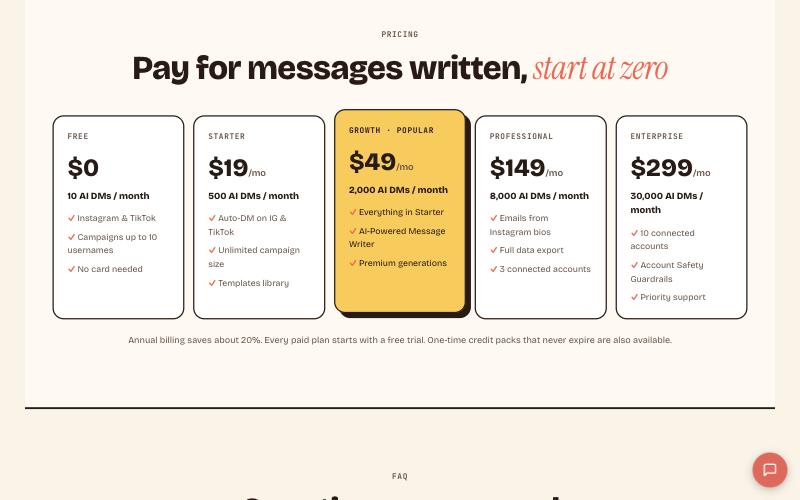
- Extension pricing: 10 free AI DMs a month, then $19 for 500, $49 for 2,000, $149 for 8,000 and $299 for 30,000 AI DMs a month.
- Safety: platform automation runs on official APIs. The extension uses your own browser session, never asks for your password and ships with Safety Mode on.
- Main limit: DMpro does not schedule or publish posts, and automated outreach can still trip a platform’s anti-spam systems.
DMpro at a Glance
| DMpro platform | DMpro Chrome extension | |
|---|---|---|
| Job | Automate replies to DMs, comments and mentions | Send personal first DMs to profiles you pick |
| Channels | Instagram, TikTok, LinkedIn, WhatsApp, Telegram, Messenger | Instagram and TikTok |
| How it connects | Official platform APIs, with permissions you approve | Your own logged-in Instagram or TikTok session in Chrome, Brave or Edge on desktop |
| How you build | Describe the flow in plain English | Write a prompt once, with variables like name and bio |
| Pricing meter | Conversations (one unique person messaged in 30 days) | AI messages (credits) |
| Free plan | 250 conversations per month | 10 AI DMs per month |
| Paid plans | Pro from $19 per month ($15 billed annually) | Starter $19, Growth $49, Professional $149, Enterprise $299 per month |
| Best for | Creators, stores, coaches, agencies that sell through DMs | Brands, creators, sales teams, recruiters and agencies doing outreach |
The Two DMpro Products
DMpro describes the platform as defense and the extension as offense, and the split is useful. The platform reacts: someone comments, DMs or mentions you, and it replies. The extension acts: you choose the people, and it opens the conversation. They have separate pricing, separate safety profiles and separate help centers, so we review them separately below.
Part 1: The DMpro Platform
What it does
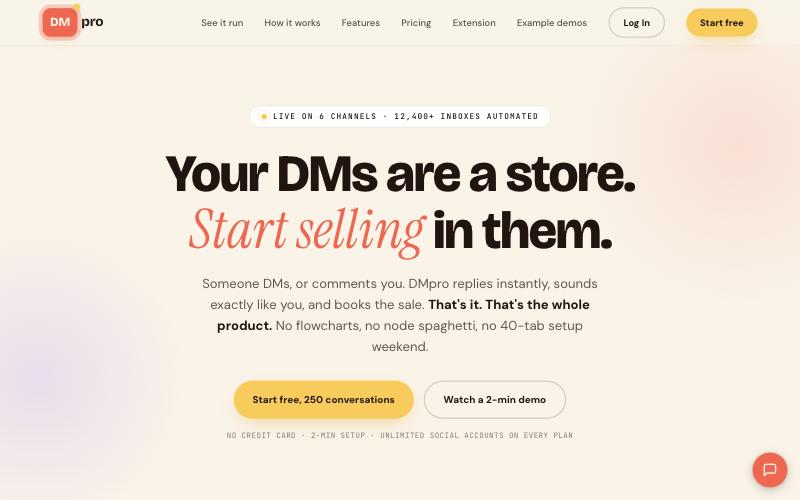
You connect your social accounts, tell the AI what you want in plain English, and DMpro watches your DMs, comments and mentions and replies in seconds, in your tone. It can qualify a lead, ask the questions you would ask, capture an email, send a product card from your store, share a booking link or tag a lead for follow-up, then attribute the sale back to the exact conversation.
How it works
- Connect. Link your social accounts and, if you sell products, your store. DMpro says it connects through the official APIs for Instagram, Facebook Messenger, WhatsApp, Telegram, LinkedIn and TikTok, with permissions you approve.
- Describe. Type what you want, for example “when someone comments PRICE on my reel, DM them the pricing link and tag them as a hot lead”. The AI builds the trigger, actions and tags, and you can edit by typing.
- Let it run. DMpro watches DMs, comments and mentions and replies instantly.
- Qualify and hand off. The AI asks your questions, captures emails and passes the conversation to you when it should. A refund request, for example, is escalated to you and automation pauses on that thread.
- Track. Sales from connected stores are tracked back to the exact DM.
Channels and what each supports
| Channel | DMs | Comments |
|---|---|---|
| Yes | Yes | |
| TikTok | Yes | Yes |
| Messenger | Yes | Yes |
| Yes | Not listed | |
| Yes | Not listed | |
| Telegram | Yes | Not listed |
Mentions are covered as well. DMpro’s own example is an Instagram story mention that triggers a thank-you DM with a discount code.
The AI flow builder and 65 example flows
Instead of a canvas of nodes, you describe the outcome in one sentence. DMpro’s website shows 65 example flows, each one a sentence a real user typed, grouped in seven categories. The help center documents the building blocks behind them: triggers such as a comment on a post, a direct message or a story reply, actions such as sending a DM, an AI response or a product card, and logic such as delays and conditions.
Replies in your voice, in 180+ languages
You train the AI on your tone, and it replies the way you would. DMs can be translated into 180+ languages, with replies translated back for you. The help center also describes uploading context documents, such as an FAQ, so the AI answers from your own material. AI usage is billed at raw OpenAI token cost with no markup, and DMpro says a typical reply costs a fraction of a cent.
Stores, payments, bookings and attribution
DMpro connects to stores such as Shopify and WooCommerce, payment tools such as Stripe, booking tools such as Calendly and Cal.com, affiliate programs such as Amazon Associates, and newsletter, course and link-in-bio platforms. You can also upload a custom catalog as CSV, Excel, XML or JSON. The AI uses these to send live product cards and checkout links, and revenue is tracked back to the DM that started the sale. Affiliate link clicks can be tracked per campaign.
Teams, A/B tests and CRM sync
On Pro, DMpro adds a campaign manager with multi-step outreach sequences, A/B tests, CRM sync to HubSpot, Salesforce and Notion, and a shared inbox with assignments, internal notes and status labels. Pro also includes access to the Ainfluencer marketplace for creator and brand collaboration.
Rules set by the networks
Automation does not change what Meta allows. DMpro’s help center notes that Instagram automation needs a Business or Creator account linked to a Facebook Page, that personal accounts cannot receive API messages, that an automated private reply to a comment is limited to one per comment, and that user-initiated conversations follow a 24-hour messaging window. Plan your flows around these limits.
Migration and enterprise options
If you already run flows elsewhere, DMpro offers a one-click importer for a ManyChat export and free migration support for agencies moving three or more client accounts. Enterprise adds SSO and SAML, a SOC 2 Type II review, dedicated infrastructure and sending IPs, a white-label option, custom AI fine-tuning and a dedicated success manager.
Part 2: The DMpro Chrome Extension
What it does
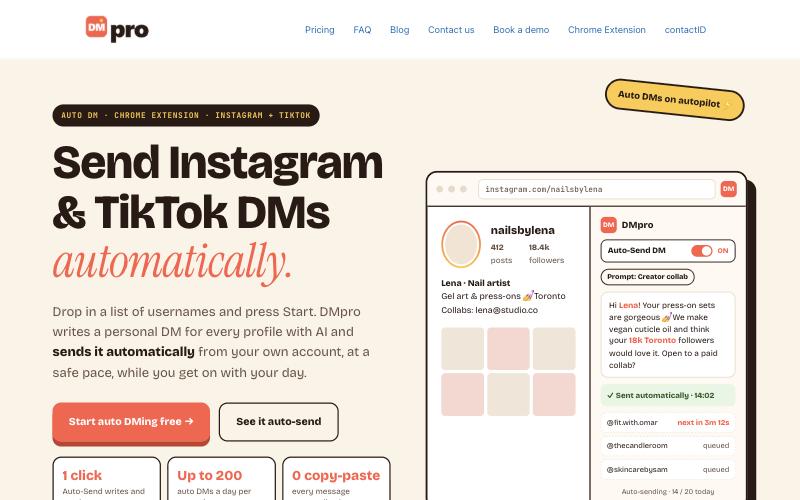
The extension reads a public Instagram or TikTok profile, writes a personalized DM with AI from your own prompt, and sends it from your own account. You can work one profile at a time, turn on Auto-Send to merge Generate and Send into one click, or run a campaign from a list of usernames.
Three ways to send
| Mode | How it works | Good for |
|---|---|---|
| One-off DM | Browse to a profile, click Generate, review the message, click Send | 1 to 10 DMs at a time, or testing a new prompt |
| Auto-Send | Generate writes and sends the DM in one click. It still respects Safety Mode’s daily cap and delays, and there is no undo | High-volume sessions once your prompt is proven |
| Campaign | Paste or import a list of usernames and the extension sends one at a time over hours or days | 30 to 500+ usernames |
Prompts, variables and templates
You write the instructions once, and DMpro uses them to write a different message for each profile. Prompts support variables such as the person’s name, bio, follower count and platform, plus your own details such as your display name and niche. Prompts are stored on DMpro’s server, so you can use them from any browser. The template library has 20+ pre-built prompts, including brand outreach, creator collaboration pitches by niche and sales pitches. During onboarding you pick a persona (Brand, Creator or Business), which seeds a starter prompt, and you can connect an Ainfluencer or brandID profile.
Bulk campaigns
- Usernames. Paste one per line or comma-separated, or import a CSV. Duplicates are removed, invalid entries are listed so you can fix them, and DMpro warns you if a username is already in another campaign. Professional and above can sync usernames from Ainfluencer.
- One platform per campaign. A campaign targets Instagram or TikTok, not both. Create two campaigns to do both.
- Daily limit. You can set 1 to 200 DMs a day per campaign. DMpro recommends 20 to 30 for safety.
- Delays. Set a minimum and maximum, and DMpro randomizes each gap. The campaign form defaults to 2 to 5 minutes.
- Statuses. Draft, running, paused, completed, stopped or out of credits, with live counts of sent, failed, skipped and remaining.
Safety Mode
Safety Mode is on by default. DMpro describes it as a cap of 20 DMs a day per campaign, randomized gaps of 3 to 6 minutes, and an automatic pause the moment a platform shows a block signal. Enterprise adds Account Safety Guardrails, and server-side guardrails pause and flag runaway sending. DMpro is direct about the limit: automated messaging can still trip a platform’s anti-spam systems, and personal, relevant messages lower the risk further.
Emails from bios and your data
When an Instagram bio lists an email, DMpro saves it to your contacts as a second channel, with CSV export. This is Instagram only and on Professional and Enterprise. The extension works through the session already open in your browser and never asks for or stores your social password. It runs on Chrome and other Chromium browsers such as Brave and Edge, on desktop.
DMpro Pricing
Platform pricing
| Plan | Price | What you get |
|---|---|---|
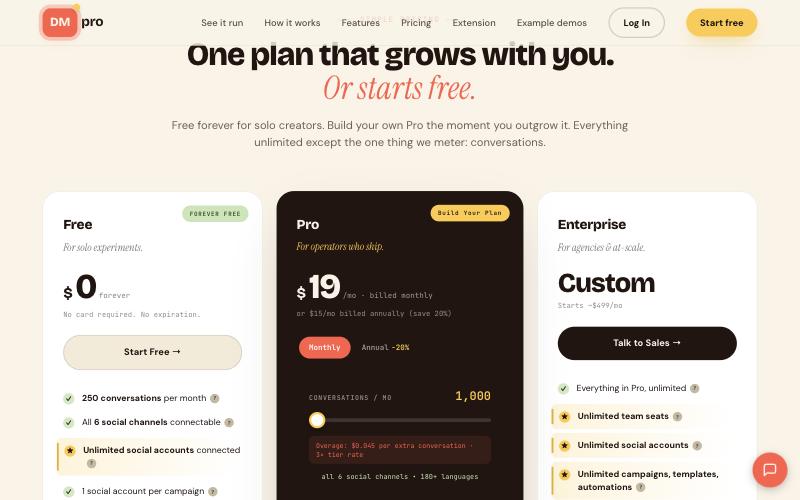
| Free | $0 forever, no card | 250 conversations per month, all six channels connectable, unlimited social accounts, campaigns, templates and automations, 180+ language translation, $3 of AI credits each month, 1 team seat. Each campaign uses one social account at a time. |
| Pro | $19 per month billed monthly, or $15 per month billed annually (save 20%) | From 1,000 conversations per month, with a slider up to 30,000. Unlimited team seats and accounts, accounts can be combined in a campaign, campaign manager, A/B tests, CRM sync, shared inbox, Ainfluencer collaboration, priority support. A $1 first month is offered. |
| Enterprise | Custom, from about $499 per month | Everything in Pro at unlimited scale, plus SSO and SAML, dedicated infrastructure, white label, custom AI fine-tuning and a dedicated success manager. |
A conversation is one unique person you message within 30 days. DMing the same person 50 times still counts as one, and you are not charged per message or per contact. On the 1,000-conversation tier, DMpro lists an overage of $0.045 per extra conversation, so 200 extra conversations would add about $9. A higher tier on the slider may be cheaper, so check the plan page. AI is billed separately at raw token cost, and DMpro says heavy Pro users typically spend about $5 to $15 per month.
Extension pricing
| Plan | Monthly | Annual (per DMpro’s help center) | AI DMs per month | Key additions |
|---|---|---|---|---|
| Free | $0 | n/a | 10 | Campaigns up to 10 usernames, one active prompt at a time, basic templates |
| Starter | $19 | $182 per year ($15.17 per month) | 500 | Auto-DM on Instagram and TikTok, unlimited campaign size, templates library |
| Growth | $49 | $470 per year ($39.17 per month) | 2,000 | AI-Powered Message Writer, premium generations |
| Professional | $149 | $950 per year ($79.17 per month) | 8,000 | Emails from bios, full data export, 3 connected accounts |
| Enterprise | $299 | $2,390 per year ($199.17 per month) | 30,000 (50,000 on annual billing) | 10 connected accounts, Account Safety Guardrails, priority support |
Every paid plan starts with a free trial, and one-time credit packs that never expire are available. The help center lists trials of 3 days on monthly plans and 5 days on annual plans, with message caps from 25 on Starter up to 400 on Enterprise annual. Free credits reset monthly and do not carry over, and an anti-abuse check blocks free credits if the same Instagram handle is registered on another DMpro account. The extension page says annual billing saves about 20%, while the help center’s annual prices show larger savings on Professional and Enterprise, so confirm at checkout.
Is DMpro Safe for Your Accounts?
| Platform (inbox automation) | Extension (outreach) | |
|---|---|---|
| How it connects | Official platform APIs, with permissions you approve | Your own browser session |
| Password needed | No | No |
| Risk profile | Runs inside each platform’s rules and rate limits, which DMpro describes as the approved route | Automated messaging can trip anti-spam systems, so volume and relevance matter |
| Built-in protection | Rate limits, escalation to a human on out-of-scope requests | Safety Mode: daily cap, randomized delays, auto-pause on block signals, server-side guardrails |
| Your move | Respect Meta’s rules on windows and replies | Start small, keep Safety Mode on, send relevant messages |
Our advice: keep the two motions separate, begin with inbox automation, and treat cold outreach as a slow, small-batch channel. See our guide to Instagram DM automation for more on staying safe.
DMpro Pros and Cons
The platform
DMpro Pros
- Free forever plan, no card required
- Six channels in one inbox, on official APIs
- Describe a flow in plain English instead of building nodes
- Unlimited accounts, campaigns, templates and automations
- AI billed at raw token cost, with no markup
- Stores, payments and bookings connected, with sales tracked to the DM
DMpro Cons
- Does not schedule or publish posts
- Only conversations are metered, so a viral spike still raises usage
- LinkedIn, WhatsApp and Telegram are DM-only
- Free plan: 1 social account per campaign and 1 team seat
- Collaboration, CRM sync and A/B tests need Pro
- Meta’s account and messaging-window rules still apply
The extension
DMpro Pros
- AI writes a different message for every profile
- Free tier to test a prompt, and campaigns you can leave running
- Instagram and TikTok in one interface
- Safety Mode on by default, no password required
- Emails from bios on higher plans
DMpro Cons
- Free tier is only 10 AI DMs and 10 usernames per campaign
- Desktop Chromium browsers only, and the browser must stay open for campaigns
- Automated outreach carries account risk
- Emails from bios are Instagram only and Professional and above
- Auto-Send has no undo
Who Should Use DMpro?
| If you are… | Use | Why |
|---|---|---|
| A creator selling products or affiliate links | Platform | Comment-to-DM flows send links instantly, and the free plan lets you test |
| An ecommerce brand on Shopify or WooCommerce | Platform | Live product cards, checkout links and attributed sales inside the chat |
| A coach, salon or local service | Platform | Booking links and lead qualification in the DM |
| A brand pitching creators | Extension, then platform | Personal openers at scale, then automation for the replies |
| A sales team or recruiter | Extension | Reach decision-makers and candidates through public profiles |
| An agency with many clients | Both | Unlimited accounts and seats on Pro, up to 10 connected accounts on extension Enterprise |
| Someone who only needs a post scheduler | Neither | Use a scheduler from our management tools guide |
How to Get Started
Platform
- Step 1. Sign up free at dmpro.brandid.app. No card is needed.
- Step 2. Connect the channel that brings you the most DMs. For Instagram, use a Business or Creator account linked to a Facebook Page.
- Step 3. Connect your store or booking tool.
- Step 4. Describe one flow, such as a keyword comment that sends a link.
- Step 5. Test it from a second account, then go live.
- Step 6. Review conversations weekly, fix the instructions and add the next flow.
The DMpro platform knowledge base documents each trigger, action and setting, channel by channel.
Extension
- Step 1. Install the extension from the DMpro extension page in Chrome, Brave or Edge.
- Step 2. Pick your persona and a starter prompt, or write your own.
- Step 3. Test the prompt on 5 to 10 profiles with the free tier.
- Step 4. Create a campaign, add usernames, set a low daily limit and keep Safety Mode on.
- Step 5. Read your replies and refine the prompt before you scale.
The Cold DM knowledge base covers prompts, campaigns, plans and safety in detail.
DMpro Alternatives
DMpro automates conversations, so you still need a scheduler to publish posts. Buffer, Later, Publer and SocialPilot are covered in our 20 best social media management tools. For more DM automation options, see our guides to the best Instagram automation tools and the best Instagram chatbots.
Final Verdict
DMpro covers both sides of social conversations. The platform is the better-known half: six channels in one inbox, flows you describe in a sentence, official-API automation and a free plan to test with. The extension is the offensive half: AI-written openers, paced campaigns, Safety Mode and a free tier to prove a prompt before you pay.
Their limits are clear. Neither schedules posts, the platform meters conversations, and outreach automation always carries some account risk. Start with the platform if people already message you, start with the extension if you need to reach people first, and add a scheduler for publishing. Use the free tiers before you spend.
DMpro Review FAQs
What is DMpro?
DMpro is two products. The DMpro platform automates replies to DMs, comments and mentions on six channels. The DMpro Chrome extension writes and sends personalized first DMs on Instagram and TikTok.
Is DMpro free?
Yes. The platform has a forever-free plan with 250 conversations a month. The extension has a free tier of 10 AI DMs a month. Both need no credit card.
How much does the DMpro platform cost?
Free is $0. Pro is $19 per month, or $15 per month billed annually, starting at 1,000 conversations and scaling up to 30,000. Enterprise is custom, from about $499 per month.
How much does the DMpro extension cost?
Free gives 10 AI DMs a month. Paid plans are Starter at $19 for 500, Growth at $49 for 2,000, Professional at $149 for 8,000 and Enterprise at $299 for 30,000 AI DMs a month, with annual billing available.
Which channels does the platform support?
Instagram, TikTok, LinkedIn, WhatsApp, Telegram and Messenger. Instagram, TikTok and Messenger support DMs and comments, while LinkedIn, WhatsApp and Telegram are listed for DMs.
Does DMpro schedule or publish posts?
No. DMpro handles conversations. To schedule posts, pair it with a scheduler.
Is DMpro safe to use on Instagram?
The platform runs on official APIs and within rate limits. The extension works through your own browser session with Safety Mode on by default, but DMpro says automated messaging can still trip anti-spam systems, so start small and keep messages relevant.
Does the extension need my Instagram password?
No. It uses the Instagram or TikTok session already open in your browser and never asks for or stores your social passwords.
How many DMs can the extension send a day?
Safety Mode caps campaigns at 20 DMs a day by default. Campaigns can be set from 1 to 200 a day, and DMpro recommends staying at 20 to 30.
Which browsers does the extension support?
Chrome and other Chromium browsers such as Brave and Edge, on desktop. You can view the dashboard on mobile, but sending needs the desktop extension.
Can I move my flows from another tool?
The platform offers a one-click importer for a ManyChat export, and free migration support for agencies moving three or more client accounts.
Who is DMpro best for?
Creators, ecommerce brands, coaches, salons and agencies that sell through DMs use the platform. Brands, creators, sales teams and recruiters doing outreach use the extension.
 Summarize this article with: