
How to compare plans and upgrade
Compare Starter, Growth, Professional and Enterprise, choose monthly, annual or one-time, and start your plan. About five minutes.
Before you start
- A card for Stripe checkout (you enter it on Stripe’s page, never in DMpro)
- A rough idea of how many DMs you send a month
Open the pricing page
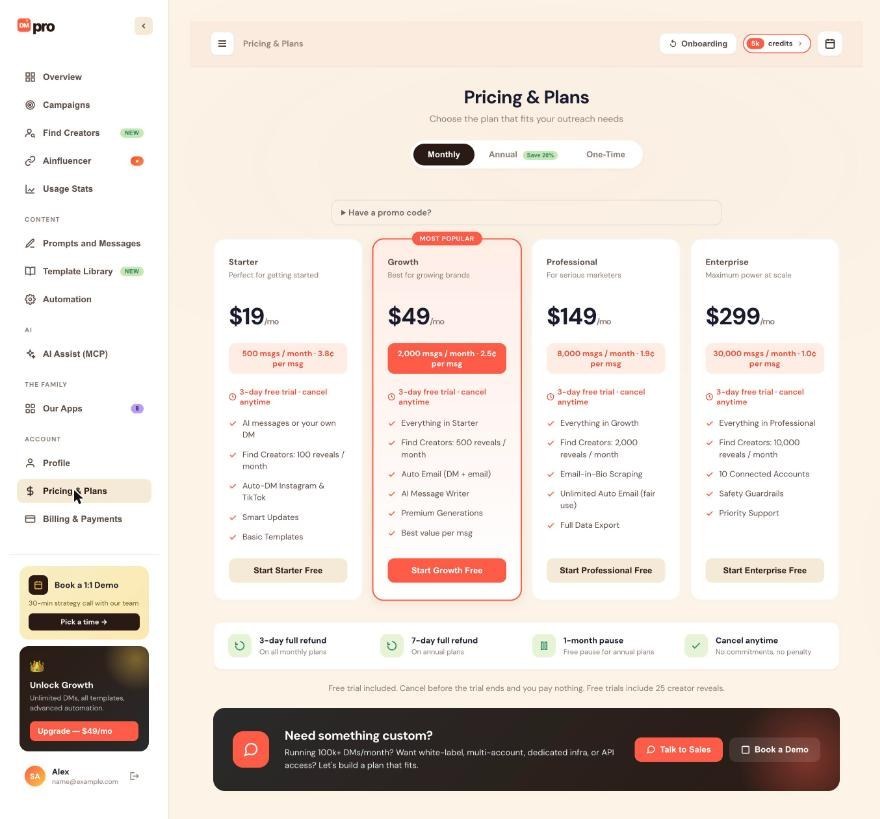
Click Pricing & Plans in the left menu under ACCOUNT. The credits pill, the Upgrade button in the sidebar and Get more credits on Overview all lead here too.
Choose how you pay
At the top, the toggle offers Monthly, Annual (labelled Save 30%) and One-Time. Monthly and annual are subscriptions with credits that refill each period. One-Time is a credit package you buy without subscribing. One-time credits stay in your account until you use them.
Compare the four plans
- Starter $19/mo: 500 msgs a month (3.8 cents per msg), AI messages or your own DM, Find Creators 100 reveals a month, Auto-DM on Instagram and TikTok.
- Growth $49/mo (MOST POPULAR): 2,000 msgs (2.5 cents), everything in Starter, 500 reveals, Auto Email (DM + email), AI Message Writer, Premium Generations.
- Professional $149/mo: 8,000 msgs (1.9 cents), everything in Growth, 2,000 reveals, Email-in-Bio Scraping, Unlimited Auto Email (fair use), Full Data Export.
- Enterprise $299/mo: 30,000 msgs (1.0 cent), everything in Professional, 10,000 reveals, 10 Connected Accounts, Safety Guardrails, Priority Support.
One credit is one AI-written message or one own DM sent, so match the monthly number to how many messages you send. Auto Email starts at Growth.
Read the trial and refund strip
Each card says “3-day free trial, cancel anytime”. Under the cards, a strip lists a 3-day full refund on monthly plans, a 7-day full refund on annual plans, a 1-month pause (free pause for annual plans) and cancel anytime with no penalty. A line below says that if you cancel before the trial ends you pay nothing, and that free trials include 25 creator reveals.
Add a promo code if you have one
Click Have a promo code? to expand it and type the code before you pick a plan. Percent-off and dollar-off codes are applied at checkout.
Start or upgrade your plan
Click the button on the plan you want, for example Start Growth Free. DMpro sends you to Stripe’s checkout, where you enter or confirm your card and click the pay button.
Confirm it worked
You come back to the dashboard with a “Payment successful! Your plan is now active.” message. Your credits pill and the Plan card on Overview update within a minute. If they do not, reload the page.
Tips
- Growth is the cheapest plan with Auto Email, and the price per message drops as you move up.
- Credits from a subscription do not roll over, but one-time credits do not expire, so a one-time package is a good way to cover a burst.
If something goes wrong
My card was declined at checkout
Stripe shows the reason right away (declined, expired, insufficient funds). Try again with the same or a different card. DMpro charges nothing until Stripe confirms the payment.
I paid but my plan or credits did not change
Wait a minute, then reload the dashboard. Check that you are signed in to the same account you paid with. If nothing changes, contact support with the payment date and amount.
I upgraded by mistake
Check the refund strip on Pricing & Plans (3 days on monthly plans, 7 days on annual plans), then contact support with your account email and the payment details.
Related how-to guides
Still stuck? We’re happy to help.
Create your account, or reach out to support.




