
How to downgrade or cancel your plan
Move to a cheaper plan or stop your subscription, and know exactly what you keep. About three minutes.
Before you start
- An active paid plan: the downgrade and cancel controls do not appear on a Free account
Choose between downgrade, pause and cancel
- Downgrade: move to a cheaper paid plan. You keep a subscription.
- Pause: a temporary break. See “How to pause your subscription”.
- Cancel: stop renewing. You return to the Free plan when your paid period ends.
Both a downgrade and a cancellation take effect at the end of your current period, so you keep what you paid for until then.
Open your billing page
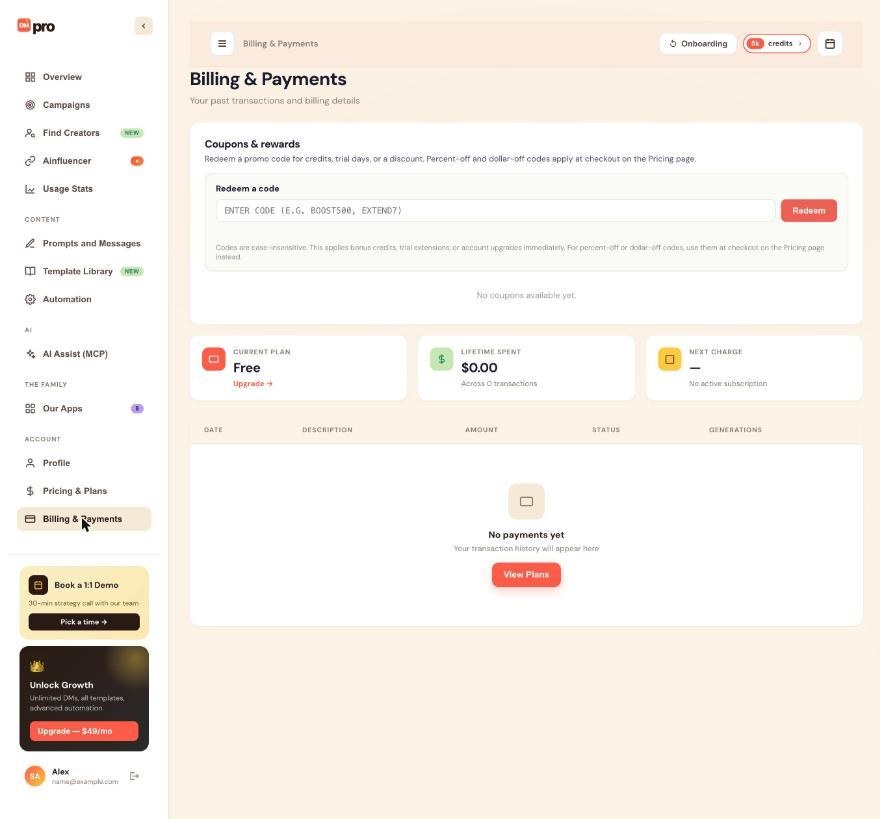
Click Billing & Payments in the left menu. The Current plan card shows your plan and the Next charge card shows when you will next be billed. Your subscription controls are on this page.
To downgrade: pick the lower plan
Click Downgrade to followed by the plan name, then Confirm. DMpro shows when the switch happens. Until that date you keep your current plan and its credits. On that date your subscription credits reset to the new plan’s amount and features the cheaper plan lacks switch off, for example Auto Email when you drop below Growth. Your one-time credits stay.
To cancel: use Cancel Subscription
Click Cancel Subscription. You can give a reason and a comment, both optional. Leave Cancel at period end selected. You keep full access until the last day, no further charge is made, and you then drop to Free.
Understand what happens to your credits
- Subscription credits can be used until the period ends, then they zero out.
- One-time credits stay in your account forever.
- Prompts, own DMs, campaigns and settings are kept.
- A campaign that runs out of credits pauses as Out of Credits. Nobody is skipped.
Undo it before it takes effect
Until the end of the period, a banner on Billing & Payments shows the pending change. Click Undo Downgrade or Undo Cancellation and your subscription continues on your current plan with no interruption. After the change has happened, you can pick a plan again any time on Pricing & Plans.
Tips
- Refund windows: the Pricing & Plans page lists a 3-day full refund on monthly plans and a 7-day full refund on annual plans. Contact support inside that window.
- If you want to leave DMpro for good, cancel first and then follow “How to delete your DMpro account”. Deleting removes your remaining credits.
If something goes wrong
I cannot find a cancel or downgrade button
Those controls show only on accounts with an active paid plan. On Free, there is nothing to cancel. If you are on a paid plan and still cannot find them, contact support.
I was charged after I cancelled
Check the date on your cancellation. If it was set to cancel at period end, the final charge may be from before that. Compare the charge on Billing & Payments with your bank statement and contact support with the details. Do not start a chargeback before you have written to support.
My credits disappeared after the period ended
Subscription credits zero out when the paid period ends. Credits from one-time packages stay. Subscribe again from Pricing & Plans to get a fresh monthly amount.
Related how-to guides
Still stuck? We’re happy to help.
Create your account, or reach out to support.




