
How to compare plans and upgrade
See what Free, Pro and Enterprise include, choose the right size for Pro, and upgrade when you are ready.
Before you start
- A DMpro account
- A payment card, only if you decide to upgrade to Pro
Open Plans
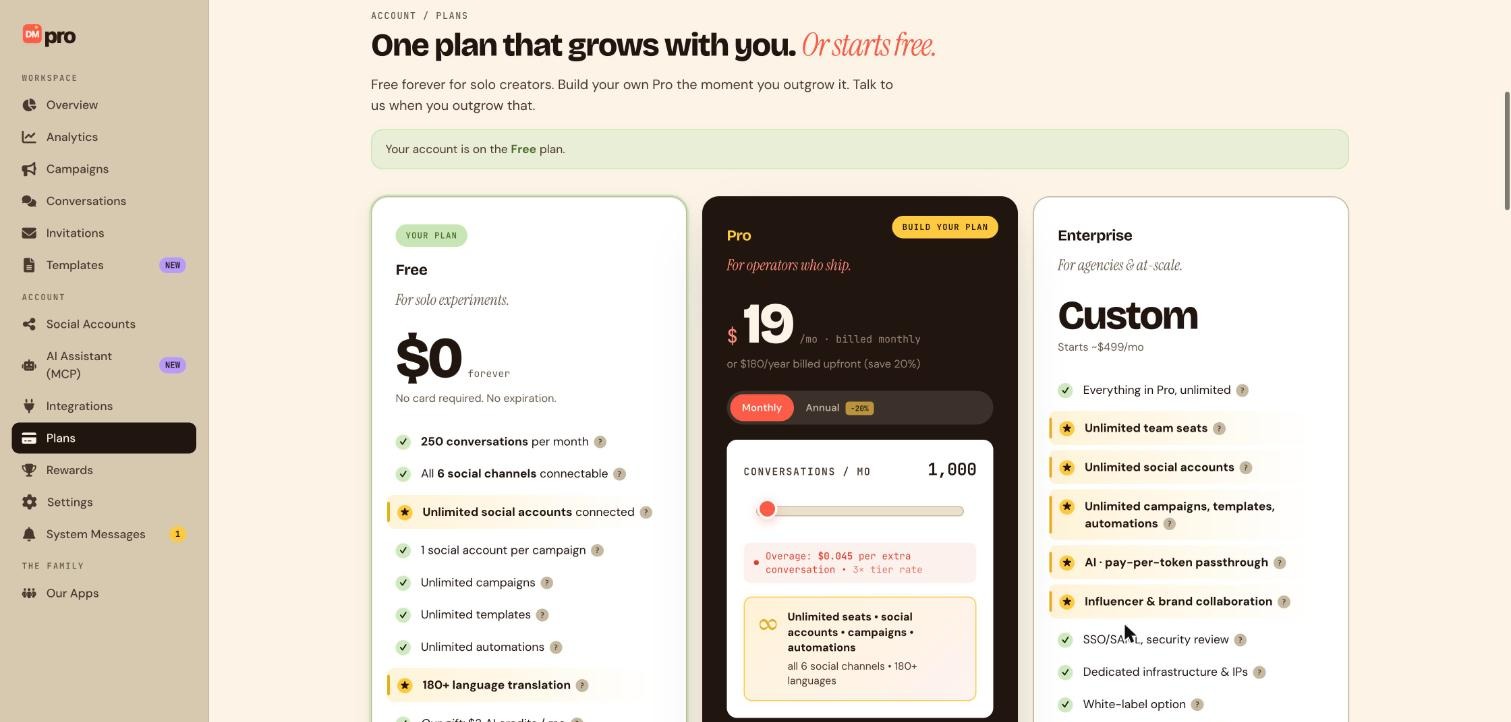
Click Plans in the sidebar. A green banner at the top tells you which plan your account is on right now, for example Your account is on the Free plan. Below it are three cards: Free, Pro and Enterprise.
Read the Free card
Free costs $0 forever, with no card required. It includes 250 conversations per month, unlimited social accounts connected, 1 social account per campaign, unlimited campaigns, templates and automations, translation into 180+ languages, $3 of AI credits per month and 1 team seat.
The card lists all 6 social channels, but today only Instagram, TikTok, Telegram and Discord can be connected. Facebook, WhatsApp and LinkedIn are coming soon.
Read the Pro card
Pro is $19 per month billed monthly, or $180 per year billed upfront, which saves 20 percent. Use the Monthly and Annual switch to see each. Pro is built around a Conversations / mo slider that starts at 1,000. It adds unlimited seats, social accounts, campaigns and automations, collaboration with other accounts, and AI that you pay for per token with no markup. The card also shows the overage rate for the tier you choose.
A conversation is one unique person you message in a rolling 30 day window, however many messages you send them.
Look at Enterprise
Enterprise is custom pricing, starting around $499 per month. It is for agencies and larger teams and adds things like SSO and security review, dedicated infrastructure and a white-label option. Use the contact option on its card to talk to the team rather than checking out.
Pick your Pro size
Move the conversations slider to a number that fits your audience. Start with your current usage: the Conversations this month card on Overview shows how many you use out of your limit. Watch the price on the card after you move the slider, and choose Monthly or Annual.
Upgrade
When you are ready, use the upgrade button on the Pro card. A secure Stripe checkout opens where you enter your payment method. The plan updates when the payment succeeds, and the sidebar then shows your new plan.
Upgrading charges your card. Check the plan, the billing period (monthly or annual) and the amount on the checkout page before you pay. If you have a gift code, you can enter it at checkout instead of paying the full price.
Tips
- To change or cancel later, use the subscription management option on the Plans page. A downgrade takes effect at the end of the billing period, and campaigns that depend on Pro features, like multi-account campaigns, are switched off if you go over Free limits.
- Annual billing costs less per month but is charged upfront. Choose Monthly if you are unsure.
- Turn on overage billing only if you want DMpro to keep going past your limit and charge you for it. See the guide on overage billing.
If something goes wrong
My card was declined at checkout.
Try again, or use a different payment method. If your bank blocks international or online payments, contact the bank. If it keeps failing, message support from System Messages and mention the problem.
I do not know which slider size to choose.
Start at the default of 1,000 and watch the Conversations meter on Overview for a month. You can change your size later.
I upgraded by mistake.
Open the subscription management option on Plans to stop it renewing, and message support from System Messages with the date of the charge. Refunds are reviewed by the team and are not guaranteed.
Related how-to guides
Still stuck? We’re happy to help.
Create your DMpro account, see pricing, or reach out to support directly.




