
Plans & Billing
Free, Pro, and Enterprise plans, Stripe checkout, overage handling, gift codes, upgrade and downgrade.
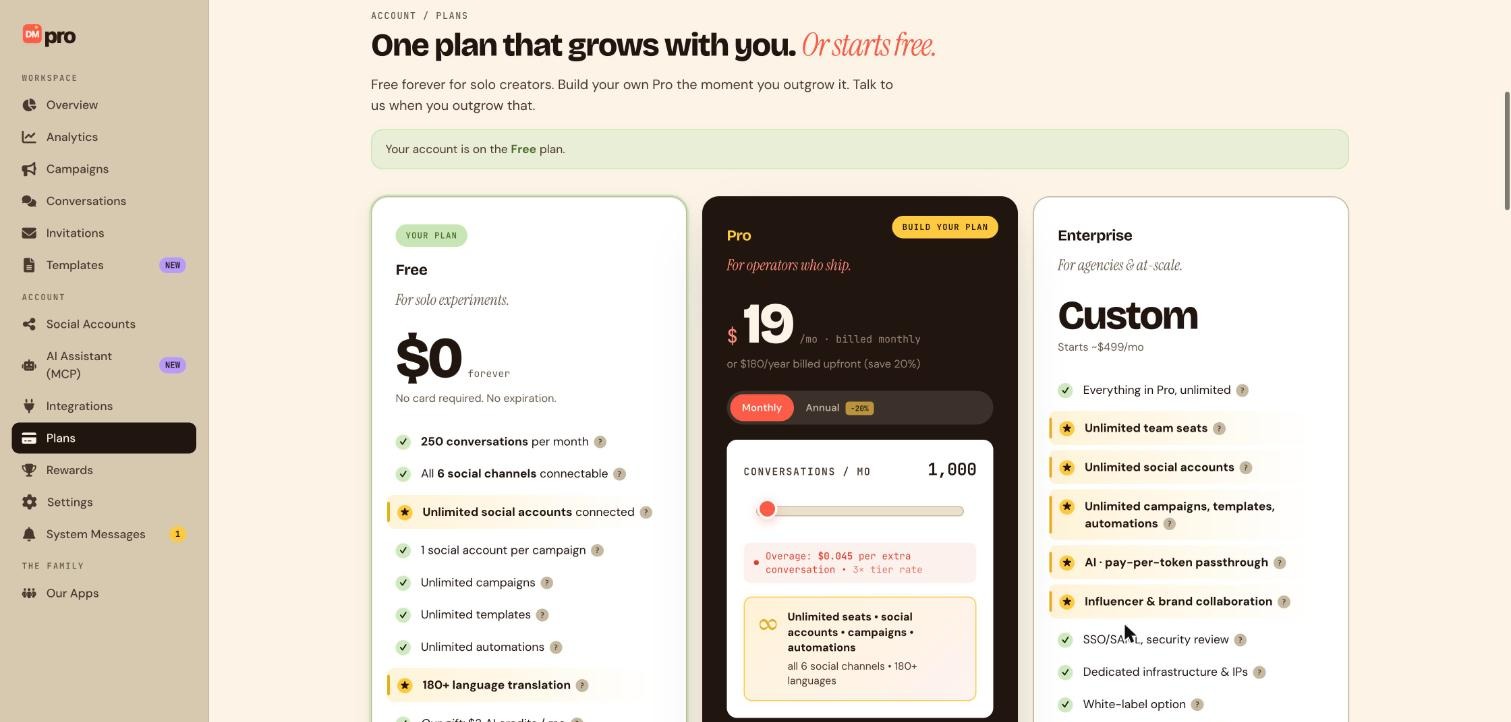
Three plans, Free, Pro (most popular), and Enterprise custom pricing.
Route: /plans, sidebar item Plans (also public at /plans without login).
Compare plans
| Feature | Free | Pro | Enterprise |
|---|---|---|---|
| Conversations/month | 250 | Build Your Plan slider (from 1,000+) | Unlimited / custom |
| Connected accounts | Unlimited | Unlimited | Unlimited |
| Accounts per campaign | 1 | Unlimited | Unlimited |
| Team seats | 1 | Unlimited | Unlimited |
| Collaboration invites | No | Yes | Yes |
| AI credits | $3/mo included | Pay-per-token passthrough | Custom |
| Support | Instant live support | Priority live support | Dedicated CSM |
| Overage | $0.08/conversation | 3× tier rate | Custom |
Upgrade to Pro via Stripe
- Click Plans in sidebar or Upgrade in sidebar footer.
- On
/plans, adjust Build Your Plan conversation slider. - Click Upgrade to Pro: Stripe Checkout opens in new tab.
- Enter payment method, on success, plan updates immediately.
- Return to
/dashboard, sidebar shows Pro plan name.
Conversation overage
- Free plan: after 250 conversations, overage bills at $0.08/conversation via Stripe.
- Pro plan: overage at 3× your tier’s per-conversation rate.
- View usage on Overview meters, amber at 80%, red at 100%.
Overage billing is opt-in. You’re only charged for going over your limits if you turn on overage billing (separately for conversations and for AI credits) and have a payment method on file. If overage isn’t turned on, DMpro simply pauses new responses once you hit the limit until your next billing cycle, upgrade, or gift redemption.
AI credit overage
- Turn on AI credit overage to keep AI Response running after you use up your plan’s monthly AI credits, extra usage bills per token at your plan’s rate.
- Like conversation overage, this is off by default and requires a payment method on file before it can turn on.
- Track AI credit usage on the same Overview meters as conversations.
Redeem gift code
- Navigate to
/gift. - Enter gift code from email or promotion.
- Click Redeem: plan upgrades or credits apply instantly.
- Confirmation shows new plan tier and expiration if applicable.
You can also enter a gift code directly at Stripe checkout while upgrading a plan on /plans, instead of redeeming it separately first. Some gifted plans are one-time (they expire and revert you to Free) while others auto-renew, which needs a payment method on file, the redemption confirmation tells you which applies.
Downgrade
- On
/plans, click Manage subscription (Stripe Customer Portal). - Select Downgrade to Free or lower Pro tier.
- Downgrade takes effect at end of billing period.
- Multi-account campaigns and collaborator invites deactivate if exceeding Free limits, validation warns before downgrade.
- Changed your mind? From Manage subscription you can cancel a pending plan change before it takes effect and stay on your current plan.
Enterprise
- Click Contact sales on Enterprise card.
- Opens System Messages or brandID contact form.
- SSO/SAML, white-label, dedicated infrastructure, custom AI fine-tuning.
—
Still stuck? We’re happy to help.
Create your DMpro account, see pricing, or reach out to support directly.




