
How to use Rewards
Earn score through challenges and invites, then spend it on prizes such as extra conversations.
Before you start
- A DMpro account
- Score, which you earn by completing challenges or when someone signs up with your invite link
Open Rewards
Click Rewards in the sidebar, in the Account section. The Overview page also has a Prizes button on its Your score card.
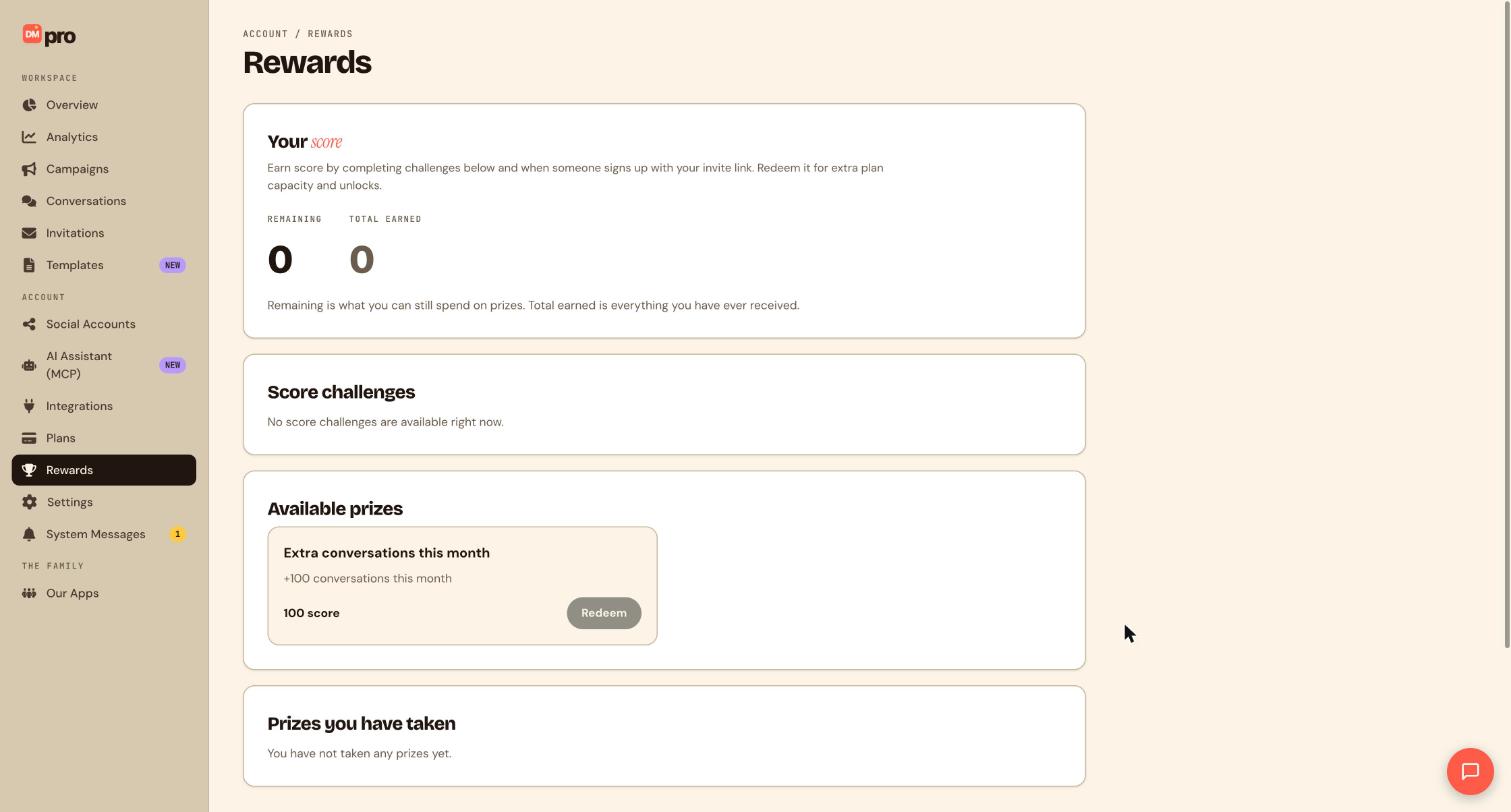
Read Your score
The Your score card has two numbers. Remaining is what you can still spend on prizes, and Total earned is everything you have ever received. Spending score lowers Remaining but never Total earned. For example, if you have earned 150 score in total and spent 100, Remaining is 50 and Total earned stays at 150.
Find ways to earn score
The page explains that you earn score by completing the challenges below and when someone signs up with your invite link. The Score challenges card lists what is open. When there is nothing, it says No score challenges are available right now, so check back later. To share DMpro with others, look for the Share DMpro button at the bottom of the sidebar.
Look at Available prizes
Available prizes lists what you can claim and what each costs. Today the prize is Extra conversations this month: 100 more conversations for the current month, for 100 score. If your Remaining score is lower than the cost, the Redeem button is greyed out. With 100 or more remaining it becomes available, and you can redeem again later once you have earned another 100.
Redeem a prize
When you have enough score, click Redeem on the prize.
Redeeming spends the score straight away and you cannot take it back. Check the prize and its cost first.
Prizes you claim are then listed under Prizes you have taken.
Put the extra conversations to work
Open Overview and look at the Conversations this month card to see your higher limit. Redeemed conversations add capacity for the current month only.
Tips
- Only you can redeem a prize. A connected AI assistant with the Score and rewards permission can see your score and challenges but never redeems a prize.
- Rewards and gift codes are separate. A gift code is redeemed on its own page and is not paid for with score.
- If you hit your conversation limit often, compare Rewards with upgrading your plan.
If something goes wrong
The Redeem button is greyed out.
Your Remaining score is lower than the prize cost. Earn more score, then try again.
There are no score challenges.
Challenges come and go. The page shows No score challenges are available right now when none are open.
I have a question about a specific challenge or prize.
Rewards is a newer area and not every detail is published yet. Message support from System Messages and the team will help.
Related how-to guides
Still stuck? We’re happy to help.
Create your DMpro account, see pricing, or reach out to support directly.




