
How to connect TikTok to DMpro
Authorize your TikTok business account in two quick steps so DMpro can reply to comments and answer messages.
Before you start
- A TikTok Business or Creator account you have admin access to
- A browser that allows popups for DMpro
Check your TikTok account
Use a TikTok Business or Creator account and make sure you are the admin of it. Accounts without Business Messaging eligibility will show an unauthorized error after you approve.
Open Social Accounts
Click Social Accounts in the sidebar. TikTok is the second card and shows NOT CONNECTED until you link an account.
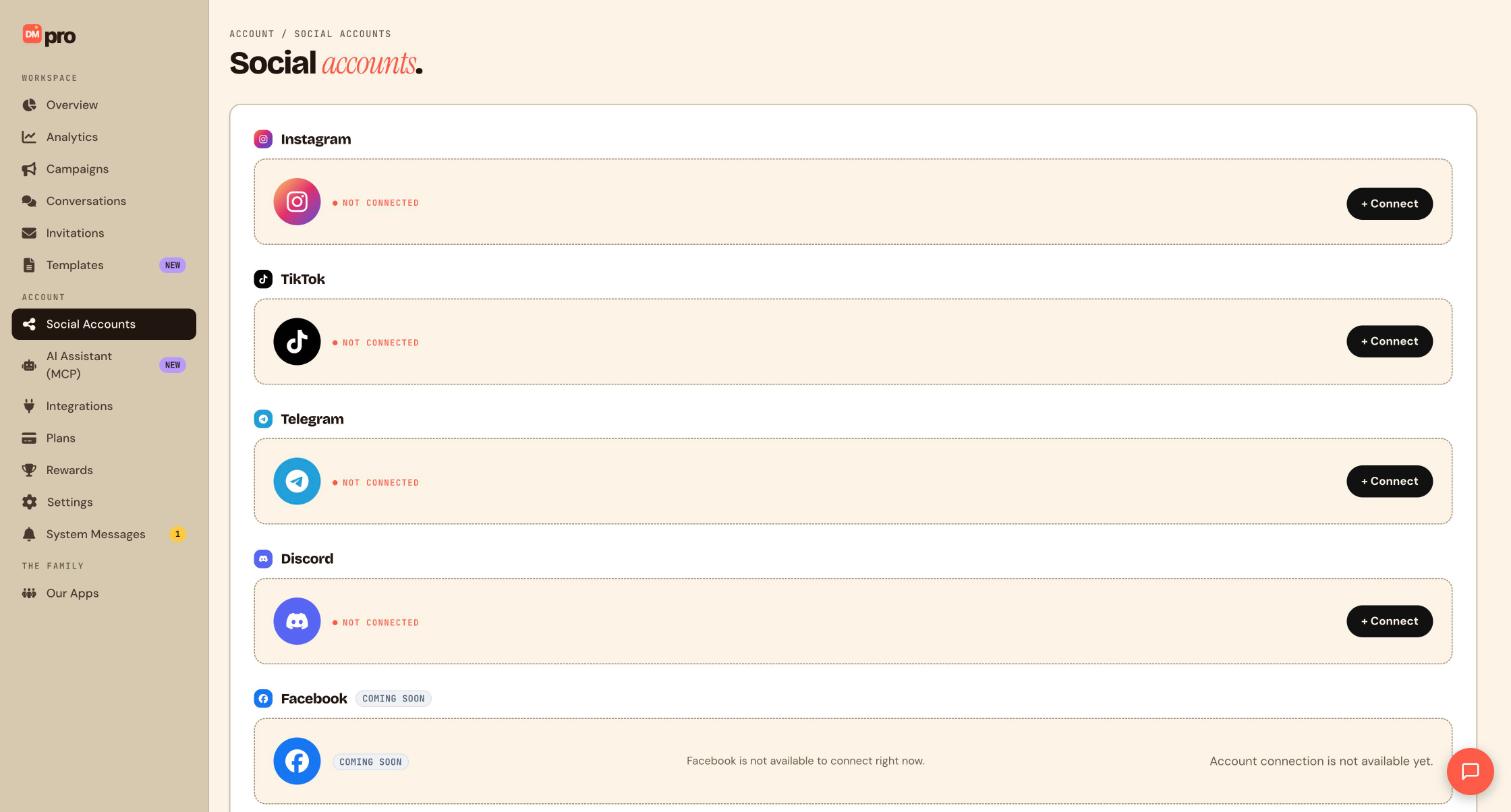
Click Connect on the TikTok card
Click + Connect next to TikTok. This starts a real TikTok login on TikTok’s own screen. DMpro never sees your password, and you can revoke access later from TikTok.
Sign in with the TikTok account you want to automate. Authorizing the wrong account links the wrong account.
Complete both authorizations
TikTok asks twice, one right after the other in the same window:
- The first authorization lets DMpro read comments and reply to them.
- The second, for Business Messaging, lets DMpro answer direct messages and use the Send DM step.
If you only finish the first, comment reply campaigns work but Direct message triggers and Send DM do not appear in the builder. Click + Connect again and finish the second.
Confirm the account is connected
Back on the Social Accounts page, the TikTok card should no longer say NOT CONNECTED and should show your @handle.
Know the TikTok limits before you build
- You can message a fan within 48 hours of their last message to you.
- TikTok allows 10 business replies after each fan message.
- DMs are text only, with no cards, carousels or link buttons.
- Comment replies and comment-to-DM are switched on per account by DMpro. If they are not available for your account, DMpro tells you the reason when you try to save the campaign.
Then build from the Templates page or the campaign builder. Nothing goes live until you publish.
Tips
- Test with a second TikTok account before you publish to real fans.
- Keep TikTok messages short and clear. You get few replies per fan message, so every message should do one job.
- Turn on Workflow paused alerts in Settings, Notifications, to hear about a dropped connection by email.
If something goes wrong
TikTok shows an unauthorized error after I approve.
The account probably lacks Business Messaging eligibility. Check it is a Business or Creator account and that you are its admin, then click + Connect again. If the error persists, contact support through System Messages and include your TikTok handle.
Direct message triggers are missing in the builder.
The second authorization was not completed. Click + Connect again and approve the Business Messaging step as well.
My campaigns paused and the account asks to reconnect.
The TikTok login expired or was revoked. Reconnect from Social Accounts, then open Campaigns and resume anything that paused.
Related how-to guides
Still stuck? We’re happy to help.
Create your DMpro account, see pricing, or reach out to support directly.




