
How to choose Auto-Send or copy and paste
Decide whether DMpro sends each single-profile DM for you or leaves it in the box for you to paste. It takes under a minute to change.
Before you start
- The DMpro extension installed and signed in
Understand the two modes
- Auto-Send (the default): DMpro opens the conversation in your tab, types the message and sends it as soon as it is written or filled in.
- Copy and paste: the message stays in the box. You read it, edit it, copy it and paste it into the person’s DMs yourself.
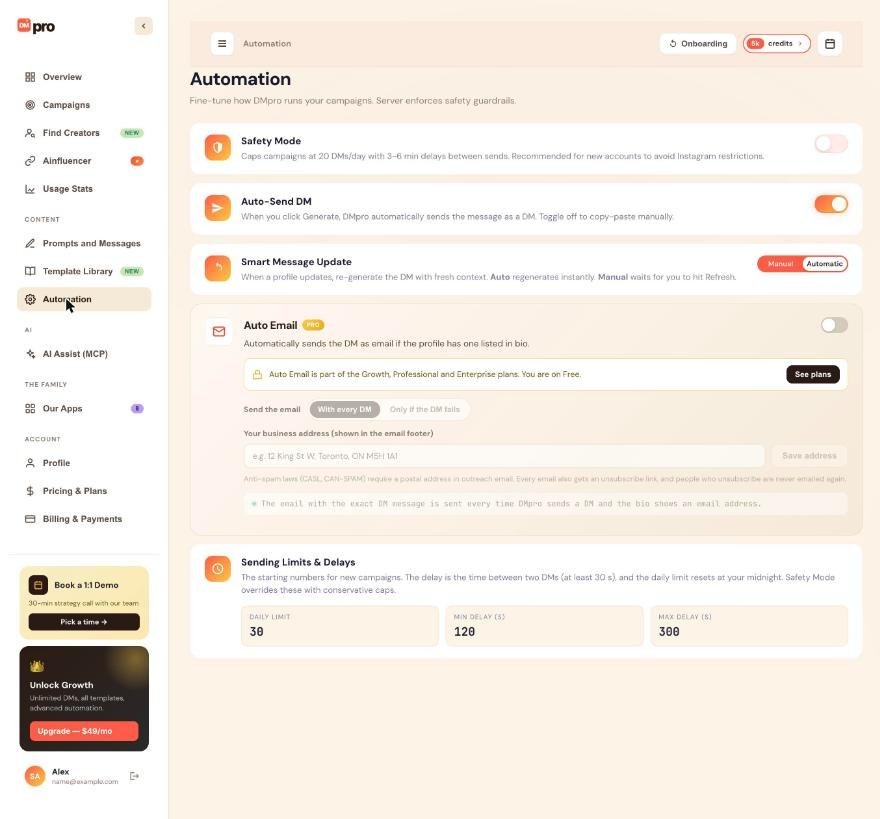
Auto-Send also applies after Generate, Fill in and after Smart Message Update rewrites a message when you click Refresh on a new profile.
Find the switch on the dashboard
In the dashboard, click Automation in the left menu. The Auto-Send DM card says “When you click Generate, DMpro automatically sends the message as a DM. Toggle off to copy-paste manually.” Turn the switch on or off.
Or use the extension
In the extension, the Auto Send DMs switch is on the main screen under the message. It is also under your initials menu, Automation settings, Auto Send DM. All three places show the same setting, because it is saved to your account.
To copy and paste, turn it off and use Copy To Clipboard
With the switch off: click Generate (or Fill in), read the message, edit it if you like, click Copy To Clipboard, open the person’s DMs on Instagram or TikTok, paste and send. Manual mode also works for places DMpro does not send from, such as story replies or a video’s message button.
Compare the costs
- AI Prompt mode: the credit is used when the AI writes the message, so it costs 1 credit either way.
- Your Own DM mode: filling in and copying are free. Only DMs that DMpro sends use 1 credit, so a DM you paste yourself costs nothing.
Know what you give up in manual mode
There is no Auto Email for that message, because Auto Email only works for DMs that DMpro sends. DMpro also does not record the DM, so it cannot check at send time whether you already messaged that person. It still warns you before it writes for someone it already sent a single-profile DM to.
Tips
- A good routine: keep Auto Send DMs off for your first 10 to 20 DMs while you check the wording, then turn it on.
- Campaigns have their own Auto-send DMs checkbox in the campaign form. The single-profile switch does not affect them.
- DMpro sends only to the profile the message was written for. If the tab moved to another profile it stops with “Not sent: this message was written for @name…”.
If something goes wrong
Auto Send is on but nothing is sent.
Read the message in the panel. “Auto-DM failed: Please switch to an Instagram or TikTok tab to send direct messages” means the active tab is not Instagram or TikTok. The profile may not accept DMs from you, or you may be signed out of Instagram or TikTok. The failed-DM guide lists the checks.
A DM went out when I only wanted to test.
Auto Send DMs is on by default. Turn it off before you test a prompt or an own DM. DMpro cannot take back a DM that was sent.
The switch is on one page but off on another.
The setting is saved to your account and shared. Wait a moment for the other place to update, or reload it. If you signed in to the extension with a different DMpro account, it shows that account’s settings.
Related how-to guides
Still stuck? We’re happy to help.
Create your account, or reach out to support.




