
Plans & Pricing
PAYG, Starter, Growth, Pro, and Scale plans, plus free trial credits, extra credit packages, and the AI wallet. Everything you need to pick the right plan and understand exactly what upgrading, downgrading, and topping up actually do.
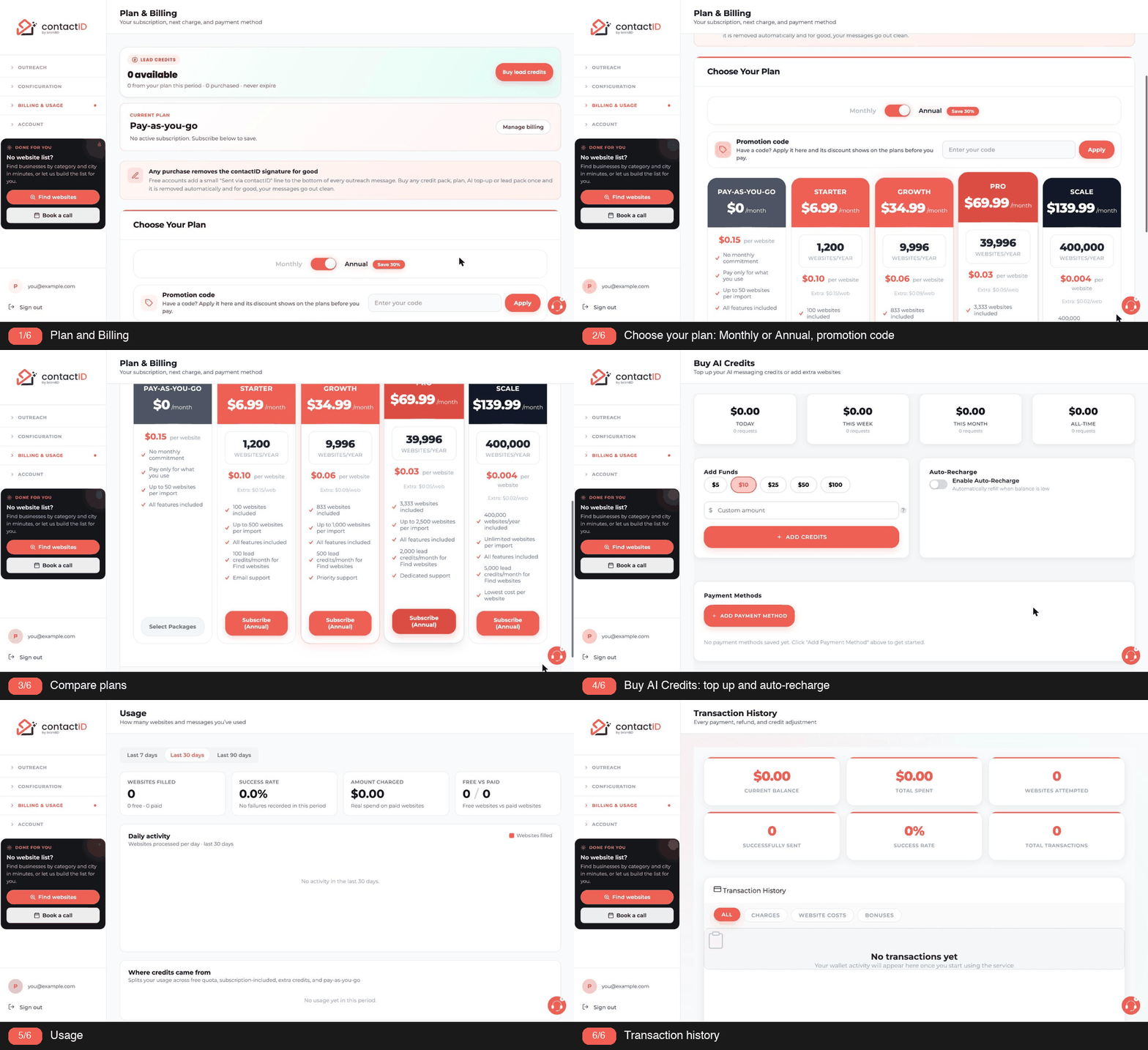
contactID offers five plan tiers. Each is tuned for a different monthly outreach volume. Here is a detailed look at what each includes and how they compare.
1. Pay-As-You-Go (PAYG)
No monthly subscription. You buy credit packages any time, and each website contact costs a fixed rate.
- Base cost: $0.15 per website contact.
- Minimum purchase: $10 for 66 credits.
- Per import: up to 50 websites.
- Included AI wallet: None (top up separately).
- Best for: Occasional users, under 50 sends per month.
PAYG credits never expire; they stay on your account until used.
2. Starter Plan
$9.99 per month (or $6.99/mo billed annually with 30% discount).
- Included: 100 websites per month.
- Effective cost per site: $0.10.
- Extras cost: $0.15 per extra site (matches PAYG rate).
- Lead credits: 100 for Find websites each month (once a year on annual billing).
- Per import: up to 500 websites.
- Best for: Regular users, 50 to 150 sends per month.
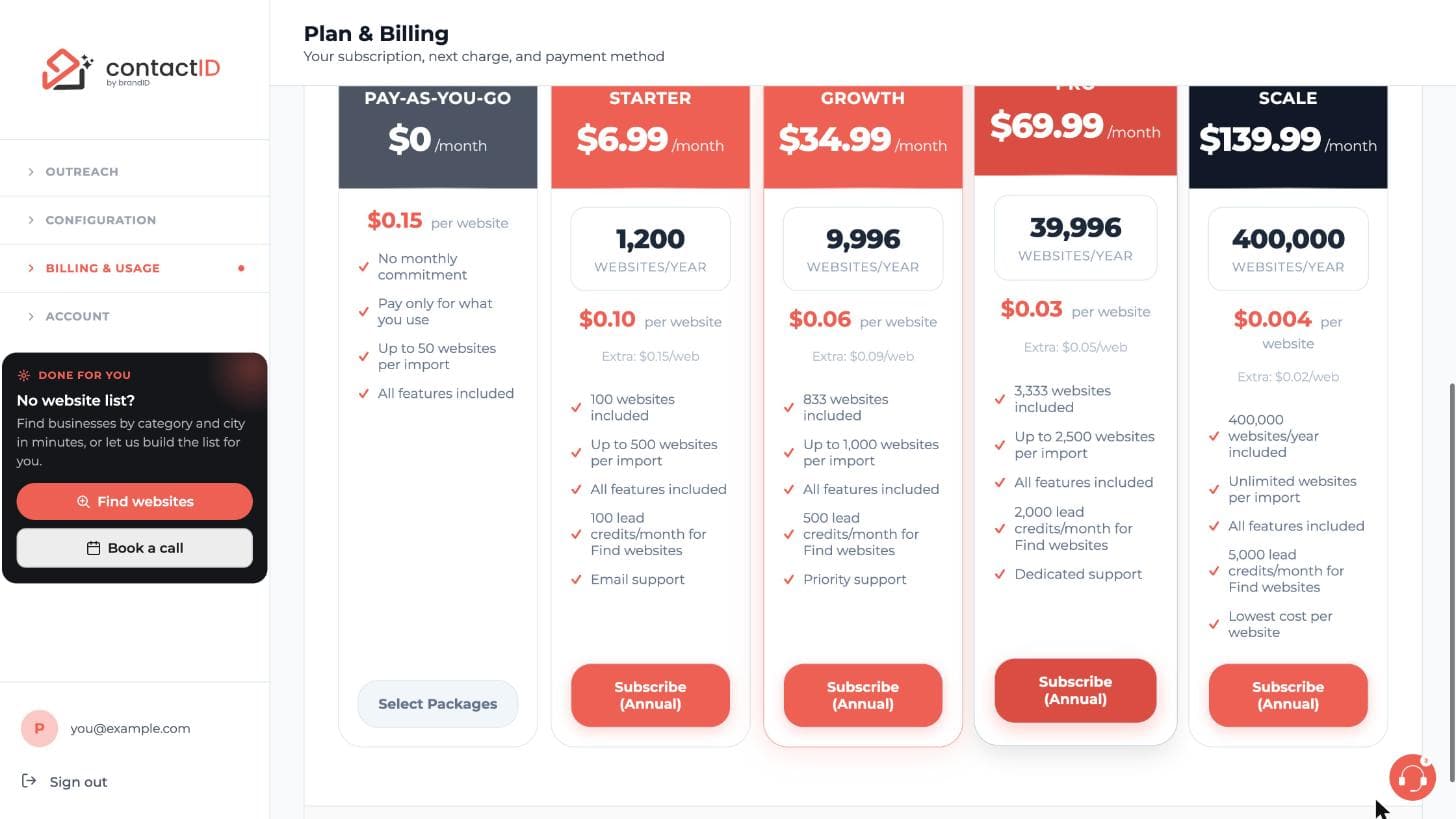
3. Growth Plan
$49.99 per month ($34.99/mo billed annually).
- Included: 833 websites per month.
- Effective cost per site: $0.06.
- Extras cost: $0.09 per extra site.
- Lead credits: 500 for Find websites each month (once a year on annual billing).
- Per import: up to 1,000 websites.
- Best for: Small teams or heavy users, 500 to 1,500 sends per month.
Growth is where cost per send drops meaningfully. It is the most-recommended plan for anyone doing outreach as a core part of their week.
4. Pro Plan
$99.99 per month ($69.99/mo billed annually).
- Included: 3,333 websites per month.
- Effective cost per site: $0.03.
- Extras cost: $0.05 per extra site.
- Lead credits: 2,000 for Find websites each month (once a year on annual billing).
- Per import: up to 2,500 websites.
- Best for: Agencies and heavy operators, 2,000 to 4,000 sends per month.
5. Scale Plan
$199.99 per month ($139.99/mo billed annually).
- Included: 19,999 websites per month.
- Effective cost per site: $0.01.
- Extras cost: $0.02 per extra site.
- Lead credits: 5,000 for Find websites each month (once a year on annual billing).
- Per import: unlimited.
- Annual billing: 400,000 websites for the year at $0.004 per website.
- Best for: Very high volume operators, 10,000+ sends per month.
6. How To Compare Plans
The right plan is the smallest one that covers your monthly volume. To pick:
- Estimate your typical monthly send count.
- Find the smallest plan whose included count covers your estimate. Busy months are covered by extra credits, and included credits you do not use roll into your extra credits at renewal.
- Compare effective cost per site. Higher tiers have lower per-site cost.
Each plan in the plan picker shows its per-website price, so you can compare plans side by side.
7. Free Tier
Every new account starts with 10 free credits. These are separate from any plan and never expire. They exist so you can test contactID end-to-end before committing to any paid plan.
8. Changing Plans
Upgrade any time; the change is immediate. There is no direct downgrade: cancel your plan and subscribe to the lower one when the current period ends. See the articles on upgrading and downgrading for exactly what happens to your credits.
Related questions:
Upgrading takes a minute and is safe: your plan changes only when the payment succeeds.
1. Open The Plan Picker
In the extension, the Choose your plan window opens on its own when you have no website credits left (when you add websites, when you press Start, or during a run) and when you press Start with fewer credits than queued websites. It also opens from Upgrade on the low-credits card on the Send tab and from Remove Branded Signature From Message on the Agent tab. The credits meter, the “Remove the signature” card on the Send tab and Pricing & Plans in the account menu open the same plans on the dashboard’s Plan & Billing page. The picker shows your current plan, a Monthly / Annual switch (annual is 30% cheaper), the five plans with their websites, per-website price, extra price, per-import limit and support level, and the pay-as-you-go packages.
2. Checkout
Subscribe opens the dashboard’s plans, where Stripe Checkout takes the card and first-time subscribers pay the plan price. If you already have a plan, the higher plans show Upgrade instead. The upgrade window says what is charged today, with a code you applied counted in: on the same billing cycle, the difference for the rest of the billing period, and your billing date stays the same; a move to the other billing cycle (Monthly to Annual, or the other way) starts a new billing period today and charges its first month or year, less the unused time of your current plan. The unused time of your current plan is always credited at the price you paid for it: a discount that came later (an offer to stay) or a lower plan you scheduled for the next renewal does not change that, and a payment that was refunded is not credited. Confirm, and the card on file is charged right away, the amount the window showed (it is checked again when the window stays open over 25 minutes).
A promotion code goes in the Promotion code box above the plans before you click Upgrade; the upgrade window then shows it and what it takes off (see How To Use A Promotion Code?).
The window waits while a plan payment is due (“Your last plan payment did not go through. Update your payment method so it is paid, then change your plan.”) and right after a renewal until its payment is made and recorded: Stripe takes up to an hour to charge a renewal (“Your plan just renewed and its payment is still being processed, which can take up to an hour. Try again once it is paid.”), then a moment to record it (“Your plan just renewed and its payment is still being recorded. Try again in a minute.”). If the window cannot check today’s charge, it says so with Try again, and Confirm Upgrade waits until the charge is shown.
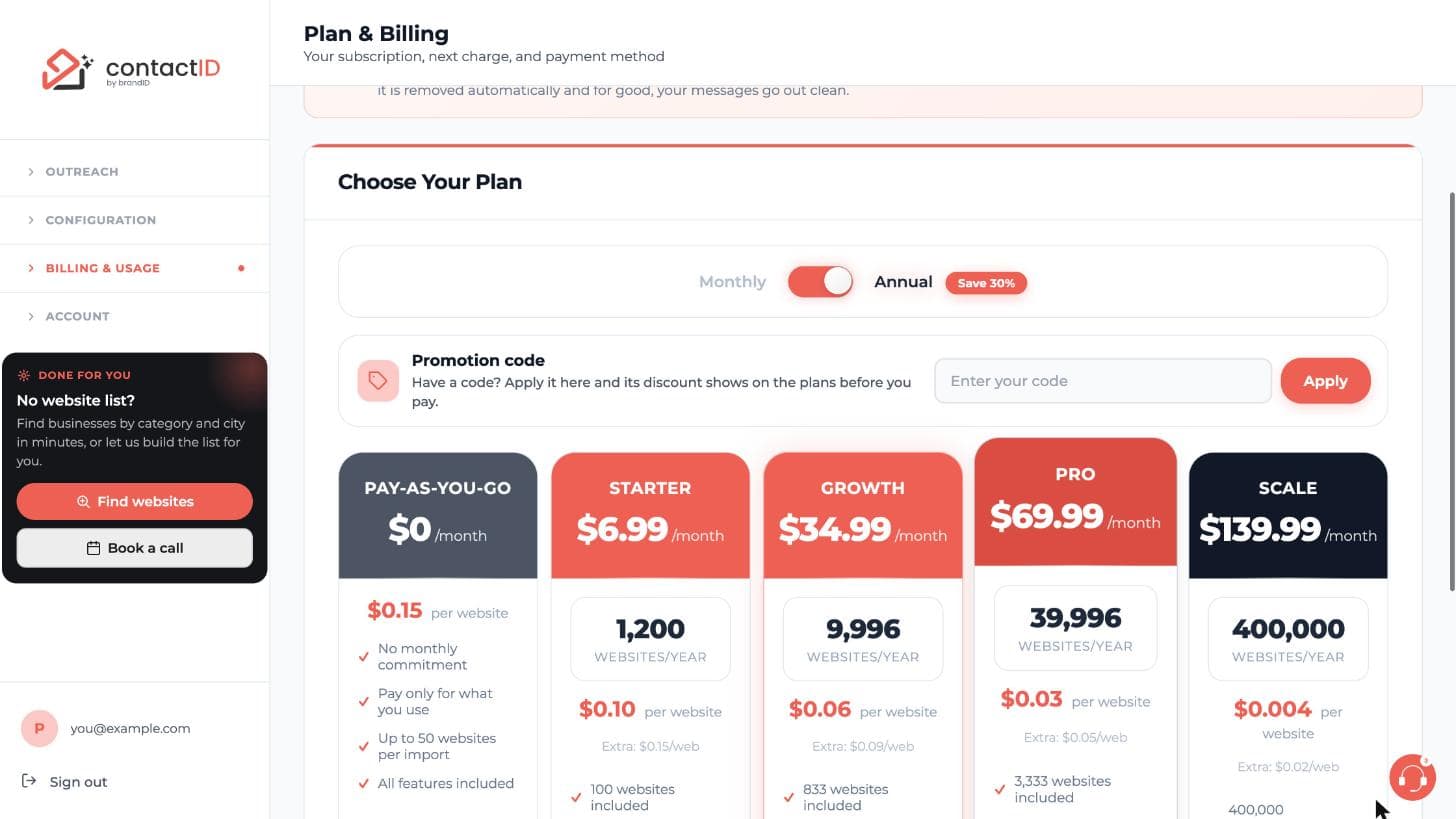
The dashboard’s plan picker always opens with Annual switched on, and the Monthly / Annual choice you made in the extension’s picker is not carried over. To stay on monthly billing, switch to Monthly before you click Subscribe or Upgrade; an upgrade with Annual on moves your plan to annual billing: your billing date moves to today and the first year is charged at once, less the unused time of your current month.
3. If The Card Is Declined
Nothing changes. Your current plan, billing date and credits stay exactly as they were, the unpaid invoice is voided, and you see “Your card was declined for the upgrade, so your plan was not changed.” Update the card on the Plan & Billing page and try again.
If your bank asks you to confirm the payment (3-D Secure), Stripe’s payment page opens and you see “Your bank asks you to confirm this payment. Open the payment page to confirm it; your plan changes as soon as it is paid. If you do not confirm it, your plan stays as it is.” Nothing was declined, and your plan does not show Payment Due meanwhile.
4. After A Successful Upgrade
Included credits switch to the new plan at once, the signature line stops on the next run, and the import limit rises immediately. The old plan’s unused included credits move to your extra credits for the part of the billing period already used (for a discounted period, only the share you paid): the rest of the period is credited against the upgrade’s charge, so it is not paid for twice. An upgrade right after a renewal keeps almost none of them; one near the end of a period paid in full keeps almost all. The new plan’s websites count as paid for the share of its price you paid: with a code that makes the upgrade free, none of them become extra credits later.
Related questions:
Downgrading moves you to a lower tier. The dashboard does not switch a plan down directly: you cancel the current plan and subscribe to the lower one when it ends. Here is how that works and what happens to your credits.
1. Where To Downgrade
- Open the dashboard’s Plan & Billing page and click Cancel subscription.
- Your plan keeps running until the end of the period you paid for.
- When it has ended, open Plan & Billing again and Subscribe to the lower plan.
While your plan is active, lower plans show “Current plan is higher” in the plan picker and cannot be picked.
2. Downgrade Timing
- Your current plan runs until the period end. You keep the higher-tier included credits until then.
- When it ends, you are on pay-as-you-go until you subscribe to the lower plan, which starts the day you subscribe, at the lower price.
There is no option to downgrade immediately.
3. What Happens To Included Credits
When the plan ends, its unused included credits move into your extra credits, which never expire. The lower plan then adds its own included credits each period.
4. What Happens To Extras And PAYG Credits
Untouched. Extras and PAYG credits are yours until you use them, regardless of plan changes.
5. What Happens To The AI Wallet
Nothing. The AI wallet is a separate balance; no plan includes AI credits, so a plan change does not touch it.
6. Canceling Vs Downgrading
Both start with Cancel subscription:
- Downgrade if you still want the tool but at a lower volume: subscribe to the lower plan when the current one ends.
- Cancel if you want to stop paying entirely; see the article on canceling.
7. Changing Your Mind
Until the end date, Plan & Billing shows when your plan ends. Click Reactivate to keep your current plan.
You can do this any time before the end date.
Related questions:
Every contactID subscription plan comes in monthly and annual billing cycles. Annual saves 30%. Here is the tradeoff, the math, and how to decide.
1. The Discount Structure
- Monthly cycle: Full advertised price ($9.99, $49.99, etc.).
- Annual cycle: 30% off the monthly rate, billed once for the full year.
For example:
- Starter monthly: $9.99/mo = $119.88/year.
- Starter annual: $6.99/mo effective = $83.92 total for the year.
- Savings on annual: $35.96 (30%).
Same 30% ratio applies to every tier.
2. When Annual Makes Sense
Pick annual when:
- You will use contactID for at least a year. The annual price equals about 8.4 months of monthly billing; from the 9th month on, annual has saved you money.
- You have the cash flow. Paying a full year upfront requires the runway.
- Your outreach volume is stable. You know you will use the plan you picked all year.
3. When Monthly Makes Sense
Pick monthly when:
- You are still evaluating contactID. Do not commit annually until you know it fits your workflow.
- Your volume is unpredictable. Annual locks you into a tier; if you need to shift up or down more than once a year, monthly gives flexibility.
- You have seasonal outreach. If you only do outreach in Q4, subscribing monthly during that quarter and canceling for the rest of the year is cheaper than annual.
4. Switching From Monthly To Annual
You can move a monthly plan to annual billing at any time, on the dashboard’s Plan & Billing page:
- On the same plan: open the plans, keep Annual on (it is on by default on the dashboard) and click Switch to annual on your plan’s card (with Monthly on, the card shows Current Plan). The window says what is charged today: the first year of your plan, less the unused time of your current month, credited at the price you paid for it. Click Confirm Switch and the card on your subscription is charged at once; your billing date moves to today, and the year’s website credits and lead credit allowance are added right away. If the card is declined, nothing changes.
- When you upgrade: leave Annual on when you click Upgrade on a higher plan. The new plan is billed annually from that day: its first year is charged at once, less the unused time of your current month.
A promotion code for moving to yearly billing goes with either one: enter it in the Promotion code box first, and its discount comes off your first year.
5. Switching From Annual To Monthly
Annual plans are paid for the whole year up front:
- You cannot switch to monthly mid-year to get money back.
- The dashboard has no billing-cycle switch for your current plan. To go monthly after the year, cancel before the renewal date and subscribe again on Monthly when the year ends.
- If you cancel an annual plan, the plan runs to the end of the year you paid for; no refund is issued for the unused months.
Contact support at [email protected] if you have a special circumstance that justifies breaking an annual commitment; case-by-case decisions are possible.
6. Cancellation Rules
- Monthly plans can be canceled anytime; the plan runs to the end of the current month.
- Annual plans run to the end of the year you paid for, regardless of when you cancel.
7. Credits On Annual
An annual plan gives you the whole year’s included credits at the start of the year: 12 times the monthly amount (for example 1,200 on Starter), or 400,000 on Scale at $0.004 per website. They do not reset each month; unused included credits roll into your extra credits at renewal. Lead credits for Find websites work differently: the plan’s allowance (for example 100 on Starter) is added once, when the annual payment goes through; it is not multiplied by 12 and it does not carry over.
8. The 9-Month Rule
Simple heuristic: if you would keep the plan for 9 months or more, annual pays for itself. For 8 months or fewer, monthly is cheaper.
Related questions:
Extra credits are website credits you buy without a subscription, or on top of one. They never expire.
1. Packages
- $10: 66 websites
- $25: 200 websites (+$5 bonus)
- $50: 400 websites (+$10 bonus)
- $100: 800 websites (+$20 bonus)
- $200: 1,600 websites (+$40 bonus)
These are the pay-as-you-go and Starter packages. The bonus is already counted in the websites shown, and everything you buy is added as extra credits. On Growth, Pro and Scale, Buy Extra Credits shows that plan’s own packages (Growth from $50, Pro from $150, Scale from $200), converted at the plan’s extra-website price ($0.09, $0.05 and $0.02); for example $50 on Growth gives 666 websites.
2. Custom Amounts
$10 and up on pay-as-you-go and Starter ($50 on Growth, $150 on Pro, $200 on Scale), with a 25% bonus.
3. Where To Buy
On the dashboard’s Plan & Billing page: pay-as-you-go accounts use Select Packages, subscribers Buy Extra Credits. In the extension’s plan picker, Select packages lists the packages and picking one takes you there. Payment goes through Stripe Checkout; credits arrive when the payment completes.
4. How They Are Used
Included plan credits are used first, then your wallet balance, then extra credits. Extra credits stay on your account across plan changes and cancellations.
Related questions:
A custom package is any amount you choose instead of the preset packages.
1. Rules
- Minimum $10 on pay-as-you-go and Starter, $50 on Growth, $150 on Pro, $200 on Scale. There is no maximum for website credits.
- A 25% bonus is added to the amount. An amount equal to one of your plan’s packages (for example $25 on pay-as-you-go) is sold as that package, with that package’s bonus.
- Websites are calculated at your plan’s extra-website price ($0.15 on pay-as-you-go and Starter, $0.09 on Growth, $0.05 on Pro, $0.02 on Scale).
2. Where
The dashboard’s Plan & Billing page (the Custom package). Select packages, then Custom, in the extension’s plan picker takes you there.
3. AI Credits Are Separate
AI top-ups go from $5 to $500 and carry no bonus.
Related questions:
AI credits pay for AI-written messages and drafts. They are a separate balance from website credits.
1. Amounts
Any amount from $5 to $500 per top-up, no bonus, no expiry.
2. Where
The AI Wallet sheet in the extension (account menu, the AI credits row) or the dashboard’s Buy AI Credits page. Stripe Checkout takes the payment; credits are added when it completes.
3. Auto-Recharge
Set a threshold and an amount in the AI Wallet’s Auto-Recharge tab to top up automatically from your saved card.
4. Typical Spend
A personalized message with a “mini” model costs a fraction of a cent; $10 covers thousands of messages. The Pricing tab of the AI Wallet lists each model’s price, and the AI credits card on the Agent tab shows what you spent today and this month.
Related questions:
One website credit is used for every send a site confirms: a thank-you message or page after the submit, or the form plugin’s own answer. Nothing else costs a credit.
1. Free Actions
Checking websites, sends the site did not confirm (Sent, not confirmed), failed submissions, websites with no form, retries that fail, previews, and canceled imports are free.
2. The Order Credits Are Used
- Included credits from your plan for the current period.
- Wallet balance, if your account has one (a dollar balance added by the contactID team, used at your per-website price).
- Extra credits: packages you bought (bonus included), unused included credits rolled over, and referral rewards. They never expire.
On the free plan you start with 10 credits that never expire.
3. At Renewal
Unused included credits roll over into your extra credits when the period renews, and a fresh set of included credits is added. You never lose credits you paid for.
4. Seeing Your Balance
The credits meter in the extension header shows websites left, and the account menu shows included and extra separately. The dashboard’s Usage page shows the history.
Related questions:
The 10 free credits every new account gets have specific rules. Here is exactly what they cover, what they do not, and how they interact with paid features.
1. What The Free Credits Cover
Every contactID feature works on free credits, except unlocking lists in Find websites, which uses lead credits (free accounts get none):
- Chrome extension (side panel, all features).
- Agents (create, edit, delete).
- AI Personalization (assuming you have AI wallet balance).
- Bulk import (up to 50 websites per import).
- Analytics and exports.
- All ordinary sends.
The restrictions are the 10-credit total, 50 websites per import, and the “Sent via contactID extension” line at the end of every message until your first purchase.
2. Free Credits Are Not Monthly
This is the most important rule to remember: free credits are a one-time lifetime allocation, not a monthly reset.
Once you use them all, you have to buy PAYG credits or subscribe to keep sending.
3. Free Credits Never Expire
If you use 5 credits in your first week and then step away for six months, the remaining 5 are still there when you come back.
4. Free Credits Cannot Be Refunded
Because they were never purchased, they cannot be refunded. You cannot request a “reset” of the free tier.
5. Order Of Consumption
If you buy credit packages without subscribing, your free credits are used first. If you subscribe, any unused free credits move into your extra credits and your plan’s included credits are used first. This means:
- Free credits are never lost when you subscribe.
- They are used after your plan’s included credits, together with your other extra credits.
This maximizes value across your entire contactID lifetime.
6. AI Wallet On Free Tier
Free tier does not include any AI wallet balance. If you want to use AI Personalization on free credits, you need to top up your AI wallet separately (minimum $5).
7. Anti-Abuse Rules
Creating more accounts to get more free credits is against the terms of service:
- The terms allow one person or organization per account.
- Accounts created to get extra free credits can be closed without refund.
8. What Happens When You Run Out
Once the 10 credits are exhausted:
- Pressing Start does not start a run: the Choose your plan window opens with an “Out Of Credits” note, the plans and the packages.
- A batch already running stops as soon as your balance reaches zero. Because a credit is charged only for a send the site confirms (never reserved up front), it stops at exactly the point your credits run out.
- The credits meter at the top of the extension shows “No credits left. Add credits to keep sending.” with Get more, and while websites are queued the Send tab shows “0 website credits left” with an Upgrade button.
9. Upgrading From Free Tier
When you subscribe or buy PAYG credits:
- You keep any unused free credits. They stack with your new credits.
- A stopped batch can resume. Once you have credits again, resume the batch from where it stopped; no URLs are lost.
- Your effective per-site cost drops to your new plan’s rate.
10. Deleting And Re-Creating An Account
Do not do this to get more free credits. Beyond violating terms:
- Free credits are granted once per account, and the terms do not allow extra accounts to get more; such accounts can be closed without refund.
- A new account starts without your history, agents and paid credits; they stay with the old account.
- It is much cheaper to just buy a $10 PAYG pack (66 credits, which is more than 10).
Related questions:
Auto-recharge tops up your AI wallet automatically when it drops below a threshold, so a run does not pause for an empty AI wallet as long as your card is accepted and the wallet still had enough for the last request. Here is how to configure it.
1. What Auto-Recharge Does
- You set a trigger balance between $1 and $100 (e.g., $3).
- You set a recharge amount between $5 and $500 (e.g., $25).
- When an AI request leaves your AI wallet below the trigger, contactID charges your saved card the recharge amount.
- The new balance appears within seconds.
- Runs keep going as long as the charge goes through.
- It only fires after an AI request, so if your AI wallet is already too low for one request, add funds by hand once.
2. Enabling Auto-Recharge
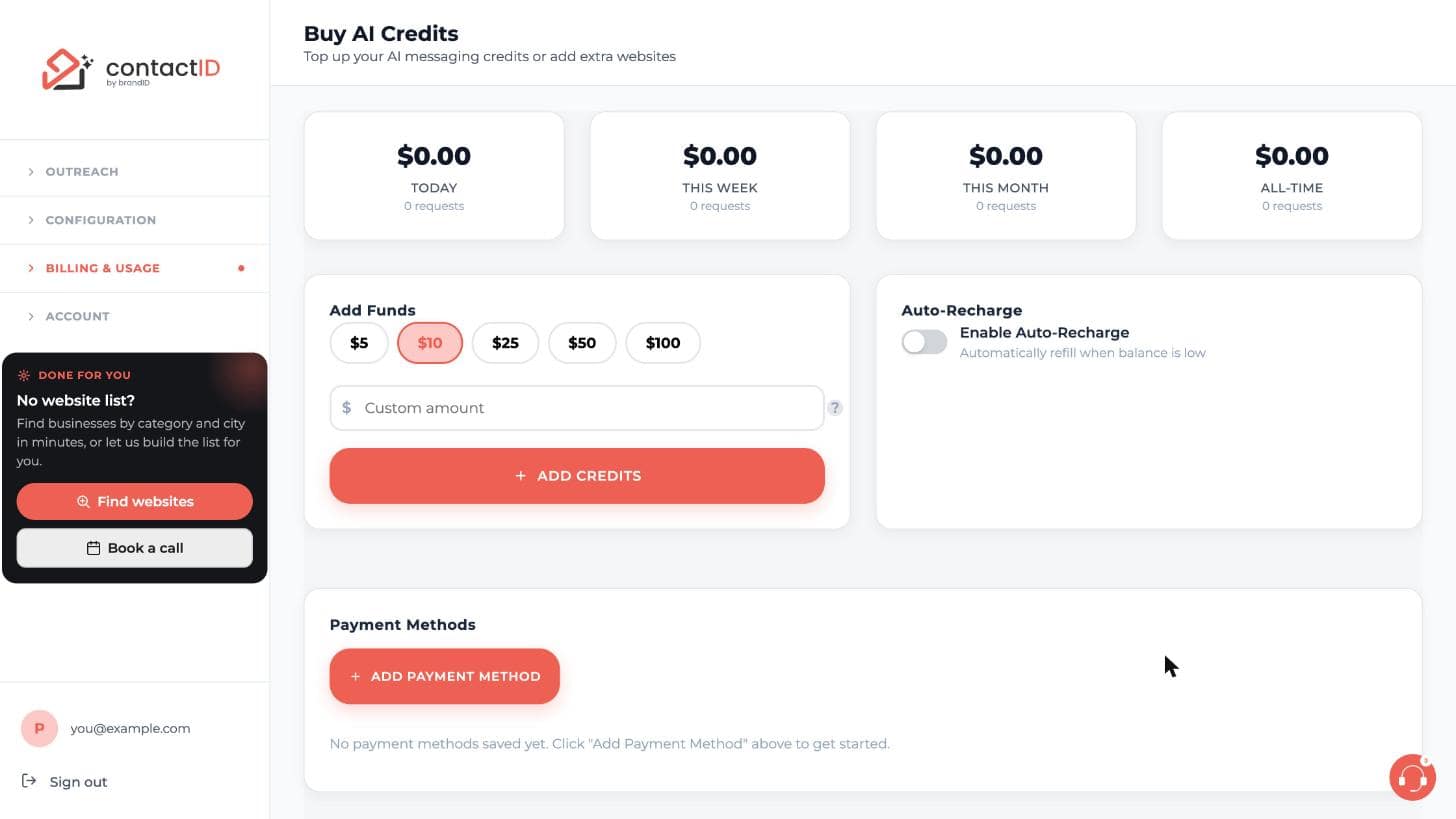
- In the extension, open the account menu, click the AI credits row, then the Auto-Recharge tab. On the dashboard, open Buy AI Credits.
- Add a card first if you have none (Cards in the extension, Payment Methods on the dashboard).
- Turn on Enable Auto-Recharge.
- Enter the trigger balance and the recharge amount.
- Click Save Settings.
3. How Often It Fires
It is checked after every AI request, so it can fire whenever a request leaves the balance below the trigger:
- No hourly limit. A larger recharge amount means fewer charges.
- One charge at a time. A second charge never starts while one is still going through.
- An optional daily cap. On the dashboard’s Buy AI Credits page you can set a daily auto-recharge cap (the most auto-recharge may charge in one day, at least one recharge amount). When the next charge would go past it, auto-recharge pauses until tomorrow (midnight UTC) and then starts again by itself. You can also pause it until a date and time you choose.
- No email per charge. Each charge is listed in the AI wallet’s payment history.
4. When Auto-Recharge Fails
If your saved card is declined:
- The recharge does not happen.
- When the wallet runs out, the run pauses and the website goes back to the queue with “Paused: insufficient AI credits”.
- If the card has expired, auto-recharge turns itself off; it may also turn off when the card needs 3D Secure verification, and it turns off after 3 declined charges in a row. The AI wallet page says why.
- Update the card in the AI wallet (Cards in the extension, Payment Methods on the dashboard), add funds, turn auto-recharge back on if it went off, and press Resume.
5. Disabling Auto-Recharge
- Turn off Enable Auto-Recharge in the same place and click Save Settings.
- Effective immediately.
- No further auto-charges occur.
6. Auto-Recharge For Website Credits
Website credits have no auto-recharge; you buy them on the dashboard’s Plan & Billing page.
Lead credits for Find websites have their own auto-recharge; see How Do Lead Credits Work?
7. Choosing The Trigger And Amount
Rule of thumb:
- Trigger: the lowest allowed is $1, which already covers many messages with a mini model; $1 to $3 suits most runs.
- Recharge amount: enough for at least one full batch, ideally 5+ batches. Reduces auto-recharge event frequency.
Example: for a user running $2 AI batches, a $3 trigger and a $10 recharge works well.
8. Auto-Recharge History
Every auto-recharge charge is listed in Payment History on the dashboard’s Buy AI Credits page. contactID does not email you for each charge and has no activity log.
Track the pattern; if auto-recharges are firing more than expected, you may want to raise the recharge amount to reduce event frequency.
Related questions:
A promotion code takes money off a plan or adds bonus credits to a credit pack; here is where to enter one and what it does.
1. Where To Enter A Code
Open the plans on the dashboard’s Plan & Billing page (in the extension, Pricing & Plans in the account menu opens them). The Promotion code box sits under the Monthly / Annual switch, always open: type the code (capitals or not; spaces do not matter) and click Apply. A code from a link (a contactID email, a newsletter, a partner’s page) is applied for you when the plans open, and it waits up to 14 days, through sign-in. Codes for lead credit packs are entered under Find websites, Credits.
2. What You See Once A Code Is Applied
The box turns green and shows the code, what it gives and when it ends, with Remove. Each plan card shows its price with the code, for example “$9.99 → $7.49 for your first month”. A code for the other billing cycle switches the plans to it; a code for credit packs offers Show credit packs and marks the packs it adds credits to. When a code cannot be used, the box says why in plain words. The checkout shows the discount before you pay.
3. One Code, Different Offers
Some codes give a different offer depending on what you buy. For example, a seasonal code can give 25% off your first month on a monthly plan and 50% off your first year on an annual plan, and the plan cards show which applies. Each purchase gets one offer, and such a code can be used once per account: after one of its offers, the others are not available (“You have already used this code”).
4. Codes When You Already Have A Plan
A code works on a change of your plan when it is made for one:
- Upgrades: a code for upgrades goes with Upgrade on a higher plan. On the same billing cycle, a one-time discount comes off today’s charge for the rest of the billing period.
- Moving to yearly billing: a code for monthly subscribers who move to annual billing goes with Switch to annual on your plan’s card (keep Annual on), and with an upgrade to a higher plan billed annually. Its discount comes off your first year; the unused time of your month is credited in full at what you paid for it.
A plan that already carries a discount takes no new code until that discount ends.
5. If You Missed The Box Before Paying
Stripe’s payment page has no place for codes. While a promotion is running, it says above the Pay button how to add one: use the back arrow at the top of the page, enter your code in the Have a promotion code? box on the page you come back to, and you return to the plans with the code applied. Nothing is charged when you go back.
6. The Rules
- One use per account. Other spellings of the same inbox (dots or a +tag in a Gmail address) count as one person.
- A code works until its end date or until its uses run out; the box says the end date.
- A code and a referral discount do not add up: the one that saves you more is used, and the plan cards say which.
- Some codes are for new customers only, or for some plans or billing cycles only.
- Codes never apply to AI credits.
Related questions:
Still stuck? We’re happy to help.
Install the extension, start a free trial, or reach out to support.




