
Getting Started
Create your account, install the extension, and understand how contactID works.
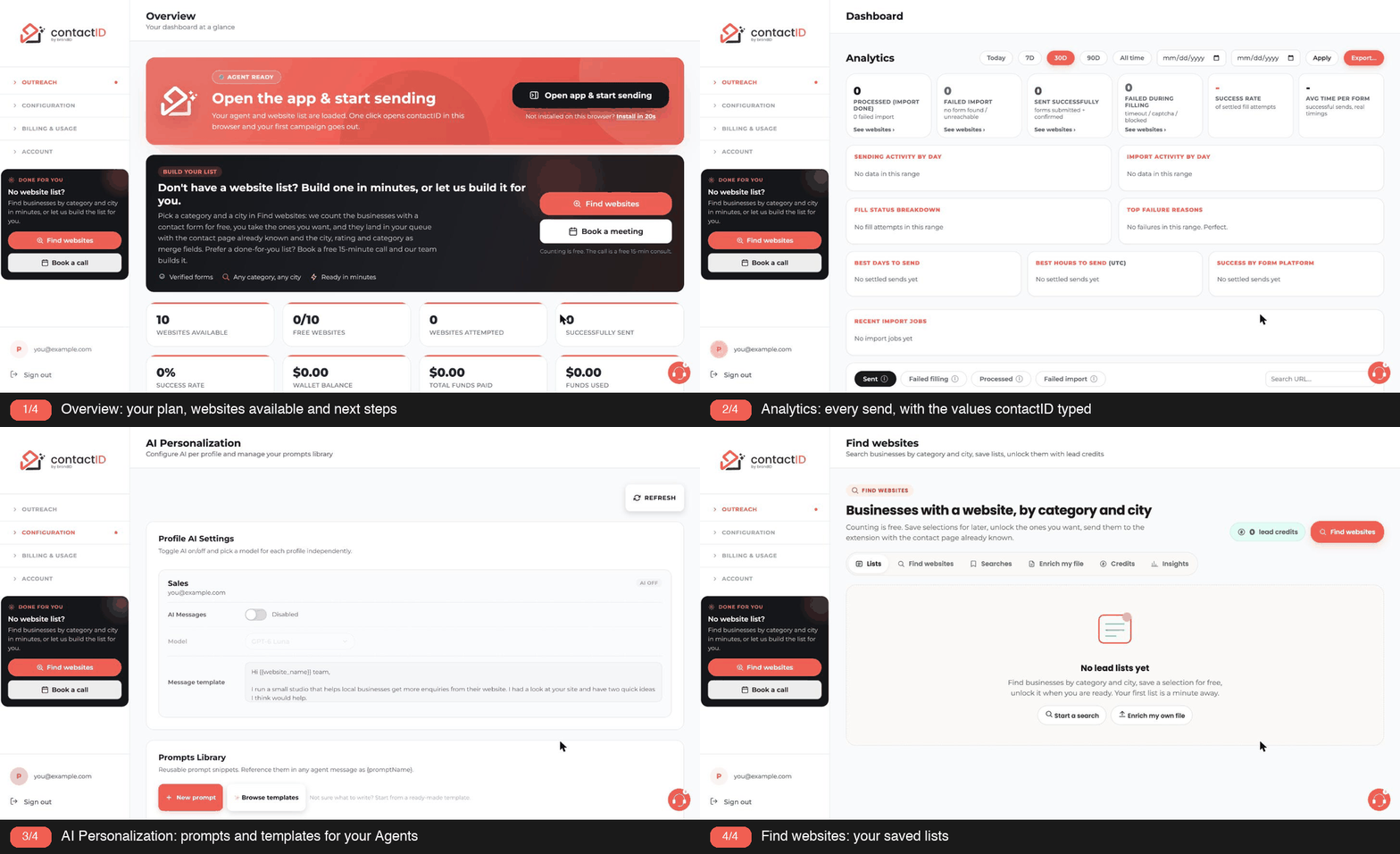
contactID is a Chrome extension that finds and fills the contact form on any website you give it, using the details and message of a sender you set up once. You bring a list of websites; contactID does the visiting, filling and submitting, and shows you what happened for each one.
1. What A Run Looks Like
- On the Agent tab you create a sender: your name, email, company, the message you want to send.
- On the Targets tab you paste website addresses or drop a CSV, TXT or Excel file. contactID checks every site and finds its contact form.
- On the Send tab you press Start sending. The extension opens each website in a background tab, fills the form with your sender details, and submits it.
- Every website moves through Queued, Processing, Sent or Failed in front of you. Websites with no contact form are listed separately so you can retry, open or replace them.
- One website credit is used for every send the site confirms (a thank-you message or page, or the form’s own answer). A send the site does not confirm shows as Sent, not confirmed and costs nothing, and so do checking a website and a failed attempt.
2. What contactID Fills
Name, email, phone, company, job title, website, address, social links, subject and message, plus any extra columns you import from a spreadsheet (they become tags such as {{city}} you can use in your message). Every message can name the website it goes to with the {{website_name}} tag.
3. Where Things Live
- The side panel is where you work. Click the contactID icon in the toolbar to open it, or use the fullscreen button in the header for a wide layout in its own tab.
- The web dashboard is where you buy credits, manage your plan, see analytics for every submission and manage your account.
4. Credits And Plans
Every new account starts with 10 free website credits that never expire. Paid plans add monthly credits and higher import limits; pay-as-you-go packages add credits without a subscription.
Related questions:
Creating your contactID account takes about two minutes: sign up, verify your email, and complete the short onboarding so your first agent is ready to send. Here is a step-by-step guide.
1. Sign Up On contactID
Go to the contactID website and click Get started free, then Sign up for free on the sign-in screen. The extension’s sign-in sheet has the same Sign up for free link.
You can sign up two ways:
- Email. Enter your email address. contactID is passwordless: a 6-digit code is sent to that address, and entering it both verifies the email and signs you in. Your name is collected in the next onboarding step.
- Continue with Google. Fastest option; uses your Google identity and pre-fills your name and email.
2. Verify Your Email (Email Sign-Ups Only)
A six-digit verification code is sent to your inbox. Enter it on the verification screen to confirm your address and proceed. The code expires after 10 minutes, so check your spam folder if it does not arrive within a minute. You have up to 5 attempts per code, and there is a short 2-minute wait between resends.
3. Complete The Onboarding Steps
contactID asks a few short questions so it can fill your forms and set sensible defaults. The onboarding includes:
- About you. Your full name (used on every form your agent fills), your country (detected for you), a phone number (recommended, since many forms ask for one), and how you found contactID.
- Your business. Company name, company website, industry and your role. All optional; Skip for now moves on.
- Targets. Choose I have my own list or Help me find websites (Find websites builds a list of businesses by category and city).
- Agent. Your first sender, prefilled from your answers: agent name (“Outreach Agent”), your first and last name, reply-to email, a subject line and a starter message. Create agent saves it, and so does Skip to dashboard, so the required fields must be filled either way.
4. Install The Chrome Extension
After your agent, the Open app & start sending step checks for the contactID Chrome extension. This is the piece that actually opens tabs and fills forms. The dashboard alone cannot do outreach without the extension. If it is already installed, click Open the app; if not, click Add to Chrome to open the Chrome Web Store.
Click the Add To Chrome button. A confirmation dialog will appear from Chrome asking you to confirm the permissions. Click Add Extension.
Once installed, pin contactID to your toolbar for easy access. Right-click the puzzle-piece icon in Chrome’s top right, then click the pin icon next to contactID.
5. You’re In, Welcome To Your Dashboard
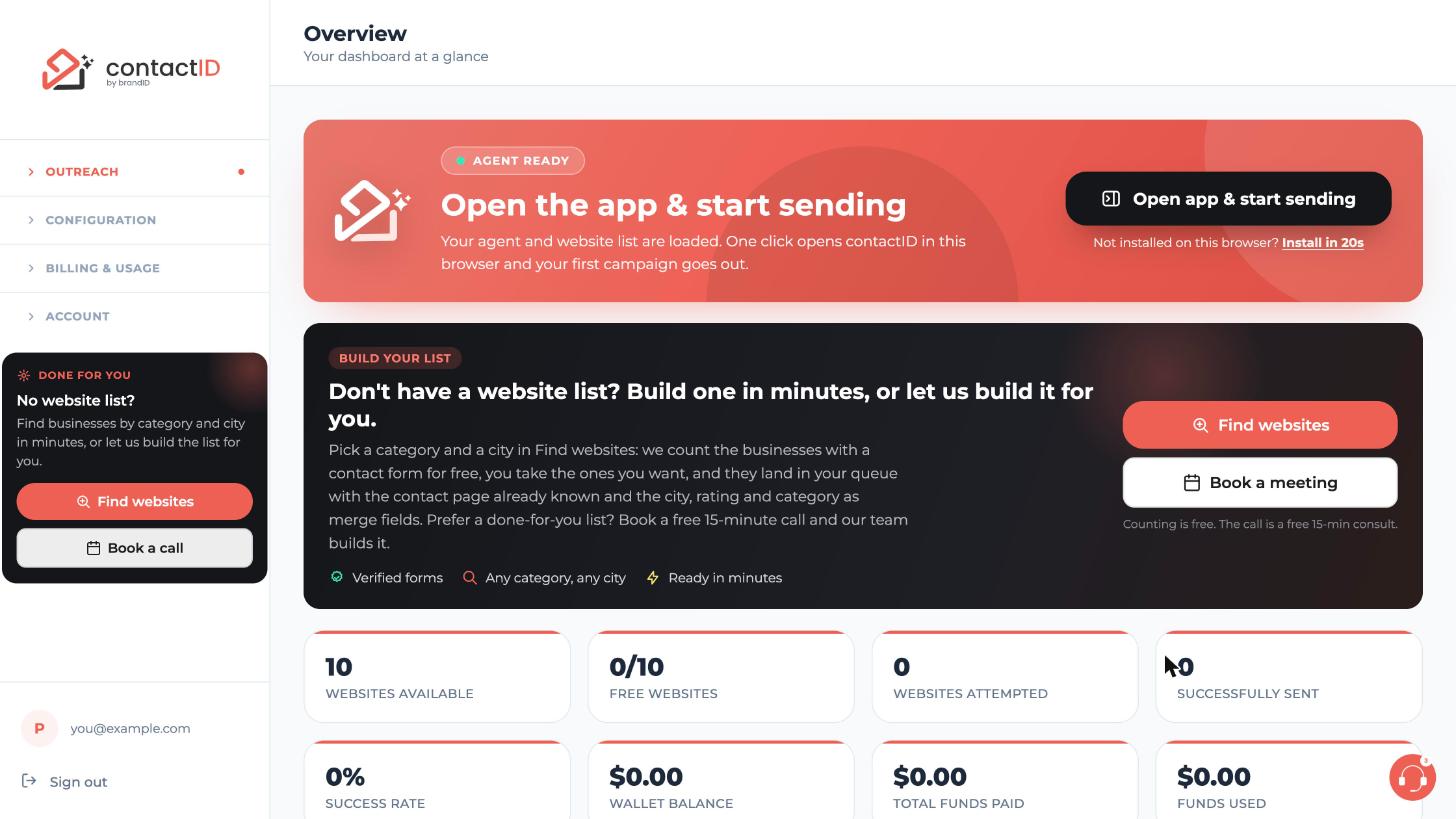
The last step, Your agent is ready, ends with Open my dashboard. On the dashboard’s Overview page you will see:
- An Open app & start sending banner that opens the extension (or shows how to install it).
- Your balances as cards, including Websites Available and Free Websites (10 for a new account).
- A Build your list banner that leads to Find websites if you do not have a website list yet.
Your first agent, named “Outreach Agent” unless you renamed it and carrying the details you entered during onboarding, is ready on the Agents page and in the extension.
You can start filling forms right now. The next thing most users do is refine their default agent so the pitch message reads the way they want.
Related questions:
contactID keeps sign-up short on purpose. You need only a few details to create an account, and everything else can be filled in later. Here is exactly what to have ready.
1. Required Information
To create an account you need:
- A valid email address. This is where sign-in codes, payment receipts, and important account notices are sent. Use one you check regularly.
- Access to your email inbox. Email sign-ups confirm with a 6-digit code sent to your address; Google sign-ins skip this. contactID never asks you to create a password.
- Your full name. First and last name, asked on the About you step. They are used as the name on the contact forms your agent fills.
- Your country and how you found contactID. Also on About you; the country is detected for you and can be changed.
2. Optional But Recommended
Filling these in during onboarding saves you steps later:
- Your phone number. Many contact forms have a phone field; adding yours lets your agent fill it.
- Your company name, company website, industry and role. Asked on the Your business step, all optional. They fill company fields on forms and help contactID suggest pitch angles.
- A short pitch. The Agent step comes prefilled (agent name, your name and email, a subject line and a starter message), and both Create agent and Skip to dashboard save that agent, so have your message ready or edit it later.
3. What You Do Not Need At Sign-Up
You do not need to provide any of these to start using contactID:
- Credit card details. The free tier gives you 10 websites to try the platform first.
- Target website URLs. You can add these any time on the extension’s Targets tab, or build a list with Find websites on the dashboard.
- Team members. contactID accounts are single-user by default.
4. What contactID Does Not Store
Even after you sign up, contactID never asks for these:
- Your personal Gmail, Outlook, or other email account password. contactID does not send email through your account; it fills forms on target websites.
- Social security numbers, national ID numbers, or other government identifiers.
- Bank account details. All payments are processed through Stripe, and contactID never sees your card number.
5. Business Vs Personal Accounts
contactID accounts are personal by default. If you plan to use it for a business and want the receipts to go to a company email or bookkeeper:
- Use a business email address at sign-up (like [email protected]). Receipts and invoices go to the email you sign in with; there is no separate billing email setting.
- Add your company name on the Your business onboarding step so your first agent fills it on contact forms. Later, change it in the agent’s Company field on the extension’s Agent tab.
Related questions:
Email verification confirms you own the address you signed up with, protects your account from typos, and unlocks the full contactID experience. Verification happens once per email address and takes under a minute.
1. When Verification Happens
Verification is required when:
- You sign up or sign in with your email (Google sign-ups skip this).
- You reset a forgotten password (a separate 6-digit reset code). Changing your account email is done by support, not with a code.
- You request a fresh sign-in code for an existing account.
2. Enter The Six-Digit Code
Right after you sign up, contactID sends a verification code to your inbox. The email comes from contactID with a subject line in the form “123456 is your contactID AI verification code” (a code requested in the extension reads “123456 is your contactID AI sign-in code”), where the six digits are your actual code, so you can read the code straight from the subject.
Open the email, copy the six-digit code, and enter it on the code screen. Click Verify and continue (in the extension, Verify and sign in).
3. What If The Code Does Not Arrive?
If you do not see the email within one minute:
- Check your spam or junk folder. Some corporate mail systems flag automated verification emails.
- Confirm the email address you used. A typo like “gmial.com” instead of “gmail.com” is the most common cause of missing codes.
- Whitelist the sender. Add the address the code email came from (it shows as “contactID”) to your safe-senders list so future emails from contactID (codes, receipts, payment notices) arrive without delay.
- Send a new code. On the code screen, send a new code becomes active 2 minutes after the last code, and a timer shows when. In the extension the button reads Resend code.
4. Code Expiry
Verification codes expire after 10 minutes. If you take longer than that, request a fresh code with send a new code (in the extension, Resend code). Old codes stop working immediately once a new one is issued. You get up to 5 attempts per code, with a short 2-minute wait between resends.
5. What Happens After Verification
An email account is created only when you enter the correct code (a Google sign-up is verified by Google), so every account is verified from the start. Right after verification:
- You continue with onboarding and land on your dashboard.
- Payment receipts and account notices go to this address.
- You can later set a password on the Security page and reset it by email if you forget it.
Related questions:
The contactID Chrome extension is the piece that actually opens browser tabs and fills contact forms; without it, your dashboard cannot send anything. Installation takes about 30 seconds.
1. Install From The Chrome Web Store
Go to chromewebstore.google.com and search for “contactID”. Or open Launch App in the dashboard sidebar and click Add to Chrome (the Install in 20s link on the Overview page leads there too), which opens the Web Store directly to the correct listing.
2. Add To Chrome
Click the blue Add To Chrome button on the listing page. Chrome shows a confirmation dialog listing the permissions the extension needs. Click Add Extension to confirm.
3. Pin The Extension To Your Toolbar
By default, Chrome hides new extensions behind the puzzle-piece icon in the top right corner. Pin contactID so it is one click away.
- Click the puzzle-piece icon.
- Find contactID in the dropdown.
- Click the pin icon next to it. The contactID icon now appears in your toolbar.
4. Sign In Through The Extension
Click the pinned contactID icon. The side panel opens on the right side of your browser. If you are signed in on the contactID dashboard in this browser, the extension signs in to the same account by itself as soon as you open the dashboard or switch to its tab. Otherwise the header shows Get Started; click it to open the sign-in sheet.
Sign in using the same email address you used to create your contactID account. If you signed up with Google, use Continue with Google here too.
5. What Chrome Permissions contactID Uses
contactID needs a specific set of Chrome permissions to do its job. Here is what each one is for:
- Tabs and windows to open target websites in background tabs during a batch, and the Google sign-in window.
- Scripting and Active Tab to detect and fill contact form fields on those pages.
- Storage to remember your session, current queue, and settings.
- Web Navigation to detect when a page has finished loading before filling, and where it went after sending.
- Notifications only for the optional contact-page finder (Options page, off by default), which offers to add a contact page it found on a website you opened.
- Downloads to save a list of websites as a CSV or TXT file (the Export button on a status list of the Send tab, and the CSV and TXT buttons on the Targets tab’s “No contact form” card).
- All URLs (host permission) because contact forms live on every website domain; contactID cannot know in advance which ones you will target.
- Side Panel for the main extension UI.
- Alarms for housekeeping timers (spotting a website stuck in Processing, resending results that could not be reported).
- Identity for Continue with Google.
- Proxy and Web Request for the optional proxy settings (routing a run through your proxy and answering its sign-in request). Web Request also runs a passive listener that changes no request and sends nothing, and, in the tab of your queue that just sent its form, reads the status of the site’s answer to the send for up to two minutes (a refusal, such as a firewall’s 403, marks the website Failed with no credit used).
6. Supported Browsers
The extension is built for Chromium-based browsers. It works on:
- Google Chrome
- Brave
- Microsoft Edge
- Opera
- Arc
Firefox and Safari are not supported at this time because they use different extension APIs.
Related questions:
Signing in to the extension takes under a minute and you stay signed in for 30 days of activity.
1. Open The Side Panel
Click the contactID icon in the Chrome toolbar. When you are signed out, the header shows a Get Started button.
If you are already signed in on the contactID dashboard in this browser, you do not need to sign in again: the extension signs in to the same account as soon as you open the dashboard or switch to its tab.
2. Choose How To Sign In
- Google: one click with your Google account. Your Google profile photo becomes your avatar in the extension and the dashboard.
- Email code: click Sign in without a password, enter your email and press Send code; we email you a 6-digit code. Codes are valid for 10 minutes, you get 5 attempts, and you can request a new code after 2 minutes. The code option in the extension is for existing accounts; to create an account, use Sign up for free at the bottom of the sheet (it opens the contactID sign-in page in a new tab, where you can create the account) or Continue with Google.
- Password: available if you set one on the dashboard’s Security page. It is optional; most people use the code or Google. In the extension the password form opens first and needs your password; without one, choose Sign in without a password. On the dashboard’s sign-in page the password field may be left empty: an empty password sends you a code instead, and a password typed for an account that has none sends a code too, so you are never stuck.
3. After Signing In
Your avatar appears in the header. Hover or click it to open the menu: Dashboard, Find websites, Analytics, Pricing & Plans, Refer To Earn, AI Personalization, About Us, Feature Guide, Settings (opens the Settings page on the dashboard), your balances (websites left, AI credits and lead credits), and Sign out. The credits meter under the header shows how many websites you can still contact.
4. Staying Signed In
Your session lasts 30 days and extends every time you use contactID. The extension and the dashboard in this browser share one sign-in: Sign out in the menu signs you out here and on the dashboard, ends the session on the server, and stops a run in progress. Other browsers and computers stay signed in.
Related questions:
Your contactID dashboard is the web control panel where you manage agents, review results, buy credits, and configure everything the extension does. This article walks through every section so you know where to find things.
1. Accessing The Dashboard
Open it from the extension (avatar menu, Dashboard) or sign in on the contactID website. The dashboard opens on Overview by default.
2. The Left Sidebar Sections
The sidebar groups the pages under four names, listed top to bottom. A group opens when you rest the pointer on its name, and closes when you rest on another group or move away from the sidebar. Click a name to keep its group open (its arrow turns coral): it stays open until you click the name again or click anywhere else. On a phone or tablet, tap a name to open or close its group. A coral dot marks the group of the page you are on.
Outreach
- Overview. Your at-a-glance summary: websites available, free websites, sends and success rate, wallet balance.
- Find websites. Search businesses by category and city, save lists, unlock them with lead credits.
- Agents. Create, edit, and manage sending profiles.
- Launch App. Open the extension, or install it in this browser.
- Analytics. Every form submission with its status, the values filled and the failure reason; Export… downloads your results.
Configuration
- AI Personalization. Configure AI per profile and manage your prompts library.
- Settings. The settings of contactID in this browser: sending pace, targeting, required questions, what the Send cards show, captcha and proxies, the copy of your Send lists, AI apps on this computer, and how many websites are worked on at once (see Understanding The Extension Interface).
Billing & Usage
- Plan & Billing. Your subscription, next charge, payment method, website credits and lead credits.
- Buy AI Credits. Top up your AI wallet.
- Usage. How many websites and messages you have used.
- Referrals. Invite friends and earn free credits.
- Transaction History. Your plan and website credit payments, credit changes and refunds (AI credit top-ups are on Buy AI Credits, lead credit packs on the Credits tab of Find websites).
Account
- Profile. Your name, business, and contact info.
- Security. Your password.
- AI Assist (MCP). Connect Claude, ChatGPT and other AI apps to your account (see What Is AI Assist?).
Sign out sits at the bottom of the sidebar.
3. Where Your Balances Show
There is no top bar with balances. The Overview page shows them as cards: Websites Available, Free Websites, Wallet Balance, Total Funds Paid and Funds Used, with Add Credits and AI Wallet buttons. Your plan, next charge and payment method are on Plan & Billing.
4. The Overview Page
Overview is the first thing you see after sign-in. It shows:
- Open app & start sending. Opens the extension in this browser, or shows how to install it.
- Build your list. Leads to Find websites for a website list, or to booking a call for a done-for-you list.
- Your numbers. Websites Available, Free Websites, Websites Attempted, Successfully Sent, Success Rate, Wallet Balance, Total Funds Paid and Funds Used.
- Add Credits and AI Wallet buttons.
5. Where To Do Common Tasks
Here is where most first-time users get stuck. Save yourself time:
- Change your pitch message. Agents page, edit any agent, scroll to Pitch message (or edit the agent in the extension’s Agent tab).
- Buy more credits. Plan & Billing, or the Add Credits button on Overview.
- See why a form failed. Analytics, open any failed row to see the Failure reason.
- Change your subscription. Plan & Billing.
- Update your email. It cannot be changed in the dashboard; the Profile page shows “Contact support to change your email”.
- Turn on AI personalization. AI Personalization page (not the Agents page).
6. What The Extension Does Versus What The Dashboard Does
Rule of thumb: the extension sends; the dashboard configures and reports.
- Use the extension when you want to start, pause, or monitor a batch in progress.
- Use the dashboard when you want to set up agents, buy credits, review history, or manage your account.
You do not need to have the dashboard open while the extension runs; the extension pushes results to the dashboard automatically.
Related questions:
contactID offers five plans: pay-as-you-go and four monthly subscription tiers, and every new account starts with 10 free websites. The right one depends on how many websites you plan to contact per month.
1. The Plan Ladder At A Glance
Every contactID user starts on the free tier and can either use pay-as-you-go for occasional sends or subscribe to a monthly plan for regular outreach volume.
- Free tier. 10 free websites, one-time (not monthly). Once used, upgrade or top up.
- Pay-as-you-go (PAYG). No subscription. Buy credits in packages, pay $0.15 per website.
- Starter, $9.99/month. 100 websites/month included, $0.10 effective cost, extras at $0.15/site.
- Growth, $49.99/month. 833 websites/month included, $0.06 effective cost, extras at $0.09/site.
- Pro, $99.99/month. 3,333 websites/month included, $0.03 effective cost, extras at $0.05/site.
- Scale, $199.99/month. 19,999 websites/month included, $0.01 effective cost, extras at $0.02/site.
2. How To Pick The Right Plan
The economics get better the more you send, but the right plan is the smallest one that covers your typical monthly volume. Here is the rule:
- Under 50 sends per month. Use pay-as-you-go. Buy a $10 credit pack when you need it.
- 50 to 100 per month. Starter ($9.99 for 100 websites) already costs less than pay-as-you-go from about 67 sends a month.
- 100 to 833 per month. Growth. The per-site cost drops to $0.06, with 833 included.
- 833 to 3,333 per month. Pro. The per-site cost drops to $0.03, with 3,333 included.
- 3,333 to 20,000 per month. Scale. The per-site cost drops to a cent, and 19,999 included is enough for most agencies.
If your volume exceeds 20,000 per month, contact us through the chat button on the dashboard (Buy Bulk Websites) or at [email protected] for enterprise pricing.
3. Monthly Versus Annual Billing
Every subscription plan comes in two billing cycles:
- Monthly. Pay every month, cancel anytime.
- Annual. 30% discount on the effective monthly price, billed once for the full year. No cancellation refund. The full year of included websites is added on the day you subscribe (12 times the monthly amount; Scale annual includes 400,000).
4. Extra Credits On Top Of Any Plan
Every subscription plan lets you buy extra credit packages if you use up your included quota mid-month. Credits from packages carry over month to month. At the start of each billing cycle your plan’s included credits are renewed, and any included credits you did not use move into your extra credits, so they are not lost.
Package pricing per tier is on the Plan & Billing page. Custom packages start at $10 on pay-as-you-go and Starter ($50 on Growth, $150 on Pro, $200 on Scale) and get a 25% bonus.
5. What The 10 Free Websites Cover
Every new account gets 10 free website credits. These:
- Never expire.
- Cannot be topped up. Once used, you need to upgrade or buy PAYG credits.
- Work with every feature (AI Personalization, agents, batch mode) exactly as paid credits do, with two differences: until your first purchase, messages end with the line “Sent via contactID extension”; and, as on every pay-as-you-go account, one import holds up to 50 websites until you subscribe to a plan.
6. Changing Plans
Upgrade any time from the Plan & Billing page; the change is immediate, and the upgrade window says what is charged today (the prorated difference, or for a move to the other billing cycle the new first month or year, less the unused time). There is no direct downgrade: cancel your plan and subscribe to the lower one when the current period ends. See the articles on upgrading and downgrading for exactly what happens to your credits.
Related questions:
Every new contactID account gets 10 free website credits so you can try the full platform, end to end, before deciding on a plan. Here is exactly how the free tier works.
1. What Is Included In The Free Tier
The 10 free credits give you access to every contactID feature at full capacity:
- Every contactID Chrome extension feature.
- Every AI Personalization feature (subject to your AI wallet balance).
- Every agent creation and management tool.
- Every dashboard page, including Analytics with its Export… and Find websites (lead credits for Find websites are bought separately).
The limits are the 10 free websites themselves, up to 50 websites per import (the pay-as-you-go limit, raised by a subscription), and the line “Sent via contactID extension” at the end of every message until you make any purchase.
2. When Credits Are Consumed
A free credit is consumed when a website’s form is sent and the site confirms it (a thank-you message or page, or the form plugin’s own answer). Specifically:
- A send the site confirms deducts one credit.
- A send the site does not confirm (Sent, not confirmed) does NOT deduct a credit.
- Failed form fill (site could not be reached, form not detected, blocked by captcha) does NOT deduct a credit.
- Site loaded but form not detected does NOT deduct a credit.
- Site loaded, form detected, submission failed (network error or the site rejected it) does NOT deduct a credit.
You are only charged for a send the site confirms. See the article on how credits are consumed for the exact rules.
3. Do Free Credits Expire?
No. Free credits do not expire. They stay on your account until:
- You use them all up.
- You upgrade to a subscription (in which case they stack; you keep them and add the plan’s monthly quota on top).
4. What Happens After The 10 Credits Are Used
Once you have used all 10 free credits, the extension stops filling new forms and shows an Out Of Credits panel. To keep sending you need to either:
- Buy a pay-as-you-go credit pack starting at $10 (worth 66 websites) with no subscription.
- Subscribe to a monthly plan (Starter, Growth, Pro, or Scale).
Any partially sent batch is preserved: the websites that were not sent stay in your queue. After you buy credits, press Start sending again and the run continues with them; no URLs are lost.
5. Can You Get More Free Credits?
The free credit pool is fixed at 10 per user, per lifetime of the account. It is not a monthly reset.
If you refer a friend to contactID, you may earn bonus credits under the referral program (see the referrals article). Beyond that, additional credits require a purchase or subscription.
6. Is The Free Tier Ever Discontinued?
The free 10 credits are a permanent part of contactID. We reserve the right to change the amount for future signups but never for existing accounts; if you have unused free credits, they stay yours.
Related questions:
Deleting your contactID account removes your personal data. It does not cancel a subscription by itself, so cancel that first. Here is what happens, how to do it, and what to save first.
1. Before You Delete: Export Your Data
Once deletion is confirmed, your data cannot be recovered. Export what you want to keep first:
- Results. Go to Analytics in the dashboard, click Export…, and download the CSV of your form submissions.
- Website lists. In the extension, use Advanced Export on the Send tab; lists from Find websites have a CSV button.
- Invoices. On Plan & Billing, open Manage billing (Manage payment method if you have a subscription) and download your past invoices for your bookkeeping.
- Agent data. Use Advanced Export on the extension’s Agent tab, or copy your pitch messages by hand.
2. Cancel Any Active Subscription First
Deletion does not automatically process a refund. Cancel your subscription on the Plan & Billing page before deleting:
- Go to Plan & Billing.
- Click Cancel subscription and answer the short survey.
- Confirm the cancellation.
Your subscription runs until the end of the current billing period, then stops.
3. Initiate Account Deletion
Once your subscription is canceled (or if you never subscribed):
- There is no delete button in the dashboard or the extension.
- Email [email protected] from the email address of your contactID account and ask for the account to be deleted.
4. What Gets Deleted
When your account is deleted:
- Every session on every device is ended.
- Your personal data is removed within 30 days, except where the law requires us to keep it.
- The queue in your extension stays in that browser until you clear it or remove the extension.
5. What We Keep (And Why)
Some data is retained for legal, financial, and abuse-prevention reasons even after deletion:
- Payment records are retained for seven years to comply with tax and accounting law.
- Aggregate usage statistics (like “N total form submissions this month”) stay in our analytics, but they are anonymized and cannot be traced back to you.
- Usage logs are kept for 90 days for security and debugging.
6. Can You Restore A Deleted Account?
No. Once you confirm deletion, the account is gone. If you change your mind, you can sign up again with the same email, but you start fresh: your data, credits, and history are gone.
7. Deleting Instead Of Canceling
If you just want to stop being billed but keep your data for later, cancel your subscription (see step 2 above) but do NOT delete your account. Your data stays; you just stop paying. You can pick up any time by re-subscribing.
Related questions:
Still stuck? We’re happy to help.
Install the extension, start a free trial, or reach out to support.




