
You spend an hour making a Reel. You post it. It flops. Your followers scroll past an underperforming video sitting on your profile grid, and the algorithm quietly notes that your latest upload failed to hold attention. That single flopped Reel drags down the distribution of your next 3 posts.
What if you could test that Reel on strangers first, see if it actually works, and only show it to your followers once the numbers confirm it? That is exactly what Instagram Trial Reels do. Launched by Meta in December 2024 and expanded globally through 2025 and 2026, Trial Reels let you publish content exclusively to non-followers. Your existing audience never sees it unless you decide it is worth sharing.
This guide covers everything you need to know about Instagram Trial Reels in 2026: how the feature works, who can use it, exactly what to test, the 7 strongest strategies for using them systematically, and how to schedule them using the February 2026 scheduling update. If you also need a bank of specific concepts to actually run through Trial Reels, the 75 Instagram post ideas for creators cover every Reel format worth testing.
Key Takeaways
- Trial Reels are shown only to non-followers. They do not appear on your profile grid, in your followers’ feeds, or on your Reels tab unless you choose to share them or Instagram auto-graduates them
- Eligibility is a public account with 1,000+ followers. Meta chose this threshold because the algorithm needs a follower baseline to compare Trial Reel performance against your normal content
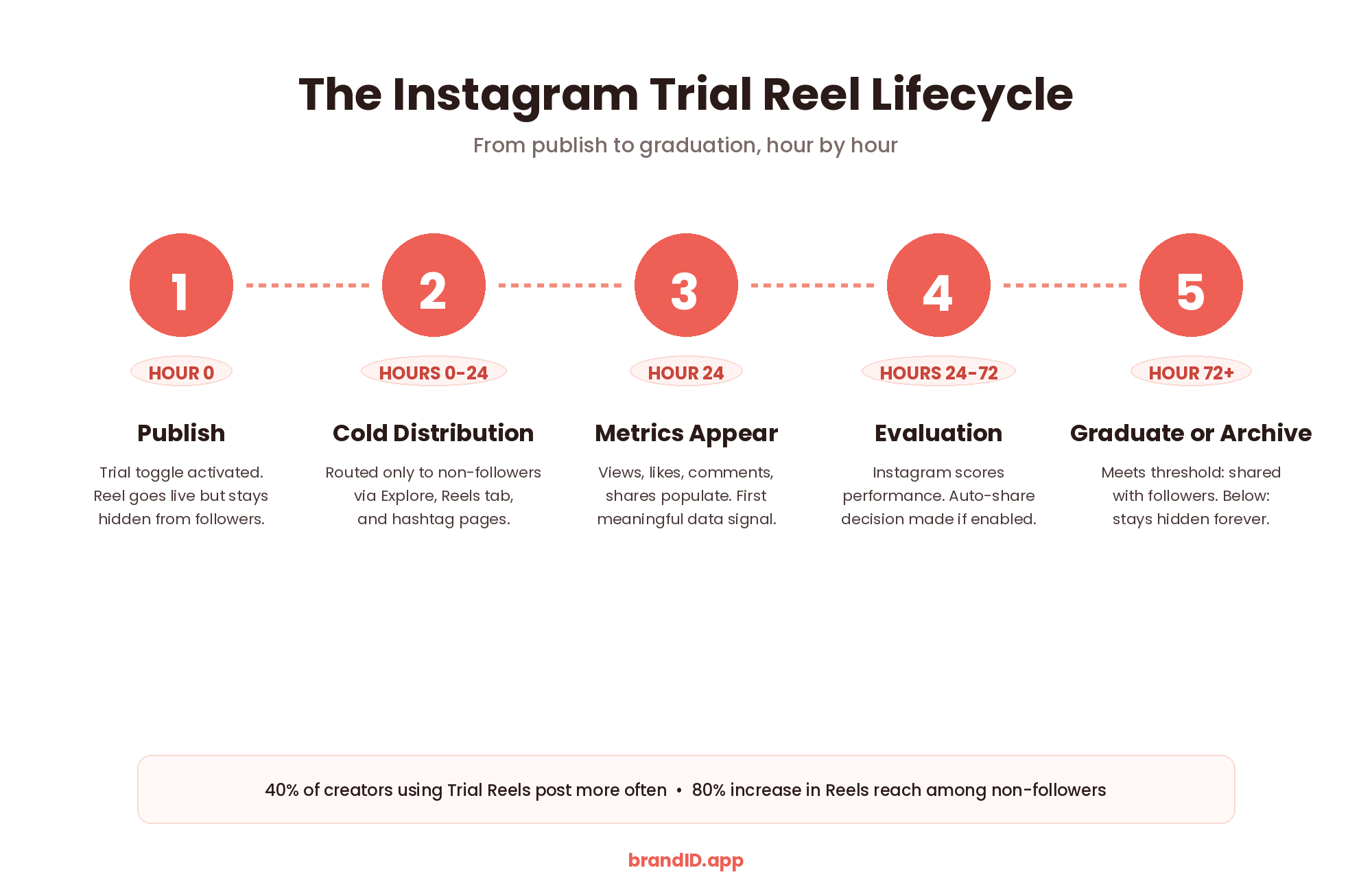
- Metrics populate after 24 hours; auto-share window is 72 hours. Check numbers only after the 24-hour window, and Instagram uses the first 72 hours to decide whether to auto-share to followers
- Instagram introduced Trial Reel scheduling in February 2026. You can now queue Trial Reels for peak testing windows (typically Monday to Wednesday, 10 AM to 1 PM)
- 40% of creators who used Trial Reels post more often as a result (Instagram, June 2026). The feature also drove an 80% increase in Reels reach among non-followers
- Reposting identical content as Trial Reels is now flagged as spam. The old workaround of reposting viral winners is closed; Trial Reels only reward genuinely new content
What Are Instagram Trial Reels?
Instagram Trial Reels are Reels that Instagram distributes only to accounts that do not follow you. They do not appear on your profile grid, your followers’ feeds, or your Reels tab. Think of them as a private test run with a fresh audience, entirely separate from your regular content.
The feature exists because creators consistently reported feeling nervous about posting content outside their usual niche or trying new formats, worried that a flop would hurt their engagement rate and reduce distribution on future posts. Trial Reels solve that fear directly: no matter how badly a Trial Reel performs, your existing followers never see it, so your regular content signal stays clean.
This is the closest thing Instagram has ever built to a real A/B testing system for creators. Meta officially confirmed the feature on the Instagram for Creators blog in December 2024 and has been expanding it steadily since, including the February 2026 addition of Trial Reel scheduling. It is one of the most underused features on the platform in 2026, which means the creators who use it systematically get a real edge.
Who Can Use Instagram Trial Reels?
Instagram Trial Reels are available to public professional accounts (either Creator or Business accounts) with at least 1,000 followers. Private accounts and accounts below the 1,000-follower threshold cannot access the feature.
The 1,000-follower minimum exists because the algorithm needs a meaningful follower baseline to run a valid comparison. Instagram measures how a Trial Reel performs against your recent regular Reels to decide whether to auto-graduate it to your followers, and that comparison requires enough historical data. If you are close to the threshold and monetization is on your radar, the specific milestones covered in how many followers on Instagram to get paid map out what unlocks at each follower tier.
Once eligible, Trial Reels appear as a toggle inside the Reel composer, not as a separate posting flow. You compose the Reel exactly as you would a regular Reel and flip the Trial toggle before publishing.
How to Post an Instagram Trial Reel (Step by Step)
The Trial Reel posting flow is intentionally similar to a normal Reel so creators do not need to learn a separate workflow.
Step 1: Open the Reel composer. Tap the + icon at the bottom of Instagram, then select Reel. Choose an existing video from your library or record a new one.
Step 2: Edit as normal. Add audio, text overlays, filters, transitions, and effects exactly as you would for a regular Reel. Trial Reels support every editing feature available in the standard composer.
Step 3: Write your caption. Draft the caption the same way you would for a public post. Since Instagram now weighs SEO-style keywords in captions heavily, strong Instagram captions still matter even for Trial Reels because non-followers who see the Reel will read them.
Step 4: Toggle the Trial option on. On the sharing screen, tap the “Trial” toggle at the bottom. Only you will see that the Reel is a Trial; nobody watching will know they are seeing test content.
Step 5: Decide on auto-share. Before publishing, choose whether Instagram should automatically share the Reel with your followers if it performs well within the first 72 hours. You can change this setting later.
Step 6: Publish and wait. After 24 hours, engagement metrics (views, likes, comments, shares) populate in the Reels viewer. Instagram also shows how the Trial is performing compared to your previous Trial Reels.
Step 7: Choose whether to share with everyone. If the Trial performed well, tap “Share with everyone” to publish it to your followers. Once shared, the Reel lives on your profile grid and is eligible to appear on every Instagram surface.
How Instagram Trial Reels Actually Distribute
Understanding the distribution mechanics is critical, because Trial Reels behave differently from regular Reels in ways that affect how you should interpret the data.
- Distribution is exclusively to non-followers. Instagram routes Trial Reels through the Explore feed, the Reels tab, and hashtag/audio pages, but only to accounts that do not follow you. Your existing followers are excluded from the distribution pool entirely.
- Reach is typically lower than regular Reels. Adam Mosseri confirmed that Trial Reels almost always get less reach than regular Reels because they cannot leverage the warm-audience signal that boosts distribution. This is not a bug; it is a design choice to keep the test population pure.
- Metrics populate after 24 hours. Do not check numbers before the 24-hour mark. Early data is statistically meaningless because Instagram is still spooling up distribution, and you will make wrong decisions based on incomplete signal. Set a reminder and leave it alone.
- The 72-hour auto-share window matters. If you enabled auto-share, Instagram evaluates the Trial Reel’s performance in the first 72 hours and decides whether to graduate it to your followers automatically. Set the auto-share option intentionally, not by default.
- Leaks happen through shares and DMs. While your followers do not see Trial Reels in their feeds, they can encounter them if someone shares the Reel via DMs, Stories, or reposts. This is rare in practice but worth knowing.
What to Test With Instagram Trial Reels
The value of Trial Reels comes entirely from what you choose to test. Testing random content generates random data; testing specific variables with a clear hypothesis generates learning that compounds. These are the 8 highest-value dimensions worth running through Trial Reels in 2026.
The opening 3 seconds determine whether Instagram distributes the Reel further or buries it. This is the single highest-leverage variable to test because a strong hook can 5x reach on the exact same content underneath.
How to test: Film the body of the Reel once, then record 3 different opening 3-second segments (question hook, statement hook, curiosity hook). Publish as separate Trial Reels.
Instagram’s algorithm actively pushes certain audio tracks harder than others in any given week. Trial Reels reveal which audio is receiving algorithmic boost in your niche, letting you ride the wave before it saturates.
How to test: Post identical Reel content with 3 different trending audio tracks. Compare views and reach; the winner is the audio Instagram is currently favoring for your niche.
Talking-head, text-overlay with B-roll, POV, storytelling, and screen-recording formats each work differently in different niches. Trial Reels let you find your format-market fit without committing to a style publicly.
How to test: Cover the same message across 3 different formats (talking-head, text-first, screen-recording). Compare completion rate and shares to find which format your niche actually engages with.
The most valuable Trial Reels use case: testing content adjacent to your niche without risking your existing audience. If a tangential topic hits, you have discovered a new growth lane. If not, no follower ever sees the miss.
How to test: Pick 3 adjacent topics you have been curious about but afraid to post. Publish one Trial Reel per topic over 2 weeks. Any topic hitting 3x your average is a new lane worth exploring.
Instagram removed the 60-second Reel cap in 2025, but longer Reels only outperform shorter ones for certain content types. Trial Reels let you find the length sweet spot for your specific niche before over-investing in production time.
How to test: Post the same core idea at 15s, 30s, and 90s versions. Compare completion rate; whichever length holds attention longest is your niche’s sweet spot.
The first frame in Explore and the Reels tab acts as a thumbnail. A visual pattern-interrupt in that first frame can dramatically increase the tap-through rate before the Reel even starts playing.
How to test: Post the same Reel with different opening frames (bold text overlay, face close-up, unusual visual). Compare view counts; the winner is your scroll-stopper.
The specific keyword you ask followers to comment (for DM automation) affects the comment rate dramatically. Testing different CTA phrasings identifies which keyword triggers the highest comment volume before you commit to it in a full launch.
How to test: Publish 3 versions with “Comment LINK,” “Comment YES,” and “Comment GUIDE” as the CTA. The one with the highest comment-to-view ratio becomes your standard DM automation trigger.
Instagram now scores content comprehension (how well the audience understands your message) as a distribution factor. Testing caption structures reveals whether short-hook captions or longer explainer captions convert better in your niche.
How to test: Same Reel, three caption styles: (1) hook-only 5 words, (2) hook + 100-word body + CTA, (3) hook + bulleted breakdown. Compare saves and comments.
Best Instagram Trial Reels Strategies
Knowing what to test is only half of the equation. The creators who compound learnings from Trial Reels are the ones running structured testing protocols, not one-off experiments. These are the 7 strongest strategies for using Instagram Trial Reels systematically in 2026.
The single highest-leverage strategy for Trial Reels. Since hooks determine 80% of a Reel’s distribution ceiling, systematically testing 3 hook variations against the same body content compounds returns faster than any other approach.
How to run it: Film your body content once. Record 3 different opening 3-second segments: a question hook (“What if I told you…”), a statement hook (“This is why…”), and a curiosity hook (“Nobody talks about…”). Publish as 3 separate Trial Reels 48 to 72 hours apart. Compare completion rate and shares.
Best for: Discovering which hook style your target audience responds to before committing to a permanent voice.
Niche expansion is Trial Reels’ most valuable strategic use case. It eliminates the single biggest downside of experimentation (alienating existing followers) by testing tangential topics on cold non-followers first.
How to run it: Pick 2 to 3 adjacent topics you have been curious about but afraid to post. Publish one Trial Reel per topic across 2 weeks. Any topic hitting 3x your average metrics is a new growth lane worth integrating gradually.
Best for: Creators whose current niche has plateaued and who need a new lane without risking their existing audience.
Trial Reels are the closest thing Instagram has given creators to real product analytics. The Sequential Iteration Loop uses them as a weekly learning cycle where each week’s Trial Reel builds on the previous week’s data, compounding learning across 8 to 12 weeks.
How to run it: Publish 1 Trial Reel per week. After the 24-hour metric window, write down the top 1 thing you learned. The following week’s Trial Reel builds directly on that learning. Repeat for 8 weeks minimum to compound insight.
Best for: Creators who post consistently but feel like they are not learning what actually works over time.
The highest signal-to-noise strategy for your main feed. Instead of posting every idea publicly, batch 5 tests across a week and only graduate the top 2 performers to followers. Your feed becomes a curated highlight of proven winners.
How to run it: Schedule 5 Trial Reels across Monday to Friday. After 72 hours per Reel, rank them by completion rate, shares, and comments. Manually share the top 2 to followers, archive the rest.
Best for: Creators who want to raise the average quality of their feed content without slowing down their overall content pace.
DM automation depends on followers commenting a specific keyword to trigger the automated message. Trial Reels let you test which trigger word gets the highest comment rate on non-followers before committing to it in a full launch, unlocking the highest-converting version.
How to run it: Create 3 versions of the same Reel with different CTA triggers: “Comment LINK,” “Comment YES,” “Comment GUIDE.” Publish as separate Trial Reels 48 hours apart. Whichever gets the highest comment-to-view ratio becomes your standard trigger for the full launch.
Best for: Creators using ManyChat, Instagram’s native automation, or any DM funnel to convert comments into sales.
Trial Reels reach only non-followers, and non-follower behavior peaks at different times than existing-follower behavior. 2026 data shows Monday through Wednesday drives the highest Trial Reel performance across all categories. Use February 2026’s scheduling feature to hit those windows precisely.
How to run it: Schedule Trial Reels for Tuesday or Wednesday between 10 AM and 1 PM in your target audience’s primary time zone. If you need a fuller breakdown of when your niche audience actually shows up, the analysis of the best times to post on Instagram covers weekly patterns across every major creator category.
Best for: Creators trying to maximize the reach and statistical validity of every Trial Reel they publish.
If a specific format is working repeatedly for creators in your space, do not commit a public Reel to trying it. Test the format via a Trial Reel first, see how your version performs with cold non-followers, and only graduate to the feed if the numbers justify it.
How to run it: Identify 3 formats currently working in your niche (specific video structures, hook patterns, editing styles). Adapt each to your voice, publish as separate Trial Reels across 2 weeks. Graduate the winners; archive the rest.
Best for: Creators who want to stay format-relevant in a fast-moving niche without publicly testing every emerging trend.
brandID turns your Instagram bio link into a real storefront: affiliate marketplace with 5 million+ products from 2,000+ brands, tips, paid subscriptions, bookings, and a media kit for brand deals. Free forever, launches in 15 minutes, 0% platform fees on paid plans.
Try brandID Free →When to Graduate a Trial Reel to Your Followers
Graduation is the moment you decide to share a Trial Reel with your regular followers. Get this decision right and your feed becomes a highlight reel of proven content. Get it wrong and you either publish underperforming content to followers or leave winning content buried in your Trial archive.
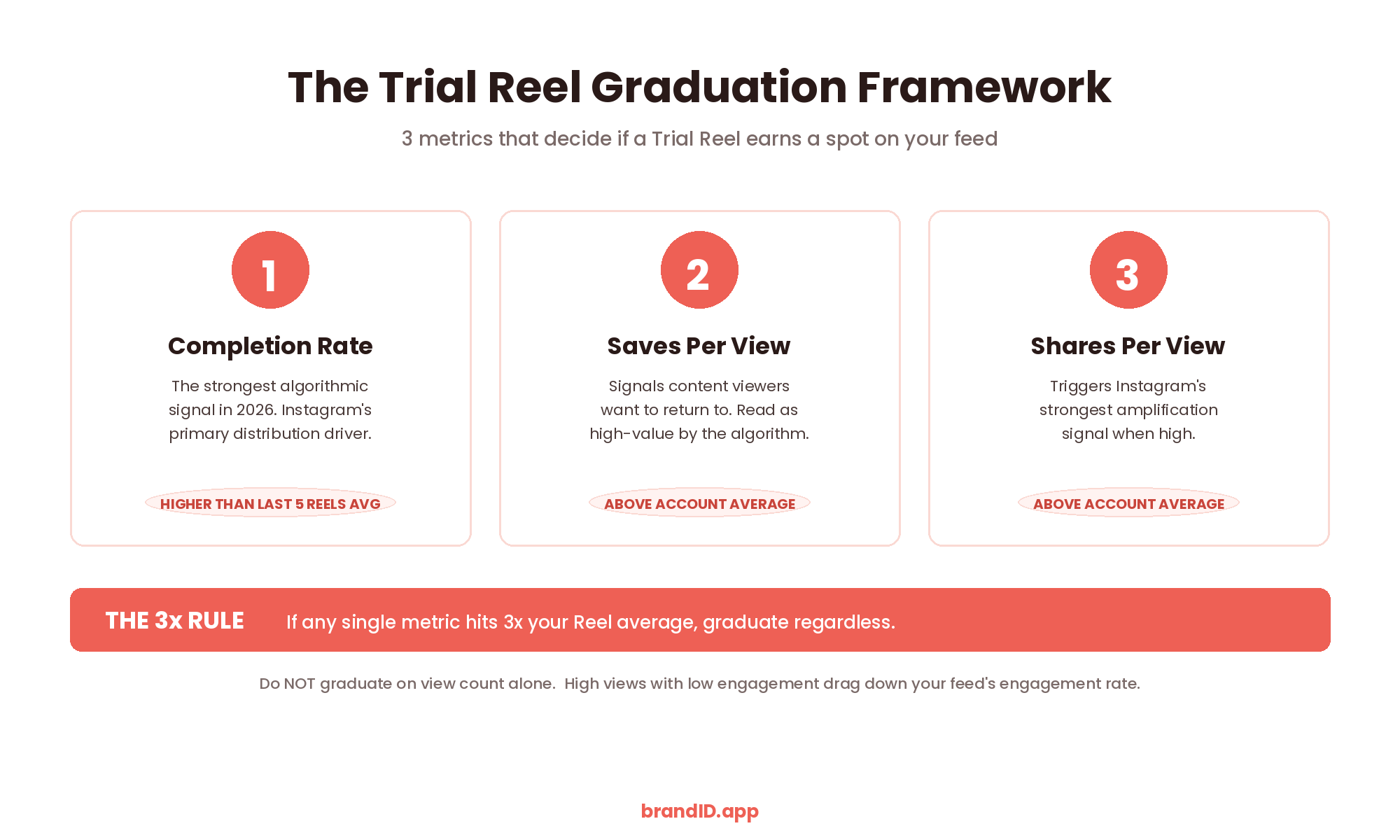
The rule of thumb: graduate a Trial Reel only if its performance exceeds your recent Reel average across at least 2 of these 3 metrics.
1. Completion Rate
The strongest signal in 2026. If your Trial Reel’s completion rate is higher than your last 5 regular Reels’ average, the content is holding attention. Instagram’s algorithm treats completion rate as the primary predictor of whether to distribute wider.
2. Saves Per View
Saves signal that a viewer wants to return to the content, which the algorithm reads as high value. If saves-per-view exceed your recent average, the content will likely earn additional distribution when shared with followers.
3. Shares Per View
Shares indicate the content is worth sending to a friend, which triggers Instagram’s strongest amplification signal. High shares on a Trial Reel almost always predict high reach when graduated.
4. The 3x Rule
If a Trial Reel hits 3x your regular Reel average on any single metric (usually shares or saves), graduate it regardless of the other metrics. That kind of outlier signal is what most creators are hunting for.
5. Do Not Graduate on View Count Alone
View count is the most common vanity metric on Instagram in 2026. A high-view, low-engagement Trial Reel means the algorithm distributed it but the audience did not care. Graduating that content to followers hurts your engagement rate.
How to Schedule Instagram Trial Reels
In February 2026, Instagram added the ability to schedule Trial Reels directly inside the Reel composer, addressing one of the biggest complaints creators had about the feature. Scheduling matters because Trial Reels reach only non-followers, and non-follower behavior peaks at very specific times.
Step 1: Compose the Trial Reel as usual. Edit the video, add audio and text, write the caption, and toggle Trial mode on.
Step 2: Tap “Advanced settings.” On the sharing screen, scroll down to advanced options and tap “Schedule Reel.” Set the date and time when you want the Trial Reel to publish.
Step 3: Choose a peak testing window. Data across 2026 consistently shows Monday to Wednesday between 10 AM and 1 PM produces the highest Trial Reel performance across almost every niche. Weekends underperform for B2B content but overperform for lifestyle.
Step 4: Confirm and preview. Instagram shows the scheduled Trial Reel in your content calendar. You can edit or cancel until it goes live.
Third-party alternatives. If you manage multiple accounts or want a unified calendar with regular Reels and Trial Reels, tools like Buffer, PostFast, and Later added Trial Reel scheduling support in Q1 2026. These are worth considering if you are batching content across a full month.
Common Mistakes When Using Instagram Trial Reels
- Reposting old winners as Trial Reels. Instagram now flags this as spam activity and throttles distribution. The old workaround of reposting viral content is closed; Trial Reels only reward genuinely new content.
- Checking metrics before 24 hours. Early numbers are statistically meaningless because Instagram has not fully distributed the Reel yet. Set a 24-hour reminder and leave the metrics alone until then.
- Testing multiple variables at once. If you change the hook, audio, and format all at once, you have no idea which variable moved the numbers. Change only one thing per test to isolate the signal.
- Graduating based on view count alone. High views with low engagement means the algorithm distributed the Reel but the audience did not care. Graduating that content hurts your regular feed’s engagement rate.
- Expecting Trial Reels to match regular Reels’ reach. Mosseri confirmed Trial Reels almost always get less reach than regular Reels because they cannot leverage the warm-audience signal. Judge them against other Trial Reels, not your regular content.
- Publishing Trial Reels randomly. Trial Reels only reach non-followers, and non-follower behavior peaks Monday to Wednesday, 10 AM to 1 PM in most niches. Random posting times undermine your test data.
- Leaving auto-share on by default. Auto-share is powerful but should only be enabled when you would be genuinely happy to have the Trial go public. Leaving it on for tests you were not sure about surfaces mediocre content to followers.
- Testing without a hypothesis. “Let’s see what happens” is not a strategy. Every Trial Reel should have a specific hypothesis (“hook A will outperform hook B”) so the data actually teaches you something.
- Ignoring the bio conversion path. A winning Trial Reel drives traffic to your profile, and if your bio link is a generic Linktree, the win stops there. Compare the top link in bio tools before you commit to one so every Trial Reel win actually converts.
- Never keeping a testing log. Creators who compound learning from Trial Reels write down every hypothesis, result, and takeaway. Creators who forget last month’s tests re-run the same experiments and never build a systematic picture.
Every winning Trial Reel drives new followers to your profile, and the bio link is where that reach converts. brandID turns your bio link into a full storefront: main product, affiliate marketplace, tips, subscriptions, bookings, and a media kit for brand deals. Free forever on the base plan with 0% platform fees on paid tiers, so every non-follower who taps through actually has a place to convert.
Instagram Trial Reels vs Regular Reels
Understanding the differences between Trial Reels and regular Reels helps you decide when to use each. Both belong in a serious creator’s content system, but they solve different problems.
| Dimension | Trial Reels | Regular Reels |
|---|---|---|
| Audience | Non-followers only | Followers + non-followers |
| Profile grid visibility | Hidden | Visible |
| Reels tab visibility | Hidden | Visible |
| Average reach | Lower (no warm audience) | Higher (warm + cold) |
| Purpose | Testing new ideas | Publishing proven content |
| Impact on engagement rate | None (kept separate) | Direct impact on account average |
| Metrics available | Views, likes, comments, shares (after 24h) | Full Insights suite |
| Eligibility | Public accounts, 1,000+ followers | All accounts |
| Scheduling | Yes (added Feb 2026) | Yes |
| Auto-graduation | Optional (72-hour window) | Not applicable |
The practical framework: use Trial Reels to test hypotheses and reduce risk. Use regular Reels to publish everything that already has evidence behind it. A creator running both formats systematically has a real advantage over one running only regular Reels, because they are publishing pre-validated content while their competitors are guessing.
Conclusion
Instagram Trial Reels are the most underused feature on the platform in 2026. Most creators do not know they exist. The creators who do use them systematically get a real edge: they only show their followers content that is already proven to work, and their profile grid becomes a curated highlight of tested winners.
The 7 strategies covered above (the 3-Hook Split Test, the Niche Expansion Play, the Sequential Iteration Loop, the Batch and Graduate System, the DM Automation Trigger Test, the Peak-Time Scheduling Play, and the Competitor Format Steal) each solve a specific creator problem. Pick the one that matches your current bottleneck and run it consistently for 4 to 8 weeks before evaluating.
Growing an audience on Instagram in 2026 is only the first half of the work. Converting that audience into affiliate revenue, product sales, or brand partnerships is where creator income actually comes from. Creators building toward brand deals can start with the tiered playbook in how micro influencers get brand deals, which covers exactly what works at every follower stage.
Every winning Trial Reel earns you new followers, and brandID gives them somewhere real to convert. Instead of “link in bio” pointing to a generic Linktree, brandID turns your bio link into a full storefront: main product, affiliate marketplace with 5 million+ products from 2,000+ brands, tips, subscriptions, bookings, and a media kit for brand deals. It launches in 15 minutes, keeps 0% platform fees on paid plans, and stays free forever if you want to start with just the core features.
Frequently Asked Questions
What Are Instagram Trial Reels?
Instagram Trial Reels are Reels distributed only to accounts that do not follow you. They do not appear on your profile grid, your followers’ feeds, or your Reels tab. Meta launched the feature in December 2024 and expanded scheduling support in February 2026. Trial Reels let creators test new hooks, formats, topics, and audio with a cold audience before deciding whether to share with existing followers.
Who Can Post Instagram Trial Reels?
Instagram Trial Reels are available to public professional accounts (Creator or Business) with at least 1,000 followers. Private accounts and accounts below 1,000 followers do not have access. The 1,000-follower threshold exists because Instagram needs a comparison baseline to measure Trial Reel performance against your regular content.
How Do You Post a Trial Reel on Instagram?
Open the Reel composer, record or upload your video, edit it as normal with audio, text, and effects, write your caption, then toggle the “Trial” option on the sharing screen. Choose whether to enable auto-share (Instagram will graduate the Trial to followers if it performs well in the first 72 hours) and publish. Metrics populate after 24 hours.
Do Instagram Trial Reels Get Less Reach Than Regular Reels?
Yes. Adam Mosseri confirmed that Trial Reels almost always get less reach than regular Reels because they cannot leverage the warm-audience engagement signal that boosts distribution. This is intentional; the feature is designed to give clean testing data from non-followers, not to compete with regular Reels on reach.
When Should You Graduate a Trial Reel to Your Followers?
Graduate a Trial Reel to followers only if it exceeds your recent regular Reel average across at least 2 of these 3 metrics: completion rate, saves per view, shares per view. If a Trial Reel hits 3x your regular average on any single metric, graduate it regardless. Do not graduate on view count alone, since high views with low engagement will drag down your feed’s engagement rate.
What Should You Test With Instagram Trial Reels?
The 8 highest-value variables to test in 2026: hooks (opening 3 seconds), audio track, format style (talking head vs text vs POV), subject matter (niche expansion), video length, opening frame or thumbnail, CTA phrasing (for DM automation), and caption structure. Test only one variable at a time to isolate what actually moved the numbers.
Can You Schedule Instagram Trial Reels?
Yes. Instagram added native Trial Reel scheduling in February 2026 inside the Reel composer’s advanced settings. Third-party tools like Buffer, PostFast, and Later added Trial Reel scheduling support in Q1 2026. The best time windows for maximum reach are Tuesday and Wednesday between 10 AM and 1 PM in your audience’s primary time zone.
Do Trial Reels Show Up on Your Profile Grid?
No. Trial Reels are hidden from your profile grid, your Reels tab, and your followers’ feeds. They only appear on your profile if you choose to “Share with everyone” or if Instagram auto-graduates them based on performance in the first 72 hours. This is what makes them safe for testing risky content.
Can You Repost Old Reels as Trial Reels?
No. Instagram now flags reposting identical content as spam activity and throttles distribution accordingly. The old workaround where creators reposted viral winners is closed. Trial Reels only reward genuinely new content, so use them to test fresh hooks, new topics, or different formats, not to recycle existing wins.
How Long Do You Wait Before Checking Trial Reel Metrics?
Wait at least 24 hours. Early numbers are statistically meaningless because Instagram is still ramping up distribution, and decisions made from partial data are usually wrong. Instagram uses the first 72 hours to decide whether to auto-graduate the Trial Reel, so if you enabled auto-share, that is the full evaluation window to watch.
Are Instagram Trial Reels Worth Using in 2026?
Yes, especially for any creator willing to test systematically. Instagram reported that 40% of creators who used Trial Reels ended up posting more often as a result, and the feature drove an 80% increase in Reels reach among non-followers. Trial Reels are the most underused Instagram feature in 2026, which means creators who use them get a real edge.
How Are Content Creators Monetizing Instagram Reels in 2026?
The three highest-converting income streams tied to Reels in 2026 are affiliate marketing (product recommendations woven into Reels), digital product sales like the ones covered in how to sell information products, and brand partnerships (typically starting around 5,000 to 10,000 followers with strong engagement). Every winning Trial Reel earns more revenue when the bio link points to a real storefront rather than a generic Linktree.
 Summarize this article with:









