
You open Instagram to post. Your mind freezes on the same question you asked last week: what do I even post today? The freeze becomes an excuse to skip. One day becomes three, the feed goes cold, and the algorithm reads inconsistency as a signal to reduce distribution to your existing followers.
The gap between creators who grow steadily and creators who stall is almost never a shortage of ideas in the world. It is a shortage of ideas already sitting in front of them, ready to execute. Picking from “anything at all” is far harder than picking from a curated list you can adapt to your niche in 60 seconds.
This guide gives you 75 Instagram post ideas for content creators, organized into 10 categories, each tagged with the best format (Reel, Carousel, Story, or photo) and a concrete example you can adapt to any niche. Every idea is grounded in Q2 2026 Instagram engagement data, so the format-to-goal pairings reflect what actually distributes right now, not what worked two years ago. If you are also working on the underlying growth mechanics that make these ideas convert, the playbook to increase Instagram followers covers what actually moves the needle across bio optimization, SEO, and Reel strategy in 2026.
Key Takeaways
- Carousels win engagement, Reels win reach. In Q2 2026, carousels averaged 0.50% engagement (highest of any format) while Reels reached 30.81% of followers on average (2.25x more than photos)
- Carousels with 7 to 10 slides get 23% more engagement than carousels with fewer than 4 slides. Long-form swipe experiences signal high dwell time to the algorithm
- Instagram re-serves carousels to followers who scrolled past without swiping. This second-chance mechanism does not exist for Reels or photos, which is why carousels dominate saves. Your strongest carousel is a prime pick to pin to your profile grid
- The 60/25/10 mix wins for most creators (60% Reels for reach, 25% carousels for engagement, 10% photos as brand anchors), plus daily Stories and 1 to 2 Lives per month
- Static image engagement has declined 17% year over year. Photos still have a role as brand anchors, but the calendar cannot lean on them
- Posts with location tags earn 79% more engagement. The best times to post are Tuesday and Wednesday between 10 AM and 1 PM, according to Later’s 2026 data
The 2026 Instagram Format Data Every Content Creator Needs
Before diving into the 75 ideas, understand what the numbers actually say. Choosing the right format is often more important than choosing the right idea, because a great idea in the wrong format loses to a mediocre idea in the right one.
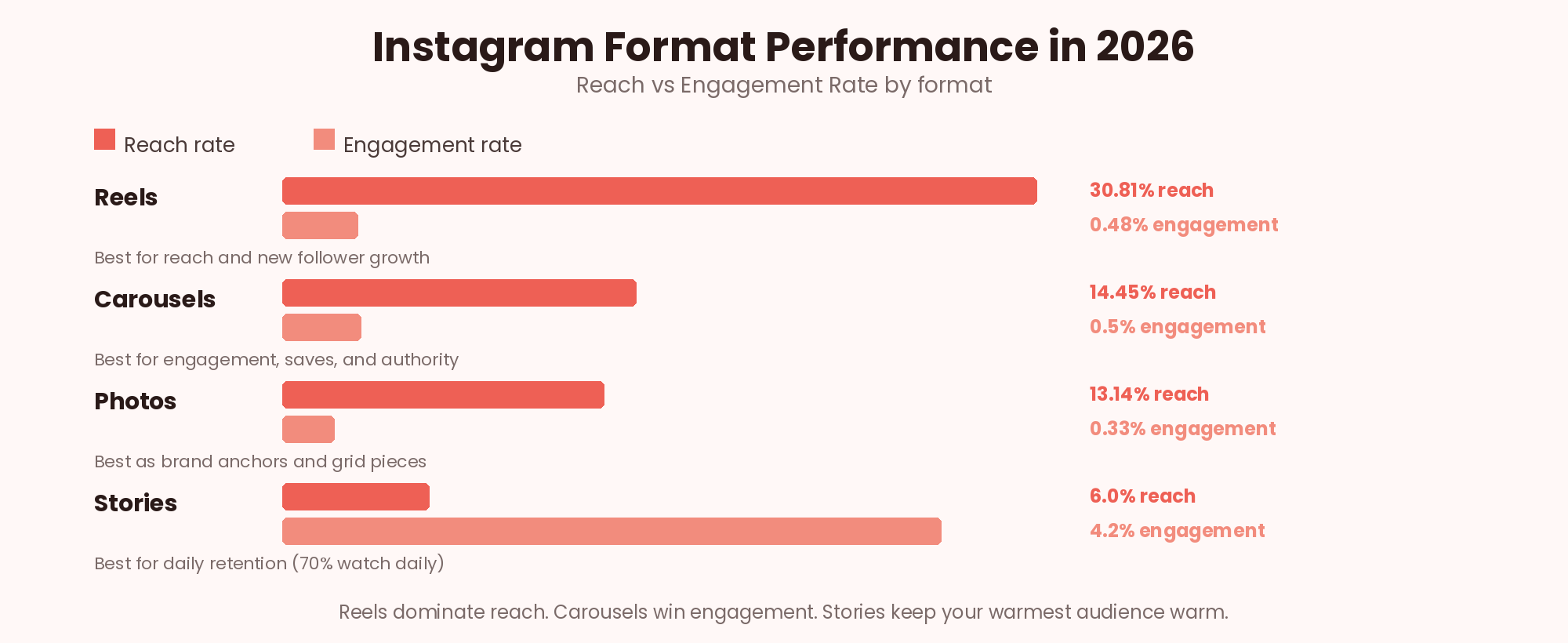
The pattern that holds across every major 2026 dataset: Reels reach 2.25x more people than static photos and 1.36x more than carousels, but carousels convert that smaller reach into 109% more engagement per impression than Reels. Stories reach only 2 to 9% of followers on average, but 70% of Instagram users watch them daily, which makes them the strongest retention format for warming an audience you already have.
The practical implication is that every Instagram post idea should be matched to its goal before it is matched to a format. Trying to grow reach with a photo carousel is a losing bet. Trying to trigger saves with a fast-cut Reel is equally wasted effort. The 75 ideas below are tagged with their strongest format, based on which goal each one serves best.
How to Match Instagram Post Ideas to the Right Format
Before you execute any of the ideas below, decide what the post is actually for. Instagram behaves like five different platforms depending on which format you pick, and each one is optimized for a different job.
- Reels for reach. If the goal is reaching people who do not follow you yet, Reels are the only format Instagram routinely distributes to non-followers via the Explore feed and Reels tab. Educational hooks, transformations, POV skits, and trend-based content all belong here.
- Carousels for engagement and saves. Carousels dominate engagement rate and generate roughly 2x the saves of Reels per impression. The re-serve mechanism (Instagram shows a carousel a second time to followers who scrolled past) gives them a longer engagement window than any other format. Frameworks, case studies, resource lists, and “how to” content all belong here.
- Photos as brand anchors. Static photos have lost distribution priority (engagement down 17% year over year), but they still work for launch announcements, high-quality product shots, and portfolio pieces you want prominent on your profile grid.
- Stories for retention and trust. Only 2 to 9% of followers see any given Story, but the 70% of Instagram users who check Stories daily are the warmest slice of your audience. Polls, Q&As, quick updates, and countdowns all belong here.
- Lives for deep community. Only 2 to 5% of followers watch a Live in real time, but Lives generate 10x more engagement than regular posts among the audience that does show up. Reserve them for launches, milestones, and Q&A sessions.
75 Instagram Post Ideas for Content Creators (By Category)
The 75 ideas below are organized into 10 categories. Each idea has a suggested format tag and a concrete example you can adapt to your niche. Nothing here is theoretical: every format-idea pairing reflects what actually distributes well in 2026.
Category 1: Educational Instagram Post Ideas (10 ideas)
Educational content is what gets saved, shared, and revisited. These 10 Instagram post ideas work in almost any niche and form the backbone of a carousel-heavy content strategy that compounds authority over time.
Take your one-of-one process, the thing you do repeatedly that gets consistent results, and package it as a swipeable visual framework. Followers screenshot and save these because they replace hours of trial and error with a clear step-by-step map.
Example: A copywriter posting “The 4-step system I use to write viral captions” with each step on its own slide, closing on a summary framework slide followers can screenshot for later.
Vulnerability paired with specific lessons is one of the strongest carousel formats in 2026. Buyers trust creators who have made the same mistakes they are about to make. Structure the mistake on one slide, the fix on the next.
Example: A designer sharing “5 client mistakes I made in my first year freelancing” with each mistake followed by the exact fix that would have prevented the pain.
Take one concrete example of great work in your field and label every part with why it works. This teaches through specific example rather than abstract theory, and the annotations become the reason people save it.
Example: A copywriter posting “The anatomy of a $10K sales page” with annotated screenshots identifying which sections convert and why each headline choice matters.
Transformations naturally capture attention because people enjoy seeing progress. What turns them from entertainment into education is the steps in between. Show the “before,” the “after,” and every specific action that connects them.
Example: A fitness creator posting a 6-month transformation, then breaking down the exact weekly protocol, macro targets, and mindset shifts that produced it.
Time-boxed promises convert 30 to 50% better than open-ended ones because they reduce perceived commitment. Instead of “how to write a Twitter thread,” promise “how to write one in 15 minutes.” The specificity earns the swipe.
Example: A marketer posting “How to write a Twitter thread in 15 minutes (the template I use every time)” with the timer showing on-screen.
Cheat sheets are the highest-save format on Instagram because they replace the need to bookmark a website. Design one clean visual reference that solves a recurring problem, and followers will save it and come back weekly.
Example: A marketer posting “The cheat sheet for writing hooks that stop the scroll” with 20 hook formulas organized by content type on a single densely-designed slide.
Detailed case studies work because they replace guesswork with a concrete blueprint. Break down a specific person’s journey, revenue numbers, and exact tactics, then extract the transferable principles at the end.
Example: A business creator posting “How this coach hit $30K/month in 6 months (the full playbook)” with screenshots of the actual funnel, ad spend, and revenue data.
Contrarian takes get the highest comment counts and shares on Instagram, but only when backed by real evidence. State the common belief, cite the actual research, and end with what people should do differently.
Example: A nutritionist posting “The ‘small meals throughout the day’ advice was based on a single flawed study. Here is what the actual research shows about meal timing.”
Curiosity-gap hooks work in every format because they promise insider knowledge. Deliver something the audience genuinely could not have Googled, or the payoff will feel cheap and shares will drop.
Example: A wedding photographer posting “The one thing nobody tells you about wedding photography (it’s not gear, it’s how you handle mothers-in-law).”
Comparisons are inherently scannable and shareable. Set up a clean two-column visual, contrast every dimension that matters, and end with a clear “pick this one if” recommendation for each option.
Example: A designer posting “Figma vs Sketch in 2026: a side-by-side comparison for solo designers” with 6 comparison rows and a clear winner per use case.
Category 2: Behind-the-Scenes Instagram Post Ideas (7 ideas)
Behind-the-scenes Instagram post ideas build trust faster than any other format because they replace performative polish with real process. Best delivered as short Reels or Story sequences.
The over-produced morning routine trope has burned out. Show the honest version: rough hair, iPad in bed, coffee before you brush your teeth. Authenticity is now the differentiator, not aspiration.
Example: A creator opening with “The morning routine Instagram lied to you about” and showing 45 seconds of real, messy morning behavior with honest voice-over.
Setup tours are one of the most re-watched Instagram post ideas because followers are always trying to optimize their own space. Include exact prices for gear, honest reviews, and the specific reason you picked each thing.
Example: A podcaster walking through their full setup in 60 seconds with on-screen text listing prices and one-line reasoning for each piece of equipment.
Show what actually happens between “blank canvas” and “finished project.” The value is in the small decisions and course corrections viewers never see in the polished final work.
Example: A designer filming their screen from blank canvas to final logo export in 90 seconds, narrating the reasoning behind each color and shape decision.
Time-lapses convert hours of work into a satisfying 30-second watch. The satisfaction of seeing something come together at speed is one of the most re-shareable content patterns on Instagram in 2026.
Example: A ceramicist filming a bowl from raw clay to glazed finish in 45 seconds, with light background music and no voice-over needed.
The rejected drafts are often more interesting than the final piece because they show the taste and judgment behind the work. This format also normalizes iteration for followers who quit at the first bad draft.
Example: A copywriter showing the 12 headline drafts they wrote before landing on the one that got approved by the client.
Screen-recording your own workflow with narration over it turns invisible expertise into a teachable moment. The specificity of the reasoning is what separates it from a generic BTS clip.
Example: A brand designer screen-recording their font pairing process, explaining out loud why they rejected 3 options before landing on the one that fits the brand.
Vulnerability content builds parasocial trust faster than polished expertise ever will. Followers who see you struggle honestly become the ones who buy when you eventually launch something.
Example: A creator sharing what they do when nothing is landing: walking, taking a day off, journaling. Normalizes the experience for every other creator watching.
Category 3: Instagram Reel Post Ideas That Grow Your Reach (10 ideas)
Reels are the only format Instagram consistently distributes to non-followers. These 10 Instagram Reel post ideas are proven to earn Explore-feed placement when the hook and structure work together.
Trending audio is a distribution shortcut Instagram actively pushes toward more viewers. The generic version of any trend is buried; the niche-specific application gets amplified because it feels fresh in a saturated format.
Example: A B2B creator using a viral dance audio with text overlays covering SaaS pricing pain points, running 15 to 20 seconds.
POV framing makes the viewer feel personally addressed. Open with a specific “POV: you are…” that describes the exact frustration or aspiration your ideal follower feels, then deliver a single insight in under 30 seconds.
Example: A fitness creator opening “POV: you have been trying to lose 15 pounds for 3 years” then delivering one specific mindset shift that changes everything.
This format signals experience because only creators with real reps have things they used to believe and no longer do. The specificity of the mind-change earns the watch and the follow.
Example: A marketer posting “3 things about copywriting that changed my mind after 500 client projects” with a fast-cut structure showing each belief flip.
Text-first Reels work because they respect the fact that 85% of Instagram video is watched with sound off. Lead with a sharp text hook on frame 1, deliver the message through on-screen copy, and use B-roll as visual rhythm.
Example: A finance creator running text-only slides over stock B-roll with hook “You are losing $500/mo to fees you don’t know about” on frame 1.
The transformation reveal is one of the most reliably viral Reel patterns because it creates a promise the viewer waits to see fulfilled. Show the rejected versions, build tension, then reveal.
Example: A designer opening with “This logo took me 40 tries” while showing rejected versions flying past, ending with the polished final version on frame 20.
Skill-in-action Reels work because Instagram viewers are constantly evaluating whether creators can actually do the thing they claim. Prove it visibly, cut to close-ups on the moments that require real expertise.
Example: A chef filming themselves plating a complex dish, cutting to macro close-ups on the specific techniques that separate professional plating from home cooking.
Reaction content taps into the search volume around breaking news in your industry. Post within the first 24 hours of a story breaking and Instagram often surfaces the Reel in Explore for that keyword.
Example: A tech creator posting a 45-second Reel reacting to a new product launch or major acquisition with their honest hot take.
Narrative Reels get watched to completion at higher rates than any other format because humans are wired for story. Pair a compelling story voice-over with slow-motion or cinematic B-roll for emotional weight.
Example: A travel creator narrating a memorable moment from a trip over slow-motion footage, cutting on the emotional beats of the story.
Contrarian Reels earn the highest comment counts because they invite disagreement and defense. Take a widely-accepted piece of advice, explain why it is wrong or incomplete, and offer the specific alternative.
Example: A copywriter posting “Everyone says to use short sentences. Here is why that advice is making your writing worse” with a 30-second explanation.
Explainer Reels that compress complexity into 15 seconds without losing accuracy signal expertise powerfully. The tight constraint forces you to identify what actually matters and cut everything else.
Example: A finance creator explaining what a Roth IRA is using screen text and a visual diagram, in one clean take under 15 seconds.
Category 4: Instagram Carousel Post Ideas That Get Saved (10 ideas)
Carousels earn 2x the saves of Reels per impression and trigger Instagram’s re-serve mechanism, giving them a longer distribution window than any other format. These 10 Instagram carousel post ideas are the strongest structures in 2026.
Numbered “rules” carousels work because they promise a complete framework in a scannable format. Use exactly 10 slides (Instagram’s max is 10), keep one rule per slide, and design a memorable final summary slide.
Example: A photographer posting “10 rules for lighting a subject in natural light” with one rule per slide and a side-by-side photo example for each.
Introduce a visual framework on slide 1 (the whole diagram), then dedicate each subsequent slide to one component with a clear explanation. Ends on slide 10 with a downloadable-looking summary.
Example: A consultant posting their client onboarding process as a visual funnel diagram, with each stage broken into its own slide with specific tactics.
Resource-list carousels earn the highest save rates because followers use them as reference material. Include the logo, the honest one-line review, and a specific use case for each tool.
Example: A marketer posting “Every tool I use to run my agency (and why)” with 8 slides, each covering one tool with logo, price, and one-line review.
Case study carousels combine story with data. Structure them as: the client and situation → what you tried → what worked → the specific numeric result → the transferable lesson.
Example: A copywriter posting “How I wrote a $47K launch email in 90 minutes” with actual email screenshots and reasoning behind each copywriting decision.
Tool roundups convert well because they solve a common decision-fatigue problem. Include ratings, honest cons alongside pros, and the specific reason you chose each tool over the alternatives.
Example: A designer posting “12 apps that make me 3x more productive” with a rating out of 10 and one-line pro plus con for each app.
Mistake-fix pairing is one of the most consistently high-saving carousel patterns. The mistake slide catches attention with recognition, the fix slide provides the actionable value.
Example: A finance creator posting “5 tax mistakes small business owners make (and the exact fix for each)” with mistake and fix on alternating slides.
Q&A carousels convert well because they mirror how the audience thinks. Each question slide creates a small suspense loop that the answer slide resolves, driving swipe-through rates up.
Example: A therapist posting “5 questions to ask before ending a relationship” with each question on its own slide and a nuanced 2-paragraph answer on the next.
Binary-choice carousels get high comment engagement because they force followers to pick a side. End with a “which one are you” slide that invites debate in the comments.
Example: A branding designer posting “Bold vs subtle: 8 design decisions where the right answer depends on your goal.”
Journey carousels build parasocial connection while also teaching. Show revenue, follower count, or income year by year with the specific lesson from each year on the same slide.
Example: A creator posting “My income journey year by year” with screenshots of annual revenue plus one hard-won lesson per year.
Data-heavy carousels signal authority and get saved as reference. Design clean chart images with one data point per slide, adding your specific interpretation of what the numbers mean.
Example: A marketer posting “The results of my 6-month cold email test” with actual open, reply, and conversion rate charts on each slide.
Category 5: Instagram Story Post Ideas That Build Trust (6 ideas)
Stories reach only 2 to 9% of followers, but that slice is the warmest part of the audience. These 6 Instagram Story post ideas convert lurkers into engaged viewers who will look for your feed content later.
Poll stickers get high interaction because they cost the follower nothing. Use them to gather audience opinions on specific niche debates, then follow up with a Story explaining the winning answer.
Example: A design creator posting “Serif or sans in 2026?” with a poll sticker, then a follow-up Story showing which answer won and why the audience got it right (or wrong).
Q&A boxes turn passive followers into engaged commenters. Narrow the topic (“ask me anything about pricing your services”) to filter for high-quality questions, then answer the best 3 to 5 in follow-up Stories.
Example: A copywriter opening a question box on “Ask me anything about pricing your services” and using the responses as source material for a follow-up feed carousel.
Binary-choice Stories are the highest-engagement Story format because they let followers participate without typing. Use them to test creative directions on your audience before finalizing feed content.
Example: A designer posting “This or that” with two color palettes for an upcoming client project, letting followers vote and revealing the winner the next day.
Countdown stickers create urgency and let followers set a reminder they will receive automatically. Best deployed 7 days before a launch, with fresh content posted daily to keep viewers checking back.
Example: An info product seller running a 7-day countdown to a course launch, with a new piece of course content revealed each day.
Emoji sliders let followers express feeling without typing. Combined with a strong image, they generate substantially higher engagement than a plain photo Story with no interactive sticker.
Example: A photographer posting a new photo with an emoji slider sticker: “Rate how much you love this shot.”
Event Stories build trust because they show real-time proof that you attend, contribute to, and shape your industry. Post 5 to 10 slides across the event day, capturing sessions, meals, meetings, and takeaways.
Example: A creator at an industry conference posting throughout the day: opening keynote thoughts, lunch meeting screenshots, and one big takeaway to close.
Category 6: Community and Engagement Instagram Post Ideas (7 ideas)
Engagement-focused Instagram post ideas turn a follower base into a community. The goal is not reach; it is comment density, DM triggers, and repeat participation from the same warm accounts.
Personal response offers convert followers into commenters because the payoff is immediate and specific. Only offer this if you can actually deliver on it for the first 20 to 50 comments.
Example: A designer posting “Comment your logo brief in one line and I will critique the first 20 for free” then delivering thoughtful critique in the replies.
Featuring a follower turns them into an evangelist for your brand and demonstrates social proof to everyone else watching. This is one of the highest-share community post formats in 2026.
Example: A business coach posting “My client @username hit her first $10K month, here is how she did it” with a screenshot of the win and the exact playbook she followed.
Turning a repeated DM or comment into a public response demonstrates that you listen and generates content organically from your audience. Screenshot the comment and address it directly on frame 1.
Example: A finance creator posting “I keep getting this exact question in DMs, so here is the full answer” and unpacking it in a 60-second explainer Reel.
User-generated content posts do double duty: they thank the creator who made it and demonstrate real customer experience to everyone else. Split-screen your reaction alongside the original for maximum effect.
Example: A product-based creator reposting a customer’s unboxing video with their genuine reaction alongside it in split-screen format.
Tag-based content generates a share loop: every tag pulls a new viewer into your post’s comments, which the algorithm reads as heightened engagement and often boosts distribution.
Example: A therapist posting “Tag a friend who has been overworking themselves” alongside a quotable, screenshot-friendly graphic that captures a specific truth about burnout.
Giveaways are one of the fastest ways to spike both engagement and follower count in a single post, when structured correctly. Use a verifiable winner selection tool so the process feels transparent and legitimate.
Example: A creator running “Follow, tag 2 friends, and save this post for a chance to win,” using one of the Instagram giveaway picker tools to select a winner fairly and on video.
Fill-in-the-blank prompts get high comment counts because they lower the friction to reply. The answer is short, personal, and there is no wrong response, which is exactly what pushes engagement rates up.
Example: A copywriter posting “The one word that made my last client cry was ___” and inviting followers to share their own version.
Category 7: Sales and Monetization Instagram Post Ideas (8 ideas)
Sales content should be roughly 10 to 20% of the total mix. These 8 Instagram post ideas convert without feeling like ads because they lead with proof, transparency, or story. If you want to see how these fit into a broader monetization system, the Instagram sales funnel guide maps each type of post to a funnel stage.
Product demos convert when they show a specific outcome the buyer wants, not a feature list. Show the before, the transformation, and the after, all in under 30 seconds with a clear voice-over.
Example: An info product seller demoing “How my Notion template turns a chaotic project into a 5-minute setup” with actual screen recording of the transformation.
Success stories are the softest sell that still converts because they let the client’s transformation speak for the product. Include specific numbers, direct quotes, and the exact playbook you used.
Example: A coach posting “How @clientname went from $2K to $18K/month in 4 months (the exact playbook)” with screenshots of the client’s real revenue growth.
Sharing the process behind a product launch builds anticipation and buy-in from day one. Show validation, build, refinement, and launch day, with your audience becoming part of the story.
Example: A creator posting a 6-month behind-the-scenes journey of building their upcoming course, from initial validation calls all the way to launch day.
Testimonial carousels stack social proof visibly. Screenshot 8 different testimonials all showing a specific transformation, so the pattern of results becomes undeniable by slide 4.
Example: A consultant posting 8 client testimonial screenshots in a row, all showing the same specific outcome (revenue doubled, hires made, or hours saved).
Transparency about what is inside a product reduces buyer hesitation because it removes the uncertainty gap. Show a full walkthrough of every module or feature, with a preview clip from the strongest lesson.
Example: A course creator posting a full walkthrough of every module, plus a 30-second preview clip from module 1 to demonstrate teaching quality.
Publishing your exact pricing tiers publicly filters out bad-fit buyers and signals confidence. Break down what each tier includes, who it is for, and why the price is what it is.
Example: A freelancer posting “My exact pricing tiers, with a breakdown of what each includes and why” with a slide per tier explaining the deliverables.
Limited bundles create real urgency without discounting your core products. Design the bundle to include one flagship product plus 2 to 3 complementary assets that would not normally sell together.
Example: A digital product seller posting “The bundle I have never offered before, live for 72 hours only” with a clear visual layout of what is included.
Origin stories humanize a product and give buyers a reason to root for it. Structure it as: the personal pain point → the failed attempts to solve it → the moment you decided to build → what it does now.
Example: A product creator explaining the personal pain point that led to building their tool, ending with a current customer transformation as the emotional payoff.
Category 8: Authority-Building Instagram Post Ideas (6 ideas)
Authority content signals credibility to both followers and brands scouting for partnerships. These 6 Instagram post ideas work particularly well for creators building toward brand deal income.
Publishing original research (even from a small sample) is one of the strongest authority moves you can make. Run a poll or survey of 50 to 200 people in your niche and share the findings as a data carousel.
Example: A marketer posting “I surveyed 200 solopreneurs about their biggest revenue block. Here is what they said” with a data chart on each of 8 slides.
Contrarian takes only build authority when they are supported by evidence. Cite the specific data, quote the sources, and provide a clear alternative recommendation so followers walk away with an action, not just an opinion.
Example: A designer posting “Everyone says minimalism is dead. Here is what actual client engagement data shows” with 3 case studies backing the argument.
Named-experience lessons (“what I learned from losing my biggest client”) build authority faster than generic advice because they are unmistakably grounded in reps. Extract 3 to 5 specific principles.
Example: A creator posting “3 lessons from losing my biggest client (with the specific mistakes I made)” and turning each mistake into a transferable framework.
Predictions position you as a thinker rather than just an operator. Include specific reasoning for each prediction so the post reads as analysis, not speculation. Timestamp them so you can revisit later.
Example: A tech creator posting “3 predictions for the SaaS industry in 2027 (with reasoning)” and citing the specific market signals behind each call.
Weighing in on a heated industry debate positions you as a voice worth listening to. Take a clear side, back it with specifics, and acknowledge the strongest version of the opposing view so you look measured.
Example: A copywriter posting a considered take on the latest industry Twitter debate, with two specific examples showing why the other side is missing something.
Publicly committing to a specific goal (with a deadline) builds accountability with followers and generates repeat engagement as you post updates. It also gives you a natural content stream for the next 30 to 60 days.
Example: A creator posting “I am committing to publishing daily for 60 days, here is why, and I want you to hold me to it” with a specific tracking mechanism.
Category 9: Trend-Based and Viral Instagram Post Ideas (8 ideas)
Trend-based Instagram post ideas are a shortcut to reach, but only when applied with a niche-specific twist. Generic trend participation gets buried; niche-specific trend application gets amplified.
Trending audio is a distribution boost, but only if you apply it to your specific niche pain point. Use the format everyone else is using and replace the generic message with something only your audience would recognize.
Example: A B2B creator using a viral audio with text overlay covering their specific niche pain point instead of the generic surface-level version.
The “every X who does Y” format works because it invites the target to laugh at themselves. Play all the characters yourself and make sure the observation is specific enough that only insiders will fully understand.
Example: A designer posting “Every startup founder who thinks they can design their own logo” playing all the characters in a 20-second sketch.
Format hijacking is a shortcut to reach: use a viral format everyone recognizes, but apply it to something entirely different. The dissonance between format and content is what triggers the shares.
Example: A copywriter using the trending “get ready with me” format to walk through a client project instead of a makeup routine.
Meme templates get high shares because they are already primed for social spread. Take a viral meme format and apply your specific brand voice or industry insider knowledge to make it fresh.
Example: A finance creator posting a viral meme template with a caption specifically calibrated to their audience’s pain points about taxes or investing.
Stitching or reacting to a competitor’s viral Reel taps into their audience’s algorithmic signal. Keep the reaction respectful and value-adding, not petty; the goal is to demonstrate your different angle.
Example: A creator stitching another creator’s viral video and adding their own nuanced take alongside, either agreeing with a twist or offering a productive disagreement.
Instagram’s Collab feature lets two creators co-post a single piece of content that appears on both feeds, doubling the discoverable audience without duplicating the work. Choose collaborators whose audience genuinely overlaps yours.
Example: Two complementary creators posting a joint Reel using Instagram’s Collab feature, each contributing their expertise to a shared thesis.
Format hijacking is a shortcut to Reach because the structure has already been algorithm-validated. Adapt the hook, pacing, and structural pattern to your niche while keeping the underlying rhythm.
Example: A copywriter using a photographer’s viral “5 mistakes I made in year 1” format but applying it to writing craft instead of camera work.
Commenting on a trend rather than just participating in it demonstrates critical thinking. Take a viral moment in your space, unpack why it went viral, and offer your genuine analysis of what it means.
Example: A creator commenting on a viral trend in their space with genuine analysis instead of just riding the trend for reach without adding thought.
Category 10: Personal Brand and Storytelling Instagram Post Ideas (3 ideas)
Personal storytelling is what turns followers into fans and fans into paying customers. These 3 Instagram post ideas are the strongest starting points for building parasocial trust at scale.
Origin story posts anchor your identity as a creator and give new followers immediate context. Focus on the pivotal moment or decision that changed your trajectory, rather than a chronological life summary.
Example: A creator posting “How I went from corporate marketer to full-time creator (the story I have never shared)” with the specific moment they knew they had to leave.
Year-over-year comparison posts are among the most-shared content patterns because the underlying story (visible progress) is universally relatable. Add the specific actions that closed the gap between then and now.
Example: A creator posting a screenshot of their bank account, follower count, or income from exactly one year ago alongside the current version, with 5 specific changes.
“Past self” content works because it lets you share hard-won wisdom without lecturing. Frame it as a genuine message to yourself, and the audience listens as if it were meant for them too.
Example: A creator recording an honest 30-second message to their year-ago self, capturing the exact moment before they made the pivot that changed everything.
How to Execute These Instagram Post Ideas Consistently
Ideas do not fail because they are bad. They fail because execution is inconsistent. The creators who grow on Instagram in 2026 are the ones who systematize the ideas into a repeatable calendar and stop treating each post as a one-off decision.
1. Batch Content 4 Weeks at a Time
Sit down once per month and plan 4 weeks of posts using the 75 ideas above. Assign each post idea a category, a format, and a rough script or outline. This turns “what should I post today?” into “which of my 12 pre-planned posts is going out today?”
Batching converts the biggest source of creator drop-off (decision fatigue) into a solved problem. Every hour spent batching saves 3 to 5 hours of daily indecision over the following month.
2. Use the 60/25/10 Format Mix
The strongest format mix for creators in 2026 is 60% Reels (for reach and new follower growth), 25% carousels (for engagement and saves), 10% photos (as brand anchors), plus daily Stories and 1 to 2 Lives per month. Skew toward Reels if pure growth is the goal, skew toward carousels if authority or sales is the goal.
3. Repurpose Every Idea Across Formats
One strong Instagram post idea should produce 3 to 5 pieces of content. A framework carousel becomes a Reel voice-over of the same points, a Story series with the same slides, and a photo of the summary slide. Repurposing extends the life of every idea and reaches different slices of your audience.
4. Post at Peak Times
2026 data from Later shows the best times to post are Tuesday and Wednesday between 10 AM and 1 PM in your audience’s primary time zone. Posts with location tags earn 79% more engagement, so add a location whenever it makes sense. For a deeper breakdown of weekly patterns across every major creator niche, the best times to post on Instagram shift by format and audience.
5. Move Beyond Hashtag-Only Discovery
Instagram’s discovery algorithm now weighs SEO-style keywords in captions and alt-text at least as heavily as hashtags. Write captions that clearly signal what the post is about in plain language, use 3 to 5 targeted hashtags, and fill in the alt-text description on every post. Strong Instagram captions combine a scroll-stopping hook, a value-packed middle, and a clear CTA that points followers to your bio link.
Common Mistakes When Executing These Instagram Post Ideas
- Posting inconsistently. The algorithm reduces distribution for accounts that post irregularly. Better to post 3 times per week consistently for 6 months than 7 times per week for 3 weeks followed by a month off.
- Format monotony. Posting only Reels caps engagement growth; posting only carousels caps reach growth. The 60/25/10 mix exists because different formats do different jobs.
- Weak hook on slide 1 or frame 1. Nothing else matters if the hook fails. Slide 1 and frame 1 determine whether Instagram distributes the post further or buries it.
- No clear call to action. Every post should ask for something specific: a save, a comment, a share, a click. Vague endings leave engagement on the table.
- Ignoring saves as a metric. Saves are the strongest signal to Instagram’s algorithm that a post is worth showing to more people. Track saves per post and double down on formats that trigger them.
- Chasing trends without niche fit. Generic trend participation gets buried. Niche-specific trend application gets amplified.
- Never analyzing what worked. Creators who scale look at Instagram Insights weekly. Creators who stall guess at what their audience wants.
- Skipping Stories. Stories only reach 2 to 9% of followers, but the 70% of Instagram users who watch them daily are the warmest slice of your audience. Posting daily Stories keeps the warm audience warm.
- Treating every post as a make-or-break moment. Instagram is a volume game. Individual posts fail; consistent creators grow.
- Neglecting the bio link. The bio link is the highest-conversion real estate on your profile. A generic Linktree with 6 random destinations undersells every good post you publish, which is why comparing the strongest link in bio tools matters before you commit to one.
brandID turns your Instagram bio link into a full storefront: main product, secondary offers, email signup, affiliate products, tips, bookings, and portfolio, all in one page. Every post idea above earns more revenue when it points to a bio link built to convert, not a generic Linktree with 6 links pointing nowhere. It is free to start, with 0% platform fees on paid tiers.
Quick-Start 30-Day Content Plan Using These Instagram Post Ideas
If you have been posting inconsistently, use this 30-day plan to build a rhythm before overthinking format optimization. Each week uses ideas drawn from different categories above.
Week 1 (build rhythm). 2 Reels (ideas 18 and 27), 3 carousels (ideas 1, 5, and 28), daily Stories (ideas 38 to 43 rotated), 1 photo (idea 74).
Week 2 (introduce authority). 3 Reels (ideas 20, 23, and 25), 2 carousels (ideas 7 and 31), 1 authority post (idea 61), daily Stories.
Week 3 (add sales). 4 Reels (ideas 22, 24, 26, and 65), 2 carousels (ideas 30 and 34), 1 sales post (idea 55), daily Stories.
Week 4 (community + Live). 3 Reels (ideas 19, 21, and 66), 3 carousels (ideas 8, 32, and 36), 1 community post (idea 44), 1 Live (Q&A drawing from Q&A Stories submitted throughout the month).
By day 30, you have published 24 feed posts (12 Reels, 10 carousels, 2 photos), roughly 30 Stories, and one Live. That is enough activity for Instagram to firmly categorize your account and start distributing your best posts to non-followers.
Conclusion
Instagram in 2026 is no longer a platform where randomness works. The creators who grow steadily treat their content as a system: 60% Reels for reach, 25% carousels for engagement and saves, 10% photos as brand anchors, daily Stories for the warmest audience, and monthly Lives for deep community moments.
The 75 Instagram post ideas above are a starting point, not a finish line. Adapt them to your niche, batch them 4 weeks at a time, and repurpose every winning idea across multiple formats. Consistency compounds. Randomness stalls.
Once your content system is running, the next question is monetization. Growing an engaged audience is the foundation, but income comes from converting that audience into affiliate revenue, product sales, or brand deals. Creators building toward brand deal income can start with the 6-path playbook in how micro influencers get brand deals, which covers what actually works at every follower tier in 2026.
brandID gives every one of these 75 post ideas a real place to convert. Instead of “link in bio” pointing to a generic Linktree, brandID turns your bio link into a full storefront: main product, affiliate marketplace with 5 million+ products from 2,000+ brands, tips, subscriptions, bookings, and a media kit for brand deals. It launches in 15 minutes, keeps 0% platform fees on paid plans, and stays free forever if you want to start with just the core features.
Frequently Asked Questions
What Are the Best Instagram Post Ideas for Content Creators in 2026?
The strongest Instagram post ideas for creators in 2026 fall into 10 categories: educational carousels, behind-the-scenes Reels, reach-focused Reels, save-driving carousels, Story-only formats, community engagement posts, sales content, authority-building posts, trend-based Reels, and personal storytelling. The specific format matters as much as the idea itself, because Instagram distributes each format differently.
Which Instagram Format Performs Best in 2026?
Carousels earn the highest engagement rate (0.50% average in Q2 2026) and roughly 2x the saves of any other format, but Reels reach 2.25x more people than photos and 1.36x more than carousels. The right format depends on the goal: Reels for reach and growing new followers, carousels for engagement and saves from existing followers, photos as brand anchors, Stories for daily retention.
How Often Should Content Creators Post on Instagram?
Consistency beats volume. 3 to 5 feed posts per week (a mix of Reels and carousels) plus daily Stories is the strongest baseline in 2026. Posting daily works too, but only if the quality can be maintained. Posting 7 times one week and then twice the next signals inconsistency to the algorithm and reduces distribution.
What Type of Instagram Content Gets the Most Engagement?
Educational carousels with 7 to 10 slides get 23% more engagement than shorter carousels, and Instagram re-serves them to followers who scrolled past the first time. Frameworks, cheat sheets, case studies, and step-by-step guides consistently earn the highest save rates, which is the strongest algorithmic signal a post can send.
What Are Good Instagram Post Ideas for New Creators?
New creators should start with 3 formats that require no audience to work: educational carousels (idea numbers 1 to 10 above), reach-focused Reels (18 to 27), and behind-the-scenes Stories (11 to 17). These 3 formats build authority, reach non-followers, and warm the small audience you already have. Sales content and community posts work better once a base audience exists.
Are Reels Better Than Carousels for Growth?
For reach and new follower growth, Reels are better. Instagram routinely distributes Reels to non-followers via the Explore and Reels feeds, which no other format triggers. For engaging existing followers, driving saves, and building long-term authority, carousels are better. Both formats belong in the calendar. The 60/25/10 mix (Reels/carousels/photos) is the strongest baseline for most creators.
How Do I Come Up With Instagram Content Ideas Consistently?
The strongest solution is a curated list of ideas categorized by format and goal (like the 75 ideas above), plus a monthly batching session where you pre-plan 4 weeks of content at once. This turns daily “what should I post?” decisions into “which of my pre-planned posts is going out today?” The idea shortage is almost always a decision-fatigue problem, not an inspiration problem.
Do Hashtags Still Work on Instagram in 2026?
Yes, but they matter less than they used to. Instagram’s discovery algorithm now weighs SEO-style keywords in captions and alt-text at least as heavily as hashtags. The optimal approach in 2026 is 3 to 5 targeted hashtags per post, keyword-rich captions in plain language, and filled-in alt-text on every image. This layered approach produces roughly 30% more Explore-tab distribution than hashtag-only optimization.
What Should I Post on Instagram Every Day?
Daily Stories are the strongest baseline: polls, Q&As, quick updates, behind-the-scenes moments, and reactions to your latest feed posts. Daily feed posting is optional and only works if quality can be maintained. Most creators do better with 3 to 5 high-quality feed posts per week plus daily Stories than with 7 rushed feed posts per week.
How Do Content Creators Turn Instagram Posts Into Income?
The three highest-converting income streams for creators in 2026 are affiliate marketing (layered onto every relevant post), digital product sales like the ones covered in how to sell information products, and brand deals starting around the follower count where Instagram starts paying. Every Instagram post idea earns more revenue when the bio link points to a real storefront instead of a generic Linktree.
How Long Should an Instagram Carousel Be?
Carousels with 7 to 10 slides get 23% more engagement than carousels with fewer than 4 slides. The sweet spot for most educational carousels is 8 slides: 1 hook slide, 6 content slides, 1 summary or CTA slide. Longer carousels (up to 15 slides) work for framework diagrams and deep case studies, but past 10 slides the swipe-through rate drops noticeably.
Should Content Creators Focus on Reels or Carousels First?
If the goal is growing followers from zero, focus on Reels first since they are the only format Instagram routinely distributes to non-followers. If the goal is monetizing an existing follower base, focus on carousels since they generate 2x the saves and drive the highest engagement rate. Most creators need both, and the 60/25 Reels-to-carousels ratio works for most stages of growth.
 Summarize this article with:









