Instagram is no longer just a feed people scroll. It is a sales channel, a support desk, and a lead pipeline rolled into one. Over 150 million people message businesses on Instagram every month, and most carry real buying intent. Manual replies cannot keep up, and that is where Instagram chatbots come in.
Instagram chatbots automate replies to DMs, comments, and Story interactions through Meta’s official messaging API. They answer FAQs in seconds, capture leads while interest is fresh, route hot prospects to humans, and turn comment threads into private conversations that convert.
If you want to see how this engagement maps to real income, our guide on how many followers you need on Instagram to get paid shows why message automation often matters more than raw audience size.
This guide explains how chatbots on Instagram actually work in 2026, which AI chatbots on Instagram lead the market, what they cost, and how to pick one that fits your goals without risking your account.
Key Takeaways
- Comment-to-DM is the killer feature. The flow that auto-DMs anyone who comments a keyword on a post converts 3 to 10 times better than a link-in-bio call to action.
- AI beats rule-based flows for sales. A study of 828K Instagram DM conversations found that AI chats lasting 11+ messages reached a 29.3% qualification rate, while short scripted replies hit nearly zero.
- Only Meta-approved tools are safe. Browser-emulation bots get accounts banned. Every chatbot in this guide is built on Instagram’s official Graph API.
- Pricing splits in two. Flat-rate Instagram-only tools start at $9.99 to $19 per month. Multi-channel AI platforms with CRMs reach $149 and beyond.
- Creators should pair a chatbot with a storefront. A bot that drops users on a monetized bio page turns conversations into commissions, tips, and digital product sales.
What Are Instagram Chatbots and How Do They Work
Instagram chatbots are automated agents that handle conversations inside Instagram for a business or creator account. They reply to DMs, react to keyword comments, answer Story mentions, and route complex cases to humans. Some follow rigid if-then flows. Others use large language models to sound human.
All compliant tools connect through the Instagram Messaging API, part of Meta’s official Instagram Platform documentation. That API enforces a 24-hour customer-service window, caps near 200 outbound DMs per hour, and approval reviews for production access.
Tools that skip the API and use browser emulation get accounts suspended. The first filter when shopping for chatbots for Instagram is the Meta Business Partner badge.
Rule-Based vs. AI Chatbots on Instagram
Rule-based chatbots follow scripted flows. A user types a trigger word like “GUIDE” or “PRICE,” and the bot fires a pre-built sequence. They are fast to set up, predictable, and ideal for lead-magnet delivery and Story-reply giveaways. ManyChat, Chatfuel, and CreatorFlow lead this category.
AI chatbots on Instagram use generative models to interpret intent and reply in natural language. They handle pricing, objections, and order updates without rigid menus. The trade-off is higher cost and clean training data. The strongest AI bots train on the brand’s own conversations, not generic GPT.
Inside the Comment-to-DM Flow
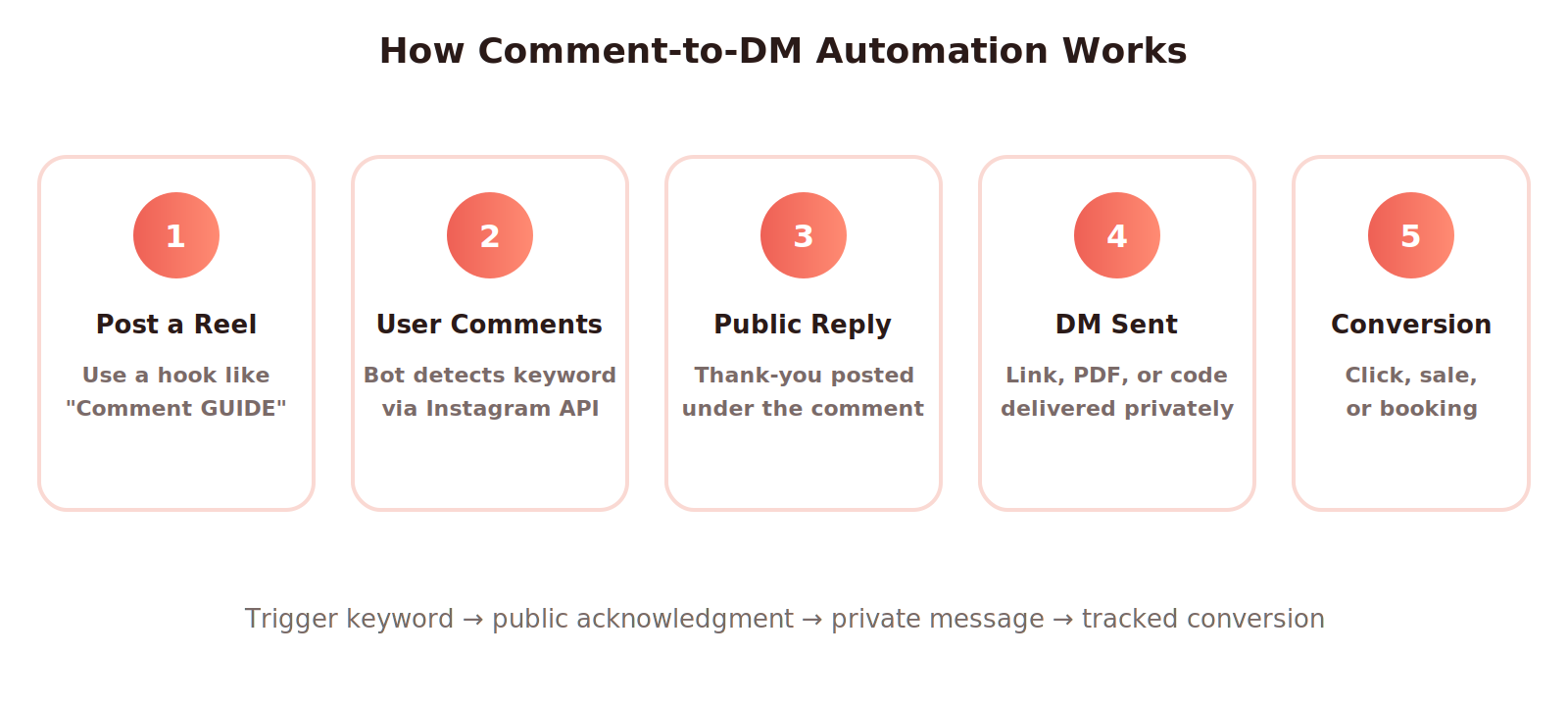
The single most-used feature inside Instagram AI chatbots is comment-to-DM. The creator posts a Reel with copy such as “Comment SHOP and I’ll DM you the link.” When a follower comments the keyword, the chatbot detects it, fires a public reply, and slides into the DMs with the promised link, PDF, or code.
This flow outperforms a generic link in bio by 3 to 10 times. Instagram rewards comment-driven engagement and never penalizes the post for outbound clicks. The audience is also self-qualifying.
Someone who typed a keyword is far more likely to open the DM than a passive viewer. For more on weaving these links into posts, see our walkthrough on how to add a link to an Instagram post.
Why Instagram Chatbots Matter for Businesses and Creators in 2026
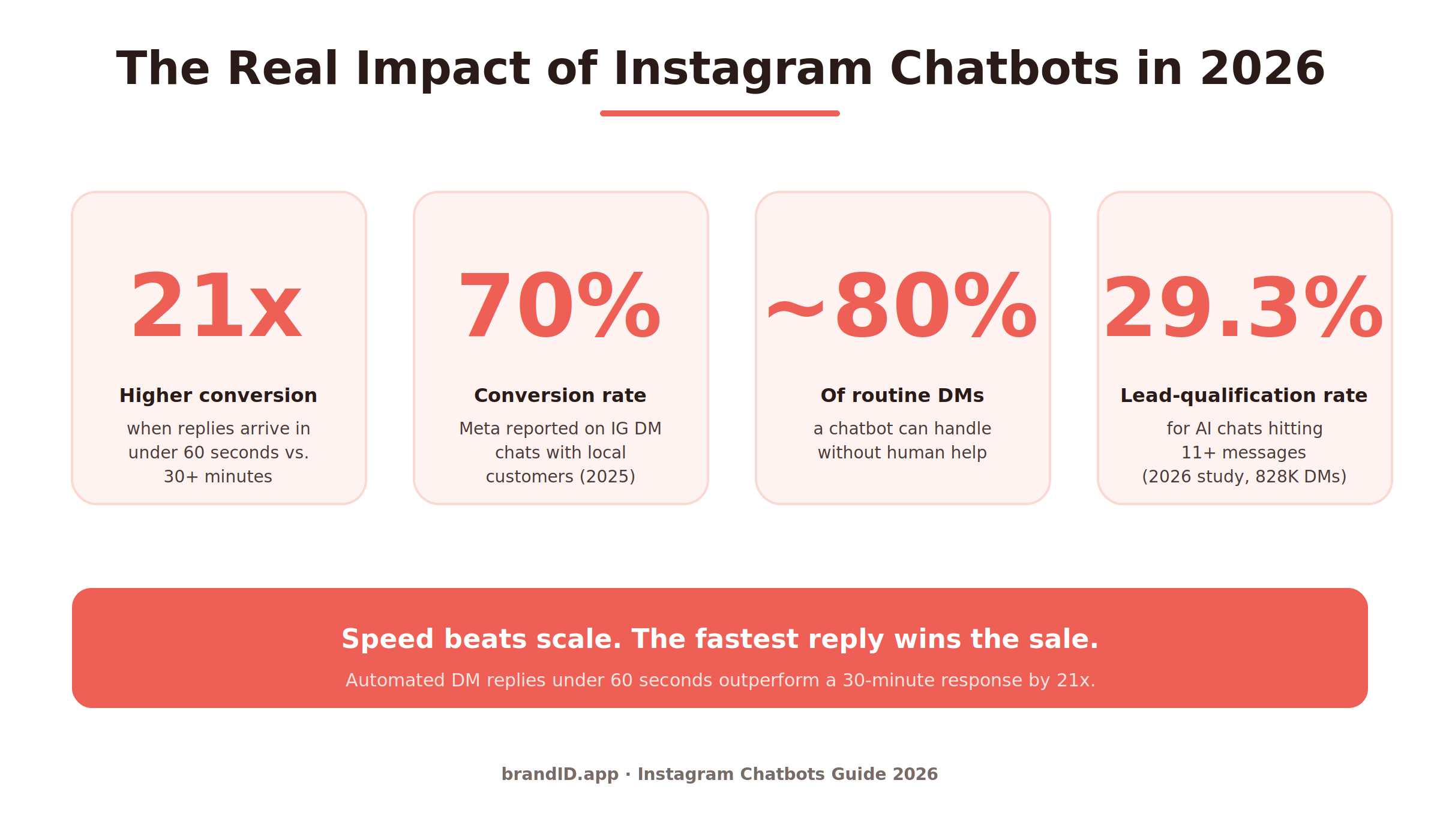
Speed is why Instagram chatbots have become a frontline tool. Industry data from January 2026 shows automated responses sent within 60 seconds get a 21x higher conversion rate than replies after 30 minutes. Most teams cannot answer 50 comments in a minute. A bot can.
A second number matters too. Meta reported a 70 percent conversion rate on Instagram DM chats with local customers, and 79 percent of users seek more info about a product after seeing it on Instagram. The audience wants to talk. Chatbots on Instagram give them that space.
For creators, the calculus is simpler. Every DM is a chance to send someone to a paid offer, a tip jar, an affiliate product, or an email opt-in. Pair a chatbot with a monetized bio page and the entire funnel runs without manual work. Our guide to the best link-in-bio tools covers the destination side of that loop.
Real Business Impact From AI Chatbots on Instagram
Across case studies and vendor benchmarks, Instagram chatbots deliver four measurable wins. Response time drops from hours to seconds. Routine question deflection runs around 80 percent. Lead capture grows because no DM goes ignored at 2 a.m. Cost per acquired customer falls because the bot scales without payroll.
11 Best Instagram Chatbots in 2026 (AI and Rule-Based)
After testing the leading options against four criteria (API safety, AI quality, comment-to-DM reliability, and pricing transparency), these eleven Instagram AI chatbots stand out for 2026. Each entry covers what it does, who it fits, the standout features, the trade-offs, and what to expect on pricing.
DMpro
DMpro tops the list because it solves the one problem every other Instagram chatbot still struggles with: account safety at scale. It is an AI-powered DM platform for Instagram and TikTok that crafts personalized messages based on each target’s profile and your campaign details.
DMpro delivers messages through a hybrid model that combines AI personalization with managed sending. Among Instagram chatbots, it is the rare option that lets brands run high-volume outreach without the action blocks that hit browser-emulation tools.
Best For: Brands, agencies, and creators who need personalized outreach at scale and refuse to risk their account on browser bots.
DMpro Key Features: AI-generated DMs personalized per profile, campaign-based targeting, multi-platform support across Instagram and TikTok, managed delivery to sidestep automation bans, and account-safety-first workflow.
- Strongest account-safety track record
- True per-profile AI personalization
- Works on both Instagram and TikTok
- Less self-service than no-code builders
- Pricing on request, not on the site
- Outreach-led, lighter on flow building
DMpro Pricing: Custom quotes based on campaign size and platform mix.
Recommendation: Pick DMpro when targeted Instagram and TikTok outreach is your growth engine and an account ban would cost more than the tool.
ManyChat
ManyChat is the most widely used Instagram chatbot in the world, with over a million creators, marketers, and brands on the platform. It runs on Meta’s official API, ships a clean visual flow builder, and supports comment triggers, Story replies, DM keywords, and broadcast campaigns.
Most listicles ranking chatbots for Instagram put ManyChat near the top because its comment-to-DM flow is reliable, well documented, and cheap at the entry tier.
Best For: Solo creators, micro-influencers, and small marketing teams that need a polished flow builder without a steep learning curve.
ManyChat Key Features: Drag-and-drop flow builder, comment-to-DM, Story mention triggers, A/B testing, integrations with Shopify, Klaviyo, and Google Sheets, and a large template library.
- Largest community and template library
- Reliable native Instagram features
- Cheap entry tier
- AI add-on uses generic GPT, not brand-trained
- Pricing scales with contacts
- One subscription per IG account
ManyChat Pricing: Free for 25 contacts. Essential $15/mo, Pro $29/mo, scaling to about $139/mo for high-volume agencies.
Recommendation: Start here if you want the safest, most documented entry into Instagram chatbots without paying for AI you do not yet need.
Chatfuel
Chatfuel is one of the oldest no-code chatbot builders, originally built on Messenger and now a strong option for Instagram AI chatbots. It pairs a visual flow builder with AI-enhanced reply blocks that go beyond keyword matching. Chatfuel is a Meta Business Partner and integrates with Shopify, Stripe, and Calendly.
Best For: Small e-commerce stores and creators who want a hybrid of rule-based flows and AI-assisted replies in one tool.
Chatfuel Key Features: Comment-to-DM, Story mention automation, AI-assisted reply blocks, shared inbox, Shopify product lookups, and broadcast campaigns within Meta’s policy windows.
- Mature platform with strong stability
- Native Shopify integration
- Decent AI for replies, not only keywords
- Messenger remains the stronger product
- Documentation thinner on Story features
- Free plan was discontinued
Chatfuel Pricing: Plans start at $15/mo, with higher tiers from $39/mo. Custom enterprise pricing for high message volume.
Recommendation: Pick Chatfuel if your audience lives on both Instagram and Messenger and you want one tool that handles both.
Jotform Instagram AI Agent
Jotform’s Instagram AI Agent is a no-code AI chatbot for Instagram that handles DMs, comment replies, and Story interactions around the clock. It shares a knowledge base with Jotform’s other agents, so teams already on Jotform get faster setup. The agent uses natural-language understanding, not rigid keywords.
Best For: Creators and small teams already in the Jotform ecosystem who want context-aware Instagram automation.
Jotform Instagram AI Agent Key Features: AI-driven DM replies, full Story coverage, shared knowledge base across agents, easy human handoff, and connections to Jotform forms and workflows.
- Strong AI replies with context
- Smooth setup if you already use Jotform
- Full Story trigger support
- Best ROI tied to Jotform usage
- Newer in the Instagram space
- Fewer ready-made templates than ManyChat
Jotform Instagram AI Agent Pricing: Free starter plan. Paid tiers begin at $39/mo and rise with usage and agent count.
Recommendation: Strong pick for creators who want one of the more capable AI chatbots on Instagram without a steep technical setup.
Respond.io
Respond.io is an enterprise messaging platform that brings Instagram, WhatsApp, Facebook, Telegram, and more into one inbox. Its AI Agents learn from a brand’s own knowledge sources (website, help docs, FAQs), so replies stay accurate. The platform suits sales, marketing, and support teams handling high volume.
Best For: Mid-sized and large businesses that need lifecycle management across multiple channels, not only Instagram.
Respond.io Key Features: Multi-channel inbox, AI Agents trained on brand data, lead qualification, conversation summaries, advanced routing, and detailed analytics.
- Brand-trained AI, not generic GPT
- Full multi-channel coverage
- Powerful routing and team features
- Heavier than solo creators need
- Per-user pricing adds up
- Longer onboarding
Respond.io Pricing: Plans start near $79/mo (Growth) and scale into custom enterprise tiers.
Recommendation: The right choice when Instagram is one of several channels and your team needs one workspace to run them all.
Tidio
Tidio is a small-business live chat and chatbot platform that added Instagram DM coverage to its inbox. Its Lyro AI add-on answers questions using your own help content, making it one of the easier AI chatbots on Instagram to start with. Shopify integration pulls order context into chats automatically.
Best For: Small e-commerce stores that want website chat and Instagram DM management in one tool.
Tidio Key Features: Shared inbox across web, Instagram, and Messenger, Lyro AI for FAQs, Shopify order lookups, and basic flow builder.
- Quick to deploy
- Clean shared inbox UX
- Good Shopify support
- Lyro replies cap at the plan limit
- Limited depth for complex funnels
- Not built for agency multi-account use
Tidio Pricing: Free plan available. Paid plans start at $29/mo. Lyro AI sold as an add-on.
Recommendation: Strong starter pick for stores that already use Tidio chat on their site and want Instagram coverage without a second vendor.
SendPulse
SendPulse is a multi-channel marketing platform with a chatbot builder for Instagram, WhatsApp, Telegram, Facebook, and Viber. It is one of the more affordable Instagram AI chatbots when paired with email and SMS in the same account. Triggers include new subscribers, keywords, comments, and Story mentions.
Best For: Solo marketers and small teams that want chatbots for Instagram alongside email and SMS in a single dashboard.
SendPulse Key Features: Drag-and-drop flow editor, multi-channel automation, built-in CRM, API request blocks, and email plus SMS combined with Instagram.
- Cross-channel value at one price
- Generous free tier
- Built-in CRM
- Instagram features less deep than specialists
- UI is dense
- AI replies less refined
SendPulse Pricing: Free plan with limited subscribers. Paid plans from $8/mo per channel.
Recommendation: Pick SendPulse when you want one inexpensive stack that covers email, SMS, and chatbots for Instagram together.
InstantDM
InstantDM does one thing very well: safe, high-volume comment-to-DM automation. Among chatbots on Instagram, it has the strongest reputation for protecting accounts that post Reels with hundreds of comments. Features like DM Queue, Super Slow Mode, and Flood Controller spread outbound messages across hours.
Best For: High-volume creators and viral-content accounts that need rate-limit safety more than fancy AI conversations.
InstantDM Key Features: Comment-to-DM with anti-spam safeguards, rolling rate-limit handling, drag-and-drop flow builder, link tracking, and email capture.
- Industry-leading account-safety features
- Affordable flat pricing
- Simple, fast setup
- Narrow feature set
- No native CRM
- Limited multi-channel support
InstantDM Pricing: From $9.99/mo for the starter plan. Higher tiers up to $29/mo for advanced safety features.
Recommendation: The safest pick when a single Reel can drive 500+ comments and you cannot afford an action block from Instagram.
CreatorFlow
CreatorFlow is a flat-rate Instagram chatbot built for solo creators and small business owners who do not want pricing that scales with contacts. It ships a modern UI with a real-time phone preview and covers the core features creators use: keyword DMs, comment automation, Story replies, and link tracking.
Best For: Single-account creators, affiliate marketers, and coaches who want predictable monthly costs.
CreatorFlow Key Features: Flat monthly price, real-time mobile preview, comment-to-DM, Story reply triggers, UTM-friendly link tracking, and a 14-day free trial.
- Flat pricing avoids surprise bills
- Modern, creator-friendly UI
- 500 free DMs per month
- Single-platform focus (Instagram only)
- No multi-touch attribution
- Lighter on AI features
CreatorFlow Pricing: $15/mo flat, with a free tier of 500 DMs per month.
Recommendation: Pick CreatorFlow if you are an Instagram-first creator and your audience grows fast enough to break ManyChat’s contact-based pricing.
Botpress
Botpress is an open-source chatbot framework that gives developers full control over Instagram bot logic. It pairs a visual flow builder with code-level customization and connects to large language models. Among AI chatbots on Instagram, it is the most flexible with engineers and the most demanding without.
Best For: Developer-led teams and agencies that need custom Instagram experiences and full data ownership.
Botpress Key Features: Open-source core, custom code blocks, LLM integration, multi-channel support, self-hosting option, and detailed conversation analytics.
- Full control over logic and data
- Strong AI options
- Self-hosting available
- Requires engineering skill
- Steep learning curve
- Higher total cost when hosted at scale
Botpress Pricing: Free community edition. Cloud plans from about $89/mo, enterprise pricing on request.
Recommendation: Only the right answer if you have developers on staff and need a chatbot for Instagram that does something the no-code tools cannot.
Inflowave
Inflowave is a newer agency-focused Instagram chatbot, built from day one for accounts running more than one brand. It includes an AI Setter trained on your own DM history, unlimited IG accounts on one subscription, native CRM, and white-label. Pricing often beats per-account tools by hundreds per month.
Best For: Marketing agencies and creator networks managing five or more Instagram accounts at once.
Inflowave Key Features: AI trained on your DM history, unlimited connected IG accounts, comment and Story triggers, real CRM pipeline, and full white-label.
- Flat price for unlimited IG accounts
- AI closes in your tone of voice
- Agency-grade reporting and CRM
- No free tier (7-day trial only)
- Overkill for solo creators
- Newer player, smaller community
Inflowave Pricing: Starts at $149/mo for unlimited Instagram accounts.
Recommendation: Choose Inflowave once you cross the three-account mark and the math on per-account tools stops working.
Top Use Cases for Chatbots on Instagram
The chatbot category sounds the same on every landing page. The actual jobs they do for businesses and creators split into four sharp use cases. Pick the use case first, then the tool.
Lead Generation and Qualification
A chatbot can ask three or four questions inside the DM to qualify a lead before a human ever sees the conversation. For coaches, consultants, and B2B service providers, that pre-screen is the difference between booking calls and burning hours.
AI chatbots on Instagram with branching logic and CRM hand-off live here. Pair the bot with a content magnet (PDF, mini-course, swipe file) to give people a reason to start the conversation.
Customer Support and FAQs
DMs about shipping, sizing, returns, and store hours follow patterns. Instagram chatbots answer these instantly while keeping the brand voice consistent. The strongest support bots ground replies in a knowledge base (FAQ, product docs) so they do not hallucinate. Handoff rules send harder cases to a human.
Sales, Cart Recovery, and Product Q&A
For e-commerce brands, Instagram is where 83 percent of users say they discover new products. A chatbot for Instagram that connects to a product catalog can answer “do you have this in size XL,” send size charts, and recover abandoned carts. Stores using AI chatbots for product Q&A report higher average order values.
Creator Monetization and Affiliate Funnels
For creators, Instagram chatbots are a monetization engine. A Reel with a comment trigger (“Comment SHOP for the link”) routes hot traffic into a DM that drops an affiliate link, a digital product page, or a booking calendar.
For more on the link side, read our guide on how to promote affiliate links. Add an email opt-in inside the DM and the chatbot becomes the front door to a full affiliate marketing system.
How to Choose the Right Instagram Chatbot
Most Instagram chatbots look similar on a feature checklist. The choice gets clearer when you score them against the criteria that actually move outcomes. Use this decision matrix and the table below to shortlist two or three tools before signing up for trials.
How to Set Up Instagram Chatbots: Step-by-Step
Every platform on the list above shares the same first-time setup arc. Plan on 30 to 60 minutes for your first working flow. Settling for “good enough” and iterating beats waiting for perfect.
- Switch to a Professional account. Instagram chatbots only work on Business or Creator accounts. If you are still on a personal profile, switch it in Settings → Account Type. Our walkthrough on how to change your Instagram bio covers the related profile setup.
- Link Instagram to a Facebook Page. The Instagram Messaging API runs through Meta’s infrastructure, so a connected Page is required.
- Connect the chatbot via OAuth. Sign up for the tool, approve the Meta permissions, and select the Instagram account to manage.
- Build one comment-to-DM flow first. Pick a single Reel or post idea. Choose a one-word trigger like SHOP, GUIDE, or LIST. Write the DM copy and add a tracked link.
- Add an email capture step. Ask for an email before sending the link or a discount code. This turns ephemeral DM traffic into a list you own. Our guide on how to build an email list without a website walks through the patterns.
- Add a fallback DM auto-reply. Cover the FAQs anyone might ask outside the keyword trigger: pricing, shipping, hours.
- Set a human handoff rule. If the AI fails twice or the user types “human,” route to inbox.
- Tag every link with UTMs. Track which posts drive the most revenue, not just the most clicks. Without UTM tagging you cannot tell Reel A from Reel B in analytics.
Instagram Chatbot Pricing Compared
Pricing for Instagram chatbots splits into three brackets. Solo creators pay $9 to $19 per month for flat-rate Instagram-only tools. Small businesses pay $29 to $79 for multi-channel platforms with AI add-ons. Agencies pay $149 and up for tools with multi-account support and full CRM pipelines.
Your chatbot brings people in. Your bio page closes them. The brandID affiliate marketplace gives creators access to over 5 million products from more than 2,000 brands, with average commissions up to 65% (some brands pay even higher).
Pick products in your niche, build a free storefront in minutes, and link your social posts straight to the products you recommend. Every DM your bot sends becomes a chance to earn.
Final Thoughts on Instagram Chatbots in 2026
Instagram chatbots have moved from experiment to a core piece of how brands and creators win on the platform. The math is hard to ignore: 21x higher conversions on sub-minute replies, 70 percent close rates on local DMs, and a 29.3 percent qualification rate on deeper AI chats. None of that scales without automation.
The right pick depends on the job. Solo creators win with flat-rate tools like CreatorFlow or InstantDM. Small businesses get the most from ManyChat or Tidio. Mid-market teams need Respond.io or a custom Botpress build. Agencies should look at Inflowave once the per-account math turns ugly.
Whichever tool you pick, run it on Meta’s official API, design the flow around one strong comment-to-DM trigger, and tag every link.
If you are a creator, do not stop at the chatbot. Pair it with a monetized link in bio and an affiliate marketplace, and the messages your bot sends start paying for themselves. For a deeper look at the niches that earn fastest, the report on the most profitable Instagram niches in 2026 is a strong next read.
Frequently Asked Questions
Are Instagram chatbots safe to use?
How much do Instagram chatbots cost?
Can Instagram chatbots send DMs to people who haven’t messaged me first?
Do I need coding skills to set up an Instagram chatbot?
 Summarize this article with: