
Have you ever wondered why you cannot simply add a clickable link to your Instagram posts? If so, you are not alone. For years, creators, influencers, and brands have hit the same wall: you write the perfect caption, and there is nowhere to drop a tappable link to your shop, blog, or booking page.
According to Adam Mosseri, the head of Instagram, this is deliberate. Instagram's policies are designed to keep people scrolling inside the app, and he has said it also helps reduce spam. The good news is you can still get your audience clicking; you just need the right method. This guide covers every way to add a link to an Instagram post in 2026, from the caption workaround to Stories, your bio, DMs, and more. If your profile needs a refresh first, our step-by-step guide on how to change your Instagram bio is a quick place to start.
Key Takeaways
- Captions are not clickable: Instagram shows a URL in a feed caption as plain text, so it cannot be tapped
- You can still add a link to an Instagram post: Use Stories, your bio, a link in bio tool, DMs, ads, or Instagram Shopping
- Your bio is your best permanent link: Add up to five links, or use a link in bio tool like brandID to share more from one page
- Make captions work anyway: Pair a plain-text URL with a specific "link in bio" call to action or a comment-to-DM prompt
- Stories and Highlights give clickable links: The link sticker works for every account, and saving it to a Highlight makes it permanent
- Automate it: Tools like DMpro send your link automatically to everyone who comments a keyword
Can You Add a Link to an Instagram Post?
Short answer: not directly inside a feed post caption. Instagram does not make links in captions clickable, so a URL you paste there shows up as plain text that people would have to copy and type into a browser. That is true for photos, carousels, and Reels alike.
The longer answer is more encouraging: yes, you can absolutely add a clickable link to an Instagram post using the right feature. Instagram Stories, your bio, link in bio tools, comment-to-DM automation, ads, and Instagram Shopping all let you share a working link. Below, we break down each method so you can post a link on Instagram the way that fits your goal.
Why Can't You Add Clickable Links to Instagram Post Captions?
Instagram's business model depends on keeping people inside the app. Every extra minute users spend scrolling is another chance to show them paid ads, so clickable caption links, which send people away from Instagram, work against that goal. That single decision is why you cannot put a clickable website link in an Instagram post caption today.
There is a silver lining worth knowing. Google now crawls public Instagram posts, so even a non-clickable URL or a clear call to action in your caption can help your content get discovered in search. In practice, that means you should lean on two strategies: drive people to a clickable link (your bio or a Story), and encourage them to comment or DM you for a link directly.
Ways to Add a Link to an Instagram Post at a Glance
Here is every method compared, so you can pick the right one before you dive into the steps.
| Method | Clickable link? | Best for |
|---|---|---|
| Instagram Stories (link sticker) | Yes | Timely promos and campaigns |
| Instagram bio link | Yes | Your one always-on, permanent link |
| Link in bio tool (brandID) | Yes | Sharing many links from one page |
| Caption + "link in bio" CTA | No | Pointing feed posts to your bio |
| Comment-to-DM (DMpro) | Yes | Turning comments into link clicks |
| Instagram Reels | No | Traffic via caption CTA and DMs |
| Pinned post with a CTA | No | Guiding new profile visitors |
| Story Highlight with a link | Yes | A permanent, always-visible link |
| Broadcast channel | Yes | Sharing links with your subscribers |
| Instagram Ads | Yes | Paid, targeted link promotion |
| Instagram Shopping (product tags) | Yes | Selling tagged products |
How to Add a Link to an Instagram Post: 11 Methods That Work
Although Instagram does not allow clickable links directly in post captions, these strategies let you overcome that limit and send your audience exactly where you want them to go.
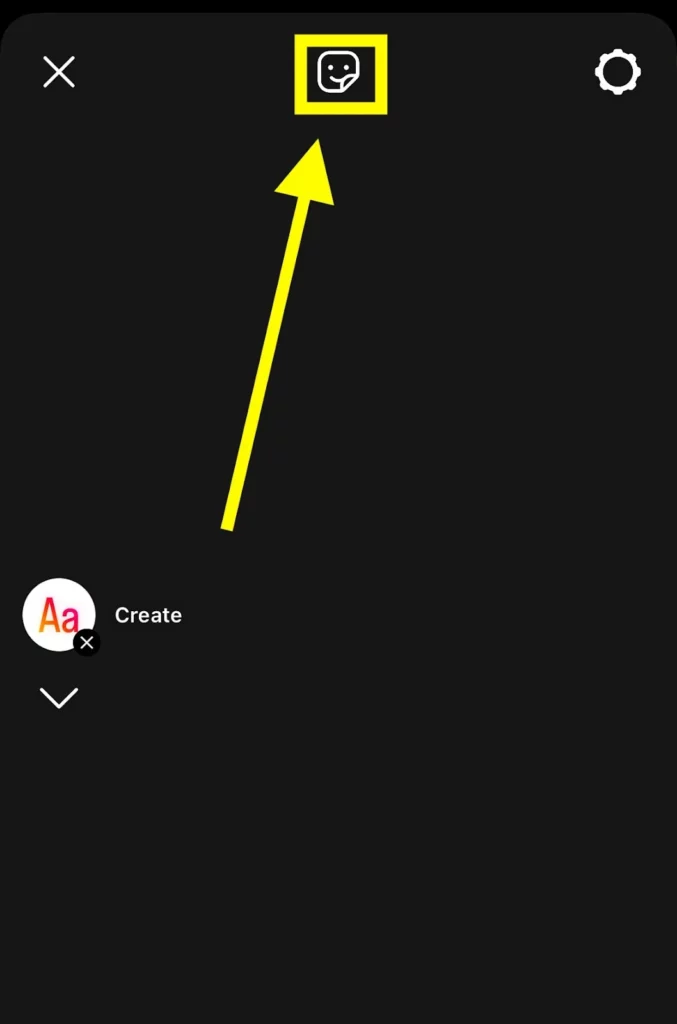
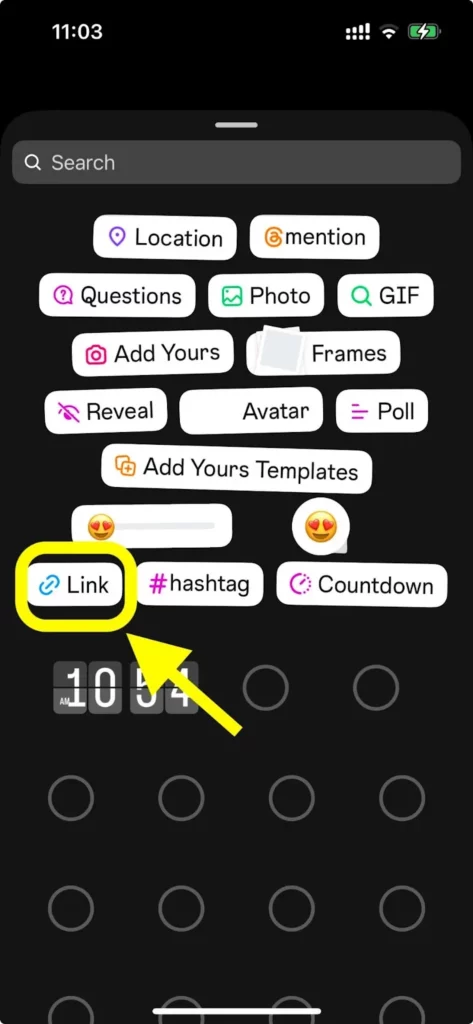
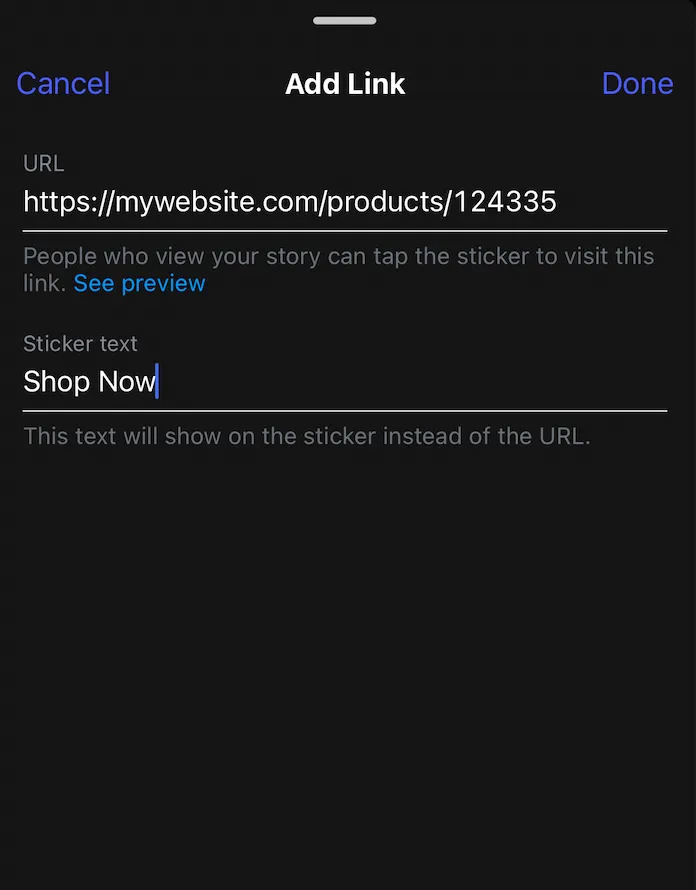
1. Add a Link Using Instagram Stories
Instagram Stories are the most direct way to share a clickable link. The old rule that required 10,000 followers to use link stickers is gone, so any account can add a tappable link to a Story. For the deeper walkthrough, see our full guide on how to add a link to your Instagram Story.
Step-by-step guide
- Tap the "+" icon and select "Story."
- Add your photo or video.
- Tap the sticker icon.
- Search for "Link" and select it.
- Enter your URL.
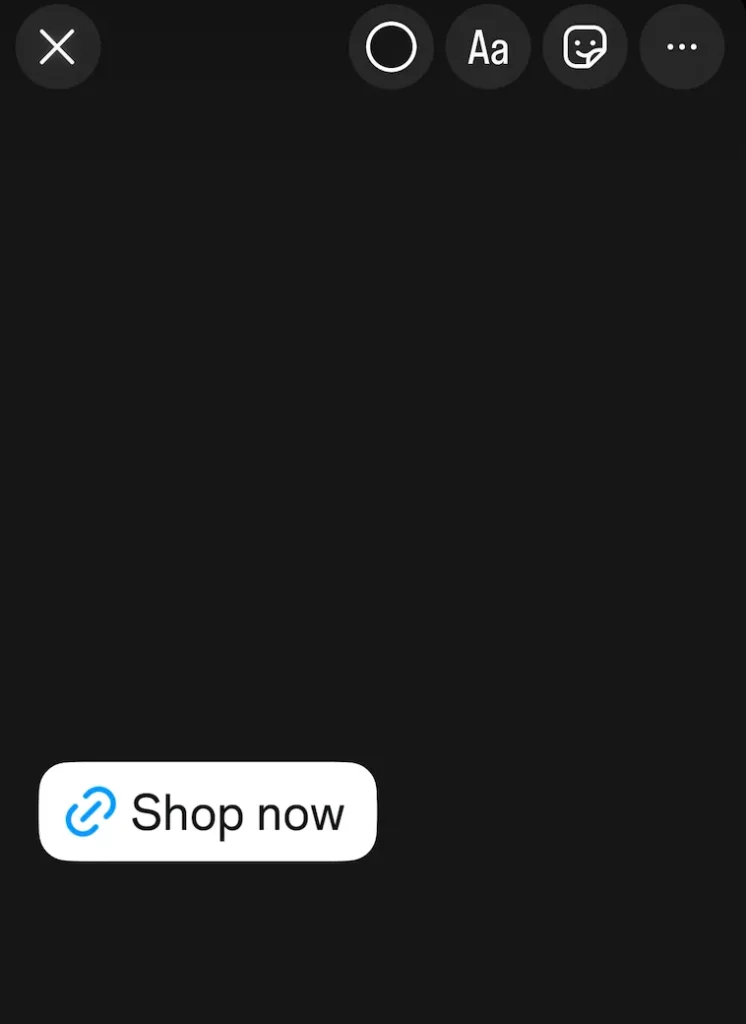
- Customize the sticker text (for example, "Shop now" or "Watch now").
- Position the link where you want it, then share.
2. Add a Link in Your Instagram Bio
Your Instagram bio is the most valuable real estate on your profile. It is the one place you can keep a permanent clickable link that anyone can tap, whether you are promoting a blog post, a product page, a YouTube video, or an affiliate offer. Unlike captions, where links are readable but not clickable, your bio link works, so make full use of it. As of now, Instagram lets you add up to five external links to your profile.
Step-by-step guide
- Tap "Edit Profile" under your picture and bio.
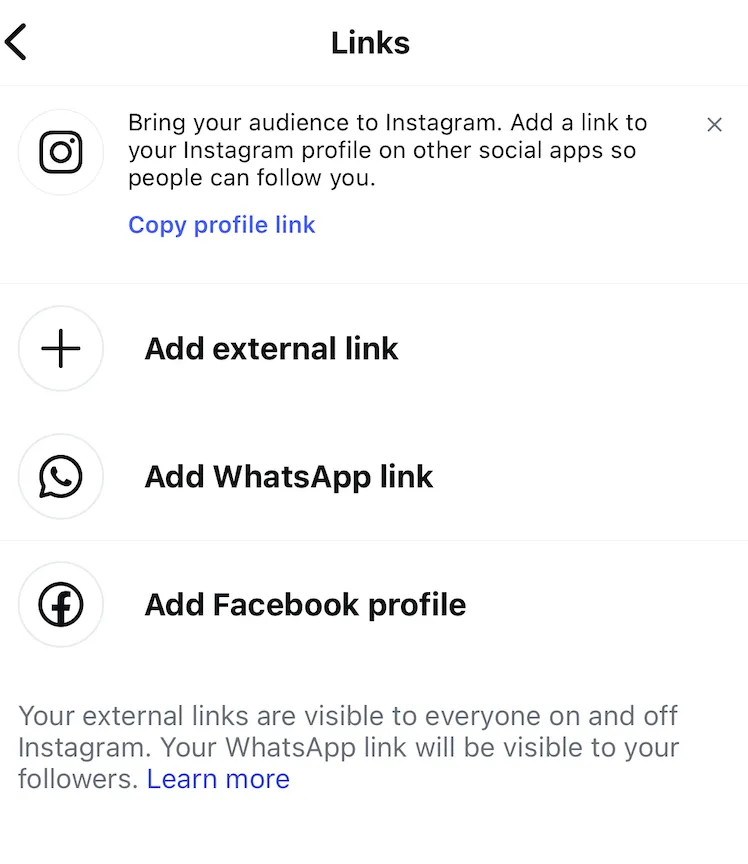
- Scroll to "Links" and tap "Add external link."
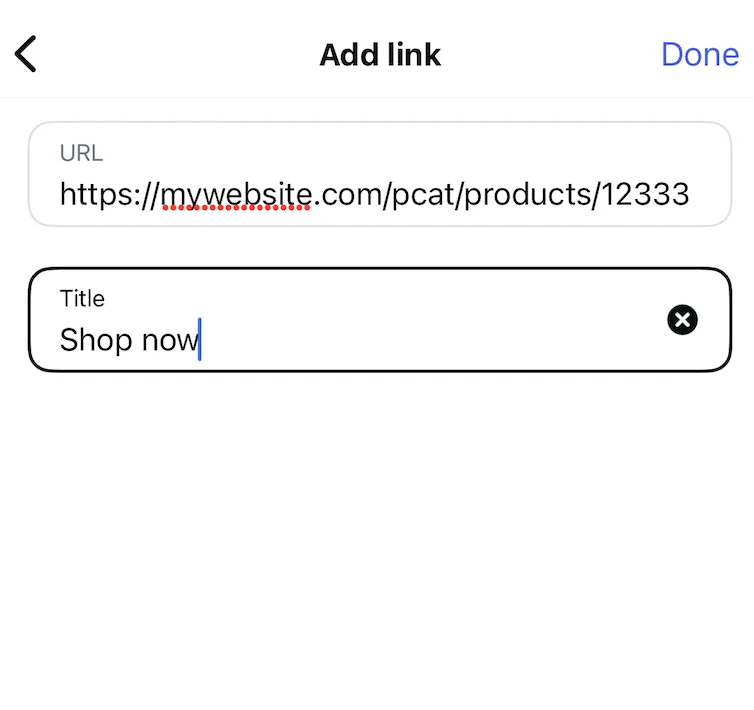
- Paste the full URL you want to share (website, blog, shop, podcast, donation page, and so on).
- Add a clear title, such as "Shop Now" or "Read the Blog," so followers know what it is.
- Tap "Done" to save. Your link is now live on your profile.
To look more professional, shorten long, messy URLs with a tool like Bitly first. For example, turn mywebsite.com/product-category/product-33334/?ref=instagram into bit.ly/YourOffer. While you are optimizing your profile, a few fresh Instagram bio ideas can sharpen the line above your link, and an Instagram audit tool helps you spot underperforming posts and profile mismatches before you send traffic anywhere.
Bonus: the keyword-in-bio trick
Many top creators add an extra prompt in their bio text, like "DM me the word GUIDE for my free playbook." It works around the five-link limit, tells people exactly what they will get, and moves interested followers into your DMs, where you can send the link and start a real conversation.
3. Use a Link in Bio Tool
The bio supports up to five links, but it is limited: a plain, 150-character space you cannot really customize or brand. If you want something more flexible and on-brand, use one of the best link in bio tools.
brandID is an all-in-one platform that offers a clean, customizable link in bio page and also lets creators and influencers sell digital products, collect tips, run monetized giveaways, and share affiliate offers. It is ideal for anyone who wants a professional, aesthetically consistent landing page behind their single Instagram link, instead of a bare list of URLs.
Build a free, customizable brandID page for your shop, content, and socials, then drop it in your Instagram bio.
Create Your Free Bio Link4. Share a Link in Your Instagram Post Caption
This is the method most people search for, so let us be clear: you cannot make a caption link clickable, but you can still use your caption to drive real traffic. Here is how to put a link in an Instagram post caption effectively.
- Add the plain-text URL: paste a short, clean link in the caption. It will not be tappable, but people can type it, and Google can crawl it, which helps discovery.
- Point to your bio the right way: instead of a lonely "link in bio," be specific: "I broke down all 5 steps in a free guide, grab it from the link in my bio."
- Use a shortened, memorable URL: a link like bit.ly/YourOffer is easier to remember and looks more trustworthy than a long string.
So while you cannot post a clickable website link on an Instagram post caption, a specific caption CTA paired with a strong bio link does the same job.
5. Turn Comments Into Links With DMpro Automation
One of the most effective ways to share a link from a feed post is to never put it in the caption at all. Instead, ask people to comment a keyword, then send them the link by DM. For example: "Comment GUIDE and I'll send you the free checklist."
Doing this by hand does not scale, so automate it with DMpro. Set a keyword once, and DMpro instantly sends your link to everyone who comments it, across Instagram and your other channels. It works on two levels: the link reaches interested people directly in their DMs, and the flood of comments signals engagement to the algorithm, which pushes your post to even more viewers.
6. Drive Link Clicks From Instagram Reels
Reels do not support a clickable link in the caption or as a sticker, so you need an indirect route. The good news is Reels are one of Instagram's best traffic drivers, so it is worth the extra step.
- Write a specific caption CTA: tell viewers exactly what to do and what they will get, then send them to your bio link.
- Use comment-to-DM: ask viewers to comment a keyword and let DMpro auto-send them the link.
- Pin a comment: post a comment with your CTA and URL, then pin it to the top so it stays visible.
- Tease it in a Story: follow your Reel with a Story that uses the link sticker, creating a clickable two-step path.
7. Pin a Post That Points to Your Link
Instagram lets you pin up to three posts to the top of your profile grid, and most people ignore this. Use at least one pinned spot for a post with a clear CTA that sends new visitors to your bio link, such as a carousel that explains your offer and ends with "tap the link in my bio to get started."
To pin a post, open it on your profile, tap the three dots in the top corner, and choose "Pin to your profile." It takes seconds and quietly works for every new profile visitor.
8. Save a Link in a Story Highlight
Story links normally vanish after 24 hours, but there is a simple trick to make one permanent: add the Story that contains your link sticker to a Highlight. The link stays tappable inside the Highlight, so you effectively get a second always-visible link that lives right under your bio.
Create a Highlight called "Links," "Shop," or "Start Here," and save your key link Stories to it. New visitors can tap through to your offers any time, not just during the 24-hour window, which makes this one of the most underused ways to add a permanent link to your profile.
9. Share Links in a Broadcast Channel
Instagram broadcast channels are one-to-many chats where a creator posts and followers subscribe to receive updates. Unlike feed captions, messages in a broadcast channel can include fully clickable links, so it is a direct line to your most engaged fans.
Once your channel is active, you can drop a link to a new product, blog post, or launch and every subscriber can tap it instantly. It is ideal for announcements and time-sensitive offers where you want your most loyal audience clicking right away.
10. Add a Clickable Link With Instagram Ads
If you want a guaranteed clickable link inside the feed, Instagram ads are the answer. Unlike regular posts, ads can include a fully clickable link right in the ad, which makes them ideal for promoting blog posts, product pages, and campaigns.
With Meta Ads Manager you can also target by demographics, interests, and behavior, so your link is shown to the people most likely to click, which improves engagement, conversions, and return on ad spend.
Step-by-step guide
- Open Meta Ads Manager.
- Choose a campaign objective (Traffic, Conversions, or Engagement).
- Select your ad format (feed, Story, Reels, or carousel).
- Add your link in the URL field.
- Set your budget and launch.
11. Link Products With Instagram Shopping
Instagram Shopping lets you tag products directly in your posts so followers can tap a product and go straight to its page. It is a great option for small businesses selling physical or digital products. You will need a business account and a connected store like Shopify or WooCommerce, set up through Meta's Commerce Manager.
Once your shop is approved, you can tag items in your photos, like a boutique tagging a new dress with a "Shop Now" label. When someone taps the tag, they see the product details and can click through to buy. It is a smooth way to turn views into sales without making followers hunt for a link.
Common Mistakes to Avoid When Sharing Links
Even with the right method, a few habits quietly kill your click-through rate. Steer clear of these:
- A vague "link in bio" with no context: tell people what is waiting for them, or most will scroll past.
- Pasting long, ugly URLs in captions: they look spammy and no one types them. Shorten and brand them instead.
- Forgetting to update your bio link: if your post talks about one thing and your link points somewhere else, you lose the click.
- Never tracking results: without UTM tags or analytics, you are guessing which posts and links actually drive traffic.
- Overloading one post with links: one clear call to action beats three competing ones every time.
Tips to Get More Clicks From Your Instagram Links
Adding the link is only half the job; getting people to tap it is the other half. A few habits make a big difference:
- Be specific in every CTA: "Book your free 30-minute call" beats "link in bio" every time.
- Repeat the CTA: mention it in the caption and on the image or Story so there is no confusion about what to do.
- Point your link with purpose: whether you want more sales or to learn how many followers you need to get paid on Instagram, your bio link should lead there.
- Stay consistent across platforms: the same setup works when you add a link to your TikTok bio, so one bio link can power every profile.
- Track your clicks: add UTM parameters or use a bio tool with analytics to see which links and posts actually perform.
Conclusion
Spending hours creating great content only to be limited to one link is frustrating, but you are not actually stuck. You cannot drop a clickable link in a feed caption, yet between Stories, your bio, link in bio tools, comment-to-DM automation, Reels CTAs, pinned posts, Highlights, broadcast channels, ads, and Instagram Shopping, there are plenty of ways to add a link to an Instagram post and get people clicking.
Instagram has its limits, but you can outsmart them. Pick the method that fits your goal, point followers to a link worth tapping, and pair it with a clean brandID bio link so every post has a clear path to your offer.
FAQs About Adding a Link to an Instagram Post
How Do I Add a Clickable Link to My Instagram Post Caption?
Instagram does not support clickable links in feed captions. You can paste a plain-text URL that people copy manually, but for a tappable link, use your bio, an Instagram Story link sticker, or comment-to-DM automation instead.
Can You Add Links to Instagram Posts?
Not directly inside a feed post caption, since caption links are not clickable. But you can add a working link to an Instagram post through Stories, your bio, a link in bio tool, DMs, ads, or Instagram Shopping, all covered in the methods above.
How Do I Put a Website Link on an Instagram Post?
To share a website link, add it to your bio as a clickable link, place it on a Story with the link sticker, or run it as an ad. In a feed caption you can include the URL as plain text and pair it with a "link in bio" call to action pointing to that website.
Can I Add a Link to an Instagram Post After It Is Published?
You cannot add a clickable link to a feed post after publishing, or before. You can edit the caption to include a plain-text URL or a "link in bio" prompt, and for Reels you can pin a comment with your CTA and link once it is live.
How Do I Post a Link on Instagram for Free?
Every core method is free: add a link to your bio, use the Story link sticker, share a link by DM, or build a free brandID link in bio page. Only Instagram ads cost money, since they are paid promotions.
How Do I Automatically Send a Link When Someone Comments?
Use a DM automation tool like DMpro. You set a keyword, and it instantly sends your link to anyone who comments that word on your post, so you capture interested people without replying by hand.
Can I Share a YouTube Link on Instagram?
Yes. Since captions are not clickable, add the YouTube link to your bio or share it with the Story link sticker. A link in bio tool like brandID lets you feature your YouTube link alongside your other links on one clean page.
How Do I Add a "Shop Now" or Affiliate Link on Instagram?
Use a link in bio tool like brandID to create a page with your affiliate products or shop, then point followers to it. If you are eligible, you can also share these links directly with the Story link sticker.
How Many Links Can I Add to My Instagram Bio?
Instagram currently lets you add up to five external links in your bio. If you need more, a link in bio tool consolidates all of them into one link that opens a single page with everything you want to share.
How Can I Track Link Clicks From Instagram?
Add UTM parameters to your URLs and check Google Analytics, or use a link in bio tool with built-in analytics. Both show which posts and links drive the most traffic so you can do more of what works.
 Summarize this article with:









