
How to run a campaign with your own DM
Send your own saved DM, filled in for each person, to a whole list instead of having the AI write each message. It takes about 10 minutes.
Before you start
- A saved own DM on Prompts and Messages (this guide shows how to write one)
- The DMpro extension up to date in Chrome and signed in
- Credits on your account (1 per DM sent)
Write and save your own DM
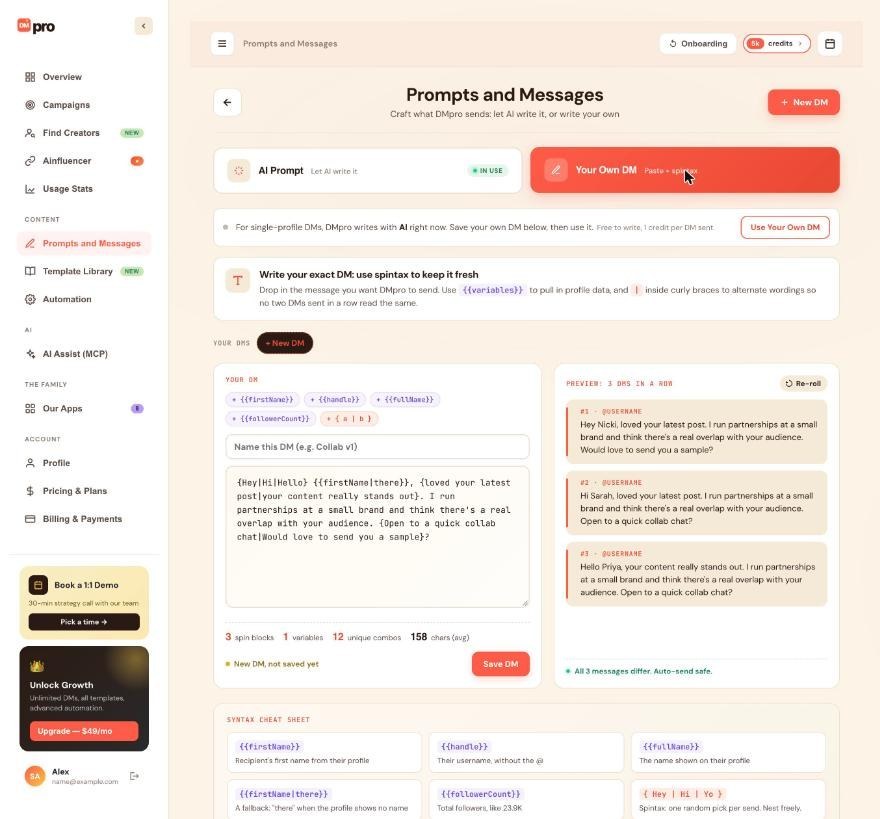
Open Prompts and Messages in the left menu and click the Your Own DM tab. Click + New DM, type a name in “Name this DM (e.g. Collab v1)”, and write the message in the big text box.
Use the chips above it to add {{firstName}}, {{handle}}, {{fullName}}, {{followerCount}} or a spintax block { a | b }. For example:
{Hey|Hi|Hello} {{firstName|there}}, {loved your latest post|your content really stands out}. I run partnerships at a small brand. {Open to a quick chat|Would love to send you a sample}?
The part after the bar in {{firstName|there}} is the fallback used when a profile shows no first name. Click Save DM when you are done.
Preview it
Next to the editor, PREVIEW: 3 DMS IN A ROW fills your DM in for three sample profiles. Click Re-roll to see three other versions. The line under the preview tells you if your wording is varied enough, for example “All 3 messages differ. Auto-send safe.” If every DM reads the same, add more { a | b } choices.
Errors show in red with the line and column and must be fixed before you can save. Previews never send anything and never use credits.
Start a new campaign
Click Campaigns, then Create Campaign. Fill in the name, platform, recipients and pace as usual. The guide How to create your first campaign walks through those fields.
Choose Your Own DM in the Message section
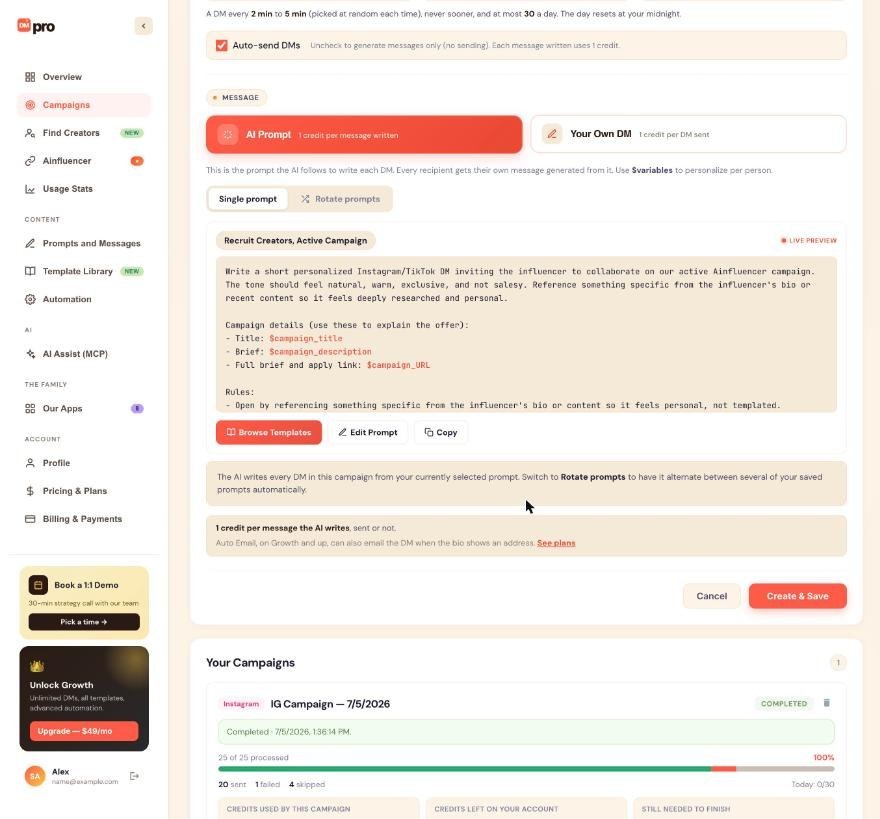
Under MESSAGE, click Your Own DM (“1 credit per DM sent”) instead of AI Prompt. If you have several own DMs, pick one under DM to send. The active one is selected first.
The form shows a preview for sample profiles and the number of versions your spintax gives. Click Edit this DM to change it, or Write your DM if you have none yet.
Understand what it costs
- A credit is taken right before each DM is sent.
- A DM that fails is refunded, and the details show “credit refunded”.
- A DM that may have gone out when Chrome closed keeps its credit and is never sent again.
- A DM that failed but was delivered by Auto Email counts as sent and keeps its credit.
- With Auto-send DMs unchecked, DMpro only prepares each message, for free.
Under the message, the form shows the most the list can cost.
Create, save and start
Click Create & Save. DMpro will not create an own DM campaign if the chosen DM has an error (“[name] needs a fix first”) or if you have none saved. When the draft is ready, click Start on its card.
chrome://extensions turn on Developer mode and press Update, or reinstall it from the Chrome Web Store.Know what you can change later
The campaign sends the own DM you picked in the form. Edits you save to that DM apply to the people still waiting. Switching your active own DM, or switching the message mode on Prompts and Messages, does not change a campaign that already exists. If you delete the DM, the campaign keeps sending the copy it saved when it was created.
Rotate prompts is for AI prompts only. To vary an own DM, use spintax.
Tips
- Keep each version under about 1,000 characters. Instagram cuts a DM at about that length, and the editor warns you when a version can run longer.
- Add at least two or three spintax blocks. Sending the same text to many people can look like spam to Instagram and TikTok.
- To see your DM for a real person without sending it, turn Auto Send DMs off in the extension, open the profile, click Refresh, then Fill in. Filling in is free.
If something goes wrong
Save DM stays disabled.
The DM is empty or has an error. Typical errors are an unclosed {, a } without a match, or a variable DMpro does not know such as {{city}}. Fix the line the editor points to.
A DM came out empty for one profile.
Your DM is only variables and that profile had none of them. Add text around the variables or use fallbacks like {{firstName|there}}.
The campaign paused and says its own DM is empty.
Open Prompts and Messages, write the DM again, then Resume the campaign.
Related how-to guides
Still stuck? We’re happy to help.
Create your account, or reach out to support.




