
How to switch between an AI prompt and your own DM
Choose whether single-profile DMs are written by the AI or sent from a DM you wrote yourself. It takes under a minute.
Before you start
- At least one saved prompt to use AI, or one saved own DM to use your own text
Open Prompts and Messages
In the dashboard, click Prompts and Messages. In the extension, click your initials and choose Prompts and Messages. You will see two tabs: AI Prompt (“Let AI write it”) and Your Own DM (“Paste + spintax”).
Find which mode is in use
The tab for the mode in use carries an IN USE badge, and a line at the top of each tab says what single-profile DMs do right now. Clicking a tab only changes the view. It does not change the mode.
In AI Prompt mode, DMpro writes each message from your active prompt and uses 1 credit per message written. In Your Own DM mode, DMpro sends your active own DM, filled in for each person. Writing it is free and 1 credit is used per DM sent.
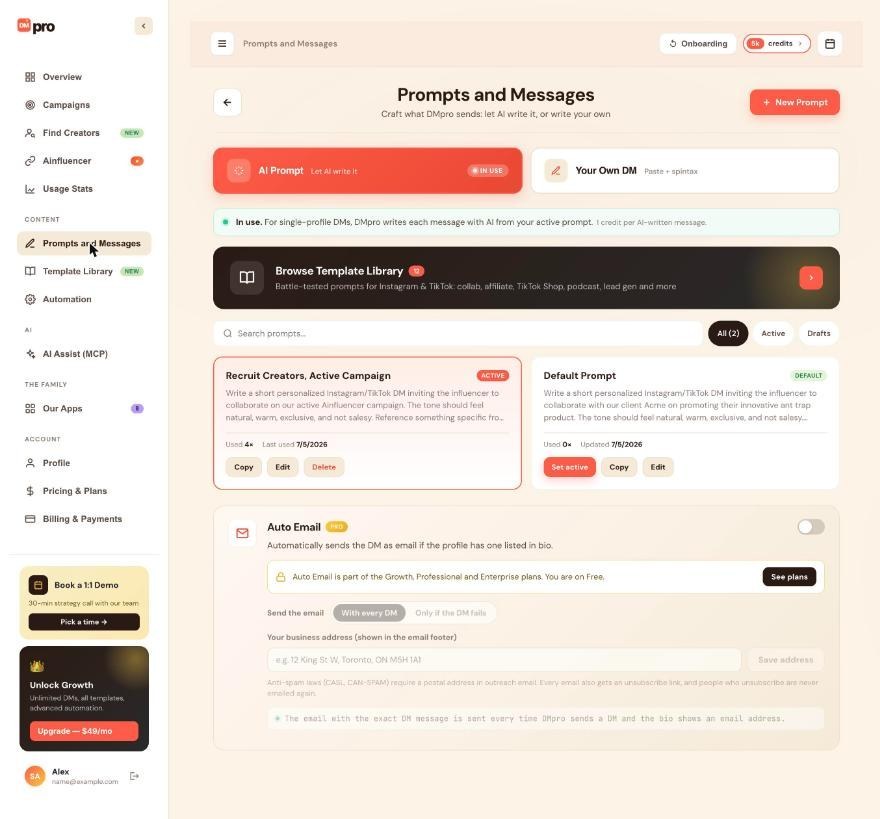
Switch to your own DM
Open the Your Own DM tab and click Use Your Own DM. DMpro sends your active own DM, the one with the green dot. To send a different one, open it and click Set as active DM first. DMpro confirms “DMpro now sends your own DM.”
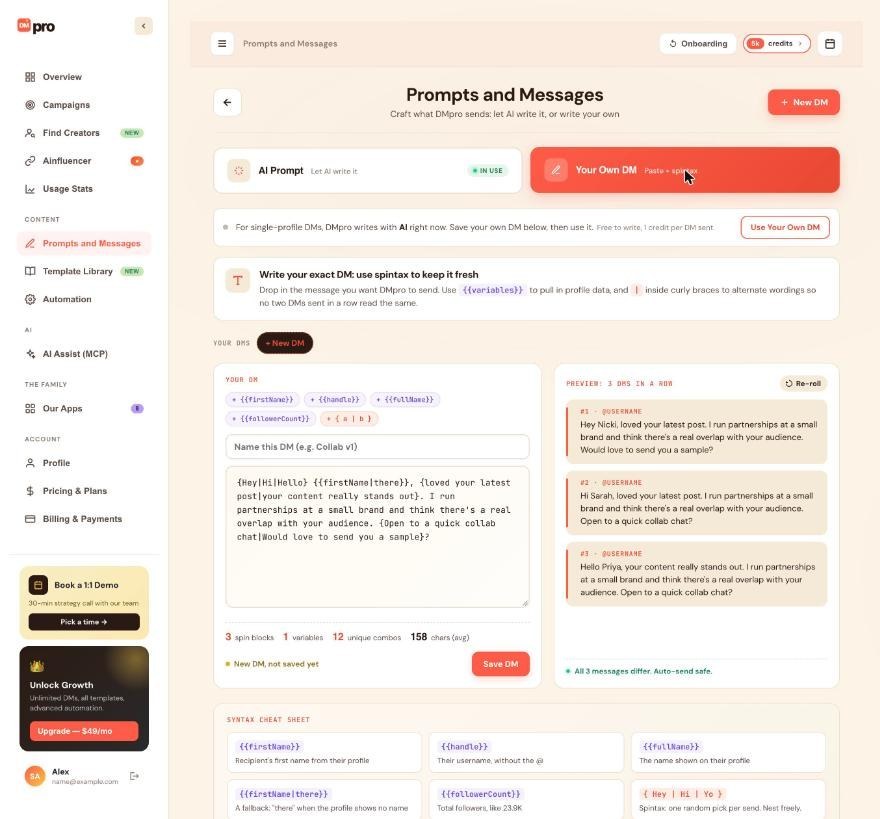
Switch back to AI
Open the AI Prompt tab and click Use AI Prompt. The AI writes from your active prompt, and DMpro confirms “DMpro now writes your DMs with AI.” Unsaved changes in the editor are saved first.
Check the extension
In Your Own DM mode, the extension’s main screen shows Your own DM with the DM’s name instead of Active prompt, the Generate button reads Fill in, and the Prompt button reads My DM. A line says filling it in is free and that DMpro uses 1 credit for each DM it sends.
In AI Prompt mode, every message the AI writes uses 1 credit, sent or not.
Remember what the mode does not control
The mode only decides single-profile DMs. Each campaign chooses AI Prompt or Your Own DM when you create it, and the form starts on your current mode. Choosing a prompt with Set active or an own DM with Set as active DM does not switch the mode either.
Tips
- The mode is saved to your account, so the dashboard and every browser where you are signed in show the same one.
- If you click Use Your Own DM with no saved own DM, DMpro saves whatever is in the editor (the example text if you did not change it) as “My DM” and sends that. Write your own message first.
- If you delete your last own DM while the mode is Your Own DM, DMpro goes back to AI automatically.
If something goes wrong
My DMs still use the wrong source after I picked a prompt or an own DM.
Set active and Set as active DM only choose which prompt or own DM is used. Use Use AI Prompt or Use Your Own DM to switch the mode.
Fill in shows an error such as “needs a fix first”.
Your active own DM has an error. Open it on Prompts and Messages, fix the red error and save it. “Pick your own DM first” means you have no active own DM yet.
A running campaign did not change when I switched.
That is expected. A campaign sends what it was created with: an own DM campaign sends its own DM, and an AI campaign with Single prompt writes from the active prompt at that moment.
Related how-to guides
Still stuck? We’re happy to help.
Create your account, or reach out to support.




