
How to pick an Ainfluencer campaign for your DMs
Choose which of your Ainfluencer campaigns your AI-written DMs invite creators to, then use it in a prompt. It takes about 5 minutes.
Before you start
- An Ainfluencer account with at least one active campaign (Ainfluencer is free for brands)
- Ainfluencer connected to DMpro (see the guide on connecting it)
Connect Ainfluencer if you have not
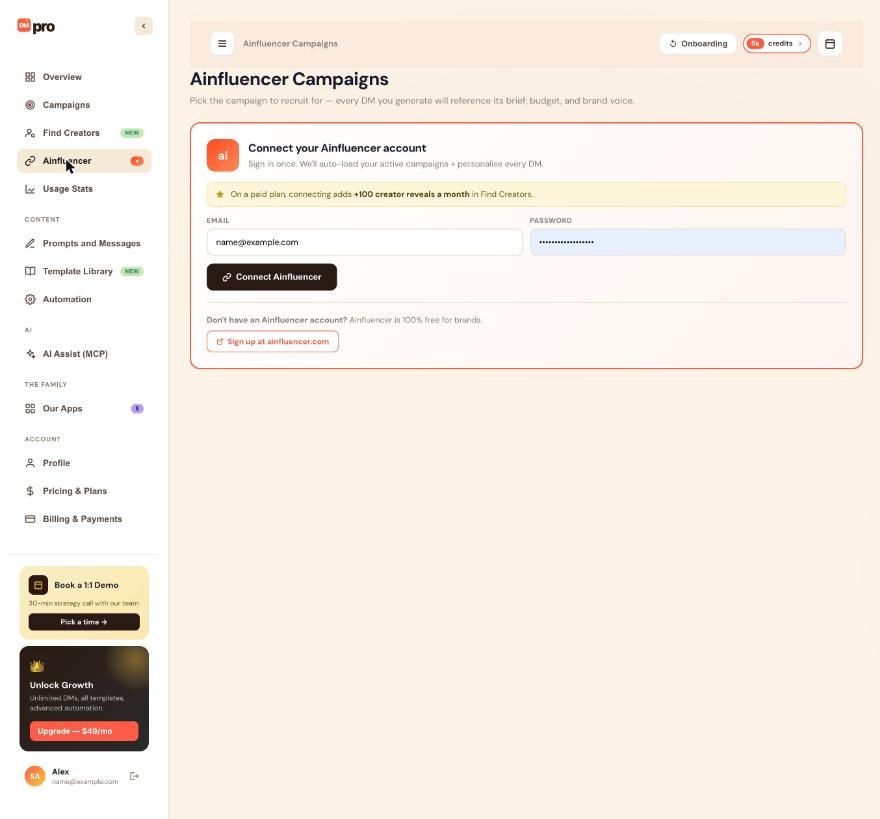
Click Ainfluencer in the left menu. If you see the card Connect your Ainfluencer account with EMAIL and PASSWORD fields, you are not connected yet. Follow the guide How to connect Ainfluencer to DMpro, then come back.
On a paid plan, connecting also adds 100 creator reveals a month in Find Creators.
Open your active campaigns
Once connected, the Ainfluencer page shows a Connected as line with a Disconnect link, and your Active campaigns with a Refresh button. Only active campaigns are listed, 10 per page. If none show up, create a campaign on Ainfluencer and click Refresh.
Select the campaign
Click the card of the campaign you want. DMpro saves it and shows it in a Currently selected for DMs banner at the top. The next AI messages use it.
The page says that every DM you generate will reference the campaign you pick here.
Use the campaign variables in a prompt
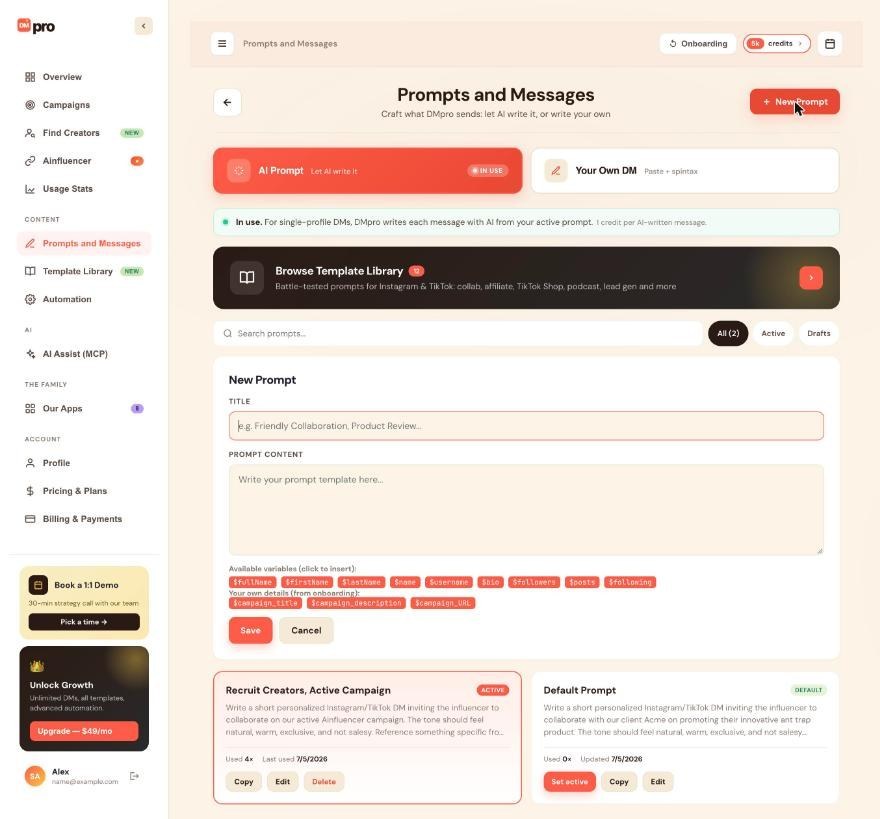
Open Prompts and Messages and click New Prompt. Under “Your own details (from onboarding)” click $campaign_title, $campaign_description or $campaign_URL to insert them. Write them exactly like that, with the capital letters in $campaign_URL.
$campaign_titleis the campaign’s title.$campaign_descriptionis its description as shown on the card (long ones are shortened).$campaign_URLis the short apply link.
Example: Write a short DM to $firstName about their content ($bio). Invite them to our campaign ‘$campaign_title’ and end with the apply link $campaign_URL.
If you onboarded as a Brand, DMpro already added a prompt called “Recruit Creators, Active Campaign” that uses them. They work for single profiles and for campaigns, but only in AI prompts, not in your own DM.
Switch or clear the campaign
To switch, click another campaign on the Ainfluencer page. To clear, click Clear in the Currently selected for DMs banner and confirm. With no campaign selected, DMpro leaves the campaign variables out of your prompts before the AI writes.
Reconnect when the session ends
The Ainfluencer connection lasts about 30 days. When it ends, the page shows Ainfluencer session expired with a Reconnect button, or the connect form again. Sign in again to see your campaigns. Until you do, DMpro keeps using the campaign you last selected, but you cannot switch or clear it.
Tips
- Pick the campaign before you write or test prompts, so the preview shows its real title and link.
- Use the campaign’s apply link in the DM instead of pasting a long brief. It keeps messages short.
- An AI app with access to the Ainfluencer area can list your active campaigns, choose one or clear the choice. It asks you first if that would change what a running AI campaign writes.
If something goes wrong
My campaign does not appear in the list.
Only active campaigns are listed. Check its status on Ainfluencer, then click Refresh. If your session expired, reconnect first.
The variables are missing in my DMs.
With no campaign selected, DMpro leaves the campaign variables out. Select a campaign. Also check the spelling and the capitals in $campaign_URL.
The page asks me to sign in again.
The connection lasts about 30 days. Use Reconnect and sign in to Ainfluencer again. DMpro does not keep your Ainfluencer password.
Related how-to guides
Still stuck? We’re happy to help.
Create your account, or reach out to support.




