
How to DM a creator list in a campaign
Turn the creators you revealed into a campaign that writes and sends a DM to each of them from your own account. It takes about 10 minutes.
Before you start
- Revealed creators, ideally saved in a list
- The DMpro extension signed in in Chrome, and Chrome signed in to Instagram or TikTok
- Credits for the messages (reveals are paid separately)
Check your creators
Open Find Creators and the My creators tab. Make sure the creators you want are revealed. A campaign has one platform, so decide whether this one is for Instagram or TikTok. Only the creators on that platform are used.
Start a new campaign
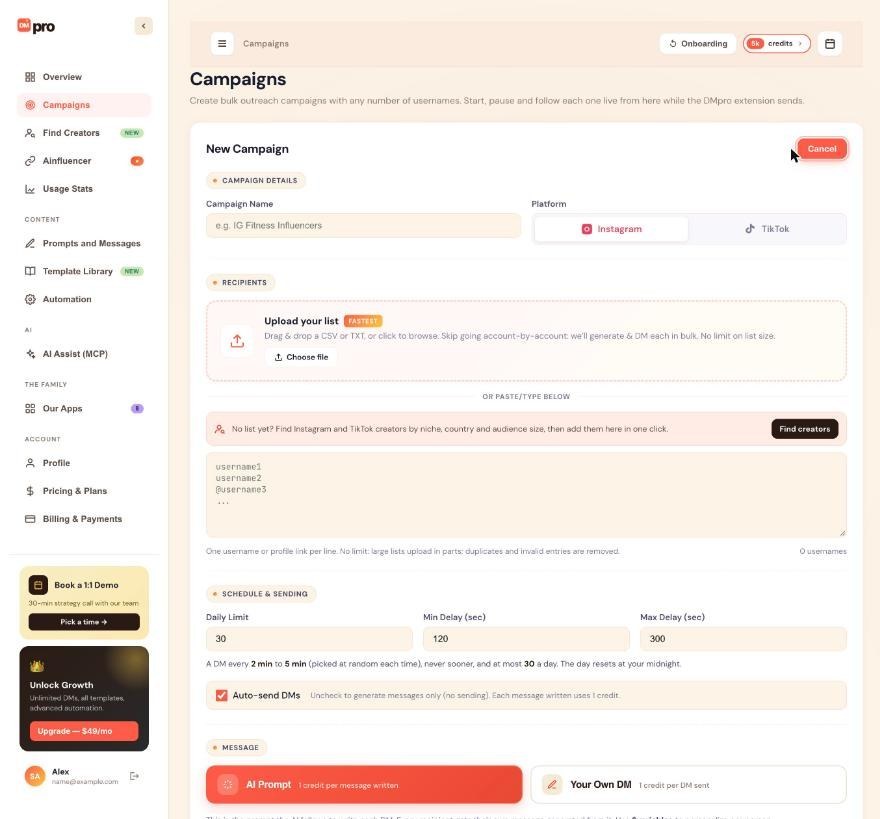
Click Campaigns, then Create Campaign. Name the campaign and choose Instagram or TikTok.
In the RECIPIENTS area, the line “No list yet? Find Instagram and TikTok creators by niche, country and audience size, then add them here in one click.” comes with a Find creators button.
Bring the creators into the campaign
Choose the way that fits:
- From the New Campaign form: click Find creators, pick creators, and add them to the campaign.
- From a creator’s panel: in Find Creators, click Details on a card, then Reveal and add to campaign at the bottom of the panel. The reveal costs a monthly reveal or 3 credits.
- By pasting handles: copy the handles of your revealed creators from My creators and paste them, one per line, in the paste box.
- With an AI app: ask it to create a draft campaign from your creator list. It uses the list’s creators on the campaign’s platform, and the campaign is a draft until you approve the start.
Choose the message
Under MESSAGE, choose AI Prompt or Your Own DM. For recruiting creators to an Ainfluencer campaign, use a prompt with the campaign variables, as the guide How to pick an Ainfluencer campaign for your DMs explains. The creators’ bios help the AI write something specific for each person.
The credits for messages are separate from the credits you spent revealing.
Set the pace and create the campaign
Check Daily Limit, Min Delay (sec) and Max Delay (sec), and the Auto-send DMs checkbox. Click Create & Save. The campaign is saved as a Draft, and nothing has been sent.
Start it, then check the results
Click Start on the campaign card. The extension in your Chrome works through the creators one at a time. Follow the progress in View Details.
Tips
- Test with a short list of 5 to 10 creators first and read the messages before you scale up.
- Use Safety Mode for a new account. The guide How to turn on Safety Mode shows how.
- DMpro does not read replies. Check your Instagram or TikTok inbox for answers.
If something goes wrong
My list gave fewer people than I expected.
A campaign only uses the list’s creators on its own platform. Creators of the other platform are left out.
A creator I revealed does not appear.
Only revealed creators can be used. Open My creators to confirm they are revealed, and check you picked the right platform.
The campaign does not start sending.
Keep Chrome open with the DMpro extension signed in, and see How to fix a campaign that is not sending.
Related how-to guides
Still stuck? We’re happy to help.
Create your account, or reach out to support.




