
How to connect Ainfluencer to DMpro
Connect your Ainfluencer account so DMpro can load your active campaigns and put the one you choose into your AI-written DMs. It takes about three minutes.
Before you start
- An Ainfluencer account with at least one active campaign (Ainfluencer is free for brands)
- The email and password you use at ainfluencer.com
Open the Ainfluencer page
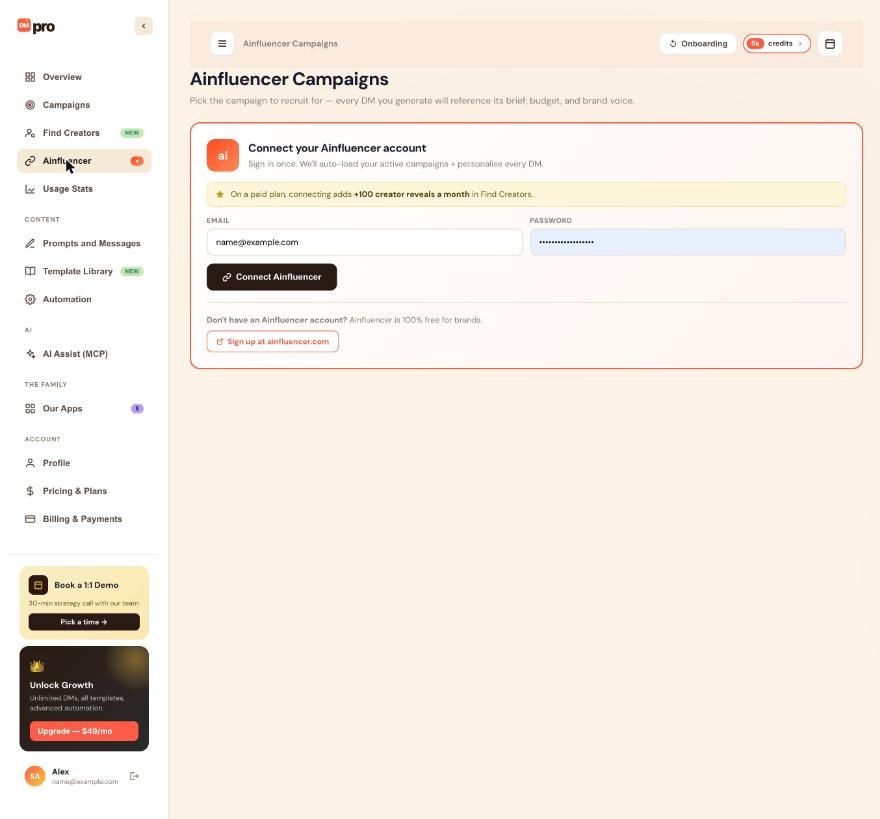
In the dashboard sidebar, click Ainfluencer. You can do this at any time, whatever persona you chose. During onboarding, the Brand persona connects Ainfluencer on its details step instead.
If you do not have an Ainfluencer account yet, click Sign up at ainfluencer.com on the same card, create a campaign there and come back.
Sign in to Ainfluencer
In Connect your Ainfluencer account, type your Ainfluencer Email and Password, then click Connect Ainfluencer.
DMpro sends your email and password to Ainfluencer once to sign you in, keeps only the resulting access key and does not save your password. On a paid plan, connecting also adds 100 creator reveals a month in Find Creators, as the page notes.
Check the connected view
The page switches to a Connected as line with a Disconnect link and your Active campaigns with a Refresh button. A dot appears next to Ainfluencer in the sidebar while you are connected.
If the list is empty, create a campaign on Ainfluencer and click Refresh. Only active campaigns are listed, 10 per page.
Select the campaign to promote
Click a campaign card. DMpro saves it and shows it in a Currently selected for DMs banner at the top. From now on, every AI-written DM can refer to that campaign.
Use the campaign variables in a prompt
Once a campaign is selected, three variables are filled from it:
$campaign_title: the campaign’s title$campaign_description: its description (long ones are shortened)$campaign_URL: its short apply link
Use them in any AI prompt, written exactly like this, including the capital letters in $campaign_URL:
Write a short DM to $firstName inviting them to our campaign '$campaign_title'. Include the apply link: $campaign_URL.
Switch, clear or disconnect
- Switch: click another campaign card. The next DMs use it.
- Clear: click Clear in the Currently selected for DMs banner and confirm. DMpro then leaves the campaign variables out of your prompts.
- Disconnect: click Disconnect and confirm. DMpro deletes the saved connection and your selected campaign. Your persona and prompts do not change.
Tips
- Ainfluencer is optional unless you finish onboarding as a Brand. Creator and Business accounts never need it.
- The connection lasts about 30 days. When it ends, the page shows Ainfluencer session expired with a Reconnect button.
- Find Creators in DMpro searches the Ainfluencer network, so connecting Ainfluencer also gives you the monthly reveal bonus on paid plans.
If something goes wrong
No campaigns are listed.
Only active campaigns appear. Create or activate a campaign on Ainfluencer, then click Refresh on the DMpro Ainfluencer page.
The page shows “Ainfluencer session expired”.
The connection lasts about 30 days. Click Reconnect and sign in again. Until you do, DMpro keeps using the campaign you last selected, but you cannot switch or clear it.
The campaign details are missing from my DMs.
Check that a campaign is selected in the Currently selected for DMs banner and that your prompt contains the variables spelled exactly as above. With no campaign selected, or after you disconnect, DMpro leaves the three variables out.
Related how-to guides
Still stuck? We’re happy to help.
Create your account, or reach out to support.




