
Referrals & Rewards
Invite people with your personal referral link and earn free website credits as they use contactID.
Invite people to contactID with your personal link and earn free website credits as they use the product. Here is the whole program in one page.
1. Your Personal Referral Link
Every account has a permanent referral code and a link in the form:
Anyone who opens that link, signs up, and finishes onboarding is recorded as your referral, on any device. You can only ever refer an account once, and an account can only ever be referred by one person.
2. What Each Side Gets
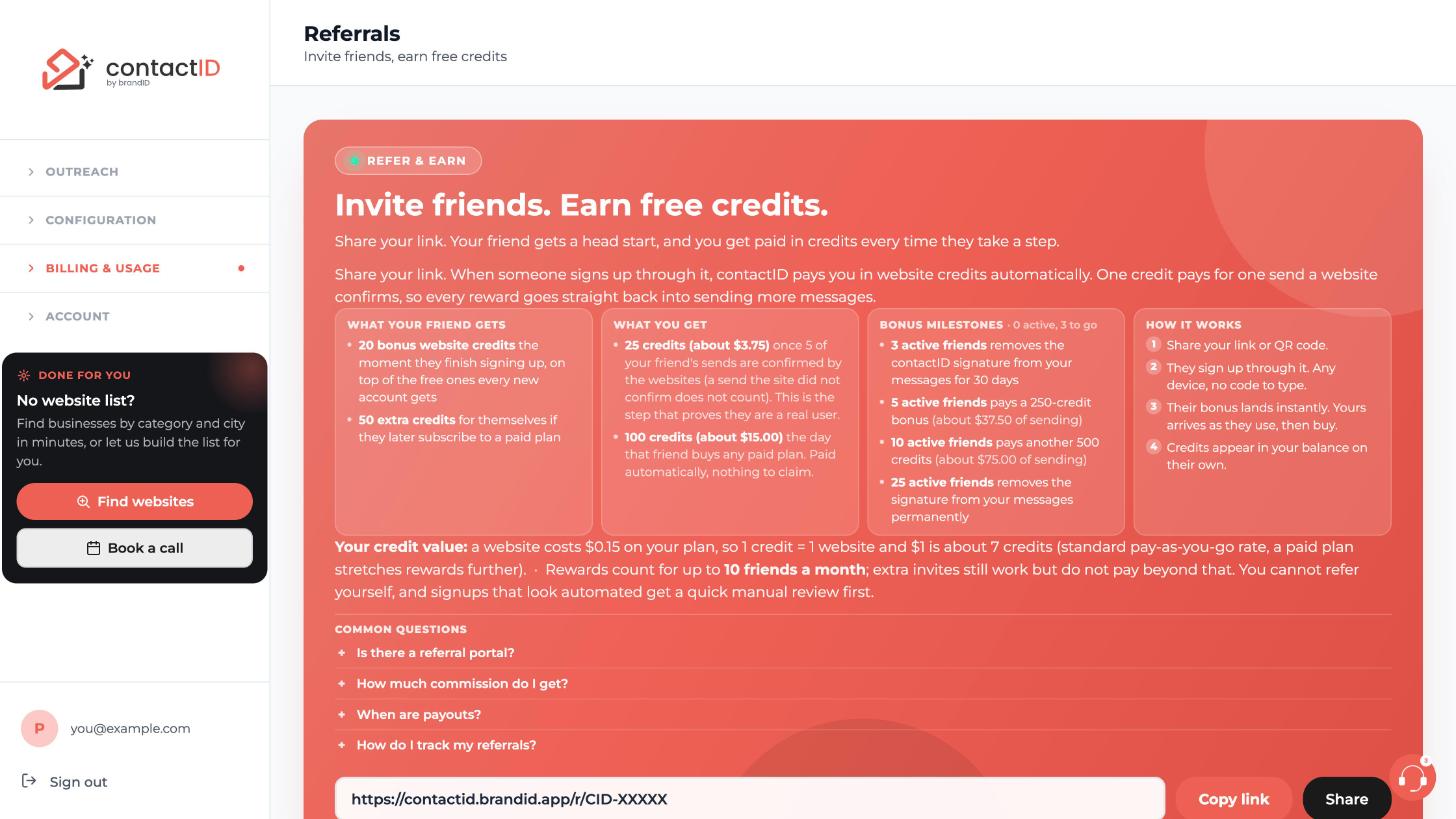
- Your friend starts with bonus website credits on top of the 10 free credits every account gets (currently 20 extra, shown live on your Referrals page).
- Your friend also gets another 50 credits if they later subscribe to a paid plan (also shown live on your Referrals page).
- You earn credits in two stages: an activation reward when your friend has their first 5 sends confirmed by the websites, and a larger conversion reward the day they buy any subscription. See the rewards article for the numbers.
3. Where To Manage It
Open your contactID dashboard and click Referrals in the left sidebar (or choose Refer To Earn in the extension’s account menu). The page shows your link with Copy link and Share buttons, your code, how the rewards work, your live totals (Friends invited, Activated, Subscribed, Credits earned), and your 10 most recent referrals with their status.
4. The Signature Is Not A Referral Link
The “Sent via contactID extension” line that accounts without a purchase add to their messages is plain text with no link, so it does not bring you referrals. Share your link yourself (see How Do I Find And Share My Referral Link?).
5. Will I Be Told When A Friend Joins?
The moment a friend joins through your link, activates (reaches the form threshold) or subscribes is recorded on your account, and each can trigger an email when that journey is on. Your Referrals page always shows the live status of every friend, with the credits earned.
Related questions:
Your referral link lives on the dashboard Referrals page and takes one click to copy. Here is where to find it and the best ways to share it.
1. Find Your Link
Sign in to the dashboard, click Referrals in the left sidebar, and your link appears in the box at the top with your code below it. Click Copy link and it is on your clipboard.
2. Ways To Share
- Paste it anywhere. Chat, communities, social bios, your email signature, a blog post. The link works from any device or browser.
- Share button. Click Share next to Copy link to send your link through Gmail, Outlook, your mail app, WhatsApp, Telegram, SMS, LinkedIn, X, Facebook, Slack or Teams, or to make a QR code. Email invites go out from your own email account (see the invites article).
- Not through the signature. The “Sent via contactID extension” line on free accounts’ messages is plain text and does not carry your link.
3. What The Person Sees
Your link opens the contactID sign-in page (the same page as Get started free), where your friend creates an account with Continue with Google or an email code. Their signup flows exactly like a normal one; the only difference is the bonus credits waiting for them when onboarding completes.
4. When The Referral Counts
The referral is recorded when your friend finishes onboarding, not at the first page view. Someone who opens the link and leaves is not counted. Your code is saved on their account the moment they create it through your link, so finishing onboarding days later still counts; if they close the page before creating the account, they need to open your link again. Only new accounts can be referred.
Related questions:
Referral rewards are paid in website credits at three moments, plus a milestone ladder for consistent referrers. Current values are always shown live on your Referrals page; the defaults are below.
1. The Three Reward Moments
- Friend signs up: they get +20 credits. Your friend starts with 30 free websites instead of 10.
- Friend activates: you get +25 credits. Activation means 5 of their sends were confirmed by the websites (the sends that use a credit; a send the site does not confirm does not count). Real usage, not just a signup, is what pays you.
- Friend subscribes: you get +100 credits. The day they buy any paid plan. If they had 5 confirmed sends first, this comes on top of the activation reward; if they subscribe before that, the subscription reward replaces it. Your friend also gets +50 credits when they subscribe.
2. The Milestone Ladder
Milestones count your active referrals (friends with 5 confirmed sends or a subscription, not revoked):
- 3 activated: the signature is removed from your messages for 30 days. If you already have signature-free time, the 30 days are added to it.
- 5 activated: +250 bonus credits.
- 10 activated: +500 bonus credits.
- 25 activated: the signature is removed for life.
A signature removal you earn is tied to your account. It only matters while your account has never paid: any purchase (a credit pack, a plan, AI credits or lead credits) removes the signature for good, even after a plan is canceled, unless that payment is refunded or charged back.
3. Monthly Cap
Up to 10 referrals per calendar month earn activation rewards automatically. Referrals past the cap are held for a quick review and released by the contactID team; they are not lost.
4. Where Rewards Land
All credits go to your wallet’s extra pool immediately and appear in your balance, your ledger, and the Referrals page totals.
Related questions:
The Referrals page prepares a designed invite email with your personal link, and you send it from your own email account. Here is how it works.
1. Send Invites
On the dashboard Referrals page, click Share. Pick Gmail, Outlook or Mail app to open a new email with the subject and invite text already filled in, add your friends’ addresses, and send it. For the designed version, click Copy designed email, open a new email and paste; the layout stays.
2. Other Ways To Share
The same window shares your link to WhatsApp, Telegram, SMS, LinkedIn, X, Facebook, Slack and Teams, copies the link, and makes a QR code you can download.
3. What The Email Says
The invite is short and honest: what contactID does, the bonus credits waiting, and your link, sent from your own address so they know it is from you. Nothing is created for the recipient until they choose to sign up, and ignoring the email does nothing.
Related questions:
Every referral moves through clear statuses, and a few protections keep the program fair. Here is how to read your list and what each situation means.
1. The Statuses
On the Referrals page, each referral shows one of:
- Signed up. They finished onboarding. Their welcome credits are granted (for a referral held for review, once it is approved); your reward comes at activation.
- Activated. They had 5 sends confirmed by the websites and your activation reward was paid.
- Subscribed. They bought a plan and your conversion reward was paid.
- Revoked. The referral was withdrawn (for example after a refund, chargeback, or a fairness review) and its rewards were reversed.
Emails in the list are partially masked for your friends’ privacy.
2. Why A Referral Stays At Signed Up
Your friend simply does not have 5 confirmed sends yet (a send the site did not confirm does not count). Nudge them to run their first small batch; the reward pays out automatically the moment they cross the line.
3. Why A Referral Might Be Held For Review
Some signups are held for a quick fairness review before rewards are paid, most commonly when:
- The new account looks like the same person (very similar email address, or a throwaway email service).
- A second friend of yours signs up from the same internet connection (IP address) as an earlier one within 90 days.
- You passed the monthly cap of 10 automatically rewarded referrals. This hold starts when the friend activates: your activation reward waits for the review, while your friend’s welcome credits are not affected.
A held referral is not lost. The contactID team reviews it and releases legitimate ones; only confirmed abuse is revoked. Until the review is done, a held referral shows as Signed up on your list.
4. The Ground Rules
- Each account can be referred exactly once, ever.
- Self-referrals do not count: your own address with a +tag, or with extra dots on Gmail, is recognized as you, and an address very close to yours is held for review.
- Rewards can be reversed if the referred account is refunded, charged back, or closed for abuse.
5. What Happens When A Held Referral Is Released
When the team approves a held referral, everything the hold withheld is paid at once: your friend’s welcome credits, and your activation or subscription reward if your friend already reached that milestone while the referral was held.
6. Refunds And Disputes
If a referred friend gets a refund or opens a dispute on a contactID payment within 30 days of starting a plan, the referral is revoked automatically: the rewards it paid you (activation and subscription) and your friend’s bonus credits are taken back, and it shows as Revoked.
7. When The Program Is Paused
Your link keeps working and friends can still create accounts, but friends who join while the program is paused are not recorded as your referrals, and neither of you earns anything for them. Referrals recorded before the pause earn again when the program is back on: an activation reward is paid at the friend’s next completed form, while a subscription bought during the pause is not rewarded. The Referrals page tells you when the program is paused.
Related questions:
Still stuck? We’re happy to help.
Install the extension, sign up, or reach out to support directly.




