
To sell PDFs online, create a PDF people actually want, upload it to a selling platform like brandID, Gumroad, Payhip or Etsy, set a price, and drive traffic to the product with a link in bio, email and social posts. You can start for free and take payments the same day, which is why selling PDFs online is one of the simplest digital product businesses to launch in 2026.
Selling PDFs is one lane. For a wider view, 15 realistic passive income ideas for 2026 compare PDFs with templates, affiliate programs, dividend funds, and 11 other options with real timelines to first dollar.
This guide covers the full process: a side-by-side comparison of the best platforms to sell PDFs online with real fees, a six-step launch plan, how to sell PDFs for free, how to price and protect your files, and what is legal to sell. PDFs are one of the best digital products to sell because you make them once and sell them forever, so whether you want to sell digital products as a side project or build passive income, the steps below are the same, only the scale changes.
- Pick the platform by fee model: own-store tools like brandID and Payhip charge little to nothing per sale, marketplaces like Etsy and Gumroad take roughly 6.5 to 10 percent but bring their own buyers.
- You can sell PDFs online for free: a free brandID or Payhip storefront plus a PayPal or Stripe checkout lets you launch with zero upfront cost.
- Price on value, not page count: most PDFs sell for $5 to $49, and a focused 12-page template can outsell a 100-page ebook when it solves one clear problem.
- Traffic decides income: the digital-document market is projected to grow from about $22.4 billion in 2024 to $36.2 billion by 2034, but only sellers who market their file consistently capture it.
- Protect and stay legal: watermark or per-buyer stamp your files, and only sell content you created or hold resale rights to.
Can You Make Money Selling PDFs Online?
Yes, you can make money selling PDFs online, and the margins are among the best of any product because a PDF is created once and sold unlimited times with no printing, shipping or inventory. The global market for ebooks and digital documents is projected to grow from roughly $22.4 billion in 2024 to about $36.2 billion by 2034, so demand is expanding, not shrinking.
Real income depends far more on your audience and marketing than on the file itself. Reported creator results range widely: some earn a few hundred dollars a month from a single template, while creators with an engaged following have launched a PDF to five figures in their first weeks. A realistic path for a new seller looks like the table below.
| Stage | Sales per month | Rough monthly revenue | What it takes |
|---|---|---|---|
| Starter | 5 to 25 | $95 to $475 | One good PDF, a link in bio, occasional posts |
| Side income | 25 to 100 | $475 to $1,900 | A small email list, Pinterest or SEO traffic, 2 to 3 products |
| Full business | 100+ | $1,900+ | A product line, bundles, a membership and steady marketing |
The takeaway: making money selling PDFs is realistic, but treat it as a traffic problem, which the marketing step below covers in full.
9 Best Platforms to Sell PDFs Online Compared
Where you sell decides how much you keep and how much traffic you get for free. The best place to sell PDFs online splits into three routes: your own store (lowest fees, you bring the traffic), a marketplace (higher fees, built-in buyers), and your own website (full control). Compare the fees below before you commit.
| Platform | Type | Fee per sale | Monthly cost | Best for |
|---|---|---|---|---|
| brandID | Store + link in bio | 0% marketplace fee | Free plan | Creators who want store and bio link in one |
| Payhip | Own store | 5% on free plan, less on paid | Free, or from ~$29 | Beginners wanting a free storefront |
| Gumroad | Own store + discovery | ~10%, up to 30% via discovery | Free to start | Fast launch with some built-in traffic |
| Sellfy | Own store | 0% per sale | From ~$22 | Steady-volume sellers avoiding per-sale cuts |
| Etsy | Marketplace | ~6.5% + $0.20 listing + processing | None | Tapping 90M+ existing buyers |
| Lemon Squeezy | Own store (merchant of record) | ~5% + processing | Free to start | Global sellers who want tax handled |
| Shopify | Own website | ~2.9% + 30¢ processing | From ~$39 | Building a full branded store |
| Amazon KDP | Marketplace (ebook) | 30% or 65% royalty split | Free | Selling the PDF as a Kindle ebook |
| Own site + Stripe/PayPal | Own website | ~2.9% + 30¢ processing | Hosting cost | Maximum control and margin |
Quick rule: if you already have any audience, start on a low-fee own-store tool so you keep the margin. If you have none, a marketplace like Etsy can supply buyers while you build your own channels. If a platform’s cut feels steep, cheaper Gumroad alternatives and flat-fee Sellfy alternatives are worth weighing before you lock in.
Which Platform Is Right for You
No audience yet: lead with a marketplace. Etsy puts your printable or template in front of buyers who are already searching, so list there for discovery, then send every buyer a thank-you that points to your own store for the next purchase. Amazon KDP works the same way if your PDF suits a Kindle ebook.
Growing audience: lead with a low-fee own store. If you post on social or send any email, a free brandID or Payhip store keeps almost all of every sale, and your bio link does the discovery that a marketplace would otherwise charge you for. Gumroad is a fine middle ground when you want a little built-in discovery too.
Established brand or high volume: move to your own website with Shopify or a Stripe checkout, or a flat-fee tool like Sellfy, so per-sale percentages stop eating your margin. At scale, a merchant-of-record like Lemon Squeezy is worth it purely for handling global sales tax.
How to Sell PDFs Online in 6 Steps
Follow these six steps in order. They apply whether you sell one ebook or a full catalog of templates.
1. Choose a Niche and PDF Topic People Buy
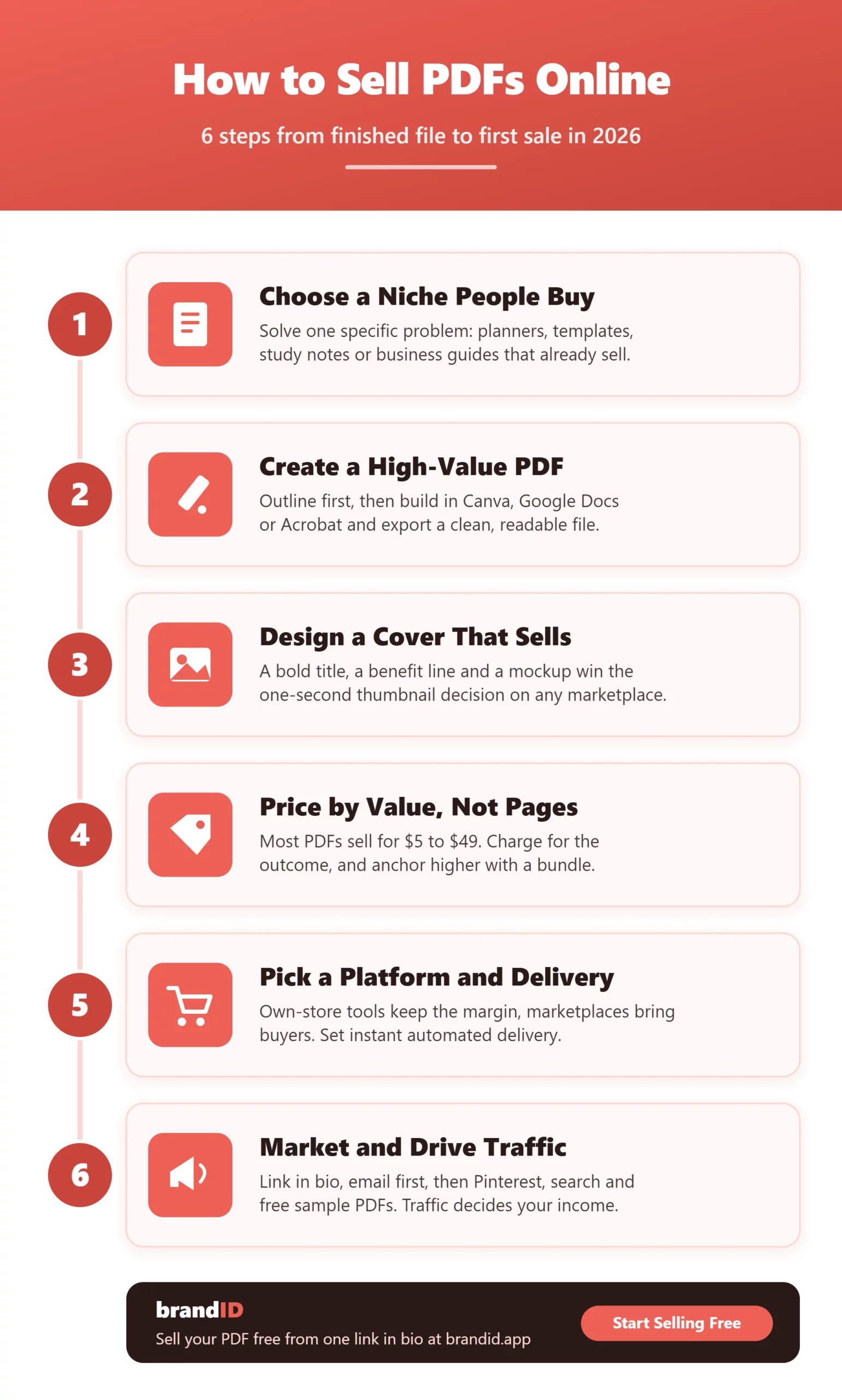
Sell a solution to a specific problem, not a general “guide.” Profitable PDF niches include personal finance, fitness and meal plans, business and marketing templates, study notes and lesson plans, design assets, and hobby guides. Validate demand before you build: search the topic on Etsy and Gumroad, check what already sells, and read the reviews to find the gaps buyers complain about.
2. Create a High-Value PDF
Outline the document before you design it so the buyer reaches the outcome fast. Build it in a tool you can move quickly in: Canva for visual planners and templates, Google Docs or Microsoft Word for text-heavy guides, or Adobe Acrobat for fillable forms. Format for readability with clear headings, white space and examples, then export to PDF and test it on both desktop and mobile before you sell a single copy.
3. Design a Cover That Sells
Your cover is the thumbnail buyers judge in under a second. Design a clean cover in Canva with a bold title, a benefit line, and a mockup that shows the PDF as a book or tablet screen. On marketplaces where every listing looks similar, a professional cover is often the difference between a scroll-past and a sale.
4. Price Your PDF by Value
Price on the outcome, not the page count. Most PDFs sell in the $5 to $49 range: simple checklists and printables at $5 to $12, in-depth guides and planners at $15 to $29, and premium bundles or toolkits at $39 to $99. Anchor higher with a bundle, for example three related planners for $27 instead of $12 each, and test one price up and one down to find where revenue peaks.
5. Pick Your Platform and Set Up Delivery
Choose a platform from the comparison table above, upload your PDF, write a benefit-led product description with your keywords in the title, and set up instant automated delivery so buyers get the file the moment they pay. Confirm the download works and that your receipt and terms of use are clear before you promote it.
6. Market Your PDF and Drive Traffic
This step decides your income. Put your product where every follower already taps, the link in bio, email your list first, and post where your audience already is: Pinterest and search drive buyer-intent traffic for printables and templates, while short video and communities work for guides. Give away a free sample PDF as a lead magnet to build an email list, then bundle related PDFs to raise your average order value.
How to Sell PDFs Online for Free
You do not need to pay anything up front to start selling PDFs online. Three free routes cover most beginners:
1. A free storefront. Open a free brandID or Payhip store, upload the PDF, and share the link. You only pay a small processing or per-sale fee when you actually make money, so there is no risk in launching.
2. A simple payment button. Create a PayPal or Stripe payment link and deliver the file manually or through an automated email. It is the barest setup, but it works for a first sale today.
3. A free link in bio store. Turn your social profiles into a shop by pointing your bio link at a free brandID page that lists every PDF, so every follower is one tap from buying. This is the fastest free setup if you already post on social media.
How brandID Helps You Sell PDFs Online
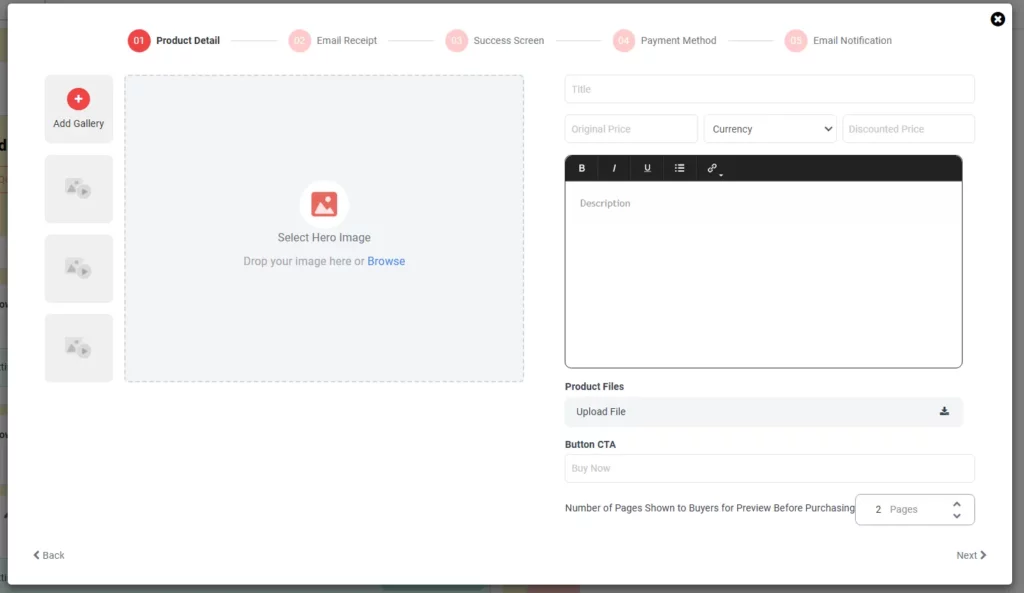
brandID is a free, no-code creator store and link in bio built for exactly this, already trusted by 10,000+ creators and businesses. It turns your bio link into a storefront for digital downloads and every other kind of digital product, and you can go from uploading a file to your first sale in under 3 minutes. Instead of stitching together a storefront, a payment tool and a separate bio link, you upload your PDF, set a price, and share one link that sells it, with no marketplace cut taken from your sales.
| brandID feature | What it does for a PDF seller |
|---|---|
| Free no-code store | Upload a PDF, set a price and start selling in under 3 minutes, with no marketplace fee. |
| Preview pages before purchase | Let buyers preview a set number of pages to build trust and lift conversions before they buy. |
| Automated delivery emails | Send the download link the instant someone pays, plus a custom post-purchase thank-you message. |
| PayPal, Stripe or brandID Gateway | Take payments three ways; the in-house brandID Gateway is tuned for creators with the lowest fees and instant setup. |
| Link in bio and customizable cards | Turn every follower into a buyer and match the product cards to your brand. |
| Memberships and lead-magnet giveaways | Add recurring income and collect emails with a free sample PDF, then sell the paid version to that list. |
Be clear on fit: brandID is an own-store and audience tool, so you still bring traffic through your bio link, email and content. It pairs with the marketing in step 6 rather than replacing it, and the same fundamentals drive any digital product business you grow from here.
Open a free brandID store, upload your PDF, and share one link that sells it, with 0% marketplace fees and instant delivery.
Start Selling PDFs FreeHow to Protect Your PDFs From Piracy
You cannot make a PDF impossible to copy, so aim to make sharing inconvenient and traceable rather than chasing perfect protection. Use these layers:
1. Per-buyer stamping. Add the buyer’s name or email onto each downloaded copy so a leaked file traces back to its source. Many selling platforms do this automatically.
2. Download limits and unique links. Cap the number of downloads and issue a unique, expiring link per purchase to stop mass re-sharing.
3. A visible watermark or footer. A subtle brand watermark and a terms-of-use line remind honest buyers that redistribution is not allowed.
4. Link or flipbook delivery. For premium products, deliver through a gated online viewer instead of a raw file so there is no downloadable original to pass around.
Is It Legal to Sell PDFs Online?
Selling PDFs online is completely legal as long as you own the rights to the content. You can freely sell material you created yourself, and you can sell PDFs you have valid resale or private-label rights (PLR) to, provided you follow that license. What you cannot do is sell copyrighted work you do not own, such as another author’s ebook, scanned textbooks, or templates lifted from someone else’s product.
Two housekeeping points: add a short terms-of-use and license line to every PDF stating it is for personal use and not for redistribution, and remember that PDF income is taxable, so keep records of your sales. If you sell globally, a merchant-of-record platform like Lemon Squeezy can handle sales tax for you.
7 Types of PDFs That Sell Best
Some formats convert far better than a plain text guide because they save the buyer time or give them a ready-to-use tool:
- Planners and calendars such as daily, budget and fitness planners.
- Templates including resumes, invoices, social media kits and Notion setups.
- Ebooks and guides that teach one skill or outcome end to end.
- Workbooks and worksheets for coaching, courses and classrooms.
- Printables like wall art, checklists and habit trackers.
- Recipe and meal plans with shopping lists included.
- Patterns and design assets such as knitting patterns, presets and SVGs.
Design assets made with AI are a fast-growing category too, though selling AI art carries its own licensing rules worth sorting out before you list.
5 Mistakes to Avoid When Selling PDFs Online
1. Competing on price. Racing to $3 attracts refund-seekers and starves your margin. Sell the outcome and charge for it.
2. No traffic plan. Uploading a PDF and waiting is the top reason sellers earn nothing. Plan step 6 before you launch.
3. A weak product page. A vague title and no cover kills conversions. Lead with the benefit and show a mockup.
4. Only one product. A single PDF caps your income. Add bundles and related files so each visitor can spend more.
5. Ignoring your email list. Marketplaces own their buyers. Capture emails with a free sample so you can sell again without paying for traffic twice.
Bottom Line on Selling PDFs Online
Selling PDFs online is one of the cleanest ways to earn from what you know: create the file once, pick a low-fee platform, price on value, and put marketing behind it. Start free on a brandID or Payhip store, add a marketplace like Etsy if you need buyers, and reinvest every sale into more traffic and more products.
The sellers who win are not the ones with the longest PDF, they are the ones who keep showing up in front of the right audience. Build one useful PDF this week, get it in front of people, and let the catalog grow from there.
FAQs
1- What is the best platform to sell PDFs online?
There is no single best platform, it depends on whether you have an audience. Own-store tools like brandID, Payhip and Sellfy keep the most margin and suit sellers who bring their own traffic, while marketplaces like Etsy and Gumroad take a bigger cut but expose your PDF to existing buyers. Many sellers use both: a marketplace for discovery and an own store for repeat sales.
2- Can you make money selling PDFs?
Yes. Because a PDF is made once and sold unlimited times with no inventory, margins are high. New sellers often start at a few hundred dollars a month and scale into a full income with more products and steady marketing. Your results track your traffic more than your file.
3- How do I sell a PDF online for free?
Open a free brandID or Payhip store, or create a PayPal or Stripe payment link, then upload your PDF and share the link. You pay only a small processing or per-sale fee when you actually sell, so there is no upfront cost to launch.
4- How much should I charge for a PDF?
Most PDFs sell between $5 and $49. Price simple checklists and printables at $5 to $12, detailed guides and planners at $15 to $29, and premium bundles at $39 to $99. Price on the outcome the buyer gets, not on how many pages the file has.
5- Is it legal to sell PDFs online?
Yes, as long as you own the content or hold valid resale or private-label rights to it. You cannot sell copyrighted material you do not own, such as another author’s ebook or scanned textbooks. Add a terms-of-use line and keep records, since PDF income is taxable.
6- How do I sell a PDF with PayPal?
Create a PayPal payment button or link for the price you want, then deliver the file automatically through a store tool or manually by email after payment. It is the simplest free setup, though a dedicated store adds instant automated delivery and buyer stamping.
7- How do I stop people from copying or sharing my PDF?
You cannot fully prevent it, but you can make sharing traceable and inconvenient: stamp each copy with the buyer’s details, limit downloads, use unique expiring links, and add a visible watermark and terms of use. For premium files, deliver through a gated online viewer instead of a raw download.
8- What types of PDFs sell best?
Planners, templates, ebooks and guides, workbooks, printables, meal plans, and design patterns sell best because they save time or give the buyer a ready-to-use tool. Formats that solve one specific problem outsell broad general guides.
9- Can I sell a PDF as an ebook on Amazon?
Yes. You can convert a PDF into a Kindle ebook and sell it through Amazon KDP, which gives you a huge marketplace but takes a 30 or 65 percent royalty split. For more control and margin, sell the PDF directly from your own store and use Amazon as an extra channel, the same approach that works when selling ebooks online.
10- Where is the best place to sell PDFs for beginners?
For a true beginner with no audience, a free storefront like brandID or Payhip plus an Etsy listing is the fastest start: the free store keeps your margin and the marketplace supplies early buyers while you build an email list and social following.
 Summarize this article with:









