
How to set your active prompt
Choose which saved prompt DMpro’s AI writes from right now. It takes under a minute.
Before you start
- At least two saved prompts, or one prompt besides the Default Prompt
Open Prompts and Messages
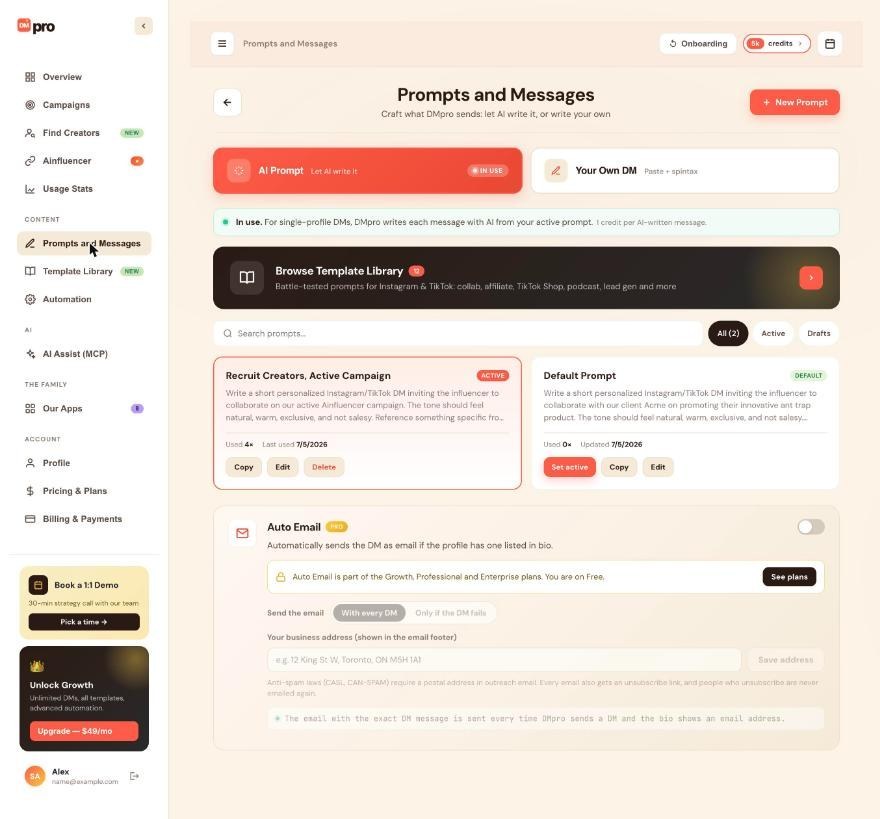
In the dashboard, click Prompts and Messages and stay on the AI Prompt tab. Exactly one prompt is active at a time and its card shows ACTIVE. The fallback prompt shows DEFAULT, or ACTIVE while it is the active one. If you finished onboarding, the starter prompt DMpro made for your persona is usually the active prompt.
Click Set active
Find the prompt you want and click Set active on its card. The card moves to the top and shows ACTIVE. Every other prompt card now offers Set active.
Or set it in the extension
Click your initials at the top right of the extension, choose Prompts and Messages, and on the AI Prompt tab select the round button next to the prompt. The choice is saved to your account, so the dashboard shows the same active prompt. Use this when you are already on a profile and want to change the prompt without leaving the page.
Check the message mode
Making a prompt active does not switch the message mode. If single-profile DMs currently send your own DM, click Use AI Prompt on the AI Prompt tab. The line at the top of the tab then reads “In use. For single-profile DMs, DMpro writes each message with AI from your active prompt.”
Confirm it in the extension
On the extension’s main screen, the chip under the Single Profile and Bulk Campaign toggle shows Active prompt with the prompt’s name. Open a profile, click Refresh and Generate. DMpro reads the active prompt at the moment you click Generate.
Think about running campaigns first
The active prompt controls two things: single-profile DMs while the mode is AI Prompt, and every AI campaign that uses Single prompt. Such a campaign writes each DM from the active prompt at the moment that DM is written, so people still waiting in a running campaign get DMs written from the new prompt.
Tips
- Campaigns that use Rotate prompts write from their own prompts, and campaigns that send your own DM never use a prompt, so the active prompt does not affect them.
- Switching prompts costs nothing. Only a message the AI writes uses a credit.
- A message that is already written does not change when you switch prompts.
If something goes wrong
I set a prompt active but the DMs still use my own text.
Your message mode is Your Own DM. Open Prompts and Messages, stay on the AI Prompt tab and click Use AI Prompt.
The active prompt changed by itself.
This happens in three cases. You deleted the active prompt, so the default prompt became active. You edited the default prompt, which saves your edit as a new prompt and makes it active. Or you added a template in the extension, which becomes active.
A running campaign is writing something different now.
A campaign with Single prompt always reads the prompt that is active when each DM is written. Set the old prompt active again, or pause the campaign before you change prompts. DMs already written or sent are not affected.
Related how-to guides
Still stuck? We’re happy to help.
Create your account, or reach out to support.




