
How to save a creator search
Save a search and its filters so you can run it again in one click, and get a weekly email about new matches. It takes about 2 minutes.
Before you start
- A search with the keywords and filters you want to keep
Run the search you want to keep
In Find Creators, choose a platform, type your keyword or hashtag and set the filters until the results are what you want. A saved search remembers the platform, keywords and filters.
Click Save search
Click Save search at the right of the search box. Give the search a name of up to 60 characters, for example Vegan creators, Canada. Check that the weekly email option is on if you want the Monday email about new matches.
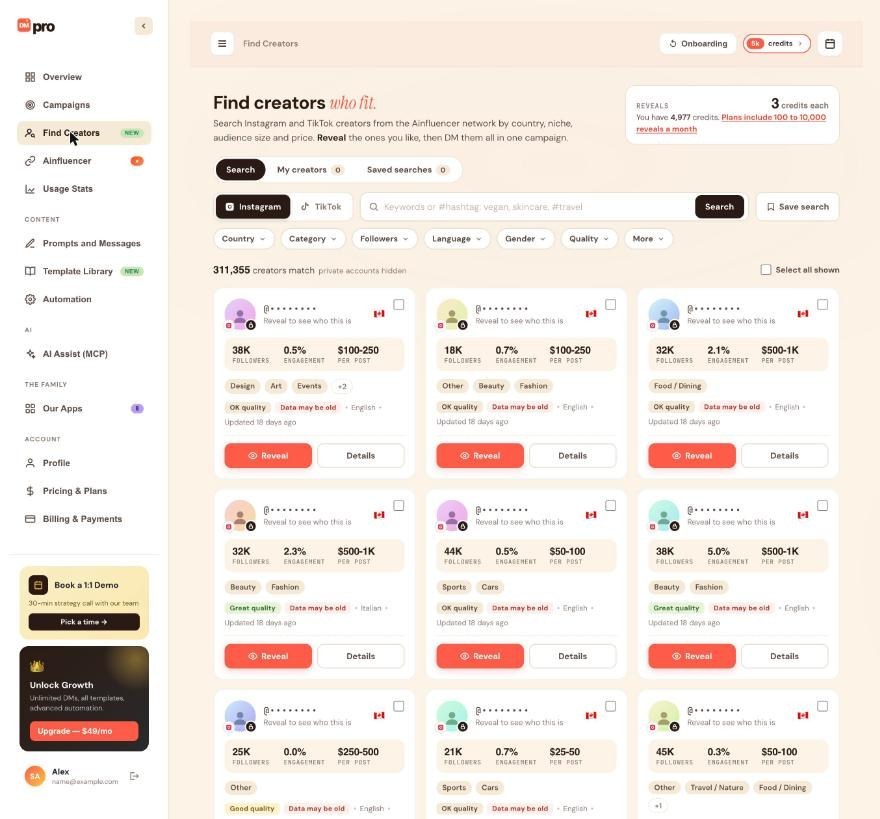
Find it on the Saved searches tab
Open the Saved searches tab. The number next to the tab shows how many you have. You can keep up to 10. Open one to run it again with the same filters, without setting everything up again.
Use the weekly email
When a saved search has the weekly email on, DMpro emails you every Monday (at 14:00 UTC) with creators that match the search and are new. Each email has links to stop the alert for one search or for all of them.
The email is not a usage report. It only lists new creators. Revealing any of them still uses reveals or credits.
Act on the new matches
When the Monday email arrives, or when you open the saved search again, look through the cards the same way as in a normal search: check the audience, quality and “Updated N days ago” in Details. Reveal only the creators worth contacting, add them to a list, and DM the list in a campaign. The guides How to reveal a creator and How to build a creator list cover those steps.
Searching is free, so you can open a saved search as often as you like. Only a reveal uses reveals or credits.
Change or delete a saved search
An AI app with access to Find Creators can rename a saved search, turn its weekly email on or off, or delete it. A deleted saved search can be brought back from the AI Assist Activity tab. Every weekly email also has links to stop the alert for one search or for all of them.
An AI app can also run a saved search and show only the matches that are new since the last check.
Tips
- Use a clear name that says what the search finds. You can only keep 10.
- Save a narrow search rather than a broad one, so the Monday email stays short and relevant.
- A saved search does not reveal anyone. You decide who to reveal.
If something goes wrong
I am not getting the Monday email.
Check the weekly email is on for that saved search. The email also needs the DMpro email notifications to reach you, so check your spam folder.
I cannot save another search.
You can keep 10 saved searches. Delete one you no longer use first.
How do I stop all the emails?
Each email has a link to stop the alert for one search or for all of them.
Related how-to guides
Still stuck? We’re happy to help.
Create your account, or reach out to support.




