
How to reveal a creator
Unmask a creator’s name, handle, photo and bio so you can DM them. It takes under a minute per creator, and it uses reveals or credits.
Before you start
- A creator you found with Find Creators
- Monthly reveals left on your plan, or credits (a reveal costs 3)
Understand what a reveal costs
DMpro uses your plan’s monthly reveals first. When none are left, each reveal costs 3 credits. The REVEALS box at the top of Find Creators shows your balance.
- Starter includes 100 reveals a month, Growth 500, Professional 2,000 and Enterprise 10,000.
- On a paid plan, connecting Ainfluencer adds 100 reveals a month.
- A free trial includes 25 creator reveals.
- Monthly reveals reset on the first of each month at 00:00 UTC.
Check the creator before you pay
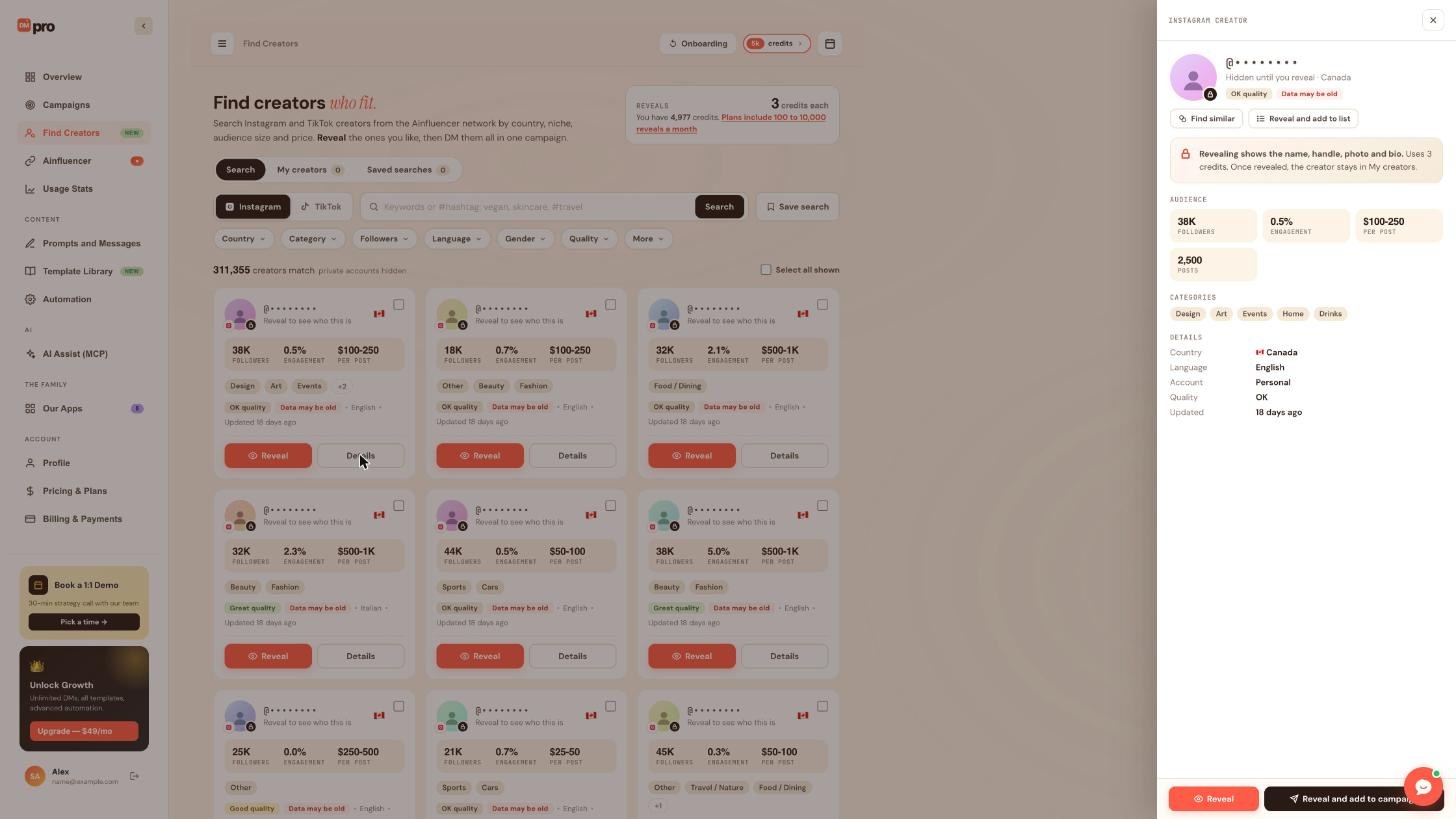
On a card, click Details. The panel shows the audience, categories, country, language, account type, quality and the date the data was updated, while the handle still reads “Hidden until you reveal”. Use it to decide. A “Data may be old” tag is a reason to look twice.
Click Reveal
Click Reveal on the creator’s card, or on the button at the bottom of the Details panel. The panel also offers Reveal and add to list (top) and Reveal and add to campaign (bottom), which reveal the creator and then add them to a list or campaign in one go.
If DMpro shows a confirmation with the number of credits it will use, read it before you confirm.
See your revealed creator
After the reveal, the card shows the real name, handle, photo and bio. The creator now appears under the My creators tab, and stays there even if you later change a list.
Reveal several creators
The checkbox in the corner of each card, and Select all shown above the results, select creators for actions on many at once. Remember that the cost multiplies: 20 creators with no monthly reveals left use 60 credits.
If you use an AI app through AI Assist (MCP), it can reveal 1 to 100 creators at once, but it always asks you first and shows the cost. A request that spends more credits than your limit waits for your approval in DMpro.
Check what you spent
The credits pill at the top of every page and the REVEALS box show your balance. On Usage Stats, credits spent on reveals count in CURRENT CYCLE, but not in LIFETIME GENERATIONS.
Tips
- Only reveal creators you actually plan to DM. Add them to a list straight away so you do not lose track of them.
- Use the follower, quality and country filters to narrow your results before you reveal anyone.
- A creator you revealed once never needs to be revealed again, even in a new campaign.
If something goes wrong
I am out of credits and reveals.
Wait for your monthly reveals to reset, buy credits or upgrade on Pricing & Plans, or connect Ainfluencer on a paid plan for 100 more reveals a month.
Did my reveal work? The creator is not in the results any more.
Open the My creators tab. Revealed creators are kept there for good.
Can I undo a reveal?
No. Reveals cannot be undone. Use the Details panel and the data date to decide first.
Related how-to guides
Still stuck? We’re happy to help.
Create your account, or reach out to support.




