
How to pause your subscription
Take a break from paying without cancelling, and know what DMpro does while you are paused. About three minutes.
Before you start
- An active paid plan that is past its free trial: pausing is not offered on Free or during the initial trial
Decide whether pause is right
Pause is for a temporary break, such as a holiday or a quiet season. It stops renewal charges for a while and then resumes by itself. Cancelling stops renewal for good and you have to subscribe again later. If you plan to leave, see “How to downgrade or cancel your plan”.
Check that your plan offers it
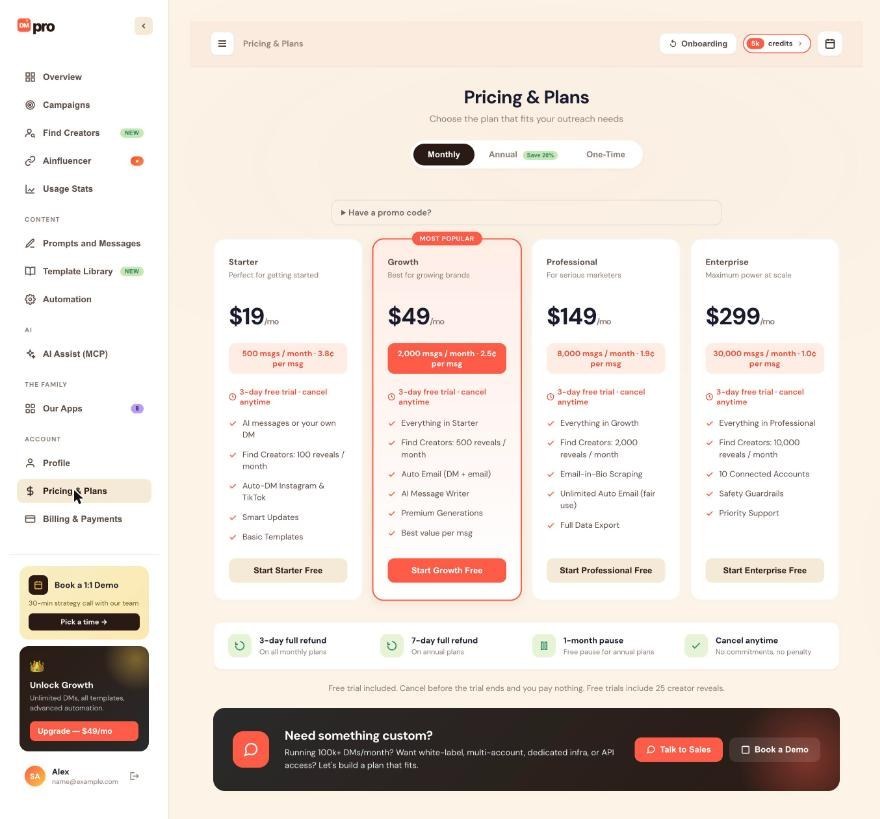
On Pricing & Plans, the strip under the plan cards lists a 1-month pause, free for annual plans. Pausing is available on the paid plans (Starter, Growth, Professional and Enterprise).
Start the pause from your billing page
Click Billing & Payments in the left menu and click Pause Subscription. Choose a pause length from the options DMpro offers, then confirm.
Know what changes while you are paused
- No charges are made.
- Your account works like the Free plan: no monthly subscription credits, and paid features such as Auto Email are off.
- One-time credits stay and can still be used.
- Your prompts, own DMs, campaigns and settings are kept.
A campaign that needs more credits than you have left pauses as Out of Credits. Nobody is skipped, and you can click Resume later.
Extend the pause or resume early
Back on Billing & Payments you can click Extend Pause before the pause ends, or Resume Now to restart straight away. Resume Now charges your card and reactivates the plan immediately.
Expect the automatic restart
When the pause ends, your subscription resumes by itself, your card is charged for the next period and your credits refill to your plan’s amount. DMpro emails a reminder 3 days before the resume date.
Tips
- Cancelling while paused ends your subscription at the end of the pause, not earlier.
- Use a pause to bridge a quiet month; if you want to keep sending without a subscription, a one-time credit package works too.
If something goes wrong
I cannot find Pause Subscription
It shows only on an active paid subscription. It is not available on Free or during your initial free trial. If you are on a paid plan after the trial and still do not see it, contact support.
I was charged when my pause ended
A paused subscription resumes automatically and charges your card. Check the refund strip on Pricing & Plans and contact support right away if the charge was unexpected.
My campaign stopped during the pause
Without subscription credits, a campaign pauses as Out of Credits when it needs one it does not have. Resume the subscription or add one-time credits, then click Resume on the campaign.
Related how-to guides
Still stuck? We’re happy to help.
Create your account, or reach out to support.




