Your UGC portfolio is the one page that decides if a brand hits reply or keeps scrolling. Most creators pack it with 40 videos, five tabs, and a logo wall nobody reads. Most brands never make it past the first clip.
Still figuring out whether UGC is the right lane for you in the first place? A full beginner roadmap on how to become a UGC creator in 2026 covers the real pay rates ($50 to $150 per video to start), the gear budget under $100, and the one difference between UGC and influencer work that trips up everyone new to it.
The UGC portfolios that actually book work are short, super specific, and lead with the exact kind of video you want more of. If you’re still picking where to host it, best UGC platforms for creators covers the paid-brief sites that pair well with the portfolio you’ll build here.
Here’s what you’ll get: the six-section layout brands actually read, eight real UGC portfolio examples you can copy, a quick Canva vs Notion vs link-in-bio pick, a six-step build plan for creators with zero past work, and the five mistakes that kill a strong portfolio on the first click.
Key Takeaways
- UGC portfolio length matters way less than how clear it is: three sharp videos beat 30 average ones. Brands decide from your first clip and your first sentence.
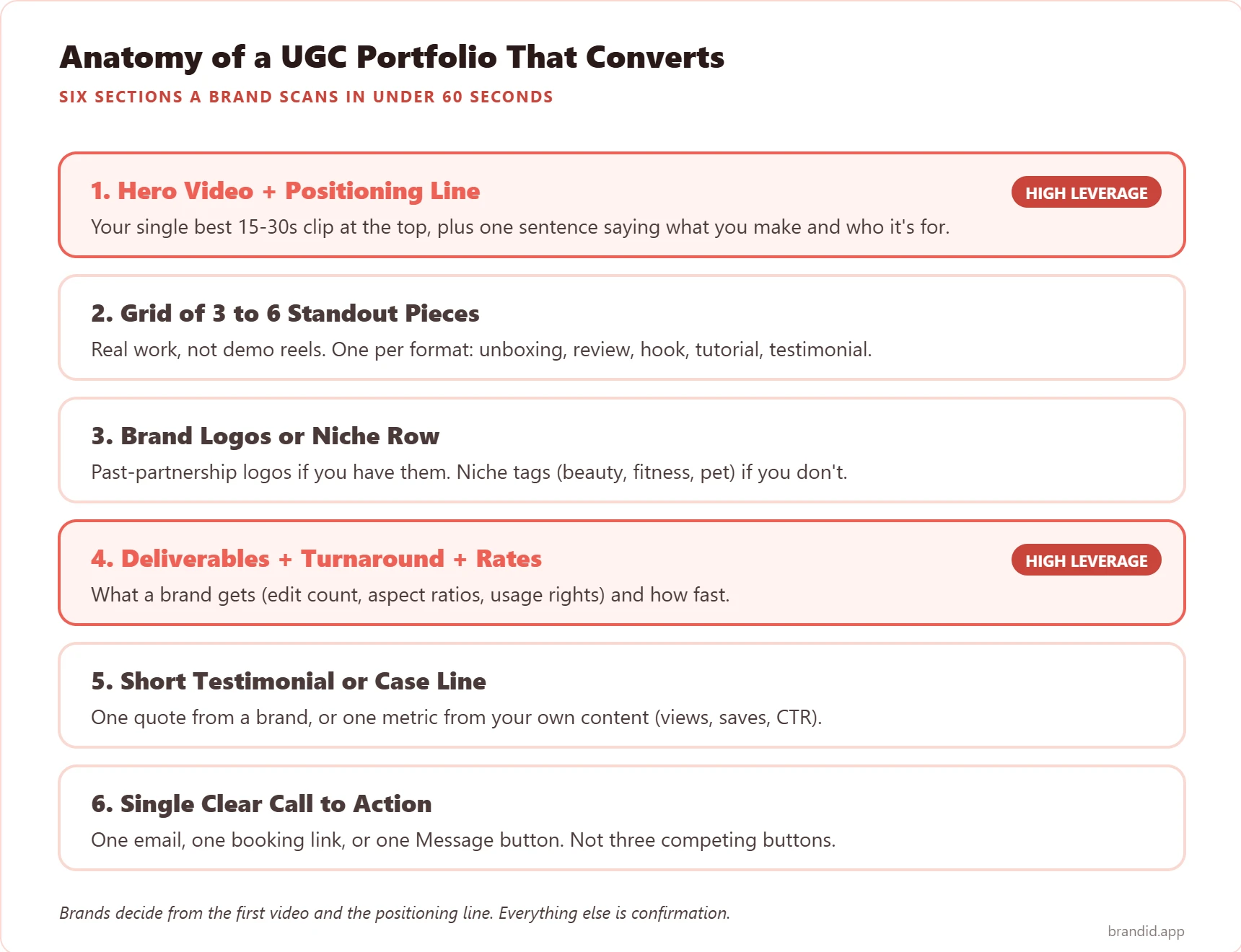
- UGC portfolio examples that book work all share six parts: a hero video with a one-line pitch, a grid of three to six pieces, brand logos or a niche row, what you give brands plus your rates, one short quote, and one clear button.
- UGC portfolio Canva templates look polished out of the box: while UGC portfolio Notion pages are faster to update and free forever. Either beats a Google Drive folder.
- UGC creator portfolio with no experience is totally normal: film three to five sample videos (unboxing, hook, review, tutorial, testimonial) using stuff you already own, and treat them like paid work.
- UGC portfolio template structure should match your niche: beauty, fitness, pet, food, and tech portfolios each need a different section order. One generic layout does not win all of them.
What a UGC Portfolio Actually Needs
Every UGC portfolio that books work has the same six parts in the same order. Niche does not change the layout. Platform does not change the layout. A brand manager spends 30 to 60 seconds on your link before they reply or move on, so each part has to earn its spot in that window.
Here are the six parts, in the order a brand actually reads them.
8 UGC Portfolio Examples You Can Model
Each one below is a layout that works for a specific type of creator. Find the one closest to your niche and style, then copy the Format and What to Steal notes. Do not copy the surface design.
1. Hero-Video UGC Portfolio (Canva Site)
This is the layout you see shared most in creator Discord servers. One big 15-second vertical video autoplays at the top of a Canva site. One sentence sits underneath. The rest is a tight three-column grid of your next five best pieces.
What works: The hero does all the heavy lifting. If a brand likes the first 10 seconds, they stay. If they don’t, they close the tab. Canva’s video embed loops cleanly, and the drag-and-drop templates are where most beginners start.
What to steal: The one-sentence pitch right below the hero. Write it as who-you-help plus the result (“I turn skincare products into 30-second UGC that gets cold TikTok viewers to buy”).
Best for: Creators who have one really strong video and want to lead with it; brand-new UGC creators making their first portfolio.
2. Niche Specialist Beauty UGC Portfolio
Beauty is the biggest UGC category by brand spend. A beauty-only portfolio beats a generalist one every time. The layout leans on skincare swatches, before-and-after shots, and GRWM tutorials instead of talking-head testimonials.
What works: Pick one slice of beauty (skincare, dupes, haircare, nail art) and build the whole portfolio around it. Beauty brand managers want proof you get their exact category before they book.
What to steal: A “Shades and tones I film well” row with the four or five product colors or textures your lighting setup nails. Generic portfolios skip this.
Best for: UGC creators pitching Sephora, Ulta, indie DTC beauty brands, and makeup or skincare startups.
3. Fitness and Wellness UGC Portfolio
Fitness UGC portfolios rely on transformation shots, at-home workout clips, and supplement unboxings. The best ones open with a short routine video (not a static photo) because fitness brands want to see your energy on camera first.
What works: Split your work into equipment-free vs equipment-based, since fitness brands usually brief one or the other. List rates per video length (15s hook, 30s routine, 60s review) up front.
What to steal: A tiny “Studio Setup” block showing your filming area, lighting, and gear. Fitness brands reuse your footage heavily, so they care what room you shoot in.
Best for: UGC creators pitching fitness apps, supplement brands, athleisure, and wellness subscription boxes.
4. Food and Beverage UGC Portfolio
Food UGC wins on close-up shots and the first-bite reaction. The layout is similar to the hero-led one, but the hero video shows food in motion (pour shots, texture closeups, steam) instead of a talking face.
What works: Split your grid into recipe-forward vs product-focused clips. Meal-kit brands and packaged-food brands brief differently. A kitchen-aesthetic grid feels editorial. A plain video wall feels flat.
What to steal: Pick one perfect still frame from each video for the thumbnail. Grainy auto-generated stills lose the brand before they click play.
Best for: Meal kits (HelloFresh, Factor), DTC packaged food, specialty coffee, kitchen gadgets, cookware.
5. Pet and Household UGC Portfolio
Pet UGC is one of the fastest-growing niches on TikTok. The portfolios that win put the pet first, not you. The hero slot is usually an unboxing shot with the pet reacting live.
What works: A visible pet profile (name, breed, age, size) near the top. Brands brief for specific pet types, and they need to see yours before they scroll.
What to steal: A short list of other pets you can film (fosters, neighbors, family) for brands that need multi-pet shoots from one creator.
Best for: Pet food, pet subscription boxes, pet tech (cameras, trackers), toys, and insurance.
6. Tech and Gadget UGC Portfolio
Tech UGC portfolios have to prove two things: you can film clean product shots AND you can explain features without reading a script. The best ones pair a slick unboxing with a 60-second “3 features I actually use” clip.
What works: Tag each piece by category (headphones, chargers, smart home, SaaS) because tech brand managers usually only work inside their lane. A “Hardware vs Software” split at the top gets them to the right spot fast.
What to steal: A one-line “Scripts I will not read word-for-word” note. Tech brands often send dense PR scripts, and saying you reframe them in your own voice puts you ahead.
Best for: Consumer electronics, SaaS tools, smart home brands, phone accessories, laptop and PC gear.
7. Minimalist Notion UGC Portfolio
The minimalist Notion UGC portfolio is where creators who hate visual design still win. Clean sans-serif headers, embedded videos, two columns, no gradients. The restraint itself looks professional.
What works: Notion’s video embeds work with TikTok, YouTube, Vimeo, and Loom, so you host your clips anywhere and Notion pulls them in. Edits are instant. The free plan handles unlimited updates.
What to steal: A short “My thinking” block under each video with two or three lines on the idea, who it is aimed at, and the hook. This is the text brand managers copy and paste when they pitch you to their boss.
Best for: Creators who update their portfolio weekly, prefer text-first layouts, or want free hosting that scales.
8. Grid-First Canva Portfolio (Ruby Yeo Style)
The most-cited real example in creator circles is Ruby Yeo’s Canva-built page. She leads with a wall of past brand partnership logos before any video plays. This flips the hero-first template on its head and works best once you have 3+ real brand jobs.
What works: Showing past partnerships first is a trust shortcut. Brand managers see familiar logos and skip the step of wondering if other brands trusted you.
What to steal: The exact layout: logo row at the top, then two columns (one video on the left, one short bio sentence on the right), then the same video-plus-context pattern down the page.
Best for: Mid-tier UGC creators with a growing list of past brand jobs who want to lead with past work instead of one hero reel.
Where to Build a UGC Portfolio
Four platforms get used the most for UGC portfolios. Each has a sweet spot. Your pick depends on how often you plan to update and how polished you need the page to look out of the box.
| Platform | Free Tier | Look + Feel | Best For |
|---|---|---|---|
| Canva Sites | Yes, with Canva brand | Polished, template-driven | Visual-first creators, beauty and fashion niches |
| Notion | Yes, unlimited | Clean, text-first | Creators who update weekly, text-forward portfolios |
| Link-in-bio hub (brandID) | Yes, custom URL | Polished, mobile-ready | Creators who want portfolio + bio page in one |
| Standalone site (Carrd, Squarespace) | Carrd free, SQSP from $23/mo | Full control | Creators treating UGC as a long-term business |
The biggest mistake is picking a platform before you have content ready. All four embed vertical video, hold a one-line pitch, and do a simple grid. If you have fewer than five pieces, go with the free option that updates fastest. Switch later only when brands start asking for a more polished page.
How to Build a UGC Portfolio With No Experience
No paid clients? Not a problem. Every working UGC creator built their first portfolio from spec videos on stuff they already owned, treated exactly like paid work.
Step 1: Pick Your Niche Before You Film
A beauty-only portfolio beats a generalist one even when the generalist has twice as many videos. Pick the one slice you can film best (skincare, pet, fitness, kitchen gadgets, software demos) and lock it in for v1. You can add more later. Narrow wins first.
Step 2: Film 3 to 5 Sample Pieces
Use stuff you already own. Shoot one of each: a 10-second hook, a 30-second unboxing, a 60-second review, a 45-second tutorial, and a 20-second testimonial. Portrait 9:16, natural light, next to a window.
Step 3: Edit for a Brand’s Eye Not Yours
Cut to beats, not sentences. Add captions on every video (TikTok and Instagram auto-mute). Drop your handle in a text overlay in the first 2 seconds so the clip still works if someone screengrabs it.
Step 4: Write One Pitch Line
One sentence under your name. Who you help plus the result. Example: “I film 30-second UGC for DTC skincare brands that need cold TikTok traffic to buy.” This beats “UGC creator passionate about storytelling” every single time.
Step 5: Add Context to Every Video
Under each piece, write two or three lines on the idea (what a brand brief would have asked for), who it is for, and the hook (opening format, how you keep people watching, what the CTA is). This is the text brand managers quote when they pitch you to their boss.
Step 6: Add One Clear Button
One link. One email. One Message button. Do not pile three buttons next to each other. Brand managers pick zero out of three but almost always click one of one. The button goes at the bottom of the page and gets repeated inside the bio sentence at the top.
UGC Portfolio Mistakes to Avoid
The portfolios that lose on the first click share the same five mistakes. Run through this list before you send the link in a pitch.
- Hero spot is a static image, not a video. UGC is a video-first category. A static hero tells brands you are not comfortable on camera.
- Pitch line reads like a bio. “UGC creator and storyteller based in Chicago” is a bio. “I film 30-second UGC for DTC pet brands” is a pitch.
- Grid has more than 10 videos. Brands check out by video 6. Cut hard.
- No rates or video options listed. Brand managers who have to email to ask your rates usually email the next creator instead.
- Button says “follow me on Instagram” instead of “email me to book”. Follows are a vanity count. Bookings are money.
Why Your UGC Portfolio Belongs on brandID
Here’s the shortcut nobody else offers: tell brandID‘s built-in AI what you want and your UGC portfolio builds itself. Open brandID, hit Build with AI, type something like “a UGC portfolio with my TikTok videos, a media kit, my rates, and a booking button”, and the page is live in under a minute.
If you already use Claude, there’s an even faster route. brandID has an official MCP connector, so you can tell Claude “build me a UGC portfolio page with 5 sample videos, logos from the 3 brands I worked with last month, and a Stripe booking link” and Claude edits your brandID page for you directly. No clicking around an editor. No template hunting. No Canva vs Notion decision.
Once the page is live, the six parts every working UGC portfolio needs are already there, because brandID ships with them:
- Media Kit block with your bio, headshot, follower counts across TikTok, Instagram, and YouTube, past brand collabs with logos, and a downloadable rate card. Covers the hero, the pitch line, and the logo row in one spot.
- Content gallery that embeds your best TikTok videos, Reels, and YouTube Shorts in a scrollable grid with a short caption under each one. That’s the “grid of 3 to 6 pieces” from the layout above.
- ShopID affiliate marketplace with 5M+ products from 2,000+ brands, one-click affiliate links (no application, no approval wait), and commissions up to 65 percent. Extra income on the same page while you wait between paid UGC jobs.
- Rentable digital billboards: brands pay to rent space on your brandID page. Another income line that doesn’t depend on booking UGC jobs.
- Email and phone capture with SMS and email follow-ups built in, so every brand manager who lands on your page and doesn’t book right away still joins your owned list.
- Custom URL at brandid.app/yourname that reads clean in cold emails, Instagram DMs, and the TikTok bio field.
One link in your TikTok, Instagram, and LinkedIn bios sends every brand to a page that doubles as your portfolio and your creator storefront. No juggling Canva, Notion, and Linktree.
Bottom Line
The UGC portfolio examples that book work in 2026 are not the biggest ones. They’re the sharpest ones. Six parts, one hero video, one pitch line, one clear button. That beats a 40-piece archive on every number brand managers track.
Pick the layout closest to your niche. Film three to five sample videos if you have no past work. Put the whole thing somewhere a brand can scan in under a minute. If you’re treating UGC as a long-term career, building a modern creator career is the natural next read.
FAQs
What is a UGC portfolio?
How many videos should a UGC portfolio have?
How do I create a UGC portfolio with no experience?
Should I use Canva or Notion for my UGC portfolio?
What should be at the top of a UGC portfolio?
Do I need past brand collaborations for a UGC portfolio?
What should I include in the rates and options section?
How often should I update my UGC portfolio?
Can my UGC portfolio also be my link-in-bio page?
What is the biggest UGC portfolio mistake?
 Summarize this article with: