

Ever wondered why your Instagram Stories rack up tons of views yet bring in little to no sales?
Here’s the hard truth: most Stories that get views but no clicks have the same problem. The creator either never adds a link to the Instagram Story, or sends taps nowhere useful because they skip the right link in bio tools to guide followers toward action. You might be producing high-value, attention-grabbing content that resonates perfectly with your audience’s needs, but without a clear path to click, how can those viewers take the next step and actually convert?
In this article, we’ll walk you through how to add a link to your Instagram Story, how to combine it with the best link in bio tools, and how to turn short-lived views into loyal fans while boosting sales using proven emotional triggers that inspire action.
- Open Instagram and swipe right (or tap the + and choose Story).
- Take or upload a photo or video.
- Tap the sticker icon (the smiley square) at the top.
- Choose the Link sticker (it shows a chain-link icon).
- Paste your URL, tap Customize sticker text to add a CTA, then tap Done.
- Drag the sticker into place, tap it to change the color, and share to Your story.
Any account can do this, with no follower minimum. Full screenshots, fixes, and tips are below.
Key Takeaways
- No follower minimum: You do not need 10,000 followers to add a link to your Instagram Story, anyone has been able to since 2021
- Use the link sticker: To add a link to Instagram Story, tap the sticker icon, choose LINK, paste your URL, add tappable text, then place it
- One link per frame: Instagram allows one link sticker per Story frame, so use separate frames or a link in bio for several links
- Pair it with a link in bio: Story links vanish in 24 hours, so send taps to a permanent link in bio hub to keep converting
- Save it to a Highlight: A link sticker stays tappable after you add the Story to a Highlight, so your best links outlive the 24 hours
- Missing sticker? Update the app first. Brand-new accounts and accounts with Community Guidelines strikes may not get the Link sticker
Who Can Add Links to Instagram Stories?
Unlike other platforms like TikTok (where you need to learn how to add a link to TikTok bio strategies), Instagram makes it incredibly easy to drive traffic directly from your Stories.
Before anything else, let’s clear up the biggest myth once and for all. You do not need 10,000 followers to add links to your Instagram Stories anymore. In fact, Instagram rolled out the link sticker feature to all accounts in October 2021.
There are only two exceptions. Instagram does not give link stickers to brand-new accounts, or to accounts that repeatedly share hate speech, misinformation, or other content that breaks its Community Guidelines. Everyone else, personal, creator, or business, gets the same sticker.
So, if you’ve been wondering how many followers on Instagram you need to add links, the answer is simple: it doesn’t matter. Whether you’ve got 100 followers or 100,000, you can easily add a link to your Story, no special permissions, no tricky application process, and no minimum follower requirement.
Even though anyone can now add links to Instagram Stories, your overall performance may suffer if a significant portion of your followers are inactive. To make sure you’re reaching genuine users ready to interact, consider using a Fake Instagram Follower Checker.
What Is the Instagram Link Sticker?
A link sticker is a clickable element you can add to your Instagram Stories to drive action, letting viewers tap and instantly open an external website or landing page. These stickers show up clearly on any photo or video within a Story. All your audience has to do is tap, and Instagram’s in-app browser takes them straight to the site you’ve linked. Here are the key features of link stickers:
- Any account in good standing, personal, creator, or business, can use link stickers regardless of follower count.
- They replaced the old “swipe up” feature, making it easier to drive traffic by tapping instead of swiping.
- They stay tappable when you save the Story to a Highlight on your profile.
- Stickers are customizable: you can change their appearance and position for better engagement.
- Used strategically, link stickers boost clicks, traffic, community engagement, and even monetization opportunities for creators and businesses.
Generally speaking, it’s safe to say that link stickers are one of the most transformative Instagram tools, making them a top choice for driving real results in 2026. Additionally, they can turn your Stories into powerful calls-to-action, helping you bridge the gap between your content and external platforms with ease.
How to Add a Clickable Link to an Instagram Story
Here is a clear, step-by-step guide for how to add a link to your Instagram Story using the link sticker, formatted for best readability and actionability:
Short on time? Here is the whole process at a glance, with the detailed walkthrough and screenshots below.
| Step | What to do | Quick tip |
|---|---|---|
| 1. Create your Story | Upload or capture your photo or video | Prep the visual before adding the sticker |
| 2. Open stickers | Tap the sticker icon, the smiley square, up top | Interactive stickers live here |
| 3. Tap the Link sticker | Select LINK, or search “link” to find it | Frequent users see it near the top |
| 4. Add your URL | Paste the full https:// link | Customize the text into a clear CTA |
| 5. Place and publish | Drag, resize, then share your Story | Keep it in the lower-middle thumb zone |
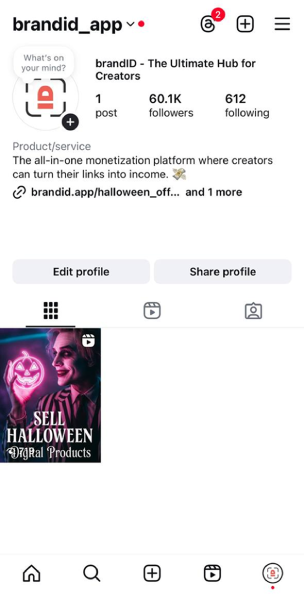
Step 1: Open the Instagram Story Creator
- Tap and hold your profile image in the upper left of your home screen or Instagram profile page, then select “Add to your story” and tap the camera icon.
- Alternatively, simply swipe right from your home screen to open the story creator.
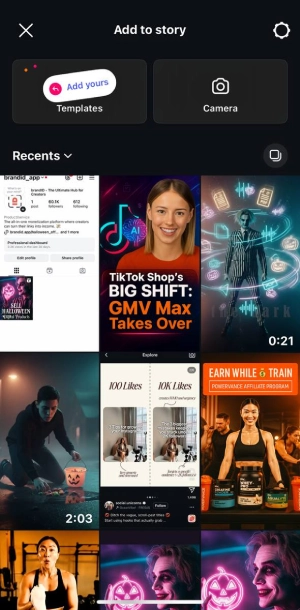
Step 2: Take or Upload a Photo or Video
- To capture new content, tap the Capture button at the bottom center of the screen.
- Or, swipe up to select an existing photo or video from your gallery.
- Once selected, move or resize as needed to fill the screen.
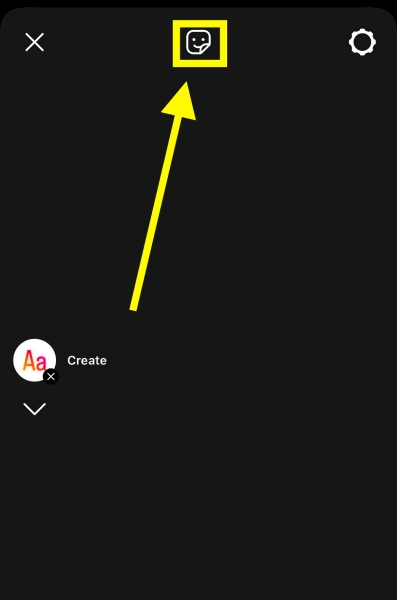
Step 3: Tap the Sticker Icon
- Find the sticker icon (a small square with a smile and a folded corner) at the upper right corner.
- Tap it to open the sticker menu.
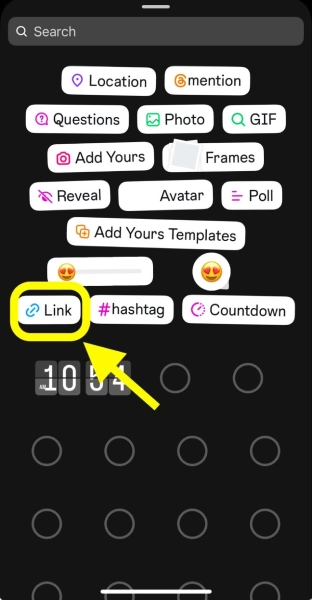
Step 4: Choose ‘LINK’ from the Sticker Menu
- In the sticker menu, find and select the LINK sticker (it looks like a chain link and says “LINK”).
- If you don’t see it, type “link” in the search bar to quickly locate it.
Step 5: Add Your Link and Customize the Sticker
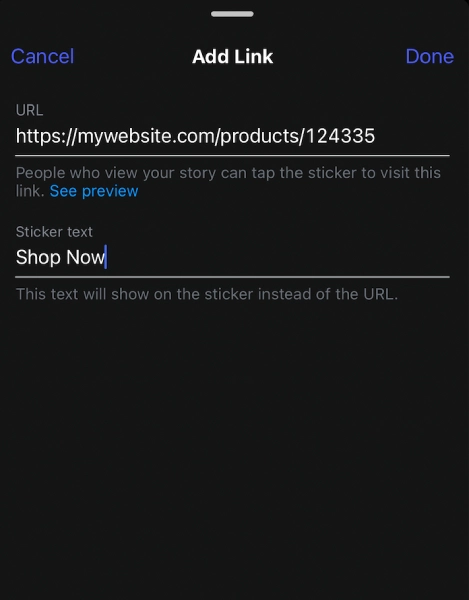
- A field will appear where you can type or paste your destination URL.
- Paste or type the full destination URL into the URL field (use the full https:// link for YouTube, GoFundMe, etc.). After entering your link, tap “Done.”
- You can then add sticker text (like “Tap to read” or “Shop Now”).
Step 6: Place and Style Your Link Sticker
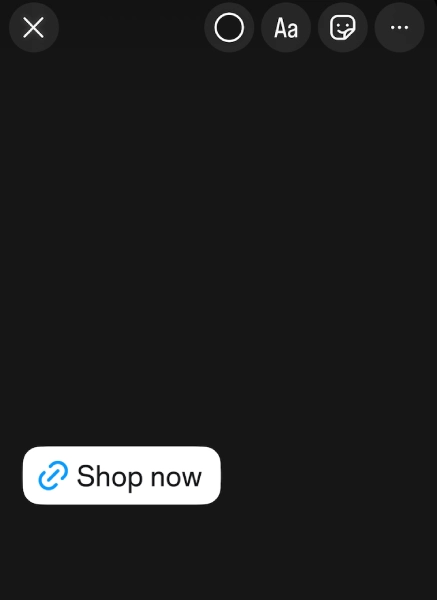
- Drag your link sticker to a spot on your Story where it’s highly visible but not blocking key visuals or text.
- Tap the sticker to shuffle through different color styles, pick a color that contrasts with your background and pops out for maximum taps, while matching your brand if possible.
- Keep your sticker text short, clear, and action-oriented (like “Shop Now,” “Tap for More,” or “Get Offer”).
- Share Your Story.
How to Share a YouTube Link, Post, or Reel in Your Instagram Story
Share a YouTube Video Link
Open the video in the YouTube app, tap Share, then Copy link. In your Instagram Story, add the Link sticker, paste the URL, and change the sticker text to something like “Watch the full video.” A screenshot or short clip of the video as the Story background makes the tap far more likely.
Share an Instagram Post or Reel to Your Story
You do not need a link sticker for your own content. Tap the paper plane icon under any post or Reel and choose Add to story. The shared post becomes tappable, and viewers who tap it are taken straight to the original.
Add a Link to Your Instagram Story Highlights
Instagram does not let you add a new link to an existing Highlight, but any Story that already has a link sticker keeps it when you save it. Publish the Story with your link, tap Highlight at the bottom of the Story (or add it from your Story archive), and the link stays live on your profile long after the 24 hours are up.
How to Add Multiple Links to an Instagram Story
Instagram is built around one link sticker per Story frame, which keeps each frame focused on a single action. The simple way around it is to use more than one frame: a Story can hold several frames, so you can add a different link sticker to each one and point viewers to a few destinations in a single Story sequence.
Your profile can also hold up to five links in the bio, but Instagram only shows the first one up front. When you have several links to share at once, the cleaner move is to send viewers to one link in bio hub that holds all of them. A single tap then gives them every link, and your Story stays clean instead of cluttered with stickers.
Why Can’t I Add a Link to My Instagram Story?
If the Link sticker is missing, greyed out, or your link will not save, one of these is almost always the cause:
| Problem | Likely cause | Fix |
|---|---|---|
| No Link sticker in the menu | Outdated app or a temporary glitch | Update Instagram, restart the app, or search “link” in the sticker tray |
| Sticker missing on a new account | Instagram withholds links from brand-new accounts | Keep posting normally and check again after a few weeks |
| Sticker removed after a violation | Repeated Community Guidelines strikes | Check Settings > Account Status and resolve any warnings |
| Link will not save | Typo, missing https://, or an unsupported link type | Paste the full https:// URL and test it in a browser first |
| Link saves but gets blocked | The domain has been flagged as spam or unsafe | Link to a trusted page, such as your link in bio, instead |
| Works on one phone, not another | Account or device-level feature test | Log out and back in, reinstall the app, or try another device |
Best Links to Add to Your Instagram Story
Not sure what to link? The highest-converting Instagram Story links send viewers somewhere that leads to a clear action, and the right destination depends on how warm your audience is. Popular options include:
- Your link in bio and creator store, so one tap reaches everything you offer
- A specific product or digital download you are promoting right now
- Your shop or digital products page for a sale or new launch
- A free lead magnet, guide, or quiz for newer followers who are not ready to buy yet
- A booking page, waitlist, or newsletter sign-up for warm followers ready to act
Whatever you choose, match the sticker text to the destination. “Shop the sale,” “Watch now,” or “Grab your spot” will always out-tap a plain “Link,” and the linked page should repeat the promise your Story made.
How to Get More Clicks on Your Instagram Story Links
Adding a link is only half the job. Getting people to actually tap it is what turns Story views into traffic and sales. A few things reliably lift your click-through rate:
- Tell them to tap. Add an arrow, a “Tap here” caption, or an animated GIF pointing at the sticker.
- Use contrast. Cycle the sticker color so it pops against your background instead of blending in.
- Give a reason. Tease what is behind the link, a discount, a guide, a full video, so the tap feels worth it.
- Warm them up first. Use a poll or question sticker on an earlier frame, then drop the link once viewers are engaged.
- Place it in the thumb zone. Keep the sticker in the lower-middle of the screen where thumbs naturally rest.
- Re-share it. Not everyone sees the first Story, so promote an important link a few times with fresh angles.
If the problem is not where to put the link but what to post, these Instagram Story ideas for creators cover formats and prompts that keep tap-through rates healthy. Consistent, well-placed Story links compound over time, and a strong Instagram bio backing them up gives new visitors somewhere to land when they check your profile.
How to Track Clicks on Your Instagram Story Links
Adding links is only worth it if you know which ones work. Instagram and a couple of free habits make Story link performance easy to measure, so you stop guessing and start repeating what sells.
- Instagram Insights: on a professional account, open a Story’s insights to see link taps, forward taps, and exits, so you can tell which CTAs land.
- UTM parameters: add small tags to your URL, like utm_source=instagram and utm_medium=story, so Google Analytics shows exactly how much traffic and how many sales each Story drove.
- Branded short links: a shortened, branded URL looks cleaner in the sticker and adds its own click tracking on top of Instagram’s.
Tracking turns guesswork into a system: once you can see that Tuesday’s Story drove clicks and sales while another flopped, you know what to repeat. A creator store with built-in analytics, like brandID, also shows which products those taps actually buy.
Story Link vs Link in Bio vs DM for Link: Which to Use
There are three main ways to share a link on Instagram, and the strongest creators use all three for different jobs. Here is how they compare.
| Method | Best for | Key benefit | Limitation |
|---|---|---|---|
| Story link sticker | Time-sensitive promos and content drops | High visibility inside engaging content | Disappears after 24 hours |
| Link in bio | Evergreen links, shops, and portfolios | A permanent hub for everything you share | Needs an extra tap to your profile |
| “DM for link” | Nurturing leads and starting conversations | Boosts engagement and builds connection | Manual, and it does not scale |
What Is the “DM for Link” Tactic?
Instead of dropping a link, you ask viewers to reply or send a keyword to receive it. It takes more effort, but every reply is a real conversation and a stronger engagement signal, which is why creators use it for higher-touch or higher-priced offers.
You do not have to pick just one. Use the link sticker for immediate action, a link in bio as your permanent hub, and “DM for link” when the goal is connection over raw clicks.
Common Mistakes to Avoid With Instagram Story Links
- Linking to your homepage. A homepage gives too many choices, so send people to one focused page instead.
- Forgetting to tell people to tap. Add a clear CTA in text or voice on every Story with a link.
- Vague sticker text. “Link” or “Click here” gives no motivation, so tie the text to the outcome.
- Sharing a link with no context. Give one sentence on what it is, who it is for, and why now.
- A mismatch between Story and page. If your Story promises a free guide, the landing page should say exactly that.
- Never checking Insights. Review taps and exits so you can improve one variable at a time.
And if you are wondering who is saving your Story frames, here is the current answer on whether Instagram notifies you when someone screenshots your Story.
Conclusion
You’ve got the content, the attention, and now the toolset, don’t let one missing tap turn views into lost sales. Link stickers get people to your offers, and a smart bio hub turns those clicks into cash. For anyone exploring online business ideas, having a centralized, conversion-first destination that sells, bundles, and collects support with zero friction is essential to turning views into real buyers.
That’s exactly what brandID does. You can build a branded hub in minutes, list digital products, bundle offers, collect tips, launch subscriptions, and get paid quickly, all from a single, beautifully designed page. It’s free to start, helps you keep more of your revenue, and finally turns passive Story views into loyal, repeat customers. Are you ready to stop hoping for sales and start owning them?
Frequently Asked Questions
How to Add a YouTube Link to an Instagram Story?
Copy the full YouTube URL (make sure it starts with https://), open the Story creator, tap the sticker icon, select Link, paste the URL, customize the sticker text (like “Watch Now”), and place it prominently.
How to Add a GoFundMe Link to an Instagram Story?
To add a GoFundMe link to your Instagram Story, first copy your campaign’s full URL, then open the Story creator, tap the sticker icon, and select the Link sticker. Paste your GoFundMe link, add a clear call-to-action like “Donate Now,” and publish your Story.
Should I Use Link-In-Bio Instead of Story Links?
Both Story links and link-in-bio tools serve different purposes. Story links are great for short-term promotions or time-sensitive campaigns since they disappear after 24 hours, while a link in bio acts as a permanent, central hub where all your content, products, and offers live. For long-term monetization and consistent traffic conversion, it’s best to combine both. Use Story links to drive attention, and your bio link to capture and convert it. With brandID, you can create a fully branded bio hub that organizes your products, bundles, tips, and analytics all in one place, ensuring every tap leads to real results.
Why Is My Link Sticker Not Showing?
The most common reasons are an outdated app, a brand-new account, Community Guidelines strikes, or a URL Instagram has flagged. Update the app, restart it, check Settings > Account Status for warnings, and paste the full https:// link. Brand-new accounts usually get the sticker after a few weeks of normal activity.
Can You Add a Link to an Instagram Story Without 10K Followers?
Yes. Instagram gave the link sticker to all accounts in October 2021, so there is no follower requirement at all. Whether you have 50 followers or 500,000, you can add a link to your Instagram Story. The only exceptions are brand-new accounts and accounts that repeatedly break the Community Guidelines.
How Do You Add Multiple Links to an Instagram Story?
Instagram allows one link sticker per Story frame, so to share multiple links, add a different link sticker to separate frames within the same Story. For more than a few destinations, point viewers to a single link in bio hub that holds every link, which keeps your Story clean and converts better.
Can You Add a Link to an Instagram Story on a Personal Account?
Yes. The link sticker is available on personal, creator, and business accounts, so you do not need to switch account types to add a link to your Instagram Story. Switching to a professional account only adds extra analytics.
Can You Add a Clickable Link to an Instagram Post?
Not for most accounts. Captions still do not turn URLs into clickable links. In March 2026 Meta began testing clickable caption links for some Meta Verified subscribers, capped at 10 links a month, but there is no wide rollout yet. For everyone else, use a link sticker in your Story, the link in your bio, or a link in bio hub you point followers to.
How Do You Track Clicks on an Instagram Story Link?
Use a professional account to see link taps in Instagram Insights, and add UTM parameters to your URL so Google Analytics shows the traffic and sales each Story drove. A branded short link adds its own click tracking and looks cleaner in the sticker.
Can You Schedule an Instagram Story With a Link?
Yes. Several social media scheduling tools let you plan Instagram Stories in advance. Check that your tool supports the link sticker before you batch a week of Stories, since some publish the image and send you a reminder to add the sticker yourself.
Do Instagram Story links work in Highlights?
Yes. A link sticker stays tappable when you save the Story to a Highlight, so the link keeps working on your profile after the Story expires. You cannot add a new link to a Story that is already in a Highlight, so add the sticker before you publish.
How do I share my own Instagram post in my Story?
Tap the paper plane icon under the post or Reel and choose Add to story. The shared post is tappable, so viewers can open the original without you adding a link sticker.
 Summarize this article with:









