
Two accounts, one post, both audiences. That is the entire promise of the Instagram Collab feature, and it is why learning how to add collaborator on Instagram is one of the fastest wins available to a creator or brand right now. A collab post is not a tag and not a repost. It is genuine co-authorship: the same post lives on both profile grids, reaches both follower bases, and pools every like, comment, save and view into one shared count.
The problem is that most guides on this topic are outdated. They tell you the limit is one collaborator when Meta officially raised it. They tell you that you cannot add a collaborator on Instagram post after publishing, which is no longer true. This guide fixes that, walks through the current flow on mobile and desktop, explains why the Invite collaborator button disappears, and shows how to turn co-authored reach into income. If you already know your way around adding a clickable link to an Instagram post, collab posts are the next lever worth pulling.
Key Takeaways
- The core flow takes four taps. Create your post, tap Tag people, tap Invite collaborator, pick the account, then Share.
- You can invite collaborator Instagram accounts after publishing. Open the live post, tap the three dots, choose Edit, then Tag people.
- Meta officially supports co-authoring with up to three accounts on a feed post, carousel or Reel, though the number shown in your app can vary.
- Nothing happens until the invite is accepted. Until then the post looks like a solo post on your grid only. Once it is accepted, you can even pin that collab post so it leads your profile grid.
- An Instagram Collab post pools engagement rather than splitting it, which is why one collab usually outperforms two separate posts.
- Reach only pays if there is somewhere to send it. A shoppable bio page turns collab traffic into revenue.
What Is An Instagram Collab Post?
An Instagram Collab post is a single feed post, carousel or Reel co-authored by two or more accounts. Both usernames sit in the post header, the post appears on every collaborator’s profile grid, and it is distributed to every collaborator’s followers. Likes, comments, saves and views merge into one shared total.
That pooling is the part people underestimate. Two separate posts split your social proof across two engagement counts. One collab post stacks it. A post with 4,000 combined likes signals popularity far more strongly than two posts with 2,000 each, and the algorithm reads that signal on a single object.
The Instagram collaboration feature also differs from the two things people confuse it with. Tagging puts your handle in a corner of someone else’s photo. Reposting creates a second, separate post with its own engagement. Only a collab makes both accounts co-owners of the same content. Here is how the three compare.
| What Happens | Collab Post | Tag | Repost |
|---|---|---|---|
| Shows on both grids | Yes, main grid | Tagged tab only | Yes, as a new post |
| Reaches partner’s followers | Yes, automatically | No | Yes |
| Engagement | One shared count | Stays with original | Split across two posts |
| Needs approval | Yes, invite accepted | No | Depends on settings |
| Best used for | Partnerships, launches, giveaways | Credit, product mentions | Adding your own commentary |
Read the table as a decision rule. If the goal is reach into a second audience, use the Instagram Collab feature. If the goal is credit only, tag. If the partner wants to say something in their own voice, let them repost.
How To Add Collaborator On Instagram (Step By Step)
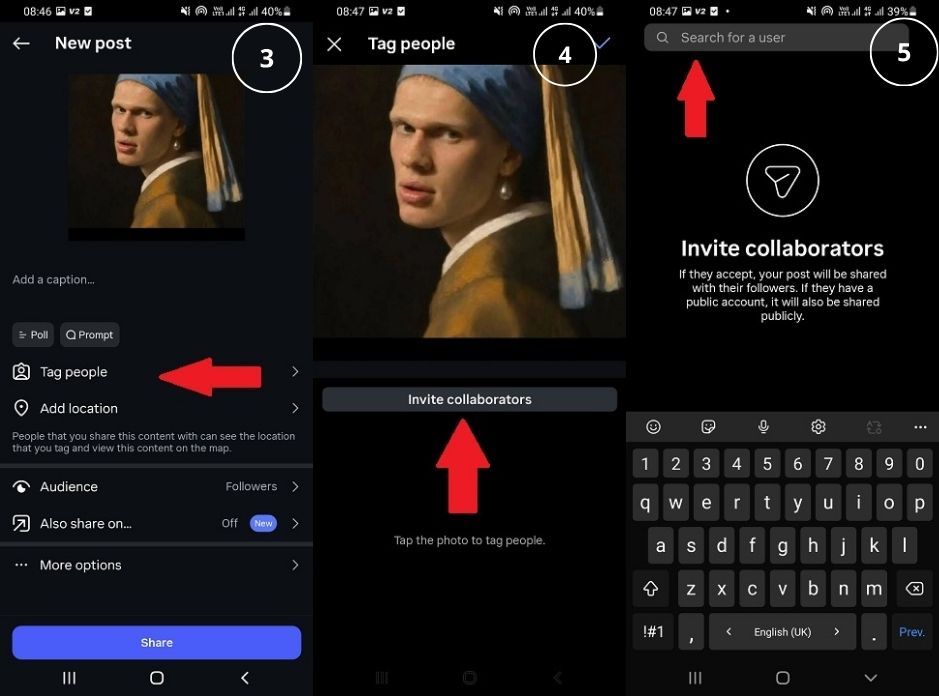
To add a collaborator on Instagram post content, open the app, start a new feed post, carousel or Reel, tap Tag people on the final screen, tap Invite collaborator, search the username, select it, then tap Share. The invite goes out the moment the post publishes, and the collaborator has to accept before the post appears on their profile.
That is the short version. The full sequence, including the parts that trip people up, looks like this.
Create The Post As Normal
Tap the plus icon, upload your photo, carousel or Reel, apply edits, and write your caption. Do all of this first. The Invite collaborator option only appears on the final review screen, not during editing.
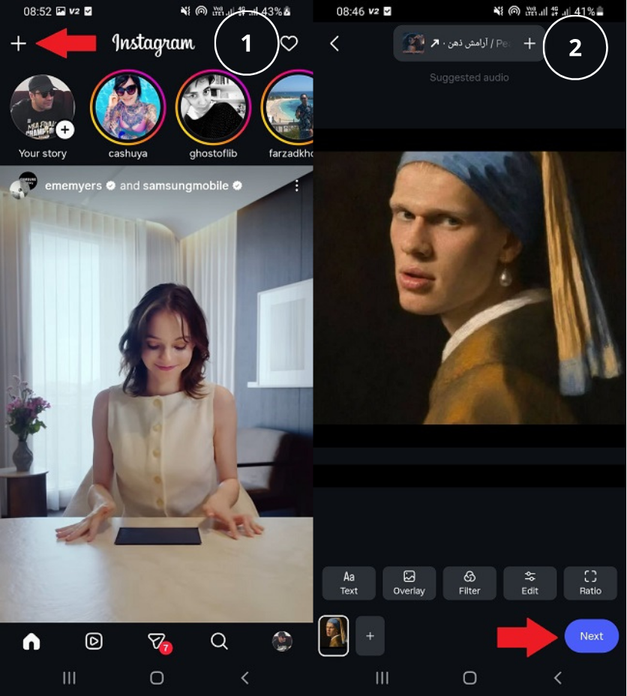
Tap Tag People, Then Invite Collaborator
On the last screen, above Add location, tap Tag people. For a Reel you will see two buttons here: Add tag and Invite collaborator. Tap Invite collaborator, not Add tag. This is the actual Instagram collaboration feature, and it sends a co-author request rather than a mention. A tag will not push the post into your partner’s feed. If the Invite collaborator button is not there at all, jump to the troubleshooting section further down, because the cause is almost always account type or app version.
Search And Select The Account
Type the exact handle. Instagram’s search here is unforgiving with typos and will happily show you a lookalike account with a trailing underscore. Copy the handle from the partner’s profile if you are running a paid campaign. Select the profile, then tap Done.
Share The Post
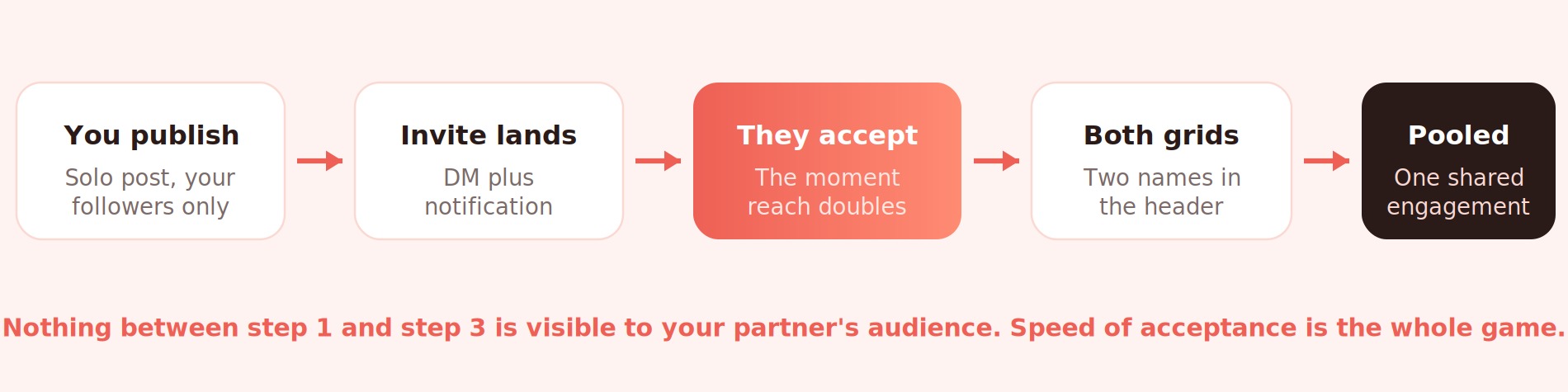
Tap Share. The post goes live on your grid immediately and the collaborator receives an invite in their DMs and notifications. Until they accept, it reads as a solo post and only your followers see it.
Get The Invite Accepted Fast
This is the step everyone skips, and it costs the most reach. The post’s strongest distribution window is its first few hours. If your partner accepts the next morning, you have handed away the window. Message them before you publish and agree on a time. That single habit does more for collab performance than any caption tweak.
The flow below shows what happens after you hit Share, and where the reach actually comes from.
How Many Collaborators Can You Add On An Instagram Post?
Meta’s official position, stated when it expanded the feature, is that you can invite up to three accounts to co-author a feed post, carousel or Reel. That means up to four names on one piece of content including yours.
In practice the number you see varies. Some app versions still cap the Instagram Collab feature at one collaborator. Some third-party schedulers allow three. Several published guides claim five. This inconsistency is not you doing something wrong, it is a staged rollout meeting regional differences, and it is why almost every article on this topic contradicts the next one.
The reliable move is to test before you plan. Open a draft post, tap Invite collaborator, and add accounts until the field stops accepting them. That takes twenty seconds and beats trusting any published number, including this one.
Strategically, more is rarely better. Two names in a post header read as a partnership. Four names read as a group promo, and the follow-through drops because nobody knows whose audience they are joining. Most brands running the Instagram collaboration feature well use exactly one collaborator per post.
Instagram Collab Post Rules Most Guides Get Wrong
The Instagram Collab feature has a set of ownership rules that only become obvious when a campaign goes sideways. Learn them before you sign a partnership, not after.
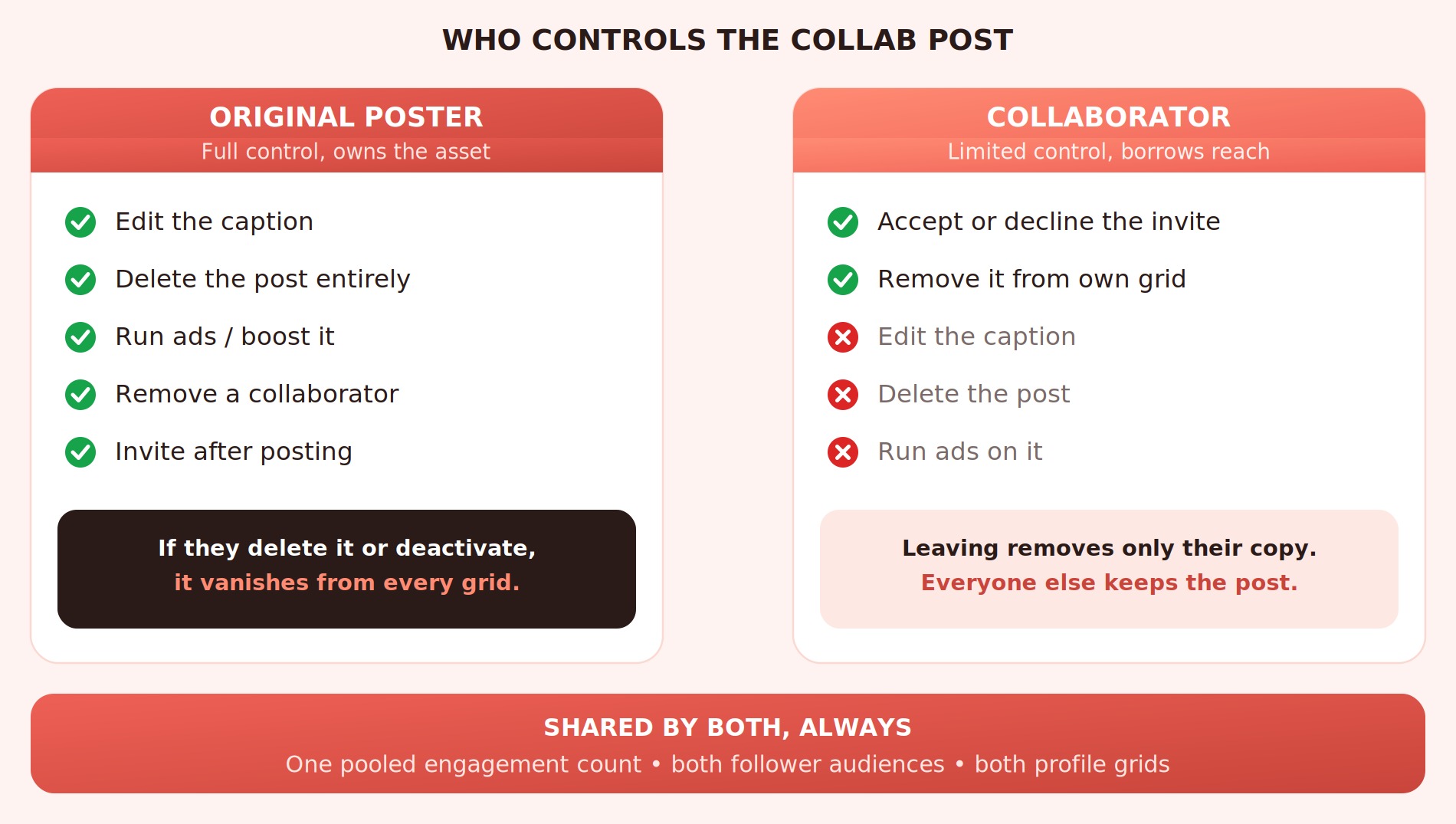
The original poster owns the post. They can edit the caption, delete the post, and run ads on it. If they delete it or deactivate their account, it vanishes from every collaborator’s grid. On a paid deal, decide who posts first and put it in writing.
Collaborators can leave at any time. A collaborator can remove the post from their own profile without affecting anyone else’s copy. They cannot edit the caption.
Stories are not supported. The Instagram collaboration feature covers feed posts, carousels and Reels. For Stories you are limited to mentions, which behave nothing like co-authorship.
A collab is not a disclosure. Co-authoring a sponsored post does not satisfy advertising rules. You still need the paid partnership label. Regulators do not accept two usernames in a header as a substitute.
Private accounts work, with limits. A private account can be invited and the collab post will still reach the public partner’s audience, which is one of the few legitimate ways a private profile gets wide exposure. Some scheduling tools that publish through the API only allow public accounts, so a tool restriction can look like an Instagram restriction.
The rules above all trace back to one fact: co-authors are not equal. The map below shows exactly where the power sits, which is the thing to settle before any paid collaboration.
Why The Invite Collaborator Option Is Missing
If you cannot find Invite collaborator, the cause is almost always one of six things. Work down this list in order and you will fix it in under two minutes.
| Symptom | Likely Cause | Fix |
|---|---|---|
| Button not visible at all | Outdated app build | Update, force close, reopen |
| Only Add tag shows | Wrong screen or post type | Go to the final review screen |
| Handle will not appear in search | Typo, block, or restriction | Copy the handle from their profile |
| Invite stuck on pending | Sitting unread in message requests | DM them, ask them to check requests |
| Missing when scheduling | Tool limits or API rules | Publish natively in the app |
| Missing on a Story | Not supported by design | Use a mention instead |
The most common real-world failure is not a bug at all. The invite arrives in a message request folder that your partner never opens. Tell them it is coming.
7 Instagram Collab Post Formats That Actually Earn Reach
Knowing how to add collaborator on Instagram is the easy part. Knowing what to co-author is what separates a collab that adds 400 followers from one that adds four. Each format below includes who it suits, how to run it, and where it fails.
The Joint Giveaway
A giveaway posted as one Instagram Collab post rather than two separate announcements. Both audiences enter on the same post, so the comment count compounds instead of splitting, and the entry rules stay in a single thread rather than fragmenting across two captions.
Best for: Two brands with adjacent, non-overlapping audiences.
How to run it: Prize should require both partners’ products. Entry is follow both plus comment. Pick winners with a random comment picker tool so the draw is defensible.
Where it fails: Prize-hunter followers who unfollow within a week. Keep the prize niche-specific, never a generic gift card.
The Creator Product Drop
A brand publishes the launch Reel and invites the creator whose face is in it. This is the highest-converting use of the Instagram collaboration feature because the creator’s audience sees a familiar face while the brand keeps ownership of the post and the ad rights.
Best for: Ecommerce brands working with micro-influencers on paid partnerships.
How to run it: Brand posts, creator accepts within the hour, both reply to comments for the first two hours.
Where it fails: When the brand’s caption sounds like a press release. Write it in the creator’s voice.
The Two-Voice Explainer
Two creators in the same niche co-author a Reel where each answers half of a question their audiences keep asking. It works because it is not a promo, so neither audience feels sold to, and the Instagram Collab post still lands in both feeds.
Best for: Creators in education-heavy Instagram niches like finance, fitness or software.
How to run it: Film separately, cut together, agree who posts. Disagree on something small. Debate drives comments.
Where it fails: Identical takes. If you both say the same thing, there was no reason to collab.
The Customer Spotlight
A brand co-authors a post with an actual customer instead of a paid creator. You invite collaborator Instagram accounts belonging to real buyers, which turns a testimonial into a post that lives on the customer’s grid too and reads as pride rather than advertising.
Best for: Small brands with no influencer budget and a loyal base.
How to run it: Ask permission in DMs, use their photo, credit them in the first line of the caption.
Where it fails: Small accounts add little raw reach. The value is trust and repeatability, not follower counts.
The Event Announcement
A workshop, live, podcast episode or pop-up announced once as an Instagram Collab post by every account involved. Sign-ups tend to land better here because both audiences see the same post with one shared comment thread full of questions and answers.
Best for: Co-hosted events, podcast guests, panel line-ups.
How to run it: Post the announcement as a collab, then each account promotes it separately in Stories.
Where it fails: Announcing too far out. Collab reach is front-loaded, so post inside the sign-up window.
The Portfolio Carousel
Photographers, designers, venues, planners and stylists co-author the work they made together. Every party gets the piece on their grid, which is why the Instagram collaboration feature quietly became standard practice across the wedding and creative services world.
Best for: Service businesses where several vendors touch one project.
How to run it: Whoever shot the work posts. Credit the rest in the caption even if the collab limit stops you inviting them all.
Where it fails: Vendor pile-ups. Four names in a header dilutes the message, so pick the one partner who matters.
The Collab Chain
One collab post per week with a different partner, run as a standing routine rather than a campaign. This is the format that compounds, because each new audience that meets you through the Instagram Collab feature is warmed by the co-author they already trust.
Best for: Accounts under 10,000 followers trying to grow their Instagram following without ads.
How to run it: Line up eight partners of similar size. One a week. Rotate who posts so the ad rights spread fairly.
Where it fails: Partners with the audience you already have. Overlap kills the entire point.
One thread runs through all seven. Reach is only the first half. The caption has to give the new audience somewhere to go, which is why writing the caption with intent matters as much as picking the partner.
Turning Collab Reach Into Actual Revenue
Here is the uncomfortable part. A collab post can put you in front of 50,000 new people and earn nothing, because Instagram gives you one link and a stranger who just met you will not chase it. The fix is to make the destination match the post: if your Instagram Collab post is about a product, that product should be the first thing the new audience sees, not a generic list of links.
brandID is built for exactly this handoff. Its affiliate marketplace gives creators access to over 5 million products from more than 2,000 brands, with average commissions reaching up to 65% and some brands paying more. You build a storefront in minutes and link individual posts to specific products, so you can monetise a collab without negotiating a brand deal you may not yet have the followers for, and earn on every sale from either audience.
Build a storefront, pick products from over 2,000 brands, and connect each collab post to what it is actually selling.
Final Thoughts
Learning how to add collaborator on Instagram takes about thirty seconds. Tag people, Invite collaborator, pick the account, Share. The mechanics were never the hard part, which is why so many articles stop there and so few collab posts actually work.
The outcome is decided by everything around those taps: choosing a partner whose audience you do not already have, getting the invite accepted while the post is still young, letting the brand publish on paid deals, and adding the partnership label. Do that, and the Instagram collaboration feature stops being a novelty and becomes real distribution. Then give the new audience somewhere worth going.
Frequently Asked Questions
Does a collab post help both accounts equally?
Rarely. The account with the smaller audience usually gains more followers, while the larger account gains engagement and credibility. The uplift depends on audience overlap, not follower parity. If both partners share 60% of the same followers, the Instagram Collab post mostly recycles reach you already had. Pick partners whose audiences you do not already own.
Can you remove a collaborator after they accept?
Yes. As the original poster, open the post, tap Edit, tap Tag people, and remove the account. The post immediately disappears from their grid. Collaborators can also remove themselves without asking you. Neither action deletes the post or resets its engagement, but removing a partner mid-campaign is worth a message first.
Can you promote or boost a collab post as an ad?
Only the original poster can run ads on it, and organic collab distribution does not carry over into paid delivery. This is the single biggest reason brands should be the ones publishing on sponsored campaigns. If the creator posts and invites the brand, the brand cannot boost that asset without partnership ad permissions set up separately.
Do both collaborators see the same insights?
Both professional accounts can open insights on the post and see the shared totals for likes, comments, saves and views. What you cannot see is the split. Instagram reports one combined figure rather than telling you which audience delivered what, so the only way to attribute results is to run a control post without a collaborator and compare.
 Summarize this article with:









