
As a creator, you’re constantly juggling links, emails, and sales pitches, which can easily lead to lost followers and, in the end, zero revenue growth. And you know what the worst part is? You’re promised the world, but most of the time, it never actually delivers. On top of that, high fees and poor support leave you feeling exhausted and, frankly, broke.
But here’s the good news: you’re not alone. Most creators struggle to monetize their audience effectively, and many turn to link-in-bio tools like Beacons AI for salvation. Nevertheless, is it really the game-changer it claims to be? This Beacons.ai review covers its strengths, weaknesses, pros, and cons, while also exploring the top alternative, brandID.
Key Takeaways
Key Takeaways
- This Beacons.ai review comes down to one number: the free plan charges 9% on every sale, and that decides which plan you should be on
- Four plans: Free, Creator Pro $10, Store Pro $30 and Business Pro $90, with the 9% fee dropping to 0% only at Store Pro
- Above about $222 a month in sales, Store Pro is cheaper than Creator Pro, and above $334 it beats the free plan
- Stripe’s 2.9% plus $0.30 sits on top of the 9%, so the effective rate on a free-plan sale is closer to 12%
- Annual billing saves roughly two months, taking Creator Pro to about $8.33 and Store Pro to $25
- The most common complaints are support delays, account suspensions and email limits, rather than the features themselves
- It cannot host live video sessions, so coaches running calls need a second tool regardless of plan
What Is Beacons AI?
Beacons AI is a powerful link-in-bio platform built specifically for content creators, influencers, and entrepreneurs who want to monetize their social media following without having to build a full website.
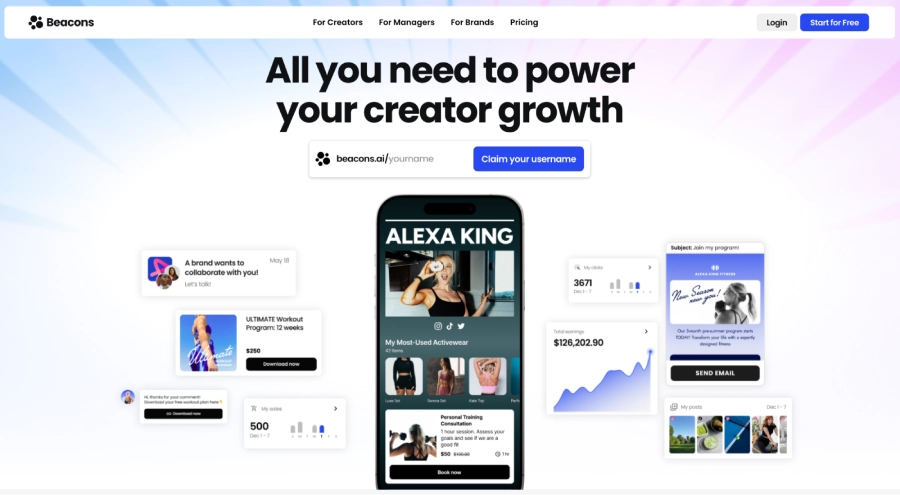
At its core, Beacons AI acts as your digital storefront, letting you:
- Sell digital products directly through your bio link
- Collect email subscribers with built-in marketing automation
- Accept tips and donations from your audience
- Track performance with detailed analytics
Key Features of Beacons AI
Here’s what makes Beacons AI powerful for creators:
1- Digital Product & Storefront Sales
You can easily sell digital downloads, eBooks, templates, and courses directly from a high-converting, customizable link-in-bio landing page. Which formats move fastest is covered in the best digital products to sell.
The platform lets creators showcase offers with custom branding, multiple layouts, direct payment links, and easily shareable social connections.
2- Booking and Appointments System
Thanks to its seamless integration with tools like Calendly and its built-in booking blocks, the platform lets creators sell their time through appointments, coaching sessions, and consulting calls.
One limit worth knowing before you build a coaching business on it: Beacons handles the booking and the payment, but it does not host the call itself. You will still need Zoom, Google Meet or similar alongside it.
3- Email Marketing Automation
Another useful Beacons AI feature is its email marketing suite, which lets users segment their desired audiences and send custom, personalized messages and newsletters. On top of that, you can set up different funnels, such as welcome or sales funnels, and run promotional campaigns. Put simply, creators can easily send emails for:
- Lead nurturing
- Sign-ups
- Purchases
- Engagement
All directly from their store, making external tools like mailchimp and other email marketing platforms unnecessary.
The free plan caps this at 50 email sends a month, which runs out quickly. Unlimited sends arrive on Store Pro rather than Creator Pro, and several reviewers report that unlimited still carries throttling in practice.
If email is central to your plan, it is worth knowing you can build an email list without a website on tools that do not cap sends at all.
Beacons AI Pricing
Beacons.ai pricing runs across four tiers. Whether you’re testing the platform or managing an established business, Beacons AI offers tailored plans that therefore match your specific goals and requirements.
- Free Plan ($0/month)
Best for creators who want to test Beacons and start selling with no upfront cost. Includes a customizable link-in-bio page, basic store capabilities, a media kit, and limited email sends, but sales on free accounts are subject to a ~9% transaction fee. - Creator Pro ($10/month)
Ideal for growing creators looking for more customization and marketing power. This plan adds a free custom domain (first year), order bumps, automation workflows, AI-powered brand outreach, SEO tools, and integrations. It still carries a 9% transaction fee on sales. - Store Pro ($30/month)
The Store Pro plan is designed for serious sellers and creators who want to keep 100% of their revenue by eliminating all transaction fees. It also unlocks unlimited emails and automations, supports selling full courses and memberships, offers branded product URLs, multiple calendar syncs, and advanced audience insights. - Business Pro ($90/month)
This plan is designed for agencies, businesses, or creators with high-volume needs. It usually comes with higher limits, advanced integrations, priority support, or dedicated account management, and team or multi-user tools.
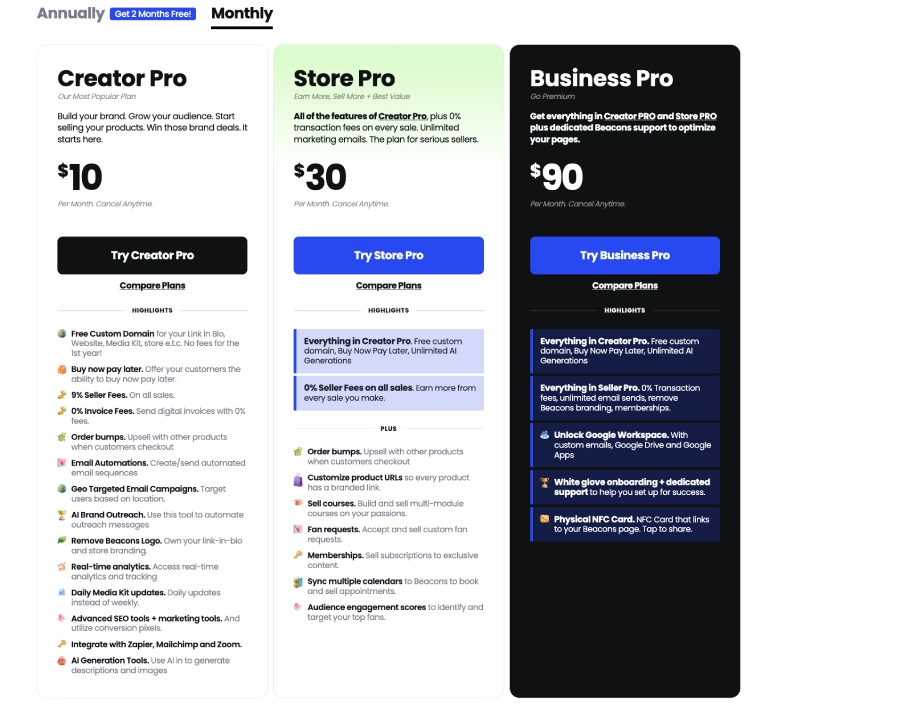
Annual billing takes roughly two months off each tier, bringing Creator Pro to about $8.33 a month, Store Pro to about $25 and Business Pro to about $75.
Plan names vary between Beacons’ own help documentation and its pricing page. The $30 tier appears as both Store Pro and Creator Plus, and the $90 tier as both Business Pro and Creator Max. The prices and the fee structure are the same either way.
What the Beacons.ai Transaction Fee Actually Costs
This is the number that decides which plan you should be on, and Beacons does not make the calculation obvious anywhere in its marketing.
The 9% applies to the Free and Creator Pro plans, and Stripe’s 2.9% plus $0.30 sits on top of it. That puts the effective rate on a free-plan sale close to 12%.
| Monthly sales | Free ($0 + 9%) | Creator Pro ($10 + 9%) | Store Pro ($30 + 0%) | Cheapest |
|---|---|---|---|---|
| $100 | $9 | $19 | $30 | Free |
| $222 | $20 | $30 | $30 | Free, and Creator Pro ties Store Pro |
| $334 | $30 | $40 | $30 | Free ties Store Pro |
| $500 | $45 | $55 | $30 | Store Pro |
| $1,000 | $90 | $100 | $30 | Store Pro, by $60 a month |
| $2,500 | $225 | $235 | $30 | Store Pro, by $195 a month |
Two breakeven points come out of that. Above roughly $222 a month in sales, Store Pro costs less than Creator Pro. Above roughly $334, it costs less than staying free.
Fees also change what you should charge, which is the calculation behind how to price a product on any platform taking a percentage.
At $1,000 a month you are paying $90 in fees to avoid a $30 subscription, which is $60 handed over for nothing. At $2,500 the gap is $195 a month.
💡 The mistake this catches:
New creators pick the free plan because it looks like no cost, then sell for months before working out that the fee has quietly overtaken the subscription. If you already have an audience and are about to launch a product, start on Store Pro rather than growing into it.
Which Beacons.ai Plan Should You Choose?
| Your situation | Plan | Why |
|---|---|---|
| Testing the platform, no sales yet | Free | Nothing to lose while there is nothing to charge a fee on |
| Under $220 a month in sales | Creator Pro | Adds a custom domain and automations, and the 9% is still small |
| Over $334 a month in sales | Store Pro | 0% fee pays for the subscription several times over |
| Selling courses or memberships | Store Pro | Full courses and memberships are gated at this tier |
| Sending real email volume | Store Pro | The free plan caps at 50 sends a month |
| Running a team or agency | Business Pro | Multi-user access and higher limits |
Real Beacons AI User Reviews
Beacons AI is a good platform and quite a decent choice for creators looking to manage their online presence and monetize digital products. Yet, it has its own flaws that users have pointed out over time. No Beacons.ai review is complete without them, so below we look at some real Beacons.ai user reviews.
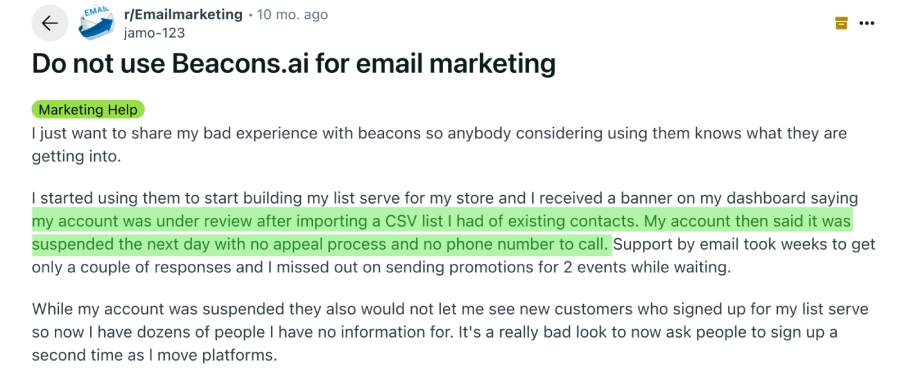
According to one Reddit reviewer, their Beacons account was suspended after importing a CSV of contacts, with no clear appeal process in place.
Support was slow and unresponsive, with only a couple of email replies over several weeks, causing them to miss promotions for two events. Since they couldn’t access newly signed-up subscribers during the suspension, they ended up losing valuable contact information and felt forced to ask followers to re-subscribe, which ultimately hurt trust.
One Google Play reviewer shared that the app suddenly stopped opening after it had just been working, causing an unexpected crash and breaking their workflow. On top of that, they couldn’t add the shortcut to their home screen for quick access, which made the app feel unreliable and clunky.

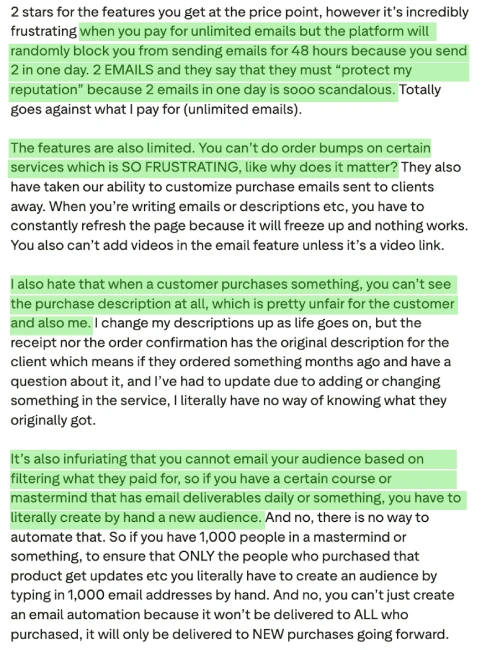
A reviewer named Coneigh on Trustpilot mentioned that while the $30 price tag feels fair, the platform underdelivers. According to them, Beacons AI blocks “unlimited” email sends for minor activity and imposes frustrating limits.
They also pointed out a buggy interface with pages freezing, missing email and customization features like order bumps or embedded videos, and the inability to see original purchase descriptions or segment email audiences by what customers bought. All of this, they explained, forces creators into extra manual work.
Three separate complaints, three different problems, but the pattern behind them is the same: the platform is capable, and the support and reliability around it are the weak points rather than the feature list.
Stan Store draws similar complaints about held payouts and slow support, as the Stan Store review sets out, so this is a category problem rather than one platform.
Beacons.ai Pros and Cons
| ✔ Beacons AI Pros | ✕ Beacons AI Cons |
|---|---|
|
|
The customization limit is the complaint that comes up most after pricing, and it is why many creators end up comparing the Linktree alternatives within a few months of signing up.
Anyone weighing a full storefront instead should also look at the best Gumroad alternatives, which cover the selling side rather than the link-in-bio side.
Why brandID Is a Better Fit
As we’ve mentioned, Beacons.ai is a well-regarded and reputable platform. With drag-and-drop link-in-bio pages, built-in digital storefronts, and AI content tools, it’s a strong all-in-one solution for early-stage creators.
Many growing creators note drawbacks, including 9% transaction fees on lower tiers, weak customer support, and limited audience segmentation.
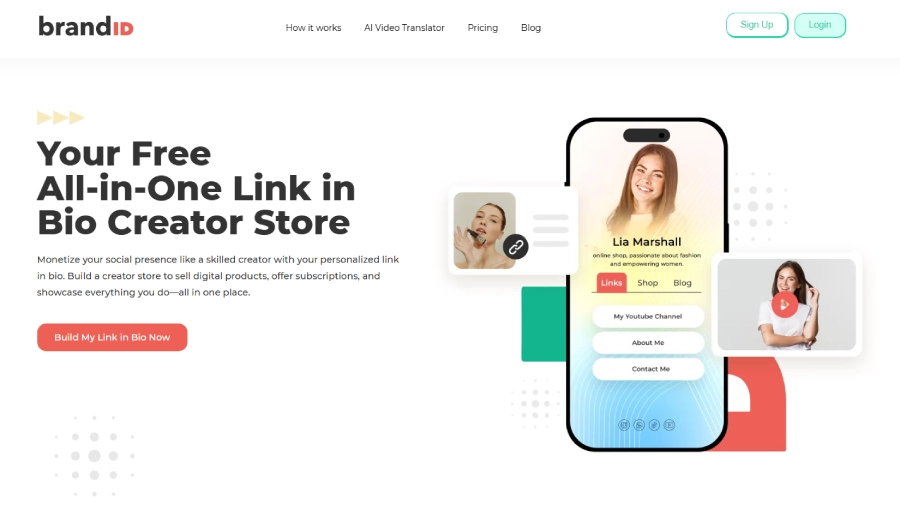
That’s where brandID comes in. Whether you’re a content creator monetizing exclusive videos, a small business building recurring subscriptions, or a marketer growing brand partnerships, brandID consistently offers a seamless, fully owned ecosystem that puts your revenue retention, creative control, and audience depth first.
In other words, it helps you diversify income streams without a doubt, avoiding the hidden costs or reliability risks that often come with Beacons AI.
What brandID Does That Beacons.ai Cannot
Three things on this list have no equivalent in Beacons at any price tier, which is what separates a cheaper alternative from a different one.
- Rent out ad space. Digital Billboards let brands pay 30 days upfront to appear on your page. You set the price per slot and approve or reject each advertiser within 24 hours, up to three slots.
- Earn commission without your own product. The affiliate marketplace carries over 5 million products from more than 2,000 brands, with no approval step and no follower minimum.
- Reach audiences in other languages. The AI Video Translator handles voice cloning, lip-sync and over 170 languages, available on the web, as a Chrome extension and on iOS and Android.
brandID Key Features:
brandID is a comprehensive, creator-focused platform built to maximize your revenue while offering diverse monetization opportunities. Here are the key features that set it apart:
- Zero Transaction Fees: Keep 100% of your revenue with no platform fee on any paid plan using your own payment gateway, starting at $9 a month rather than Beacons’ $30.
- Diverse Monetization Streams: Sell digital products, subscriptions, tips, audios, videos, downloadable intellectual property, and rent out billboard ad space, all within one platform.
- Advanced Customization: Create personalized, fully branded landing pages with rich design flexibility and no platform watermark limitations.
- Centralized Product Galleries: Showcase your full range of offerings in a professional storefront that enables direct, zero-click-to-cart purchases and detailed sales tracking.
- Robust Subscription & Community Tools: Build tiered memberships and exclusive fan communities to generate sustainable, predictable income and deeper engagement.
- Niche Audio & Video Sales: Specialized modules for selling songs, podcasts, workout plans, and exclusive video content with copyright control and streaming previews.
- Innovative Revenue Opportunities: Unique features like Rent Out Billboards turn your page into recurring revenue opportunities through brand partnerships that competitors like Beacons AI do not offer.
- Bookings and Scheduling: brandID bookMe handles paid appointments and consultations, covering the same job as Beacons’ calendar blocks.
- Contact Capture and CRM: Collect emails from your page so your audience stays reachable if a platform changes its rules or suspends an account.
- Custom Domain on the Free Plan: Beacons charges for this from Creator Pro upward.
brandID Pricing in Full
- Free: $0 forever. Custom domain included, 5% on your own payment gateway, 1 digital product, unlimited affiliate products, 3 billboard slots
- Creator: $9 a month. Unlimited products and links, custom branding and logo, extended analytics, 1,000 CRM contacts, 0% on your own gateway
- Turbo Creator: $15 a month. Adds super premium affiliate products, direct brand chat, unlimited CRM, email and SMS
Creators keep 95% of every sale on the free plan and 100% once they subscribe to any paid plan using their own payment gateway. Monthly, annual and lifetime billing are all available.
The practical comparison is the fee-free threshold. Beacons removes its 9% at $30 a month; brandID removes it at $9, which on $1,000 of monthly sales is $21 a month before anything else is weighed.
Beacons.ai vs brandID
| Beacons AI | brandID | |
|---|---|---|
| Free plan | Yes, with a 9% seller fee | Yes, with a 5% fee on your own gateway |
| Entry paid plan | $10 a month, still 9% fee | $9 a month, 0% on your own gateway |
| Fee-free tier | $30 a month | $9 a month |
| Top tier | $90 a month | $15 a month |
| Custom domain | Paid plans only | Included on the free plan |
| Watermark on free | Yes | Yes, removed on paid |
| Tipping | Yes | Yes |
| Ad space rental | No | Yes, 3 billboard slots |
| Affiliate marketplace | No | Yes, 5M+ products from 2,000+ brands |
| AI video translation | No | Yes, 170+ languages with voice cloning |
| Email sends on free | 50 a month | Contact capture and CRM |
| Live video calls | No | No, bookings only |
| Product import from other platforms | Yes | No |
The line worth reading twice is the third. Beacons removes its transaction fee at $30 a month; brandID removes it at $9. On $1,000 of monthly sales that difference is $21 a month before anything else is compared.
Beacons does have one clear advantage: it imports products directly from Stan Store, Gumroad, Etsy, Payhip and Snipfeed, which brandID does not.
Who Should Not Use Beacons.ai
Most reviews cover who it suits. These are the cases where something else is the better answer.
- You are already selling more than $334 a month and want to stay free. The 9% fee costs more than the $30 plan from that point on.
- You run live coaching calls. Beacons books and charges for them but does not host them, so Zoom or Meet is a permanent extra.
- You send serious email volume. 50 sends a month on free, and reviewers report throttling even on the unlimited tiers.
- Design is central to your brand. Customization is the most common complaint after pricing.
- You need deep analytics. There is no funnel tracking and no segmentation by what customers bought.
- You sell through affiliate links rather than products. Beacons has no affiliate marketplace, and the best affiliate programs pay considerably more than a 9% cut leaves you.
- You cannot risk downtime. Account suspensions with slow appeals are a recurring theme in user reviews.
If two or more apply, comparing the wider field first is worth the hour, and the best Stan Store alternatives cover most of the same platforms.
Conclusion
To close this Beacons AI review: Beacons.ai is a powerful and user-friendly platform that works well for getting started. However, certain drawbacks such as inconsistent email delivery, unclear pricing and fees, and limited commerce controls often push creators to seek alternatives.
That’s exactly where brandID steps in, addressing those pain points with creator-first pricing, reliable email and payments, richer media storefronts, and unique monetization options like rentable billboard space.
So, are you ready to stop losing revenue to fees and tech headaches? Join brandID today to build, monetize, and truly own your creator business. Sign up on brandID for free now and start turning your profile into profit.
FAQs
1- Why Isn’t My Custom Domain Working on Beacons AI?
Keep in mind that propagation can take up to 48 hours; therefore, double-check for typos or conflicts with your domain provider. If you’re still running into issues, then reach out to support with your domain details so that they can help troubleshoot.
2- Does Beacons AI Charge Transaction Fees?
Stripe or PayPal processing fees of roughly 2.9% plus $0.30 apply on top of that on every plan, so the effective rate on a free-plan sale is closer to 12%.
3- What AI Features Does Beacons AI Offer?
The platform even learns from your activity to provide personalized suggestions, and the best part is, you don’t need any coding skills to set it up. These features are available right from the dashboard on Pro plans and above.
4- Is Beacons.ai Legit?
5- What Is Beacons AI Used For?
6- Is Beacons.ai Safe?
7- How Much Does Beacons.ai Cost?
The sticker price is only half the cost though. Free and Creator Pro also carry a 9% seller fee, so at $1,000 in monthly sales the free plan actually costs $90 while Store Pro costs $30.
8- Is the Beacons.ai Free Plan Really Free?
It is genuinely free if you are not selling yet. Once you pass roughly $334 a month in sales, the fee overtakes the $30 Store Pro subscription and free becomes the more expensive option.
9- Which Beacons Plan Removes the Transaction Fee?
The upgrade pays for itself above roughly $222 a month in sales when moving from Creator Pro, or $334 when moving from Free.
10- Can You Run Live Coaching Calls on Beacons.ai?
You will need Zoom, Google Meet or similar running alongside it, which is worth factoring into the cost if coaching is your main product.
 Summarize this article with:









