
For creators, Instagram has quietly replaced the business card. Nobody asks for your email at an event anymore, they ask for your handle, and the first thing they read when they land on your profile is your bio.
You get 150 characters to answer three silent questions: who are you, what do you post, and why should I follow? Get that right and the follow feels obvious. Get it wrong and even great content loses people at the door. Plenty of Instagram bio ideas worth copying exist, but knowing how to write a bio for Instagram that fits your own brand is the real skill.
This guide breaks down how to write an Instagram bio as a creator, line by line: the formula, fill-in templates, real examples by niche, and the small optimizations that turn profile visits into followers and paid work.
Key Takeaways
- You have 150 characters: Instagram allows 150 characters in your bio and 30 in your name field, so every word has to earn its spot
- Your name field is searchable: Your handle and name field feed Instagram search, so put your niche or location there, not just your name
- Follow a formula: Niche, who you help, proof or personality, then a call to action is the structure that converts best
- End with one clear next step: Tell visitors exactly what to do, whether that is tapping your link, emailing you, or watching your highlights
- Revisit it as you grow: Your bio should change as your content, offers, and audience evolve
Why Your Instagram Bio Matters So Much as a Creator
Three groups read your bio, and each is looking for something different:
- New visitors who just saw one of your Reels and are deciding whether you are worth a follow.
- Brands and agencies scouting creators, often searching by niche or city and scanning for a contact email.
- Warm followers looking for your link, your shop, or a way to work with you.
A good bio serves all three at once. That is why it matters far more than its size suggests, and why it deserves more than a rushed line and a couple of emojis.
Instagram Bio Character Limits and Fields
Knowing exactly what you are working with makes writing much easier:
| Profile field | Limit | What it is for |
|---|---|---|
| Username (handle) | 30 characters | Your searchable @name, ideally your real name or brand |
| Name field | 30 characters | Searchable keywords, your name plus niche or city |
| Bio text | 150 characters | Your pitch: niche, who you help, personality, and CTA |
| Category label | Preset options | A free label like Digital Creator that does not use bio space |
| Pronouns | Up to 4 | Optional, and they do not count against your 150 characters |
| Link | One or more | Your link in bio, the only clickable spot on your profile |
The Anatomy of a Creator Instagram Bio
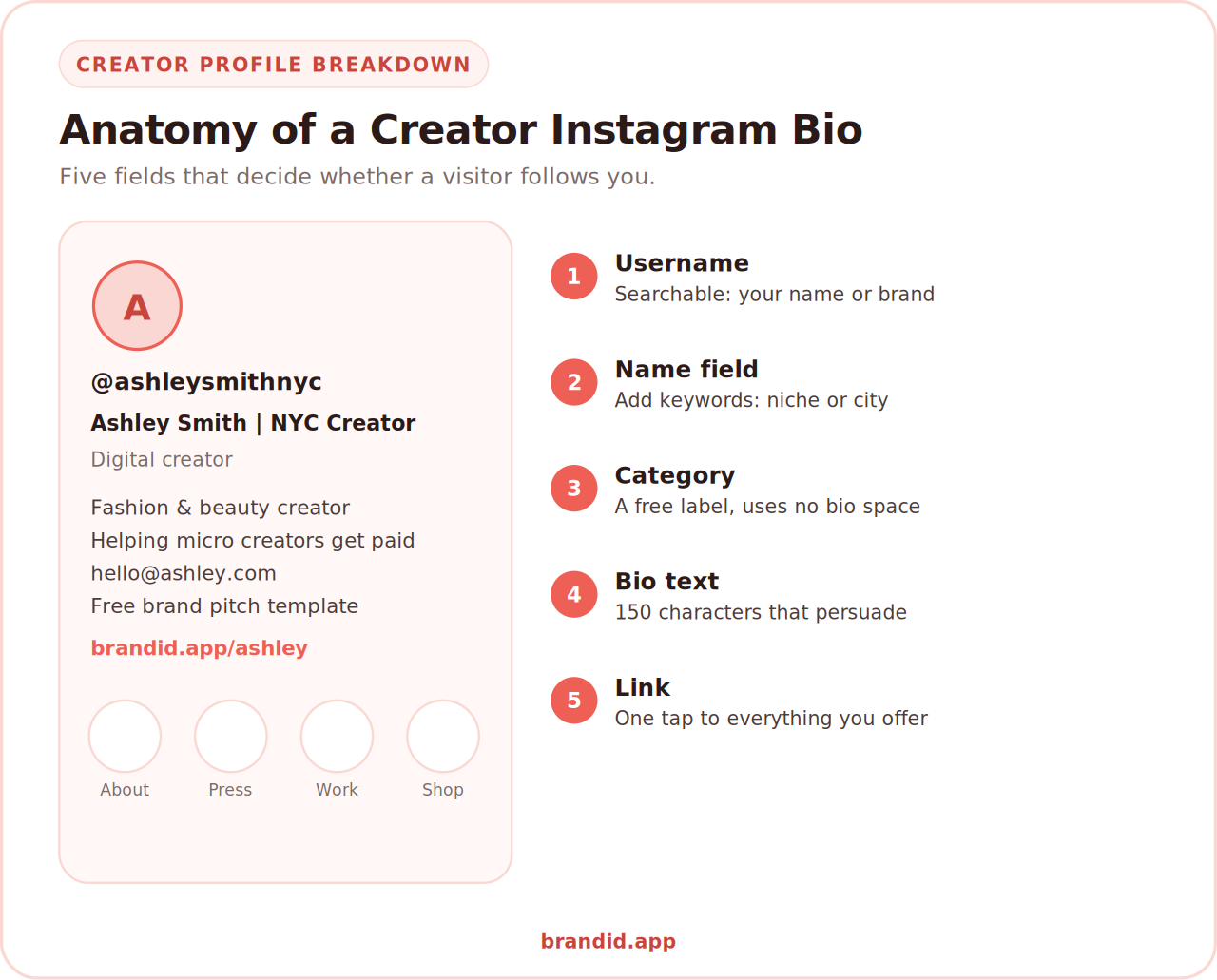
Your bio is not just the paragraph. It is five fields working together, and most creators only optimize one of them. If you would rather start from a finished line, the funny Instagram bios and the Instagram bio ideas for girls are the two biggest sets.
1. Your Username (Handle)
Make it your name or your brand name whenever possible, so people can actually find you. If your exact name is taken, add a word to the end rather than the front: @ashleysmithnyc beats @theashleysmith, because Instagram search weights those first letters and people search your name first.
2. Your Name Field
This is the most underused field on Instagram, and it is fully searchable. If your handle is your brand name, put your real name here, or better, your name plus your niche or city. A brand searching "Chicago food creator" can surface you from this field alone.
3. Your Category Label
Set this in Edit Profile. Options like Digital Creator, Artist, or Public Figure describe what you do without spending any of your 150 characters, so let the label carry your job title and use your bio for something more specific.
4. Your Bio Text
The 150 characters that do the persuading. Styled fonts eat that budget twice as fast, which the aesthetic Instagram bio ideas measure in detail. This is where your niche, your value, your personality, and your call to action live, and the formula below shows exactly how to structure it.
5. Your Link
The only clickable spot on your profile, so it should lead somewhere that holds everything you offer rather than one lonely URL. A link in bio tool built for creators turns that single slot into a full menu of your content, products, and collaborations.
How to Write an Instagram Bio in 6 Steps
Here is how to write an Instagram bio step by step, in the order that makes writing easiest.
Step 1: Name Your Niche Clearly
Lead with what you actually make. "Fashion and beauty creator" beats "lover of pretty things," because vague poetry does not tell anyone what they are signing up for. Be specific enough that the right person recognizes themselves and the wrong person keeps scrolling.
Step 2: Add the "I Help" Line
This single line separates good bios from forgettable ones. Say who you help and what changes for them: "Helping busy moms cook dinner in 20 minutes" or "Helping micro creators land their first brand deal." It answers the only question a new visitor really has, which is what is in this for me.
Step 3: Add Proof or Authority
Give one small credibility signal. A year ("creating since 2019"), a number ("120+ recipes tested"), a credential ("certified PT"), or a feature ("as seen in Vogue") all work. One is plenty, and it quietly tells people you are the real thing.
Step 4: Show a Little Personality
People follow people. One human detail, a hobby, a running joke, a city, or a favorite drink, makes you memorable in a sea of polished sameness. Keep it to a few words so it adds warmth without eating your whole bio.
Step 5: Add One Clear Call to Action
End by telling visitors exactly what to do next: "New guide below," "Shop my presets," or "Email for collabs." One instruction only. Two competing CTAs usually means neither gets tapped.
If you want brand deals, write your email out as text. Instagram's email button only appears on mobile, and many brand managers scout creators from a desktop where that button does not exist.
Step 6: Trim, Format, and Test
Now cut it to 150 characters, break it into short lines, and read it as a stranger would. If your bio does not make sense in three seconds, keep cutting. Then treat it as living copy: update it whenever your niche, offers, or goals change, and updating your Instagram bio takes under a minute once you know the steps.
The Creator Instagram Bio Formula
Almost every high-performing creator bio follows the same skeleton. Fill in the blanks and you have a working draft in a few minutes.
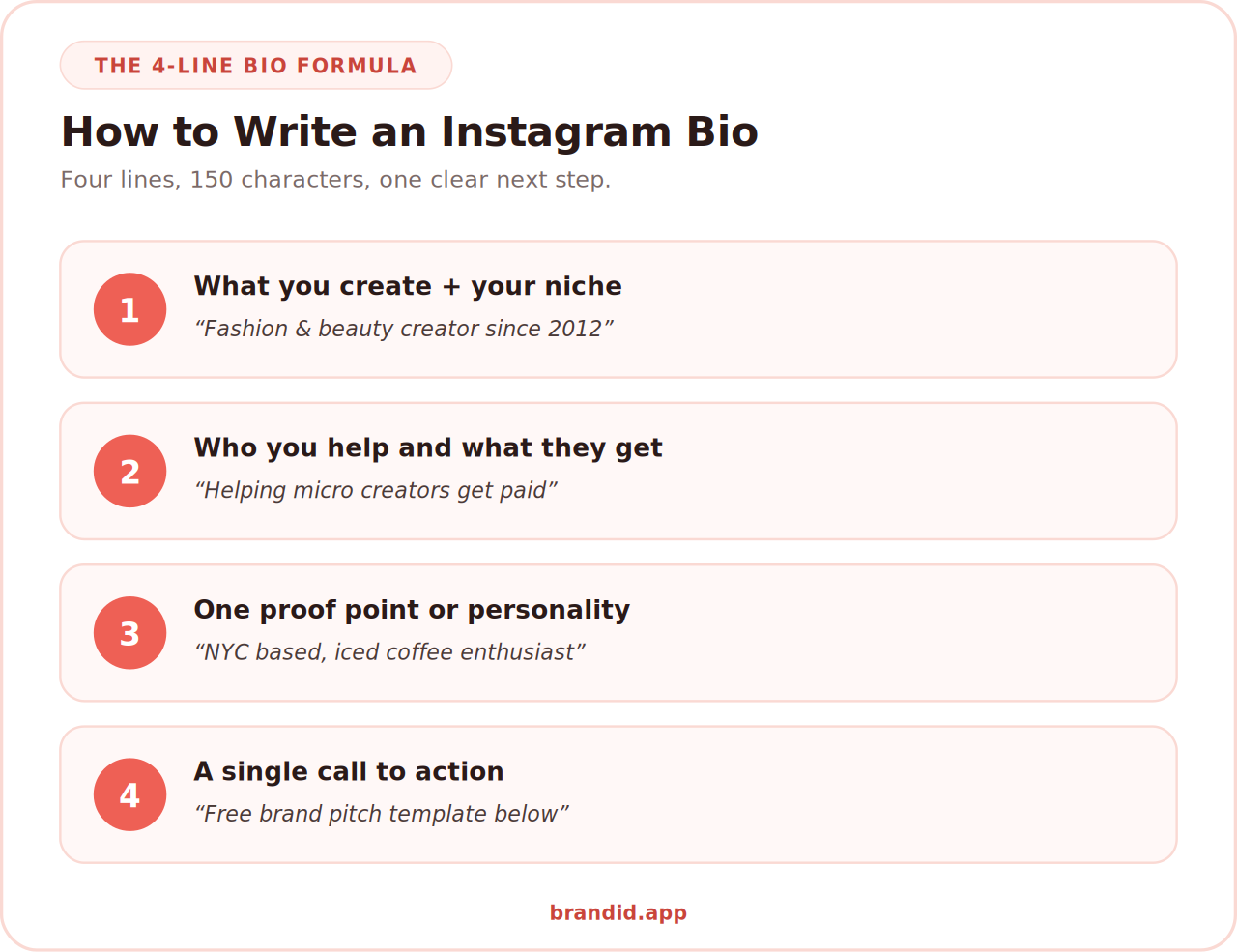
Here is what it looks like filled in for three different creators:
Notice what every one of them does: names a niche, promises a result, proves something, and ends with one instruction. That is the whole game, and it is how to write a good Instagram bio without agonizing over it.
Instagram Bio Examples by Creator Niche
Templates land better when you see them in your own world. These show how to write a good Instagram bio for six common creator niches, so adapt one to your voice, then swap in your real numbers and offers.
Every example follows the same skeleton: niche, promise, proof, then one instruction. Change the words, keep the structure.
Generate Your Instagram Bio in Seconds
Staring at a blank bio field is the hardest part. If you want a shortcut, you can skip straight to a draft and edit from there.
Our free Instagram bio generator builds bio options around your niche, audience, and tone in a few seconds. Use it to get past the blank page, then personalize the wording so it sounds like you rather than a template.
Try the Free Instagram Bio GeneratorHow to Add Line Breaks to Your Instagram Bio
Line breaks are what make a bio skimmable instead of a wall of text, and pasting is the most reliable way to get them:
- Open your Notes app and type each line of your bio on its own line, avoiding trailing spaces at the end of a line.
- Select the whole bio and copy it.
- In Instagram, go to your profile, tap Edit Profile, and tap the Bio field.
- Paste your text and tap Save. Your line breaks should hold.
- If they collapse, remove any spaces at the end of each line and paste again.
Instagram occasionally changes how its editor handles formatting, so if something behaves unexpectedly it is worth checking Instagram's official Help Center for the current behavior.
How to Optimize Your Instagram Bio for Search
This is the single biggest win in this guide, and most creators miss it. Instagram's search matches your username and name field, so those 30 characters decide whether you appear when someone searches "vegan recipes" or "Austin photographer."
- Use your niche keyword. "Maya | Vegan Recipes" will surface for far more searches than "Maya ♥️".
- Add your city if location matters. Brands casting local creators search things like "Chicago creator," so a city can win you work.
- Keep your real name in there so people who already know you can find you.
- Skip keyword stuffing. Two keywords read as clear, five read as spam.
Getting found is the first step toward getting hired, and it pairs naturally with knowing how many followers you need to start getting paid and which brands actively work with smaller creators.
Common Instagram Bio Mistakes to Avoid
- Being vague or poetic. "Just a girl chasing dreams" tells a visitor nothing about what they would be following.
- Leaving the name field as just your name. That wastes your only real search real estate.
- Stacking multiple CTAs. Asking people to shop, subscribe, email, and watch at once means none of it happens.
- Emoji overload. A few add rhythm, a wall of them makes you look unserious and hurts readability.
- Hiding your email if you want brand deals. The email button does not exist on desktop, where many brands scout.
- Sending your link to a dead end. One link to a single page wastes the most valuable click on your profile.
- Setting it once and forgetting it. Your bio should evolve as your content and offers do.
Turn Your Bio Into a Traffic and Income Engine
A strong bio earns the follow. Your link decides what that follow is worth. Since Instagram gives you one prime clickable spot, it should open onto everything you do rather than a single page.
brandID is a free-to-start creator store and link in bio, so the link in your Instagram bio can hold your content, socials, and shop on one branded page.
- Sell digital products, presets, and guides with instant delivery when you sell digital downloads to your audience
- Collect emails, tips, and collab requests in one place instead of scattered DMs
- Use one creator storefront as the destination for every platform you post on
- Track which links your Instagram audience actually taps
Pair it with timely promotion, since adding a link to your Instagram Story drives traffic in the moment while your bio link keeps converting long after.
Your Instagram Bio Checklist
Before you hit save, run through this quick audit to be sure you know how to write a bio for Instagram that actually works:
- Does my handle make me easy to find by name or brand?
- Does my name field contain a searchable keyword, not just my name?
- Is my niche obvious within the first line?
- Does my bio say who I help and what they get?
- Is there one proof point or credibility signal?
- Does a little personality come through?
- Is there exactly one clear call to action?
- Is my email visible if I want brand deals?
- Does my link lead somewhere that holds everything I offer?
- Is the whole thing under 150 characters and readable in three seconds?
Conclusion
Knowing how to write a bio for Instagram comes down to answering three questions fast: what you make, who it is for, and what to do next. Add a proof point and a touch of personality, and you have a bio that converts visits into followers.
Write your draft with the formula, trim it to 150 characters, put a real keyword in your name field, and point your link somewhere worth tapping. Then revisit it every few months as your work grows.
Once your profile is set, keep the momentum with strong Instagram captions that earn engagement, and carry the same formula across platforms with a matching set of TikTok bio ideas for creators.
Frequently Asked Questions
How Do You Write a Bio for Instagram as a Creator?
Lead with your niche, add a line about who you help and what they get, include one proof point like a year or a number, show a bit of personality, and finish with a single call to action. Keep it under 150 characters and put a searchable keyword in your name field.
How Many Characters Can an Instagram Bio Be?
Instagram allows 150 characters in the bio field, 30 characters in the name field, and 30 in your username. Your category label and pronouns sit outside the 150-character limit, so use them to save space.
What Should a Content Creator Put in Their Instagram Bio?
Your niche, who you help, one credibility signal, a hint of personality, your email if you want brand deals, and a call to action pointing at your link. Brands scanning your profile look for a clear niche and an easy way to contact you.
How Do You Write a Good Instagram Bio That Gets Followers?
Make the value obvious in the first line, since new visitors decide in seconds. Say what you post and who it is for, prove you know your subject, and end with one clear next step. Vague, poetic bios convert far worse than specific ones.
How Do I Add Line Breaks to My Instagram Bio?
Type your bio in a notes app with the line breaks you want, copy it, then paste it into the Bio field under Edit Profile and save. If the breaks collapse, delete any spaces at the end of each line and paste again.
Should I Put Keywords in My Instagram Bio?
Put them in your name field rather than the bio text, because Instagram search reads your username and name field. Something like “Maya | Vegan Recipes” helps you appear in searches, while the bio itself is for persuading visitors once they arrive.
How Often Should I Update My Instagram Bio?
Update it whenever your niche, offers, or goals change, and review it every few months regardless. Creators often refresh the call to action more frequently to promote a current launch, freebie, or collaboration.
What Link Should a Creator Put in Their Instagram Bio?
Use a link in bio page that holds everything you offer instead of a single URL. That way one tap reaches your shop, latest content, freebies, and contact options, and you can see which links your audience actually uses.
 Summarize this article with:









