

Picking from the dozens of LinkedIn outreach tools on the market can feel harder than the outreach itself. Most "best of" lists read like affiliate dumps, and the differences that actually matter, such as account safety, real pricing after credits, and who the tool is built for, get buried under feature checklists. This guide fixes that.
We compared the platforms that lead the category in 2026, then ranked them by the things that move pipeline. You will see honest pricing, the safety risk of each architecture, and clear guidance so you can match a tool to your situation in minutes. If your outreach also leans on email, the best cold email software pairs naturally with everything below.
By the end, you will know which LinkedIn lead generation tools are safe, which are overpriced, and which one fits a solo founder versus a five-person agency. Keep scrolling for the rankings, the safety rules, and the personalization tactics that lift reply rates.
Key Takeaways
- Match the tool to the job: Safety, personalization, multi-channel reach, and team features are different strengths; most teams need one or two tools, not five
- Top picks by use case: HeyReach for agencies, Dripify for value, Lemlist for multichannel, Expandi for safety, and Waalaxy for testing on a budget
- Cloud beats browser for safety: Cloud tools with dedicated IPs and throttling carry lower detection risk than Chrome extensions tied to your home IP
- Watch the pricing model: Per-seat, per-sender, and per-credit models vary widely, so total cost after credits matters more than the headline price
- Stay safe: Warm up new accounts, personalize messages, and keep within LinkedIn's roughly 100-per-week invite limit to protect your account
- Do not rely on one channel: Pair LinkedIn with email or contact-form outreach so a single restriction never stops your pipeline
What LinkedIn Outreach Tools Actually Do
LinkedIn outreach tools are software platforms that automate the repetitive parts of prospecting: sending connection requests, following up with messages, visiting profiles, and managing replies from one inbox. Instead of copying and pasting all day, you build a campaign once and let the tool run it within safe limits.
Modern LinkedIn automation tools go further. They add AI personalization, multi-channel sequences that mix LinkedIn with email, conditional logic that branches based on what a prospect does, and dashboards that show managers what is working. The category has split into clear tiers, and knowing which tier you need saves both money and account risk.
Are LinkedIn Outreach Tools Safe to Use in 2026?
Yes, LinkedIn outreach tools are safe in 2026 if you stay within the platform's limits and pick the right architecture. Account bans almost always come from aggressive volume and low acceptance rates, not from automation itself. The tool matters less than the behavioral pattern it produces.
Here is the constraint everyone has to respect. LinkedIn enforces a weekly invitation cap of about 100 requests across Free, Premium, and Sales Navigator, with a practical daily ceiling near 20 to 25. That cap matters because no subscription tier buys you more, so any tool promising "hundreds a day" is selling you straight into a restriction.
Architecture is the safety dividing line. Cloud-based tools run on dedicated remote servers with their own IP, smart throttling, and randomized delays, which keeps activity human-looking even when you are offline. Chrome-extension tools run inside your own browser session, which ties activity to your IP and carries higher detection risk. That single difference separates the safest LinkedIn outreach tools from the riskier ones.
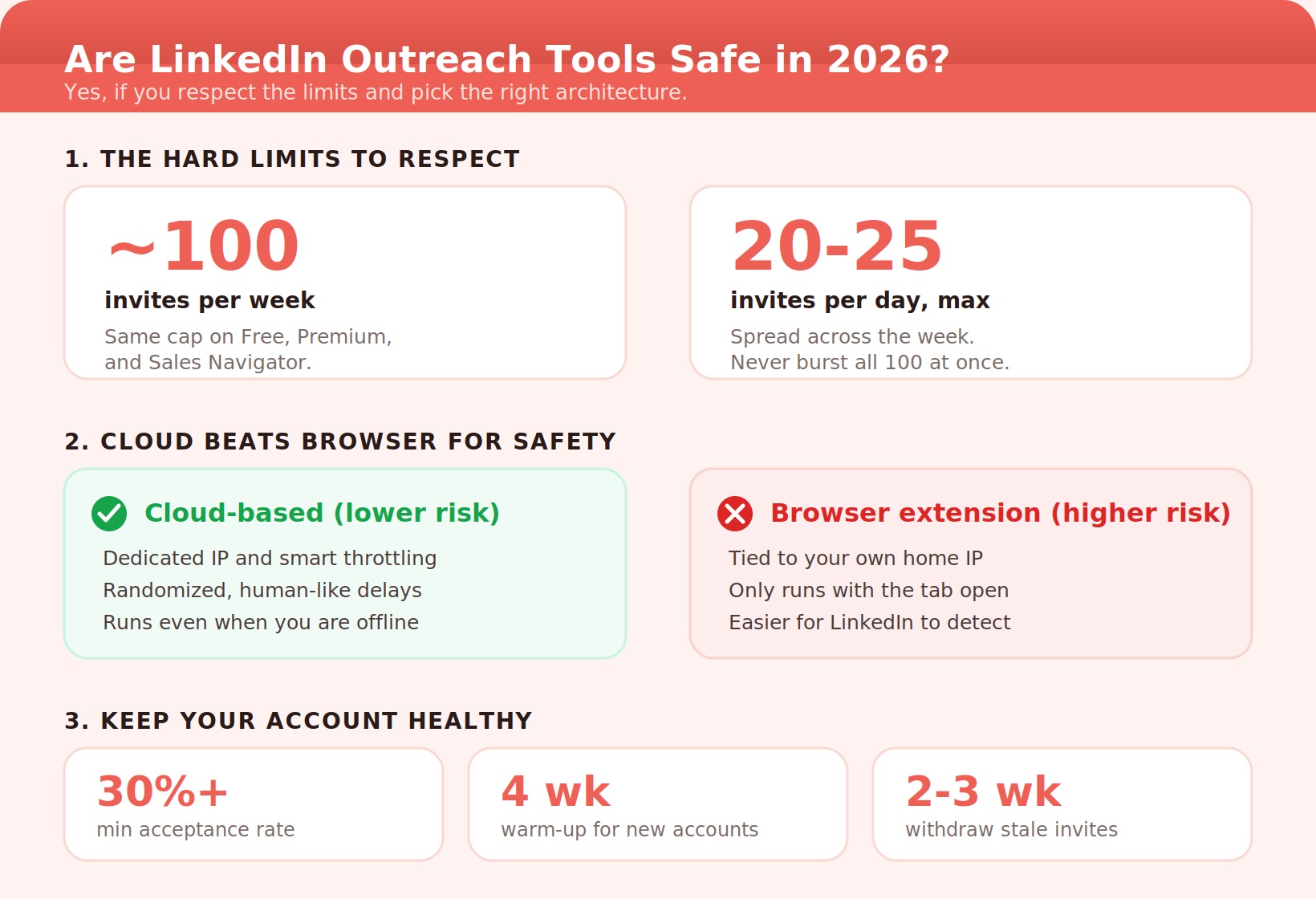
New accounts should start near 10 to 15 invites per day and ramp over four weeks. Aged accounts in good standing can run the full 100 per week. Withdraw pending invites older than two to three weeks, and never let your acceptance rate fall below 30%, or LinkedIn tightens your limits automatically.
The 11 Best LinkedIn Outreach Tools in 2026
Each tool below starts with a plain description of what it is and who it serves, then breaks down features, pricing, pros, cons, and our take. Pricing is current as of 2026 and reflects the real cost, not just the headline plan.
1. Expandi
Expandi is a cloud-based LinkedIn automation tool built around account safety and human-like behavior. It is the platform most experienced operators reach for when protecting a primary account matters more than saving a few dollars, which is why it consistently ranks among the safest LinkedIn outreach tools.
Best for: Teams that want the deepest LinkedIn-specific feature set with strong safety guardrails.
Expandi Key Features
Cloud execution with a dedicated IP, image and GIF personalization, smart warmup and throttling, webhook integrations, and warm-first "Builder" sequences that engage prospects before connecting.
- Industry-leading safety architecture
- Rich personalization with image and GIF
- Warm-up campaigns lift acceptance rates
- Steeper learning curve
- Per-seat cost adds up for agencies
Expandi Pricing
Around $99 per seat per month, with a 7-day free trial.
Our take: If your outreach runs through one or two high-value accounts you cannot risk, Expandi's safety-first design is worth the premium.
2. HeyReach
HeyReach is a cloud-based LinkedIn automation platform built specifically for agencies and growth teams managing multiple sender accounts. Its standout move is pricing by connected LinkedIn account rather than by team member, which transforms the economics of multi-account LinkedIn lead generation.
Best for: Agencies and teams running outreach across three or more LinkedIn accounts.
HeyReach Key Features
Multi-account sender rotation, a unified inbox across all accounts, native integrations with Clay, Instantly, and Smartlead, webhook and API access, plus an MCP server for advanced workflows.
- Flat pricing scales beautifully
- Unified inbox ends account-switching
- Unlimited free team seats
- LinkedIn-only, with no native email
- Enrichment is a paid add-on
HeyReach Pricing
From about $79 per month for three senders (roughly $59 on annual), scaling to unlimited senders at $199 per month.
Our take: The best LinkedIn outreach software for agencies. Once you run five or more client accounts, nothing else competes on cost per account.
3. Lemlist
Lemlist is a multi-channel outreach platform that orchestrates LinkedIn, email, and phone from a single sequence builder. It is the strongest answer to the LinkedIn outreach tools versus email outreach debate because it refuses to treat them as separate channels.
Best for: Teams that want true multi-channel sequences and native email deliverability in one platform.
Lemlist Key Features
One sequence spanning profile visit, connection request, email, and call tasks; AI ice breakers; image and video personalization; built-in email warmup, inbox rotation, and bounce handling; plus cross-channel A/B testing and CRM sync.
- Genuine LinkedIn, email, and phone in one flow
- Email engine rivals dedicated tools
- Strong personalization
- More setup complexity
- Premium price point
Lemlist Pricing
Around $99 per user per month for multi-channel plans.
Our take: Choose Lemlist if you want one system running both LinkedIn and email rather than stitching tools together with Zapier.
4. Dripify
Dripify is a cloud-based LinkedIn automation tool designed for sales teams and recruiters who want visual campaign control without agency-level complexity. It hits a comfortable middle ground: more capable than budget extensions, simpler than enterprise suites.
Best for: Solo prospectors and small sales teams wanting a clean, hands-off cloud tool.
Dripify Key Features
A visual drip-campaign builder with conditional branching, auto-views and follow-ups, A/B testing, team management with manager dashboards, and well-implemented safety limits.
- Intuitive visual builder
- Clean analytics and reporting
- Responsive support
- Deep personalization needs manual work
- Per-seat cost rises at scale
Dripify Pricing
Basic $59, Pro $79, and Advanced $99 per user per month, with roughly 50% off on annual billing (Basic drops to about $39).
Our take: A safe, user-friendly pick for individuals and small teams who value ease of use over deep customization.
5. Waalaxy
Waalaxy is a Chrome-extension LinkedIn automation tool that prioritizes simplicity and a gentle learning curve. It is a favorite entry point for freelancers and beginners who want to launch a campaign in three steps without reading a manual.
Best for: Individuals, freelancers, and small teams testing LinkedIn as a channel on a budget.
Waalaxy Key Features
Pre-built campaign templates, optional cold email sequences on higher tiers, an AI message writer, a built-in email finder, and a free starter plan.
- Easiest setup in the category
- Cheapest annual pricing
- Free plan to start
- Browser-based, so your laptop must stay on
- Higher detection risk than cloud tools
- Email credits run out fast on low tiers
Waalaxy Pricing
Pro from about €19 per month, Advanced €49, and Business €69, with up to 50% off annual.
Our take: Great for testing the channel cheaply, but keep volume conservative since the extension model ties activity to your session.
6. Skylead
Skylead is a cloud-based LinkedIn and email automation tool known for the most advanced conditional logic in the category. If your sequences need true if/then branching across channels, Skylead is one of the most capable options you can buy.
Best for: Sales teams building complex, behavior-driven multi-step sequences.
Skylead Key Features
Smart sequences with if/then logic across LinkedIn and email, native email sending alongside LinkedIn steps, image personalization, and a built-in email finder and verifier.
- Best-in-class conditional logic
- Native LinkedIn and email in one flow
- Built-in email finding
- Logic depth means a learning curve
- Priced for serious users
Skylead Pricing
Around $100 per seat per month.
Our take: Pick Skylead when your campaigns need to react to prospect behavior automatically, not just send a fixed sequence.
7. Meet Alfred
Meet Alfred is a feature-rich automation platform that runs outreach across LinkedIn, email, and X (Twitter) with a built-in CRM. It is one of the few tools that adds a third social channel, making it useful for teams that live beyond LinkedIn.
Best for: Sales teams and agencies wanting multi-channel reach plus a native LinkedIn CRM.
Meet Alfred Key Features
LinkedIn, email, and Twitter sequences, a smart inbox, a built-in CRM, team collaboration, social scheduling, and white-label options.
- Adds Twitter as a third channel
- Built-in CRM and smart inbox
- White-label for agencies
- Feature breadth can overwhelm
- Interface feels dated to some users
Meet Alfred Pricing
From about $39 per month, with a 7-day free trial.
Our take: A solid all-in-one for teams that want LinkedIn, email, and Twitter under a single roof without buying three tools.
8. Salesflow
Salesflow is a cloud-based LinkedIn and email outreach platform built for teams and agencies that want safe automation with a clean unified inbox. Among agency-focused tools, it stands out for white-label reporting and dedicated onboarding.
Best for: Agencies and team-based outreach needing white-label client reporting.
Salesflow Key Features
Cloud LinkedIn and email outreach, a unified inbox, AI reply detection, an advanced analytics dashboard, blacklist controls, and AI templates.
- Safe cloud automation
- Unified inbox and AI reply detection
- Strong, responsive support
- No native calling or SMS
- A/B testing requires a duplicate campaign
Salesflow Pricing
Around $99 per month, with team and agency tiers available.
Our take: A dependable agency choice when client-ready reporting and a shared inbox matter more than channel breadth.
9. Linked Helper
Linked Helper is a desktop-based LinkedIn automation tool built for power users who want granular workflow control and a built-in CRM. It is one of the most established tools in the space and remains a favorite of operators who like to tinker.
Best for: Hands-on power users wanting deep control at a low price.
Linked Helper Key Features
Granular campaign workflows, a built-in CRM, InMail automation, message templates, and detailed action throttling for safety.
- Deep control and customization
- Built-in CRM at a low price
- Strong published safety guidance
- The desktop app must run to work
- Less polished interface
Linked Helper Pricing
From about $15 per month.
Our take: Excellent value for technical users who want maximum control and do not mind keeping the app running.
10. Dux-Soup
Dux-Soup is a long-running Chrome-extension LinkedIn automation tool aimed at budget-conscious solo users. It covers the outreach basics cheaply, which keeps it on most shortlists of affordable tools even as cloud rivals mature.
Best for: Solo users automating basic outreach on a tight budget.
Dux-Soup Key Features
Auto profile visits, personalized messaging, connection automation, profile tagging and notes, newer automated voice-note sending, and CRM integrations with HubSpot, Salesforce, and Pipedrive.
- Very affordable
- Voice-note automation stands out
- Good CRM integrations
- Browser-based detection risk
- Limited advanced features
Dux-Soup Pricing
Pro from about $14.99 per month (roughly $11.25 billed annually).
Our take: A fine starter for basic solo outreach, but graduate to a cloud tool once volume or safety becomes a concern.
11. Octopus CRM
Octopus CRM is one of the cheapest LinkedIn automation tools with a built-in CRM, aimed squarely at individuals who want a simple, affordable way to manage outreach. It keeps LinkedIn lead generation approachable for anyone just getting started.
Best for: Budget solo users who want basic automation plus light pipeline tracking.
Octopus CRM Key Features
Connection and message automation, simple funnels, profile-view and skill-endorsement actions, a built-in CRM, and basic performance metrics.
- Among the cheapest options
- Built-in CRM for individuals
- Simple to learn
- Limited at scale
- Fewer integrations than rivals
Octopus CRM Pricing
From about $10 per month.
Our take: The lowest-cost way to test automated LinkedIn outreach with basic CRM features attached.
LinkedIn Outreach Tools Comparison Table
The table below distills the eleven LinkedIn outreach tools into a side-by-side view so you can match architecture, starting price, and ideal user at a glance. Use it to shortlist two or three tools, then trial them.
| Tool | Architecture | From / Month | Best For |
|---|---|---|---|
| Expandi | Cloud | $99 | Safety-first single accounts |
| HeyReach | Cloud | $79 / 3 senders | Agencies and multi-account |
| Lemlist | Cloud | $99 | Multi-channel (LI + email + phone) |
| Dripify | Cloud | $59 ($39 annual) | Small teams, ease of use |
| Waalaxy | Extension | €19 | Beginners on a budget |
| Skylead | Cloud | $100 | Advanced conditional logic |
| Meet Alfred | Cloud | $39 | LI + email + Twitter, CRM |
| Salesflow | Cloud | $99 | Agency white-label reporting |
| Linked Helper | Desktop | $15 | Power users, deep control |
| Dux-Soup | Extension | $14.99 | Basic solo outreach |
| Octopus CRM | Extension | $10 | Cheapest solo + CRM |
LinkedIn Outreach Tools vs Email Outreach
LinkedIn outreach tools versus email outreach is the wrong framing in 2026, because the strongest teams run both. LinkedIn typically wins on reply rate (platform data points to about 10% versus roughly 5% for cold email) and on visibility, since the prospect can see your profile before deciding to respond.
The catch is volume. LinkedIn's hard 100-per-week invitation cap means a single account can only reach so many people, while email has no equivalent ceiling. That is exactly why multi-channel sequences win: LinkedIn warms the relationship and earns the higher reply rate, then email picks up the prospects who did not accept and adds the volume LinkedIn cannot.
If you want to build that email layer properly, our guide to cold email outreach best practices covers deliverability and copy, and our B2B SaaS lead generation strategies show how the two channels feed one pipeline.
| Factor | LinkedIn Outreach | Cold Email |
|---|---|---|
| Typical reply rate | ~10% | ~5% |
| Volume ceiling | ~100 invites/week | Effectively unlimited |
| Trust signal | Visible profile | Sender reputation |
| Best role | Warm the relationship | Scale and fallback |
How to Personalize LinkedIn Outreach That Gets Replies
To personalize LinkedIn outreach effectively, reference one specific, recent detail about the prospect (a post, a job change, or company news) and open with their world, not your pitch. Personalization is the single biggest lever on reply rate, and the data is blunt about it.
Basic name-and-company personalization lifts reply rates by roughly 18% over fully generic messages, while context-aware AI personalization that references actual posts or activity can push reply rates several times higher. The reason it matters: 72% of LinkedIn outreach is still generic templates, so even modest specificity makes you stand out instantly.
There is a nuance worth knowing. Adding a note to a connection request barely changes whether people accept, but it strongly affects whether they reply after accepting. So save your personalization energy for the post-acceptance message, where it does the most work.
- Keep first messages to 60 to 100 words with one low-friction ask.
- Reference one recent, specific signal (a post, role change, or funding).
- Warm up first: view the profile and engage with a post before connecting, which can push acceptance above 60%.
- End with a value-led CTA, not a calendar demand, such as "Happy to share our playbook, worth a quick chat?"
- Avoid the "pitch-slap" of connecting then immediately selling; it carries a 91% negative sentiment among buyers.
Common Mistakes That Get Accounts Restricted
Most restrictions are self-inflicted. The fastest way to get flagged is to burst all 100 weekly invites on a Monday morning, which looks nothing like human behavior even though it stays under the weekly cap. Spread requests across the week instead, around 20 per working day.
The second killer is a low acceptance rate. If too many requests go ignored or get marked "I don't know this person," LinkedIn assumes spam and quietly shrinks your limit below the standard cap. Tight targeting protects your account as much as your pipeline, so a precise list beats a big one every time.
Finally, watch your pending-invite backlog. LinkedIn frowns on a pile of unanswered requests and enforces a soft ceiling around 500. Withdraw invitations older than two to three weeks to keep your account healthy and your sending capacity intact.
Scale Beyond LinkedIn's Limits With Contact-Form Outreach
Even the best LinkedIn outreach tool runs into the same wall: the roughly 100-invite weekly cap. Once you hit it, your pipeline stalls unless you add another channel, which is exactly why the smartest teams never rely on LinkedIn alone.
Email is one answer, but there is a second channel most teams overlook. Instead of chasing inboxes and fighting spam filters, you can send your message straight through a company's own contact form, where it reaches the team directly. ContactID automates that outreach at scale, so it slots in neatly next to the other best B2B sales tools in a modern stack.
ContactIDContact-Form Outreach
ContactID (formerly known as ContactUs AI) is an outbound tool that finds and fills companies' own "Contact Us" forms automatically, turning a channel most people do by hand into a scalable outreach engine. Because your message arrives through the official contact form, it lands in the inbox the team actually monitors instead of a spam folder, which is why it works so well as the volume layer beneath LinkedIn. You can install the contactID extension from the Chrome Web Store.
Best for: Founders and sales teams who want to add outreach volume beyond LinkedIn's weekly cap without risking domain reputation.
ContactID Key Features
AI-powered contact-form detection, automatic CAPTCHA solving, bulk submissions across thousands of sites, pay-per-success pricing, and near-100% deliverability since messages land in the company inbox rather than a spam filter.
- Pay-per-success, so you only pay for delivered messages
- Bypasses email spam filters entirely
- No domain or IP reputation to warm up
- Scales far past LinkedIn's weekly cap
- It is an outreach channel, not a LinkedIn sender itself
- Best used alongside a tool from the list above
ContactID Pricing
Pay-per-success pricing, so you are billed only for messages that are actually delivered, with no monthly minimum to get started.
Our take: Layer ContactID under your LinkedIn outreach so the moment you hit LinkedIn's cap, a second channel keeps your pipeline full without touching your domain reputation.
Reach thousands of companies through their own contact forms, pay only for successful sends, and never let LinkedIn's cap stall your pipeline.
Try ContactIDConclusion
The best LinkedIn outreach tools in 2026 are not the ones that promise the most volume; they are the ones that keep your account safe while making each touch more personal. Match the tool to your situation: Expandi or Dripify for safe single-account outreach, HeyReach for agencies, Lemlist or Skylead for true multi-channel sequences, and Waalaxy or Octopus CRM for testing on a budget.
Whatever you pick, respect the 100-per-week cap, lead with personalization, and never build your pipeline on a single channel. Pair LinkedIn with email and contact-form outreach so one restriction can never stop your flow, and you will land well above the 28% acceptance and 10% reply benchmarks that define the average.
Frequently Asked Questions
Are LinkedIn Outreach Tools Safe to Use?
Yes, when used within LinkedIn's limits. Cloud-based tools with throttling and randomized delays are the safest because they mimic human behavior and run on dedicated servers. Stay under about 100 invitations per week, keep acceptance above 30%, and avoid sending all your requests at once. Most account restrictions come from aggressive volume, not from automation itself.
What Is the Best LinkedIn Outreach Tool for a Small Team?
Dripify is a strong pick for small teams thanks to its visual builder, clean analytics, and manager dashboards at a reasonable per-seat price. If you need email alongside LinkedIn, Lemlist is worth the upgrade. Agencies juggling several accounts should look at HeyReach, whose flat per-sender pricing becomes far cheaper than per-seat tools past three to five accounts.
How Many Connection Requests Can I Send per Week in 2026?
LinkedIn caps invitations at roughly 100 per week across Free, Premium, and Sales Navigator, with a safe daily ceiling near 20 to 25. The limit is reputation-based, so high-trust accounts with strong acceptance rates may stretch toward 150 to 200, while new or low-trust accounts can be restricted at far fewer. Ramp new accounts gradually over four weeks.
Do LinkedIn Outreach Tools Work Better Than Email Outreach?
LinkedIn usually delivers higher reply rates (around 10% versus roughly 5% for cold email) and added trust because prospects can see your profile. However, email and contact-form outreach scale without LinkedIn's weekly cap. The best results come from combining them: use LinkedIn to warm the relationship, then email or a contact-form tool like ContactID to add volume and reach prospects who did not accept your request.
 Summarize this article with:








