
Most businesses lose deals in the gap between a prospect clicking submit and someone actually replying. In 2026 that gap needs to be seconds, and ai contact form automation tools are built to close it. They read incoming messages, score intent, route the lead to the right owner, and send an instant reply, without a human touching the form submissions queue.
If you run a marketing site, SaaS product, or client-services agency, manual triage stopped scaling long ago. Adopting purpose-built AI form automation is the same shift that turned modern cold email software into standard stack requirements. This guide breaks down the eight strongest platforms available today and how to pick one that fits your workflow.
Key Takeaways
- Automation closes the response gap. AI contact form automation tools qualify, route, and reply to submissions in seconds so no lead sits cold.
- Top picks by use case. ContactID for outbound at scale via contact forms, HubSpot for CRM-native teams, Jotform for SMB conversational intake, Formstack for regulated industries.
- Intent scoring is the core feature. The strongest platforms combine intent detection, native CRM sync, and automated follow-up in a single workflow.
- Watch the pricing model. Per-seat, per-submission, and per-workflow pricing scale very differently; model your real volume before you commit.
- Eliminate manual lead routing end to end. If a human still has to touch every submission, you have not really automated the process.
- Do not rely on inbound alone. Pair inbound form automation with outbound contact form outreach so a slow month never stalls your pipeline.
What Are AI Contact Form Automation Tools?
AI contact form automation tools are software platforms that use artificial intelligence to process, qualify, route, and often reply to form submissions with minimal human involvement. A traditional form drops a lead into an inbox and hopes someone reads it that day. An AI-powered system reads the message, scores intent, matches the lead to the right owner, and triggers the right action within seconds.
That action might be a personalized reply, a new CRM record enriched with company data, a Slack alert to the account owner, or an outbound sequence into a nurture campaign. The point is that every submission gets handled the same way every time. Nothing slips because a rep was in a meeting or on holiday.
The market has grown from simple form builders into full AI form automation layers that sit on top of your website, CRM, and messaging stack. Some tools focus on inbound intake. Others, including brandID’s ContactID, flip the model and use AI to submit personalized messages through the contact forms of thousands of target websites, replacing cold email as the outbound channel.
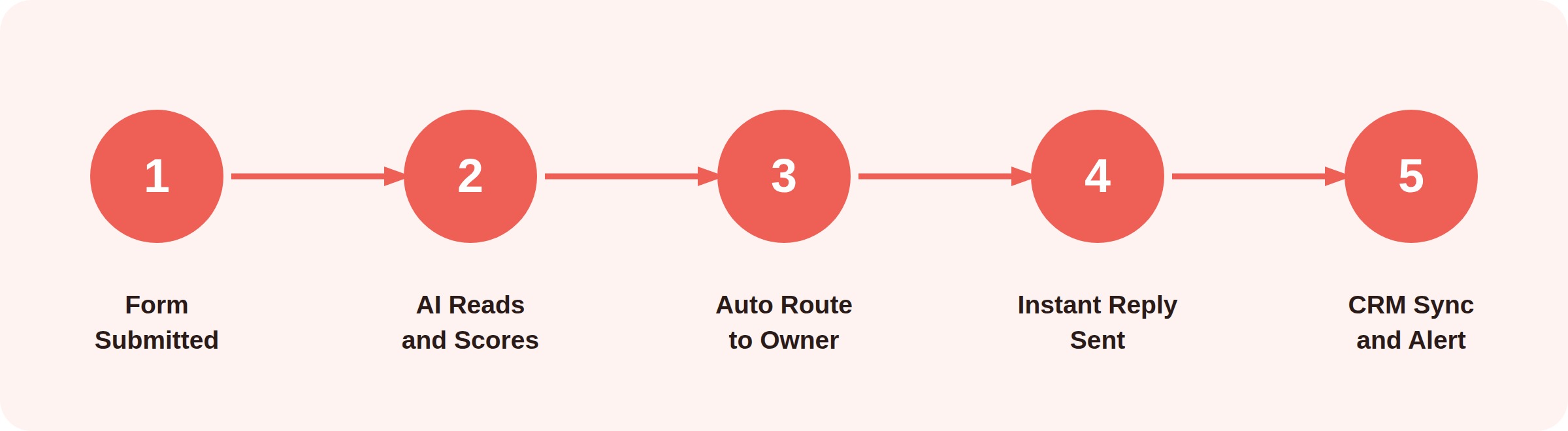
The five-stage workflow behind every AI form submission, from intake to CRM sync.
Why AI Contact Form Automation Matters in 2026
Lead response time is the strongest predictor of whether a form submission turns into a customer. The MIT lead response study found that contacting a web lead within five minutes rather than thirty makes them roughly 21 times more likely to enter the sales process. As of 2026, most teams still respond in hours, which is a competitor’s opening.
The other force pushing adoption is volume. Companies run more paid channels, SEO content, and outbound campaigns than ever, pushing more traffic into forms. Statista’s tracking of AI use in marketing shows sustained double-digit adoption growth through 2026. Triaging every message by hand stops working long before enterprise scale.
Manual lead routing also produces uneven qualification because reps interpret the same message differently. AI form response automation applies the same scoring model to every submission, so marketing reports finally line up with what sales sees in pipeline. For B2B SaaS lead generation teams, that consistency alone often pays for the tool.
Key Features to Look for in AI Contact Form Software
Not every product labeled AI actually earns the name. Before you commit, check that any AI contact form software handles the following capabilities well, not just on the pricing page.
- Intent Detection. The tool should classify submissions into buckets like sales, support, partnership, or spam. That classification lets the rest of the workflow branch correctly instead of firing the same reply at everyone.
- Automated Routing. Once intent is scored, the platform should assign the lead to the correct owner or team based on geography, deal size, product line, or account status. This is where you actually eliminate manual lead routing rather than just relabel it.
- Real-Time Response. Instant AI replies acknowledge the lead, answer common questions, and set expectations. Even a well-written acknowledgment buys your team time and cuts drop-off during the qualification window.
- Native CRM Integration. Look for prebuilt connectors to HubSpot, Salesforce, Pipedrive, or Zoho. Pushing form submissions straight into your system of record removes a middleware step and cuts sync errors.
- Spam and Abuse Filtering. Public contact forms attract huge volumes of junk. Modern AI classifiers catch these before they clutter your team’s queues or trigger a false-positive routing rule.
- Analytics and Reporting. You need conversion rates, response times, and lead-source performance in a single dashboard. Reporting quality is the fastest way to separate serious platforms from lightweight builders.
8 Best AI Contact Form Automation Tools in 2026
The list below is ranked on a mix of AI quality, integration depth, real-world reliability, and value at each price tier. Each tool is described honestly, including where it falls short. Use the comparison table further down to shortlist two or three, then trial them against real form traffic.
ContactID
ContactID (formerly known as ContactUs AI) is brandID’s AI-powered contact form submitter and bulk cold outreach tool built for B2B lead generation. It automatically finds, fills, and submits contact forms on any website at scale, so instead of sending cold email you deliver your pitch through each prospect’s own website form. You provide a target list (up to 400 domains per run) plus a sender profile and personalization prompt, and the AI handles form detection, field mapping, CAPTCHA solving, message writing, submission, and delivery tracking end to end. In contactID that sender profile is called an Agent, and you can create your first Agent from the dashboard.
Because messages arrive through the recipient’s own form, deliverability sits at 100 percent, with no domain warm-up, no spam-filter risk, and no daily sending caps. That makes ContactID a surgical alternative to cold email platforms like GMass or Instantly for teams that want to scale outbound from dozens of prospects to millions of websites without babysitting inboxes. For a closer look at the app itself, read our contactID review with screenshots.
- AI-powered form detection that locates and populates any contact form regardless of structure or language
- Built-in AI message generator that personalizes copy from your prompt using each site’s context
- Automated CAPTCHA solver with over 99 percent success rate
- Bulk submission across hundreds of target domains in a single campaign
- Real-time delivery tracking and success reporting
- Pay-per-success pricing so you only pay for form submissions that go through
- 100 percent deliverability with no domain warm-up needed
- Bypasses spam filters and daily sending caps entirely
- AI writes a personalized message for every target from your prompt
- Handles CAPTCHAs automatically with a 99 percent plus success rate
- Reaches decision makers who ignore cold email inboxes
- Pay-per-success pricing means you never pay for failed sends
- Outbound-only, not built for inbound form triage or auto-reply
- Requires a prepared list of target domains before you can start
Jotform AI Agents
Jotform AI Agents adds a conversational AI layer to one of the most established form builders on the market. Rather than showing a static form, the agent chats with visitors, asks qualifying questions, and hands off qualified submissions to your team. It is one of the more polished pieces of AI contact form software available at an SMB price point.
- AI agents trained on your own knowledge base
- Over 10,000 form templates to start from
- Wide integrations across CRM, email, and payments
- Conditional logic and calculated fields
- Easy setup with a huge template library
- Generous free tier
- Familiar builder for non-technical users
- AI agent depth is still maturing
- Deep customization can hit ceilings
Formless by Typeform
Formless is Typeform’s AI-native product, where the form is replaced by an open conversation powered by a large language model. It reads like chatting with a well-briefed assistant rather than filling in fields. For teams that value experience quality, it is one of the most polished takes on AI form automation available in 2026.
- Natural language, open-ended conversation flow
- Custom brand voice and personality settings
- Multi-language support out of the box
- Structured data extraction from free-text answers
- Elegant, on-brand experience
- Higher completion rates for long forms
- Great fit for qualitative discovery
- Not built for high-volume B2B routing
- Pricier than most SMB builders
HubSpot AI Form Builder
HubSpot’s forms are tightly wired into its CRM, and the 2026 release added AI-driven personalization, progressive profiling, and automated workflows on top. If you already run HubSpot, this is the lowest-friction contact form automation software you can add, because every submission already lives in the same platform your reps use.
- Progressive profiling on repeat visitors
- Native CRM sync with no middleware
- AI-powered content and email follow-up drafts
- Unified reporting across marketing and sales
- Deep CRM integration by default
- Unified marketing and sales reporting
- Free tier that is genuinely usable
- Full AI features gated behind higher tiers
- Total spend climbs quickly at scale
Fillout
Fillout is a modern form builder that focuses on flexible logic and workflow automation, with AI features layered in for form generation, response summaries, and routing. It has become a favorite for product teams that want more flexible AI form response automation than Google Forms without paying enterprise prices.
- AI form generation from a prompt
- Page and question conditional logic
- Calculators, scheduling, and payment blocks
- Integrations with Notion, Airtable, HubSpot, and Salesforce
- Fast build times
- Generous free tier
- Strong logic and calculation engine
- Fewer templates than mature competitors
- Reporting is still lightweight
Formstack
Formstack is an enterprise-grade platform that pairs contact form submissions with workflow automation, e-signature, and document generation. It is common in regulated industries where routing rules, audit trails, and compliance settings are non-negotiable. For those buyers it is one of the more serious AI contact form automation tools available.
- HIPAA-eligible plans and enterprise security
- Visual workflow builder for approvals and routing
- Document generation and native e-signature
- Prebuilt CRM and marketing automation connectors
- Strong compliance posture
- Powerful workflow engine
- All-in-one document and form suite
- UI feels dated versus newer tools
- Higher starting price point
Tally
Tally started as a free, no-code form builder and has grown into a capable AI form automation option for early-stage teams. It leans on simple AI features for form generation and response summarization, and its automations connect to hundreds of apps through native and Zapier integrations. Great value for teams testing product-market fit.
- Unlimited forms and submissions on the free tier
- AI-assisted form building
- Native payment collection
- Wide integrations through Zapier and Make
- Extremely generous free plan
- Simple, distraction-free builder
- Fast time to first form
- Limited routing depth
- Fewer enterprise controls
Chatfuel Lite
Chatfuel Lite treats the contact form as the beginning of a conversation rather than the end of one. It replaces the form with an AI chat widget on your site, captures the same fields inside the dialogue, and hands qualified leads to sales or a WhatsApp workflow. A strong option for teams that want AI form response automation blended with live chat.
- AI chat widget with intent detection
- Native WhatsApp Business handoff
- Meta Ads integration for click-to-message flows
- Analytics on qualified conversations, not just clicks
- Higher engagement than static forms
- Great for paid social funnels
- Strong WhatsApp support
- Chat UX does not suit every audience
- Advanced flows have a learning curve
AI Contact Form Automation Tools Compared
Use the table below to shortlist. It compares each option on best-fit audience, starting price, and the standout capability that separates it from the pack. Scroll horizontally on mobile to see every column.
| Tool | Best For | Starting Price | Standout Capability |
|---|---|---|---|
| ContactID | B2B outbound via contact forms | Pay-per-success | Cold email alternative at scale |
| Jotform AI Agents | SMBs, conversational intake | $34 / mo | Trainable AI agents |
| Formless by Typeform | Brand-led lead capture | Custom | Natural conversation flow |
| HubSpot AI Form Builder | HubSpot users | $20 / mo | Native CRM sync |
| Fillout | Product and ops teams | $15 / mo | Flexible logic engine |
| Formstack | Regulated industries | $50 / mo | Compliance and workflows |
| Tally | Founders and indie makers | Free | Unlimited free forms |
| Chatfuel Lite | Chat-first lead capture | $14.99 / mo | WhatsApp handoff |
How to Choose the Right AI Contact Form Software
Feature lists all start to sound the same after a while. To cut through, evaluate every candidate against these four questions. If a tool falls short on any of them, drop it from the shortlist even if the pricing is attractive.
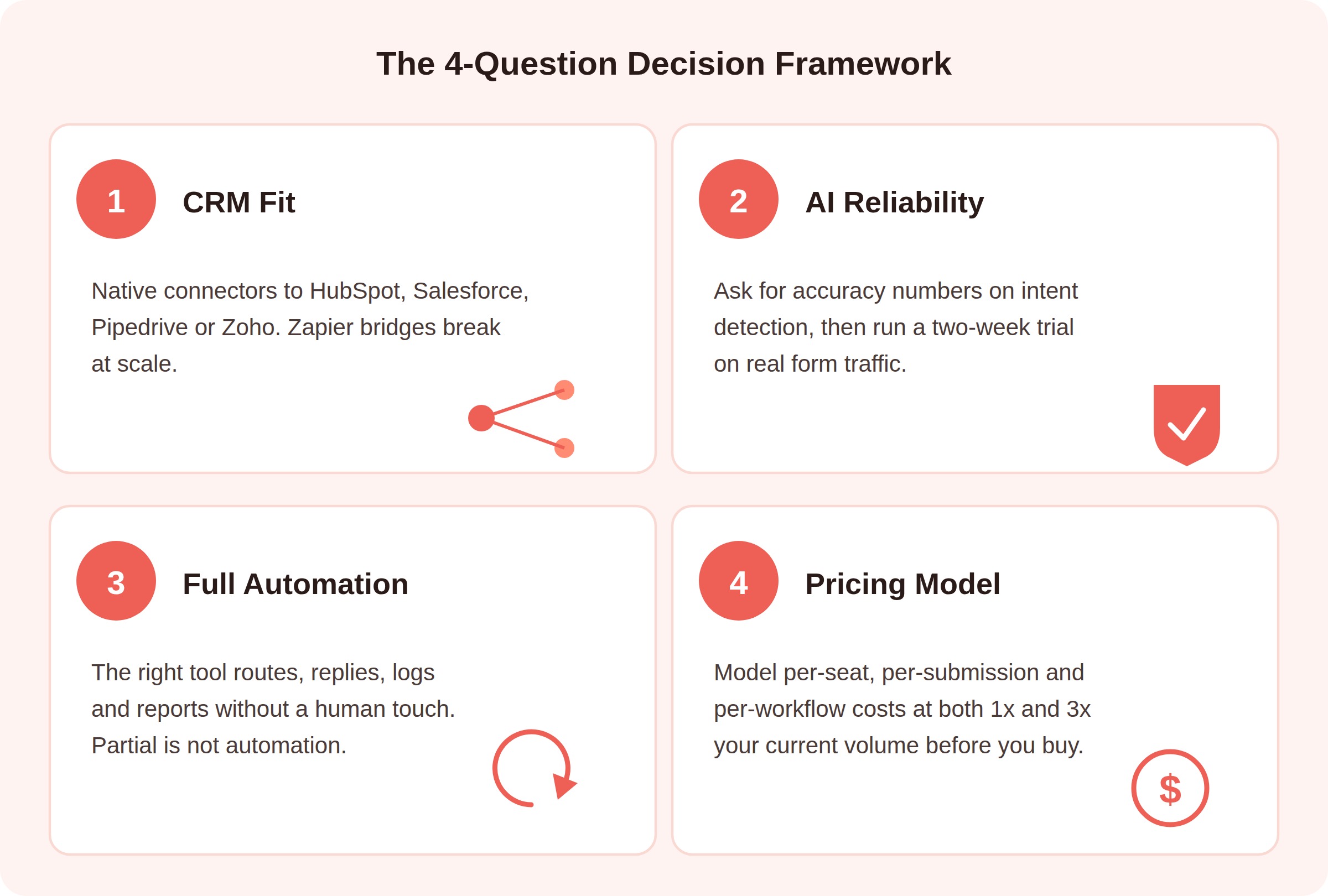
Four questions that separate the strongest AI contact form automation tools from the rest.
Does it fit your CRM? If the tool cannot sync form submissions to your CRM in real time, everything downstream breaks. Prioritize native integrations over Zapier bridges above small-team scale. The same rule applies when picking LinkedIn automation tools, where CRM sync often decides usability at scale.
Is the AI actually reliable? Ask for accuracy numbers on intent detection and spam filtering, then run a two-week trial with real traffic. Results on your own submissions are the only benchmark that matters.
Can it eliminate manual lead routing end to end? The right tool routes, replies, logs, and reports without a human touch. If a piece of the flow still needs manual review, you have not really automated the process, you have just built a nicer looking queue.
Does the pricing scale with value? Some platforms charge per submission, others per seat, others per workflow run. Model out a realistic month at your current lead volume and again at three times that volume. The cheapest starter tier is often the most expensive plan at scale.
Common Mistakes When Rolling Out Contact Form Automation Software
Even the best contact form automation software fails if the rollout is sloppy. The following mistakes come up over and over in real deployments, and each one is easy to avoid with a little planning.
Automating a broken process. If your existing routing rules are unclear, automation will just move the confusion downstream faster. Document the manual process on paper first, fix the gaps, then encode it into the tool.
Skipping human review at launch. Have a human read every AI reply for the first week or two, then sample regularly after that. AI accuracy on your specific traffic is only visible with your eyes on the output. This is especially important for financial advisor lead generation and other regulated verticals.
Ignoring the acknowledgment message. The auto-reply is a first impression, not a receipt. Write it like a real human and set expectations for when a rep will follow up.
Not measuring outcomes. Track response time, qualified rate, and pipeline created from form submissions, not just volume. Volume is a vanity metric. Pipeline is the number that pays for the tool.
Best Practices to Get More From Your Form Submissions
Once your ai contact form automation tools are live, keep improving the system. This matters most for SEO agencies and other client-services teams where the form is the primary online lead generation tool feeding pipeline every week.
Keep forms short at the top of the funnel. Every extra field costs a percentage of completions. Ask only what the AI needs to route the lead, and enrich the rest from third-party data providers.
Segment replies by intent, not by form. One form can generate five different types of leads, and each deserves a different response. Route sales, support, partnerships, and press through different tracks from the first message.
Refresh AI training monthly. Submission language shifts with your product, your ads, and the season. Feed new examples into the model regularly so intent accuracy does not drift downward.
Close the loop with sales. Ask reps which auto-replies helped and edit the templates weekly. A five-minute feedback loop with sales beats any dashboard for improving AI form response automation.
Conclusion
The best ai contact form automation tools in 2026 do more than replace a spreadsheet of assignments. They compress inbound response time, apply consistent qualification to every submission, and free your team to focus on conversations that move deals forward. The eight tools above cover every real use case, from lean founder setups on Tally to compliance-heavy Formstack deployments.
If you want to scale B2B outbound without the deliverability and warm-up headaches of cold email, brandID’s ContactID was built exactly for that job. Start with the tool that matches your team size today, then revisit the shortlist in six months once you have real data on lead quality and response times.
Frequently Asked Questions
What are ai contact form automation tools?
AI contact form automation tools are platforms that use artificial intelligence to read, qualify, route, and reply to inbound form submissions in real time. They combine intent detection, CRM sync, and instant responses so leads get the right follow-up without a human doing manual triage on every message.
How does AI form automation help eliminate manual lead routing?
AI form automation scores each submission on intent and assigns it to the correct owner using rules for geography, deal size, and product line. Because the same logic runs on every message, teams eliminate manual lead routing entirely, which cuts response times and keeps qualification consistent across the funnel.
Is AI contact form software safe for regulated industries?
Yes, if you pick a vendor with the right certifications. Look for HIPAA eligibility, SOC 2 Type II, and clear data-processing terms if you handle protected data. Formstack and HubSpot Enterprise are common picks in healthcare, finance, and government, thanks to their audit trails and access controls.
What is the difference between a form builder and an AI form automation tool?
A form builder helps you design and publish forms. An AI form automation tool takes over what happens after the submit button. It qualifies the lead, routes it to the right owner, sends a personalized reply, and pushes the record into your CRM automatically, which turns a static form into a fully automated intake system.
 Summarize this article with: