
How to share your referral link and earn credits
Find your personal referral link, share it or send it by email, and follow your referrals. It takes about three minutes.
Before you start
- A contactID account signed in on the dashboard at https://contactid.brandid.app/
Open the Referrals page
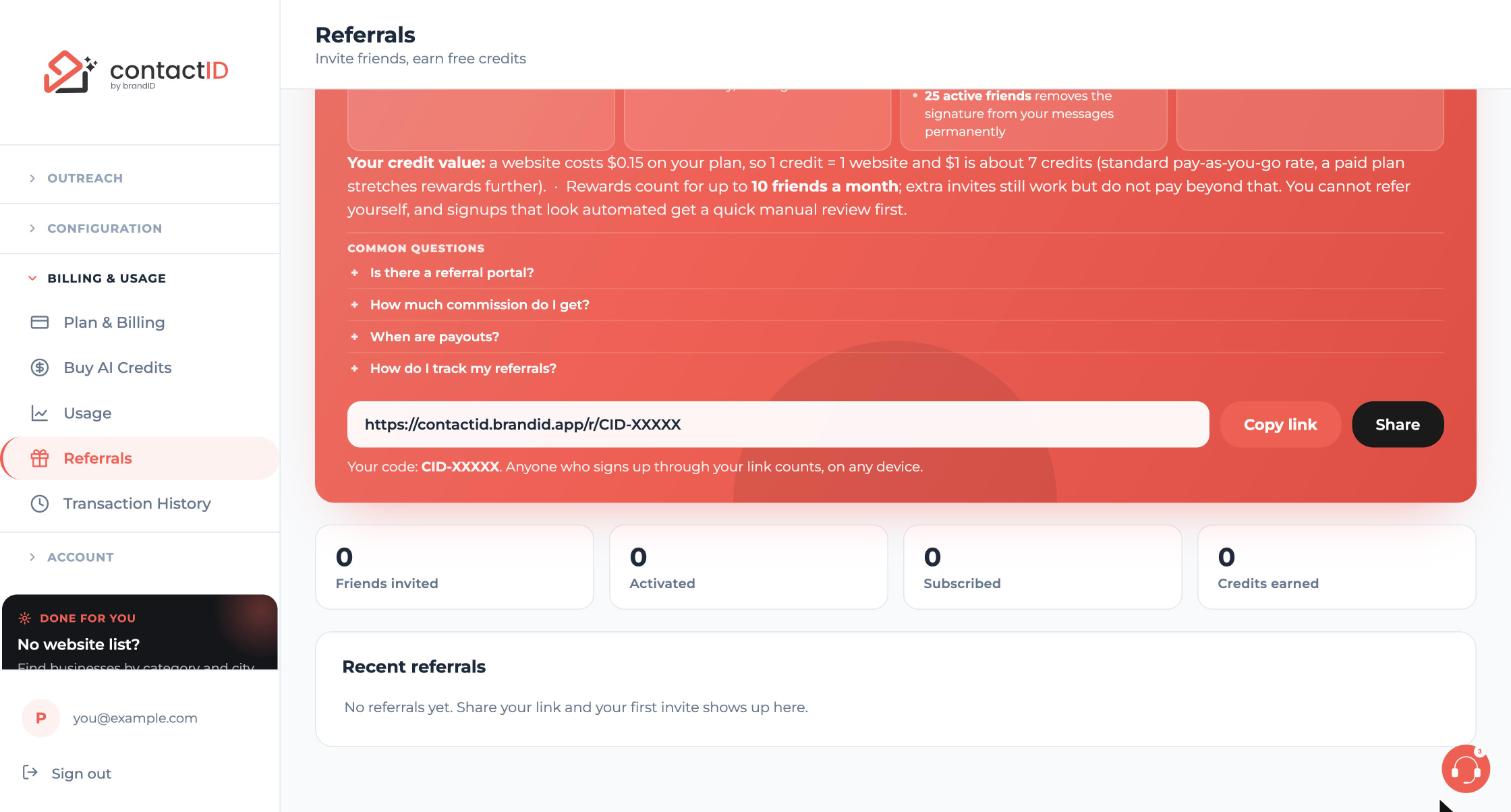
In the left sidebar, click Billing & Usage, then click Referrals. The page is titled Invite friends, earn free credits.
Find and copy your link
Your link is in the box at the top, with your code below it. Click Copy link and it is on your clipboard. You can paste it anywhere: a chat, a community, a social bio, your email signature or a blog post. It works from any device or browser.
Below the box, four cards show your totals: Friends invited, Activated, Subscribed and Credits earned.
Open the Share window
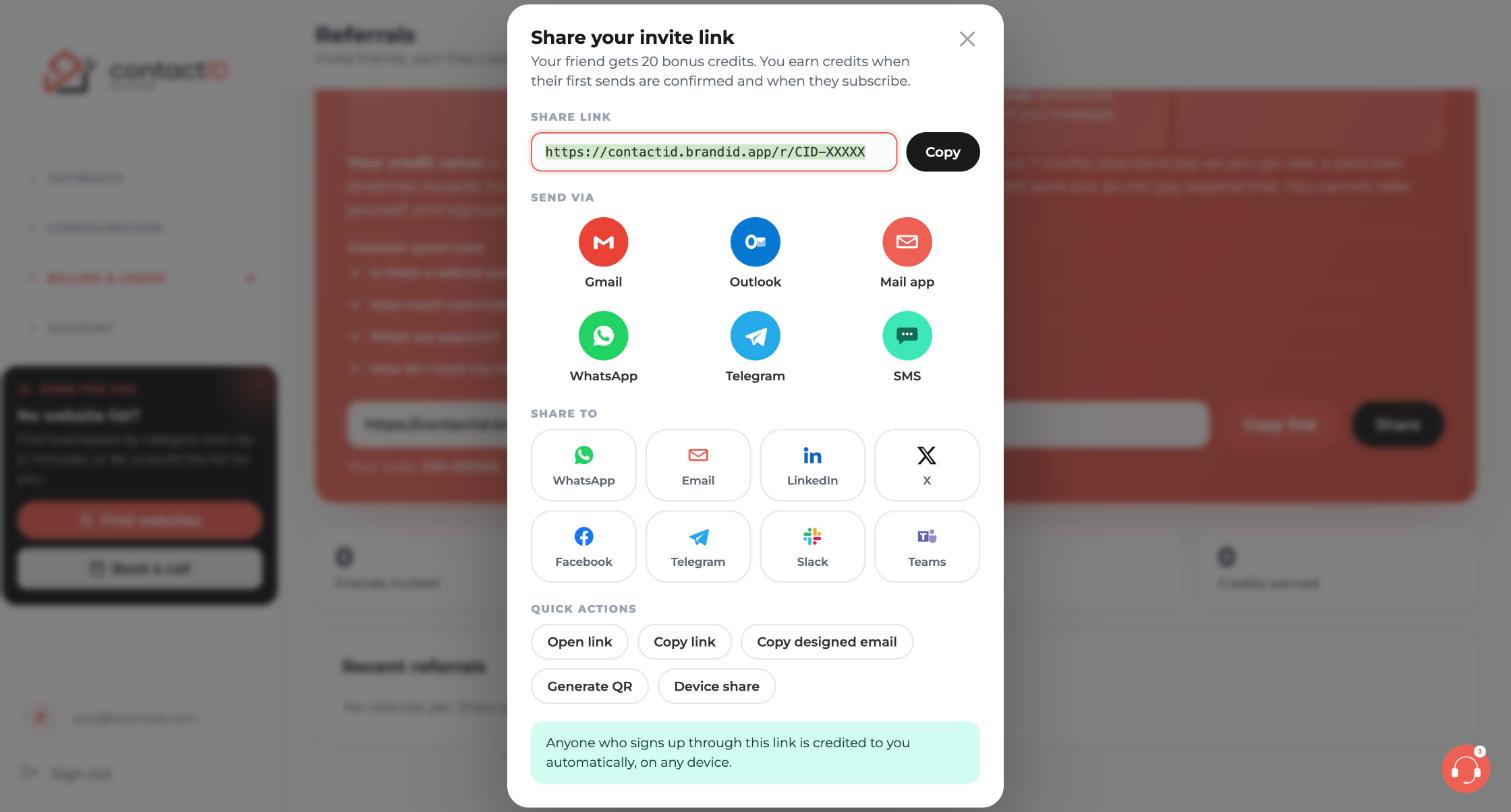
Click Share next to Copy link. The Share your invite link window opens. It offers:
- Send via: Gmail, Outlook, Mail app, WhatsApp, Telegram and SMS
- Share to: WhatsApp, Email, LinkedIn, X, Facebook, Telegram, Slack and Teams
- Quick actions: Open link, Copy link, Copy designed email, Generate QR and Device share
Invite friends by email
Click Gmail, Outlook or Mail app. A new email opens with the subject and invite text already filled in. Add your friends’ addresses, for example [email protected], and send it from your own account.
For the designed version, click Copy designed email, open a new email and paste it. The layout stays.
Understand what each side gets
The Share window says your friend gets 20 bonus credits, and that you earn credits when their first sends are confirmed and when they subscribe. A referral is recorded when your friend finishes onboarding, not at the first page view.
The Referrals page shows the current reward values live, so check it for the numbers. The line Sent via contactID that free accounts add to messages is plain text and does not carry your link, so share your link yourself.
Follow your referrals
Return to the Referrals page any time. The cards show your live totals, and Recent referrals lists your most recent friends with their status. Rewards are paid as ordinary website credits in your extra credits.
Tips
- Share where your audience already trusts you, with a short personal note instead of a bare link.
- Up to 10 referrals per calendar month earn activation rewards automatically. Others are held for a quick review and are not lost.
- Anyone who signs up through your link is credited to you automatically, on any device.
If something goes wrong
My friend signed up but nothing shows as rewarded.
The referral is recorded when your friend finishes onboarding, and the activation reward comes after 5 of their sends are confirmed by websites. The Referrals page shows the live status of every friend. See the article on referrals that are pending or flagged.
Can I refer myself or someone with an existing account?
No. You cannot refer yourself, and only new accounts can be referred. Signups that look automated get a quick manual review first.
Where is the Gmail or Outlook invite sent from?
From your own email account. Nothing is created for the recipient until they choose to sign up.
Related how-to guides
Still stuck? We’re happy to help.
Install the extension, start a free trial, or reach out to support.




