
How to buy lead credits and set auto-recharge
Buy a pack of lead credits on the Credits tab and, if you want, let contactID top up automatically when your balance runs low. It takes about three minutes.
Before you start
- A contactID account signed in to the dashboard
- A payment card (payments are processed by Stripe)
Open the Credits tab
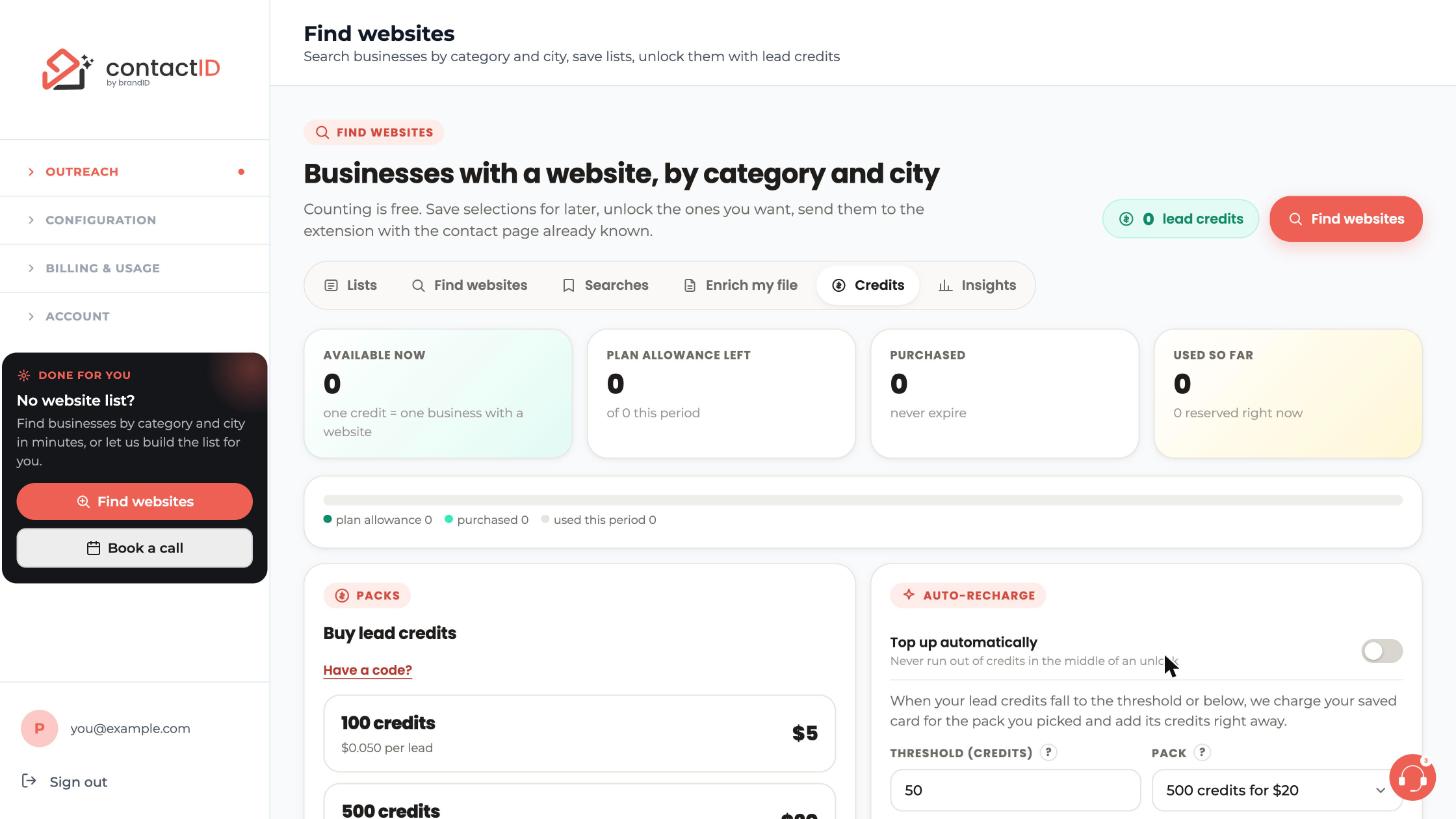
Go to Outreach, then Find websites, and click the Credits tab. At the top, four cards show your balance: Available now (one credit is one business with a website), Plan allowance left, Purchased (these never expire) and Used so far.
Understand how credits are spent
Counting is free, previews are free and saving a selection is free. Credits move only when you unlock a list: one credit is committed per business delivered with a website. Anything that could not be delivered is released back to you. Plan allowance is used before purchased credits.
Your plan’s allowance (Starter 100, Growth 500, Pro 2,000, Scale 5,000) is granted each time your plan is paid, and a new allowance replaces what was left of the old one.
Choose a pack
In the Packs box (Buy lead credits) pick a pack: 100 credits for $5, 500 for $20, 2,000 for $60 or 10,000 for $250. If you have a code for lead credit packs, click Have a code? and enter it here.
Pay through Stripe
Complete the payment on Stripe’s secure page. The credits are added the moment the payment completes. If an unlock was waiting for credits, it continues automatically. You can also buy from the dialog that appears when an unlock is short of credits.
Turn on auto-recharge
Auto-recharge is optional and off by default. In the Auto-recharge box, switch on Top up automatically. Then set:
- Threshold (credits): the balance at or below which a top-up happens, for example 50.
- Pack: the pack to buy, for example 500 credits for $20.
Press Save. Without a saved card the button reads Save and add card and takes you to Stripe’s secure page to add one. Nothing is charged at that moment.
Know the auto-recharge rules
When your available lead credits fall to the threshold or below, your card is charged once for the pack and the credits are added at once. The check runs when you spend credits, when an unlock is short of credits and when you save the setting or the card, not on a timer. The threshold counts lead credits, not dollars, and the pack must be bigger than the threshold. At most one automatic top-up runs per hour. After 3 declined charges, top-ups pause until you add a card or save again.
Change the card or check your purchases
Add a card with Add a card or change it with Replace. Packs you bought are listed under Recent activity on the Credits tab, with the credits added.
Tips
- Purchased credits never expire, but plan allowance does not carry over to the next period.
- Unused packs can be refunded through support within 14 days of purchase. Credits you already used are not refundable.
- Pick a threshold that covers one typical unlock, so the top-up lands before your next one.
If something goes wrong
The tab says On, but no card is saved.
Auto-recharge is switched on but there is no card, so nothing is charged. Press Add a card or Save and add card and add one on Stripe’s secure page.
Auto-recharge stopped working.
After 3 declined charges, top-ups pause. Add a card or save the setting again. Also check that the pack is bigger than the threshold.
I bought a pack but my unlock is still waiting.
Credits are added the moment the payment completes and the waiting unlock continues automatically. If it still waits, check the balance on the Credits tab and Recent activity.
Related how-to guides
Still stuck? We’re happy to help.
Install the extension, start a free trial, or reach out to support.




