A verified TikTok account carries a small blue checkmark next to the display name across every surface the account appears on, from the For You page to search results to comments. TikTok uses the badge to confirm that an account is who it says it is, which matters more than most creators realize once brand deals, press requests, and impersonator takedowns start showing up.
Verification is a free, request-based process (not a paid tier like X Premium or Meta Verified). It is also one of the single biggest trust signals a creator profile can carry, which is why anyone taking the long creator path mapped out in a guide to becoming an influencer eventually puts the verification request on their roadmap, usually around the 100K to 500K follower range.
Below is the exact tap sequence to request TikTok verification from inside the app, the six criteria TikTok actually evaluates against, the one requirement (editorial notability) that fails most applicants, and a set of specific tactics that measurably move an account from “ignored” to “approved” on the second or third attempt.
Key Takeaways
- TikTok verification is free and request-based: with no paid tier to skip the queue; the only route is the Verification Request form inside Settings and Privacy.
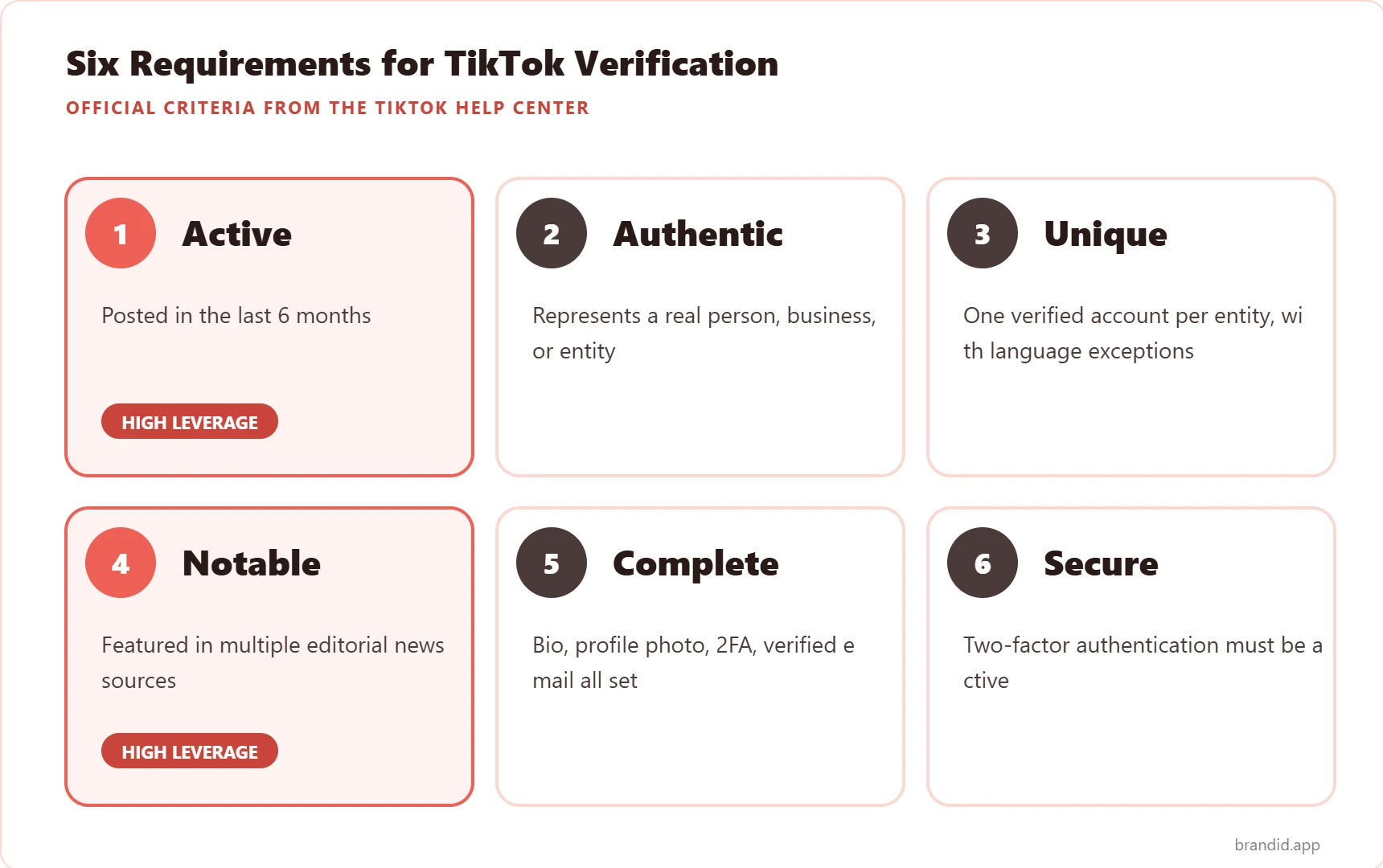
- TikTok verification requirements are six-pronged: and all six must be true at once: Active, Authentic, Unique, Notable, Complete, and Secure.
- Verified on TikTok rarely means huge followers alone: since the Notable criterion is editorial press coverage, not follower count; mid-tier creators with Wikipedia pages and news mentions beat 10M-follower creators without them.
- TikTok verification requests take 3 to 30 days: to receive a decision; a rejection is final for 30 days before you can reapply, so get the application right the first time.
- TikTok verified badge cannot be bought or transferred: and any paid service that claims otherwise is a scam; TikTok has never run a paid verification program and does not plan to.
What Is TikTok Verification
TikTok verification is the platform’s confirmation that an account belongs to the public figure, brand, or organization the username suggests. The visible result is a blue checkmark, formally called the Verified Badge, which appears next to the display name wherever that account shows up: profile page, search results, Live stream title cards, and comments.
TikTok rolled the badge out globally in 2019 to combat impersonation, following a wave of fan accounts and lookalikes that were lifting creator video libraries wholesale. The modern process is self-serve: anyone can submit a verification request from inside the app, TikTok’s Trust and Safety team reviews it, and a decision usually arrives within 30 days.
What the badge does not grant is reach, monetization, or algorithmic preference. TikTok’s engineering team has stated repeatedly that verification does not boost For You placement; the lift most verified accounts experience comes from the trust signal itself (better click-through from search, higher follow-rates from new viewers, more brand inbound), not from feed weighting.
Who Qualifies for the TikTok Blue Checkmark
TikTok’s Help Center lists six official criteria for verification. All six have to be met simultaneously; failing any one of them is an automatic rejection, regardless of how strong the other five are.
How to Request TikTok Verification Step by Step
The request lives inside Settings and Privacy, not in the Business Suite or on the web dashboard. The full flow takes under five minutes if your supporting press links are already in a note on your phone.
Step 1: Confirm Your Account Meets the Six Criteria
Run through Active, Authentic, Unique, Notable, Complete, and Secure before you open the form. A single gap, like a missing 2FA setup, is the most common reason TikTok sends an automatic rejection within hours of submission.
Step 2: Open Settings and Privacy
From your Profile tab, tap the three-line menu in the top right, then Settings and Privacy. The menu you need is Account, which groups profile-level settings including the Verification entry.
Step 3: Tap Verification
Inside the Account menu, scroll until you see Verification. If the row does not appear, your region or account age may not yet qualify (the feature is global but a small number of markets receive it on staged rollout).
Step 4: Choose Your Category
TikTok asks you to pick one category: Public Figure, Business, Brand, Media Company, Organization, Government, or Other. Pick the one that best matches your Wikipedia or About page framing. Switching categories on a resubmission is allowed and sometimes helps if the first attempt was ambiguous.
Step 5: Enter the Legal Name and Supporting Links
The form takes a legal first and last name (or legal business name) and up to five supporting links. The strongest links are editorial coverage from major outlets, a Wikipedia page, an official site, an IMDB credit, a Google Knowledge Panel, or a Crunchbase profile for a brand. Avoid self-published blog posts, press release wires, and anything that looks like paid placement.
Step 6: Submit and Wait
Tap Submit. TikTok sends a confirmation email, then a decision 3 to 30 days later. Approvals land as a push notification plus email; rejections arrive as email only. A rejection locks the request form for 30 days before you can reapply, so get the first attempt right.
What TikTok Means by Notable
Notable is the one criterion that fails most applicants. TikTok’s internal definition is tight: the account has to be “featured in multiple news sources”, with news defined as editorial coverage from established outlets, not paid placements, press releases, or sponsored content.
Press That Counts
- National or regional newspapers. New York Times, Washington Post, The Guardian, Le Monde, Der Spiegel, Times of India, and regional equivalents all count.
- Established trade publications. Variety, Billboard, Vogue, Rolling Stone, TechCrunch, Hollywood Reporter, Ad Age, Vulture, Forbes staff bylines (not Forbes contributor posts).
- Public broadcasters and major podcasts. BBC, NPR, ABC News, CBC, ARD, as well as top-30 Spotify/Apple podcasts with editorial reach.
- Reference pages. A Wikipedia article (one you did not write), a Google Knowledge Panel, or an authoritative encyclopedia entry.
Press That Does Not Count
- Press release distribution services (PR Newswire, Business Wire, EIN Presswire).
- Forbes/Entrepreneur/HuffPost contributor posts (not staff articles).
- Self-published Medium posts, Substack entries, or LinkedIn pulse articles.
- Sponsored posts labeled as advertorials, even if they ran on a major outlet.
- Social media interviews posted to brand accounts without independent editorial framing.
Tips to Boost Your TikTok Verification Chances
The six criteria are a floor, not a ceiling. These are the specific moves creators who get approved on the first or second attempt consistently use, drawn from publicly documented approvals in the 2024 to 2026 window.
Build Press Before You Apply
The biggest single lever is editorial coverage. Pitch two or three journalists at niche-relevant outlets in the quarter before you submit the verification request, with a specific data-rich story angle (your subscriber milestone, your business pivot, your community cause). Even two 300-word write-ups on established outlets convert the Notable criterion from fail to pass.
Lock In a Wikipedia Page the Right Way
A Wikipedia page is one of the strongest single Notable signals, but TikTok (and Wikipedia editors) can tell when a page was ghost-written. Wait until you have at least three independent press mentions, then let a volunteer editor create the page from those sources. Pages that get flagged for notability concerns on Wikipedia are often also flagged by TikTok.
Complete Every Profile Field
The Complete criterion is a quiet veto. Add a bio longer than 50 characters, a square 400×400 profile picture, a verified email, two-factor authentication through either the app or an authenticator, and a website link. Accounts missing even one of these are rejected without TikTok reviewing the Notable claims at all.
Match Your Legal Name Across Platforms
Mismatches between the legal name on the TikTok form, the name on your Instagram, YouTube, LinkedIn, and press coverage trigger an automatic review flag. If you go by a stage name, use the stage name in Legal Name AND match it everywhere else; if you go by your birth name, keep that consistent too. Pick one and commit.
Submit During Low-Volume Weeks
TikTok’s Trust and Safety team processes requests in batches, and queue times rise sharply in January (new-year wave), September (back-to-school creators), and late November (holiday brand push). Submissions in April, June, or late October historically receive decisions in under 10 days, versus 25 to 30 in the heavy months.
Clean Your Comment and Message History First
TikTok reviews the account’s content history as part of the Authentic criterion. Delete any violative videos still live on the account, resolve pending Community Guidelines strikes, and clear out spam comments from your most-viewed videos before applying.
Request Across Multiple Linked Accounts
If you have a verified Instagram, YouTube, or X account, mention this in your TikTok verification request supporting links. Cross-platform verification is read as corroborating evidence by TikTok’s reviewers, and it often tips a borderline application toward approval.
Common TikTok Verification Rejection Reasons
Rejections cluster around five patterns. Checking against this list before you resubmit saves 30 days of waiting on another dead attempt.
- Insufficient notability. The press links you submitted were not independent, editorial coverage. Rework your supporting links before reapplying.
- Follower-count obsession. Submitting with only follower counts as justification almost always fails. TikTok does not use follower thresholds; the Notable criterion is press, not reach.
- Incomplete profile. Missing 2FA, missing bio, missing profile picture, or an unverified email all trigger an automatic rejection before the manual review step.
- Active Community Guidelines strikes. Any pending or recent strike disqualifies the application. Accounts flagged for TikTok shadowban-adjacent issues are quietly deprioritized by reviewers.
- Impersonation or trademark conflicts. If TikTok’s database already has a verified account with the same name, or if your username conflicts with a registered trademark you do not own, the application is blocked at intake.
What to Do If TikTok Rejects Your Verification
A rejection is not permanent. The 30-day lockout exists so that applicants fix the gap, not so that TikTok permanently closes the door. Use the window to upgrade the weakest criterion before resubmitting.
Fix the Weakest Criterion First
If the rejection email cites a specific issue, that is the one to prioritize. If it is generic (“your request did not meet our criteria”), audit Complete, Secure, and Notable in that order; those three are the most common silent failures.
Add Fresh Supporting Links
TikTok reviewers notice when the same five links are resubmitted unchanged. Add at least one new editorial source between attempts, even if the first set was strong, so the resubmission reads as new information rather than a rerun of the same case.
Build a Short Press Portfolio Page
A dedicated About or Press page on your own site, listing every editorial mention with date and quote, gives TikTok reviewers a single click-through that surfaces all your notability signals at once. This often converts borderline cases that otherwise fail on time-to-verify.
Your brandID Page Is the Press Kit Reviewers Expect to Find
The Notable criterion fails most verification applicants, and the second-order reason is almost always the same: when a TikTok reviewer (or a journalist you are pitching) opens the one link in your bio, there is nothing there that looks like a creator press kit. A Linktree stub with three social icons does not read as the home of a verifiable public figure, and a dead URL reads worse than no link at all.
This is where brandID earns its spot on a verification-track account. The free plan is less a link-in-bio tool and more a lightweight media kit that a journalist, a brand manager, or a TikTok reviewer can scan in 30 seconds. What a creator chasing the blue check actually gets:
- A built-in Media Kit module with your bio, headshot, follower counts across platforms, past brand collaborations, and downloadable rate card. This is the single page journalists ask for when a creator pitches them, and the single page editors use to verify a Notable claim.
- A content portfolio gallery that showcases your best TikTok videos, press features, and campaign work in a scrollable grid. Reviewers see social proof in one place instead of hunting across platforms.
- The ShopID affiliate marketplace with 5M+ products from 2,000+ brands. Grab an affiliate link in one click with no application and no approval wait, so you earn between brand deals during the months you are building the press portfolio for verification.
- Rentable digital billboards: brands pay to rent space on your brandID page, which is a second revenue line that is independent of TikTok’s view-based payouts.
- Email and phone capture with SMS and email remarketing baked in, so the audience you build on TikTok becomes an owned list that cannot be shadowbanned or deprioritized.
- A clean custom URL at brandid.app/yourname that reads as professional in press pitches, brand-deal emails, and the TikTok verification form itself.
A concrete example of how this compounds: a creator with 180K TikTok followers used their brandID press-kit URL in three pitches to niche trade outlets, landed two editorial write-ups in six weeks, cited those write-ups as supporting links in the TikTok verification form, and had the badge approved on the first attempt. The brandID page did the work the Linktree never could.
Bottom Line
Getting verified on TikTok is a free, request-based process that lives inside Settings, and the six criteria TikTok evaluates against are a floor rather than a target. The requirement that fails most applicants is Notable, which is editorial press coverage, not follower count; building two or three independent news mentions in the quarter before you submit does more for approval odds than another million followers would. Once the badge is live, it compounds the same levers that drive every other creator income stream, including the paid routes covered in a rundown of every way creators monetize TikTok today.
FAQs
How many followers do you need to get verified on TikTok?
Can you pay to get verified on TikTok?
How long does TikTok verification take?
Can I apply for TikTok verification more than once?
Does TikTok verification come with any extra features?
Can a TikTok business account get verified?
What happens if TikTok takes away my verification?
Does TikTok verification carry over from Instagram or X?
Can I get verified on TikTok as a creator under 18?
Why is the Verification option missing from my TikTok Settings?
Do I need a business email to apply for TikTok verification?
 Summarize this article with: