Someone taps the link in your Instagram bio, visits your page, then disappears. You open the app expecting a list of names and find a plain number instead. That gap is exactly why so many creators search for how to see who clicks on your Instagram link, hoping the app hides a secret report somewhere. It does not, but that is far from the end of the story.
Instagram keeps individual identities private, yet it still hands you plenty of useful data once you know where to look. In this guide you will learn what the app tracks, which link-in-bio tool gives you deeper numbers, and how to build a setup that gets close to real attribution.
Key Takeaways
- No, you cannot see individual names. Instagram never reveals the specific usernames of people who tap your link. Privacy rules keep identity-level data off-limits.
- Insights shows aggregate data. Business and Creator accounts see total External Link Taps plus the age, gender, and location of the people clicking.
- Per-post link taps are new for 2026. You can now see how many clicks a single post earned, so you can test which content drives traffic.
- Third-party tools go deeper. Link-in-bio pages, UTM parameters with GA4, and URL shorteners add per-link and conversion data.
- Stacking methods works best. A bio page plus UTM tags gets you the closest thing to knowing who clicks and what they do next.
Can You See Who Clicks on Your Instagram Link?
No. Instagram does not show the usernames or identities of people who tap the link in your bio, a Story sticker, or a post. You get anonymous totals and rough demographics, never a named list. So if you searched can you see who clicks your links on Instagram expecting profiles, the honest answer is that no native or third-party tool can give you that.
This trips up thousands of creators every month. They post a link, watch the taps climb, then open the app hoping for names and find a chart. The design is deliberate. Meta treats click identity as private user data, the same way a search engine treats someone’s search history.
What actually helps your strategy is knowing how many people clicked, when, from which post, and roughly who they are. That data is available, and the table below shows which method delivers what.
| Method | What You See | Names? | Cost | Best For |
|---|---|---|---|---|
| Instagram Insights | Total link taps, demographics | No | Free | A quick free baseline |
| Link-in-bio tool | Per-link clicks, click rate | No | Free to paid | Multiple links and offers |
| UTM + GA4 | On-site behavior, conversions | No | Free | Serious attribution |
| URL shortener | Clicks, device, referrer | No | Free to paid | Fast, lightweight tracking |
Notice the pattern: none of them names the person, but each adds a different layer of insight.
What Instagram Actually Lets You See
Instagram Insights, the analytics panel for Business and Creator accounts, reports your bio link taps as a raw count called External Link Taps. Alongside it, you get audience demographics: age ranges, gender split, and top cities and countries. That is the real answer to how to see who clicked on your Instagram link at the account level.
Personal accounts do not get this. You need to switch to a professional account first, which is free and also turns on the Links field and business chat tools. According to Instagram’s official Help Center, these metrics stay anonymous by design.
One number worth context: as of 2025, roughly 80% of global marketers use Instagram for business, according to Sprinklr and Hootsuite research. Yet most still judge success by followers and likes rather than link taps, which means tracking clicks alone puts you ahead of the majority.
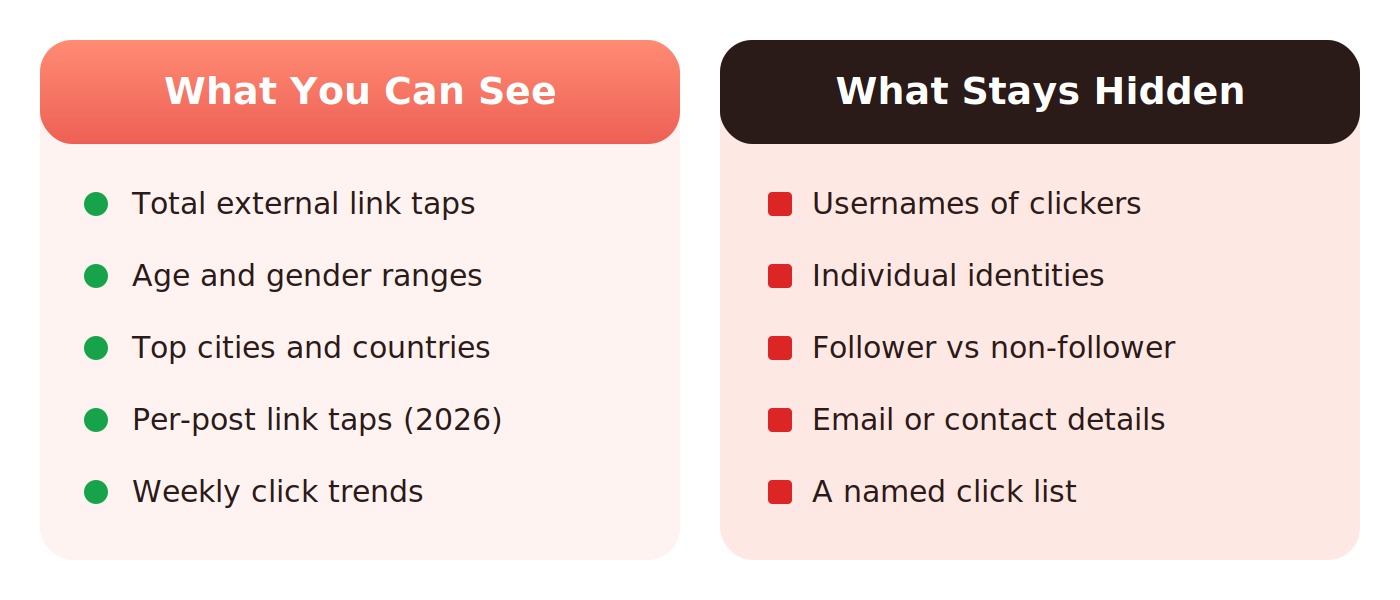
Instagram shares the numbers on the left and locks away everything on the right.
How to Check Link Clicks in Instagram Insights
To find your bio link taps, open the app and take five quick steps. This is the fastest free way to answer can you tell who clicks on your Instagram link at the account level, even though it stops at totals.
- Open your profile and tap the menu (three lines) in the top right.
- Tap Insights, or open your Professional dashboard under your bio.
- Go to Accounts Reached and scroll to Profile Activity.
- Find Bio link taps (sometimes shown as Website Clicks) for the total.
- Change the date range to compare weeks and spot trends over time.
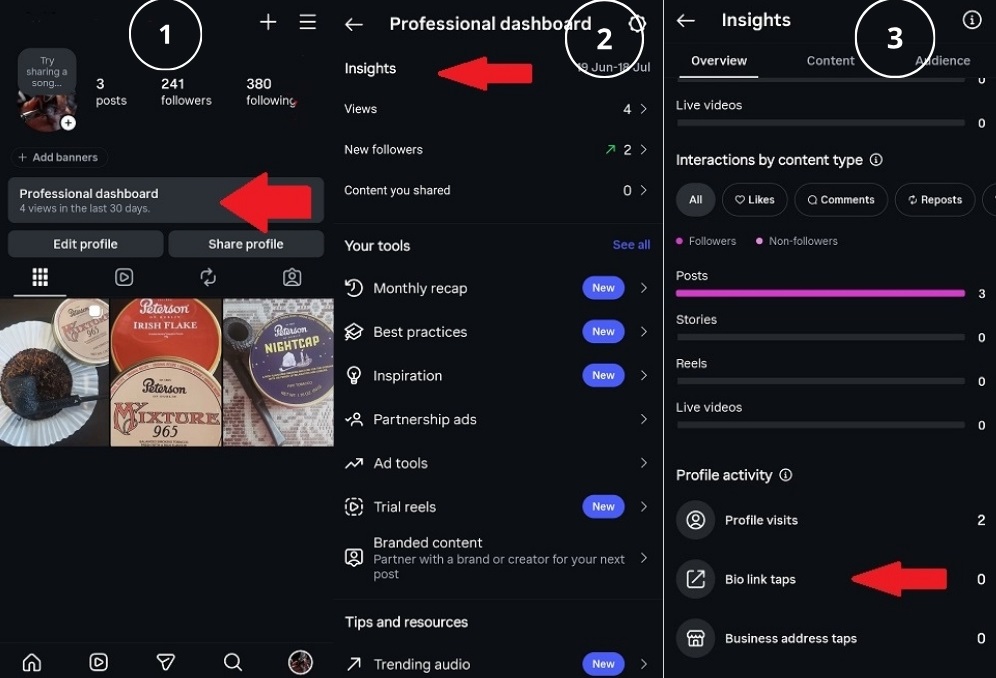
Where to find your bio link taps inside Instagram Insights.
4 Ways to Track Who Clicks on Your Instagram Link
Each method below adds a layer the last one misses. Stack two or three and you build a full picture of your link performance, which is the practical version of asking can you see who clicks on your Instagram link. Every option starts with what it is, then who it suits and its trade-offs.
Instagram Insights (Native Analytics)
Instagram Insights is the free analytics panel built into every Business and Creator account. It reports your total external link taps plus audience demographics, and it is the first stop for anyone learning how to see who clicks on your Instagram link without extra tools.
Instagram Insights Best For: Creators who want a free, no-setup baseline for weekly link taps.
Instagram Insights Key Features: Total External Link Taps, per-post taps (2026), and age, gender, and location breakdowns.
- Completely free and always on
- Demographic data included
- New post-level click data
- No individual identities
- Data can lag up to 48 hours
- Business or Creator account required
Recommendation: Start here to establish your baseline, then layer a deeper tool on top for detail.
Link-in-Bio Tools (Per-Link Click Data)
A link-in-bio tool swaps your single bio URL for a mini landing page that holds several links and tracks a tap on each one. Tools like Linktree and Beacons cannot name the clicker either, but they answer can you see who clicks your links on Instagram at the per-link level that the native app hides.
Link-in-Bio Tools Best For: Creators promoting multiple offers who need to know which link earns the tap.
Link-in-Bio Tools Key Features: Per-link clicks, click-through rate, top links, and simple traffic charts.
- Splits clicks by individual link
- Hosts many links in one place
- Free tiers available
- Still no usernames
- Advanced stats often paid
- Adds one extra hop before the site
Recommendation: Ideal if you send followers to more than one destination. Compare options in our roundup of the top Linktree alternatives.
UTM Parameters With Google Analytics 4
UTM parameters are short tags you add to your link so Google Analytics 4 knows the traffic came from Instagram. This is the highest-resolution method because it tracks what visitors do after the tap, going beyond can you tell who clicks on your Instagram link into what they actually buy or read.
UTM + GA4 Best For: Anyone selling or capturing leads who wants true conversion attribution.
UTM + GA4 Key Features: Source and medium tagging, on-site behavior, conversions, and real-time reports.
- Tracks actions, not just taps
- Free and very detailed
- Works with any destination
- Needs a short setup
- Some iOS taps show as Direct
- You must own the landing site
Recommendation: Build tagged links with Google’s free Campaign URL Builder, then read results under Reports, Acquisition, Traffic Acquisition.
URL Shorteners (Bitly and Similar)
A URL shortener turns a long link into a tidy branded one and counts every click behind it. Tools like Bitly show aggregate clicks, device type, and referrer, so they answer how to see who clicked on your Instagram link with quick, lightweight stats and no site access needed.
URL Shorteners Best For: Creators who want fast click counts without touching website analytics.
URL Shorteners Key Features: Total clicks, geography, device breakdown, and clean branded links.
- Set up in seconds
- Works without a website
- Cleaner, trackable links
- No identities or conversions
- Free plans cap features
- Some users distrust short links
Recommendation: Use it for one-off campaign links where you only need the click count fast.
Track Every Bio Link Click With a brandID Bio Page
If you want the click data Instagram hides without juggling four tools, a bio link that points to your own page does the heavy lifting. brandID gives you a free link-in-bio storefront that tracks every tap per link, so you finally see which offer, product, or post earns the click.
You build the page in minutes, add unlimited links, and organize products into collections by niche, season, or campaign. Because each link is measured on its own, you get a clear read on can you see who clicks your links on Instagram at the level that matters: which link, how often, and from where.
It also makes your content shoppable. Connect a post to a product on your bio page and every tap becomes a tracked step toward a sale, not an anonymous dead end. That turns click data into revenue instead of a vanity number.
Why Instagram Hides Individual Click Data
Instagram hides usernames because click behavior counts as personal data under privacy laws like the GDPR. Sharing who tapped your link without their consent would break those rules, so the platform reports only anonymous totals. That is the real reason can you tell who clicks on your Instagram link has no yes answer.
There is a technical layer too. Apple’s App Tracking Transparency framework limits cross-app tracking, which is why some iOS clicks land in Google Analytics as Direct rather than Instagram traffic. As of 2026, GA4 attributes Instagram referrals better than older versions, but that iOS gap still exists.
The takeaway is simple. Stop chasing names and start reading patterns. Aggregate clicks, demographics, and on-site behavior tell you what to change, which is more useful than a list of usernames ever would be.
How to Get Closer to Knowing Who Clicks
You cannot unmask a clicker, but you can invite them to identify themselves. The trick is to move people from an anonymous tap to a voluntary action. These tactics get you as close as the rules allow to how to see who clicks on your Instagram link.
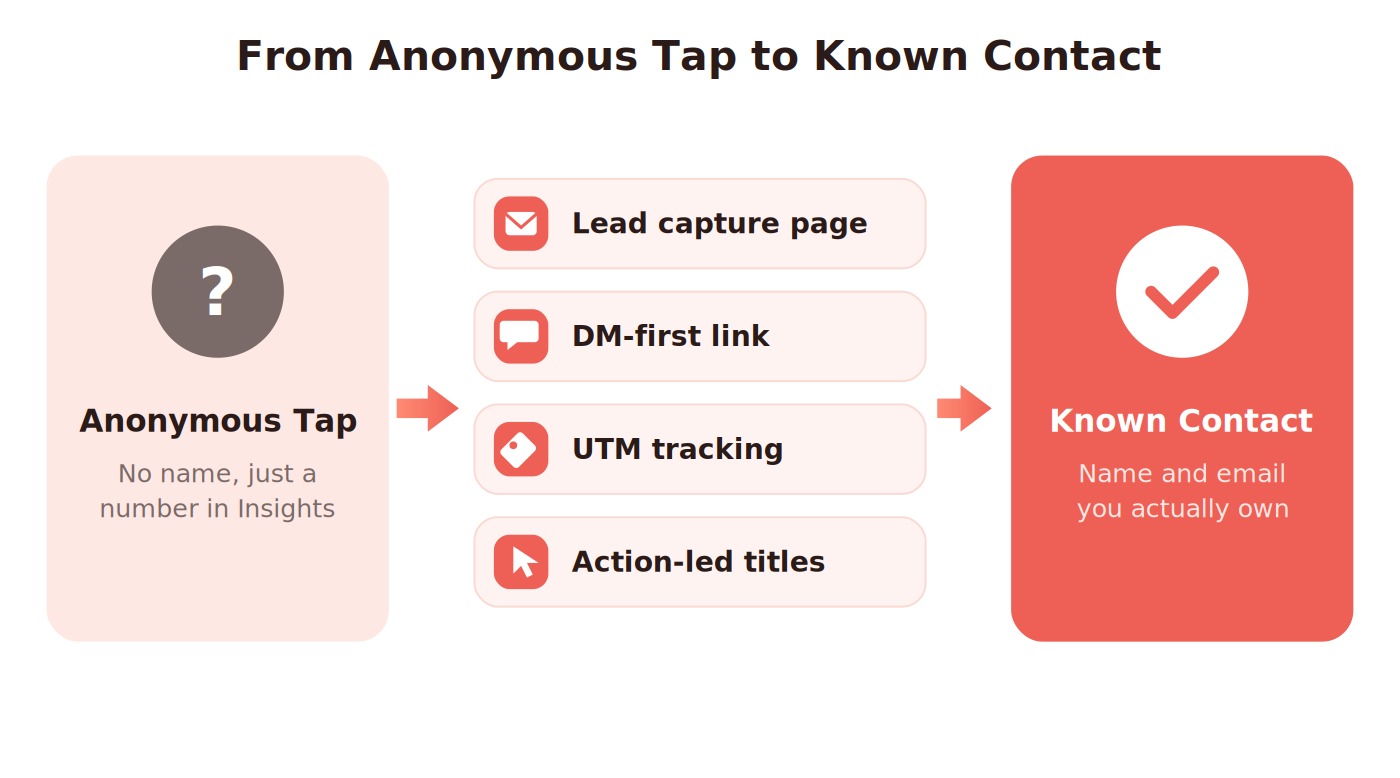
Four tactics that turn an anonymous tap into a lead you can name and reach.
- Send taps to a lead capture page. Offer a freebie in exchange for an email. Now an anonymous click becomes a named contact you own.
- Use a DM-first link. A click-to-message link starts a conversation, so you see the username of everyone who follows through.
- Tag every destination with UTMs. Pair a bio page with UTM tags to connect the tap to the sale.
- Write action-led link titles. “Book a free call” beats a raw URL and lifts the click rate on the link you are measuring.
Pairing these with steady Instagram follower growth means more taps to measure and a bigger pool of identifiable leads over time.
Common Mistakes to Avoid
Most tracking problems come from small setup slips, not missing features. Fix these and your data on how to see who clicked on your Instagram link becomes far more reliable.
- Staying on a personal account. Insights only work on Business and Creator profiles, so you see nothing until you switch.
- Reading data too soon. Account-level taps can lag up to 48 hours, so a low number today may not be final.
- Skipping UTM tags. Without them, GA4 cannot separate Instagram traffic from everything else.
- Chasing usernames. No tool provides them, so time spent hunting is better spent optimizing the offer behind the link.
Conclusion
The plain truth behind how to see who clicks on your Instagram link is that Instagram will never hand you a list of names. Privacy rules make identity-level data impossible, and no native or third-party tool changes that. Once you accept it, the useful data opens up.
Instagram Insights gives you free totals and demographics, a bio page splits clicks by link, UTM tags with GA4 track what happens after the tap, and shorteners deliver quick counts. Stacked together, they replace the wish for usernames with something better: a clear map of what your audience does.
So aim your energy at the offer behind the link, test which posts drive taps, and route those taps toward an action that reveals a real contact. Anonymous clicks are only a dead end if you leave them that way.
Frequently Asked Questions
Can you see who clicks on your Instagram link in real time?
No. Even in real time, Instagram shows only how many taps a link received, never who tapped it. For live numbers, use the Realtime report in Google Analytics 4 with UTM-tagged links, which updates instantly but still keeps every visitor anonymous rather than named.
Can you tell who clicks on your Instagram link if you have a business account?
A business account switches on Instagram Insights, but it still will not name your clickers. You gain total External Link Taps plus age, gender, and location data. That extra context helps you understand your audience, yet the specific usernames of people who click stay private under Instagram’s rules.
How do I see who clicked on my Instagram Story link?
Open Insights, go to the Stories section, and tap a Story to see link sticker taps as a count. You will see how many people clicked, not who they were. To learn the mechanics first, follow our guide on adding a link sticker to your Instagram Story.
Is there any app that shows who clicked your Instagram link?
No app can reveal that, and any that claims to is unsafe. Link-in-bio tools, shorteners, and analytics platforms all report anonymous clicks and segments, never identities. Privacy regulation blocks identity-level tracking, so the honest goal is deeper aggregate data plus lead capture that invites people to identify themselves.
 Summarize this article with: