
Choosing the right preset tip amounts makes a big difference in how much your fans actually give. Here’s how to set them up, and how to think about pricing.
Adding Tip Amounts
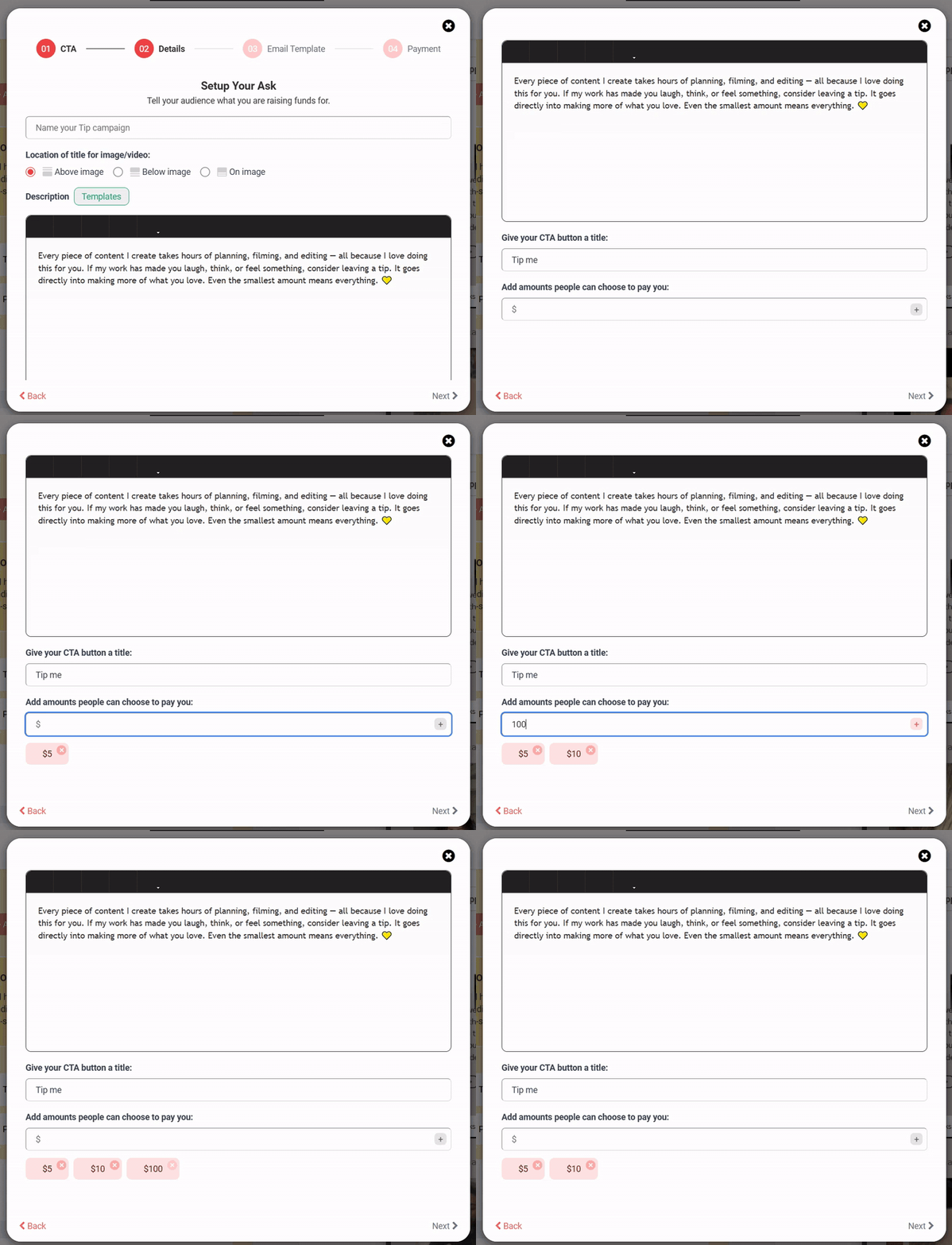
- In the Details step of the wizard, scroll to “Add amounts people can choose to pay you.”
- Type a number (e.g., 5) in the dollar field.
- Click the + button. The amount appears as a chip below the field (e.g., $5 ×).
- Repeat for each preset (e.g., $5, $15, $25, $50).
- Remove any amount by clicking the × on its chip.
How Many Tip Amounts Should You Offer?
Three to five preset amounts is the sweet spot. Too few feels limiting; too many overwhelms fans into picking nothing.
A Few Notes on the Pricing Strategy
- The “small commitment” amount ($1–$5): Lowers the psychological barrier — anyone can afford it.
- The “default” amount ($10–$25): Where most tippers will land. Make this one feel reasonable but generous.
- The “true fan” amount ($50–$100+): For your most engaged supporters. Even if a few people pick it, it anchors all the other amounts as feeling reasonable.
Required: You must add at least one tip amount before you can move to the next step.